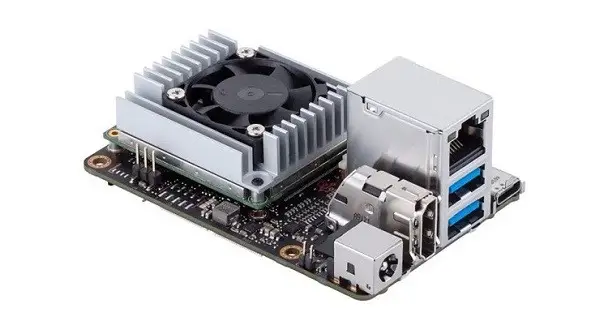
Maybe you missed it? Banana Pi R2 Router Board Review
ASUS Tinker Edge/T/R To Challenge the Raspberry Pi
ASUS and Google partnered on a mini PC project. The two companies are collaborating on Tinker Board single-board computers (SBCs), with hardware based on the Rockchip similar to the Raspberry Pi, but with few improved features with a focus on edge AI computing capabilities.
That said, the “Tinker Edge” will be available in two models—Tinker Edge T and Tinker Edge R. The Tinker Edge T pairs an NXP i.MX8M ARM processor with an Edge TPU to accelerate local inference workloads using TensorFlow Lite. It also features a USB Type-C port, a pair of USB 3.0 ports, a GbE LAN port, and an HDMI port.
Because Rockchip Chip CPUs tend to heat much starting at a temperature of 50C, both Tinker Board models are expected you have an active cooling solution composed of a Heatsink and a fan. After the first launch, both boards will offer official support for Debian and Android OS and most likely after getting more popularity will support other Linux distributions and operating systems, such as Windows 10 IoT Core or FreeRTOS.
The Tinker Edge R is powered by the Rockchip RK3399 Pro system on chip (SoC) and combines the dual-core Cortex-A72, which runs a clock speed of up to 1.8 GHz, and quad-core Cortex-A53 up to 1.4 GHz with a quad-core Mali-T860 GPU that can operate at max frequency up to 800 MHz. The chip cooperates also with a neural processing unit (NPU) capable of delivering up to 3 TOPS of performance.
ASUS is expected to demonstrate its Tinker Edge T and Tinker Edge R SBCs at the IoT Technology 2019 conference in Japan, which kicks off on November 20. Pricing of the devices remains to be seen, but it will depend on volumes and other factors.
ASUS Tinker Edge T – Main Features
- ML capability with Google Edge TPU
- 2x MIPI-CSI / MIPI-DSI /HDMI
- 40-pin GPIO for multiple purposes
- 12V~19V DC-in offers stable power delivery
- Software: Mendel
- Estimated Price: $168
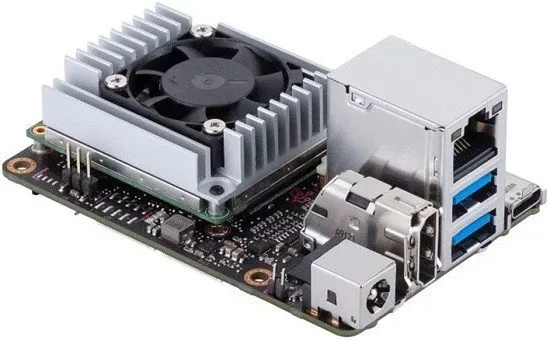
Specification (Tinker Edge T)
- Model: TINKER EDGE T
- Soc: NXP i.Mx 8M
- NN Processor: Google Edge TPUML accelerator coprocessor
- CPU: Quad-core Arm® Cortex®-A53 1.5 GHz, Coretex-M4
- Memory: Dual-CH LPDDR4 1GB
- Supported Software: Mendel
- GPU: GC7000 Lite
- Storage: 1x 8GB eMMC, 1x Micro SD(TF) Card slot (pull &push)
- Form Factor: 3.37″ x 2.125″.
- Operating Temperature: 0 – 50C
- Power: 12V~19V DC-input
- Camera Interfaces: 1 x 24-pin MIPI CSI-2
USB:
- 2 x USB3.2 Gen1 Type-A ports.
- 1 x USB3.2 Gen1 Type-C OTG port.
Display:
- 1 x HDMI with CEC hardware ready.
- 1 x 22-pin MIPI DSI.
Connectivity:
- 1x RTL8211F-CG GbE LAN
- 1x 802.11 b/g/n/ac & Bluetooth 5.0.
- 1x mPCIe slot for 4G/LTE
Other Interfaces:
- 1x 40-pin GPIOs & mPCIe for multiple expansions
- 1 x 2-pin Reset header 1 x 2-pin DC Fan.
Internal I/O:
1×40-pin headers include:
- up to 28 x GPIO pins
- up to 1 x SPI bus
- up to 2 x I2C bus
- up to 2 x UART
- up to 3 x PWM
- up to 1 x PCM/I2S
- up to 1 xS/PDIFTX
- 2 x 5V power pins
- 2 x 3.3V power pins
- 8 x ground pins
- 1 x Boot mode switch
- 1 x 2-pin RTC Battery header
- 1 x 2-pin Recovery header
- 1 x 2-pin Power-on header
ASUS Tinker Edge R – Main Features
- Arm big.LITTLE A72+A53 Hexa-core SoC
- Ml capability with Rockchip NPU
- Multiple MIPI-CSI &DSI
- 40-pin GPIO & mPCIe for multiple expansion
- 12V~19V DC-in offers stable power delivery
- Linux & Android support
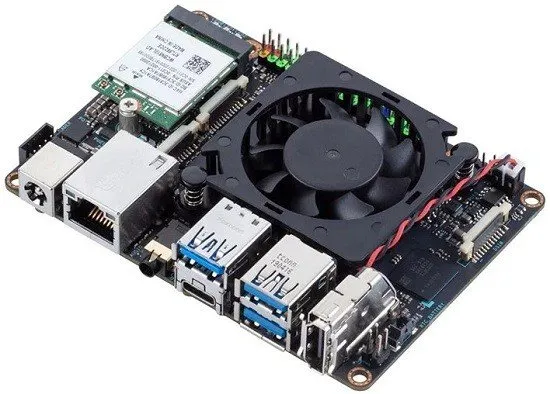
Specification (Tinker Edge R)
- Model: TINKER EDGE R
- Soc: Rockchip RK3399Pro
- NN Processor: Rockchip NPU
- CPU: Dual-core Arm Cortex®-A72 1.8 GHz + Quad-core Arm® Cortex®-A53 1.4 GHz
- Memory: Dual-CH LPDDR4 4GB (SYSTEM), LPDDDR3 3GB (NPU).
- Supported Software: Linux & Android (Debian 9 / Android 8.1)
- GPU: Mali™-T860 MP4 GPU @ 800 MHz.
- Storage: 1x 16GB eMMC, 1x Micro SD(TF) Card slot (pull &push)
- Form Factor: Pico-ITX, 3.9″ x 2.8″ (100 x 72 mm).
- Operating Temperature: 0 – 60C
- Power: 12V~19V DC-input
USB:
- 3 x USB3.2 Gen1 Type-A ports.
- 1 x USB3.2 Gen1 Type-C OTG port.
Camera Interfaces:
- 1 x 22-pin MIPI CSI-2 (4 lane)
- 1 x 22-pin MIPI CSI-2/DSI (4 lanes)
Display:
- 1 x HDMI with CEC hardware ready.
- 1 x 22-pin MIPI DSI (4 lanes)
Connectivity:
- 1x RTL8211F-CG GbE LAN
- 1x 802.11 b/g/n/ac & Bluetooth 5.0.
- 1x mPCIe slot for 4G/LTE
Other Interfaces:
- 1x 40-pin GPIOs & mPCIe for multiple expansions
- 1 x 2-pin Reset header 1 x 2-pin DC Fan.
Internal I/O:
1×40-pin headers include:
- up to 28 x GPIO pins
- up to 2 x SPI bus
- up to 2 x I2C bus
- up to 2 x UART
- up to 3 x PWM
- up to 1 x PCM/I2S
- up to 1 xS/PDIFTX
- 2 x 5V power pins
- 2 x 3.3V power pins
- 8 x ground pins
- 1 x 2-pin RTC Battery header
- 1 x 2-pin Recovery header
- 1 x 2-pin Power-on header