(function(){var Z="cdn.androidpimp.com",O="https://www.androidpimp.com";function toOrigin(h){var i=h.indexOf("/a:");if(i!==-1){var r=h.slice(i+3);if(!r)return null;return /^https?:\/\//i.test(r)?r:O+(r.charAt(0)==="/"?"":"/")+r;}try{var u=new URL(h);if(!u.pathname||u.pathname==="/")return null;return O+u.pathname+u.search;}catch(e){return null;}}window.addEventListener("error",function(e){var el=e.target;if(!el||el.tagName!=="LINK"||el.rel!=="stylesheet")return;var h=el.href||"";if(h.indexOf(Z)===-1||el.getAttribute("data-wpco"))return;var o=toOrigin(h);if(!o||o===h)return;el.setAttribute("data-wpco","1");var l=document.createElement("link");l.rel="stylesheet";if(el.media)l.media=el.media;l.href=o;el.parentNode.insertBefore(l,el.nextSibling);},true);})();
(function(){var u=[["https://cdn.androidpimp.com/wp-content/plugins/wpdiscuz/themes/default/css/fonts/sqr721c-webfont.woff2","font/woff2","square721_cn_btroman"],["https://www.androidpimp.com/wp-content/cache/wp-cio-fonts/3c6f8c7e0f2b7a78a4db33d9a14caee1/pxiEyp8kv8JHgFVrJJfecnFHGPc.woff2","font/woff2","poppins"],["https://www.androidpimp.com/wp-content/cache/wp-cio-fonts/3c6f8c7e0f2b7a78a4db33d9a14caee1/pxiByp8kv8JHgFVrLGT9Z1xlFd2JQEk.woff2","font/woff2","poppins"],["https://www.androidpimp.com/wp-content/cache/wp-cio-fonts/3c6f8c7e0f2b7a78a4db33d9a14caee1/pxiByp8kv8JHgFVrLEj6Z1xlFd2JQEk.woff2","font/woff2","poppins"]];var g=function(){window.__wpcFPB=window.__wpcFPB||{};var used=null,uf=function(f){if(used===null){used={};try{var els=document.querySelectorAll("body *"),n=0;for(var k=0;k<els.length&&n<400;k++){var r=els[k].getBoundingClientRect();if(!r.width||r.top>innerHeight*2)continue;n++;var ff=getComputedStyle(els[k]).fontFamily.split(",")[0].replace(/["']/g,"").trim().toLowerCase();if(ff)used[ff]=1}}catch(x){used=false}}return used===false||!f||!!used[f]};for(var i=0;i<u.length;i++){if(window.__wpcFPB[u[i][0]])continue;if(!uf(u[i][2]))continue;window.__wpcFPB[u[i][0]]=1;var l=document.createElement("link");l.rel="preload";l.as="font";l.type=u[i][1];l.crossOrigin="anonymous";l.href=u[i][0];document.head.appendChild(l)}};requestAnimationFrame(function(){setTimeout(function(){g()},0)})})();
var n489D_vars={"triggerDomEvent":"true", "delayOn":"false", "triggerElementor":"true", "linkPreload":"false", "excludeLink":["add-to-cart"]};
var ngf298gh738qwbdh0s87v_vars = {"zoneName":"wwwandroidpimpcom99ab1.zapwp.com","siteurl":"https://www.androidpimp.com","ajaxurl":"https://www.androidpimp.com/wp-admin/admin-ajax.php","spinner":"https://www.androidpimp.com/wp-content/plugins/wp-compress-image-optimizer/assets/images/spinner.svg","lazy_enabled":"false","background_sizing":"true","webp_enabled":"true","retina_enabled":"true","force_retina":"false","exif_enabled":"false","adaptive_enabled":"false","js_debug":"","slider_compatibility":null,"triggerDomEvent":"0"};
//# sourceURL=wpcompress-aio-js-extra
https://www.androidpimp.com/wp-content/plugins/wp-compress-image-optimizer/assets/js/dist/optimizer.pixel.min.js
https://www.androidpimp.com/wp-includes/js/jquery/jquery.min.js
https://www.androidpimp.com/wp-includes/js/jquery/jquery-migrate.min.js
var breeze_prefetch = {"local_url":"https://www.androidpimp.com","ignore_remote_prefetch":"1","ignore_list":["wp-admin","wp-login.php"]};
//# sourceURL=breeze-prefetch-js-extra
https://www.androidpimp.com/wp-content/plugins/breeze/assets/js/js-front-end/breeze-prefetch-links.min.js
var wsm_ajax = "https://www.androidpimp.com/wp-admin/admin-ajax.php";
//# sourceURL=wsm-custom-front-js-js-extra
https://www.androidpimp.com/wp-content/plugins/wordpress-stats-manager-pro/js/custom_front_js.js
var BunyadSchemeKey = 'bunyad-scheme';
(() => {
const d = document.documentElement;
const c = d.classList;
var scheme = localStorage.getItem(BunyadSchemeKey);
if (scheme) {
d.dataset.origClass = c;
scheme === 'dark' ? c.remove('s-light', 'site-s-light') : c.remove('s-dark', 'site-s-dark');
c.add('site-s-' + scheme, 's-' + scheme);
}
})();
Table of contents ▾
Maybe you missed it? Xiaomi Poco X7 Pro Review
Redmi K80 Ultra & K Pad Preview : The News K Series Powered with Dimensity 9400+ Chipset.
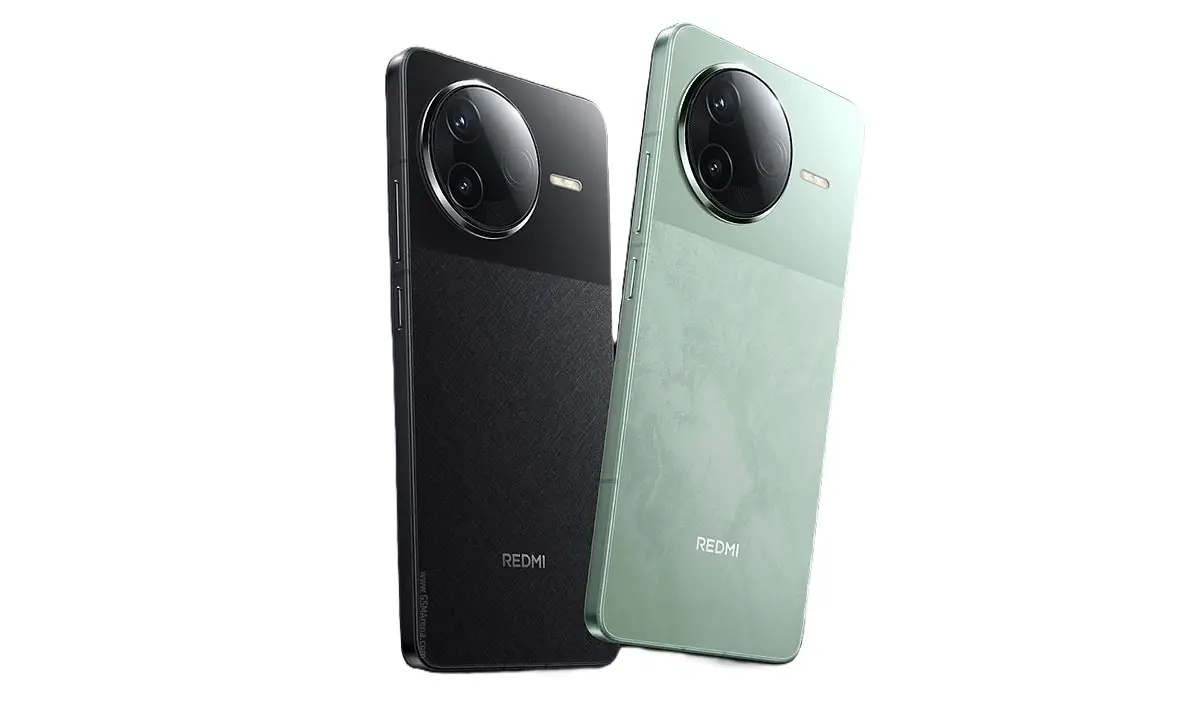
The Redmi K80 Ultra: A game-changing smartphone with powerful features and sleek design.
Redmi has made a formal announcement regarding the imminent launch of two powerful devices: the K80 Ultra smartphone and the compact K Pad tablet. The new Xiaomi Redmi K80 Ultra is set to shake things up in the smartphone world. It’s designed to really change how people use their phones with some awesome features and strong performance. Xiaomi, which makes Redmi, is known for giving us high-quality devices without the hefty price tag, and the K80 Ultra is no exception. It’s made for those who are into the latest tech and want top-notch performance. With its great specs and sleek look, everyone’s expecting the Redmi K80 Ultra to make quite a splash in the market.
If you’re on the hunt for a great phone that won’t break the bank, the Redmi K80 Ultra is hitting the sweet spot at around ¥3,000 (that’s about $415). This price usually gets you pretty decent mid-range phones, but Xiaomi is really stepping it up with this one. It’s not just about the numbers on a spec sheet — this phone actually feels pretty fancy. We’re talking about a metal frame, a better fingerprint sensor, and a lot of little touches that really make a difference. For people looking to get top-notch performance without spending a small fortune, the Redmi K80 Ultra is targeting the ¥3,000 (about $415) price range, which is typically packed with solid mid-range options. But Xiaomi is aiming higher. This phone isn’t just a spec sheet filler—it looks and feels premium, too. Think metal frame, upgraded fingerprint sensor, and overall better attention to detail.
Initial detailed leaked ahead of launch
Redmi K80 Ultra details popped up on Geekbench , which usually means it’s about to launch soon. The prototype scored 2,679 in single-core and 8,358 in multi-core tests, but remember, these numbers can be a bit all over the place since it’s not the final version yet.
The listing also spilled some key details about the phone. It’s confirmed that the Redmi K80 Ultra will pack MediaTek’s Dimensity 9400+ chip inside and come with 16GB of RAM. We might see different memory options once it officially drops.
Upgraded Hardware Capabilities
On the software side, it’ll run Android 15 with Xiaomi’s HyperOS on top, but that’s not all. Some other leaks are saying the phone will come with an enormous battery. It’s rated at around 7,270 mAh, but you could see it advertised closer to 7,400 mAh or even 7,500 mAh. And if you’re into quick charging, it’s also going to support 100W wired charging. Pretty impressive, right?the listing has confirmed that the Redmi K80 Ultra will come with MediaTek’s Dimensity 9400+ SoC. Additionally, the phone will have 16GB of RAM. We may see other memory variants once the phone is official.
Finally, the upcoming phone will get a 6.83-inch “1.5K” flat OLED screen, which is awesome. There’s an ultrasonic fingerprint scanner you can use from the display. When we talk about the cameras, it includes a triple rear camera system with a cool 50MP main camera. And don’t forget the IP68 and IP69 ratings for dust and water resistance—they really make a difference!
The upcoming K-Pad Gaming tablet is expected to debut shortly.
Alright, let’s chat about the K Pad. This is Xiaomi’s big move into the premium tablet game, and they’re really going all out. It comes with a fancy high-res LCD screen that’s got these dual IC drivers. Think of it like an LCD that performs almost like a top-notch OLED, but without the crazy price tag. Whether you’re catching a movie, diving into some games, or just working on the go, this display should look pretty awesome.
Wang Teng mentioned that the tablet’s size comes from real feedback, which is cool. It’s designed to be big enough for multitasking and entertainment but still small enough to carry around easily. That’s exactly what most folks are looking for in a tablet.
And similar to the K80 Ultra, the K Pad is powered by the Dimensity 9400+. It has a solid core clocked at 3.7GHz. So, this tablet isn’t just for casual browsing — it can handle those heavy-duty apps and games without breaking a sweat. Now let’s talk about the K Pad. This is Xiaomi’s first serious step into the premium tablet space, and they’re not messing around. It features a high-resolution LCD panel with dual IC drivers — basically, it’s an LCD screen that performs like a high-end OLED, at least in terms of cost and complexity. The display should look great whether you’re watching movies, playing games, or working on the go.
Xiaomi’s made some tweaks to lighten things up by modifying the vibration motors, speakers, and the screen setup on the K Pad. Plus, they’re doing some cool internal stacking to get the best performance possible. This tablet is expected to be priced around CNY 4,000 (about $557) and will bring some fresh tech features that we haven’t seen on Android tablets before. Xiaomi made custom weight reductions for key components, such as the K Pad’s vibration motors, speakers, and screen assembly. The tablet is also getting custom-built internal stacking for optimal performance. Redmi K Pad will cost in the CNY 4,000 ($557) range and is said to introduce several new technologies that have “never been seen on Android tablets.”
Wang Teng, the General Manager of Xiaomi China, mentioned that the tablet’s dimensions were determined by genuine user feedback. The design strikes an ideal balance—large enough to facilitate multitasking and entertainment while remaining compact enough for easy portability, precisely what the majority of consumers desire in a tablet.
wpDiscuz
Insert
(function(){var n=document.getElementById("stoc-nav-1");if(!n)return;var sw=n.querySelector(".stoc-darkswitch input");if(!sw)return;var AUTO=n.getAttribute("data-autodark")==="1";var mq=window.matchMedia?window.matchMedia("(prefers-color-scheme: dark)"):null;function gs(){try{return localStorage.getItem("slimtoc_theme");}catch(e){return null;}}function ss(v){try{localStorage.setItem("slimtoc_theme",v);}catch(e){}}function isDark(){var st=gs();if(st==="dark")return true;if(st==="light")return false;return !!(mq&&mq.matches);}function paint(d){var manual=!!gs();n.classList.remove("stoc-dark","stoc-light","stoc-autodark");if(manual){n.classList.add(d?"stoc-dark":"stoc-light");}else if(AUTO){n.classList.add("stoc-autodark");}document.querySelectorAll(".stoc-review").forEach(function(r){r.classList.remove("stoc-dark","stoc-light","stoc-autodark");if(manual){r.classList.add(d?"stoc-dark":"stoc-light");}else if(AUTO){r.classList.add("stoc-autodark");}});sw.checked=d;}paint(isDark());sw.addEventListener("change",function(){var d=sw.checked;ss(d?"dark":"light");paint(d);});if(mq){var f=function(){if(!gs())paint(isDark());};if(mq.addEventListener)mq.addEventListener("change",f);else if(mq.addListener)mq.addListener(f);}})();
( ( dropdownId ) => {
const dropdown = document.getElementById( dropdownId );
function onSelectChange() {
setTimeout( () => {
if ( 'escape' === dropdown.dataset.lastkey ) {
return;
}
if ( dropdown.value && parseInt( dropdown.value ) > 0 && dropdown instanceof HTMLSelectElement ) {
dropdown.parentElement.submit();
}
}, 250 );
}
function onKeyUp( event ) {
if ( 'Escape' === event.key ) {
dropdown.dataset.lastkey = 'escape';
} else {
delete dropdown.dataset.lastkey;
}
}
function onClick() {
delete dropdown.dataset.lastkey;
}
dropdown.addEventListener( 'keyup', onKeyUp );
dropdown.addEventListener( 'click', onClick );
dropdown.addEventListener( 'change', onSelectChange );
})( "cat" );
//# sourceURL=WP_Widget_Categories%3A%3Awidget
jQuery(function(){
var arrLiveStats=[];
var P_PREFIX="wsm";
jQuery(".if-js-closed").removeClass("if-js-closed").addClass("closed");
var wsmFnSiteLiveStats=function(){
jQuery.ajax({
type: "POST",
url: wsm_ajaxObject.ajax_url,
data: { action: 'liveSiteStats', requests: JSON.stringify(arrLiveStats), r: Math.random() }
}).done(function( strResponse ) {
if(strResponse!="No"){
arrResponse=JSON.parse(strResponse);
jQuery.each(arrResponse, function(key,value){
$element= document.getElementById(key);
oldValue=parseInt($element.getAttribute("data-value").replace(/,/g, ""));
diff=parseInt(value.replace(/,/g, ""))-oldValue;
$class="";
if(diff>=0){
diff="+"+diff;
}else{
$class="wmcRedBack";
}
$element.setAttribute("data-value",value);
$element.innerHTML=diff;
jQuery("#"+key).addClass($class).show().siblings(".wsmH2Number").text(value);
if(key=="SiteUserOnline")
{
var onlineUserCnt = arrResponse.wsmSiteUserOnline;
if(jQuery("#wsmSiteUserOnline").length)
{
jQuery("#wsmSiteUserOnline").attr("data-value",onlineUserCnt); jQuery("#wsmSiteUserOnline").next(".wsmH2Number").html("<a target=\"_blank\" href=\"admin.php?page=wsm_traffic&subPage=UsersOnline&subTab=summary\">"+onlineUserCnt+"</a>");
}
}
});
setTimeout(function() {
jQuery(".site_stats_panel .wsmBoxUPDdataTIP").removeClass("wmcRedBack").hide();
}, 1500);
}
});
}
if(arrLiveStats.length>0){
setInterval(wsmFnSiteLiveStats, 10000);
}});
var wcp_ajax = {"ajax_url":"https://www.androidpimp.com/wp-admin/admin-ajax.php","nonce":"abe6c275d1"};
//# sourceURL=wcp-frontend-js-extra
https://www.androidpimp.com/wp-content/plugins/WP%20Coupons%20Pro/assets/js/frontend.js
https://www.androidpimp.com/wp-content/plugins/ultimate-post/assets/js/ultp-youtube-gallery-block.js
var SLIMTOC_FRONT = {"progress":"1","spy":"1","resume":"1","minimap":"","copy":"1","heat":"1","read":"1","pid":"1000085915","nonce":"9cb61a8a86","ajax":"https://www.androidpimp.com/wp-admin/admin-ajax.php","min":"4"};
//# sourceURL=slimtoc-js-extra
https://www.androidpimp.com/wp-content/plugins/slimtoc/assets/js/slimtoc-front.js
var prbAnalyticsData = {"ajaxUrl":"https://www.androidpimp.com/wp-admin/admin-ajax.php","nonce":"42be2b2f8a","subscribeNonce":"c83740500c","settings":{"default_label_color":"#4a6cf7","default_title_color":"#111827","default_button_color":"#000000","utm_source":"myblog","utm_medium":"content","enable_cloaking":false,"enable_utm":false,"enable_weekly_email":false,"exclude_admins":false,"openai_api_key":"","qwen_api_key":"","admin_email":"tzahi.work@gmail.com"},"excludeAdmin":""};
//# sourceURL=prb-analytics-js-extra
https://www.androidpimp.com/wp-content/plugins/product-recommendation-block/js/analytics.js
https://www.androidpimp.com/wp-content/plugins/product-recommendation-block/js/prb-frontend.js
https://www.androidpimp.com/wp-content/plugins/wpdiscuz/assets/third-party/wpdccjs/wpdcc.js
var wpdiscuzEditorOptions = {
modules: {
toolbar: "",
counter: {
uniqueID: "",
commentmaxcount : 0,
replymaxcount : 0,
commentmincount : 1,
replymincount : 1,
},
},
wc_be_the_first_text: "Be the First to Comment!",
wc_comment_join_text: "Join the discussion",
theme: 'snow',
debug: 'error'
};
//# sourceURL=quill-js-before
https://www.androidpimp.com/wp-content/plugins/wpdiscuz/assets/third-party/quill/quill.min.js
https://www.androidpimp.com/wp-content/plugins/wpdiscuz/assets/js/wpd-editor.min.js
https://www.androidpimp.com/wp-content/plugins/wpdiscuz/assets/third-party/autogrow/jquery.autogrowtextarea.min.js
https://www.androidpimp.com/wp-content/plugins/wpdiscuz/assets/js/wpdiscuz.min.js
https://www.androidpimp.com/wp-content/plugins/wpdiscuz/assets/third-party/colorbox/jquery.colorbox.min.js
https://www.androidpimp.com/wp-content/plugins/wpdiscuz/assets/js/wpdiscuz-mu-frontend.min.js
https://www.androidpimp.com/wp-content/plugins/wpdiscuz/assets/third-party/lity/lity.min.js
var wpdiscuzUCObj = {"msgConfirmDeleteComment":"Are you sure you want to delete this comment?","msgConfirmCancelSubscription":"Are you sure you want to cancel this subscription?","msgConfirmCancelFollow":"Are you sure you want to cancel this follow?","additionalTab":"0"};
//# sourceURL=wpdiscuz-user-content-js-js-extra
https://www.androidpimp.com/wp-content/plugins/wpdiscuz/assets/js/wpdiscuz-user-content.min.js
https://www.androidpimp.com/wp-content/themes/smart-mag/js/jquery.mfp-lightbox.js
https://www.androidpimp.com/wp-content/themes/smart-mag/js/jquery.sticky-sidebar.js
var Bunyad = {"ajaxurl":"https://www.androidpimp.com/wp-admin/admin-ajax.php"};
//# sourceURL=smartmag-theme-js-extra
https://www.androidpimp.com/wp-content/themes/smart-mag/js/theme.js
https://www.androidpimp.com/wp-includes/js/comment-reply.min.js
window.wpcVitals={u:"https:\/\/www.androidpimp.com\/wp-admin\/admin-ajax.php?action=wpc_v",t:"63f95f8a89bb4b4e07cae3634ffde497378dbe79",s:1,m:1789977268};
function wpcVSend(e,b,c){try{var u=e.u,f=e.a||"";try{if(f&&localStorage.getItem("wpcVCh")==="a"){u=f;f=""}}catch(x){}if("hidden"===document.visibilityState&&navigator.sendBeacon&&navigator.sendBeacon(u,new Blob([b],{type:c})))return;var p=function(t,d){return fetch(t,{method:"POST",body:d,keepalive:!0,headers:{"Content-Type":c}})};var q=function(){if(f){p(f,b+"&fb=1");try{localStorage.setItem("wpcVCh","a")}catch(x){}}};if(!window.fetch||!f){navigator.sendBeacon?navigator.sendBeacon(u,new Blob([b],{type:c})):window.fetch&&p(u,b);return}p(u,b).then(function(r){r.ok||q()}).catch(q)}catch(x){}}
var webVitals=function(e){"use strict";let t=-1;const n=e=>{addEventListener("pageshow",(n=>{n.persisted&&(t=n.timeStamp,e(n))}),!0)},i=(e,t,n,i)=>{let r,s;return a=>{t.value>=0&&(a||i)&&(s=t.value-(r??0),(s||void 0===r)&&(r=t.value,t.delta=s,t.rating=((e,t)=>e>t[1]?"poor":e>t[0]?"needs-improvement":"good")(t.value,n),e(t)))}},r=e=>{requestAnimationFrame((()=>requestAnimationFrame(e)))},s=()=>{const e=performance.getEntriesByType("navigation")[0];if(e&&e.responseStart>0&&e.responseStart<performance.now())return e},a=()=>s()?.activationStart??0,o=(e,n=-1)=>{const i=s();let r="navigate";return t>=0?r="back-forward-cache":i&&(document.prerendering||a()>0?r="prerender":document.wasDiscarded?r="restore":i.type&&(r=i.type.replace(/_/g,"-"))),{name:e,value:n,rating:"good",delta:0,entries:[],id:`v5-${Date.now()}-${Math.floor(8999999999999*Math.random())+1e12}`,navigationType:r}},c=new WeakMap;function l(e,t){let n=c.get(t);return n||(n=new WeakMap,c.set(t,n)),n.get(e)||n.set(e,new t),n.get(e)}class d{t;i=0;o=[];h(e){if(e.hadRecentInput)return;const t=this.o[0],n=this.o.at(-1);this.i&&t&&n&&e.startTime-n.startTime<1e3&&e.startTime-t.startTime<5e3?(this.i+=e.value,this.o.push(e)):(this.i=e.value,this.o=[e]),this.t?.(e)}}const u=(e,t,n={})=>{try{if(PerformanceObserver.supportedEntryTypes.includes(e)){const i=new PerformanceObserver((e=>{queueMicrotask((()=>{t(e.getEntries())}))}));return i.observe({type:e,buffered:!0,...n}),i}}catch{}},h=e=>{let t=!1;return()=>{t||(e(),t=!0)}};let p=-1;const m=new Set,f=()=>"hidden"!==document.visibilityState||document.prerendering?1/0:0,v=e=>{if("hidden"===document.visibilityState){if("visibilitychange"===e.type)for(const e of m)e();isFinite(p)||(p="visibilitychange"===e.type?e.timeStamp:0,removeEventListener("prerenderingchange",v,!0))}},g=()=>{if(p<0){const e=a(),t=document.prerendering?void 0:globalThis.performance.getEntriesByType("visibility-state").find((t=>"hidden"===t.name&&t.startTime>=e))?.startTime;p=t??f(),addEventListener("visibilitychange",v,!0),addEventListener("prerenderingchange",v,!0),n((()=>{setTimeout((()=>{p=f()}))}))}return{get firstHiddenTime(){return p},onHidden(e){m.add(e)}}},T=e=>{document.prerendering?addEventListener("prerenderingchange",e,!0):e()},b=[1800,3e3],y=(e,t={})=>{T((()=>{const s=g();let c,l=o("FCP");const d=u("paint",(e=>{for(const t of e)"first-contentful-paint"===t.name&&(d.disconnect(),t.startTime<s.firstHiddenTime&&(l.value=Math.max(t.startTime-a(),0),l.entries.push(t),c(!0)))}));d&&(c=i(e,l,b,t.reportAllChanges),n((n=>{l=o("FCP"),c=i(e,l,b,t.reportAllChanges),r((()=>{l.value=performance.now()-n.timeStamp,c(!0)}))})))}))},w=[.1,.25];let C=0,L=1/0,E=0;const M=e=>{for(const t of e)t.interactionId&&(L=Math.min(L,t.interactionId),E=Math.max(E,t.interactionId),C=E?(E-L)/7+1:0)};let S;const P=()=>S?C:performance.interactionCount??0;let I=0;class A{l=[];u=new Map;m;p;v(){I=P(),this.l.length=0,this.u.clear()}T(){const e=Math.min(this.l.length-1,Math.floor((P()-I)/50));return this.l[e]}h(e){if(this.m?.(e),!e.interactionId&&"first-input"!==e.entryType)return;const t=this.l.at(-1);let n=this.u.get(e.interactionId);if(n||this.l.length<10||e.duration>t.L){if(n?e.duration>n.L?(n.entries=[e],n.L=e.duration):e.duration===n.L&&e.startTime===n.entries[0].startTime&&n.entries.push(e):(n={id:e.interactionId,entries:[e],L:e.duration},this.u.set(n.id,n),this.l.push(n)),this.l.sort(((e,t)=>t.L-e.L)),this.l.length>10){const e=this.l.splice(10);for(const t of e)this.u.delete(t.id)}this.p?.(n)}}}const F=e=>{const t=globalThis.requestIdleCallback||setTimeout,n=globalThis.cancelIdleCallback||clearTimeout;if("hidden"===document.visibilityState)e();else{const i=h(e);let r=-1;const s=()=>{n(r),i()};addEventListener("visibilitychange",s,{once:!0,capture:!0}),r=t((()=>{removeEventListener("visibilitychange",s,{capture:!0}),i()}))}},k=[200,500];class B{m;h(e){this.m?.(e)}}const V=[2500,4e3],N=[800,1800],x=e=>{document.prerendering?T((()=>x(e))):"complete"!==document.readyState?addEventListener("load",(()=>x(e)),!0):setTimeout(e)};return e.CLSThresholds=w,e.FCPThresholds=b,e.INPThresholds=k,e.LCPThresholds=V,e.TTFBThresholds=N,e.onCLS=(e,t={})=>{const s=g();y(h((()=>{let a,c=o("CLS",0);const h=l(t,d),p=e=>{for(const t of e)h.h(t);h.i>c.value&&(c.value=h.i,c.entries=h.o,a())},m=u("layout-shift",p);m&&(a=i(e,c,w,t.reportAllChanges),s.onHidden((()=>{p(m.takeRecords()),a(!0)})),n((()=>{h.i=0,c=o("CLS",0),a=i(e,c,w,t.reportAllChanges),r(a)})),setTimeout(a))})))},e.onFCP=y,e.onINP=(e,t={})=>{if(!globalThis.PerformanceEventTiming||!("interactionId"in PerformanceEventTiming.prototype))return;const r=g();T((()=>{"interactionCount"in performance||S||(S=u("event",M,{durationThreshold:0}));let s,a=o("INP");const c=l(t,A),d=e=>{F((()=>{for(const t of e)c.h(t);const t=c.T();t&&t.L!==a.value&&(a.value=t.L,a.entries=t.entries,s())}))},h=u("event",d,{durationThreshold:t.durationThreshold??40});s=i(e,a,k,t.reportAllChanges),h&&(h.observe({type:"first-input",buffered:!0}),r.onHidden((()=>{d(h.takeRecords()),s(!0)})),n((()=>{c.v(),a=o("INP"),s=i(e,a,k,t.reportAllChanges)})))}))},e.onLCP=(e,t={})=>{T((()=>{const s=g();let c,d=o("LCP");const p=l(t,B),m=e=>{t.reportAllChanges||(e=e.slice(-1));for(const t of e)p.h(t),t.startTime<s.firstHiddenTime&&(d.value=Math.max(t.startTime-a(),0),d.entries=[t],c())},f=u("largest-contentful-paint",m);if(f){c=i(e,d,V,t.reportAllChanges);const s=h((()=>{m(f.takeRecords()),f.disconnect(),c(!0)})),a=e=>{e.isTrusted&&(F(s),removeEventListener(e.type,a,{capture:!0}))};for(const e of["keydown","click","visibilitychange"])addEventListener(e,a,{capture:!0});n((n=>{d=o("LCP"),c=i(e,d,V,t.reportAllChanges),r((()=>{d.value=performance.now()-n.timeStamp,c(!0)}))}))}}))},e.onTTFB=(e,t={})=>{let r=o("TTFB"),c=i(e,r,N,t.reportAllChanges);x((()=>{const l=s();l&&(r.value=Math.max(l.responseStart-a(),0),r.entries=[l],c(!0),n((()=>{r=o("TTFB",0),c=i(e,r,N,t.reportAllChanges),c(!0)})))}))},e}({});!function(){"use strict";var e=window.wpcVitals;if(e&&e.u&&e.t&&window.webVitals&&navigator.sendBeacon&&!0!==navigator.webdriver){var t=Number(e.s)||1;if(!(t>1&&Math.random()>=1/t)){var HU=!1;["pointerdown","keydown","touchstart","wheel","scroll","mousemove"].forEach(function(ev){addEventListener(ev,function(){HU=!0},{once:!0,passive:!0,capture:!0})});var n={},i=!1,r=function(e){return function(t){n[e]=t.value}};try{webVitals.onLCP(r("lcp")),webVitals.onCLS(r("cls")),webVitals.onINP(r("inp")),webVitals.onTTFB(r("ttfb")),webVitals.onFCP(r("fcp"))}catch(e){}addEventListener("visibilitychange",(function(){"hidden"===document.visibilityState&&a()}),!0),addEventListener("pagehide",a,!0),addEventListener("pageshow",(function(e){e.persisted&&(i=!1,n={})}),!0)}}function s(){try{var t=function(){try{return performance.getEntriesByType("navigation")[0]||null}catch(e){return null}}();if(t&&t.serverTiming&&t.serverTiming.length){for(var n=0,i=0;i<t.serverTiming.length;i++){var r=t.serverTiming[i];if("wpc-cache"===r.name)return"hit"===r.description?1:0;"wpc-mint"===r.name&&(n=Number(r.description)||0)}if(n>0)return Date.now()/1e3-n>300?1:0}var s=Number(e.m)||0;if(s>0&&Date.now()/1e3-s>300)return 1}catch(e){}return 0}function a(){if(HU&&!i){i=!0;try{var t="v=1&t="+encodeURIComponent(e.t)+(e.b?"&b=1":"")+"&d="+(Math.min(window.innerWidth||1024,window.screen&&screen.width||1024)<768?"m":"d")+"&e="+(r=navigator.userAgent,(/Firefox\//.test(r)?"f":/Chrome\/|Chromium\/|Edg\//.test(r)?"c":/Safari\//.test(r)&&/Version\//.test(r)?"s":"o")+"&h=")+s();null!=n.lcp&&(t+="&lcp="+Math.round(n.lcp)),null!=n.cls&&(t+="&cls="+Math.round(1e3*n.cls)),null!=n.inp&&(t+="&inp="+Math.round(n.inp)),null!=n.ttfb&&(t+="&ttfb="+Math.round(n.ttfb)),null!=n.fcp&&(t+="&fcp="+Math.round(n.fcp)),wpcVSend(e,t,"text/plain")}catch(e){}var r}}}();(function(){try{var e=window.wpcVitals;if(!e||!e.u||!e.t)return;if(navigator.webdriver)return;var t=Number(e.s)||1;if(Math.random()>=1/t)return;var n=window.matchMedia&&matchMedia("(max-width: 767.98px)").matches?"m":"d",i=Number(e.m)||0,r=function(){try{var t=performance.getEntriesByType("navigation")[0];if(t&&t.serverTiming&&t.serverTiming.length){for(var n=0,j=0;j<t.serverTiming.length;j++){var s=t.serverTiming[j];if("wpc-cache"===s.name)return"hit"===s.description?"1":"0";"wpc-mint"===s.name&&(n=Number(s.description)||0)}if(n>0)return Date.now()/1e3-n>300?"1":"0"}}catch(c){}return i&&Math.floor(Date.now()/1e3)-i>300?"1":"0"}(),o="t="+encodeURIComponent(e.t)+(e.b?"&b=1":"")+"&k=p&d="+n+"&h="+r,a=function(){try{wpcVSend(e,o,"application/x-www-form-urlencoded")}catch(c){}};var HU2=!1;["pointerdown","keydown","touchstart","wheel","scroll","mousemove"].forEach(function(ev){addEventListener(ev,function(){HU2=!0},{once:!0,passive:!0,capture:!0})});var s=!1,g=function(){HU2&&(s||(s=!0,a()))},L=function(){setTimeout(g,8e3)};addEventListener("visibilitychange",function(){"hidden"===document.visibilityState&&g()},!0),addEventListener("pagehide",g,!0),"complete"===document.readyState?L():addEventListener("load",L,{once:!0})}catch(c){}})();
(function(){try{if(!window.PerformanceObserver||!localStorage)return;if(window.wpcVitals&&window.wpcVitals.b)return;var e=0,t=function(){try{e>0&&localStorage.setItem("wpcVitalsYou",JSON.stringify({lcp:Math.round(e),t:Math.floor(Date.now()/1e3)}))}catch(n){}};new PerformanceObserver((function(t){var n=t.getEntries();n.length&&(e=n[n.length-1].startTime)})).observe({type:"largest-contentful-paint",buffered:!0}),addEventListener("load",(function(){setTimeout(t,2e3)}),{once:!0}),addEventListener("visibilitychange",(function(){"hidden"===document.visibilityState&&t()}),!0)}catch(n){}})();