- Maybe you missed it? Review of the Banana Pi BPI-R4 Lite.
- SpacemiT K3 New Products Overview: A brief look at the key highlights of the newest RISC-V hardware.
SpacemiT has rolled out an exciting new range of products built around the K3 ecosystem, delivering a great balance of affordability and power efficiency.
In recent years, China has made impressive progress in the chip industry, driven by its use of open-source software solutions and the RISC-V architecture. SpacemiT Inc. is one of the leading Chinese semiconductor companies, specializing in developing next‑generation, high‑performance AI CPUs based on the RISC‑V architecture. Their mission is to create the best native computing platform for the new AI era, with a focus on large‑model AI workloads.
This article will cover their latest K3 RISC-V AI CPU, designed to handle large-scale models with support for capacities of up to 30 billion parameters.
Why “capable of running 30B‑parameter LLMs” is a big deal?
Running a 30-billion-parameter model on your own machine is no easy task. Typically, this requires:
- High memory bandwidth
- Efficient parallel compute
- Optimized AI acceleration
- Support for quantization and model compression
- A robust software stack (e.g., ONNX Runtime)
1. The K3 is a cutting-edge, high-performance RISC-V CPU built for advanced AI applications.
SpacemiT K3 chip series adopt RISC-V homogeneous integrated computing technology, integrating 8 high-performance computing X100 cores and 8 ultra-wide parallel AI computing A100 cores developed by SpacemiT, which provide 130 KDMIPS of general computing power and 60 TOPS of general AI computing power, and can smoothly run 30-billion-parameter models.
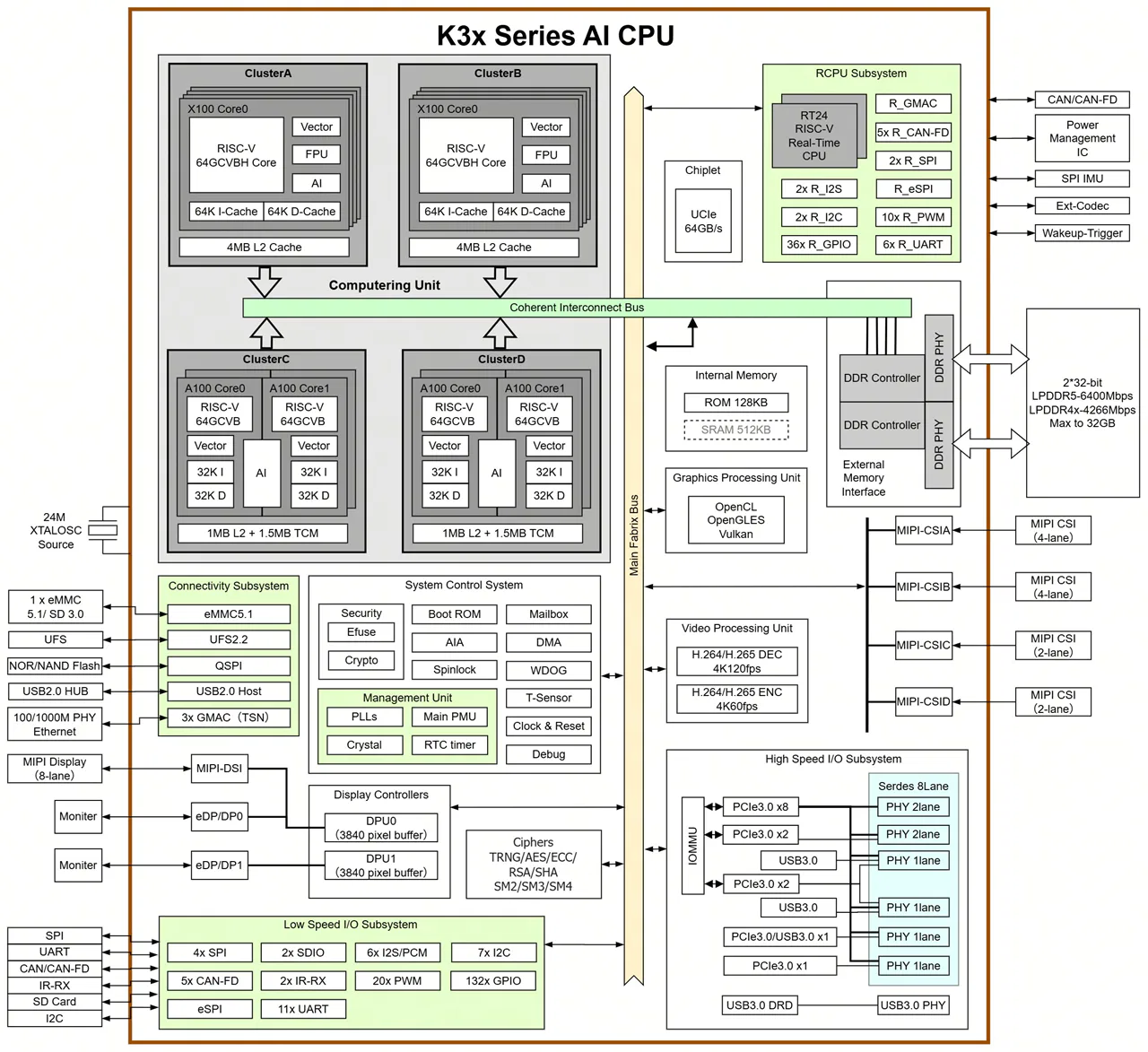
Target market
The K3 chip series is designed for AI consumer hardware, including smart home gadgets, AI-powered conference and office tools, AI content creation devices, AI-driven e-commerce setups, retail systems, and users who want to run local LLMs, among other applications.
Main Highlights
| Feature | Required by RVA23 | Supported by SpacemiT K3 |
|---|---|---|
| RV64I base | ✔ | ✔ |
| M/A/F/D/C | ✔ | ✔ |
| Bit‑manip (B) | ✔ | ✔ |
| Vector (V / RVV 1.0) | ✔ | ✔ (1024‑bit) |
| Hypervisor (H) | ✔ (S‑profile) | ✔ |
| AIA / IOMMU | Optional | ✔ |
| Full RVA23 compliance | ✔ | ✔ |
All of this offers real value to developers, as mainstream Linux distributions, toolchains, and runtimes work smoothly right out of the box without any tweaks.
Completely compliant with the RVA23 profile.
What is RVA23 and why is it important?
RVA23 is a “standard package” of features that every modern 64‑bit RISC‑V processor must have if it wants to run big operating systems like Linux or Android smoothly. Think of it like a minimum spec list for RISC‑V CPUs. Without RVA23, every chip maker could pick random features, and software would break.
With RVA23, everyone agrees on the same baseline.
What’s inside RVA23?
RVA23 requires a CPU to support:
- Basic math + advanced math (multiplication, division, floating point)
- Compressed instructions (smaller, faster code)
- Atomic operations (needed for multithreading)
- Bit manipulation (faster crypto, hashing, graphics)
- Vector instructions (the big one)
- Performance counters (profiling, debugging)
- Memory model guarantees (so OSes behave predictably)
- Optional: hypervisor support (for virtualization, in the S‑profile)
Why developers care?
RVA23 means:
- No more guessing which extensions a CPU supports
- One binary target for Linux/Android
- Better performance guarantees
- A stable foundation for future RISC‑V software ecosystems
It’s the difference between “maybe it works” and “it definitely works
In one sentence
RVA23 is the official checklist that ensures all modern 64‑bit RISC‑V CPUs have the same essential features — especially vectors — so software runs reliably everywhere.
Here’s some more detailed information showcasing the capabilities of the SpacemiT K3:
| Feature Category | Details |
|---|---|
| Core Description | High‑performance RISC‑V AI CPU capable of running 30B‑parameter LLMs smoothly; integrates 8× X100 CPU cores + 8× A100 AI cores |
| General Compute | 130 KDMIPS total CPU compute |
| AI Compute | 60 TOPS general‑purpose AI performance; supports BF16, FP16, FP8, INT8, INT4 |
| Model Performance | Smooth 30B LLM inference; >10 tokens/s @ 30B; ~84% of 235B model capability |
| Use Cases | AI smart home, AI office devices, AI content creation, AI retail/e‑commerce, consumer AI hardware |
| CPU Cores | 8× X100 64‑bit RISC‑V cores; quad‑issue, out‑of‑order; 2.4 GHz max |
| CPU Performance | 130 K DMIPS; SPECint2006 > 9.0/GHz (Cortex‑A76 class) |
| CPU Architecture | RVA23 profile; 8 MB shared L2 per 8‑core cluster |
| AI Cores | 8× A100 ultra‑wide AI cores |
| Vector Processing | RVV 1.0 with 1024‑bit vector width |
| AI Acceleration | Dedicated TCM + DMA |
| Security (General) | M/S/U privilege levels; hardware protection against Spectre/Meltdown‑class attacks |
| Security (Crypto) | AES, SHA, RSA, SM2, SM3, SM4 |
| Security (RISC‑V) | PMP, ePMP, IOPMP; secure boot; secure storage; signature verification; full lifecycle security |
| Virtualization | RVH 1.0 CPU virtualization; AIA interrupt virtualization; IOMMU device virtualization |
| Memory Support | LPDDR5‑6400, LPDDR4X‑4266; 64‑bit bus; up to 32 GB; 51 GB/s bandwidth |
| Storage Support | SPI Flash, eMMC 5.1, UFS 2.2, SDIO 3.0; NVMe SSD via PCIe |
| Real‑Time Processing | Dual‑core RT24 64‑bit RISC‑V; 6‑stage in‑order pipeline |
| Graphics | Integrated 3D GPU supporting Vulkan, OpenCL, OpenGLES |
| Video Decode | 4K 120fps (H.265, H.264, VP9, others) |
| Video Encode | 4K 60fps (H.265, H.264) |
| Display Outputs | Dual 3840×2160@60fps |
| MIPI‑DSI | 8‑lane, 4.5Gbps/lane; supports 4K60, 1440p90, 1080p60 |
| DP/eDP | Dual outputs; up to 1440p144 |
| Camera Interfaces | 4× MIPI‑CSI; 12 lanes total; supports up to 12 cameras |
| PCIe | 8 lanes @ 8Gbps; 5 controllers; RC/EP modes; hot‑plug |
| USB | 3× USB 3.0 Host; 1× USB 3.0 DRD (Type‑C); 1× USB 2.0 Host |
| Ethernet | 4× GMAC (RGMII/RMII/MII); TSN support |
| Other I/O | 6× SPI, 2× eSPI, 17× UART, 10× CAN‑FD, 9× I2C, 30× PWM |
| Power | 15W–25W TDP |
| Operating Temperature | –40°C to 85°C (industrial‑grade) |
2. K3 Pico-ITX single board computer
The K3 Pico-ITX is a compact single-board computer packing up to 60 TOPS of AI performance. It comes with a unified memory setup, 8 CPU cores, and 8 AI acceleration cores, plus fast onboard UFS storage and a 10Gb optical network port. Its design boosts computing power and efficiency, making it great for tasks like scientific computing and AI.
The K3 Pico-ITX, designed in a compact 2.5-inch Pico-ITX Plus form factor, is perfect for tight spaces. It features dual M.2 expansion slots and offers interfaces for real-time motion control and system management.
Packed with versatile I/O options and built with an industrial-grade design, the K3 Pico-ITX makes it easy to evaluate and integrate systems quickly, helping speed up time to market.
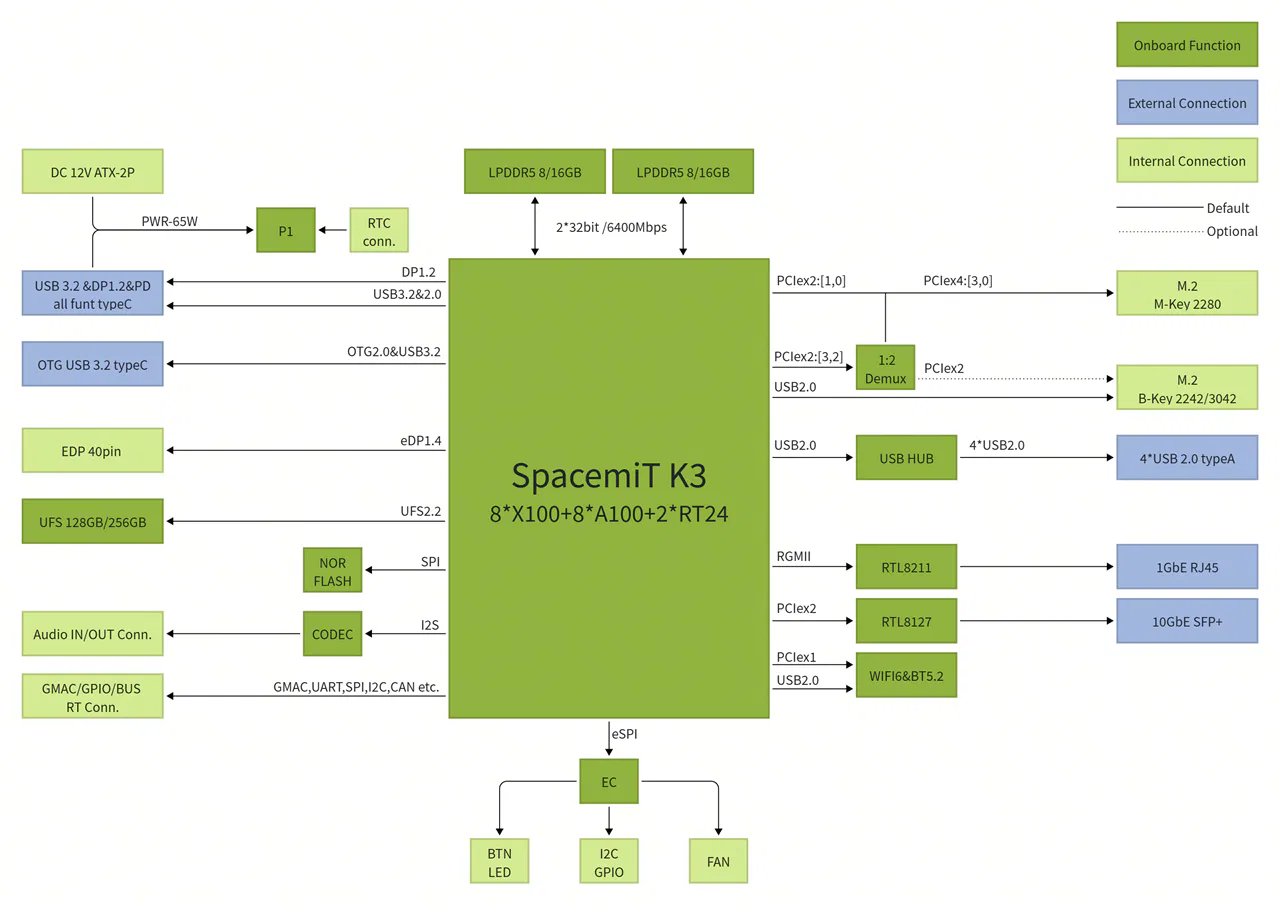
Specifications
| Module | Description |
|---|---|
| Processor | SpacemiT K3, 8 cores @2.4 GHz, 60 TOPS AI performance, RVA23 compliant, supports IME vector extensions and full virtualization |
| Display | DP Type-C: up to 4K (3840 × 2160) @ 60 Hz 40-pin eDP: up to 2.5K (2560 × 1600) @ 90 Hz |
| Memory | Dual-channel 2 × 32-bit LPDDR5 6400 MT/s, 16 GB / 32 GB options |
| Local Storage | UFS 2.2, 128 GB / 256 GB options |
| Storage Expansion | M.2 M-Key (PCIe Gen3 ×4), supports 2280 NVMe SSD |
| HS Expansion | M.2 B-Key (PCIe Gen3 ×2 + USB), supports 2242/3042 cards |
| Real-Time Expansion | FPC connector for EtherCAT, 5 × CAN-FD, SPI, I²C, UART, etc. |
| Wireless | Onboard Wi-Fi 6 + BT 5.2, dual-band, dual-antenna, 802.11 a/b/g/n/ac/ax compliant |
| Wired Network | 1 × RJ45 Ethernet, 10/100/1000 Mbps adaptive |
| Optical Network | 10GbE SFP+ port, supports 10GBASE-R / 10GBASE-X, QinQ, MSI-X, WOL, and clustering |
| Audio | Onboard CODEC, internal audio input/output |
| USB | 2 × USB 3.2 Gen1 Type-C (1 full-featured, one OTG) 4 × USB 2.0 Type-A Host |
| Debug | UART, JTAG, and 3 side buttons for power, reset, and firmware update |
| System Management | Onboard EC controller for power, thermal, and system status; includes I²C/UART/GPIO expansion |
| Form Factor | 100 × 86 mm, Pico-ITX Plus single-board computer, approx. size of a 2.5″ drive |
| OS | Pre-installed Bianbu 3.0; supports Ubuntu 26.04, OpenHarmony 6.0, OpenKylin, Deepin, Fedora, etc. |
| Power Input | Dual Type-C USB-PD (65 W) or ATX 2-pin 12 V @ 7 A |
| Reliability | ESD protection: board: ±4 kV (contact), ±8 kV (air); system: ±6 kV (contact), ±12 kV (air) Compliant with CCC, CE, and FCC; operating temp: -20 °C ~ 70 °C (consumer) / -40 °C ~ 85 °C (industrial) |
| Clock | Onboard RTC with battery interface, supports G3 state |
| Structure | Optional single-board or fan-cooled heatsink assembly Optional single-board or fully-metal industrial chassis Optional real-time board, touchscreen, terminal blocks |
Note: The M.2 B-Key PCIe ×2 lanes share bandwidth with the M-Key slot; if both are in use, the M.2 M-Key runs at PCIe Gen3 ×2.
Optional Components
| Category | Name | Description | Interface |
|---|---|---|---|
| Peripheral | SSD | 980 NVMe™ M.2 SSD, PCIe Gen 3.0 ×4, NVMe 1.4, sequential read up to 3,500 MB/s, sequential write up to 3,000 MB/s | M.2 M-Key 2280 |
| SSD | B+M NVMe SSD 128 GB | M.2 B-Key 2242 | |
| 4G Module | EM05 | M.2 B-Key 3042 | |
| SATA Expansion Card | PCIe to 5 × SATA interface | M.2 M-Key 2280 | |
| Docking Station | Type-C dock for HD 4K display, PD charging, USB 3.0 for tablets/laptops (3-in-1) | Full-featured Type-C | |
| Ultra HD Display | 16″ 2.5K LCD, 90 Hz, 2560 × 1600 | 40-pin eDP | |
| Real-time Control Expansion Board | 19 V input, 5 × CAN-FD, EtherCAT, RS232 & RS485 I/O, industrial-grade isolation protectiosn | FPC | |
| Structural Accessory | Embedded Fan Heatsink | Custom aluminum design | FAN |
| Metal Chassis | 120 × 120 × 48 mm self-developed metal chassis | BTN |
3. A Full-Stack RISC-V Robotics Development Kit
The SpacemiT K3-CoM260 Developer Kit packs an 8-core general-purpose CPU and an 8-core AI CPU into a compact compute module with a reference carrier board. It offers up to 60 TOPS of AI performance and 130 KDMIPS of general computing power, making it capable of running 30B large models smoothly.
Powered by the RISC-V architecture, the kit makes it easy to run popular AI models while sticking to standard CPU programming methods, enabling smooth, cost-free migration of AI algorithms. It’s hardware compatibility with the Orin Nano makes it a complete solution for edge AI development and testing, perfect for AI appliances, service robots, and autonomous edge devices.
Key Features
| Feature Category | Description |
|---|---|
| High‑Performance Edge AI | Up to 60 TOPS AI compute, enabling smooth 30B‑parameter model inference and multi‑stream concurrent workloads |
| CPU + AI CPU Architecture | Co‑designed general‑purpose CPU + AI CPU for balanced system compute and high‑performance AI inference |
| Modular Design | Compute module + carrier board form factor; fully compatible with K3‑CoM260 series for easy integration |
| Developer‑Friendly | Standard CPU programming model allows zero‑cost migration of AI algorithms and system software |
| Advanced RISC‑V Architecture | First compact RISC‑V edge platform supporting the RVA23 profile |
| Rich Standard Interfaces | Comprehensive high‑speed I/O for cameras, sensors, and peripherals |
| Built for Real‑World Applications | Ideal for AI appliances, service robots, and autonomous edge agents |
| Engineering‑Ready Support | Supports custom software, carrier board design, and full system integration to accelerate deployment |
Specifications
| Module | Description |
|---|---|
| Chip | SpacemiT K3 RISC-V AI CPU |
| CPU | 8 x X100™ 64-bit RISC-V CPU cores – 2 clusters x 4 cores per cluster, each cluster includes 4 MB shared L2 cache, with cross-cluster access – Each X100 core includes 64 KB I-cache and 64 KB D-cache – Compliant with the RVA23 profile – Supports RVV 1.0, VLEN: 256 bits |
| AI Performance | 8 x A100™ AI CPU cores, delivering 60 TOPS – 2 clusters x 4 cores per cluster, each cluster includes 1 MB shared L2 cache and 1.5 MB TCM (Tightly Coupled Memory), with cross-cluster access – Each A100 core includes 32 KB I-cache and 32 KB D-cache – Supports RVV 1.0, VLEN: 1024 bits |
| GPU | Integrated 3D GPU, with support for Vulkan, OpenCL, and OpenGL ES |
| Memory | 8GB/16GB/32GB 64-bit LPDDR5, 6400MT/s |
| Storage | Supports internal UFS, SD card slot, and external NVMe |
| Video Encoding | 4K60 (H.264/H.265) |
| Video Decoding | 1x 4K120 (H.264/H.265/VP9) 2x 4K60 (H.264/H.265/VP9) 8x 1080p60 (H.264/H.265/VP9) 16x 1080p30 (H.264/H.265/VP9) |
| Power Consumption | 18W–25W |
Reference Carrier Board
| Module | Description |
|---|---|
| Camera | 2 x MIPI CSI-1.1, 22-pin camera connectors |
| PCIe | M.2 Key M slot (PCIe Gen3 ×4) M.2 Key M slot (PCIe Gen3 ×1) M.2 Key E slot |
| USB | 4 x USB 3.0 Type-A 1 x USB Type-C |
| Networking | 1 x GbE connector |
| Display | 1 x DP 1.2 connector 1 x MIPI DSI-1.2 30-pin display connector |
| Other I/O | 40-pin expansion header (UART, SPI, I2S, I2C, GPIO) 12-pin button header 4-pin fan header DC power jack |
| Mechanical | 103mm x 90.5mm x 34.77mm (Height includes feet, carrier board, module, and thermal solution) |
Extensive software compatibility
The K3 now has native support in Linux kernel 7.0, and work is underway to upstream OpenSBI, U-Boot, LLVM, and other core software.
For more information, see the details on the project’s GitHub wiki.
OS compatibility now includes Ubuntu 26.04 with support for RISC-V architecture.
K3 currently supports a range of open-source operating systems, including Ubuntu, OpenHarmony, OpenKylin, and OpenEuler. Additional operating systems and widely used tools are in the process of being adapted to expand compatibility.
Continuously updated download links can be found at:
(https://www.spacemit.com/community/eco-software?id=spacemit-open-source-soft)
Supporting the Spine‑Triton kernel development system
Triton, developed by OpenAI, is a high-level language that lets developers create custom AI kernels with impressive speed. In simpler terms, it’s an open-source framework and library for writing highly efficient GPU code, designed to boost productivity beyond what CUDA offers.
Spine-Triton is a compiler and kernel-writing framework supports SpacemiT RISC-V chips like the K1 and K3, making it easy to create high-performance kernels—like MatMul, Softmax, and FlashAttention—using Triton-style code.
Why does SpacemiT care about Triton?
If SpacemiT gets Triton running efficiently on their RISC‑V AI CPU, it means:
- Developers can write GPU‑style kernels for K3
- AI operators can be optimized without hand‑coding assembly
- RISC‑V becomes more competitive with NVIDIA/ARM
- K3 becomes a real platform for custom AI workloads
This is a smart strategy to create a modern AI software ecosystem that complements their hardware.
Although Triton has many advantages, it has limitations when targeting CPUs. SpacemiT aims for something bigger: enabling Triton‑written operators to run efficiently on RISC‑V AI CPUs.
- Deployment info: https://github.com/spacemit-com/spine-triton
- Example: https://forum.spacemit.com/t/topic/872
Platforms that are already compatible with the K3 architecture.
| Platform | Description |
|---|---|
| Zenow | On-device AI knowledge assistant desktop app. All data processing stays local, ensuring privacy. Supports multi-model management, intelligent chat, knowledge base Q&A, voice interaction, etc. |
| Yumeet | An on-device AI meeting assistant desktop application offering local audio processing, transcription, translation, and summarization to enhance meeting efficiency while safeguarding sensitive data. |
| Seewise | multi-modal vision processing: image search by text, video search by text. |
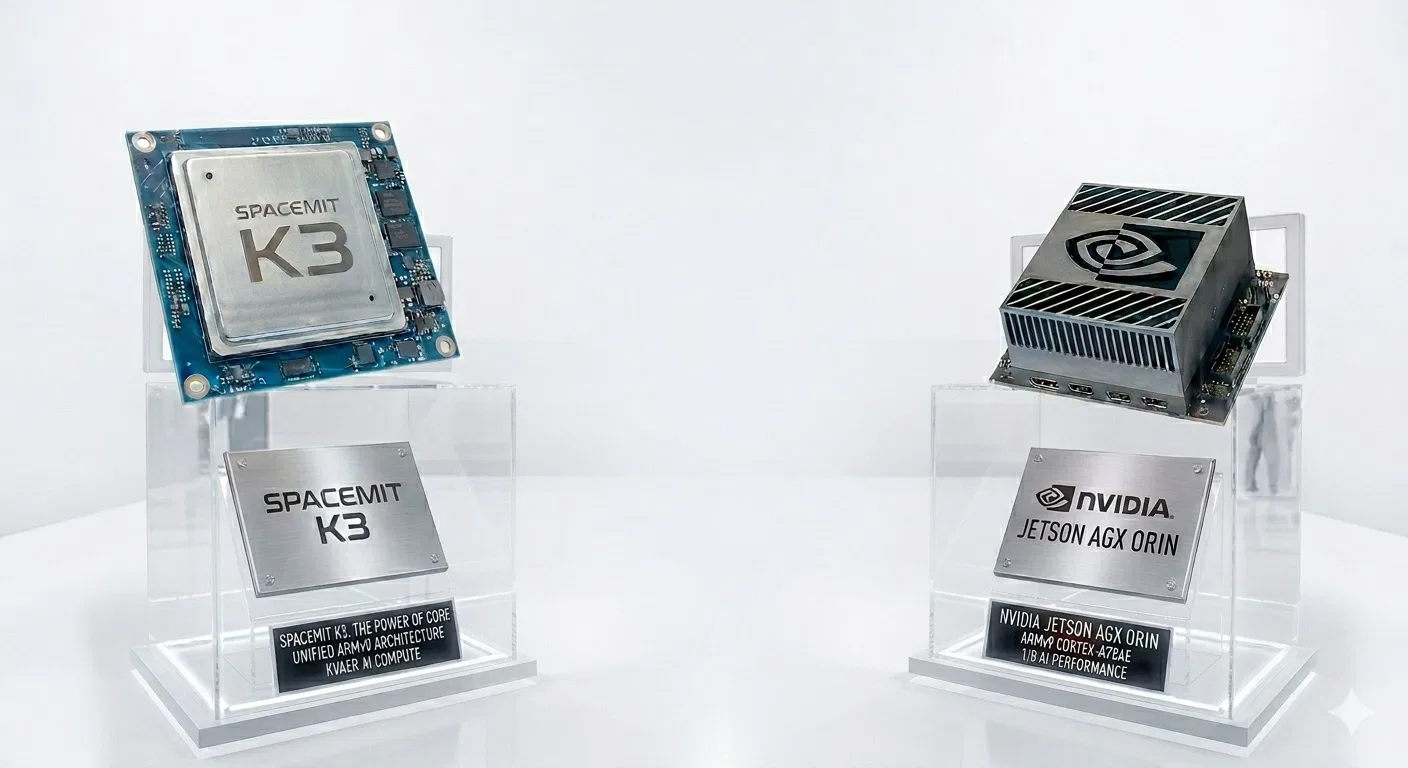
Here’s a clear, side‑by‑side comparison table highlighting the performance positioning of the SpacemiT K3, NVIDIA Jetson Orin Nano, and NVIDIA Jetson AGX Orin.
SpacemiT K3 vs NVIDIA Jetson Series – Performance Comparison
The table below shows that the SpacemiT K3 stands out as a strong contender against the NVIDIA Jetson Orin Nano.
| Category | SpacemiT K3 | NVIDIA Jetson Orin Nano | NVIDIA Jetson AGX Orin |
|---|---|---|---|
| AI Compute (TOPS) | 60 TOPS | 20 TOPS | 275 TOPS |
| LLM Capability | Smooth 30B model inference | Suitable for small models (≤7B) | Can run 70B+ models (quantized) |
| AI Architecture | 8× A100 AI cores (1024‑bit RVV vector engines) | 32 Tensor Cores | 2048 CUDA cores + 64 Tensor Cores |
| CPU Architecture | 8× X100 RISC‑V @ 2.4GHz | 6× ARM Cortex‑A78AE | 12× ARM Cortex‑A78AE |
| Strengths | Efficient LLM inference, strong vector AI, low power | Lowest cost, good for vision tasks | Maximum performance for robotics & multi‑model AI |
| Weaknesses | No CUDA ecosystem; new platform | Limited AI compute | High cost & high power draw |
| Power (TDP) | 15–25W | 7–15W | 15–60W |
| Best Use Cases | Edge LLMs, AI appliances, RISC‑V development | Lightweight robotics, cameras, CV | Heavy robotics, multi‑camera AI, high‑end edge compute |
| Estimate price | Not announced yet, but expected to be competitive. | $280 – $580 USD | $1,300–$1,900 USD |
SpacemiT Community, support, and social media channels:
- SpacemiT Community: https://www.spacemit.com/community
- SpacemiT Forum: https://forum.spacemit.com/
- SpacemiT Reddit: https://www.reddit.com/r/spacemit_riscv/
- SpacemiT X: https://x.com/spacemit_riscv
- SpacemiT Discord: https://discord.com/invite/hCPARBCt7k
- SpacemiT YouTube: https://www.youtube.com/@SpacemiT_CN
Business cooperation and purchase inquiries
- WeChat (Business): SpacemiT1102
- Phone: +86 189 6649 8607
- Email: business@spacemit.com