- Maybe you missed it? Banana Pi R4 Pro Review
- Banana Pi BPI-SM10: A 60 TOPS RISC-V SBC That Truly Rivals the Jetson Orin Nano.
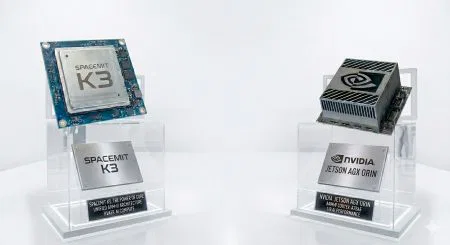
Banana Pi debuts the BPI-SM10 (K3-CoM260), featuring the SpacemiT K3 AI chip design.
In an era where artificial intelligence is increasingly moving from cloud data centers to local devices, two prominent names in the single-board computer ecosystem—Banana Pi and Radxa—are making significant strides with the introduction of remarkably compact computing platforms built around the open-source RISC-V architecture. These new devices, headlined by the Banana Pi BPI-SM10, promise to deliver substantial artificial intelligence processing capabilities within a form factor that challenges conventional expectations about what edge computing hardware can achieve.
A closer look at the BPI-SM10 kit
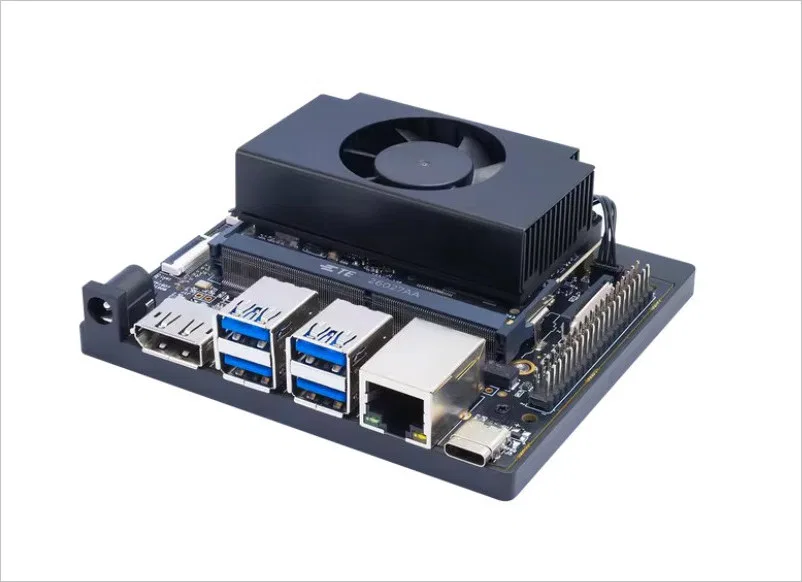
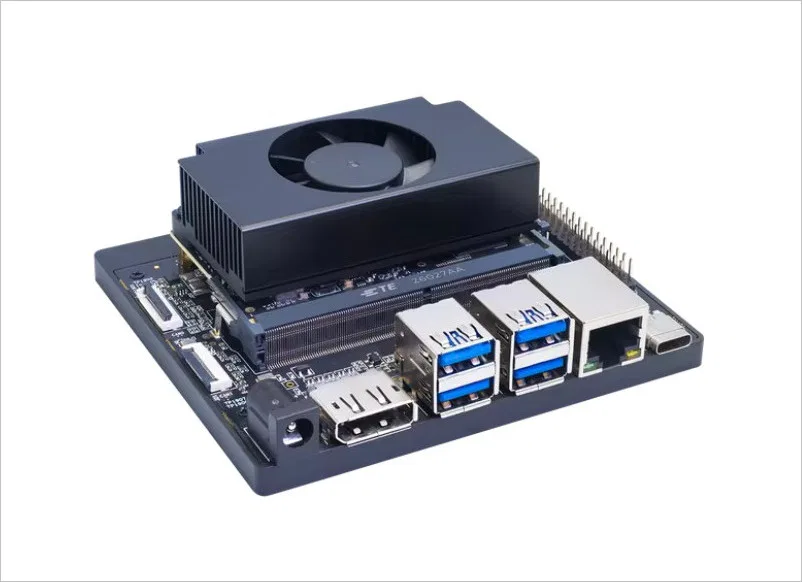
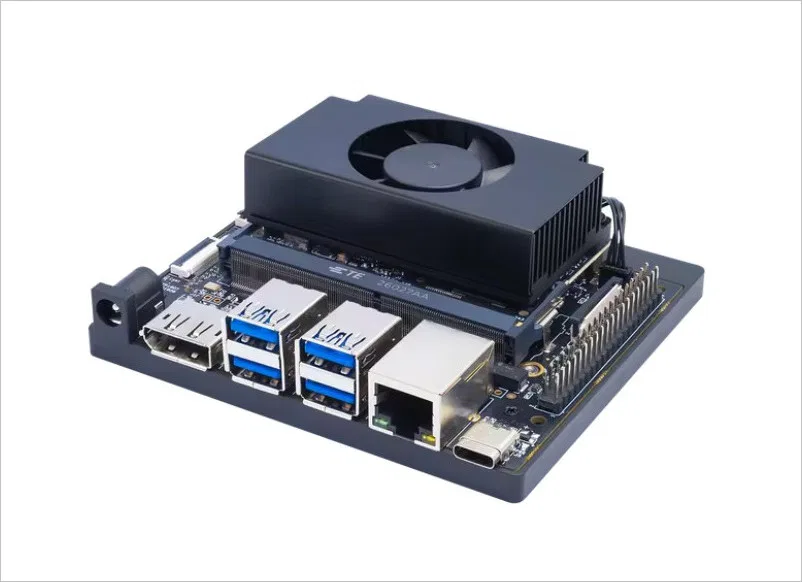
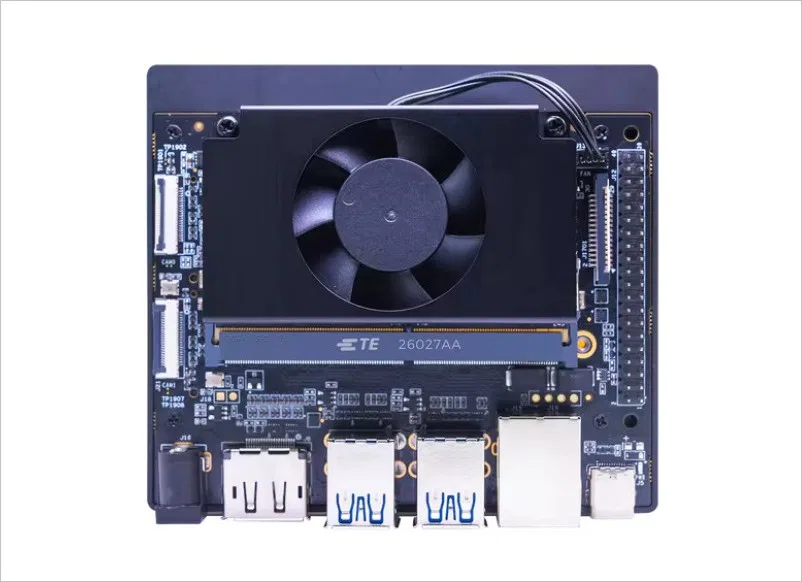
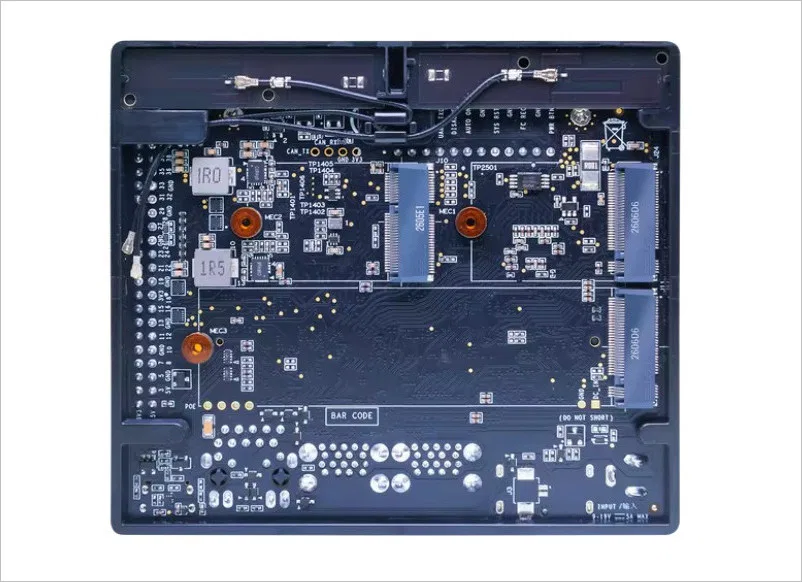
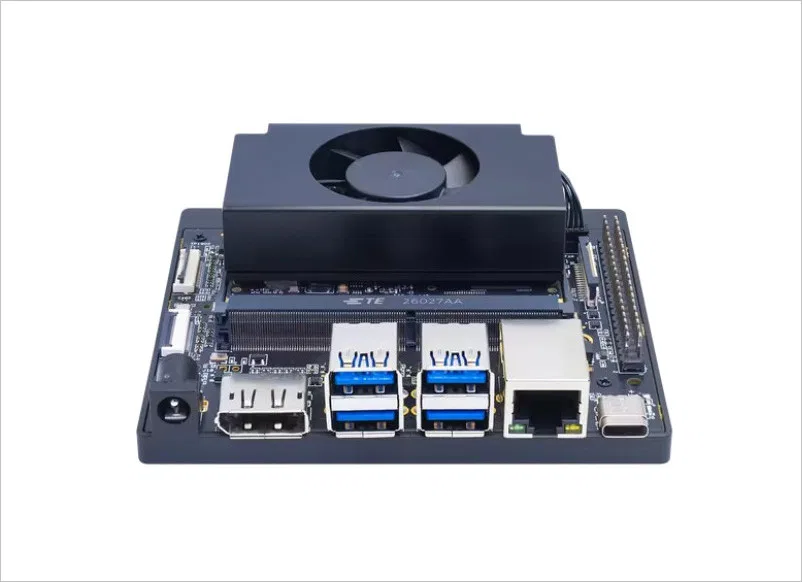
Main Features
| Category | Specification | Details |
|---|---|---|
| 🧠 CPU & AI Processing | CPU Cores | 8× X100™ 64‑bit RISC‑V cores |
| Pipeline | 4‑issue out‑of‑order, 12‑stage pipeline (RVA23 compliant) | |
| L2 Cache | 8 MB shared L2 | |
| AI Cores | 8× A100™ 64‑bit AI CPU cores | |
| AI Performance | 60 TOPS general‑purpose AI compute | |
| Vector Engine | 1024‑bit RW 1.0 vector width | |
| Additional Memory | 2 MB L2 + 3 MB TCM | |
| 💾 Memory & Storage | System Memory | 64‑bit LPDDR5 @ 6400 MT/s |
| Storage Support | External NVMe devices | |
| 📸 I/O & Expansion | Camera Interfaces | 2× MIPI CSI‑2 (22‑pin) |
| M.2 Slots | 1× M.2 Key M, 1× M.2 Key E | |
| USB Ports | 4× USB 3.0 Type‑A | |
| USB Type‑C | UFP mode | |
| Ethernet | Gigabit Ethernet | |
| Display Output | DisplayPort | |
| Expansion Header | 40‑pin GPIO header | |
| Display Interface | MIPI DSI (30‑pin) | |
| 🔌 Power | Power Input | DC power input |
Hardware Specifications
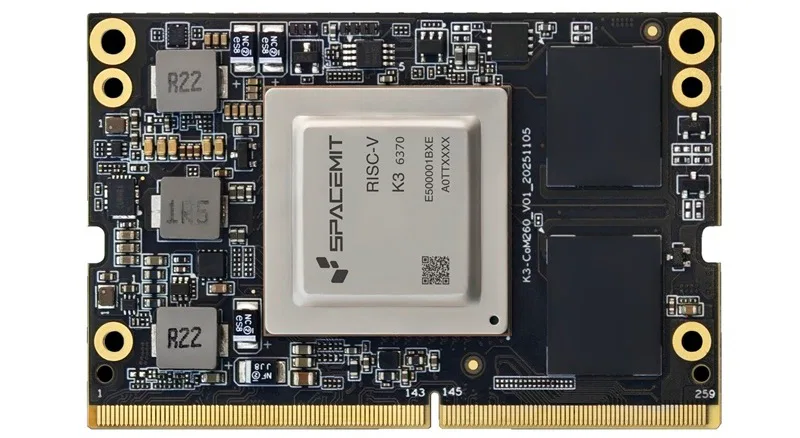
Banana Pi BPI‑SM10 RISC‑V Core Board — Specification Table
| Category | Specification |
|---|---|
| Chip | SpacemiT K3 RISC‑V AI CPU |
| CPU | • 8× X100™ 64‑bit RISC‑V cores, up to 2.4 GHz • 2 clusters, each with 4 cores • 4 MB shared L2 cache per cluster (cross‑cluster access) • Each core: 64 KB I‑cache + 64 KB D‑cache • RVA23 profile compliant • RVV 1.0, VLEN = 256 bits |
| AI Cores | • 8× A100™ AI CPU cores, 60 TOPS • 2 clusters, each with 4 cores • 1 MB shared L2 cache per cluster • 1.5 MB TCM per cluster (cross‑cluster access) • Each core: 32 KB I‑cache + 32 KB D‑cache • RVV 1.0, VLEN = 1024 bits |
| GPU | Integrated 3D GPU Supports Vulkan, OpenCL, OpenGL ES |
| Memory | 8 GB / 16 GB / 32 GB LPDDR5, 64‑bit, 6400 MT/s |
| Storage | • Internal UFS • SD card support • External NVMe |
| Video Encoding | 4K60 (H.264 / H.265) |
| Video Decoding | • 1× 4K120 (H.264 / H.265 / VP9) • 2× 4K60 (H.264 / H.265 / VP9) • 8× 1080p60 (H.264 / H.265 / VP9) • 16× 1080p30 (H.264 / H.265 / VP9) |
| Power Consumption | 18 W – 35 W |
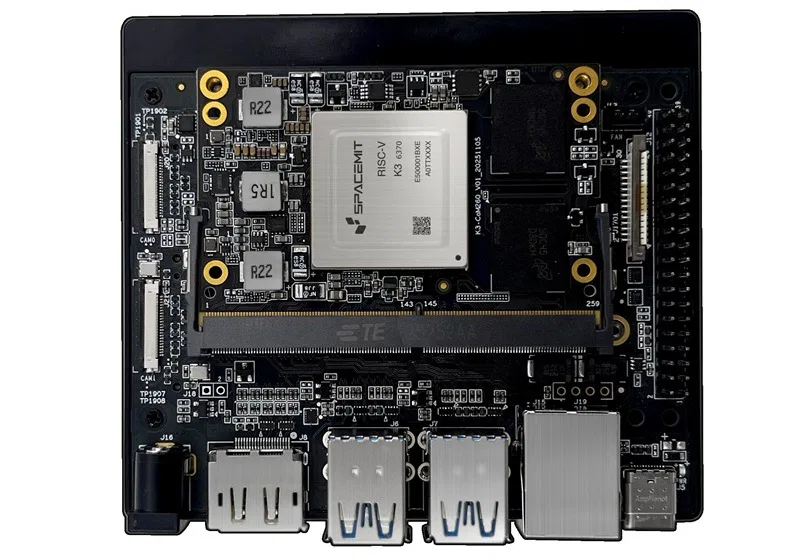
Banana Pi BPI‑SM10 RISC‑V Carrier Board — Specification Table
| Category | Specification |
|---|---|
| Camera Interfaces | 2× MIPI CSI‑2, 22‑pin camera connectors |
| PCIe Expansion | • M.2 Key M (PCIe Gen3 ×4) • M.2 Key M (PCIe Gen3 ×1) • M.2 Key E slot |
| USB | • 4× USB 3.0 Type‑A • 1× USB Type‑C (UFP device mode supported) |
| Networking | 1× Gigabit Ethernet (GbE) connector |
| Display Outputs | • 1× DisplayPort 1.2 • 1× MIPI DSI‑1.2, 30‑pin display connector |
| Other I/O | • Pin expansion header (UART, SPI, I2S, I2C, GPIO) • Pin button header • Pin fan header • DC power jack |
| Mechanical Dimensions | 103 mm × 90.5 mm × 35 mm (Height includes feet, carrier board, module, and thermal solution) |
The Banana Pi BPI-SM10: Architecture and Design
At the heart of the Banana Pi BPI-SM10 lies the SpacemiT K3 system-on-module, a snappy processor that embodies the convergence of general-purpose computing and specialized AI acceleration. This octa-core processor operates at frequencies up to 2.4 GHz and maintains compliance with the RVA23 profile, ensuring compatibility with modern RISC-V software ecosystems. What truly distinguishes this chip, however, is its integrated eight-core neural processing unit capable of delivering up to 60 trillion operations per second (TOPS) for artificial intelligence workloads.
What does “60 TOPS” really mean?
TOPS stands for Trillions of Operations Per Second.
- Imagine the board has 60 trillion tiny calculators working at the same time.
- In 2026, a standard “AI PC” needs about 40 TOPS to be considered high-end. With 60 TOPS, this board is punching way above its weight class.
- The result: When you ask the AI a question, it replies at about 10–12 words per second. That’s faster than most people can read, making the conversation feel natural and instant.
Memory and bandwidth
The BPI-SM10 adopts a modular design approach that separates the core computing components from the input/output infrastructure. The compute module itself resembles a SO-DIMM memory stick in form factor, integrating the SpacemiT K3 processor alongside up to 32GB of high-speed LPDDR5-6400 memory. This configuration provides substantial bandwidth for both general computing tasks and the data-intensive operations characteristic of machine learning inference.
Carrier Board
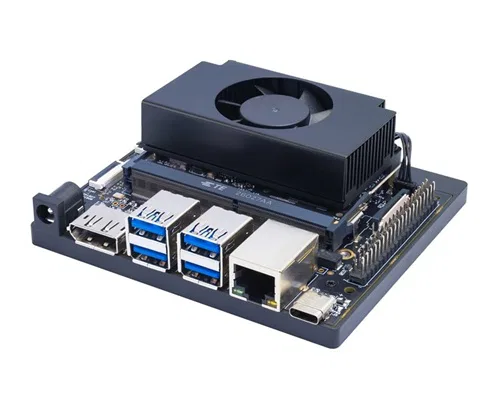
The companion carrier board measures approximately 103 by 90.5 millimeters and serves as the interface between the compute module and external peripherals. Despite its compact dimensions, this board packs an impressive array of connectivity options. Two M.2 slots provide expansion capabilities, with one supporting PCIe Gen 4 x4 lanes and the other offering Gen 4 x2 configuration. This flexibility enables users to add high-speed storage, wireless networking modules, or additional acceleration hardware according to their specific requirements.
Connectivity, Expansion Capabilities and power co
Modern edge computing applications demand versatile connectivity, and the BPI-SM10’s carrier board delivers comprehensively in this regard. Four USB 3.2 Gen 2 Type-A ports provide high-speed connections for peripherals, while an additional USB 3.2 Gen 2 Type-C port offers both data transfer and potential display output capabilities. For visual output, the board includes a DisplayPort 1.2 connector, enabling support for high-resolution monitors or digital signage applications.
Interfaces
Network connectivity is handled through a Gigabit Ethernet port, ensuring reliable wired connections for applications requiring stable bandwidth. For developers working with computer vision or sensor fusion applications, the dual MIPI-CSI interfaces enable connection of multiple camera modules, facilitating sophisticated imaging pipelines. The inclusion of a standard 40-pin GPIO header maintains compatibility with the extensive ecosystem of Raspberry Pi-compatible sensors and expansion boards, lowering the barrier to entry for hobbyists and prototypers.
Power Consumption
Power delivery is managed through a dedicated DC input connector, with the complete system expected to consume between 18 and 35 watts under typical operating conditions. This power envelope represents a thoughtful balance between performance and efficiency, making the platform suitable for both always-on edge deployments and battery-powered applications with appropriate power management.
Performance wise
AI Performance: Understanding the 60 TOPS Claim
The headline specification of 60 TOPS warrants careful examination. This figure represents peak theoretical performance under specific conditions, particularly when utilizing sparse integer-4 (int4) data formats. In practical terms, developers should expect different performance characteristics depending on their chosen precision levels and model architectures. For instance, when running models using half-precision floating-point (FP16) arithmetic, the effective performance settles around 7.5 TOPS—a figure that remains impressive for a device in this power class but substantially lower than the peak marketing number.
Real-world AI performance
Real-world AI performance depends on numerous factors beyond raw computational throughput. Memory bandwidth, software optimization, model quantization strategies, and framework support all influence the actual inference speeds users will experience. Early indications suggest that the BPI-SM10 should be capable of running large language models with approximately 30 billion parameters at speeds around 10 tokens per second—a performance level that enables interactive applications while maintaining local processing privacy.
The NVIDIA Jetson Orin Nano Super alternative
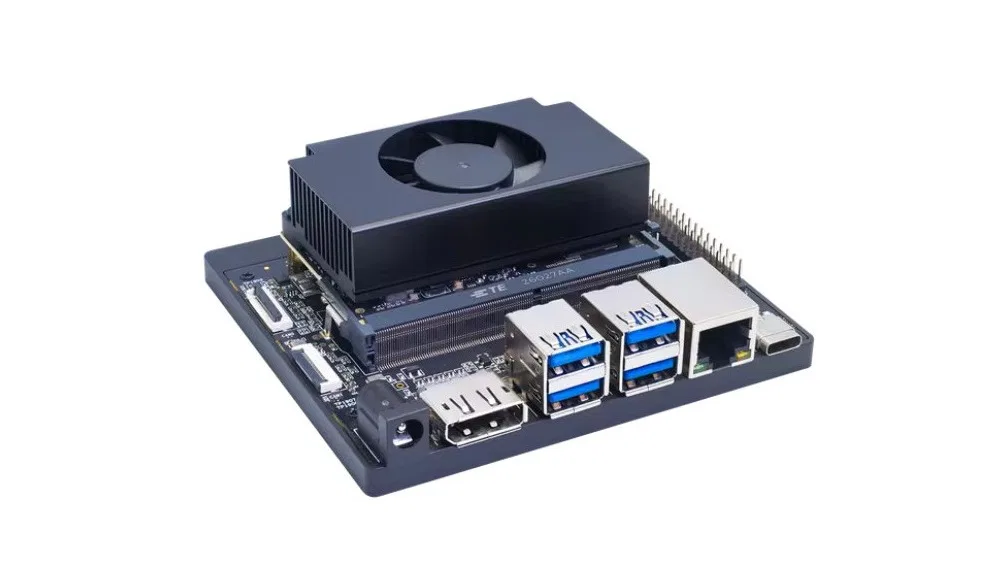
For developers comparing this platform to alternatives, it’s instructive to consider the NVIDIA Jetson Orin Nano Super, which delivers approximately 20 TOPS of real-world AI performance using mature CUDA-optimized software stacks. While the BPI-SM10’s theoretical peak appears higher, the maturity of NVIDIA’s ecosystem and tooling represents a significant advantage for production deployments. However, for developers prioritizing open-source software stacks or seeking to avoid vendor lock-in, the RISC-V approach offers compelling long-term benefits.
| Category | Banana Pi BPI‑SM10 (Core + Carrier Board) | NVIDIA Jetson Orin Nano Super |
|---|---|---|
| CPU | 8× X100 RISC‑V 64‑bit @ 2.4 GHz RVA23 profile 64KB I‑cache + 64KB D‑cache per core 4MB L2 per cluster (2 clusters) | 6‑core ARM Cortex‑A78AE |
| AI Cores / AI TOPS | 8× A100 RISC‑V AI cores 1MB L2 + 1.5MB TCM per cluster 60 TOPS | Ampere GPU + Tensor Cores 67 TOPS |
| Vector Extensions | RVV 1.0 CPU VLEN: 256‑bit AI VLEN: 1024‑bit | CUDA, TensorRT, cuDNN (no RVV) |
| GPU | Integrated 3D GPU Vulkan / OpenCL / OpenGL ES | NVIDIA Ampere GPU 1024 CUDA cores |
| Memory | 8 / 16 / 32 GB LPDDR5 @ 6400 MT/s | 8 GB LPDDR5 |
| Storage | UFS, SD card, NVMe | NVMe, microSD (varies by kit) |
| Video Encoding | 4K60 H.264/H.265 | 4K60 NVENC |
| Video Decoding | 1× 4K120 2× 4K60 8× 1080p60 16× 1080p30 | 4K60 NVDEC |
| Camera Interfaces | 2× MIPI CSI‑2 (22‑pin) | Depends on carrier board (varies by kit) |
| Display Outputs | 1× DP 1.2 1× MIPI DSI‑1.2 (30‑pin) | HDMI / DP (varies by kit) |
| PCIe | M.2 Key M (PCIe 3.0 ×4) M.2 Key M (PCIe 3.0 ×1) M.2 Key E | PCIe Gen4 (varies by kit) |
| USB | 4× USB 3.0 Type‑A 1× USB‑C (UFP device mode) | USB‑C + USB‑A (varies by kit) |
| Networking | 1× GbE | Dual GbE (varies by kit) |
| Other I/O | UART, SPI, I2S, I2C, GPIO headers Button header Fan header DC jack | Varies by kit (GPIO, I2C, SPI, UART) |
| Mechanical Size | 103 × 90.5 × 35 mm | Varies by dev kit |
| Power Consumption | 18–35 W | ~7–15 W typical |
| Price | Not yet released | ~$966–$2083 (various listings) |
Local 30B LLM Hardware
What exactly is a “30B LLM,” and why would someone need it?
Think of an LLM (Large Language Model) like a digital brain.
- The “B” stands for Billions: It refers to how many “connections” or “neurons” the brain has.
- Small Brains (7B – 8B): These are like smart high schoolers. They are fast but can get confused or forget things easily.
- Medium Brains (30B): This is the “Goldilocks Zone.” These models (like Qwen 3.5 or Gemma 4) are like university graduates—they have much deeper reasoning, better coding skills, and are far less likely to make things up (“hallucinate”).
The Problem: Normally, running a 30B model requires a $2,000 gaming PC with a hefty graphics card. The BPI-SM10 hardware makes it possible on a tiny board that consumes less power than a lightbulb.
The “K3” Magic: One Brain, Two Personalities
The SpacemiT K3 chip inside this board is unique because it’s “Homogeneous.” In simple terms, it doesn’t have a separate “AI chip” glued onto a “regular chip.” Instead, it has 16 cores that speak the same language:
- 8 “Worker” Cores: These handle your mouse, keyboard, internet, and standard Linux apps.
- 8 “Scholar” Cores: These are specialized for heavy math. They have “ultra-wide” vision (1024-bit vectors) that allows them to read and process AI data much faster than a normal computer.
Because they all speak the same language (RISC-V), the board doesn’t waste time translating instructions back and forth. It just works.
Why is this better than the NVIDIA Jetson?
For years, NVIDIA’s Jetson was the king, but it has a “memory problem.”
- NVIDIA Jetson Orin Nano: Usually has 4GB or 8GB of RAM. It’s like a genius with a tiny desk—it can’t fit a 30B model on its workspace.
- Banana Pi BPI-SM10: It offers up to 32GB of RAM. It’s like giving that same genius a massive library table. It can fit the entire 30B model into its memory at once, which is the only way to run these high-end models smoothly.
The K3 Pico-ITX Alternative: Single-Board Simplicity
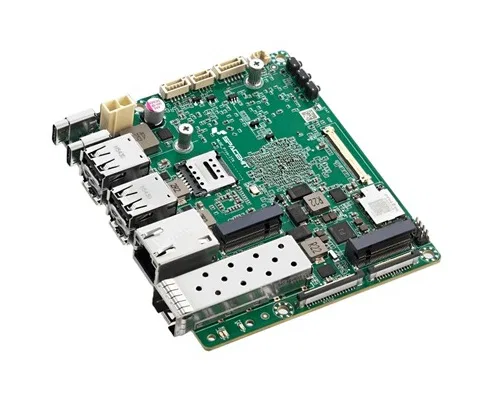
Recognizing that not all applications benefit from the modular compute module approach, Banana Pi has also announced plans for a K3 Pico-ITX board. This 2.5-inch square single-board computer integrates the same SpacemiT K3 processor but eliminates the separation between compute and carrier functions. The consolidated design includes several enhancements not found on the BPI-SM10 carrier board, such as an embedded DisplayPort (eDP) connector for direct panel integration, a front-panel header for custom enclosure controls, an RTC battery connector for persistent timekeeping, and notably, a 10-gigabit Ethernet port for high-bandwidth networking applications.
The Pico-ITX form factor represents a reference design that other manufacturers may adopt or adapt, potentially expanding the ecosystem of RISC-V-based edge AI hardware. This standardization approach could accelerate adoption by providing a known-quantity platform for software developers and system integrators.
Market Positioning and Practical Considerations
While official pricing for the Banana Pi BPI-SM10 remains unannounced at the time of writing, contextual clues suggest a premium positioning. The compute module’s physical compatibility with NVIDIA’s Jetson Orin NX and the carrier board’s similarity to Radxa’s Orin-based development kit—which retails around $499—indicate that buyers should expect comparable investment requirements. This pricing strategy positions the platform squarely in the professional developer and industrial application space rather than the hobbyist market dominated by lower-cost boards.
The target audience for these RISC-V AI computers includes several distinct segments. Research institutions and academic labs exploring open hardware architectures will appreciate the platform’s transparency and customization potential. Industrial IoT developers seeking to deploy AI inference at the edge without cloud dependency will value the combination of performance, connectivity, and deterministic behavior. Additionally, privacy-conscious application developers building solutions that must process sensitive data locally will find the local AI acceleration capabilities particularly attractive.
Software Ecosystem and Development Considerations
One critical factor influencing the adoption of any new hardware platform is the maturity of its software ecosystem. RISC-V benefits from growing support in major open-source projects, including Linux kernel mainline integration, GCC and LLVM compiler toolchains, and emerging AI framework adaptations. However, developers should anticipate that certain optimizations and libraries may require additional effort compared to more established platforms.
The SpacemiT K3’s AI accelerator will require specific software support to unlock its full potential. Developers should investigate the availability of runtime libraries, model conversion tools, and framework integrations before committing to the platform for production use. The open nature of RISC-V suggests that community-driven improvements will accumulate over time, but early adopters must be prepared to contribute to or navigate a developing ecosystem.
Energy efficiency and heat control
Operating within an 18 to 35-watt power envelope, the BPI-SM10 demonstrates thoughtful engineering for edge deployment scenarios. This power range enables passive cooling solutions in many configurations, though the reference design includes an active fan mounted atop the compute module for sustained high-load operations. For applications requiring silent operation or deployment in harsh environments, developers may need to design custom cooling solutions that leverage the board’s thermal characteristics.
The efficiency of RISC-V architectures, combined with the specialized AI accelerator’s ability to process neural network operations with minimal overhead, contributes to favorable performance-per-watt metrics. This efficiency becomes particularly valuable in remote or battery-powered installations where energy consumption directly impacts operational costs and maintenance intervals.
Conclusion: A New Chapter in Accessible AI Computing
The Banana Pi BPI-SM10 and other RISC-V platforms from Radxa and its partners mark an exciting step forward for edge AI hardware. Blending open architecture with strong computing power, these devices give developers a fresh and appealing option to closed systems. While there are still hurdles around software maturity and ecosystem growth, the overall outlook is definitely promising.
For those ready to dive into emerging tech stacks, these platforms offer a chance to create solutions built for the future, with flexibility, transparency, and long-term sustainability in mind. As AI shifts from centralized clouds to distributed edge setups, hardware that blends performance, efficiency, and openness will become key to driving the next wave of smart applications.
Product information
| Category | Description | Official Link |
|---|---|---|
| Official Documentation (Wiki) | Full specs, hardware details, diagrams, software info | Banana Pi Docs – BPI‑SM10 |
| Community Forum Thread | Discussions, updates, and additional documentation links | Banana Pi Forum – BPI‑SM10 Thread |
| Banana Pi Main Site | Main product catalog including BPI‑SM10 listing | Banana Pi Official Site (Product List) |
| SpacemiT K3 | Additional technical brief for the SpacemiT K3 | K3 Brief (Google Drive) |
Prices and availability
The Banana Pi BPI-SM10 (8GB RAM) kit is currently priced at about US $381.65 and includes an active heatsink and a semi open case. As a partner and distributor for SPACEMIT, Banana Pi also offers the SPACEMIT-K3-Pico-ITX (8GB RAM) come with an integrated SFP+ optical port which include basic accessories like a heatsink and a semi-open case, priced around US $389.63 before shipping and duties.
Both boards are available on Banana Pi’s official AliExpress stores, making them a great choice for professionals seeking high-level hardware for advanced AI projects like robotics, edge AI, industrial applications, and so forth.
Note: As the products were recently launched and are extremely fresh, they are currently out of stock but are expected to be available at a later time.
Estimate prices for each component.
| Model | Expected Price (USD) | Notes |
|---|---|---|
| BPI‑SM10 Core Board (8 GB) | $150–$180 | Entry configuration |
| BPI‑SM10 Core Board (16 GB) | $180–$220 | Most likely “standard” SKU |
| BPI‑SM10 Core Board (32 GB) | $220–$250 | High‑end SKU |
| Carrier Board | $40–$70 | Based on similar Banana Pi carrier boards |
| Core + Carrier Bundle | $190–$300 | Depends on RAM and cooling |