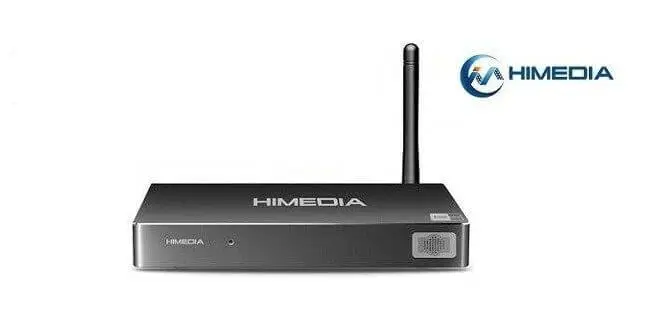
HIMEDIA H8
HIMEDIA Brand is well known in the segment of the Android Box HD player market, producing set-top boxes for the domestic market with their HIMEDIA Q1 IV, IV Q3, Q5, and Q10 IV-IV, Q8, H8 (Allwinner A31S), and recently the new HiMedia H8 model based on latest Rockchip solution.
The H8 HIMEDIA Android TV Box casing is made from aluminum. Its equipped eight-core processor, with today’s most potent Cortex A53 Octa-core RK3688 SoC. It comes with a 64-Bit Core PowerVR SGX6110 GPU chip, Supporting clock speeds up to 600Mhz, 2GB RAM, and 16GB Flash memory running the latest Android 5.1.1 lollipop operating system.
Additional features include x2 USB host ports and an HDMI 2.0 Interface capable of outputting video signal at 60 fps. In addition, the H8 comes pre-installed with Kodi 15.2, supporting playback of Blu-ray ISO files and Blu-ray Rip movies with embedded subtitles.
Himedia Website: www.himediatech.com
Company Introduction
Established in 2005, HiMedia is a high-tech engineering company specializing in designing and manufacturing HD media players, Android-based set-top boxes, IPTV boxes, and OTT boxes. These products comply with CE, FCC, RoHS standards, Dolby, and DTS with HDMI certificates. The Company has a long history of successfully providing OEM and ODM services to many premium brand customers abroad and has strategic partners from Realtek, Hisilicon, and Allwinner.
Company Team Photo ( Courtesy of HiMedia )
HiMedia H8 TV Box Main Specifications
- CPU: RK3368 Octa-core Cortex-A53 Processor.
- OS: Android 5.1.
- Casing Material: Metal.
- Blu-ray 3D: Support.
- Card Extended: Yes, Support SD card
- File system: FAT32/NTFS/EXT3
- Power Output: DC/5V 2A
- RAM: 2GB DDR3 + ROM: 16GB Flash.
Special Media Player Functions:
- Pre-installed Kodi/XBMC.
- They are supported in Kodi & Himedia Media Center App: 3D BD-ISO, BD-ISO, MVC Blu-Ray.
Ports & Interfaces:
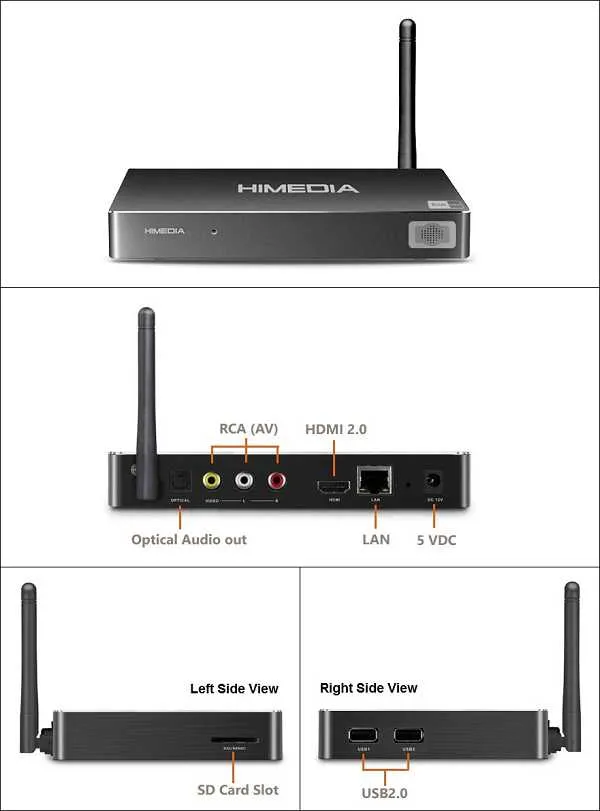
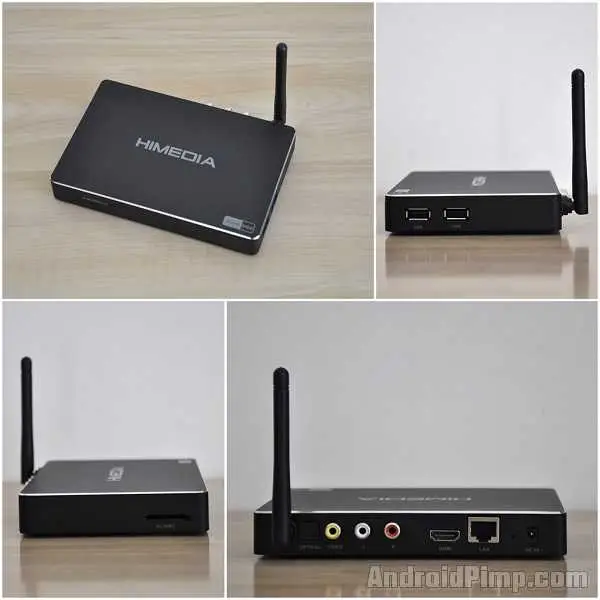
- 1 x HDMI Port
- 1 x DC 5V Charging port
- 1 x Optical Port
- 1 x AV
- 1 x LAN
- 1 x MMC/SD Card Slot
- 3 x USB Host
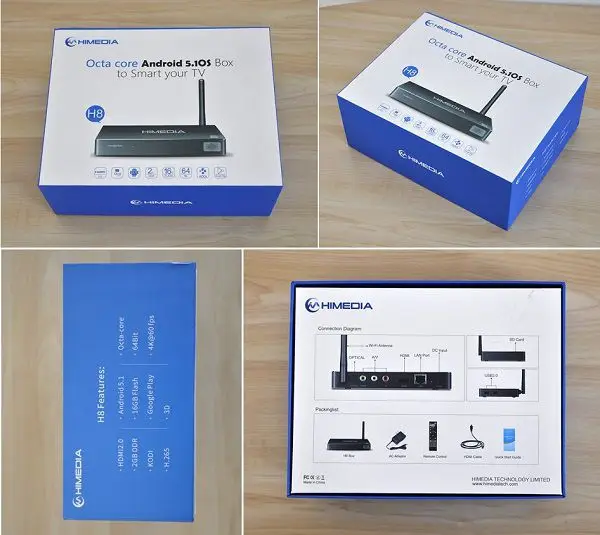
HiMedia H8 Android TV Box Package Contains:
- 1 x HiMedia H8 Quad Core Android TV Box.
- 1 x User Guide.
- 1 x Remote Controller.
- 1 x HDMI Cable.
- 1 x Charger.
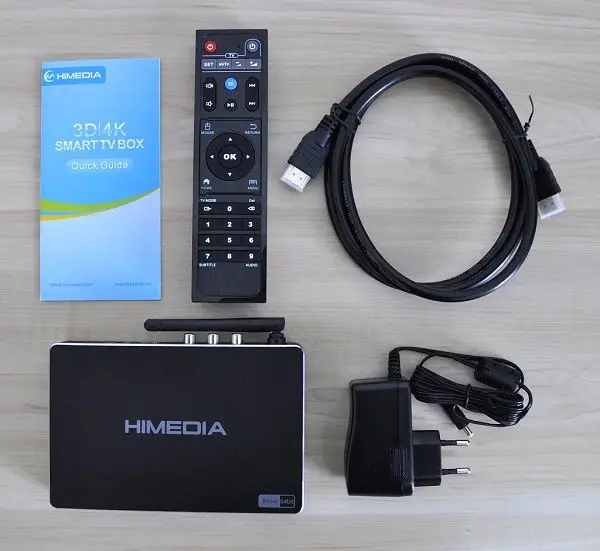
Himedia H8 Package
H8 TV Box | Unboxing Video
Items inside the package:
- 1x User Guide
- 1x RF Remote
- 1x HDMI Cable
- 1x H8 TV Box
- 1x 5V-2A Power Adapter.
Build Quality
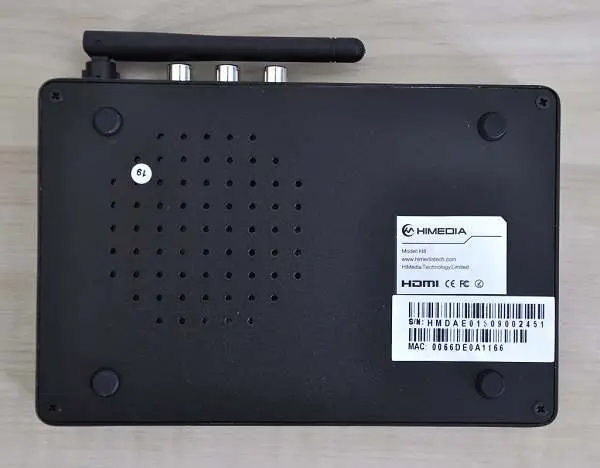
The H8 envelope (case) is all made from metal materials, and the general build quality looks and feels superb. At the bottom of the Unit, the company added a series of vent holes, which helps to get the extra heat out, keeping the device cool.
Build Design
From the first impression holding the Unit, It looks solid and well built without any quality problems. Again, no complaints on design or quality.
Hardware
Like other devices, The H8 is powered by a high-performance Rockchip RK33668 Cortex A53 Processor, operating at frequencies between 312-1.2GHz. The graphical Unit has the PowerVR Rouge G6110 GPU, which runs at a clock speed of up to 600Mhz.
Remote Control
The H8 comes with a well-designed Remote that is very easy to operate. The company added a few innovative features within their remote Unit that you usually don’t find in other TV Box Brands.
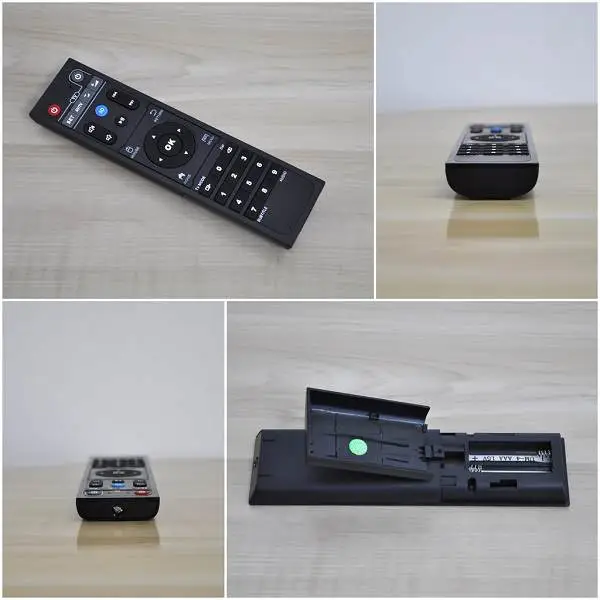
Remote Functions:
- Audio: Display Audio track information.
- Subtitle: Switching subtitles on/off.
- 3D: Switching into 3D View mode (Suitable for movies in 3D format).
- TV Mode: Switching between HDMI video resolutions & refresh rates:
- 720P 50 / 60 MHz
- 1080P 50 / 60 MHz
- 576 50 MHz
- 480 MHz
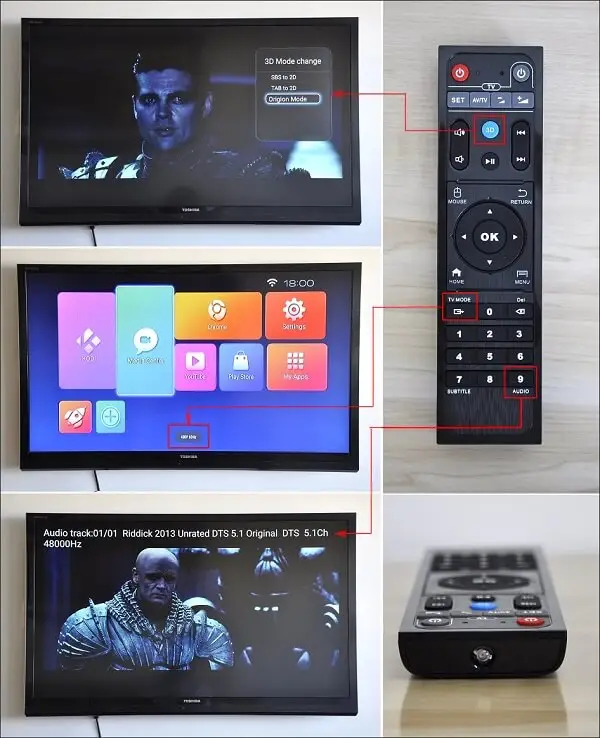
Universal Remote Function – I didn’t find proper instructions in the user guide explaining how to set up the remote to operate with my TV.
Software Support
Himedia didn’t use the default launcher by Rockchip but instead installed a customized UI that looks clean and user-friendly, very easy to navigate, and switches between various features and different screens.
The H8 currently runs the Android 5.1.1 Operating system and comes pre-installed with just a few apps, such as Facebook, Netflix, and Skype. The general feeling is that the system is stable and all work well. In addition, worth mentioning that the HiMedia company added an excellent NFS sharing option that lets you share folders/files across a LAN, which makes it very easy to share multimedia content and connect with mobile devices, Intel Powered Mini PC, PC, etc.
HiMedia H8 TV Box | UI ( User Interface )
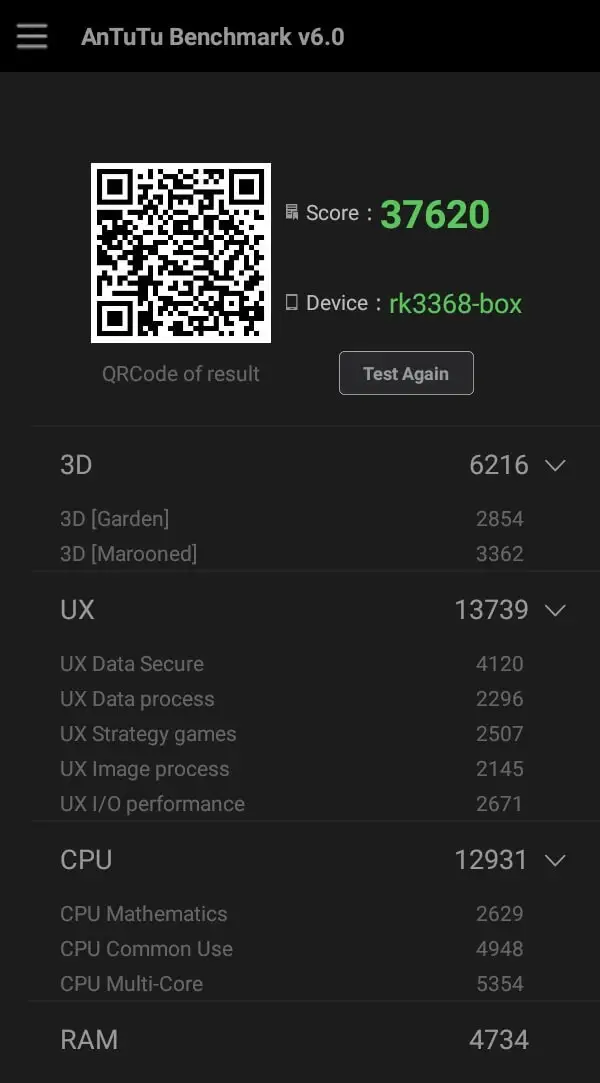
AnTuTu Benchmark v6.0 Results:
- Score: 37620
- 3D – 6216
- UX – 13739
- CPU – 12931
Kodi/XBMC Testing
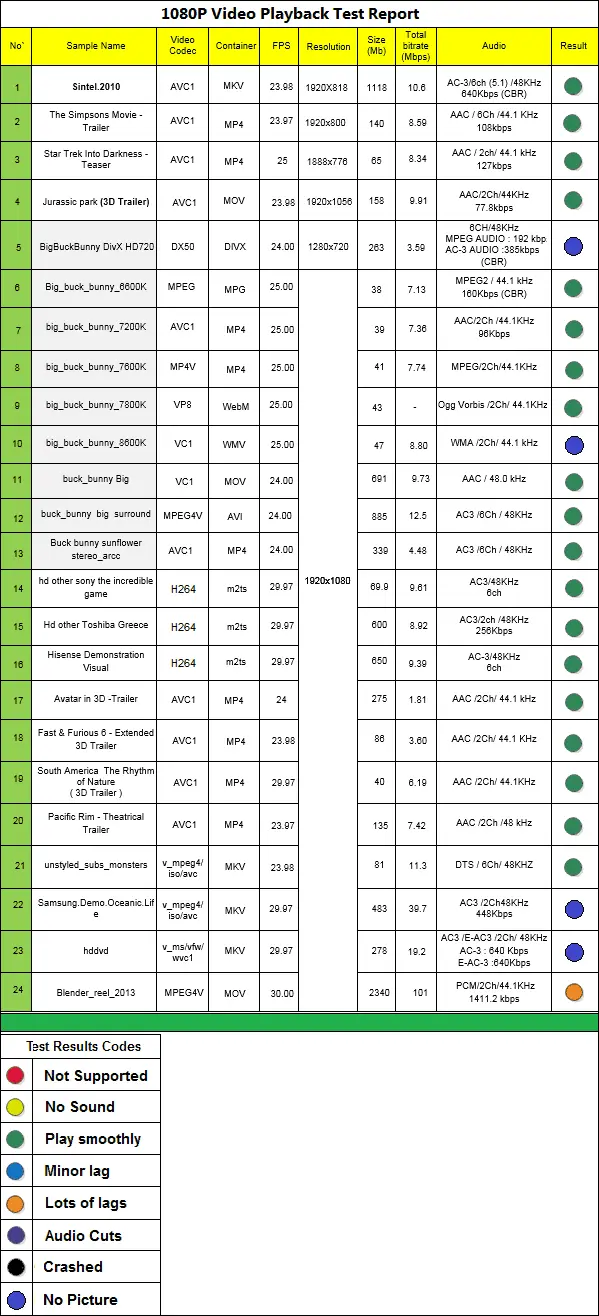
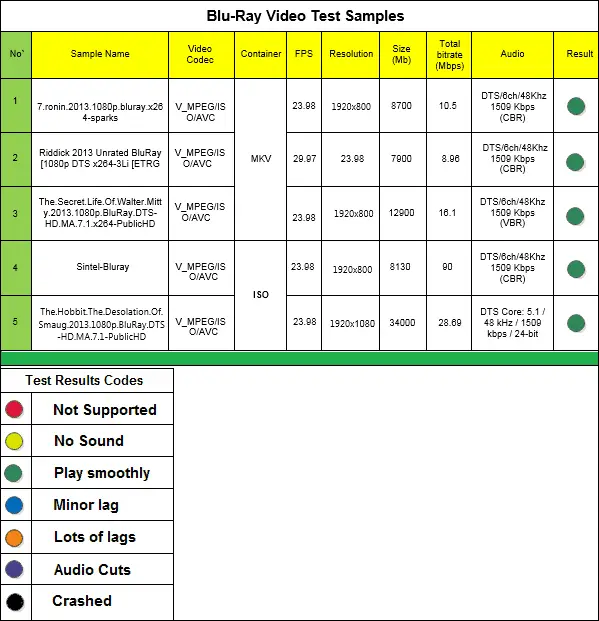
The H8 came pre-installed with Kodi/XBMC 15.2-RC1, which I used for my tests. I checked playback performance using my 60GB video samples collection in the following tests. The results were terrific. Most of my files played well and smoothly. None of the samples tested showed any frame dropping, which usually happens when the GPU sometimes fails to handle the decoding due to low clock speed or acceleration support under Kodi, especially when playing high-resolution files in 2Kx4K.
Himedia definitely invested some software R&D work in improving video decoding performance under the RK33668 Soc, which is an excellent step, making the device as compatible as possible with Kodi/XBMC Software, which shows.
Himedia H8 Quick Review
Final Words
The H8 performed better than the previous Android set-top boxes I tested. The company invested in design and software, making this device compatible with KODI/XBMC Software. The streaming performance was also good, thanks to the external WiFi Antenna. Overall, the product is excellent on all levels, and it’s defiantly a good buy and highly recommended. If you’re interested in buying it can find the item sold in AliExpress for about ~100 USD (retail price), including shipping via regular airmail postage.
PROS
- EWiFinal WiFi Antenna.
- Aluminum-made case.
- Good Kodi/XBMC Performance.
- Cost-Effective.
CONS:
- No built-in power Button ( Operated via Remote Control Unit).
Web: www.himediatech.com