Close Menu
  • Home
  • About
  • Wearables
  • Earbuds
  • Computer Accessories
    • Routers
    • Remotes
  • Embedded
    • Single Board Computers
    • Addon Boards
    • Raspberry Pi
  • Wireless Routers
  • Contact
Facebook X (Twitter) Instagram Threads
Trending
  • AliExpress Promo Codes: July 2026 (100% Verified)
  • BPI-R4 Wi-Fi 7 NIC (BE14): OpenWrt Setup & Optimal WiFi Power Guide
  • Orange Pi 6 Launches: New 45 TOPS AI SBC Beats Raspberry Pi HATs in Speed
  • Orange Pi Zero 3W Review: $25 Dual Video Pi Zero 2W Killer?
  • CamThink NeoEyes NE503: A 20 TOPS 4k Edge AI Camera Platform Powerhouse
  • DFRobot 6.67″ Flexible AMOLED Review: Best Raspberry Pi & LattePanda Display?
  • Banana Pi BPI-SM10 Review: 60 TOPS RISC-V Jetson Orin Nano Alternative
  • SpacemiT K3 Pico-ITX Review: 60-TOPS RISC-V Powerhouse for LLMs?
AndroidPIMP
Facebook X (Twitter) Instagram
  • Home
  • About
  • Wearables
  • Earbuds
  • Computer Accessories
    • Routers
    • Remotes
  • Embedded
    • Single Board Computers
    • Addon Boards
    • Raspberry Pi
  • Wireless Routers
  • Contact
AndroidPIMP
Embedded Computers

BPI-R4 Wi-Fi 7 NIC (BE14): OpenWrt Setup & Optimal WiFi Power Guide

By androidpimpJuly 10, 2026Updated:July 12, 2026No Comments8 Mins Read
Facebook Twitter Pinterest LinkedIn Tumblr Email
Follow Us
Google News Flipboard
BPi Wi Fi 7 NIC BE14(V2.1)
Table of contents
  1. Banana Pi Debut Wi-Fi 7 Module NIC BE14 (V2.1) for the R4 / R4 Pro OpenWrt router series
    1. Part I: Product introduction
  2. Key Features
  3. Software and Feature Status (OpenWrt)
  4. Hardware Design: Keeping Things Cool
  5. Software: Finally, Drivers That Just Work
  6. Who is this product intended for?
  7. NIC (Network Interface Controller) – Old vs. new design
  8. Pricing and Where to Get It
    1. BPI-R4-NIC-BE14 WiFi7 module

Banana Pi Debut Wi-Fi 7 Module NIC BE14 (V2.1) for the R4 / R4 Pro OpenWrt router series

Part I: Product introduction

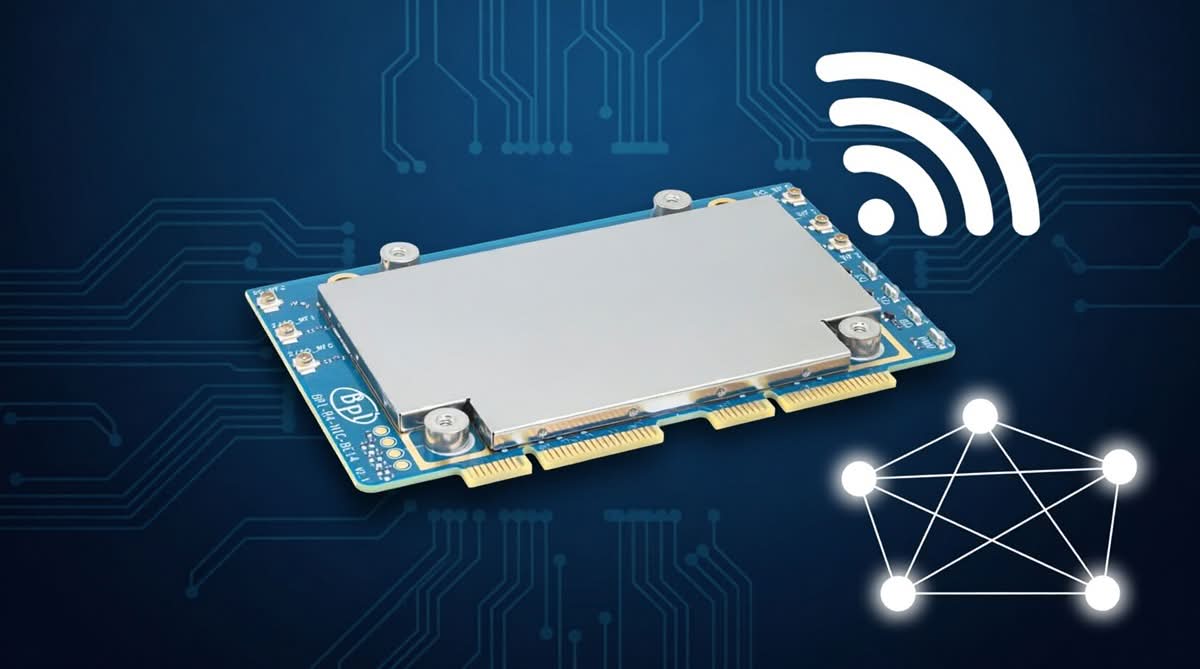
Let’s be honest: for a long time, if you wanted true Wi-Fi 7 performance, you had to drop serious cash on proprietary, closed-off enterprise gear. But Banana Pi is flipping that script with their new Wi-Fi 7 NIC. This week, they officially announced the BPI-R4-NIC-BE14, a Wi-Fi 7 network card built specifically for their wildly popular BPI-R4/Pro open-source router series. If you’ve been waiting to bring next-gen wireless speeds to your DIY networking setup without selling a kidney, this is the hardware you’ve been looking for.

The BPI-R4 has established itself as a powerhouse in the realm of open-source routing boards, featuring 2.5G and 10G SFP ports that typically come at a high cost. However, its wireless capabilities have previously been limited by older Wi-Fi standards. The new BE14 NIC revolutionizes the board, converting it into a fully-fledged, carrier-grade wireless access point that truly realizes its wired potential.

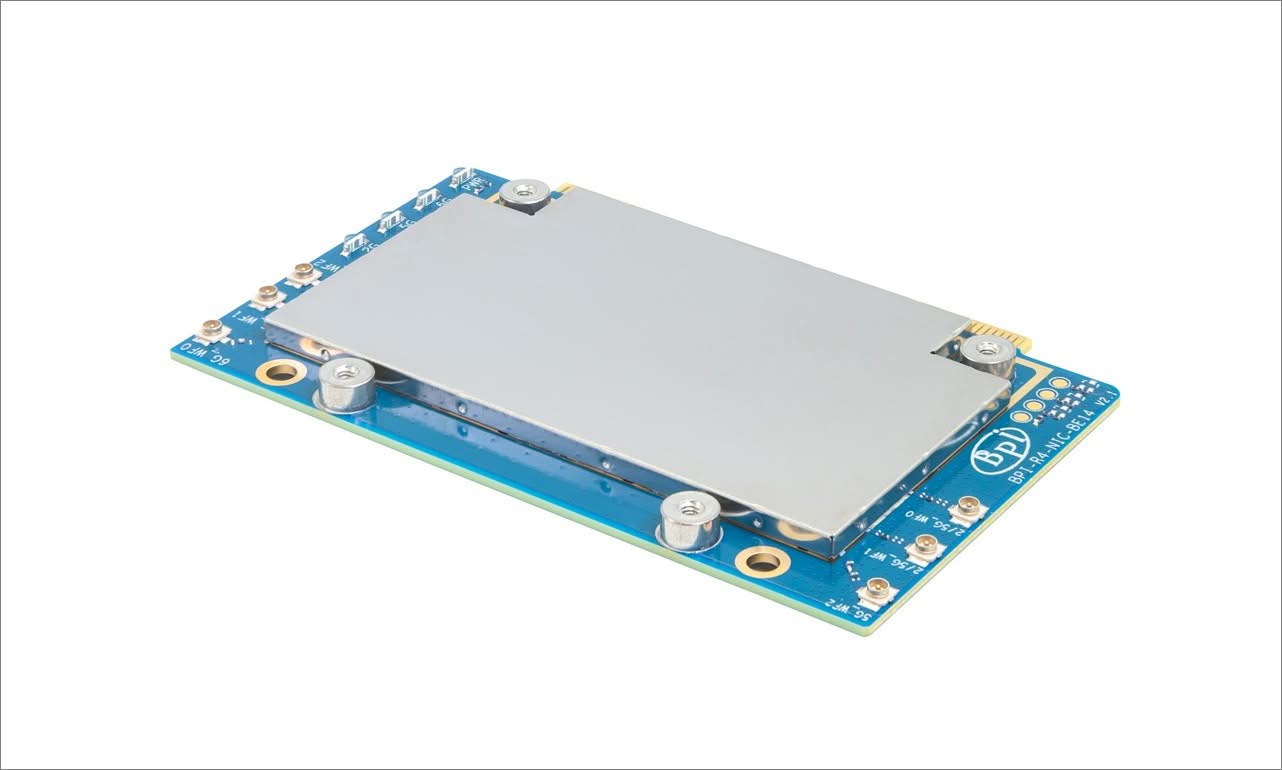
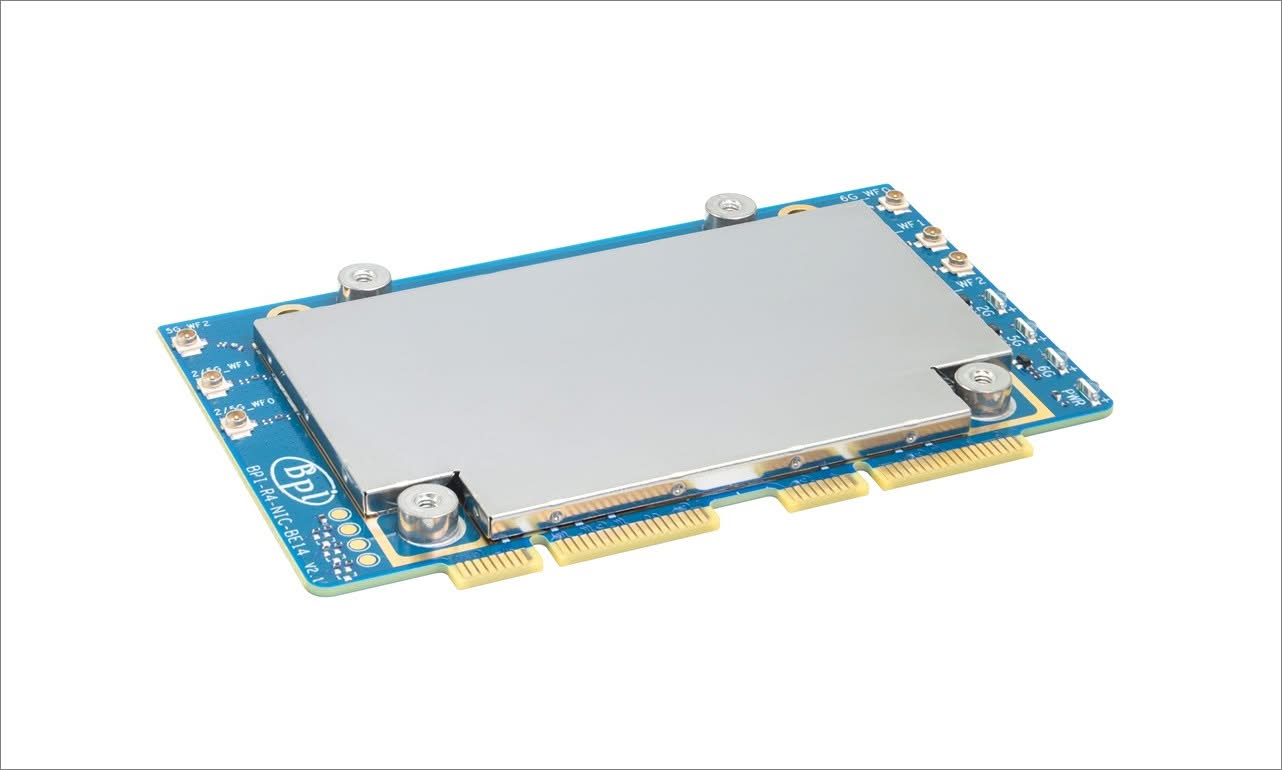
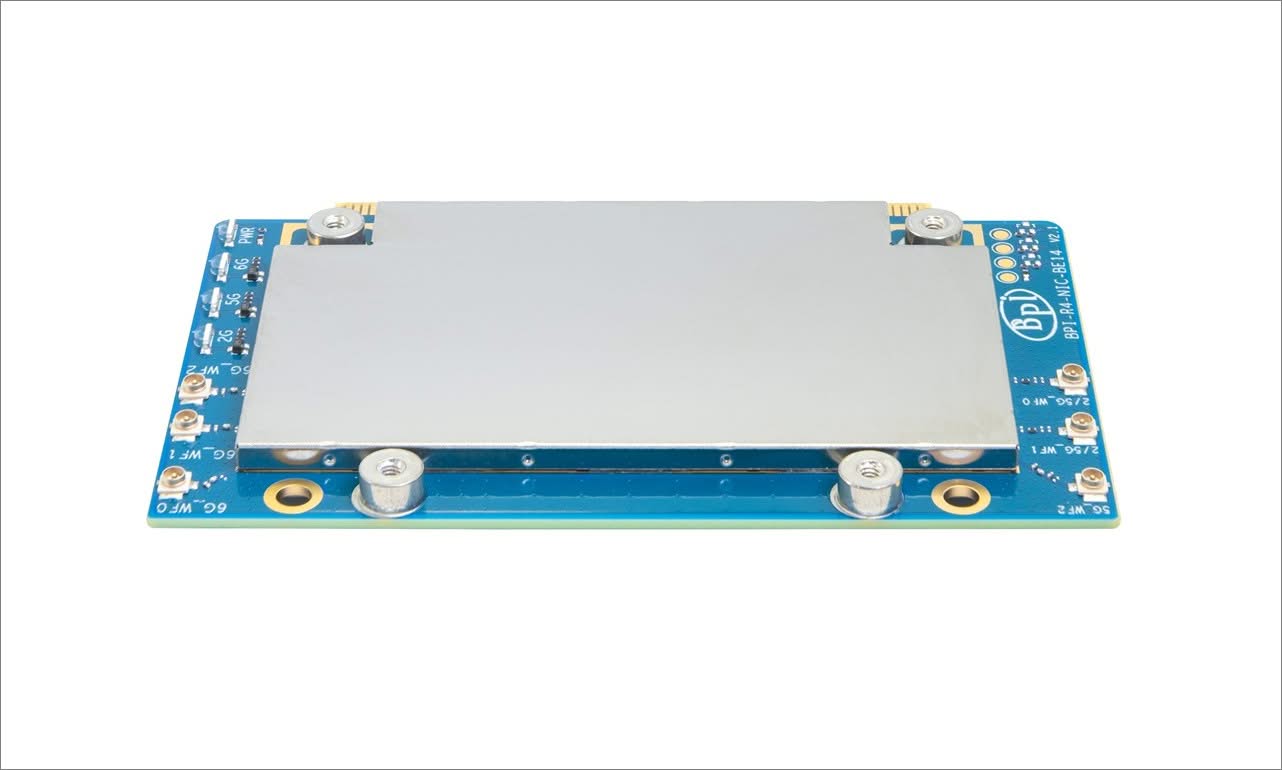
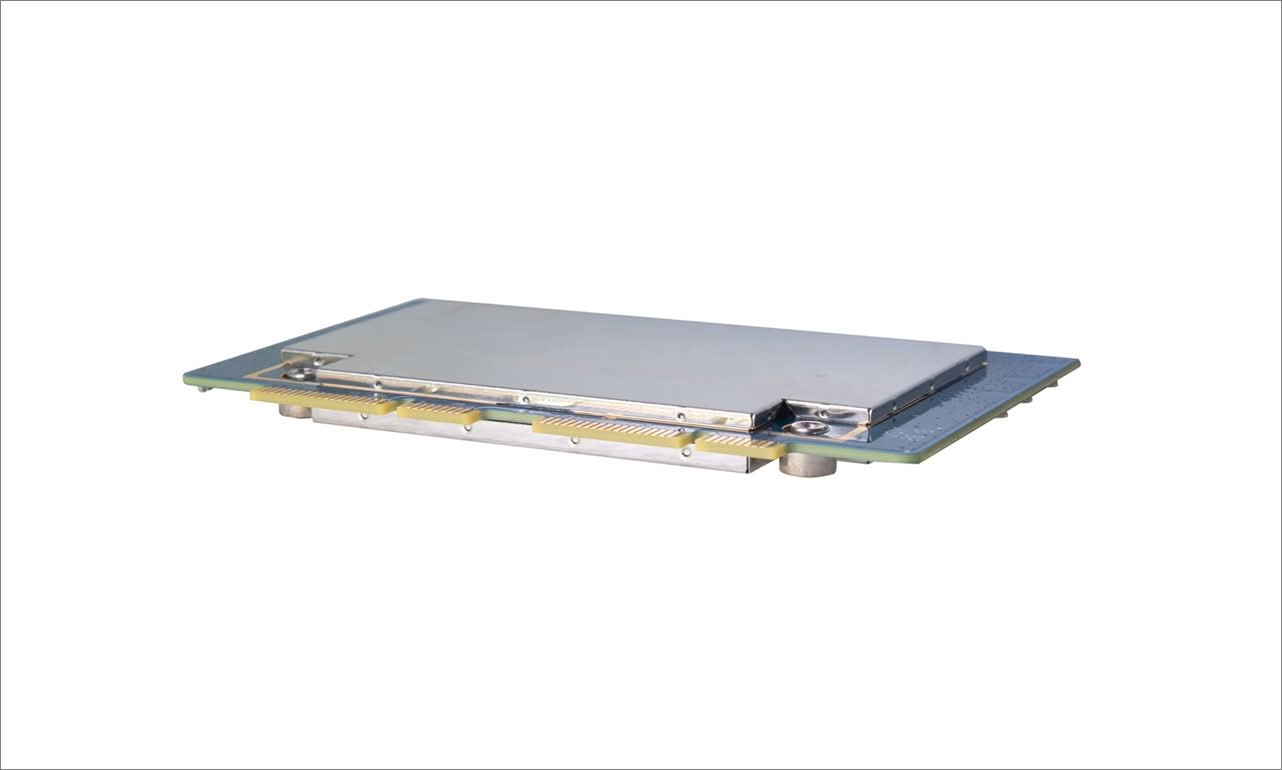
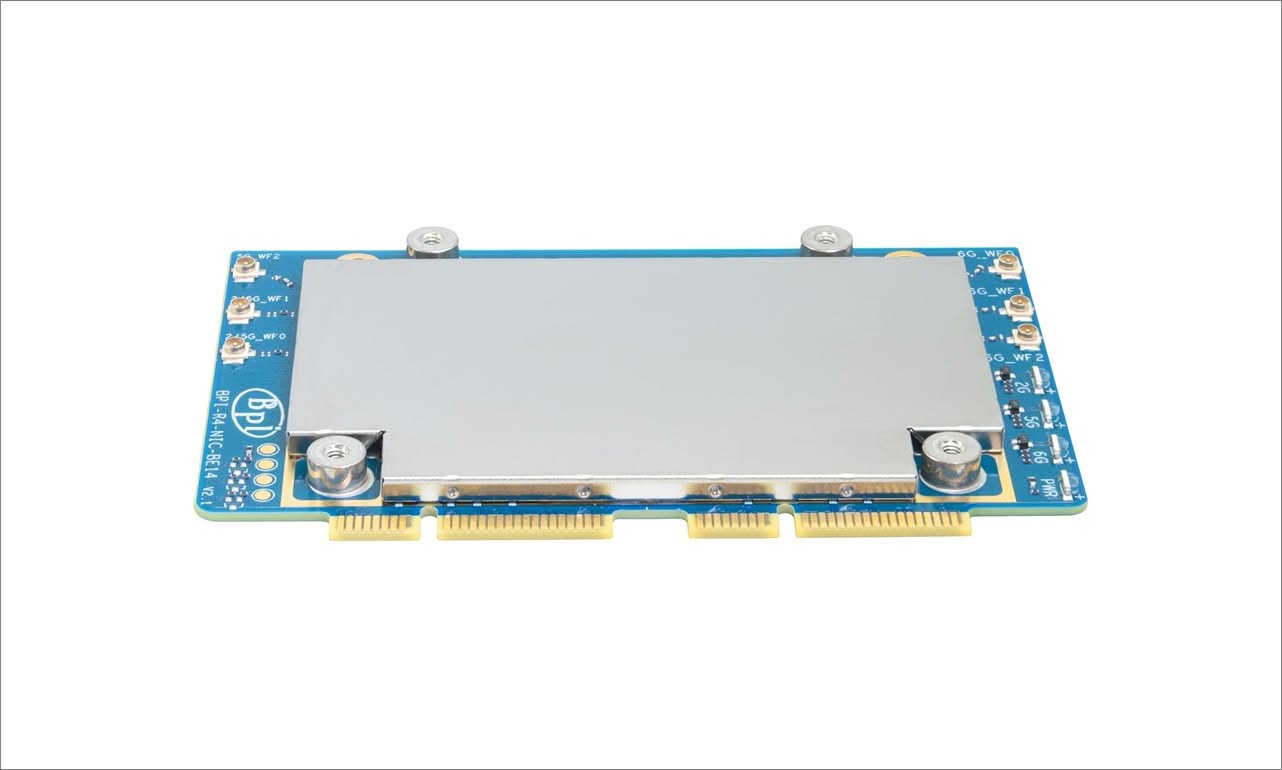
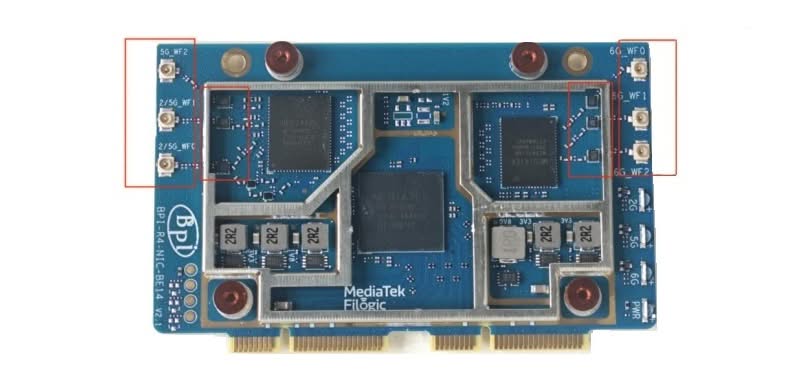
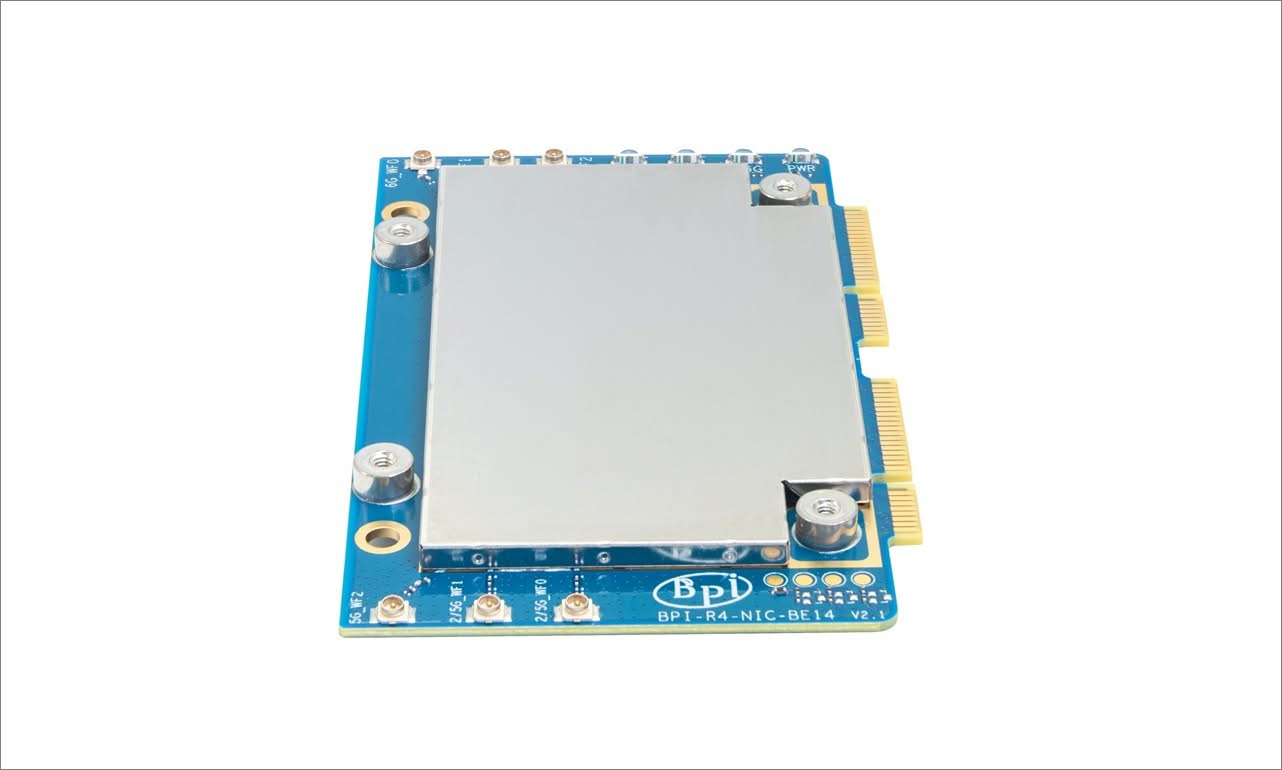
A closer look at the BPI-R4-NIC-BE14 (V2.1)
BPI R4 WiFi 7 NIC P2
BPI R4 WiFi 7 NIC P3
BPI R4 WiFi 7 NIC P4
BPI R4 WiFi 7 NIC P5
BPI R4 WiFi 7 NIC P6
BPI R4 WiFi 7 NIC P1

Key Features

  • Wi-Fi 7 Module with MediaTek MT7995AV Chipset Equipped with the advanced MediaTek MT7995AV chipset, this module delivers ultra-fast wireless performance, supporting the latest WiFi 7 standard for seamless high-speed connectivity.
  • Powerful RISC-V MCU Integration Featuring a RISC-V MCU, the module ensures efficient processing and low power consumption, ideal for demanding applications requiring high responsiveness and reliability.
  • 2 PCIe 3.0 Interfaces with 2-Lane Support The module offers 2 PCIe 3.0 interfaces with 2-lane configuration, enabling high-bandwidth data transfer and optimal performance when connected to compatible systems.
  • Designed for BPI-R4 Compatibility Specifically designed for the BPI-R4 platform, this extension board guarantees plug-and-play compatibility, making it an ideal upgrade for users looking to enhance their device’s wireless capabilities.
  • Includes 6 High-Gain Antennas: Depending on the kit, it includes 6 high-performance antennas that enhance signal strength and coverage, ensuring stable and consistent wireless performance in various environments.

Software and Feature Status (OpenWrt)

Even with the appropriate v2.1 hardware module installed, achieving “full” Wi-Fi 7 feature support under open-source software (such as OpenWrt) is still a work in progress and has some limitations. While it’s not perfect or ideal, it does represent an improvement over the previous design, and we believe it’s worth the upgrade. Below is a list of features you can expect after this upgrade:

  • Basic Tri-Band Operation (2.4 / 5 / 6 GHz): Fully Supported. Running recent software releases (such as the OpenWrt 25 series or current development snapshots), the underlying mt76 driver recognizes the hardware cleanly. You can broadcast high-speed channels natively.
  • 320 MHz Channel Width: Partially Supported / Inconsistent. A hallmark of Wi-Fi 7 is the massive 320 MHz wide channels on the 6 GHz band. On the BPI-R4, configuring 320 MHz can still be unstable or scale back under open-source drivers depending on local regulatory domains.
  • Multi-Link Operation (MLO): Experimental. MLO (allowing a phone or client to connect to 5 GHz and 6 GHz simultaneously for combined speed and stability) is actively being integrated into mainline software. It technically functions, but users frequently report drops and stability bugs.
  • The “0 TX Power” Bug: On some vanilla OpenWrt installations, the Wi-Fi card registers with zero transmit power out-of-the-box, requiring manual firmware modifications or regulatory overrides (regdb patching) to activate full transmission strength.

Hardware Design: Keeping Things Cool

The card utilizes a mini-PCIe (mPCIe) physical form factor interface, allowing it to fit perfectly into the BPI-R4’s expansion bay. Banana Pi has connected it through PCIe 3.0, which is essential because you certainly don’t want a slow data bus hindering your impressive new Wi-Fi speeds.

But here’s the thing about Wi-Fi 7 chips: they run hot. Really hot. Banana Pi clearly knows this, because they didn’t just slap a tiny piece of metal on the board and call it a day. Depending on the kit, the BE14 comes with a beefy, custom-machined aluminum alloy heatsink. It’s a passive cooler, meaning you won’t have to deal with annoying fan whine, but it’s large enough to keep the silicon from thermal throttling when you’re pushing multi-gigabit loads 24/7.

It also breaks out with six IPEX (U.FL) connectors for external antennas. This is a huge win for tinkerers, as it allows you to attach high-gain antennas and actually tune your wireless coverage to your physical space, rather than being stuck with whatever the default PCB traces give you.


Software: Finally, Drivers That Just Work

Let’s get real for a second: in the open-source router world, hardware is only half the battle. Software is where things usually get messy. Fortunately, Banana Pi has been working closely with the OpenWrt community to make sure the BE14 isn’t just a very expensive paperweight.

The card uses the mt799x driver family. If you’ve been in the OpenWrt trenches over the last few years, you know MediaTek drivers have had a slightly rocky past. But the 802.11be support has matured massively. Out of the box, the latest OpenWrt snapshots recognize the card and let you configure advanced features like fast roaming (802.11r), 802.11k/v, and VLAN tagging right from the LuCI web interface. You won’t need to be compiling custom kernel modules at 2 AM just to get your 6 GHz network to broadcast.


Who is this product intended for?

So, who is the target audience here? If you’re a homelabber or a prosumer tired of your ISP’s locked-down router, this is your new best friend. It’s a future-proof foundation for a smart home drowning in 8K streams, cloud gaming, and the latest Wi-Fi 7 smartphones.

But it’s not just for hobbyists. Small businesses, boutique cafes, and co-working spaces can use the BPI-R4 and the BE14 to build a highly secure, segmented network for a fraction of the cost of a traditional enterprise setup. Because it runs open-source software, your IT admin has total control over the firewall and traffic shaping. Plus, the ultra-low latency makes it surprisingly viable for edge computing tasks, like real-time IoT monitoring or robotics, where network jitter will completely ruin your day.


NIC (Network Interface Controller) – Old vs. new design

For those familiar with the previous NIC design, there were some issues in version 1.0 that are now fixed in this new model (version 2.1). Please check the conversion table below for details.

Feature / MetricOriginal Model (v1.0)Newer / Optimized Model (v2.1)
RF Isolation & ShieldingNone.
Bare chips are completely exposed, leading to massive electromagnetic interference (EMI) and cross-talk.
Added comprehensive metal shielding cans over the key circuitry blocks. The enclosed shielding effectively isolates the wireless RF paths from inner electromagnetic interference (EMI), stabilizing overall throughput performance.
RF Filtering ComponentsUtilized standard generic capacitors and resistors for the RF filtering and impedance matching networks.Upgraded to brand-new, high-performance filtering components, featuring fine-tuned bandpass filters and matching networks tailored for both 2/5G and 6G RF pathways, alongside an optimized PCB stack-up utilizing an 8-layer, 2-stage HDI (blind and buried via) process. This integration significantly suppresses out-of-band spurious emissions and substantially enhances cross-channel isolation.
Default Transmit Power (TX)Often hard-locked or restricted to a weak 6 dBm out-of-the-box due to hardware-to-firmware communication bugs.Restored to full operational TX levels; properly registers high-output profiles without custom regulatory hacks.
Signal Range & Noise FloorHigh noise floor, erratic Signal-to-Noise Ratio (SNR), and rapid signal drop-offs beyond a few meters.Drastically reduced noise floor, stable SNR, and normal long-range Wi-Fi 7 coverage.
IPEX (U.FL) PitchThe spacing between RF antenna connectors was tight, leaving limited clearance for dense cabling or enclosure assembly.Increased the pitch between IPEX connectors. This provides optimal clearance for the dual-band and 6G antenna cables, reducing the risk of connector collision during assembly.
RF Filtering ComponentsUtilized standard generic capacitors and resistors for the RF filtering and impedance matching networks.pgraded to brand-new, high-performance filtering components, featuring fine-tuned bandpass filters and matching networks tailored for both 2/5G and 6G RF pathways, alongside an optimized PCB stack-up utilizing an 8-layer, 2-stage HDI (blind and buried via) process. This integration significantly suppresses out-of-band spurious emissions and substantially enhances cross-channel isolation.
R4 Router WiFi7 NIC Shielding
R4 / R4Pro WiFi7 NIC Shielding Design

Pricing and Where to Get It

Banana Pi is dedicated to keeping their products affordably priced. The BPI-R4-NIC-BE14 can be found for around $79 to $93, depending on the included kit accessories. For a Wi-Fi 7 M.2 card with good thermal and design, we think that’s a good deal.

It goes on sale through AliExpress, Seeed Studio, youyeetoo and the usual authorized Banana Pi distributors.

Wi-Fi 7 has now reached a significant milestone, transforming from a mere spec-sheet curiosity to a genuinely practical standard for typical heavy tasks. Through the new BPI-R4-NIC-BE14 d design, Banana Pi is making sure that the DIY and open-source community can also engage in this development. That being said, you can get your NIC by using the links shared below.

  • Product Link: https://docs.banana-pi.org/en/BPI-R4/BananaPi_BPI-R4-NIC-BE14
  • Banana Pi Forum: https://forum.banana-pi.org/c/banana-router/62
Top Pick
BPI-R4-NIC-BE14 WiFi7 module

BPI-R4-NIC-BE14 WiFi7 module

★★★★★

The BPI-R4-NIC-BE14 is a 51x82mm Wi-Fi 7 NIC designed to extend the capabilities of the Banana Pi BPI-R4 router series.

$84.00from AliExpress $79.98from AliExpress
This site contains affiliate links to products. We may receive a commission for purchases made through these links.
Share. Facebook Twitter Pinterest LinkedIn Tumblr Email
Previous ArticleOrange Pi 6 Launches: New 45 TOPS AI SBC Beats Raspberry Pi HATs in Speed
Next Article AliExpress Promo Codes: July 2026 (100% Verified)
androidpimp
  • Website

Related Posts

Orange Pi 6

Orange Pi 6 Launches: New 45 TOPS AI SBC Beats Raspberry Pi HATs in Speed

June 26, 2026
Raspberry Pi Zero 3W SBC

Orange Pi Zero 3W Review: $25 Dual Video Pi Zero 2W Killer?

June 26, 2026
NeoEyes NE503 Edge AI Camera

CamThink NeoEyes NE503: A 20 TOPS 4k Edge AI Camera Platform Powerhouse

June 26, 2026
0 0 votes
Article Rating
Subscribe
Notify of
0 Comments
Oldest
Newest Most Voted
Categories
PureVPN
PureVPN Ad Banner
PrivadoVPN – No. 1 in Parental Control
PrivadoVPN 350x437
VyprVPN – No. 1 in Anonymity
Vyprvpn 350x260
Recent Posts
  • AliExpress Promo Codes: July 2026 (100% Verified)
  • BPI-R4 Wi-Fi 7 NIC (BE14): OpenWrt Setup & Optimal WiFi Power Guide
  • Orange Pi 6 Launches: New 45 TOPS AI SBC Beats Raspberry Pi HATs in Speed
  • Orange Pi Zero 3W Review: $25 Dual Video Pi Zero 2W Killer?
  • CamThink NeoEyes NE503: A 20 TOPS 4k Edge AI Camera Platform Powerhouse
  • DFRobot 6.67″ Flexible AMOLED Review: Best Raspberry Pi & LattePanda Display?
  • Banana Pi BPI-SM10 Review: 60 TOPS RISC-V Jetson Orin Nano Alternative
  • SpacemiT K3 Pico-ITX Review: 60-TOPS RISC-V Powerhouse for LLMs?
  • Banana Pi BPI-R4 Pro Review: The Best WiFi 7 OpenWrt Router? We Checked!
  • DFRobot ESP32-S3 LoRaWAN & Gateway Review: Build a Private IoT Network
RSS The Latest RSS Feeds
  • AliExpress Promo Codes: July 2026 (100% Verified)
  • BPI-R4 Wi-Fi 7 NIC (BE14): OpenWrt Setup & Optimal WiFi Power Guide
  • Orange Pi 6 Launches: New 45 TOPS AI SBC Beats Raspberry Pi HATs in Speed
Facebook X (Twitter) Instagram Pinterest
@2026 - All Right Reserved. Designed by AndroidPIMP

Type above and press Enter to search. Press Esc to cancel.

Accessibility
Accessibility modes
Epilepsy Safe Mode
Dampens color and removes blinks
This mode enables people with epilepsy to use the website safely by eliminating the risk of seizures that result from flashing or blinking animations and risky color combinations.
Visually Impaired Mode
Improves website's visuals
This mode adjusts the website for the convenience of users with visual impairments such as Degrading Eyesight, Tunnel Vision, Cataract, Glaucoma, and others.
Cognitive Disability Mode
Helps to focus on specific content
This mode provides different assistive options to help users with cognitive impairments such as Dyslexia, Autism, CVA, and others, to focus on the essential elements of the website more easily.
ADHD Friendly Mode
Reduces distractions and improve focus
This mode helps users with ADHD and Neurodevelopmental disorders to read, browse, and focus on the main website elements more easily while significantly reducing distractions.
Blindness Mode
Allows using the site with your screen-reader
This mode configures the website to be compatible with screen-readers such as JAWS, NVDA, VoiceOver, and TalkBack. A screen-reader is software for blind users that is installed on a computer and smartphone, and websites must be compatible with it.
Readable Experience
Content Scaling
Default
Text Magnifier
Readable Font
Dyslexia Friendly
Highlight Titles
Highlight Links
Font Sizing
Default
Letter Spacing
Default
Left Aligned
Center Aligned
Right Aligned
Visually Pleasing Experience
Dark Contrast
Light Contrast
Monochrome
High Contrast
High Saturation
Low Saturation
Adjust Text Colors
Adjust Title Colors
Adjust Background Colors
Easy Orientation
Mute Sounds
Hide Images
Hide Emoji
Reading Guide
Stop Animations
Reading Mask
Highlight Hover
Highlight Focus
Big Dark Cursor
Big Light Cursor
Cognitive Reading
Virtual Keyboard
Navigation Keys
Voice Navigation

AndroidPIMP

Accessibility Statement

  • AndroidPIMP.com
  • 10/18/2025

Compliance status

We believe the internet should be open and accessible to everyone, and we’re dedicated to making our website usable for the widest audience possible, no matter their circumstances or abilities.

To achieve this, we follow the World Wide Web Consortium’s (W3C) Web Content Accessibility Guidelines 2.1 (WCAG 2.1) at the AA level as closely as possible. These guidelines outline how to make web content accessible for people with a variety of disabilities. By complying with them, we help ensure our website is usable by everyone, including those who are blind, have motor or visual impairments, cognitive disabilities, and more.

This website uses a range of technologies to stay accessible at all times. An accessibility interface lets people with specific disabilities customize the site’s UI and design to fit their personal needs.

The website also uses an AI-powered application that works in the background to constantly enhance its accessibility. This app fixes the site’s HTML, adjusts its features and behavior for screen readers used by blind users, and optimizes keyboard functions for people with motor impairments.

If you’ve found a malfunction or have ideas for improvement, we’ll be happy to hear from you. You can reach out to the website’s operators by using the following email tzahi.work@gmail.com

Screen-reader and keyboard navigation

Our website implements the ARIA attributes (Accessible Rich Internet Applications) technique, alongside various different behavioral changes, to ensure blind users visiting with screen-readers are able to read, comprehend, and enjoy the website’s functions. As soon as a user with a screen-reader enters your site, they immediately receive a prompt to enter the Screen-Reader Profile so they can browse and operate your site effectively. Here’s how our website covers some of the most important screen-reader requirements, alongside console screenshots of code examples:

  1. Screen-reader optimization: we run a background process that learns the website’s components from top to bottom, to ensure ongoing compliance even when updating the website. In this process, we provide screen-readers with meaningful data using the ARIA set of attributes. For example, we provide accurate form labels; descriptions for actionable icons (social media icons, search icons, cart icons, etc.); validation guidance for form inputs; element roles such as buttons, menus, modal dialogues (popups), and others. Additionally, the background process scans all the website’s images and provides an accurate and meaningful image-object-recognition-based description as an ALT (alternate text) tag for images that are not described. It will also extract texts that are embedded within the image, using an OCR (optical character recognition) technology. To turn on screen-reader adjustments at any time, users need only to press the Alt+1 keyboard combination. Screen-reader users also get automatic announcements to turn the Screen-reader mode on as soon as they enter the website.

    These adjustments are compatible with all popular screen readers, including JAWS and NVDA.

  2. Keyboard navigation optimization: The background process also adjusts the website’s HTML, and adds various behaviors using JavaScript code to make the website operable by the keyboard. This includes the ability to navigate the website using the Tab and Shift+Tab keys, operate dropdowns with the arrow keys, close them with Esc, trigger buttons and links using the Enter key, navigate between radio and checkbox elements using the arrow keys, and fill them in with the Spacebar or Enter key.Additionally, keyboard users will find quick-navigation and content-skip menus, available at any time by clicking Alt+1, or as the first elements of the site while navigating with the keyboard. The background process also handles triggered popups by moving the keyboard focus towards them as soon as they appear, and not allow the focus drift outside it.

    Users can also use shortcuts such as “M” (menus), “H” (headings), “F” (forms), “B” (buttons), and “G” (graphics) to jump to specific elements.

Disability profiles supported in our website

  • Epilepsy Safe Mode: this profile enables people with epilepsy to use the website safely by eliminating the risk of seizures that result from flashing or blinking animations and risky color combinations.
  • Visually Impaired Mode: this mode adjusts the website for the convenience of users with visual impairments such as Degrading Eyesight, Tunnel Vision, Cataract, Glaucoma, and others.
  • Cognitive Disability Mode: this mode provides different assistive options to help users with cognitive impairments such as Dyslexia, Autism, CVA, and others, to focus on the essential elements of the website more easily.
  • ADHD Friendly Mode: this mode helps users with ADHD and Neurodevelopmental disorders to read, browse, and focus on the main website elements more easily while significantly reducing distractions.
  • Blindness Mode: this mode configures the website to be compatible with screen-readers such as JAWS, NVDA, VoiceOver, and TalkBack. A screen-reader is software for blind users that is installed on a computer and smartphone, and websites must be compatible with it.
  • Keyboard Navigation Profile (Motor-Impaired): this profile enables motor-impaired persons to operate the website using the keyboard Tab, Shift+Tab, and the Enter keys. Users can also use shortcuts such as “M” (menus), “H” (headings), “F” (forms), “B” (buttons), and “G” (graphics) to jump to specific elements.

Additional UI, design, and readability adjustments

  1. Font adjustments – users, can increase and decrease its size, change its family (type), adjust the spacing, alignment, line height, and more.
  2. Color adjustments – users can select various color contrast profiles such as light, dark, inverted, and monochrome. Additionally, users can swap color schemes of titles, texts, and backgrounds, with over seven different coloring options.
  3. Animations – person with epilepsy can stop all running animations with the click of a button. Animations controlled by the interface include videos, GIFs, and CSS flashing transitions.
  4. Content highlighting – users can choose to emphasize important elements such as links and titles. They can also choose to highlight focused or hovered elements only.
  5. Audio muting – users with hearing devices may experience headaches or other issues due to automatic audio playing. This option lets users mute the entire website instantly.
  6. Cognitive disorders – we utilize a search engine that is linked to Wikipedia and Wiktionary, allowing people with cognitive disorders to decipher meanings of phrases, initials, slang, and others.
  7. Additional functions – we provide users the option to change cursor color and size, use a printing mode, enable a virtual keyboard, and many other functions.

Browser and assistive technology compatibility

We aim to support the widest array of browsers and assistive technologies as possible, so our users can choose the best fitting tools for them, with as few limitations as possible. Therefore, we have worked very hard to be able to support all major systems that comprise over 95% of the user market share including Google Chrome, Mozilla Firefox, Apple Safari, Opera and Microsoft Edge, JAWS and NVDA (screen readers).

Notes, comments, and feedback

Despite our very best efforts to allow anybody to adjust the website to their needs. There may still be pages or sections that are not fully accessible, are in the process of becoming accessible, or are lacking an adequate technological solution to make them accessible. Still, we are continually improving our accessibility, adding, updating and improving its options and features, and developing and adopting new technologies. All this is meant to reach the optimal level of accessibility, following technological advancements. For any assistance, please reach out to tzahi.work@gmail.com

wpDiscuz