Close Menu
  • Home
  • About
  • Wearables
  • Earbuds
  • Computer Accessories
    • Routers
    • Remotes
  • Embedded
    • Single Board Computers
    • Addon Boards
    • Raspberry Pi
  • Wireless Routers
  • Contact
Facebook X (Twitter) Instagram
Trending News
  • CamThink NE301—Seamless Low-Power Edge AI Camera Module for Local Models
  • Orange Pi 6 Plus Review: A 12-Core SBC Powerhouse (Benchmarks, Specs, and Pricing)
  • Orange Pi 6 Unveiled: The Affordable, Slimmed-Down SBC Alternative to the 6 Plus
  • Ugoos SK4 Review (2025): The Best Mid-Range Android TV Box for Value & Features
  • AliExpress Black Friday 2025: 🚨 LATEST Deals & ALL Exclusive Country Promo Codes (Save 90%!)
  • LattePanda IOTA Review: 4 Reasons It Beats Raspberry Pi 5
  • POCO F8 Ultra/Pro global release date unveiled, showcasing flagship-level specs
  • Ugoos GaN Chargers 2025: 35W, 65W, 140W – Fast, Compact & Universal
AndroidPIMP
Facebook X (Twitter) Instagram
  • Home
  • About
  • Wearables
  • Earbuds
  • Computer Accessories
    • Routers
    • Remotes
  • Embedded
    • Single Board Computers
    • Addon Boards
    • Raspberry Pi
  • Wireless Routers
  • Contact
AndroidPIMP
Edge AI Hardware

CamThink NE301—Seamless Low-Power Edge AI Camera Module for Local Models

By androidpimpDecember 2, 2025No Comments6 Mins Read
Facebook Twitter Pinterest LinkedIn Tumblr Email
Follow Us
Google News Flipboard
NE300 MB01 AI Camera
Table of contents
  1. CamThink AI Camera Module – built for easy integration with Edge Computing and IoT devices, running local AI models and offering smooth support for real-time streaming and beyond.
  2. Brief video introduction
  3. Design with an open hardware architecture in mind
    1. Can be connected to external sensors
  4. Key highlights
  5. A closer look at the main board of the camera module
  6. Specifications
  7. Designed for Edge AI computing, it offers durability along with water and dust resistance.
    1. It can be used for AI applications, either running locally or sending data to the cloud.
  8. CamThink NeoEyes NE301 price
    1. Prices and availability

CamThink AI Camera Module – built for easy integration with Edge Computing and IoT devices, running local AI models and offering smooth support for real-time streaming and beyond.

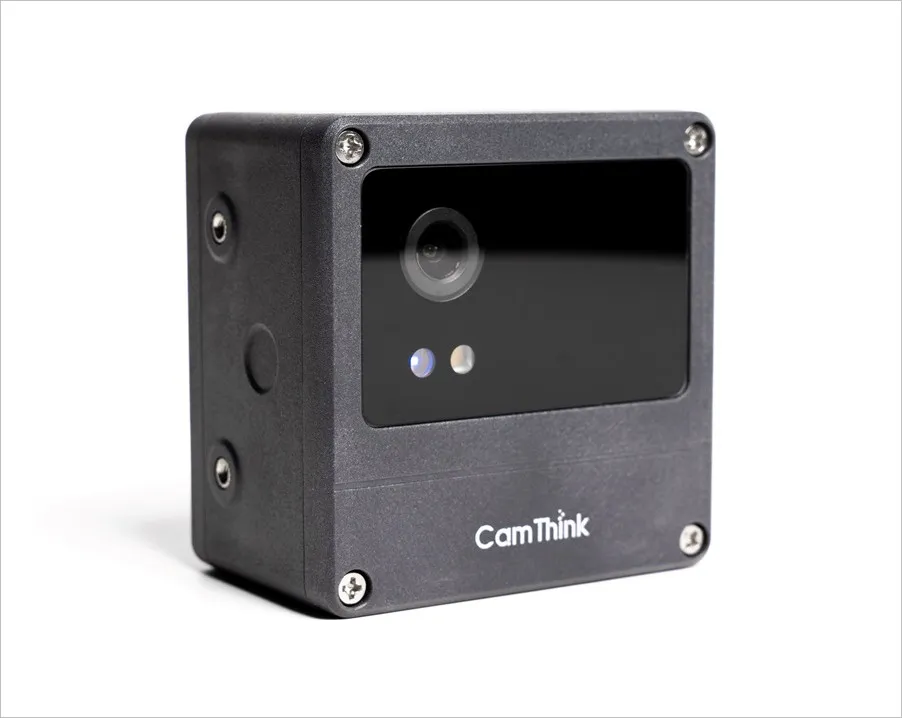
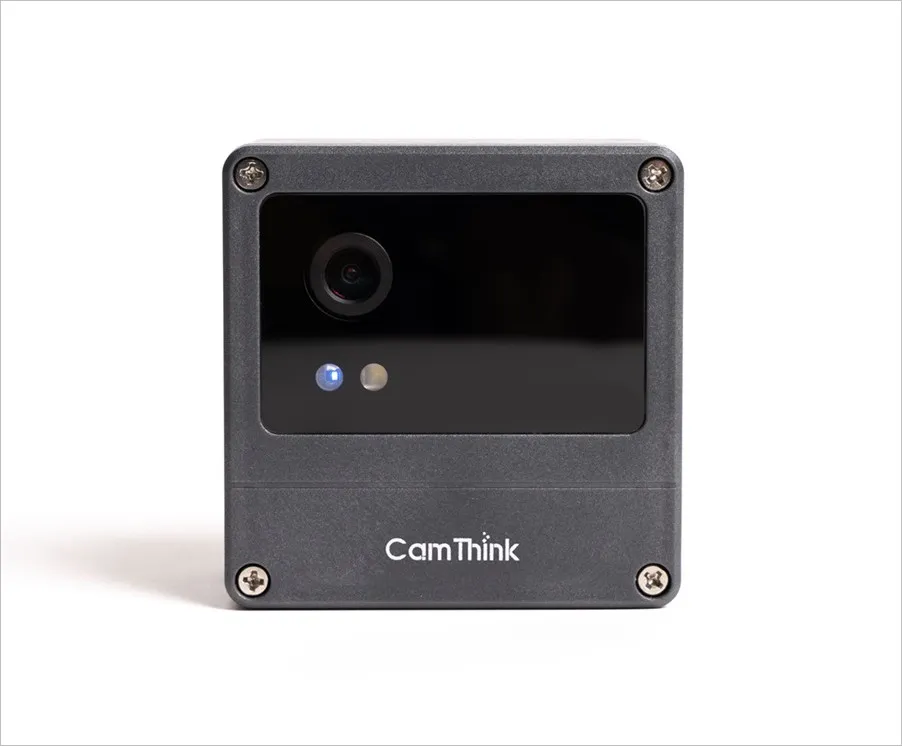
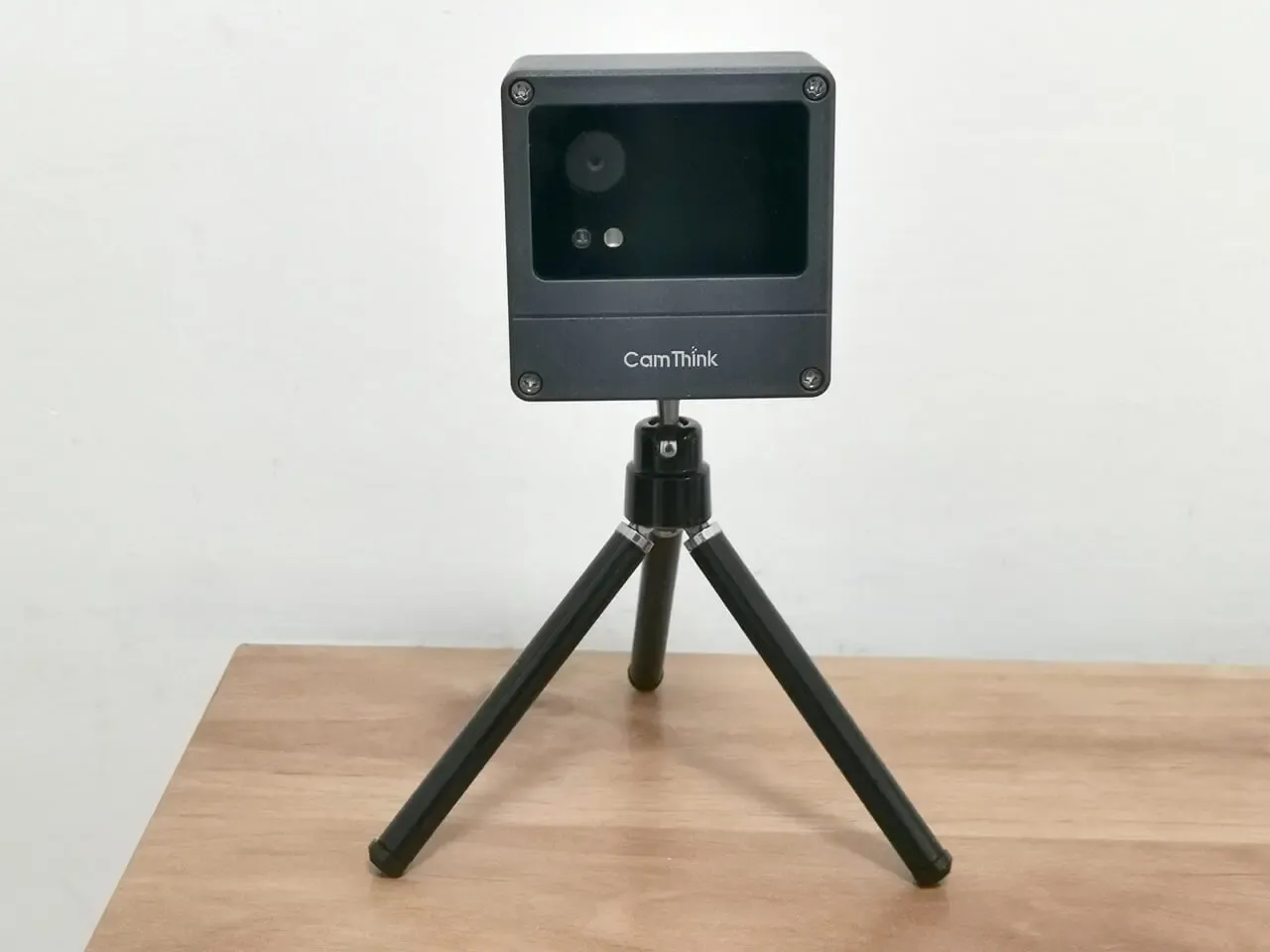
The CamThink NeoEyes NE301 is a compact, energy-efficient edge AI camera module delivering 0.6 TOPS of processing power through its STM32N6 MCU. With built-in Wi-Fi AP and a user-friendly Web UI, it’s easy to preview AI inferences, switch between model types, and tweak model settings directly from your browser.

NeoEyes NE301

CamThink NeoEyes NE301 P1
CamThink NeoEyes NE301 P2

Brief video introduction


CamThink NeoEyes NE301 AI Camera
CamThink NeoEyes NE301 AI Camera Module

Design with an open hardware architecture in mind

The camera is designed with a modular structure, enabling easy interchange of communication modules, image sensors, power options, and mounting accessories to suit various applications. With extensive interface expansion capabilities and an open hardware architecture, developers can transition rapidly from prototype development to commercial implementation.

Can be connected to external sensors

It also supports various event-triggered capture methods, including PIR, radar, acoustic, and more. When connected to external sensors, it can automatically wake, snap images, and run edge inference as soon as the trigger condition is met, enabling event-driven snapshots with built-in AI processing.


Key highlights

  • Processor: Powered by an STM32N6 microcontroller with a built-in Neural Processing Unit (NPU).
  • Modular design: Communication, camera, and power modules can be swapped or upgraded independently.
  • Runs local AI modules (e.g., YOLO object detection).
  • Durability: IP67-rated (dustproof, waterproof, outdoor-ready).
  • Power Source options: four AA batteries, or alternatively by a DC, solar, USB-C, Power over Ethernet (PoE)
  • Streaming: It can be used for live video streaming applications through the Web UI.
  • Flexible connectivity: On-board Wi-Fi 6 included, Available as an option through the Cat-1 cellular module.
  • Operation: You can access the device through a Wi‑Fi enabled phone or PC using the Web UI.
  • Designed to run AI modules locally, without relying on the cloud.
  • Include Pre-made AI models: Incorporate fall detection in elderly care, flood monitoring, wildlife protection, and construction site safety, all powered by locally deployed AI modules.
  • Open-source stack: Thanks to its open-source software environment, developers can easily deploy their own trained models.
  • Comes with plenty of rich I/O resources:
  1. 16 + 12-pin GPIO expansion headers
  2. USB Type-C for power and debugging
  3. TF card slot for removable storage
  4. Alarm/trigger input header

A closer look at the main board of the camera module

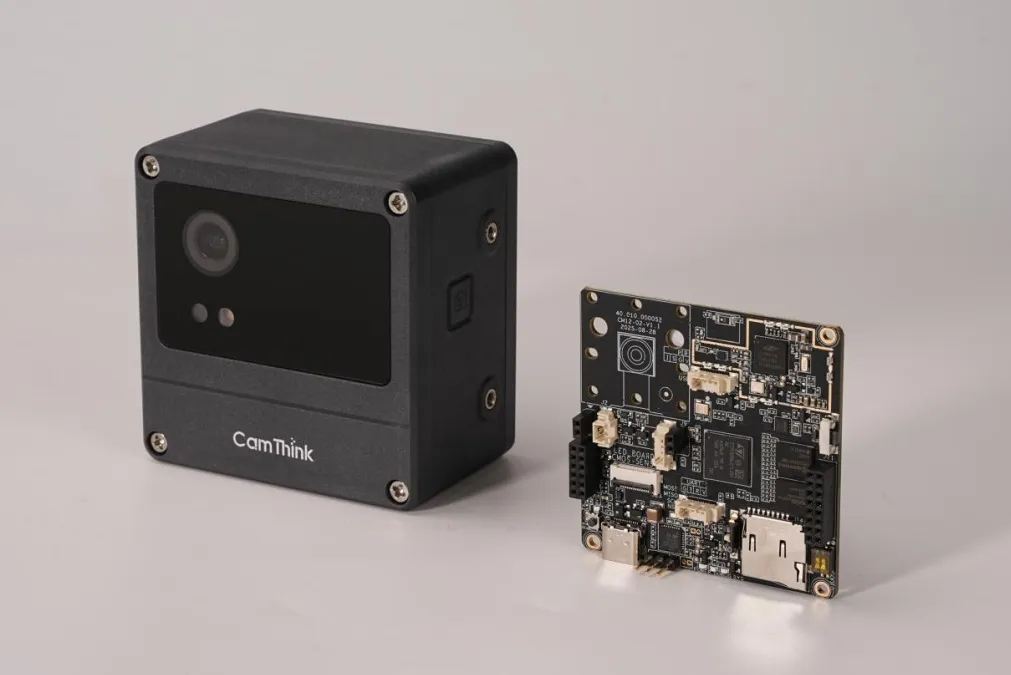
Inside the protective case, you’ll find the NE300-MB01 development board, which drives the NeoEyes NE300 series AI cameras. This reference design combines STM32U0 and STM32N6 MCUs in an ultra-low-power setup that can handle both video and still-image inference. It works with a range of trigger sensors for image capture and edge AI workflows, making it simple for developers to build proofs of concept and custom IoT camera solutions for smart agriculture, environmental monitoring, security, and wildlife tracking.
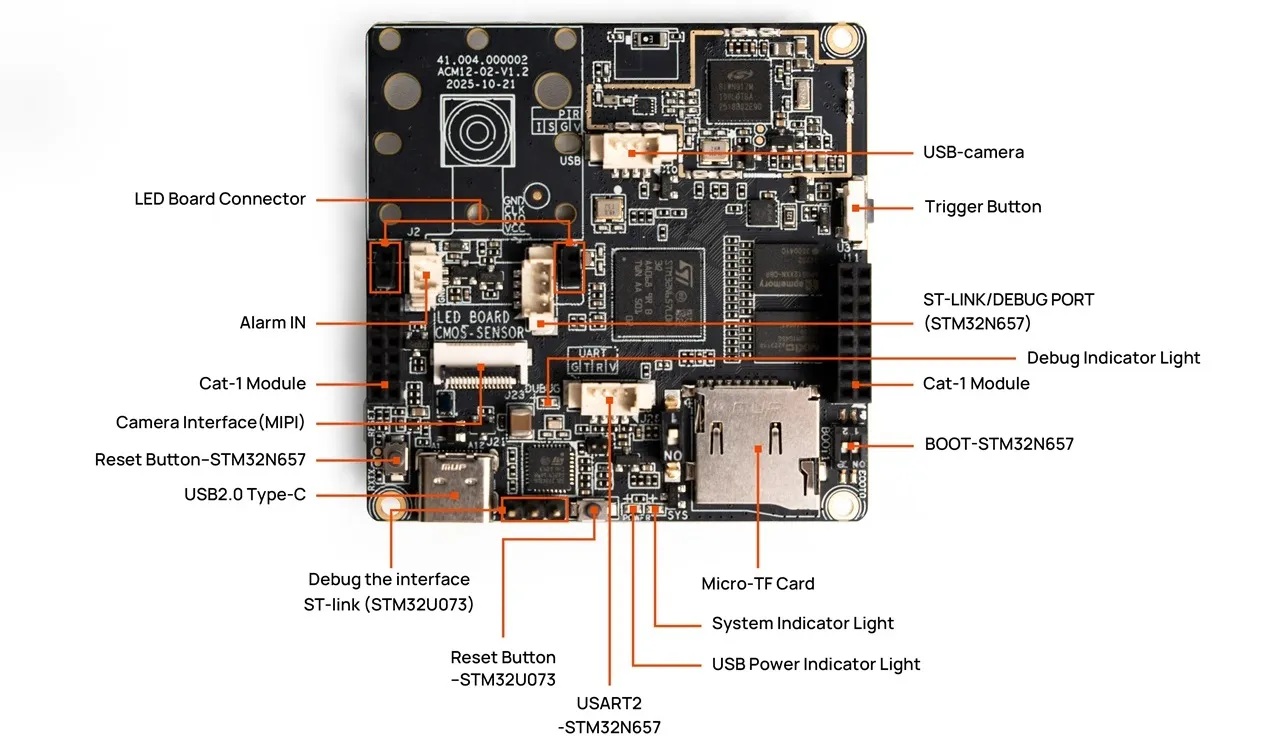
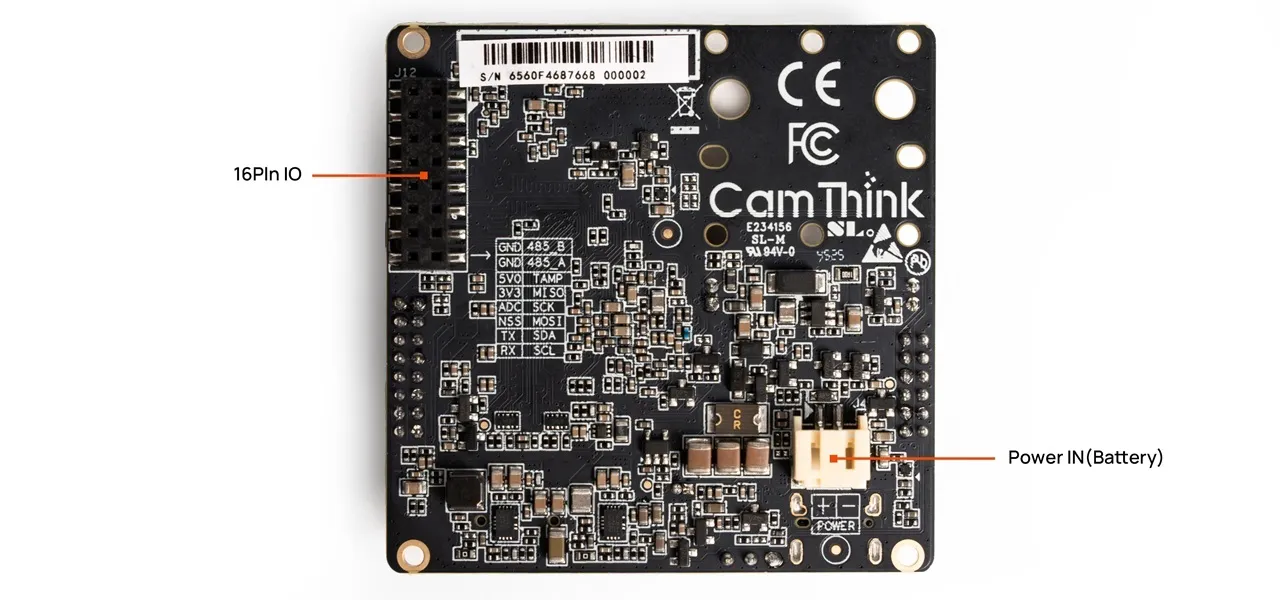
NE300 MB01 P1
NE300 MB01 P1
NE300 MB01 P2
NE300 MB01 P2

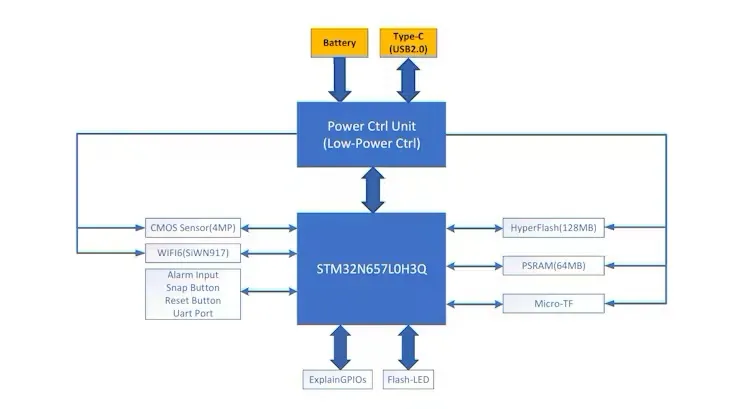
The main board packs an STM32N657L0H3 MCU paired with 64 MB of external PSRAM and 128 MB of external Flash. Power management and ultra-low-power sleep control come from the STM32U073KBU6. For connectivity, it features the SiWN917M100LGTBA Wi-Fi 6/BLE 5.4 combo chip, with optional Cat-1 cellular modules and GPIO expansions for extra flexibility. The standard kit includes an OS04C10 camera module, and USB camera modules are also available.

Here are the board’s main highlights:

  • Application MCU – STM32N657L0H3 with an Arm® Cortex®-M33 core up to 800 MHz and ST Neural-ART Accelerator (up to 1 GHz, 600 GOPS, 288 MAC/cycle)
  • External PSRAM – APS512XX-OBR-BG, 64 MB, up to 250 MHz, 16-bit bus
  • External Flash – MX66UM1G45G SPI NAND, 128 MB, up to 200 MHz, 8-bit bus
  • Wi-Fi module – SiWN917M100LGTBA with 2.4 GHz Wi-Fi 6 (IEEE 802.11 b/g/n/ax) and Bluetooth 5.4
  • Camera modules – OS04C10 CSI-2 module by default, optional USB module
  • Capture button – One-touch snapshot trigger
  • Indicators – Blue status LED plus a 0.5 W white fill light
  • Debug interfaces – ST-Link, USB, and UART headers
  • Power kill switch – Slide switch to fully disconnect the battery input
  • External sensor ports – Alarm IO, PIR input, and other sensor headers
  • Expandable IO – SPI + I2C + UART + SAI (I2S compatible) + general-purpose GPIO
  • Modem options – Cat-1 cellular module socket

Specifications

CategoryItemSpecification
MCUCoreCortex-M55 @ 800 MHz with Arm Helium vector extensions
NPUNeural-ART™ accelerator @ 1 GHz, up to 600 GOPS (0.6 TOPS), real-time inference
SRAM4.2 MB
ISP Image ProcessorDedicated ISP with demosaic, auto white balance, and other preprocessing
Video CodecHardware H.264 and JPEG encoders supporting 1080p@30 fps
Efficiency3 TOPS/W NPU efficiency without active cooling
Boot / wake-upMicrosecond boot, millisecond wake-up
Main boardHyperFlash128 MB
PSRAM64 MB
ButtonsReset, Boot, Capture / Record
Status LEDsPower LED, system LED
ConnectivityWi‑Fi 6 / BLE
Camera USB 4-pin ×1, MIPI CSI-2 ×1
OS04C10 (default)
Lens DFOV: 59°, 97°, 165°
Focus distance: 2m, 3m, 4 m (adjustable)
GPIO expansion (16-pin IO)UART ×1
RS485 ×1
I2C ×1
SPI ×1
GPIO ×2
3.3 V ×1 / 5 V ×1 (power switchable)
GND ×2
Debug & powerUSB Type‑C ×1, 4-pin UART Wafer ×1
Audio IOAudio Input ×1 (Wafer), Audio Output ×1 (Wafer)
Expansion headers12-pin + 16-pin connectors for communication / sensor modules
StorageTF card (Micro SD)
Mechanical & otherPower inputDC 5 V
Dimensions77 mm × 77 mm × 48 mm
Operating temperature−20 °C to +50 °C
Humidity0% – 90% RH (non-condensing)
CertificationsCE / FCC / RoHS / SRRC

Designed for Edge AI computing, it offers durability along with water and dust resistance.

The NeoEyes NE301 enclosure is built for dependable outdoor performance and easy, versatile deployment.

  • Tempered-glass lens cover: Highly transparent glass prevents water accumulation and secures long-term imaging quality outdoors.
  • Outdoor-grade power & protection: Battery-powered, low-energy operation plus IP67 ingress protection suits harsh environments.
  • Flexible mounting: Supports wall, ceiling, and pole mounting. Original brackets and additional enclosures are available to match different scenarios.

It can be used for AI applications, either running locally or sending data to the cloud.

The STM32N6 MCU provides 0.6 TOPS of compute, which is sufficient to run lightweight person detection, gesture recognition, and similar models locally without sending frames to the cloud. By moving workloads to the edge, NeoEyes NE301 lowers cost, latency, and privacy risk compared with traditional “device + server” architectures. Combined with low power design, easy installation, rich expansion, and IP67 protection, the camera fits long-running applications across multiple industries.
CamThink NeoEyes NE301 price

If you’re curious about CamThink products, need help with technical questions, or want to place a bulk order, just get in touch directly using the company details below.

Business inquiries contact info:

  • Name: Mingming Shen
  • Department: Sales Team
  • Tel: +86-592-5023062 (Mobile)
  • Website: https://www.camthink.ai
  • Email: [email protected]

Prices and availability

If this product caught your interest like it did ours, be sure to visit the CamThink store page for the latest prices and deals.

CategoryDetails
Standard Price$199.90
Pre‑Order Price$159.90 (20% off)
AccessoriesMounting brackets ($8.91 – $40.50)
Connectivity modules ($55.20 – $89.60)
Dev kit ($59.90 → $47.92)
AvailabilityPre‑orders open now, shipping starts December 5, 2025
PoliciesGlobal warranty, 30‑day return policy, lifetime support
ShippingFree shipping for orders over $300 (import duties may apply)
Share. Facebook Twitter Pinterest LinkedIn Tumblr Email
Previous ArticleOrange Pi 6 Plus Review: A 12-Core SBC Powerhouse (Benchmarks, Specs, and Pricing)
androidpimp
  • Website

Related Posts

HuskyLens 2 AI Machine Vision sensor

HUSKYLENS 2: DFRobot’s New AI Machine Vision Sensor Unveiled

November 5, 2025
0 0 votes
Article Rating
Subscribe
Notify of
0 Comments
Oldest
Newest Most Voted
Inline Feedbacks
View all comments
Categories
PureVPN
PureVPN Ad Banner
VyprVPN – No. 1 in Anonymity
Vyprvpn 350x260
PrivadoVPN – No. 1 in Parental Control
PrivadoVPN 350x437
Recent Posts
  • CamThink NE301—Seamless Low-Power Edge AI Camera Module for Local Models
  • Orange Pi 6 Plus Review: A 12-Core SBC Powerhouse (Benchmarks, Specs, and Pricing)
  • Orange Pi 6 Unveiled: The Affordable, Slimmed-Down SBC Alternative to the 6 Plus
  • Ugoos SK4 Review (2025): The Best Mid-Range Android TV Box for Value & Features
  • AliExpress Black Friday 2025: 🚨 LATEST Deals & ALL Exclusive Country Promo Codes (Save 90%!)
  • LattePanda IOTA Review: 4 Reasons It Beats Raspberry Pi 5
  • POCO F8 Ultra/Pro global release date unveiled, showcasing flagship-level specs
  • Ugoos GaN Chargers 2025: 35W, 65W, 140W – Fast, Compact & Universal
  • Orange Pi RG: A retro handheld gaming console powered by RISC-V is currently in dev.
  • HUSKYLENS 2: DFRobot’s New AI Machine Vision Sensor Unveiled
  • Orange Pi 4 Pro RISC-V SBC Debuts with Allwinner SoC and WiFi 6 Support
  • Orange Pi RV2 Plus with Integrated Wi-Fi 6 Chip Confirmed!
  • Banana Pi BPI-R4 Pro (8X): Wi-Fi 7 Router with 10G SFP+ Ports Released
  • Youyeetoo K1 CoM Packs an Intel N100 processor and X2 Gigabit Ethernet ports
  • Youyeetoo YY3588 Review: Ultimate RK3588 COM for AI, 8K Video & Edge Computing in 2025
  • Xiaomi 17 Pro Max vs iPhone 17 Pro Max: Specs, Price & Honest Review
  • Premium Budget RGB Gaming Keyboard 2025? Rii RK805 Full Review
  • Orange Pi AI Studio / Pro launched Globally, Rivaling Nvidia Jetson Orin Nano
  • Redmi Pad 2 Review (2025): The Best Budget Tablet Value? Full Review
RSS Recent RSS Feed
  • CamThink NE301—Seamless Low-Power Edge AI Camera Module for Local Models December 2, 2025
  • Orange Pi 6 Plus Review: A 12-Core SBC Powerhouse (Benchmarks, Specs, and Pricing) December 1, 2025
  • Orange Pi 6 Unveiled: The Affordable, Slimmed-Down SBC Alternative to the 6 Plus November 30, 2025
  • Ugoos SK4 Review (2025): The Best Mid-Range Android TV Box for Value & Features November 26, 2025
  • AliExpress Black Friday 2025: 🚨 LATEST Deals & ALL Exclusive Country Promo Codes (Save 90%!) November 24, 2025
Facebook X (Twitter) Instagram Pinterest
@2025 - All Right Reserved. Designed by AndroidPIMP

Type above and press Enter to search. Press Esc to cancel.

Accessibility
Accessibility modes
Epilepsy Safe Mode
Dampens color and removes blinks
This mode enables people with epilepsy to use the website safely by eliminating the risk of seizures that result from flashing or blinking animations and risky color combinations.
Visually Impaired Mode
Improves website's visuals
This mode adjusts the website for the convenience of users with visual impairments such as Degrading Eyesight, Tunnel Vision, Cataract, Glaucoma, and others.
Cognitive Disability Mode
Helps to focus on specific content
This mode provides different assistive options to help users with cognitive impairments such as Dyslexia, Autism, CVA, and others, to focus on the essential elements of the website more easily.
ADHD Friendly Mode
Reduces distractions and improve focus
This mode helps users with ADHD and Neurodevelopmental disorders to read, browse, and focus on the main website elements more easily while significantly reducing distractions.
Blindness Mode
Allows using the site with your screen-reader
This mode configures the website to be compatible with screen-readers such as JAWS, NVDA, VoiceOver, and TalkBack. A screen-reader is software for blind users that is installed on a computer and smartphone, and websites must be compatible with it.
Readable Experience
Content Scaling
Default
Text Magnifier
Readable Font
Dyslexia Friendly
Highlight Titles
Highlight Links
Font Sizing
Default
Letter Spacing
Default
Left Aligned
Center Aligned
Right Aligned
Visually Pleasing Experience
Dark Contrast
Light Contrast
Monochrome
High Contrast
High Saturation
Low Saturation
Adjust Text Colors
Adjust Title Colors
Adjust Background Colors
Easy Orientation
Mute Sounds
Hide Images
Hide Emoji
Reading Guide
Stop Animations
Reading Mask
Highlight Hover
Highlight Focus
Big Dark Cursor
Big Light Cursor
Cognitive Reading
Virtual Keyboard
Navigation Keys
Voice Navigation

AndroidPIMP

Accessibility Statement

  • AndroidPIMP.com
  • 10/18/2025

Compliance status

We firmly believe that the internet should be available and accessible to anyone, and are committed to providing a website that is accessible to the widest possible audience, regardless of circumstance and ability.

To fulfill this, we aim to adhere as strictly as possible to the World Wide Web Consortium’s (W3C) Web Content Accessibility Guidelines 2.1 (WCAG 2.1) at the AA level. These guidelines explain how to make web content accessible to people with a wide array of disabilities. Complying with those guidelines helps us ensure that the website is accessible to all people: blind people, people with motor impairments, visual impairment, cognitive disabilities, and more.

This website utilizes various technologies that are meant to make it as accessible as possible at all times. We utilize an accessibility interface that allows persons with specific disabilities to adjust the website’s UI (user interface) and design it to their personal needs.

Additionally, the website utilizes an AI-based application that runs in the background and optimizes its accessibility level constantly. This application remediates the website’s HTML, adapts Its functionality and behavior for screen-readers used by the blind users, and for keyboard functions used by individuals with motor impairments.

If you’ve found a malfunction or have ideas for improvement, we’ll be happy to hear from you. You can reach out to the website’s operators by using the following email

Screen-reader and keyboard navigation

Our website implements the ARIA attributes (Accessible Rich Internet Applications) technique, alongside various different behavioral changes, to ensure blind users visiting with screen-readers are able to read, comprehend, and enjoy the website’s functions. As soon as a user with a screen-reader enters your site, they immediately receive a prompt to enter the Screen-Reader Profile so they can browse and operate your site effectively. Here’s how our website covers some of the most important screen-reader requirements, alongside console screenshots of code examples:

  1. Screen-reader optimization: we run a background process that learns the website’s components from top to bottom, to ensure ongoing compliance even when updating the website. In this process, we provide screen-readers with meaningful data using the ARIA set of attributes. For example, we provide accurate form labels; descriptions for actionable icons (social media icons, search icons, cart icons, etc.); validation guidance for form inputs; element roles such as buttons, menus, modal dialogues (popups), and others. Additionally, the background process scans all the website’s images and provides an accurate and meaningful image-object-recognition-based description as an ALT (alternate text) tag for images that are not described. It will also extract texts that are embedded within the image, using an OCR (optical character recognition) technology. To turn on screen-reader adjustments at any time, users need only to press the Alt+1 keyboard combination. Screen-reader users also get automatic announcements to turn the Screen-reader mode on as soon as they enter the website.

    These adjustments are compatible with all popular screen readers, including JAWS and NVDA.

  2. Keyboard navigation optimization: The background process also adjusts the website’s HTML, and adds various behaviors using JavaScript code to make the website operable by the keyboard. This includes the ability to navigate the website using the Tab and Shift+Tab keys, operate dropdowns with the arrow keys, close them with Esc, trigger buttons and links using the Enter key, navigate between radio and checkbox elements using the arrow keys, and fill them in with the Spacebar or Enter key.Additionally, keyboard users will find quick-navigation and content-skip menus, available at any time by clicking Alt+1, or as the first elements of the site while navigating with the keyboard. The background process also handles triggered popups by moving the keyboard focus towards them as soon as they appear, and not allow the focus drift outside it.

    Users can also use shortcuts such as “M” (menus), “H” (headings), “F” (forms), “B” (buttons), and “G” (graphics) to jump to specific elements.

Disability profiles supported in our website

  • Epilepsy Safe Mode: this profile enables people with epilepsy to use the website safely by eliminating the risk of seizures that result from flashing or blinking animations and risky color combinations.
  • Visually Impaired Mode: this mode adjusts the website for the convenience of users with visual impairments such as Degrading Eyesight, Tunnel Vision, Cataract, Glaucoma, and others.
  • Cognitive Disability Mode: this mode provides different assistive options to help users with cognitive impairments such as Dyslexia, Autism, CVA, and others, to focus on the essential elements of the website more easily.
  • ADHD Friendly Mode: this mode helps users with ADHD and Neurodevelopmental disorders to read, browse, and focus on the main website elements more easily while significantly reducing distractions.
  • Blindness Mode: this mode configures the website to be compatible with screen-readers such as JAWS, NVDA, VoiceOver, and TalkBack. A screen-reader is software for blind users that is installed on a computer and smartphone, and websites must be compatible with it.
  • Keyboard Navigation Profile (Motor-Impaired): this profile enables motor-impaired persons to operate the website using the keyboard Tab, Shift+Tab, and the Enter keys. Users can also use shortcuts such as “M” (menus), “H” (headings), “F” (forms), “B” (buttons), and “G” (graphics) to jump to specific elements.

Additional UI, design, and readability adjustments

  1. Font adjustments – users, can increase and decrease its size, change its family (type), adjust the spacing, alignment, line height, and more.
  2. Color adjustments – users can select various color contrast profiles such as light, dark, inverted, and monochrome. Additionally, users can swap color schemes of titles, texts, and backgrounds, with over seven different coloring options.
  3. Animations – person with epilepsy can stop all running animations with the click of a button. Animations controlled by the interface include videos, GIFs, and CSS flashing transitions.
  4. Content highlighting – users can choose to emphasize important elements such as links and titles. They can also choose to highlight focused or hovered elements only.
  5. Audio muting – users with hearing devices may experience headaches or other issues due to automatic audio playing. This option lets users mute the entire website instantly.
  6. Cognitive disorders – we utilize a search engine that is linked to Wikipedia and Wiktionary, allowing people with cognitive disorders to decipher meanings of phrases, initials, slang, and others.
  7. Additional functions – we provide users the option to change cursor color and size, use a printing mode, enable a virtual keyboard, and many other functions.

Browser and assistive technology compatibility

We aim to support the widest array of browsers and assistive technologies as possible, so our users can choose the best fitting tools for them, with as few limitations as possible. Therefore, we have worked very hard to be able to support all major systems that comprise over 95% of the user market share including Google Chrome, Mozilla Firefox, Apple Safari, Opera and Microsoft Edge, JAWS and NVDA (screen readers).

Notes, comments, and feedback

Despite our very best efforts to allow anybody to adjust the website to their needs. There may still be pages or sections that are not fully accessible, are in the process of becoming accessible, or are lacking an adequate technological solution to make them accessible. Still, we are continually improving our accessibility, adding, updating and improving its options and features, and developing and adopting new technologies. All this is meant to reach the optimal level of accessibility, following technological advancements. For any assistance, please reach out to

wpDiscuz