Close Menu
  • Home
  • About
  • Wearables
  • Earbuds
  • Computer Accessories
    • Routers
    • Remotes
  • Embedded
    • Single Board Computers
    • Addon Boards
    • Raspberry Pi
  • Wireless Routers
  • Contact
Facebook X (Twitter) Instagram Threads
Trending
  • Off-Grid LoRa Walkie-Talkie: LoraSecret Secure Mesh Messenger
  • Banana Pi BPI-R4 Pro Review: The Best WiFi 7 OpenWrt Router? We Checked!
  • 🌏AliExpress Promo Codes 60% OFF Across the globe, <February 6, 2026>
  • Redmi Turbo 5 Max (2026) unveiled with 9,000mAh battery, specs, price, and design
  • HiWonder WonderLLM: ESP32-S3 AI Vision & Chatbot Module with 2MP Camera
  • WaveNote AI: AI Note‑Taking, Call Transcription, and Meeting Summary Tool
  • Redmi Note 15 Global Debut: 200MP Camera, eSIM & Titan Toughness
  • Orange Pi 6 SBC: Why Buy an AI HAT+? This SBC has 45 TOPS of Integrated AI Power
AndroidPIMP
Facebook X (Twitter) Instagram
  • Home
  • About
  • Wearables
  • Earbuds
  • Computer Accessories
    • Routers
    • Remotes
  • Embedded
    • Single Board Computers
    • Addon Boards
    • Raspberry Pi
  • Wireless Routers
  • Contact
AndroidPIMP
Product News & Updates

Off-Grid LoRa Walkie-Talkie: LoraSecret Secure Mesh Messenger

By androidpimpFebruary 6, 2026Updated:February 6, 2026No Comments6 Mins Read
Facebook Twitter Pinterest LinkedIn Tumblr Email
Follow Us
Google News Flipboard
LoraSecret LoRa COMMUNICATION Device
LoraSecret LoRa COMM Device
Table of contents
  1. Introducing LoraSecret: An all-in-one, off-grid, LoRa-based, walkie-talkie-style device for secure mesh communication and messaging.
  2. A brief look at the product
  3. Main features:
  4. External Design
  5. LoRa – what’s that all about?
    1. Understanding LoRa Technology: What It Can (and Cannot) Do
  6. The rising need for genuine off-grid communication
  7. Decoding the “10km Range” vs. “30km Mesh” Claims
    1. Solar Power Integration: Practical Benefits and Limitations
  8. Regulatory Constraints That Directly Impact Performance
  9. Personal thoughts

Maybe you missed it? Youyeetoo X1 Review

Introducing LoraSecret: An all-in-one, off-grid, LoRa-based, walkie-talkie-style device for secure mesh communication and messaging.

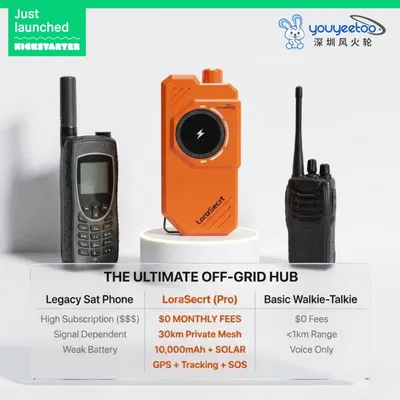
Recently, Hong Kong-based trading and hardware developer Youyeetoo announced “LoraSecrt” (note the spelling variation)—a Kickstarter project positioning itself as a “multi-functional emergency communication terminal” with claims of 10km direct range and 30km mesh networking capability, integrated solar charging, and offline GPS functionality. But with the campaign still in “launching soon” status (as of early 2026) and limited technical specifications publicly available, potential backers face a critical question: How much of this promise aligns with LoRa technology’s actual capabilities versus marketing aspiration?

This comprehensive article examines the technical realities of LoRa communication, distinguishes between direct range and mesh networking claims, analyzes regulatory constraints affecting real-world performance, and provides essential due diligence steps before supporting any off-grid communication Kickstarter project—including LoraSecrt.

A close peek at the LoraSecret
LoraSecret LoRa Device 2
LoraSecret LoRa Device 3
LoraSecret LoRa Device 1

A brief look at the product


Main features:

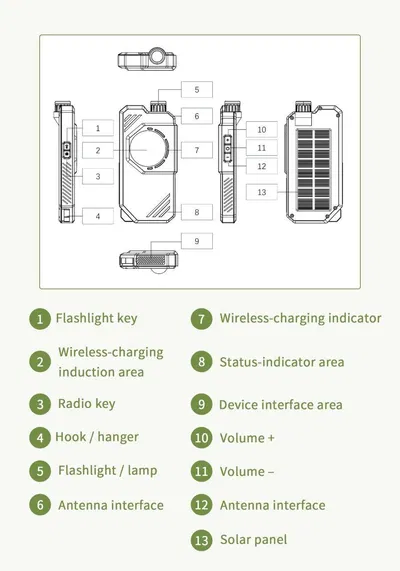
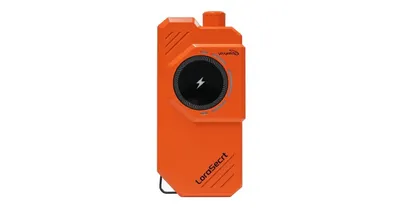
  • Built-in Flashlight.
  • Built-in 10,000mAh battery.
  • Lightweight at just 500g.
  • Can be paired with a mobile phone via Bluetooth.
  • Supports mobile app.
  • Able to use offline maps.
  • Can measure steps, routes, and walking distance.
  • One-Tap navigation.
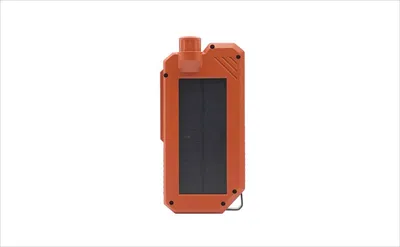
  • Can be used as a solar-powered charger for your phone.
  • wireless charging support.

LoraSecret Design
LoraSecret- Design and Features

External Design

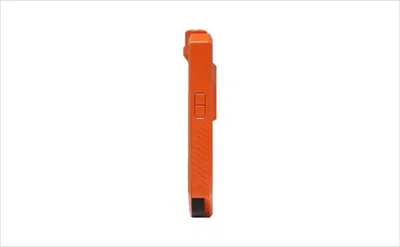
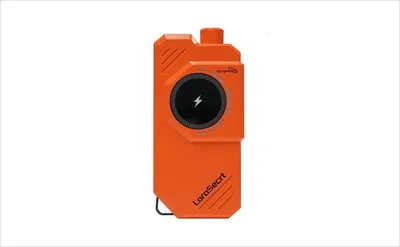
As mentioned in the title, this device sports a Walkie-Talkie-style design and likely offers some water and dust resistance, though there’s no official confirmation yet. It’s also important to note that in off-grid mode, the device actually functions as a text messaging tool rather than a true Walkie-Talkie with voice capabilities.
LoraSecrt
LoraSecrt Design

LoRa – what’s that all about?

Understanding LoRa Technology: What It Can (and Cannot) Do

LoRa, short for Long Range, is a proprietary radio modulation method created by Semtech Corporation that allows low-power, long-distance wireless data transmission. It works in license-free sub-gigahertz ISM bands—433 MHz in Asia, 868 MHz in Europe, and 915 MHz in North America—offering impressive range thanks to its outstanding receiver sensitivity (as low as -148 dBm) and spread spectrum technology that helps fend off interference.

The main technical point is that LoRa is built for small data packets, not real-time voice. It’s typically used for things like:

  • Environmental sensor readings (temperature, humidity).
  • GPS coordinate transmission.
  • Short text messages (under 240 bytes per packet).
  • IoT device status updates.

Standard LoRa setups offer data rates ranging from 300 bps to 37.5 kbps, depending on the spreading factor. For comparison, traditional analog FM walkie-talkies send voice at about 12,000 bps continuously. This inherent bandwidth limit means that true “walkie-talkie” features like push-to-talk and instant voice would require either:

  1. Heavy voice compression with a noticeable delay, causing about 2–5 seconds of buffering.
  2. A hybrid device that uses LoRa for data transmission paired with a separate FM radio module for voice communication.
  3. The newer FLRC (Fast Long-Range Communication) modes on SX1280 chips trade some range for faster data rates.

Without confirmed specs from Youyeetoo, LoraSecrt’s real voice features are still uncertain. Backers should assume text or data messaging is the main dependable function unless the campaign clearly shows real-time voice in action with latency details.


The rising need for genuine off-grid communication

When cell towers go down during natural disasters, you’re deep in the wilderness with no signal, or festival crowds clog up local networks, reliable communication turns into a safety essential rather than a luxury. This growing need has sparked huge interest in LoRa (Long Range) technology devices that offer “off-grid” connectivity without relying on cell service or paying monthly fees.


Decoding the “10km Range” vs. “30km Mesh” Claims

The LoraSecrt Kickstarter preview page references both “10km off-grid communication” and “30km mesh” capabilities—a crucial distinction many consumers misunderstand.

Direct Range (Point-to-Point): The distance two devices communicate without intermediate relays. Realistic expectations:

  • Urban environments: 300–800 meters (building penetration loss)
  • Suburban areas: 1–3 kilometers (moderate obstructions)
  • Rural/open terrain with line-of-sight: 5–8 kilometers (optimistic but achievable)
  • Laboratory conditions with elevated antennas: 10+ kilometers (not representative of handheld use)

Mesh Networking Range: In a relay network, each device passes messages along for the others. With three devices spaced 5 km apart, you could theoretically connect points 10 km apart—but this comes with higher latency and a reliance on the middle devices staying powered and within range.

The so-called “30km mesh” setup would need about 4–6 well-placed intermediate devices—feasible for organized events or community projects, but not realistic for spur-of-the-moment two-person trips into the wilderness. Plus, mesh networks can be unreliable; if one relay device shuts down or moves, the whole chain falls apart.


Solar Power Integration: Practical Benefits and Limitations

LoraSecrt’s “solar power hub” addresses a genuine concern: running out of battery during extended off-grid adventures. However, it’s worth keeping expectations in check:

  • Small integrated solar panels (typical 1–3W on handheld devices) require 6–10 hours of direct sunlight to fully recharge a 2000–3000mAh battery
  • Cloud cover, forest canopy, or suboptimal panel angle reduces charging efficiency by 60–90%
  • Solar primarily extends operational duration rather than enabling indefinite use
  • Most practical use case: trickle-charging during daytime hikes to maintain battery for evening emergencies=

Regulatory Constraints That Directly Impact Performance

LoRa devices are bound by strict regional regulations that manufacturers can’t bypass—limitations often overlooked in marketing pitches.

Duty Cycle Limits (Europe): In the 868 MHz band, devices are restricted to a 1% duty cycle on certain sub-bands. This means a continuous 1-second transmission must be followed by 99 seconds of silence, making real-time voice communication impractical without breaking the rules.

Transmit Power Caps:

  • Europe (868 MHz): 14 dBm (25 mW) EIRP maximum
  • North America (915 MHz): 30 dBm (1W) with frequency-hopping requirements
  • Asia (433 MHz): Varies significantly by country

Power limits directly set the maximum range. A device can’t legally boost its power to hit 10 km in urban areas—that’s a matter of physics, not just a tweak in software.

Frequency Band Fragmentation: A single hardware design can’t legally work worldwide. North American 915 MHz devices won’t operate in Europe’s 868 MHz band without different radio hardware. Before buying, it’s worth checking if LoraSecrt offers region-specific versions or compromises performance to meet the strictest global regulations.


Personal thoughts

According to the company, they have been working on this product for a year. This product is a great pick for emergency teams, hikers, and similar outdoor users. If it delivers on its promises, it could be a handy all-in-one emergency communication tool.

Overall, it’s better than nothing when you’re in an area with no signal, even if its actual range is just a few kilometers. That said, if you’d like to support and learn more about the Youyeetoo team and their project, you’re welcome to visit their Kickstarter page or reach out to them for business inquiries and questions through their official website.
Share. Facebook Twitter Pinterest LinkedIn Tumblr Email
Previous ArticleBanana Pi BPI-R4 Pro Review: The Best WiFi 7 OpenWrt Router? We Checked!
androidpimp
  • Website

Related Posts

Xiaomi 15S Pro Flagship

Xiaomi 15S Pro Debuts with In-House XRing 01 Chip

May 24, 2025
Orange Pi AIPro

Orange Pi AIPro powered by Huawei Ascend SoC, launched globally

February 16, 2025
Xiaomi MWC Barcelona 2025

MWC Barcelona 2025 Event: Xiaomi to unveil its Human x Car x Home smart ecosystem

January 6, 2025
0 0 votes
Article Rating
Subscribe
Notify of
0 Comments
Oldest
Newest Most Voted
Inline Feedbacks
View all comments
PureVPN
PureVPN Ad Banner
VyprVPN – No. 1 in Anonymity
Vyprvpn 350x260
PrivadoVPN – No. 1 in Parental Control
PrivadoVPN 350x437
Recent Posts
  • Off-Grid LoRa Walkie-Talkie: LoraSecret Secure Mesh Messenger
  • Banana Pi BPI-R4 Pro Review: The Best WiFi 7 OpenWrt Router? We Checked!
  • 🌏AliExpress Promo Codes 60% OFF Across the globe, <February 6, 2026>
  • Redmi Turbo 5 Max (2026) unveiled with 9,000mAh battery, specs, price, and design
  • HiWonder WonderLLM: ESP32-S3 AI Vision & Chatbot Module with 2MP Camera
  • WaveNote AI: AI Note‑Taking, Call Transcription, and Meeting Summary Tool
  • Redmi Note 15 Global Debut: 200MP Camera, eSIM & Titan Toughness
  • Orange Pi 6 SBC: Why Buy an AI HAT+? This SBC has 45 TOPS of Integrated AI Power
  • CamThink NE301 Review: STM32N6 AI Camera w/ 0.6 TOPS (25 FPS YOLOv8 Local Inference)
  • Kickpi K7C RK3576 Edge AI SBC Launches with 6 TOPS AI Power & Dual Gigabit Ethernet
RSS The Latest RSS Feeds
  • Off-Grid LoRa Walkie-Talkie: LoraSecret Secure Mesh Messenger
  • Banana Pi BPI-R4 Pro Review: The Best WiFi 7 OpenWrt Router? We Checked!
  • 🌏AliExpress Promo Codes 60% OFF Across the globe, <February 6, 2026>
Facebook X (Twitter) Instagram Pinterest
  • Home
  • About
  • Wearables
  • Earbuds
  • Computer Accessories
    • Routers
    • Remotes
  • Embedded
    • Single Board Computers
    • Addon Boards
    • Raspberry Pi
  • Wireless Routers
  • Contact
@2026 - All Right Reserved. Designed by AndroidPIMP

Type above and press Enter to search. Press Esc to cancel.

Accessibility
Accessibility modes
Epilepsy Safe Mode
Dampens color and removes blinks
This mode enables people with epilepsy to use the website safely by eliminating the risk of seizures that result from flashing or blinking animations and risky color combinations.
Visually Impaired Mode
Improves website's visuals
This mode adjusts the website for the convenience of users with visual impairments such as Degrading Eyesight, Tunnel Vision, Cataract, Glaucoma, and others.
Cognitive Disability Mode
Helps to focus on specific content
This mode provides different assistive options to help users with cognitive impairments such as Dyslexia, Autism, CVA, and others, to focus on the essential elements of the website more easily.
ADHD Friendly Mode
Reduces distractions and improve focus
This mode helps users with ADHD and Neurodevelopmental disorders to read, browse, and focus on the main website elements more easily while significantly reducing distractions.
Blindness Mode
Allows using the site with your screen-reader
This mode configures the website to be compatible with screen-readers such as JAWS, NVDA, VoiceOver, and TalkBack. A screen-reader is software for blind users that is installed on a computer and smartphone, and websites must be compatible with it.
Readable Experience
Content Scaling
Default
Text Magnifier
Readable Font
Dyslexia Friendly
Highlight Titles
Highlight Links
Font Sizing
Default
Letter Spacing
Default
Left Aligned
Center Aligned
Right Aligned
Visually Pleasing Experience
Dark Contrast
Light Contrast
Monochrome
High Contrast
High Saturation
Low Saturation
Adjust Text Colors
Adjust Title Colors
Adjust Background Colors
Easy Orientation
Mute Sounds
Hide Images
Hide Emoji
Reading Guide
Stop Animations
Reading Mask
Highlight Hover
Highlight Focus
Big Dark Cursor
Big Light Cursor
Cognitive Reading
Virtual Keyboard
Navigation Keys
Voice Navigation

AndroidPIMP

Accessibility Statement

  • AndroidPIMP.com
  • 10/18/2025

Compliance status

We believe the internet should be open and accessible to everyone, and we’re dedicated to making our website usable for the widest audience possible, no matter their circumstances or abilities.

To achieve this, we follow the World Wide Web Consortium’s (W3C) Web Content Accessibility Guidelines 2.1 (WCAG 2.1) at the AA level as closely as possible. These guidelines outline how to make web content accessible for people with a variety of disabilities. By complying with them, we help ensure our website is usable by everyone, including those who are blind, have motor or visual impairments, cognitive disabilities, and more.

This website uses a range of technologies to stay accessible at all times. An accessibility interface lets people with specific disabilities customize the site’s UI and design to fit their personal needs.

The website also uses an AI-powered application that works in the background to constantly enhance its accessibility. This app fixes the site’s HTML, adjusts its features and behavior for screen readers used by blind users, and optimizes keyboard functions for people with motor impairments.

If you’ve found a malfunction or have ideas for improvement, we’ll be happy to hear from you. You can reach out to the website’s operators by using the following email [email protected]

Screen-reader and keyboard navigation

Our website implements the ARIA attributes (Accessible Rich Internet Applications) technique, alongside various different behavioral changes, to ensure blind users visiting with screen-readers are able to read, comprehend, and enjoy the website’s functions. As soon as a user with a screen-reader enters your site, they immediately receive a prompt to enter the Screen-Reader Profile so they can browse and operate your site effectively. Here’s how our website covers some of the most important screen-reader requirements, alongside console screenshots of code examples:

  1. Screen-reader optimization: we run a background process that learns the website’s components from top to bottom, to ensure ongoing compliance even when updating the website. In this process, we provide screen-readers with meaningful data using the ARIA set of attributes. For example, we provide accurate form labels; descriptions for actionable icons (social media icons, search icons, cart icons, etc.); validation guidance for form inputs; element roles such as buttons, menus, modal dialogues (popups), and others. Additionally, the background process scans all the website’s images and provides an accurate and meaningful image-object-recognition-based description as an ALT (alternate text) tag for images that are not described. It will also extract texts that are embedded within the image, using an OCR (optical character recognition) technology. To turn on screen-reader adjustments at any time, users need only to press the Alt+1 keyboard combination. Screen-reader users also get automatic announcements to turn the Screen-reader mode on as soon as they enter the website.

    These adjustments are compatible with all popular screen readers, including JAWS and NVDA.

  2. Keyboard navigation optimization: The background process also adjusts the website’s HTML, and adds various behaviors using JavaScript code to make the website operable by the keyboard. This includes the ability to navigate the website using the Tab and Shift+Tab keys, operate dropdowns with the arrow keys, close them with Esc, trigger buttons and links using the Enter key, navigate between radio and checkbox elements using the arrow keys, and fill them in with the Spacebar or Enter key.Additionally, keyboard users will find quick-navigation and content-skip menus, available at any time by clicking Alt+1, or as the first elements of the site while navigating with the keyboard. The background process also handles triggered popups by moving the keyboard focus towards them as soon as they appear, and not allow the focus drift outside it.

    Users can also use shortcuts such as “M” (menus), “H” (headings), “F” (forms), “B” (buttons), and “G” (graphics) to jump to specific elements.

Disability profiles supported in our website

  • Epilepsy Safe Mode: this profile enables people with epilepsy to use the website safely by eliminating the risk of seizures that result from flashing or blinking animations and risky color combinations.
  • Visually Impaired Mode: this mode adjusts the website for the convenience of users with visual impairments such as Degrading Eyesight, Tunnel Vision, Cataract, Glaucoma, and others.
  • Cognitive Disability Mode: this mode provides different assistive options to help users with cognitive impairments such as Dyslexia, Autism, CVA, and others, to focus on the essential elements of the website more easily.
  • ADHD Friendly Mode: this mode helps users with ADHD and Neurodevelopmental disorders to read, browse, and focus on the main website elements more easily while significantly reducing distractions.
  • Blindness Mode: this mode configures the website to be compatible with screen-readers such as JAWS, NVDA, VoiceOver, and TalkBack. A screen-reader is software for blind users that is installed on a computer and smartphone, and websites must be compatible with it.
  • Keyboard Navigation Profile (Motor-Impaired): this profile enables motor-impaired persons to operate the website using the keyboard Tab, Shift+Tab, and the Enter keys. Users can also use shortcuts such as “M” (menus), “H” (headings), “F” (forms), “B” (buttons), and “G” (graphics) to jump to specific elements.

Additional UI, design, and readability adjustments

  1. Font adjustments – users, can increase and decrease its size, change its family (type), adjust the spacing, alignment, line height, and more.
  2. Color adjustments – users can select various color contrast profiles such as light, dark, inverted, and monochrome. Additionally, users can swap color schemes of titles, texts, and backgrounds, with over seven different coloring options.
  3. Animations – person with epilepsy can stop all running animations with the click of a button. Animations controlled by the interface include videos, GIFs, and CSS flashing transitions.
  4. Content highlighting – users can choose to emphasize important elements such as links and titles. They can also choose to highlight focused or hovered elements only.
  5. Audio muting – users with hearing devices may experience headaches or other issues due to automatic audio playing. This option lets users mute the entire website instantly.
  6. Cognitive disorders – we utilize a search engine that is linked to Wikipedia and Wiktionary, allowing people with cognitive disorders to decipher meanings of phrases, initials, slang, and others.
  7. Additional functions – we provide users the option to change cursor color and size, use a printing mode, enable a virtual keyboard, and many other functions.

Browser and assistive technology compatibility

We aim to support the widest array of browsers and assistive technologies as possible, so our users can choose the best fitting tools for them, with as few limitations as possible. Therefore, we have worked very hard to be able to support all major systems that comprise over 95% of the user market share including Google Chrome, Mozilla Firefox, Apple Safari, Opera and Microsoft Edge, JAWS and NVDA (screen readers).

Notes, comments, and feedback

Despite our very best efforts to allow anybody to adjust the website to their needs. There may still be pages or sections that are not fully accessible, are in the process of becoming accessible, or are lacking an adequate technological solution to make them accessible. Still, we are continually improving our accessibility, adding, updating and improving its options and features, and developing and adopting new technologies. All this is meant to reach the optimal level of accessibility, following technological advancements. For any assistance, please reach out to [email protected]

wpDiscuz