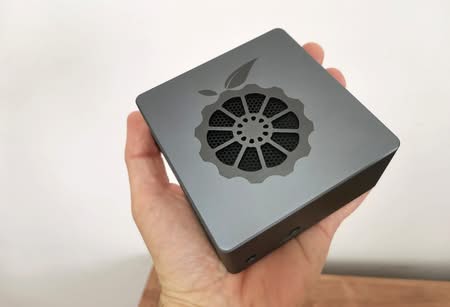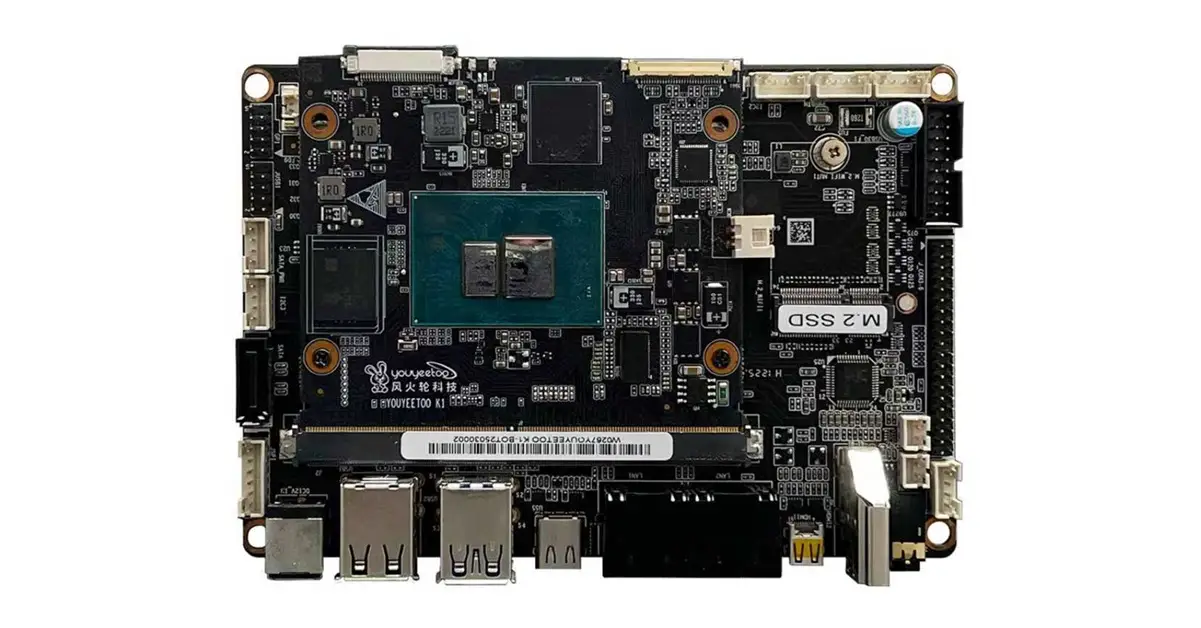
- Youyeetoo K1 review: Introducing the Youyeetoo K1 computer-on-module board.
- Maybe you missed it? Youyeetoo X1 Review
Youyeetoo Company has introduced their latest Intel K1 computer-on-module board (COM), tailored for high-end embedded computing applications.
Youyeetoo, a relatively lesser-known company in the development embedded computing design field, has recently introduced some intriguing products, including their latest new Youyeetoo K1 Computer-on-Module board built on Intel x86 architecture.
The product setup features two boards: a carrier board (main board) and a system on a module (SoM) board. Powered by the 12th Gen Intel® Alder Lake-N N100 processor, it delivers a great mix of performance and efficiency. This quad-core, quad-thread CPU runs at a base frequency of 0.8GHz, with Turbo Boost reaching up to 3.40GHz. Built on Intel’s 7 (10nm) process, it operates at an impressively low 6W TDP. Combined with Intel® UHD Graphics running up to 750MHz, it’s ideal for lightweight computing, media playback, and embedded applications. Memory options include onboard LPDDR5 RAM in 4GB, 8GB, or 16GB configurations, offering flexibility for varying performance needs.
Youyeetoo K1 Carrier (Core) Board
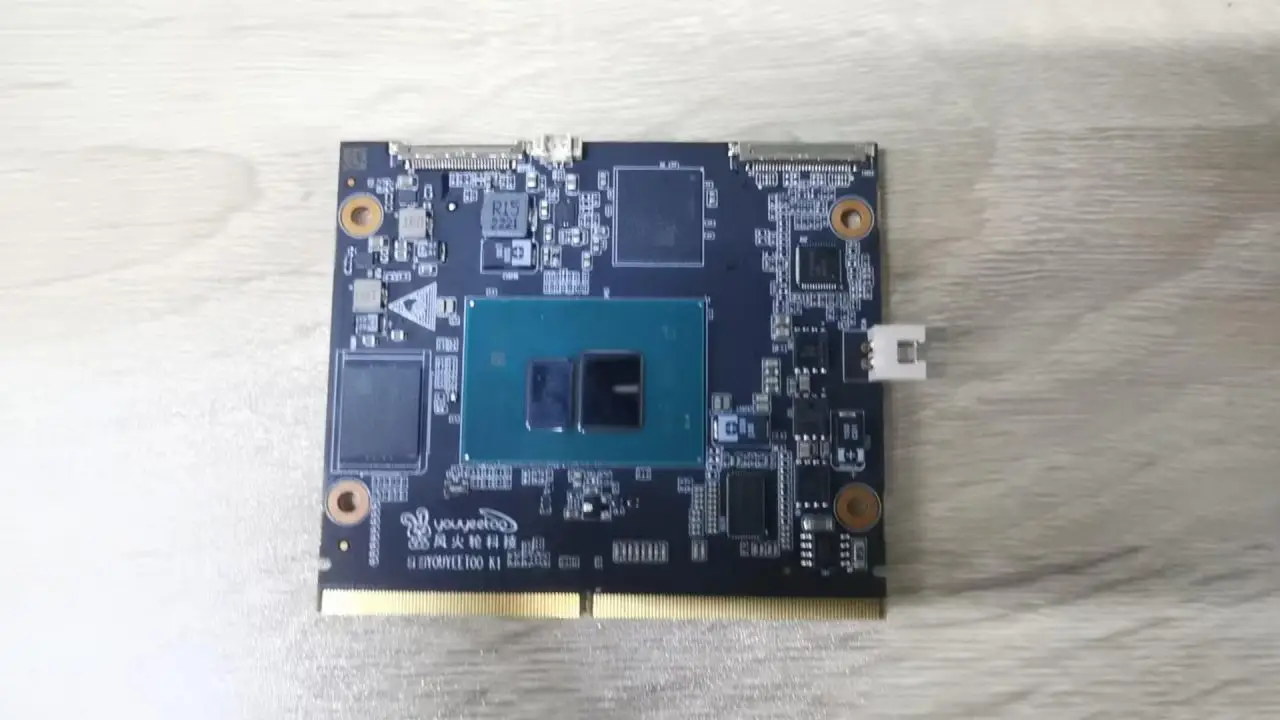
Key Features
✔ Pocket-Sized Powerhouse: Intel 12th Gen N100 Processor (4C/4T, up to 3.4GHz) in an ultra-compact 82×71mm core board, delivering x86 performance for Windows/Linux in industrial, AI, and embedded applications.
✔ Modular Flexibility: Standalone core board with 12V DC, MIPI display, USB-C, and RTC—or pair with a palm-sized carrier board for expanded I/O: Dual Gigabit Ethernet, 2xUSB3.0, 3xUSB2.0, Dual HDMI, M.2 SSD, SATA 3.0, and more.
✔ Multi-Display Ready: Pre-tested compatibility with 7″ MIPI touchscreen + 11.3″ eDP display, plus HDMI multi-monitor support for digital signage/kiosk solutions.
✔ Industrial-Grade Expansion: MIPI CSI/DSI, eDP, GPIO, I2C, SPI, UART x4—ideal for robotics, vision systems, and IoT edge nodes.
✔ Developer-Friendly: Open-source Wiki tutorials, pre-configured drivers, and step-by-step guides to accelerate deployment.
✔ Integrated NFC Support: Passive NFC communication included.
Youyeetoo K1 motherboard (Front view)
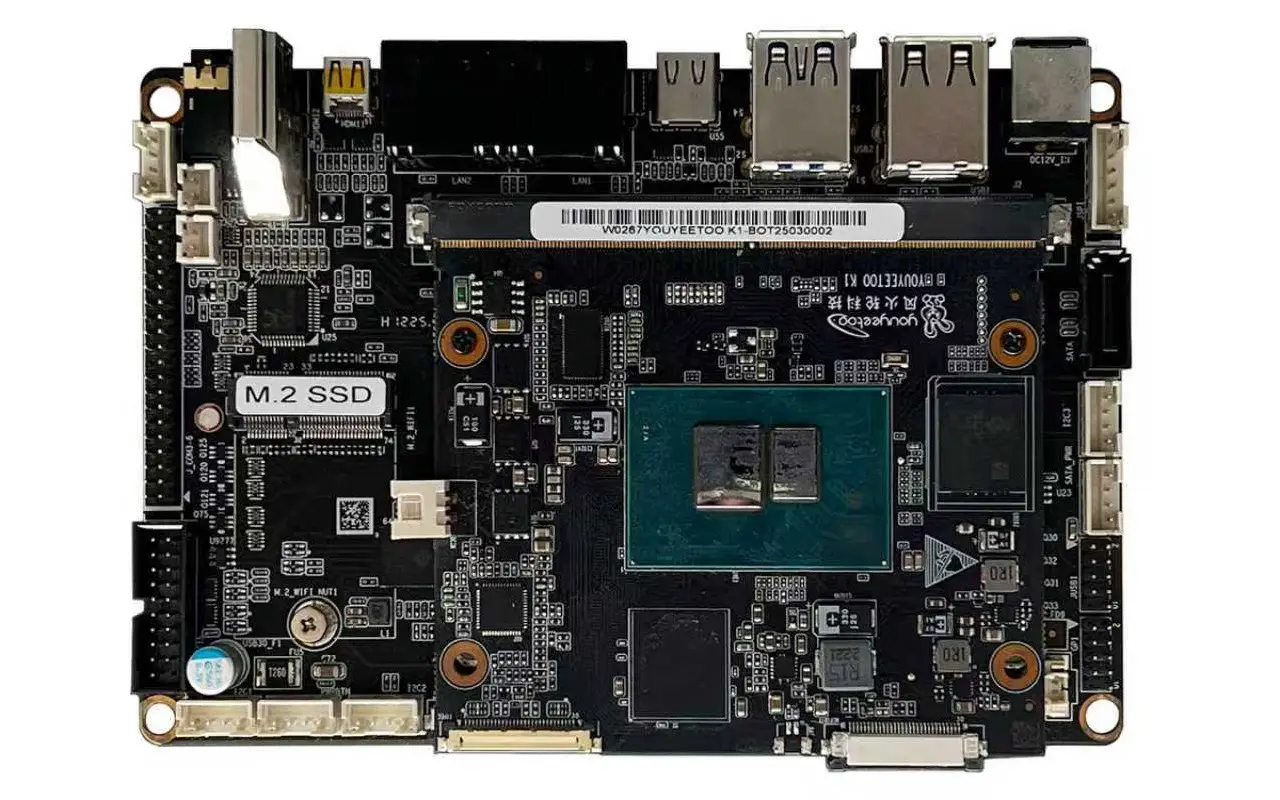
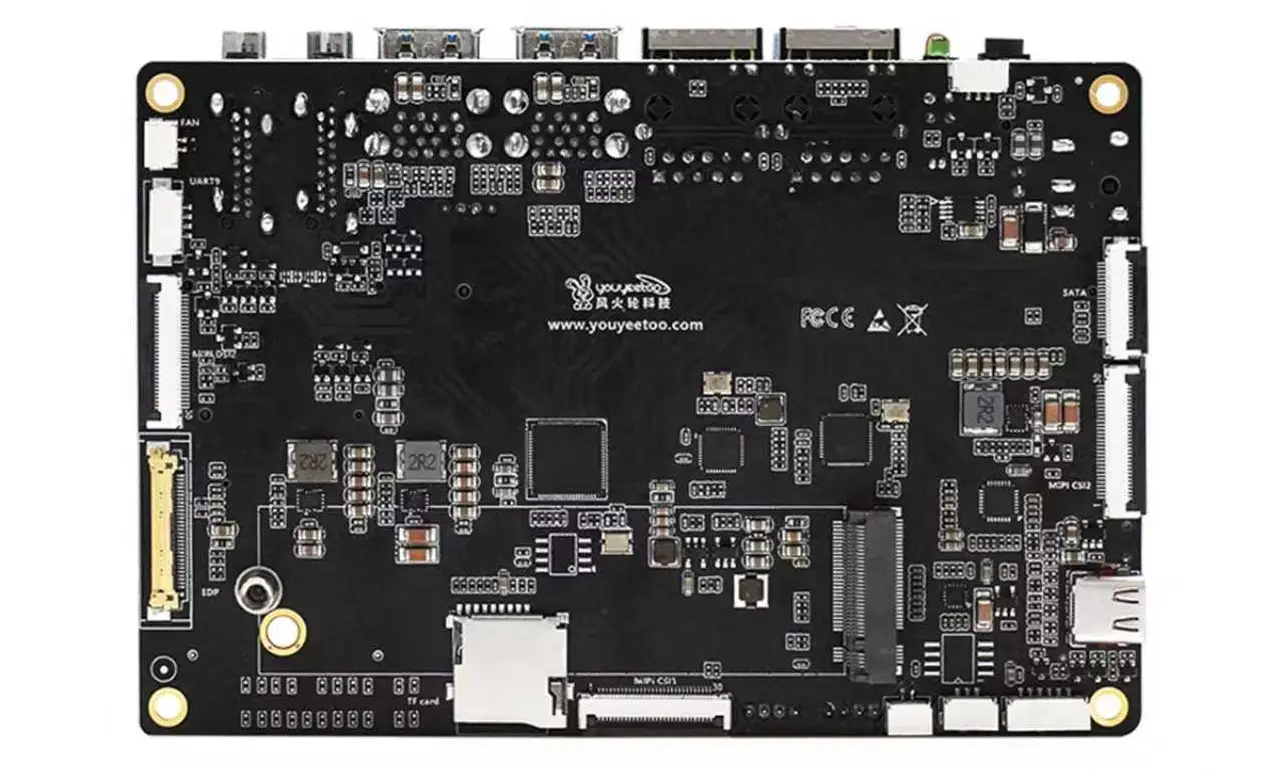
Youyeetoo K1 motherboard (Rear view)
Specifications
| Category | Specifications |
|---|---|
| Processor CPU | 12th Gen Intel® Alder Lake-N N100 (Base Frequency 0.8GHz, Turbo Boost up to 3.40 GHz, 4 Cores 4 Threads (Intel 7 10nm), TDP 6W) |
| GPU | Intel® UHD Graphics (Max Frequency 750MHz) |
| RAM | Onboard 4G/8G/16G LPDDR5 (Optional) |
| Storage | Onboard eMMC: 0/64G/128G/256G M.2 Expansion: Supports NVMe 2280 SSD (PCIe 3.0) & M.2 SATA 2280 SSD (Supports PCIe Gen3.0 x2 NVME) SATA Expansion: Supports SATA 3.0 SSD |
| Networking | Wired: RJ45 Gigabit Ethernet Port x2 Wireless: Expandable via M.2 E-key slot, Optional WIFI5+BT5.0/WIFI6+BT5.2 dual-band 4G LTE: Expandable via M.2 slot, default EC20 4G module (requires separate 4G adapter board) |
| Multi-Display | HDMI Port: HDMI2.0 4K/60Hz Micro HDMI Port: HDMI2.0 4K/60Hz MIPI0/MIPI1/eDP: MIPI supports FengHuolun MIPI7 LCD (1024×600 touchscreen), eDP supports FengHuolun 11.6″ screen (3 options,choose 1) |
| USB | USB-A: 2x USB3.0, 2x USB2.0 USB Headers: 2x USB2.0, 2x USB3.0 USB Type-C: USB Type-C x1 |
| Audio Output | SPK x1 (8Ω2W with amplifier) HDMI-OUT x1 Mini HDMI-OUT x1 |
| Audio Input | 1x Analog MIC 1x Headset MIC 1x LINE IN |
| M.2 Expansion | 2280: Supports NVME SSD/M.2 SATA SSD (M-KEY) 2230: Supports WIFI5+BT5.0/WIFI6+BT5.2 or 4G LTE expansion via FengHuolun adapter |
| UART | 4x UART TTL serial ports (convertible to RS232/RS485 modules) |
| I2C | 3x I2C interfaces (4-pin header), with Windows/Linux examples (3.3V default) |
| I2S | I2S x1 (6-pin) |
| SPI | SPI x1 (6-pin header), with Windows/Linux examples (3.3V default) |
| GPIO | 27x GPIO (9-pin header), with Windows/Linux examples (3.3V default) |
| LEDs | Onboard red/blue LEDs x2 (4-pin header), programmable control (APIs provided) Default: Red blinking/Green off |
| Buttons | Power Button x1 Reset Button x1 |
| RTC | SH1.25 battery holder (CR2032 compatible) 3.3V RTC with ~35mAh annual consumption |
| Power-On | Supports auto power-on (configurable in BIOS) |
| Power Supply | 12V DC Jack (5.5×2.5mm) & 2-pin XH-2A 2.54mm header |
| Dimensions | Core Board: 82mm x 71mm Base Board: 134mm x 92mm |
| OS Support | Windows 10/11 & Linux Ubuntu/Debian |
| NFC | Passive NFC communication (supports data transfer with Android/iOS devices) Examples & API tutorials provided |
| Software Watchdog | ✔ Supported via standard Windows APIs |
| CPU Temp Monitoring | ✔ Supported via standard Windows APIs |
| Fan Control | ✔ Supported via standard Windows APIs |
A wide variety of storage and expansion interfaces
Storage capabilities are robust, featuring onboard eMMC options ranging from 64GB to 256GB, alongside support for NVMe and SATA SSDs via M.2 and SATA 3.0 interfaces. Networking is equally versatile, with dual RJ45 Gigabit Ethernet ports for wired connectivity and expandable wireless options through M.2 E-key slots, supporting Wi-Fi 5/6 and Bluetooth 5.0/5.2. For mobile applications, 4G LTE connectivity is available via an M.2 slot with an EC20 module, requiring a separate adapter board.
Primary interfaces
It supports multi-display output via HDMI 2.0 and Micro HDMI ports, both delivering 4K at 60Hz, along with MIPI and eDP interfaces for touchscreen and standard LCD panels. USB connectivity is robust, offering multiple USB-A ports (USB 3.0 and 2.0), USB headers, and a USB Type-C port. Audio options include amplified speaker support, HDMI audio, analog and headset microphones, and line-in functionality.
Developer interfaces
Designed for embedded and development applications, the board features UART, I2C, I2S, SPI, and GPIO interfaces, all with support for Windows and Linux examples. It also offers programmable LEDs, power and reset buttons, a low-consumption RTC, and an auto power-on configuration to boost its functionality.
Software
The K1 hardware is compatible with both Windows 10/11 and Linux distributions like Ubuntu and Debian, with tutorials available for hardware operations. It supports NFC communication, software watchdog, CPU temperature monitoring, and fan control through standard Windows APIs, making it an incredibly versatile and developer-friendly platform.
Applications
The Youyeetoo K1 is built for AIoT, automation, and edge computing applications, offering compatibility with both Windows and Linux systems. Here’s a breakdown of the key applications and use cases for this product:
🧠 Core Applications
- AIoT (Artificial Intelligence of Things): Perfect for smart devices and edge AI processing thanks to its robust CPU, GPU, and compatibility with neural network frameworks.
- Automation Control Systems: Equipped with multiple UART, GPIO, I2C, and SPI interfaces, it is ideal for industrial automation and robotics.
- Home Assistant & Smart Home Hubs: It integrates effortlessly with Home Assistant and Proxmox, making it a fantastic choice for managing smart home devices.
- Gateway devices: Ideal for personal or small business gateway applications like OpenWrt or OpenSense, featuring two Ethernet ports for connectivity.
- Mini Server & Virtualization: You can use Proxmox, Linux, or Windows Server for lightweight server tasks like web hosting, file sharing, and running containerized apps.
- Electronic Signage: Thanks to its two HDMI ports, it can function as a signage player, displaying information, advertisements, or entertainment on electronic screens.
💻 Development & Learning
- Embedded Linux & Windows Development: It supports full-featured OS installations, making it an excellent platform for developers exploring system programming or creating custom OS images.
- Multimedia Projects: Capable of compiling and running FFmpeg, making it ideal for media encoding, streaming, and playback tasks.
- Educational Use: Compact and budget-friendly, it’s a practical tool for students and hobbyists delving into electronics, programming, and system integration.
Price and Availability
Not yet revealed, but as soon as we have estimated prices, we will update this article.
Contact Information
- Phone: +86-755-2301-2315
- Mobile: +86-186-6539-9520
- Email: shop@youyeetoo.com (Orders / inquiries).
- Official Website / Store: https://www.youyeetoo.com
- Address: Room 601, Building 17, No. A3, Fourth Industrial Zone, Heshuikou Community, Matian Street, Guangming District, Shenzhen.Guangdong, China.
Information about the product and its purchasing options
- Product wiki page: youyeetoo K1 wiki
- Official AliExpress Store: Smartfire store
- Official Amazon Store: Amazon store
Key Takeaways
- Youyeetoo K1 review: Introducing the Youyeetoo K1 computer-on-module board.
- Youyeetoo X1 Review Youyeetoo Company has introduced their latest Intel K1 computer-on-module board (COM), tailored for high-end embedded computing applications.
- The product setup features two boards: a carrier board (main board) and a system on a module (SoM) board.
- Youyeetoo K1 Carrier (Core) Board Key Features ✔ Pocket-Sized Powerhouse: Intel 12th Gen N100 Processor (4C/4T, up to 3.
- 4GHz) in an ultra-compact 82×71mm core board, delivering x86 performance for Windows/Linux in industrial, AI, and embedded applications.
Frequently Asked Questions
What is youyeetoo company has introduced their latest intel k1 computer-on-module board (com), tailored for high-end embedded computing applications?
Youyeetoo, a relatively lesser-known company in the development embedded computing design field, has recently introduced some intriguing products, including their latest new Youyeetoo K1 Computer-on-Module board built on Intel x86 architecture.
What is key features?
✔ Pocket-Sized Powerhouse: Intel 12th Gen N100 Processor (4C/4T, up to 3.
What is specifications?
CategorySpecificationsProcessor CPU12th Gen Intel® Alder Lake-N N100 (Base Frequency 0.
What is a wide variety of storage and expansion interfaces?
Storage capabilities are robust, featuring onboard eMMC options ranging from 64GB to 256GB, alongside support for NVMe and SATA SSDs via M.