
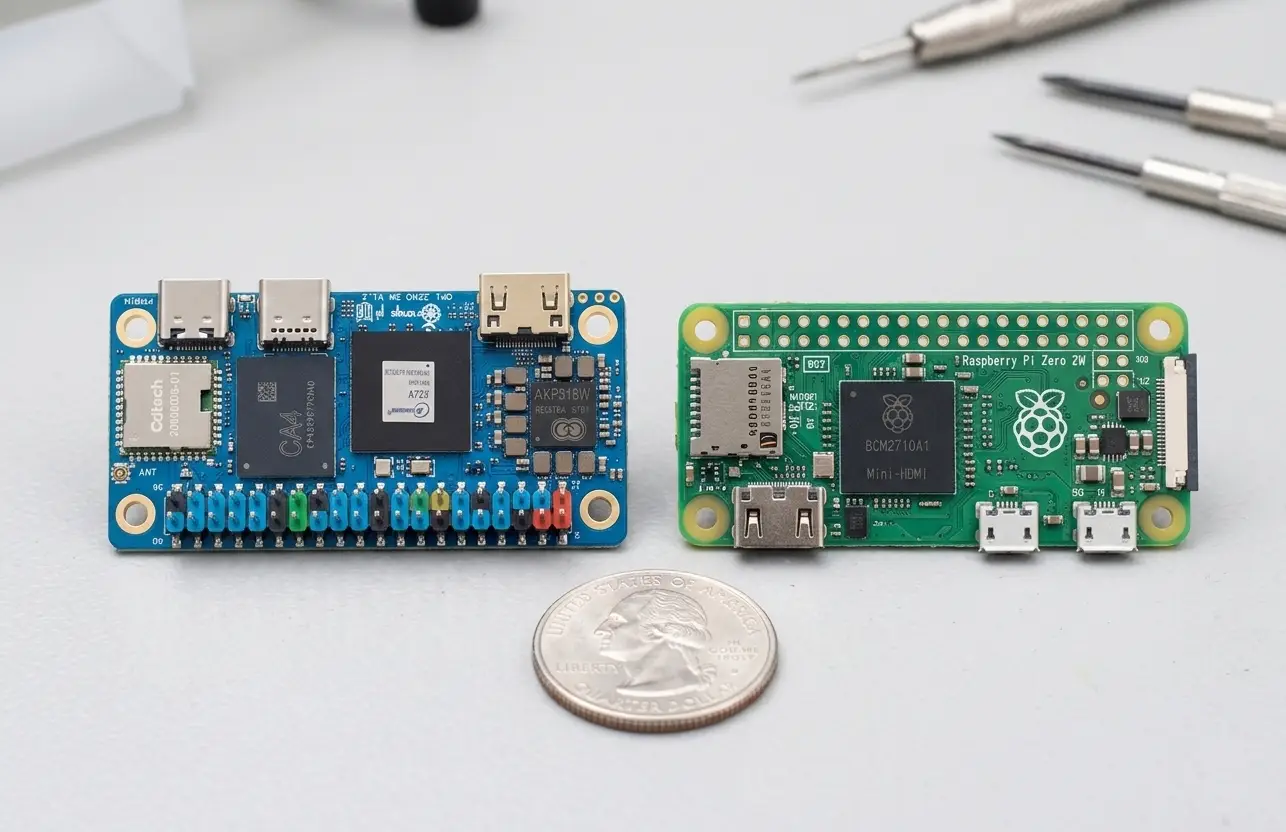
Close Menu
  • Home
  • About
  • Wearables
  • Earbuds
  • Computer Accessories
    • Routers
    • Remotes
  • Embedded
    • Single Board Computers
    • Addon Boards
    • Raspberry Pi
  • Wireless Routers
  • Contact
Facebook X (Twitter) Instagram Threads
Trending
  • AliExpress Promo Codes: July 2026 (100% Verified)
  • BPI-R4 Wi-Fi 7 NIC (BE14): OpenWrt Setup & Optimal WiFi Power Guide
  • Orange Pi 6 Launches: New 45 TOPS AI SBC Beats Raspberry Pi HATs in Speed
  • Orange Pi Zero 3W Review: $25 Dual Video Pi Zero 2W Killer?
  • CamThink NeoEyes NE503: A 20 TOPS 4k Edge AI Camera Platform Powerhouse
  • DFRobot 6.67″ Flexible AMOLED Review: Best Raspberry Pi & LattePanda Display?
  • Banana Pi BPI-SM10 Review: 60 TOPS RISC-V Jetson Orin Nano Alternative
  • SpacemiT K3 Pico-ITX Review: 60-TOPS RISC-V Powerhouse for LLMs?
AndroidPIMP
Facebook X (Twitter) Instagram
  • Home
  • About
  • Wearables
  • Earbuds
  • Computer Accessories
    • Routers
    • Remotes
  • Embedded
    • Single Board Computers
    • Addon Boards
    • Raspberry Pi
  • Wireless Routers
  • Contact
AndroidPIMP
Embedded Computers

Orange Pi Zero 3W Review: $25 Dual Video Pi Zero 2W Killer?

By androidpimpJune 26, 2026Updated:June 26, 2026No Comments37 Mins Read
Facebook Twitter Pinterest LinkedIn Tumblr Email
Follow Us
Google News Flipboard
Raspberry Pi Zero 3W SBC
Table of contents
  1. Part I: introducing the Orange Pi Zero 3W SBC
    1. The Orange Pi Zero 3W has just been released, offering a compact, budget-friendly development board with multiple interfaces, including dual video outputs.
  2. Interfaces
  3. Orange Pi Zero 3W (Design/Interfaces)
  4. Hardware Specifications
  5. Applications
  6. Storage Options
  7. So, what’s truly new about this board?
  8. How does it stack up against the Radax Zero W3?
  9. Comparison of tech specs
  10. Active Cooling and Thermal Performance
  11. Form factor
  12. Specs Comparison: Raspberry Pi Zero 2W vs. Orange Pi Zero 3W
  13. Part II: Orange Pi Zero 3W Review
    1. The Package (Package Contents)
  14. All Items
  15. A Closer Look at the Board
  16. Cooling the board components
    1. Installing the active heatsink
    2. Initial impressions
    3. Temperatures
  17. Software
  18. Storage Space
  19. Connectivity
    1. A PCIe 3.0 socket is included as well.
    2. What You Need
    3. ✔ Option B — Key‑E → PCIe x1 Riser → NVMe Adapter
    4. ✔ Option C — Powered NVMe Carrier Board
    5. Wireless Connectivity Speed
    6. The option for an external antenna
  20. Performance Wise
    1. Single‑Core Performance Breakdown
    2. Multi‑Core Performance Breakdown
    3. Comparing the performance of the Zero W 3 board to other popular boards.
    4. 📊 Geekbench 6 CPU Data Analysis
      1. 🔹 Single-Core Performance (Blue Bars)
    5. Here are the key takeaways from our Geekbench 6 results, presented clearly:
    6. 📌Bottom Line
    7. 3 TOPS NPU
    8. CPU Information
    9. CPU Governor settings
    10. 1.simple_ondemand (Default)
    11. 2. performance
    12. 3. userspace
  21. Multimedia
    1. What about video playback performance?
  22. GPU Acceleration for video decoding? Not So Fast.
    1. VLC Medai Player: Video Decoding with GPU Acceleration
    2. From our testing
  23. Key takeaways:
    1. GPU Capabilities Summary (PowerVR BXM‑4‑64 MC1)
    2. What the GPU Is Actually Useful For?
  24. The real reason is that hardware decoding is not available in the Linux images.
  25. What steps should you take if you still need support for hardware video decoding?
    1. The Android OS experience
    2. The Kodi experience
  26. Power consumption
  27. Compact in size and portable.
    1. The small form factor advantage: Tiny yet powerful
  28. Pricing (excluding taxes and shipping fees)
  29. Final Thoughts
  30. Price and availability
    1. Orange Pi Zero 3W (4GB RAM) Best value for the buck
  • Maybe you missed it? Orange Pi 6 Plus Review.
  • Orange Pi Zero 3W: A closer look at device specs, features and main interfaces.
9Expert Score
A solid high-end SBC in its category.
Overall Assessment of Orange Pi Zero 3W (Pros & Cons)

The Orange Pi Zero 3W is a compact single-board computer (SBC) that features dual video outputs and packs sufficient computing power to rival high-end SBC models, including the Raspberry Pi Zero 2W. Here’s a brief overview of its advantages and disadvantages:
  • Good Performance.
  • Integrated Wi-Fi 6 Support.
  • Decent software support.
  • Good thermal design and cooling.
  • Onboard PCIe 3.0 1-Lane FPC socket.
  • 2x Camera MIPI CSI + 1x MIPI-DSI Interfaces.
  • Lots of RAM configurations to choose from.
  • Dual video output (Type-C + Mini HDMI)
  • No internal flash storage.

Part I: introducing the Orange Pi Zero 3W SBC

The Orange Pi Zero 3W has just been released, offering a compact, budget-friendly development board with multiple interfaces, including dual video outputs.

Shenzhen Xunlong, the company behind the popular Orange Pi brand, has just launched a new product: the Orange Pi Zero 3W development board. This compact board features an Allwinner A733 octa-core processor and a Risc-V E902 core coprocessor, also known as the Alibaba XuanTie E902, which operates as a real-time clock at approximately 150 MHz. The Risc-V core utilizes an open instruction set and is designed for low energy consumption.

The processor includes a dual-core Arm Cortex-A76 and a hexa-core Arm Cortex-A55, all built on a 12nm process and utilizing a big-little architecture. The processor features a maximum clock speed of 2.0GHz and supports a 3 Tops NPU, making it ideal for edge AI acceleration applications.

Additionally, while it currently supports up to 12GB of RAM, this board can accommodate up to 16GB of LPDDR5 memory and is capable of decoding video formats up to 8K at 24fps for H.265, VP9, and AVS2. It also supports video formats up to 4K at 30 frames per second for both H.265 and H.264, which is another significant advantage.


Interfaces

This board features a variety of interfaces, including PCIe 3.0, USB Type-C 3.0, UFS, MIPI-CSI, MIPI-DSI, and a 40-pin expansion interface, along with other commonly used functional interfaces. It is compatible with operating systems such as Ubuntu, Debian, and Android 13.
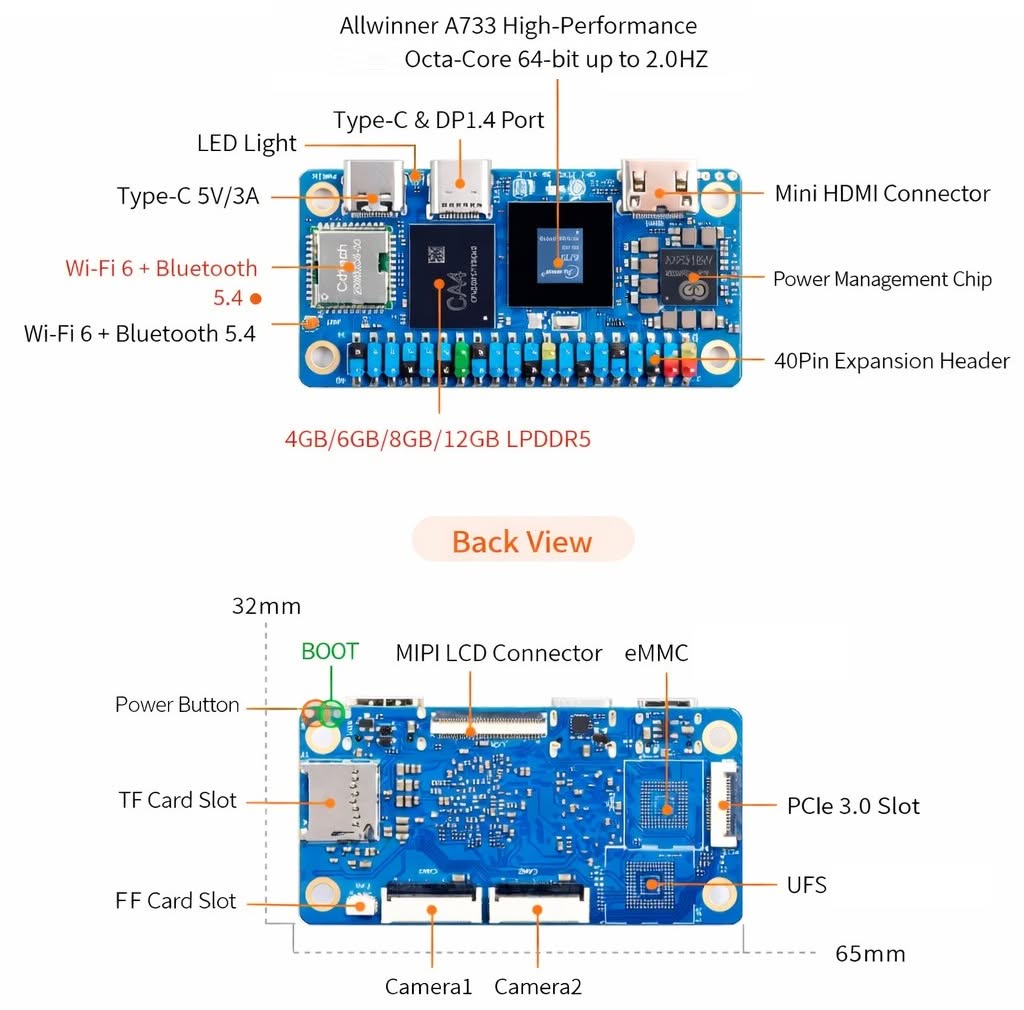
Orange Pi Zero 3W SBC Layout

Orange Pi Zero 3W (Design/Interfaces)
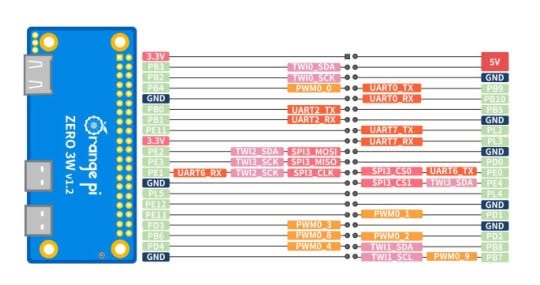
Orange Pi Zero 3W Pins Diagram

Hardware Specifications

CategorySpecification
Processor (CPU)A733 SoC
2× Cortex‑A76 + 6× Cortex‑A55, up to 2.0 GHz
CoprocessorXuantie E902 RISC-V Real-Time Coprocessor (up to 200 MHz).
GPUImagination BXM‑4‑64
NPU3 TOPS
MemorySupports up to 16 GB LPDDR5.
StorageOnboard eMMC or UFS (Optional)
TF card slot (supports up to 128GB)
WirelessWiFi 6 + Bluetooth 5.4 (BLE), WiFi/BT combo module
Display Interfaces1× Mini HDMI 2.0 (up to 4K@60fps)
1× MIPI‑DSI (4‑lane)
1× DisplayPort 1.4
Camera Interfaces2× MIPI‑CSI (4‑lane each)
USB1× USB‑C (USB 3.0 Host)
1× USB‑C (USB 2.0, Host & Device)
ButtonsBOOT (test point), PWR ON (test point)
Expansion Header40-pin GPIO header supporting GPIO, UART, I2C, SPI, PWM
Debug3-pin UART debug port
Power InputUSB‑C 5 V / 3 A DC‑IN
Supported OSUbuntu, Debian, Android 13, OpenHarmony, and others
AI development frameworksONNX, TensorFlow, PyTorch, and Caffe.
Weight14g
PCB Dimensions65 mm x 32 mm

Applications

The Orange Pi Zero 3W offers a robust hardware foundation for the deployment of generative AI and artificial intelligence algorithms in specific scenarios. It can be applied widely in fields such as smart industrial control, intelligent commercial displays, retail payment systems, smart education, commercial robotics, in-vehicle terminals, vision-assisted driving, edge computing, smart distribution terminals, and more.


Storage Options

For those with a keen eye for details, you may have noticed that the W3 board currently lists flash eMMC and UFS storage as future optional upgrades, likely due to global flash chip shortages. Currently, its primary storage option is a TF card slot that supports up to 128GB, which should be more than enough for running Ubuntu or any lightweight Linux distribution.


So, what’s truly new about this board?

If you are curious about what sets this tiny board apart from previous models, it includes Wi-Fi 6 connectivity with Bluetooth 5.4 support, as well as two video output interfaces: one Mini HDMI and one USB-C (DP) DisplayPort 1.4 output, both capable of decoding video up to 4K at 60 fps. Additionally, this board supports a variety of RAM configurations, with options ranging from 1GB to 8GB, and the potential for 12GB and 16GB.


How does it stack up against the Radax Zero W3?

Comparison of tech specs

FeatureRadxa Zero W3Orange Pi Zero 3W
SoC / CPURockchip RK3566 — Quad‑core Cortex‑A55 @ up to 1.6 GHzAllWinner A733 — hybrid octa‑core @ 2.0 GHz
GPUMali‑G52 (RK3566 family, inferred)Imagination PowerVR BXM-4-64
NPUNone listed for Zero W33 TOPS NPU
Coprocessor❌ ✔ Xuantie E902 RISC-V Real-Time Coprocessor.
RAMUp to 8GB LPDDR4Up to 12GB LPDDR5 (16GB Optional)
Storage✔ eMMC or microSD (Zero 3 series)❌ eMMC or UFS (Optional)
WirelessWiFi 6 + Bluetooth 5.4Wi‑Fi 6 + Bluetooth 5.4
Video OutputMicro HDMI (1080p@60 for Zero 3W)Dual display output through USB‑C DisplayPort and Mini HDMI port.
USB PortsUSB 3.0 Host + USB 2.0 OTG (Zero 3W)USB‑C with DP Alt Mode, up to 4K@60fps.
GPIO40pin GPIO header40pin GPIO header
PCIe Interface❌ ✔ 1 x PCIe 3.0 1-Lane FPC socket.
MIPI-DSI Interface❌ ✔ 1 x 4-lane MIPI-DSI
MIPI CSI interface1 x 4-lane MIPI CSI interface.2 x 4-lane MIPI CSI interface.
Fan interface❌ ✔ 2PIN Fan interface
Maskrom Button✔ ❌
Dimensions65 × 30 mm65 mm x 32 mm
Target UseCompact SBC for IoT, embedded, Linux systemsHigher‑performance AI‑capable SBC with NPU and LPDDR5

Active Cooling and Thermal Performance

For approximately $4 to $6, the company provides an active cooler that is accompanied by a heatsink, which surrounds all components except for the accessible GPIO header pins. This configuration guarantees that the board receives adequate cooling while maintaining accessible interfaces.


Form factor

The W3 board’s dimensions are almost a match for the Raspberry Pi Zero W2. The Pi measures 65 mm long and 30 mm wide, while the W3 comes in at 65 x 32 mm (2.56 x 1.26 inches). Both boards share identical hole spacing, making it easy to find semi-open alternative cases that fit.
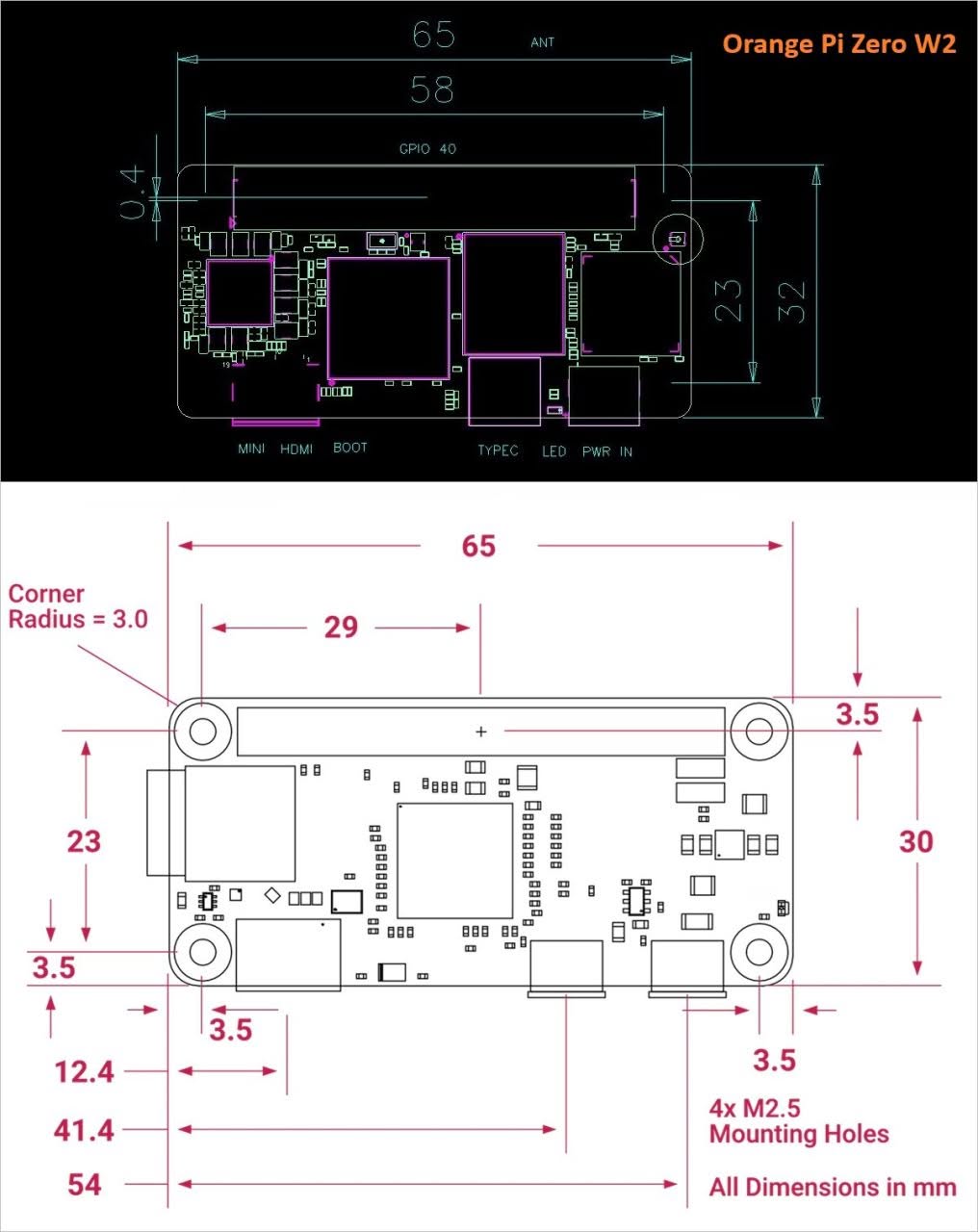
Orange Pi Zero 3W Dimensions

Specs Comparison: Raspberry Pi Zero 2W vs. Orange Pi Zero 3W

While Raspberry Pi offers the best software ‘polish,’ the Allwinner A733 provides raw power that simply didn’t exist in the Zero form factor until now. If you need Android 13 or WiFi 6 on a tiny board, the Orange Pi Zero 3W’s software ecosystem is already ahead of the aging Pi Zero 2W.

ModelRaspberry Pi Zero 2WOrange Pi Zero 3W
Official Launch DateOctober 28, 2021April 4, 2026
Processor (SoC)Broadcom BCM2710A1Allwinner A733 (Octa-core)
CPU Architecture4 Cores: 4x Cortex-A53 @ 1GHz8 Cores: 2x A76 + 6x A55 @ 2.0GHz
RAM (LPDDR)512MB (Fixed)1GB to 12GB (LPDDR5)
(16GB optional)
GPUVideoCore IVMali-G310 / PowerVR BXM
AI PerformanceN/A3 TOPS NPU (Integrated)
Video Output1x Mini HDMI (1080p)Dual: Mini HDMI + USB-C (DP)
Max Resolution1080p @ 30fps4K @ 60fps
StorageMicroSD onlyMicroSD + Optional eMMC
WirelessWiFi 4 + BT 4.2WiFi 6 + BT 5.4
Expansion40-pin Header40-pin + PCIe 3.0 (FPC)
1 2 3 4 5 6 7 8 9 10 11 12
Share. Facebook Twitter Pinterest LinkedIn Tumblr Email
Previous ArticleCamThink NeoEyes NE503: A 20 TOPS 4k Edge AI Camera Platform Powerhouse
Next Article Orange Pi 6 Launches: New 45 TOPS AI SBC Beats Raspberry Pi HATs in Speed
androidpimp
  • Website

Related Posts

BPi Wi Fi 7 NIC BE14(V2.1)

BPI-R4 Wi-Fi 7 NIC (BE14): OpenWrt Setup & Optimal WiFi Power Guide

July 10, 2026
Orange Pi 6

Orange Pi 6 Launches: New 45 TOPS AI SBC Beats Raspberry Pi HATs in Speed

June 26, 2026
NeoEyes NE503 Edge AI Camera

CamThink NeoEyes NE503: A 20 TOPS 4k Edge AI Camera Platform Powerhouse

June 26, 2026
0 0 votes
Article Rating
Subscribe
Notify of
0 Comments
Oldest
Newest Most Voted
Categories
PureVPN
PureVPN Ad Banner
PrivadoVPN – No. 1 in Parental Control
PrivadoVPN 350x437
VyprVPN – No. 1 in Anonymity
Vyprvpn 350x260
Recent Posts
  • AliExpress Promo Codes: July 2026 (100% Verified)
  • BPI-R4 Wi-Fi 7 NIC (BE14): OpenWrt Setup & Optimal WiFi Power Guide
  • Orange Pi 6 Launches: New 45 TOPS AI SBC Beats Raspberry Pi HATs in Speed
  • Orange Pi Zero 3W Review: $25 Dual Video Pi Zero 2W Killer?
  • CamThink NeoEyes NE503: A 20 TOPS 4k Edge AI Camera Platform Powerhouse
  • DFRobot 6.67″ Flexible AMOLED Review: Best Raspberry Pi & LattePanda Display?
  • Banana Pi BPI-SM10 Review: 60 TOPS RISC-V Jetson Orin Nano Alternative
  • SpacemiT K3 Pico-ITX Review: 60-TOPS RISC-V Powerhouse for LLMs?
  • Banana Pi BPI-R4 Pro Review: The Best WiFi 7 OpenWrt Router? We Checked!
  • DFRobot ESP32-S3 LoRaWAN & Gateway Review: Build a Private IoT Network
RSS The Latest RSS Feeds
  • AliExpress Promo Codes: July 2026 (100% Verified)
  • BPI-R4 Wi-Fi 7 NIC (BE14): OpenWrt Setup & Optimal WiFi Power Guide
  • Orange Pi 6 Launches: New 45 TOPS AI SBC Beats Raspberry Pi HATs in Speed
Facebook X (Twitter) Instagram Pinterest
@2026 - All Right Reserved. Designed by AndroidPIMP

Type above and press Enter to search. Press Esc to cancel.

Accessibility
Accessibility modes
Epilepsy Safe Mode
Dampens color and removes blinks
This mode enables people with epilepsy to use the website safely by eliminating the risk of seizures that result from flashing or blinking animations and risky color combinations.
Visually Impaired Mode
Improves website's visuals
This mode adjusts the website for the convenience of users with visual impairments such as Degrading Eyesight, Tunnel Vision, Cataract, Glaucoma, and others.
Cognitive Disability Mode
Helps to focus on specific content
This mode provides different assistive options to help users with cognitive impairments such as Dyslexia, Autism, CVA, and others, to focus on the essential elements of the website more easily.
ADHD Friendly Mode
Reduces distractions and improve focus
This mode helps users with ADHD and Neurodevelopmental disorders to read, browse, and focus on the main website elements more easily while significantly reducing distractions.
Blindness Mode
Allows using the site with your screen-reader
This mode configures the website to be compatible with screen-readers such as JAWS, NVDA, VoiceOver, and TalkBack. A screen-reader is software for blind users that is installed on a computer and smartphone, and websites must be compatible with it.
Readable Experience
Content Scaling
Default
Text Magnifier
Readable Font
Dyslexia Friendly
Highlight Titles
Highlight Links
Font Sizing
Default
Letter Spacing
Default
Left Aligned
Center Aligned
Right Aligned
Visually Pleasing Experience
Dark Contrast
Light Contrast
Monochrome
High Contrast
High Saturation
Low Saturation
Adjust Text Colors
Adjust Title Colors
Adjust Background Colors
Easy Orientation
Mute Sounds
Hide Images
Hide Emoji
Reading Guide
Stop Animations
Reading Mask
Highlight Hover
Highlight Focus
Big Dark Cursor
Big Light Cursor
Cognitive Reading
Virtual Keyboard
Navigation Keys
Voice Navigation

AndroidPIMP

Accessibility Statement

  • AndroidPIMP.com
  • 10/18/2025

Compliance status

We believe the internet should be open and accessible to everyone, and we’re dedicated to making our website usable for the widest audience possible, no matter their circumstances or abilities.

To achieve this, we follow the World Wide Web Consortium’s (W3C) Web Content Accessibility Guidelines 2.1 (WCAG 2.1) at the AA level as closely as possible. These guidelines outline how to make web content accessible for people with a variety of disabilities. By complying with them, we help ensure our website is usable by everyone, including those who are blind, have motor or visual impairments, cognitive disabilities, and more.

This website uses a range of technologies to stay accessible at all times. An accessibility interface lets people with specific disabilities customize the site’s UI and design to fit their personal needs.

The website also uses an AI-powered application that works in the background to constantly enhance its accessibility. This app fixes the site’s HTML, adjusts its features and behavior for screen readers used by blind users, and optimizes keyboard functions for people with motor impairments.

If you’ve found a malfunction or have ideas for improvement, we’ll be happy to hear from you. You can reach out to the website’s operators by using the following email tzahi.work@gmail.com

Screen-reader and keyboard navigation

Our website implements the ARIA attributes (Accessible Rich Internet Applications) technique, alongside various different behavioral changes, to ensure blind users visiting with screen-readers are able to read, comprehend, and enjoy the website’s functions. As soon as a user with a screen-reader enters your site, they immediately receive a prompt to enter the Screen-Reader Profile so they can browse and operate your site effectively. Here’s how our website covers some of the most important screen-reader requirements, alongside console screenshots of code examples:

  1. Screen-reader optimization: we run a background process that learns the website’s components from top to bottom, to ensure ongoing compliance even when updating the website. In this process, we provide screen-readers with meaningful data using the ARIA set of attributes. For example, we provide accurate form labels; descriptions for actionable icons (social media icons, search icons, cart icons, etc.); validation guidance for form inputs; element roles such as buttons, menus, modal dialogues (popups), and others. Additionally, the background process scans all the website’s images and provides an accurate and meaningful image-object-recognition-based description as an ALT (alternate text) tag for images that are not described. It will also extract texts that are embedded within the image, using an OCR (optical character recognition) technology. To turn on screen-reader adjustments at any time, users need only to press the Alt+1 keyboard combination. Screen-reader users also get automatic announcements to turn the Screen-reader mode on as soon as they enter the website.

    These adjustments are compatible with all popular screen readers, including JAWS and NVDA.

  2. Keyboard navigation optimization: The background process also adjusts the website’s HTML, and adds various behaviors using JavaScript code to make the website operable by the keyboard. This includes the ability to navigate the website using the Tab and Shift+Tab keys, operate dropdowns with the arrow keys, close them with Esc, trigger buttons and links using the Enter key, navigate between radio and checkbox elements using the arrow keys, and fill them in with the Spacebar or Enter key.Additionally, keyboard users will find quick-navigation and content-skip menus, available at any time by clicking Alt+1, or as the first elements of the site while navigating with the keyboard. The background process also handles triggered popups by moving the keyboard focus towards them as soon as they appear, and not allow the focus drift outside it.

    Users can also use shortcuts such as “M” (menus), “H” (headings), “F” (forms), “B” (buttons), and “G” (graphics) to jump to specific elements.

Disability profiles supported in our website

  • Epilepsy Safe Mode: this profile enables people with epilepsy to use the website safely by eliminating the risk of seizures that result from flashing or blinking animations and risky color combinations.
  • Visually Impaired Mode: this mode adjusts the website for the convenience of users with visual impairments such as Degrading Eyesight, Tunnel Vision, Cataract, Glaucoma, and others.
  • Cognitive Disability Mode: this mode provides different assistive options to help users with cognitive impairments such as Dyslexia, Autism, CVA, and others, to focus on the essential elements of the website more easily.
  • ADHD Friendly Mode: this mode helps users with ADHD and Neurodevelopmental disorders to read, browse, and focus on the main website elements more easily while significantly reducing distractions.
  • Blindness Mode: this mode configures the website to be compatible with screen-readers such as JAWS, NVDA, VoiceOver, and TalkBack. A screen-reader is software for blind users that is installed on a computer and smartphone, and websites must be compatible with it.
  • Keyboard Navigation Profile (Motor-Impaired): this profile enables motor-impaired persons to operate the website using the keyboard Tab, Shift+Tab, and the Enter keys. Users can also use shortcuts such as “M” (menus), “H” (headings), “F” (forms), “B” (buttons), and “G” (graphics) to jump to specific elements.

Additional UI, design, and readability adjustments

  1. Font adjustments – users, can increase and decrease its size, change its family (type), adjust the spacing, alignment, line height, and more.
  2. Color adjustments – users can select various color contrast profiles such as light, dark, inverted, and monochrome. Additionally, users can swap color schemes of titles, texts, and backgrounds, with over seven different coloring options.
  3. Animations – person with epilepsy can stop all running animations with the click of a button. Animations controlled by the interface include videos, GIFs, and CSS flashing transitions.
  4. Content highlighting – users can choose to emphasize important elements such as links and titles. They can also choose to highlight focused or hovered elements only.
  5. Audio muting – users with hearing devices may experience headaches or other issues due to automatic audio playing. This option lets users mute the entire website instantly.
  6. Cognitive disorders – we utilize a search engine that is linked to Wikipedia and Wiktionary, allowing people with cognitive disorders to decipher meanings of phrases, initials, slang, and others.
  7. Additional functions – we provide users the option to change cursor color and size, use a printing mode, enable a virtual keyboard, and many other functions.

Browser and assistive technology compatibility

We aim to support the widest array of browsers and assistive technologies as possible, so our users can choose the best fitting tools for them, with as few limitations as possible. Therefore, we have worked very hard to be able to support all major systems that comprise over 95% of the user market share including Google Chrome, Mozilla Firefox, Apple Safari, Opera and Microsoft Edge, JAWS and NVDA (screen readers).

Notes, comments, and feedback

Despite our very best efforts to allow anybody to adjust the website to their needs. There may still be pages or sections that are not fully accessible, are in the process of becoming accessible, or are lacking an adequate technological solution to make them accessible. Still, we are continually improving our accessibility, adding, updating and improving its options and features, and developing and adopting new technologies. All this is meant to reach the optimal level of accessibility, following technological advancements. For any assistance, please reach out to tzahi.work@gmail.com

wpDiscuz