- Maybe you missed it? Banana Pi R3 Review
- PrivadoVPN Review: Features, Testing, Plans.
- Smart DNS
- Malware and threat prevention
- Ad Blocker
- Good server speeds
- SOCKS5 Proxy.
- Sentry Antivirus (Optional for $1.99/mo).
- 10 simultaneous connections.
- Servers in 67 locations.
Exclusive Promotion
You’re welcome to check this exclusive sale! just $20 for 12 months of top-notch security or $30 for 24 months + 3 free months of limitless VPN protection!
- 24 months + 3 free months: $30 (90% off)
- 12 months + 3 free months: $20 (88% off)
A privacy-focused VPN with parental control and cybersecurity features.
In our previous articles, we have emphasized the advantages of well-known VPN services such as Ivacy VPN and VyprVPN. Today, we are excited to introduce another intriguing contender called PrivadoVPN. Now, let’s delve into the exceptional features of this service and discover how it compares to its competition.
The service offers an array of top-notch security and privacy features. The user-friendly interface of App enables effortless browsing and seamless streaming. With its strict no-logs policy and robust AES-256 encryption, ensuring the confidentiality and safety of online activities. In addition, their dedicated servers located in various parts of the world guarantee reliable and high-speed connections, delivering uninterrupted browsing and streaming experiences.
Features and Plans
PrivadoVPN Plans | ||||
Plan Type | Free plan | 1 Month Plan | 12 Month Plan | 24 Month Plan |
Price | Free | 10.99/mo | 4.99/mo | 3.99/mo |
Usage time per day | 10GB cap | Unlimited | ||
67 Locations Worldwide | 12 | 63 | ||
Simultaneous | 1 | 10 | ||
Parental Controls | N/A | Yes, Included | ||
P2P Support | Included in all plans. | |||
30-day money back guarantee | PrivadoVPN fully supports its service with a comprehensive refund policy, guaranteeing your satisfaction and peace of mind. | |||
Secure Encryption Protocols | PrivadoVPN employs the most secure protocols including OpenVPN, IKEv2, and WireGuard, guaranteeing the protection of your data. | |||
Email Support | PrivadoVPN offers 24/7 customer support via live chat or email, guaranteeing quick assistance whenever you require it. | |||
Crypto Payment Support | Premium accounts can be created using various payment methods, including Bitcoin, Etherium, and other major cryptocurrencies such as DAI, Litecoin, Dogecoin, Bitcoin Cash, and USD Coin, as well as traditional options like PayPal, credit card, SEPA, and iDeal. | |||
Advanced seurity and encryption. | PrivadoVPN is a zero-log VPN designed to safeguard your privacy. The service is headquartered in Switzerland, known for having the strongest privacy laws globally. | |||
Seamless Streaming | It seamlessly integrates with popular streaming services like Netflix, BBC iPlayer, Disney+, and others, providing you with unlimited access to your favorite content. | |||
Secure Encryption Protocols | PrivadoVPN ensures the security of your data by using the most secure protocols such as OpenVPN, IKEv2, and WireGuard. | |||
Advanced Privacy Features for Enhanced Protection | ||||
Auto Start | The PrivadoVPN app can be configured to start automatically when you turn on your device, guaranteeing that your VPN protection is active as soon as you power up. | |||
Auto Connect | Easily connect to your preferred server or the fastest server the moment you open the PrivadoVPN app, saving you valuable time and effort. | |||
Kill Switch | In the event of a connection drop or interruption, PrivadoVPN’s Kill Switch feature automatically closes all Internet-enabled apps and browsers, preventing any potential IP address leaks and ensuring your privacy remains intact. | |||
Split Tunneling | The Split Tunneling feature allows you to tailor your online experience by selecting certain apps or services to bypass the VPN connection. This gives you the freedom to maintain direct access to specific resources while enjoying the added security provided by the VPN for other activities. Customize your online journey and stay protected with PrivadoVPN. | |||
PrivadoVPN Control Tower | ||||
Ad Blocker | Remove ads and prevent trackers from infiltrating your browser, allowing for a cleaner, faster, and more private browsing experience. | |||
Malware Blocker | Protect your system from malware threats by blocking websites that are known for distributing malicious software. | |||
Ransomware Blocker | Protect valuable data from being compromised by ransomware attacks. Take the necessary steps to block access to websites that are frequently involved in distributing ransomware. Safeguard your data and keep it secure from potential threats. | |||
Crypto Scam Blocker | Protect from fraudulent cryptocurrency platforms by preventing access to recognized scam websites within the crypto industry. | |||
Parental Controls | Create a safe and controlled online environment for your family by effortlessly setting up and applying parental controls. With this feature, you can restrict your children’s access to specific websites and services, including adult content, drug-related content, Facebook, TikTok, Twitter, and YouTube. Ensure your children’s safety on the internet with ease. | |||
What sets this service apart from traditional VPN services?
Presenting Control Tower
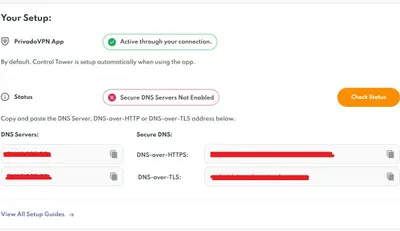
You get not only a VPN based service, but a complete solution. The company has a service called ‘Control Tower’, which comes with integrated smart DNS service. This means that you can configure your smart device using a DNS instead of installing client software. This is incredibly convenient and significantly saves valuable time. Plus, you can also control region and select your preferred streaming service profile.
Suported Netflix Regions
The video streaming powerhouse is now available in over 190 countries, boasting an extensive library filled with thousands of shows and movies. However, it’s crucial to recognize that the content available on Netflix differs significantly from one country to another.
Netflix has an extensive library of movies and series, but the availability of content varies depending on the region. This is because of copyright and licensing agreements, which limit access to certain titles in specific countries. As a result, subscribers may only have access to a portion of the full Netflix library based on their location. That’s because libraries on the popular streaming service vary from country to country, and you can only watch what is available in your geography.
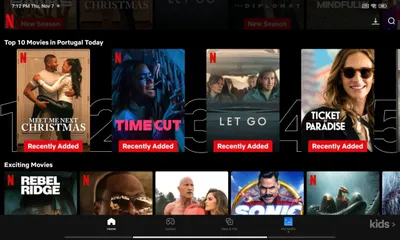
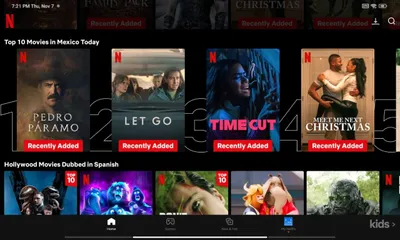
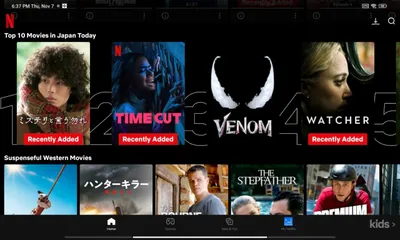
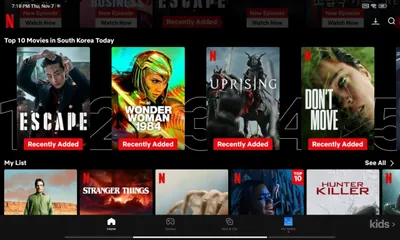
Netflix regions switch specifically targets three primary regions: France, the UK, and the USA, granting exclusive access to content from these areas. However, it also supports a wide array of additional regions we checked.
Testing it out! Verifying Netflix regions
We conducted tests across around 24 different regions, and every single one yielded positive result. The Netflix app effectively detected every country while using the Android application. Our comprehensive testing has shown that users are able to experience consistent and reliable access to a much wider range of diverse content across the supported regions. This improvement not only enhances their viewing experience but also allows them to explore and enjoy various genres and formats that were previously limited or unavailable.
 PrivadoVPN Unblock Netflix U.S
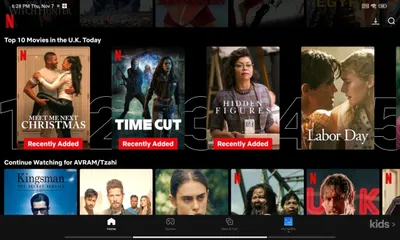
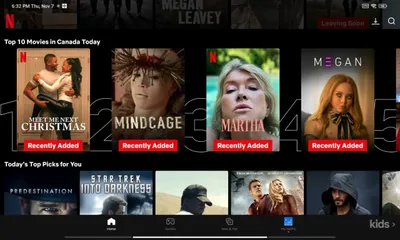

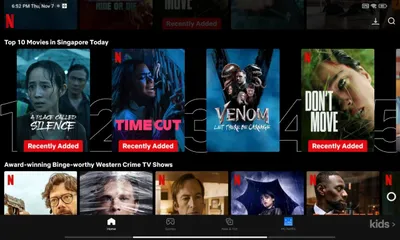

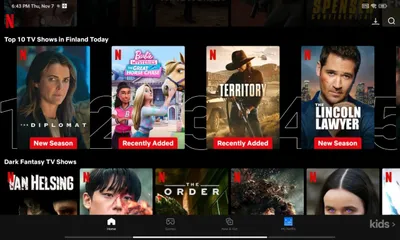
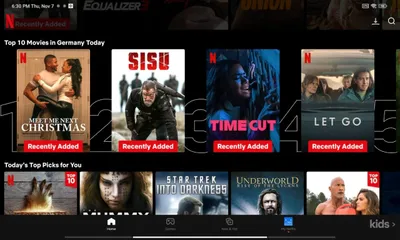

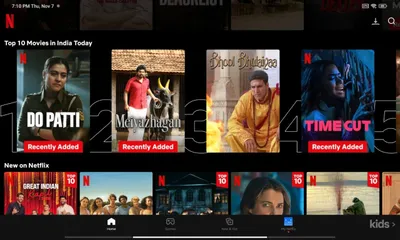

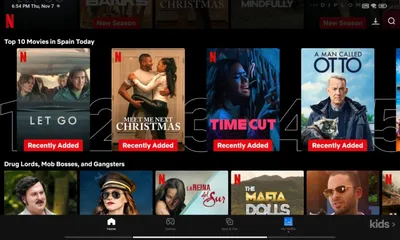
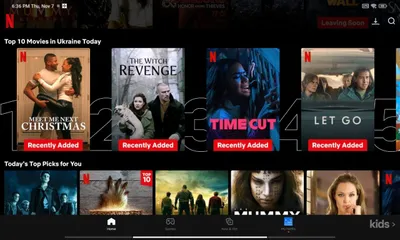

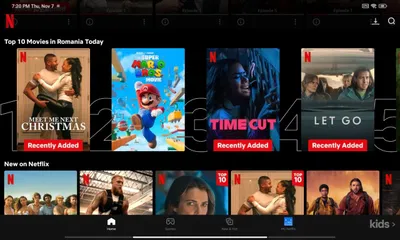

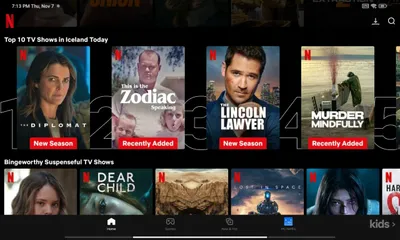
List of tested locations.
| Country | Tested |
|---|---|
| U.S | ✅ |
| U.K | ✅ |
| Canada | ✅ |
| France | ✅ |
| Hungary | ✅ |
| Bulgaria | ✅ |
| Germany | ✅ |
| France | ✅ |
| Italy | ✅ |
| Spain | ✅ |
| Ukriane | ✅ |
| Romania | ✅ |
| Portugal | ✅ |
| Finland | ✅ |
| Mexico | ✅ |
| Brazil | ✅ |
| India | ✅ |
| Singapore | ✅ |
| Hong Kong | ✅ |
| South Korea | ✅ |
| Japan | ✅ |
| Iceland | ✅ |
| Finland | ✅ |
| Australia | ✅ |
| Turkey | ✅ |
User-friendly features tailored for router users
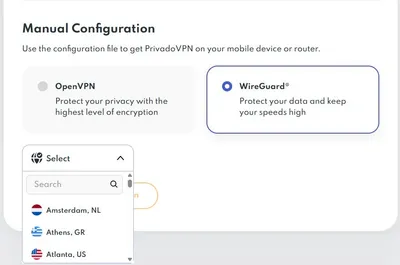
If your mobile, desktop, or router devices support OpenVPN or WireGuard protocols, obtaining configuration files has never been simpler. With our Web GUI, you can easily choose your desired server location and download the configuration files containing the credentials. After downloading, just import the file onto your device. Additionally, Linux and OpenWrt enthusiasts can also take advantage of these protocols, ensuring that establishing a secure connection in their local networks.
SOCKS5 proxies support
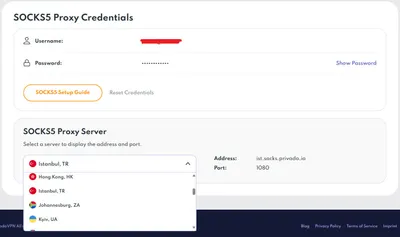
This service offers a list of SOCKS5 proxies filter by geographic regions. This option offers several advantages when used in conjunction with a VPN service, enhancing the overall security, privacy, and performance of the network. One of the primary advantages of SOCKS5 proxies in a VPN service is their ability to facilitate efficient and secure data transmission. By acting as an intermediary between the user’s device and the internet, the proxies can route network traffic through a remote server, effectively masking the user’s IP address and encrypting the data transmitted over the network.
Privado SOCKS5 Proxy Server List
Overcoming geographical limitations
The servers can provide a high level of flexibility and compatibility, allowing users to bypass geographical restrictions and access region-locked content or services. This is particularly beneficial for users who require access to specific online resources or wish to circumvent censorship or content blocking.
The speed advantage
Moreover, SOCKS5 proxies can significantly enhance the speed and performance of the VPN service. By leveraging the proxy’s optimized routing capabilities, users can experience reduced latency and improved data transfer speeds, particularly when accessing bandwidth-intensive applications or streaming media content. This can result in a smoother and more responsive online experience, especially for activities that demand high network performance.
Moreover, the use of proxies provides support for different network traffic types, such as TCP and UDP protocols, which enable seamless integration with a variety of applications and services. This versatility empowers users to take advantage of SOCKS5 proxies on multiple devices and platforms, ultimately improving the accessibility and usability of the VPN service.
Enhanced Security
Finally, SOCKS5 proxies can provide an additional layer of security and privacy for VPN users. By encapsulating network traffic within a secure tunnel and encrypting data transmissions, SOCKS5 proxies help mitigate the risk of eavesdropping, data interception, and unauthorized access to sensitive information, reinforcing the overall protection provided by the VPN service.
Smart DNS Settings
Once you configure the DNS address on your device, accessing the Control Tower settings through a web browser becomes a breeze. This setup unlocks a vast selection of streaming services and offers you the freedom to seamlessly switch between different regions, enriching your content experience. There’s no need for any additional applications; simply replace your device’s DNS address provided by the company.
It’s also worth mentioning that Smart DNS allows you to switch between three Netflix regions: France, the United Kingdom, and the United States. However, if you’re using the apps, you’ll find that it supports almost all countries (regions), which is a significant advantage.
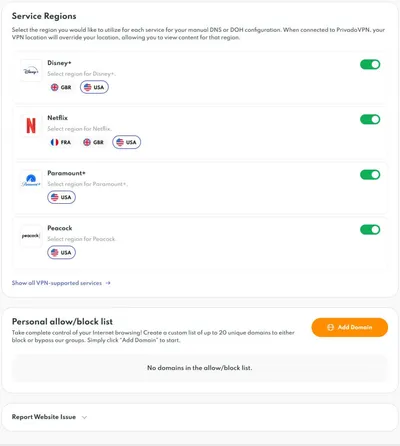
Awesome app interface for an excellent user experience!
The company offers extensive software support for popular platforms such as Android TV and Amazon Fire TV, guaranteeing users have the necessary tools for smooth integration and usage.
The mobile app now centralizes control tower features. This allows users to easily access and manage all options within the app. By implementing this enhancement, users can effortlessly manage all of the settings with greater convenience through the application itself, resulting in a streamlined and improved user experience.
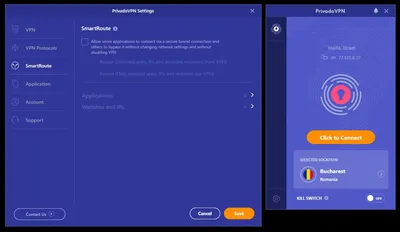
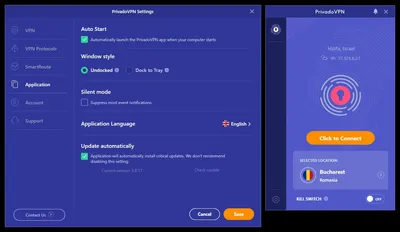
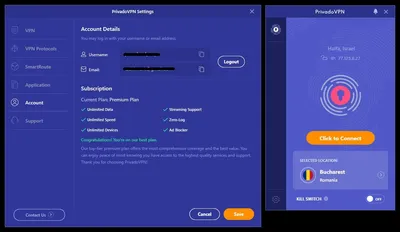
Windows Client
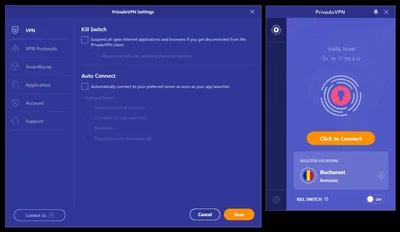 PrivadoVPN Win Client 1
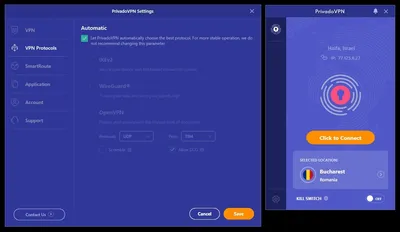
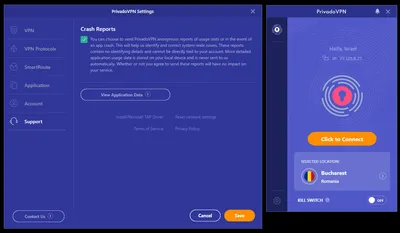
Android application.
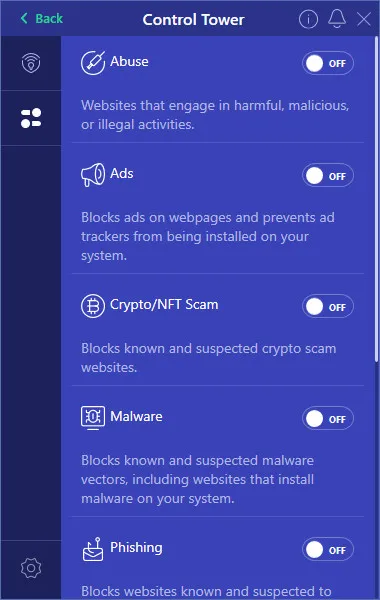
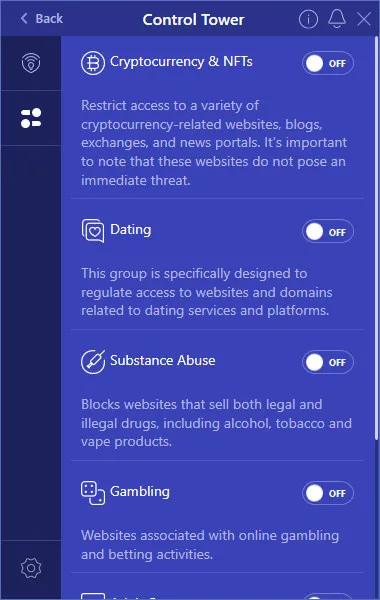
The mobile app offers advanced Control Tower features.
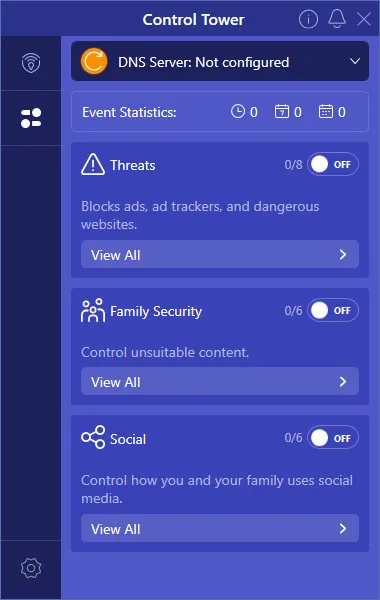
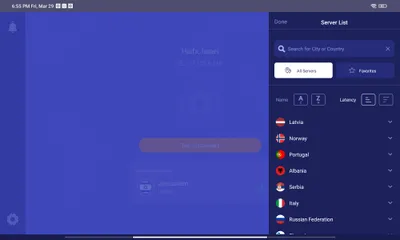
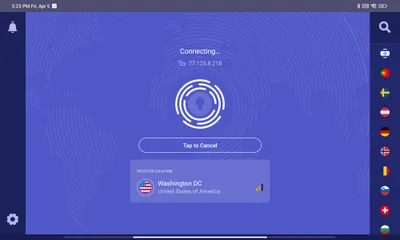
Mobile Tablet/landscape view
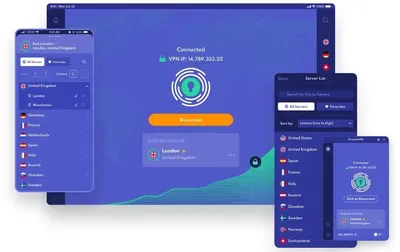
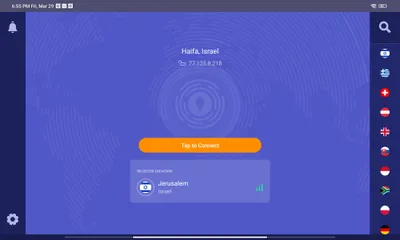
The client does not take up the majority of the screen when installed on a mobile device. You can switch between various countries. Choose a country by flag or search manually using the extended mode and pick a preferred location based on server latency.
Comprehensive, All-In-One Protection with Privado Sentry
Protecting Your Devices with Privado Sentry
This is why it is crucial to invest in a trusted antivirus solution like Privado Sentry. With Privado Sentry, you can have peace of mind knowing that your devices are protected from the latest cyber threats, allowing you to browse the internet, download files, and communicate online without fear of falling victim to malicious attacks. Without proper antivirus protection, your devices are vulnerable to a myriad of threats that can compromise your privacy and security, but now Privado also includes a built-in Antivirus solution, so you don’t need to pay $20 and higher for an antivirus software.
Privado Sentry Protection
Sentry is offered at an affordable rate of only $1.99 per month. The Privado team provides robust support for both Windows and Android app users. The Windows version operates as a standalone application, equipped with antivirus scanning, malware protection, and extensive threat defense. Meanwhile, the security features are effortlessly integrated into the existing Android and iOS mobile apps, eliminating the need for additional software installations.
What does it consist of?
- Malware Protection – Regular maintenance is essential to safeguard your computer from malware threats. the company scanning engine conducts detailed scans and implements real-time protection, ensuring your system remains free from viruses.
- Real-Time Protection – Once malware has infiltrated your system, eliminating it becomes significantly more challenging. Real-time protection actively monitors your system, ensuring that malware cannot gain a foothold on your computer.
- Instant Quarantine – Suspicious files are immediately quarantined so you can control what gets installed on your device and remove dangerous software before it hurts your system.
User experience
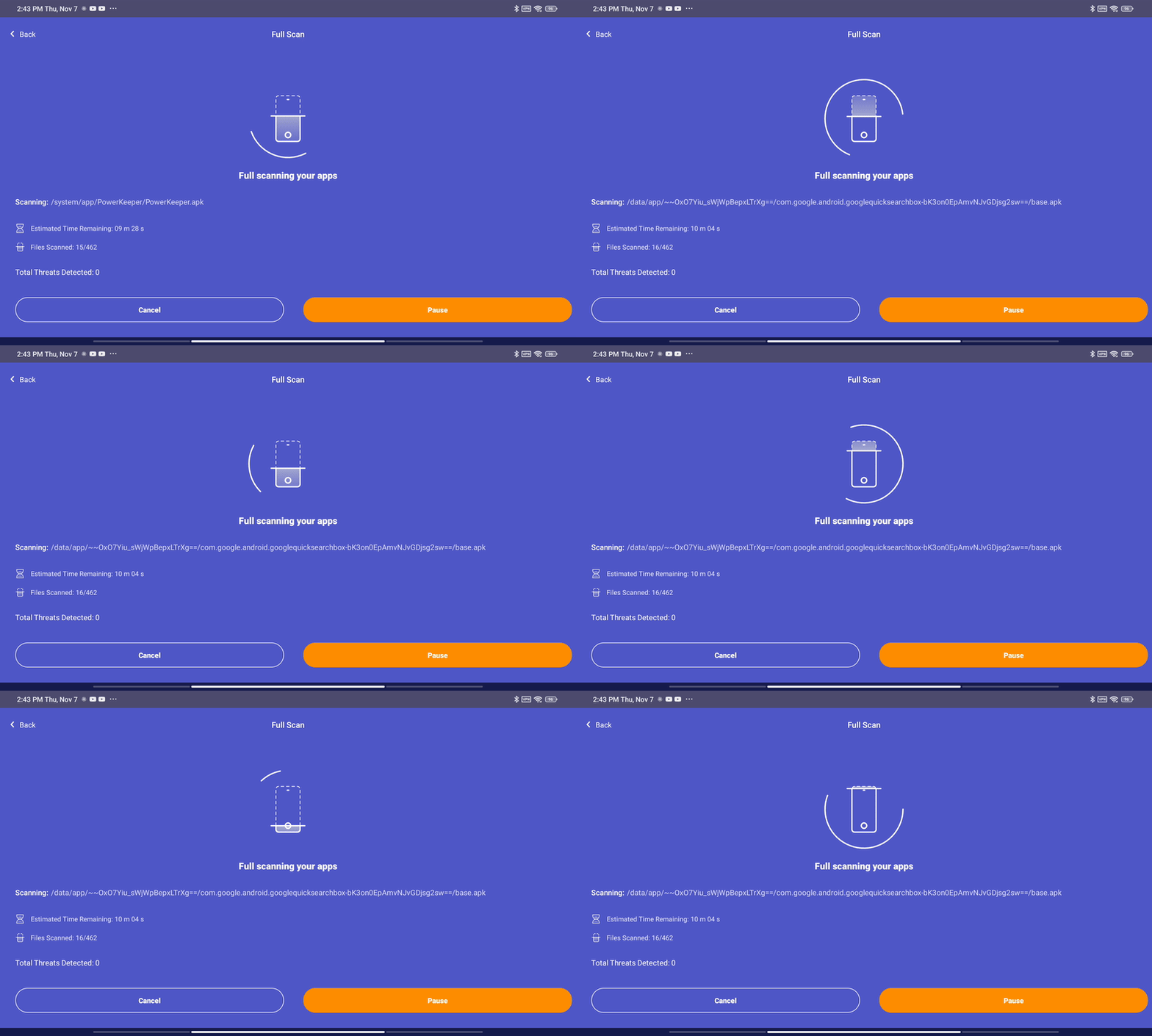
The Sentry protection features seamlessly integrate with mobile clients on Android and iOS, offering an elevated level of security. This functionality includes both quick and detailed file scanning options, contributing to the user experience and efficiency. The Windows client app does not include integrated protection, so a separate client will need to be downloaded (As shown in the screenshot below).
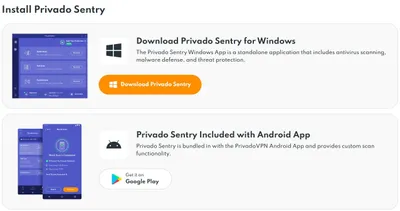
Sentry settings located within the Privado client, installed on a Xiaomi Poco Pad.
(Screenshots)
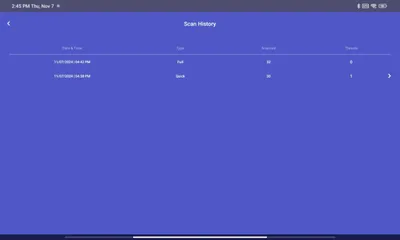
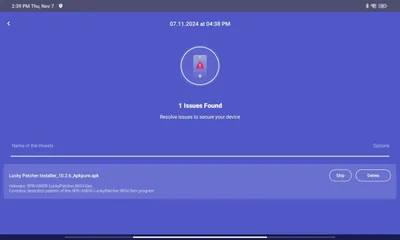
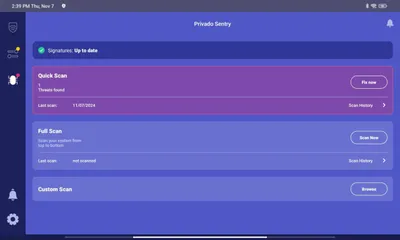
Privado Sentry File Scanning
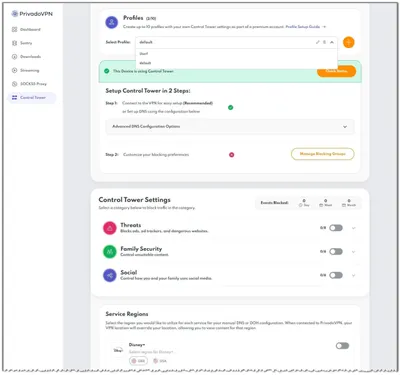
Privado Control Tower
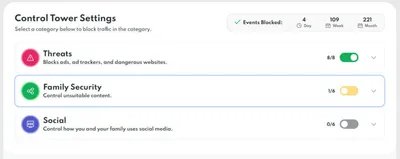
You can easily access all of these features through the web-based control panel. From there, you have the power to conveniently toggle on or off the various privacy options offered by Control Tower. The great part is that once connected to the service from any of your end devices, all settings are automatically applied.
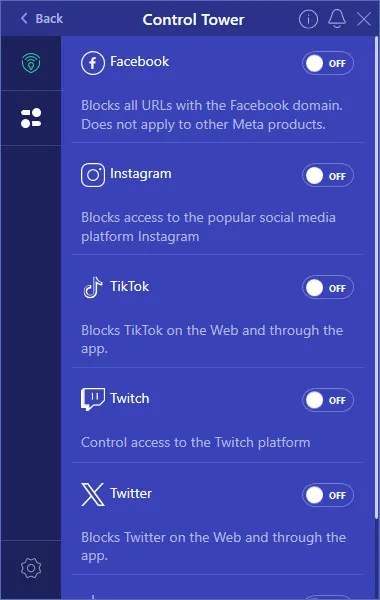
Social: Advanced filters and blocking for social media.
An additional feature of our service is the Threat Protection option, which allows you to block ads, ad trackers, and dangerous websites. We also offer a parental protection feature called Family Security, which enables you to block unwanted websites, including those related to gambling and adult content. Moreover, you can restrict access to popular social media platforms like TikTok, YouTube, and Twitter, Twitch, ensuring that your children can safely browse the internet without stumbling upon inappropriate content. Keep in mind that our service is not meant to be a traditional antivirus solution. Rather, it focuses on content filtering and blocking ads.
Threats: Protect your online experience by blocking ads, trackers, and malicious websites.
- Malware Blocker – This feature effectively prevents access to both known and potential sources of malware, such as websites that are known to distribute malicious software to users’ devices.
- Ransomware Blocker – This feature prevents known and suspected ransomware pathways, like suspicious websites, from launching attacks.
- Crypto Scam Blocker – This feature effectively blocks both confirmed and potential fraudulent cryptocurrency websites to protect users from jeopardizing their online wallets.
- Phishing Blocker – This feature effectively prevents access to websites that are notorious for deceiving users into providing personal information and passwords.
Parental controls for child internet safety
- Porn Blocker – This feature blocks all sexually explicit content, including apps and websites.
- Drug Blocker – This feature prevents access to websites that promote the sale of drugs, alcohol, and vape products. Note: This applies to both legal and illegal drugs.
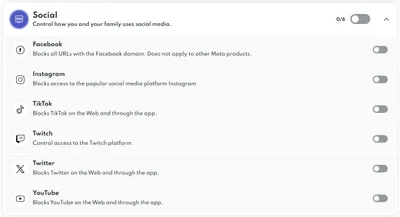
- Facebook Blocker– This feature has the ability to prevent any URLs that belong to the Facebook domain from being accessed. Please note that this only applies to other Meta products such as Instagram or WhatsApp.
- TikTok Blocker – This feature blocks access to TikTok from both the website and the app.
- Twitter Blocker – This feature effectively restricts access to Twitter, both through the web interface and the app.
- Youtube Blocker– This feature effectively prevents access to Youtube both through the Web interface and the app.
Social Media Blocking
Once you’ve configured and updated the DNS server settings with those of the company, you’ll be able to block access to various social media platforms. This feature is incredibly beneficial for preventing children from accessing inappropriate content. Moreover, you have the option to set up the main router unit to use the VPN service DNS address. This allows all devices connected wirelessly to easily block access to or change Netflix regions.
Settings for blocking social media.
How Privado Sentry Stands Out from Other Antivirus Solutions
What sets Privado Sentry apart from other antivirus solutions on the market is its comprehensive approach to cybersecurity. Unlike other antivirus software that only offers basic protection, Privado Sentry goes above and beyond to ensure that your devices are safeguarded from all angles. With its advanced threat detection capabilities, real-time scanning, and automatic updates, Privado Sentry is able to identify and neutralize even the most sophisticated cyber threats.
Privado Sentry offers a wide range of features and benefits that make it the ultimate antivirus solution for individuals and businesses. Some of the key features of Privado Sentry include real-time scanning, automatic updates, customizable security settings, and advanced threat detection. These features work together to provide comprehensive protection against viruses, malware, ransomware, and other cyber threats.
In addition to its powerful security capabilities, Privado Sentry also offers a user-friendly interface, fast scanning speeds, and minimal impact on system performance. This means that you can enjoy seamless protection without sacrificing the speed and performance of your devices. Another major benefit of using Privado Sentry is its compatibility with multiple devices and operating systems.
Support for multiple platforms
Whether you are using a Windows PC, Mac, or mobile device, Privado Sentry has you covered. This level of flexibility and compatibility ensures that all of your devices are protected, regardless of their operating system or specifications. Moreover, Privado Sentry settings can be accessed through a web browser, regardless of the operating system you are using.
Privado Sentry’s cybersecurity top features
| Protection type | Details | |
|---|---|---|
| Real-Time Security | ✅ | Constantly monitors and protects your device from threats against viruses and malware. |
| Cloud Scanning | ✅ | Harness the power of cloud technology for added security against emerging threats with real-time analysis of suspicious files, software, apps, and websites. |
| Deep Scanning | ✅ | Meticulously examines every corner of your device, leaving no room for compromise. |
| Custom Scanning | ✅ | Personalize your protection by customizing scan options. You can set scheduled scans or quick checks. |
| Quarantine Harmful Files | ✅ | Prevent disasters by isolating, encrypting, and moving harmful files to quarantine. |
| Multi-platform Support | ✅ | Compatible with various operating systems for versatile use. |
| Malware | ✅ | Detects and removes malicious software to keep your device safe. |
| Ransomware | ✅ | Block ransomware threats before they encrypt your files and demand a ransom. |
| Spyware | ✅ | Safeguard your privacy and sensitive data from unauthorized surveillance by detecting and removing spyware infections. |
| Adware | ✅ | Enjoy a better browsing experience free from intrusive ads that bury your screen, saturate your bandwidth, and drain your battery. |
| Trojan | ✅ | Identify and neutralize Trojan horses, safeguarding your data from unauthorized access. |
| Zero-Day Vulnerability | ✅ | Stay ahead of emerging threats and cyberattacks with continuous monitoring for new exploits and vulnerabilities. |
| Phishing | ✅ | Robust anti-phishing features identify and block suspicious emails, websites, and links, preventing cybercriminals from stealing your personal information. |
| Privacy | ✅ | Secures your personal information from unauthorized access. |
Server locations
Although this VPN service offers fewer cities in its coverage when compared to other VPN providers, it still provides a reliable and secure service, but it still offers a global network with 66 city locations around the world. While it may not have as many locations as some competitors, it still provides extensive coverage for users looking to access geo-restricted content and secure their internet connection. Nevertheless, the service offers good server performance, ensuring a smooth streaming experience for users.
Speed Performance: How Fast is it?
Does it measure up to other leading VPNs in 2024?
Yes, the answer is affirmative. This exceptional service not only offers fast transfer speeds but also stands toe-to-toe with renowned VPN providers like ExpressVPN, NordVPN, and Surfshark.
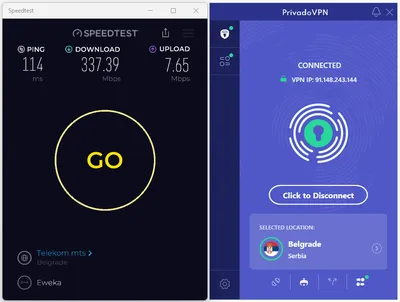
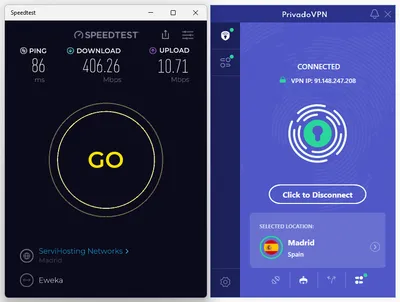
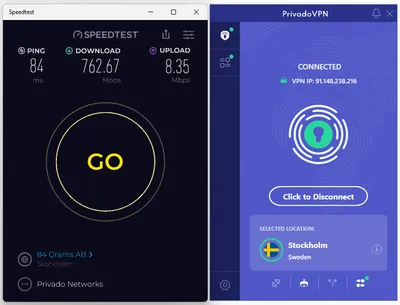
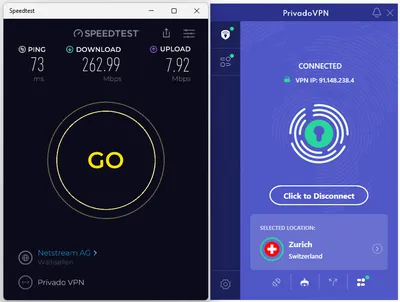
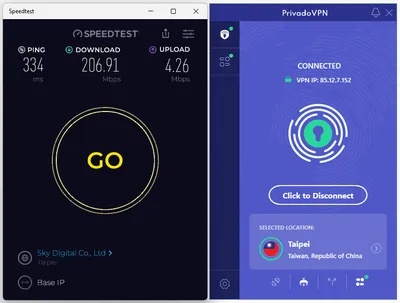
The European-based service we tested provided relative fast transfer speeds of around 300Mbps and above, depending on the server’s location. These speeds are more than enough for a smooth online streaming experience with no interruptions.
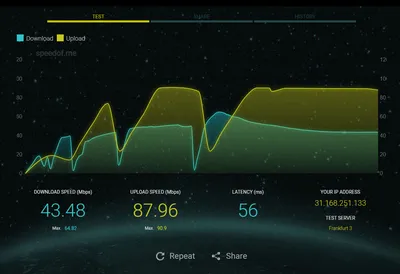
HTML5-Based Test: Evaluating Server Performance Using the SpeedOf.Me Website.
This test utilizes HTML5 to accurately measure internet speeds. However, please be aware that the test results may vary due to server location and the routing of your internet connection. Furthermore, it’s essential to emphasize that the results achieved will be notably improved when tested using services like Fast.com, which supports simultaneous multiple internet connections.
| Location | Without VPN | With VPN | Test Server Location |
| Israel [Jerusalem] | Download: 166Mbps Upload: 82Mbps Latency: 61ms | Download: 41Mbs Upload: 88Mbps Latency: 58ms | Frankfurt 3 |
| Austria [Vienna] | Download: 178Mbps Upload: 80Mbps Latency: 62ms | Download: 124Mbps Upload: 74Mbps Latency: 62ms | Frankfurt 3 |
| Germany [Berlin] | Download: 167Mbps Upload: 81Mbps Latency: 61ms | Download: 141Mbps Upload: 77Mbp Latency: 64ms | Frankfurt 3 |
| France [Paris] | Download: 186Mbps Upload: 81Mbps Latency: 62ms | Download: 53Mbps Upload: 66Mbps Latency: 77ms | Frankfurt 3 |
| Greece [Athens] | Download: 170Mbps Upload: 81Mbps Latency: 62ms | Download: 51Mbps Upload: 39Mbps Latency: 120ms | Frankfurt 3 |
| Romania [Bucharest] | Download: 173Mbps Upload: 80Mbps Latency: 62ms | Download: 43Mbps Upload: 49Mbps Latency: 124ms | Frankfurt 3 |
| Hungary [Budapest] | Download: 190Mbps Upload: 84Mbps Latency: 60ms | Download: 19Mbps Upload: 5Mbps Latency: 174ms | Frankfurt 3 |
| Hong Kong, SAR China | Download: 175Mbps Upload: 81Mbps Latency: 61ms | Download: 16Mbps Upload: 11Mbps Latency: 459ms | Frankfurt 3 |
Conducting speed tests using Speedtest by Ookla.
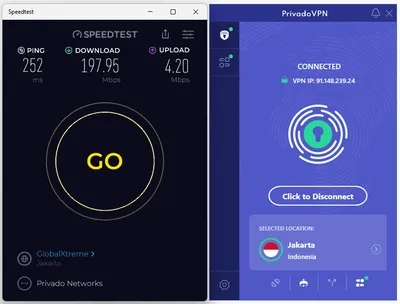
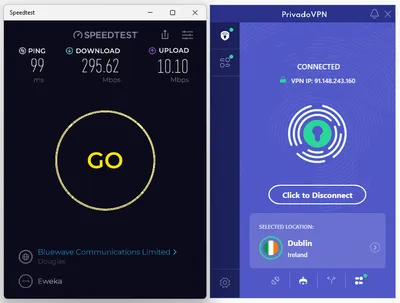
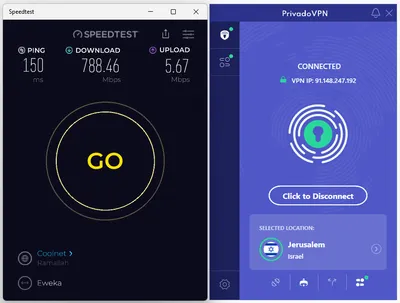
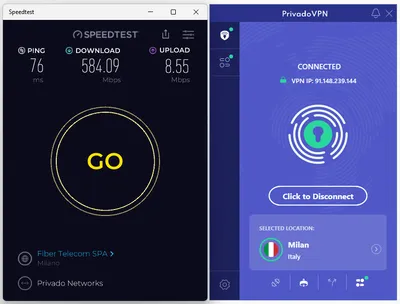
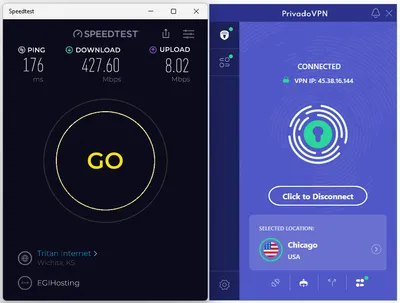
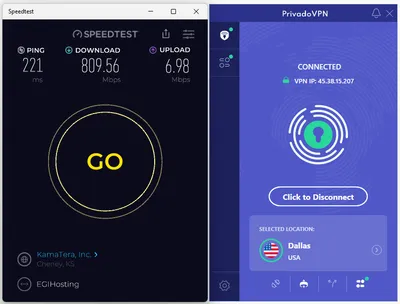
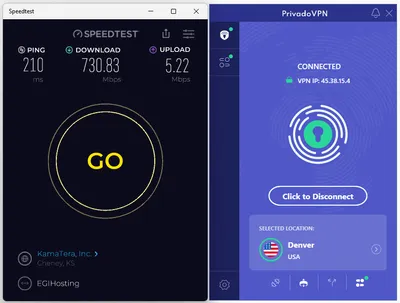
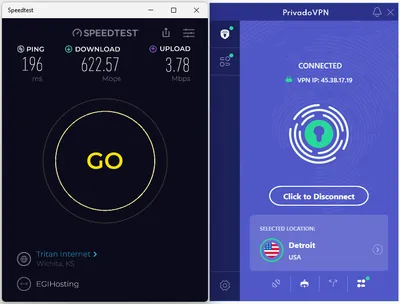
Evaluating VPN speeds can be quite intricate due to various influencing factors, including your Internet Service Provider (ISP) and proximity to servers. To assess performance, we employed the Ookla speed test service app to gauge average speeds across different regions. It’s important to note that upload speeds tend to be relatively low when tested with the Okalspeed service and the same goes with other VPN services we previously tested.
Our test results!
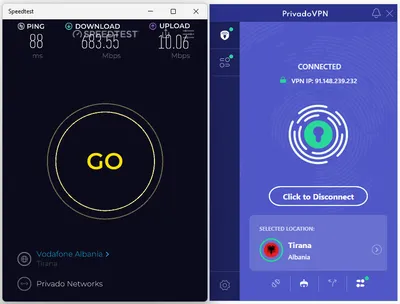
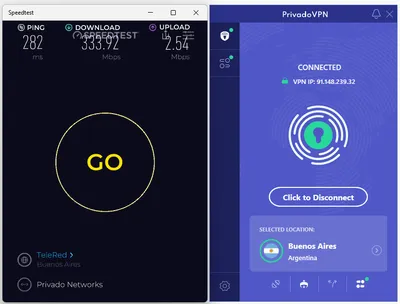
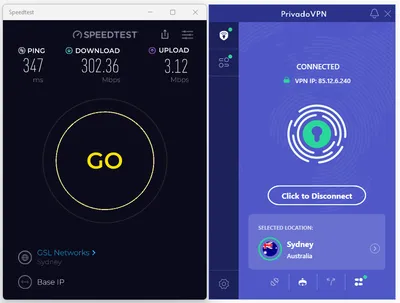
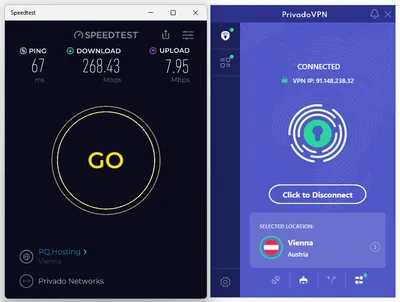
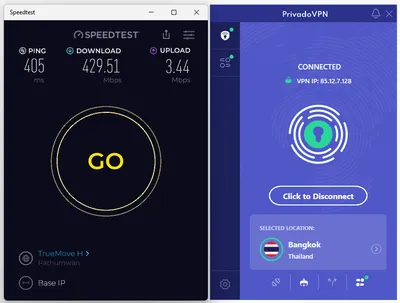
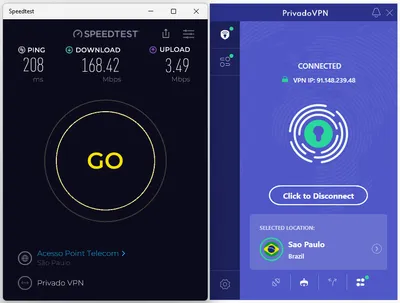
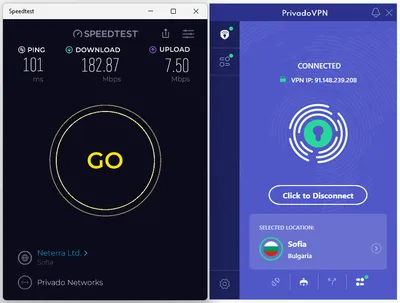
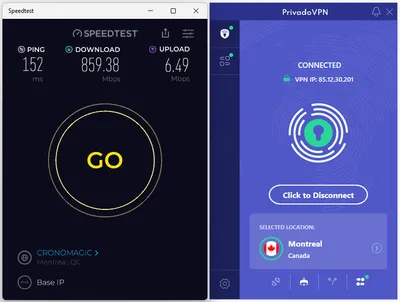
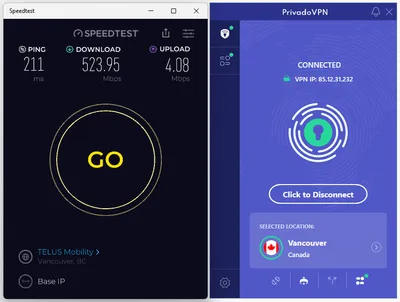
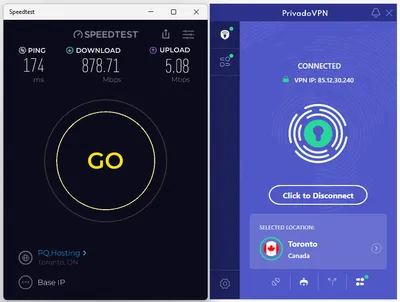
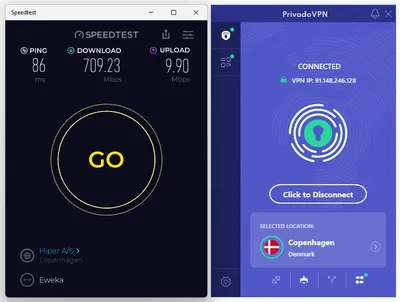
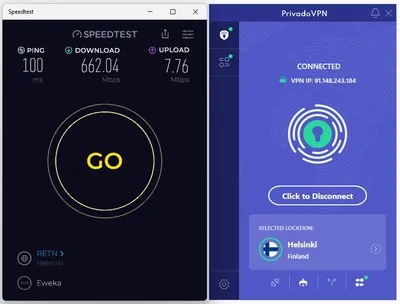
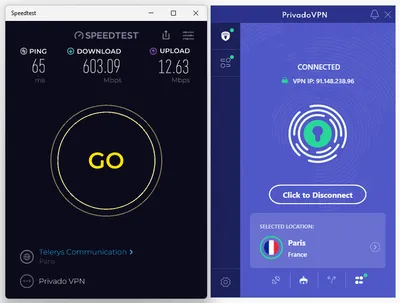
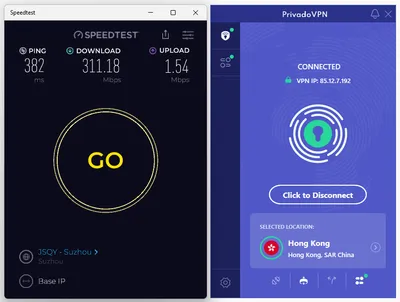
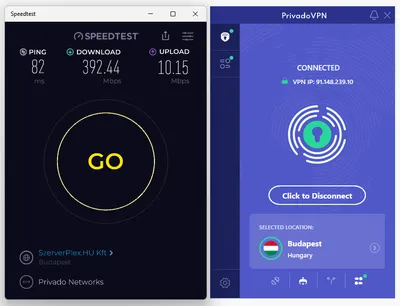
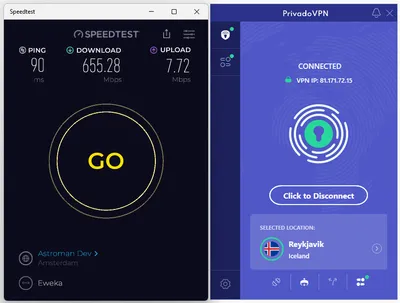
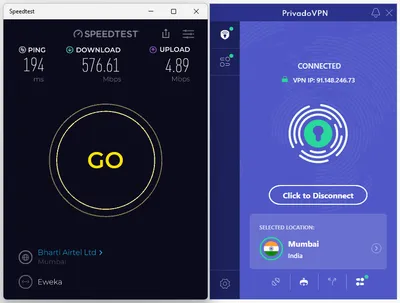
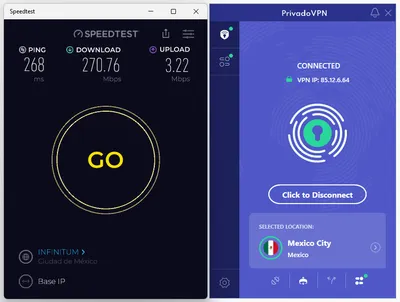
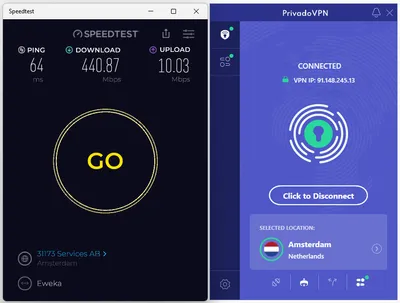
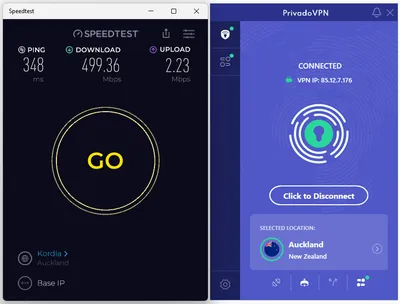
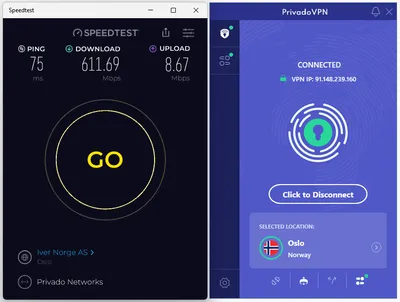
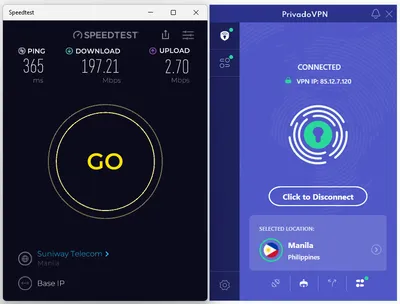
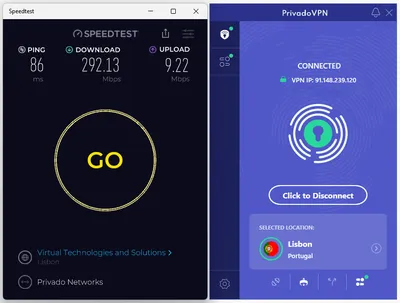
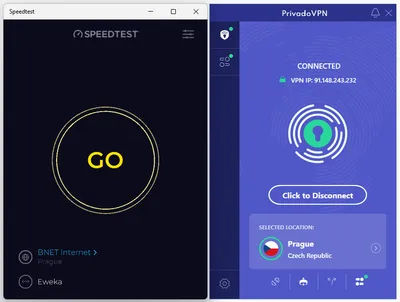
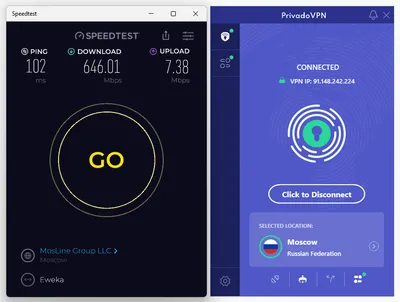
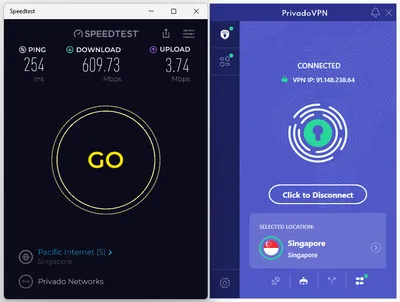
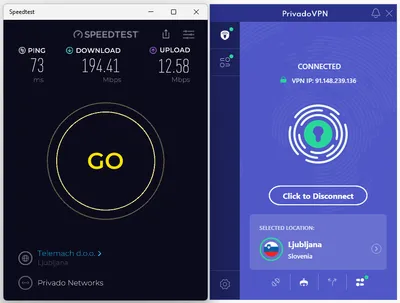
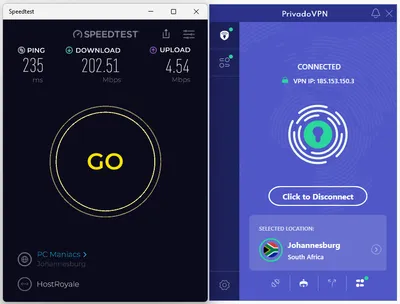
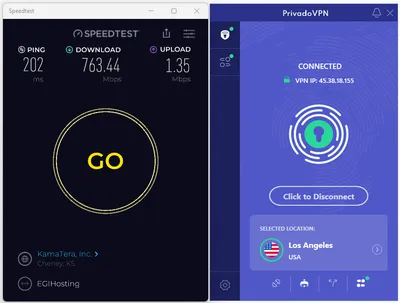
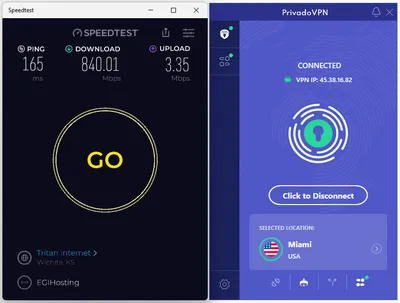
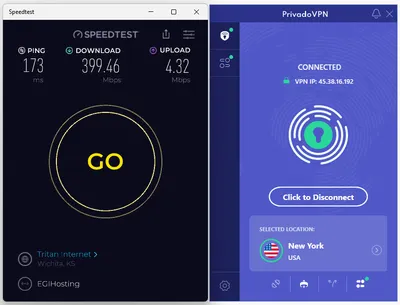
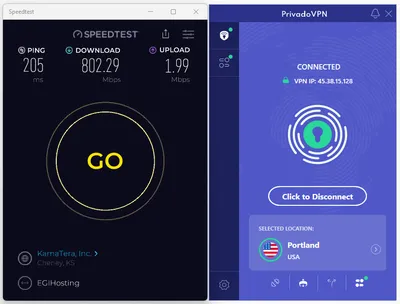
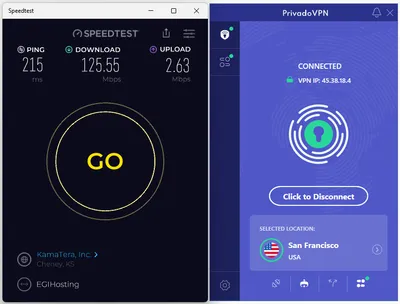
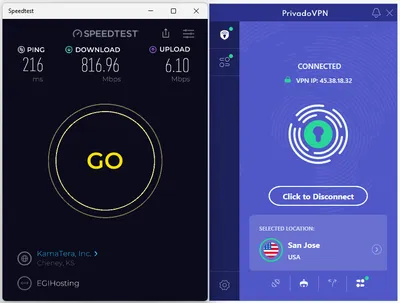
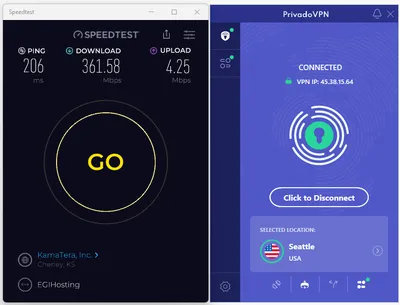
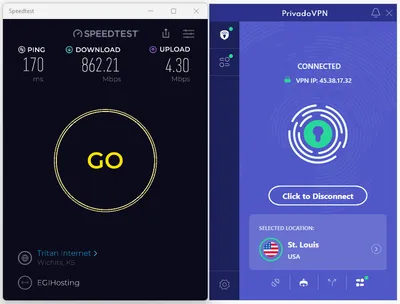
Download speeds typically range from 188 Mbps to 700 Mbps, while upload speeds hover between 5 to 10 Mbps. It’s important to note that these speeds can vary significantly based on the geographic location of the test and server load, which greatly impacts the outcomes. Our top performance was recorded while connecting to European servers in Italy, Spain, Denmark, France, and Canada. In contrast, other locations yielded an average speed of approximately 300 to 400 Mbps.
We have conducted thorough tests on all server locations. Below are the screenshots showcasing our findings.
USA Servers
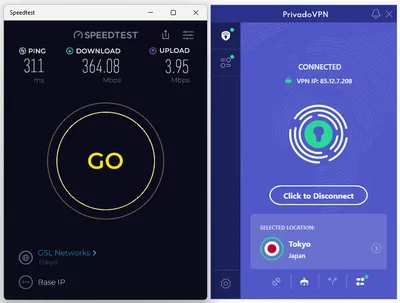
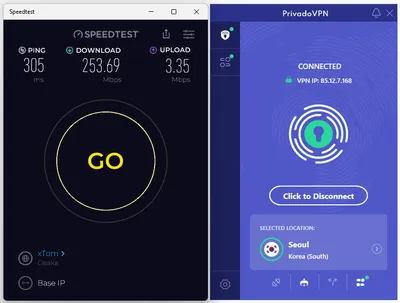
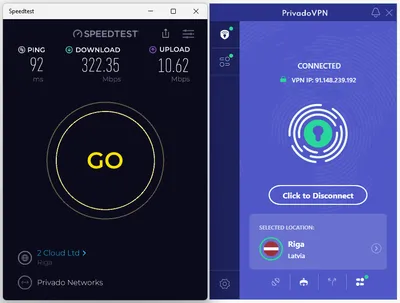
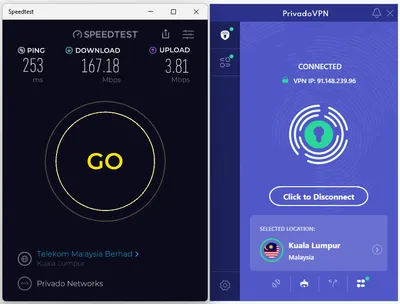
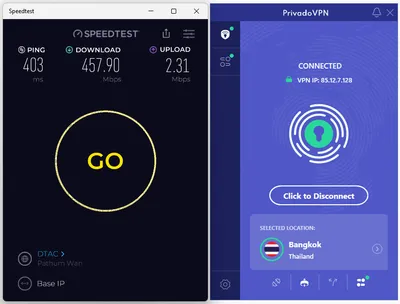
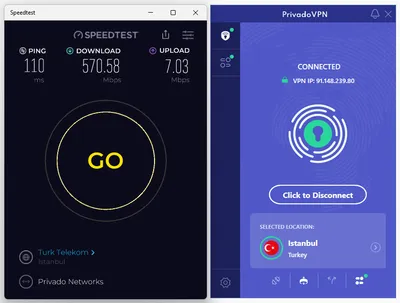
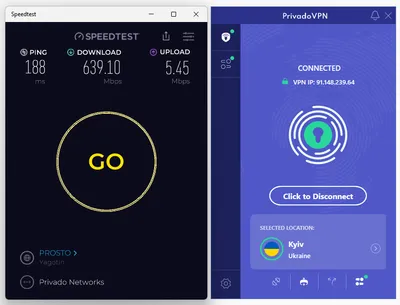
Additional countries worldwide.
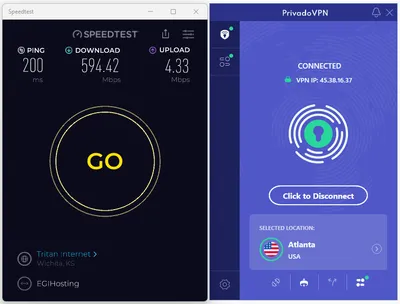
What’s new in 2025!
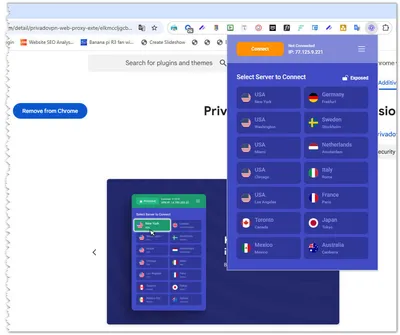
Web Proxy Extension
The company has recently expanded its accessibility by offering browser add-on extensions specifically designed for all Chrome-based browsers. This enhancement allows users to connect to the VPN seamlessly and conveniently through their web browsers without needing to download additional software.
Designed with its user-friendly and intuitive interface, the extension ensures an effortless experience for users, making it easier than ever to enjoy the benefits of secure browsing and enhanced online privacy. Now, users can protect their internet activities with just a few clicks, all from the comfort of their familiar browsing environment. If you are interested in installing it, you are welcome to download it from the official Chrome Web Store.
Chrome Addon
Integrated Speed & Latency Testing
This valuable feature, introduced in 2024, deserves your attention. The company has integrated a built-in speed test that allows users to seamlessly assess their internet connection directly within the app, eliminating the need for any external applications.
Profiles
Available under the control tower option, this useful new profiles feature lets you open up multiple profiles and tweak each one based on what services you want to enable or block. Plus, you can set a schedule to block certain online services and websites based on specific days, weeks, or months.
New Enhancements:
| Feature | Details |
|---|---|
| ✅New Chrome Extension | Now Available! |
| ✅Speed Test (Windows OS) | Compare connection speeds across various servers to optimize performance. |
| ✅ARM Support | Compatibility for ARM-based Windows devices. |
| ✅WearOS Support: | Control VPN settings directly from your smartwatch. |
| ✅GeoJump GPS Override: | Change your device’s GPS location for enhanced privacy and flexibility. |
| ✅QR Code Login | Simple and secure login process for Android TV & Apple TV users using QR scanning. |
| ✅ tvOS (Apple TV) | Dedicated VPN App: Enjoy VPN functionality directly on your Apple TV with a native app. |
Exclusive Deals Worth Checking!
Here are some key features:
- Unlimited Devices: Use on any number of devices.
- Server Locations: 67 global server locations for worldwide content access.
- Zero Log Policy: The company does not track or store data on users’ online activity, ensuring your privacy.
- User-Friendly Apps: Easy-to-use apps for PC, Mac, Android, iOS, Android TV, and Amazon Fire TV Stick.
- Ad-Free Experience: Enjoy browsing without ads.
- High-Level Encryption: The same security protocols used in their paid plans, ensuring your data is protected.
A range of flexible paid plan options is available for you to choose from.
✔ 30-day refund guarantee
✔3 Free months included.
✔ Add $1.99/mo Antivirus
✔ Save 88%
✔ 3 Free months included.
✔ Add $1.99/mo Antivirus
✔ Save 90%
Free VPN Plan Option: Offers 10 GB of data per month with unlimited speeds.
Review: The Ultimate Conclusion
Final Verdict
Overall, this user-friendly VPN service offers fast and easy installation. It provides a seamless experience for users, making it convenient and efficient for securing their online activities. Furthermore, it offers strong security features and a no-logs policy to ensure the safety of your personal information.
Overall, we found the VPN service to be quite reliable and efficient. On the Pros side, we especially value its parental protection and filtering features, as well as the Smart DNS option, which greatly simplifies setting up smart devices such as mobile devices and TVs. The software is designed with user-friendliness in mind. Additionally, the server speeds are reasonably fast.
Before you make a final decision!
The company offer a sign up for the 12-month plan or higher, you’ll receive an extra 3 months absolutely free. Don’t miss out on this fantastic opportunity to enhance your online privacy and security.
Interested in trying out the service? Download their mobile app for free from the Google Play Store and experience it firsthand before making a decision to purchase.
Sponsored Content Disclosure
This post is brought to you in collaboration with PrivadoVPN. All opinions expressed are our own. Any purchases made through my links may earn us a commission at no additional cost to you. Thank you for supporting AndroidPIMP!