- Maybe you missed it? Orange Pi 6 (Coming soon)
- WaveNote AI voice recorder and notetaker: An introduction, key features, hands-on testing, and pricing.
The WaveNote provides an exceptional suite of AI tools for transcription and summarization, making it a great device for students, business professionals, reporters, and anyone seeking a hands-free solution for meeting recordings – without occupying a smartphone. Here’s a quick look at its pros and cons:
- Great Build Quality and Design.
- Lots of cool AI features
- AI Model switching: ChatGPT/Claude
- 64GB of internal storage combined with cloud access.
- Includes a yearly subscription of 500 minutes per month.
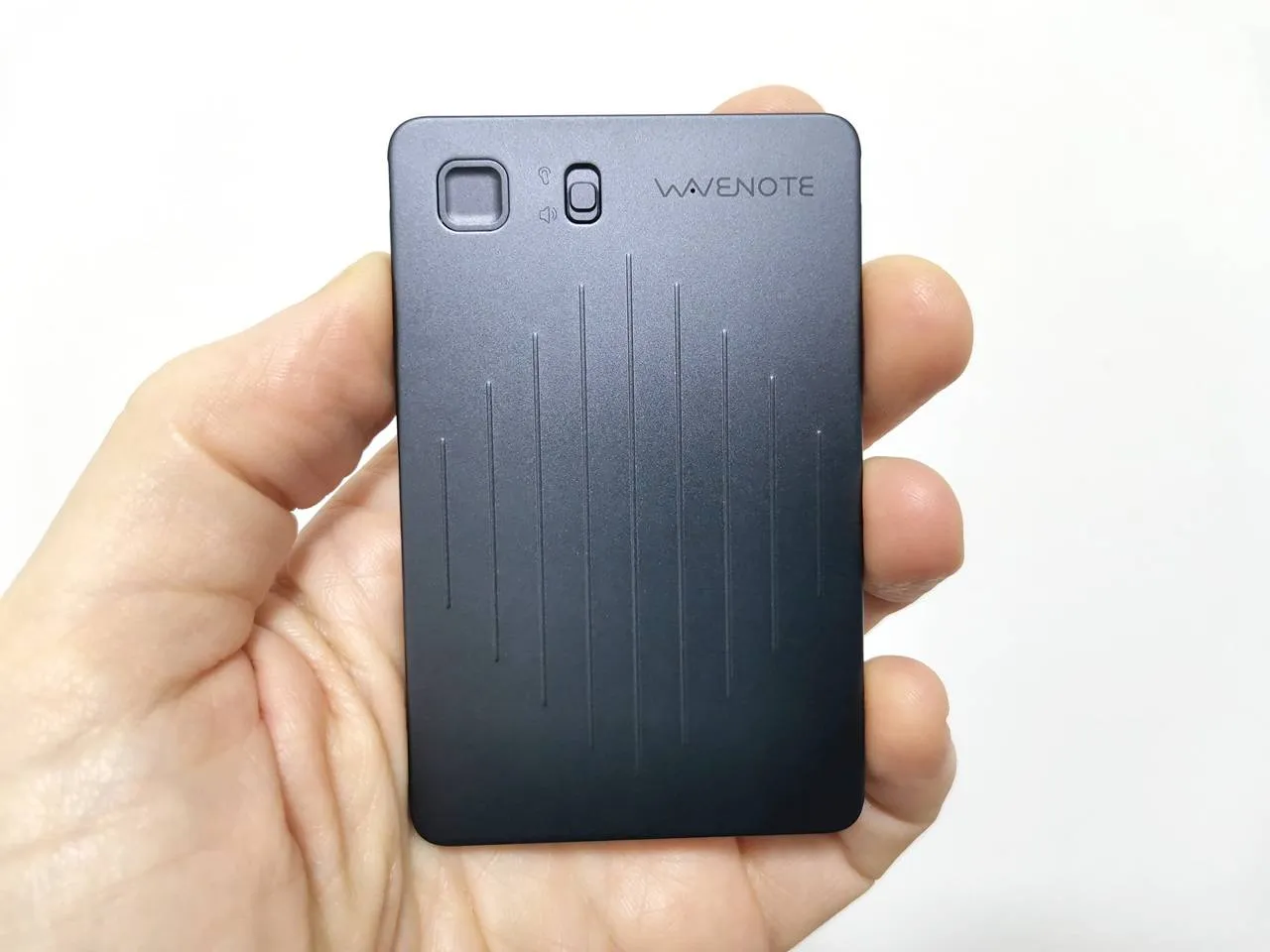
- Sleek, ultra-slim credit card design.
- The GUI design of the mobile app could be more streamlined and visually appealing.
- For more accurate transcribing, higher-tier plans may be required.
Part I: Product introduction
WaveNote is a cutting-edge AI gadget designed for meeting summaries, call transcriptions, and note-taking, capable of supporting more than 112 languages.
[Last Updated: February 24, 2026] WaveNote is a dedicated AI voice recorder and note taking ecosystem built around a physical recording device plus a cloud platform that delivers fast, multilingual transcription, summaries, meeting minutes, mind maps, and to‑do lists. It’s more than just a recording gadget; it’s a physical, MagSafe-integrated powerhouse designed for professionals, students, and creators who need to turn spoken words into organized, actionable data instantly.
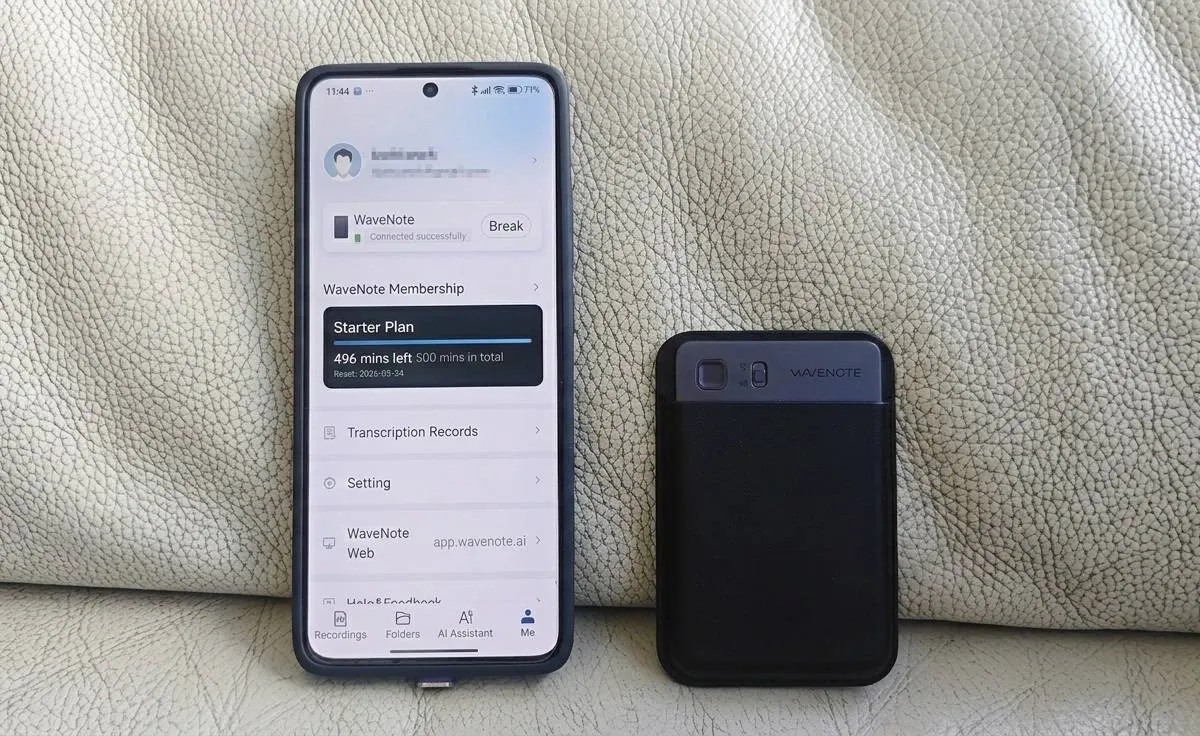
This product combines a dedicated recorder with an AI-driven workspace for web and mobile applications, streamlining the process of capturing, organizing, and reusing ideas from meetings, lectures, interviews, or daily reflections. Its sleek, credit card-sized design ensures that it easily fits into any small pocket or wallet.
The device uses GPT-5 to deliver transcriptions with 99% accuracy, and it also lets you switch between various LLMs like Anthropic’s Claude 3.7 and ChatGPT, while supporting over 112 languages.
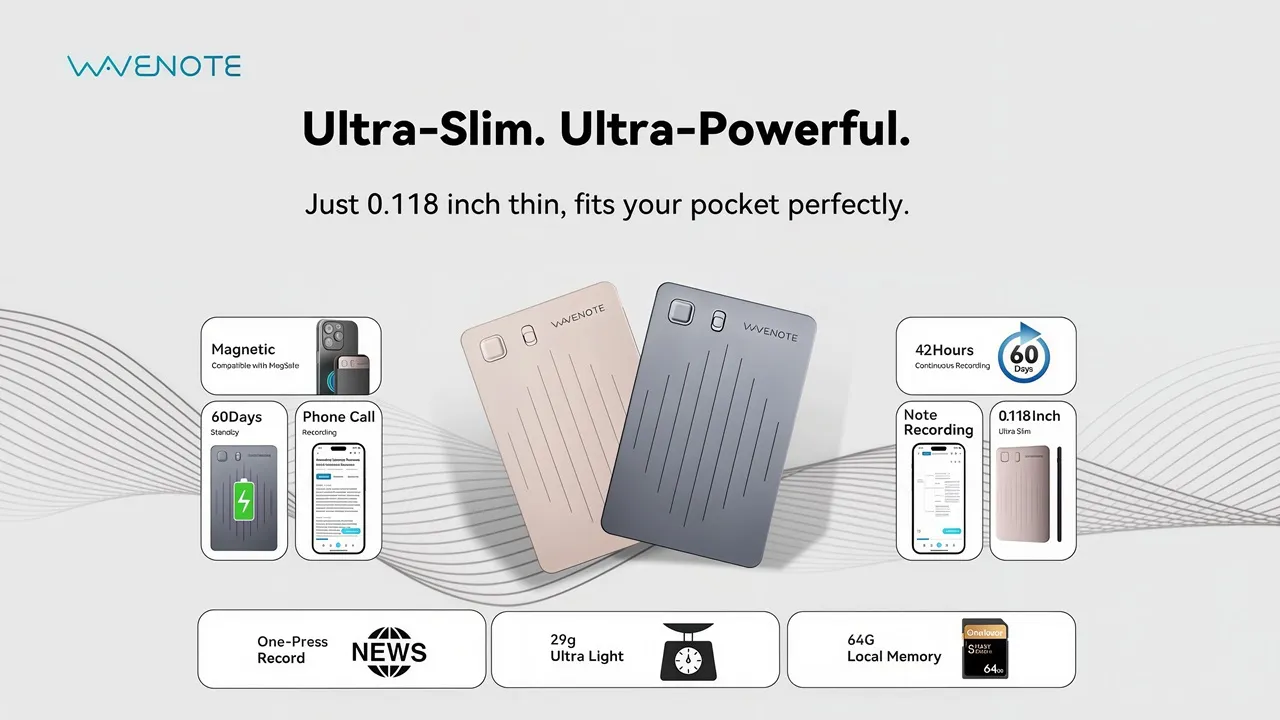
Main highlights
In the midst of the confusion created by handwritten notes, WaveNote AI revolutionizes your productivity through its groundbreaking automation features. Just take a photo with your phone, and let the AI take care of everything else.
- MagSafe & Phone Call Recording: Snaps to your iPhone to record both sides of a phone call using vibration conduction—no complex software hacks needed.
- Clearer audio: WaveNote uses AI to eliminate up to 95% of background noise.
- GPT-5 Powered Summaries: Don’t just get a transcript; get a high-level executive summary, bulleted action items, and mind maps created by the world’s most advanced AI.
- 99% Accurate Transcription: Industry-leading speech-to-text supporting over 112+ languages and specialized terminology for legal, medical, and tech fields.
- Massive Storage & Battery Performance: With the ability to record for over 40 hours on a single charge, it’s powered by a 400mAh battery and supports USB-C fast charging, reaching full capacity in under two hours. Plus, the 64GB internal drive can store up to 500 hours of audio.
- In-App AI Model Switching: The official WaveNote app now allows users to choose which LLM (Large Language Model) processes their summaries. In the app settings, you can often toggle between:
- OpenAI (GPT-5): Best for creative writing and general summaries.
- Anthropic (Claude 3.7): Many users prefer Claude for coding-heavy meetings or technical documentation because its reasoning is often more precise.
- Google Gemini 3: Ideal if you want your summaries to integrate directly with your Google Workspace (Google Docs, Calendar, etc.).
1. Hardware: A Slim AI Recorder Built for RealWorld Use
At the core of the WaveNote ecosystem is the WaveNote AI Voice Recorder, a sleek, ultrathin device built for capturing audio anytime, anywhere.
1.1 Design and build
- Premium aluminum body: The recorder uses a sleek aluminum alloy shell, designed to look and feel like a modern, professional gadget rather than a bulky traditional dictaphone.
- Ultraslim, ultralight: Marketing materials highlight a thickness on the order of a couple of cards stacked together and a weight of around 29 grams, making it easy to clip to clothing, keep in a shirt pocket, or carry on a lanyard without noticing it.
- Discreet, professional appearance: The minimalist design is intentional, so WaveNote can be used in boardrooms, classrooms, or interviews without being visually intrusive.
- Apple MagSafe Support: Compatible with Apple’s proprietary magnetic technology (as shown in the video below).
2. Audio Capture System
WaveNote’s hardware is built around speech clarity and robustness in noisy environments.
- Dual sensor architecture:
- Vibration sensor: Captures voice via surface vibrations, especially useful for phone calls and situations where the recorder sits on a table.
- Airconduction microphone: A conventional mic tuned for spoken voice, ensuring clean pickup even at a distance.
- Advanced AI noise suppression:
- WaveNote uses AI to remove up to about 95% of background noise, so voices remain intelligible in cafés, open-plan offices, and conference halls.
- This noise suppression is paired with what the company describes as “studio‑quality sound clarity,” making transcriptions more accurate and easier to read later.
- High transcription accuracy:
3. Storage and Battery
- 64 GB local memory:
- All day recording:
- Cloud backup:
4. The Wave AI Note Taker & Recorder App
The “WaveNoter” mobile and web app can record audio and turn it into organized, shareable notes. It’s designed for professionals, students, and content creators who want accurate transcripts, clear speaker attribution, and concise summaries without the hassle of taking notes by hand.
- Wave runs on iOS, Android, and a browser-based web app, syncing recordings and notes across devices through the cloud.
- The core workflow is simple: start recording, let the AI transcribe, then review or export the summary and full transcript in your preferred format.
Although WaveNoter is an app designed to complement dedicated hardware, it also boasts clear platform-level specs and technical features that matter to buyers, such as noise canceling and voice sensitive microphones.
- Supported platforms and OS:
- iOS and iPadOS from version 15.1 or later; the App Store listing specifies compatibility with iPhone and iPad running iOS/iPadOS 15.1+.
- Web access via a browser, with automatic syncing of recordings and notes between mobile apps and the web dashboard.
- Storage and infrastructure:
- Wave uses secure cloud infrastructure on Google Cloud, with encrypted storage and encrypted data transfer for recordings and transcripts.
- The service advertises SOC 2–level compliance, positioning it for business and enterprise use where security certifications matter.
- AI and transcription engine:
- Wave relies on a state-of-the-art speech-to-text backend similar to Whisperclass models, enabling highfidelity transcription in noisy environments and with rapid speech.
- It supports over 112 languages for transcription, making it suitable for international teams and multilingual meetings.
- Performance characteristics:
- Unlimited or effectively “run-long” recordings allow users to capture lengthy meetings, lectures, or podcast sessions without the constraints of strict time limits.
- Fast processing with “ultra-fast” conversion from audio to transcript and summary, designed so that long sessions become readable notes within minutes.
5. Call Transcribing & Meeting Summarizer: Advanced recording and capturing with automatic transcription
Wave is built first as a robust audio and call recorder, then layers AI on top.
- Background recording: The app can record in the background while other apps are open or with the screen off, which is crucial for long meetings or lectures.
- Non-stop sessions: It supports continuous recording, so users can track workshops, conferences, or day‑long sessions without needing to restart.
- Phone call recording via VoIP: Wave includes phone-call recording, capturing incoming and outgoing calls through the app and transcribing them automatically.
- Multi-modal capture (audio + images): A newer update allows users to capture images alongside audio, and the AI incorporates visual context into the summaries.
6. Transcription Accuracy and Speaker Detection
The exceptional quality of transcription is one of Wave’s most impressive features.
- High-accuracy transcription: Leveraging advanced speech recognition, Wave transcribes spoken content with high fidelity, even when there are technical jargon, multiple speakers, or non‑native accents.
- Multi-speaker detection: Users report that Wave identifies different speakers and can correctly attribute names or segments with very high accuracy, with one report indicating around 98% correct speaker attribution in group discussions.
- Real-time and post-processing: Wave can transcribe in real time during recording, or process existing audio files imported into the app.
7. AI Summaries and Note Structuring
The AI summarization feature distinguishes itself from conventional recorders through the following attributes:
- Intelligent summaries: After a meeting or lecture, Wave creates concise summaries that highlight key points, decisions, and action items so users can skim instead of replaying the whole session.
- Topic separation: Summaries are broken into sections or topics with headings and bullet points, making complex discussions easier to navigate.
- Action items and to-dos: The AI can turn spoken instructions and agreements into clear action items or task-style bullet points.
- Voice to structured notes: Wave converts free-form speech into structured notes, lists, and outlines, effectively acting as an assistant that organizes content instead of just transcribing it.
8. Organization, Search, and Chat
Wave also focuses on retrieval and interaction with existing notes.
- Searchable archives: All transcripts and summaries are searchable, letting users quickly locate topics, names, or decisions across many meetings.
- Categorization and lists: Recordings can be grouped into folders or lists (e.g., by project, client, or course), which simplifies long-term knowledge management.
- WaveAI Chat: A newer capability lets users ask questions about past meetings and get context-aware answers from their recordings, like “What were the next steps from last week’s sprint review?
9. Integrations and Workflow Fit
For professionals and students who live inside productivity suites, Wave’s integrations are particularly important.
- Meeting platform integrations:
- Integrates with Zoom, Microsoft Teams, and Google Meet to capture meeting audio and generate summaries that attach to calendar events or meeting records.
- Note and document tools:
- Syncs and exports to Notion, OneNote, Evernote, Google Docs, and similar tools, so AI-generated notes can live inside existing knowledge bases.
- Export formats:
- Supports export to PDF, TXT, and DOCX, as well as shareable URLs, which is helpful for collaborating with teammates who do not use Wave.
These integrations allow Wave to fit into existing workflows instead of forcing teams to switch tools, which is crucial for adoption in business environments.
10. Subscription Plans
WaveNote typically operates on a subscription model, eliminating the need for users to buy individual “credits” for every recording. For those who prefer a one-time payment option over monthly bills, they also offer convenient “minute packages.”
Here’s how the payment for AI features is broken down:
10.1 The Subscription Tiers (Most Popular)
Most users choose a monthly or annual plan because it covers both the transcription (Speech-to-Text) and the AI processing (Summaries/Action Items).
Here is a comparison table to show the main differences between different plans:
| Plan | Monthly AI Time | Best For |
| Starter | 500 minutes per month | Basic usage (Free for 12 months) |
| Pro | 2,000 minutes each month | Best value if you record daily meetings or long lectures. |
| Unlimited | Unlimited | Corporate teams & Journalists |
10.2 The “Minute Packages” (Alternative to Credits)
If you don’t want a subscription, WaveNote offers one-time “top-up” packages. These function exactly like AI Credits:
- Small Pack: ~120 minutes
- Medium Pack: ~600 minutes
- Bulk Pack: ~3,000 to 6,000 minutes
Note: These minutes usually do not expire, so you can buy them once and “burn” them only when you need a transcript.
10.3 What exactly are you paying for?
When you “spend” your time or credits, you are paying for three distinct AI processes:
- Transcription: Converting the raw audio into text.
- Speaker Diarization: Identifying who is speaking (Speaker A, Speaker B).
- LLM Processing: Leverage advanced models such as GPT-5 and Claude 3.7 to craft your summaries and outline key action items effectively.
Tips for saving money on AI credits:
- Choose your model wisely: Summarizing with GPT-5 often “costs” more in terms of credits than using a simpler model like GPT-4o mini. Check your app settings to see if you can toggle between models.
- Local Transcription: Some 2026 apps allow “On-Device” transcription for a one-time fee. This uses your phone’s processor instead of the cloud, meaning you don’t need credits, though it is slightly less accurate for multiple speakers.
- Annual Billing: Switching from monthly to annual billing for the Pro Plan usually saves you about 20-30%.
11. Privacy, Security, and Reliability
Since Wave deals with potentially sensitive conversations, the platform puts a strong focus on security and reliability.
- Security posture:
- SOC 2–compliant backend and encrypted data storage and transfer for recordings and transcripts, aligning with common corporate security requirements.
- User control:
- Users can delete recordings and transcripts at any time and can export or download them for local archiving if desired.
- Reliability and cloud backup:
- Cloud backup ensures that recordings are not lost if a device is damaged or replaced, and automatic sync keeps mobile and web copies consistent.
12. Real-World Feedback and User Experience
Public reviews and analyses emphasize Wave’s notable strengths while also pointing out some limitations.
- Reported strengths:
- Users emphasize the ease of use: recording, seeing transcripts, and reading summaries requires minimal setup.
- Many note that Wave “gets the job done” for capturing important meetings, calls, interviews, and lectures, and that it saves significant time on manual note typing.
- Reviews praise its handling of multiple speakers, technical vocabulary, and its ability to produce usable summaries that people actually read.
- Reported weaknesses:
- Some Android users mention issues around recording certain types of outgoing calls depending on device/OS limitations, which is a common constraint for call-recording apps.play.google+1
- A few reviewers mention limited or slow technical support, especially when dealing with edge cases or platform-specific bugs.
- Video reviews stress that while Wave significantly reduces the burden of transcription and note-taking, it does not completely remove the need to review content for critical decisions or compliance-heavy fields.
13. Best Scenarios: Real-World Applications
WaveAI Note Taker is positioned as a general-purpose AI sidekick for anyone who frequently attends or hosts conversations that should be documented. The product is designed for those who want more than just generic mobile apps, offering a dependable, dedicated capture device seamlessly integrated with a powerful AI workspace.
- For business professionals:
- Sales calls, client meetings, sprint reviews, and internal check-ins can be recorded, summarized, and distributed quickly, helping teams align on next steps without someone manually typing minutes.
- Multi-language support and speaker attribution are especially useful in international teams and cross-functional discussions.
- For students and educators:
- Lecture Note Taker mode is designed for classes, letting students re-focus on listening and participating, then use the AI summaries and transcripts for revision later.
- The ability to search across lectures and generate summary notes is valuable for exam preparation, especially in content-heavy courses.
- For creators, journalists, and researchers:
- Interviews, podcast recordings, and field notes can be captured and transcribed, turning voice memos into structured material ready for articles, scripts, or reports.
- Importing existing audio or YouTube content extends Wave beyond live recording, turning it into a general “audio-to-insight” tool.