

So, does the hardware outperforms the Raspberry Pi 5?
The answer is yes; as the article title suggests, here are four reasons why this compact Intel SBC surpasses the Raspberry Pi 5 board. Here’s a clearer and more streamlined breakdown of the five reasons the LattePanda IOTA SBC outshines the Raspberry Pi 5:
🥇 1. Superior CPU Performance
- Processor: Intel N150 SoC with 4 Gracemont E-cores
- Clock Speed: Boosts up to 3.6 GHz
- Benchmark Advantage: Outperforms Raspberry Pi 5 in Geekbench 6 (single-core and multi-core)
🎨 2. Exceptional GPU Power
- Graphics: Intel UHD Graphics with up to 1000 MHz
- Performance: Delivers 10–30× better GPU throughput than RPi 5
- Use Cases: Ideal for media playback, light gaming, and graphical applications
🔌 3. Advanced Connectivity & Expansion
- Ports: USB 3.2 Gen 2 (10 Gbps), HDMI 2.1 (4K @ 60Hz), Gigabit Ethernet
- Expansion: M.2 slot for SSDs or wireless modules
- Bonus: RP2040 co-processor for real-time I/O tasks (e.g., robotics, sensors)
🖥️ 4. Full x86 OS Compatibility
- Operating Systems: Runs Windows 10/11, Ubuntu, and other x86 Linux distros
- Flexibility: Supports mainstream software and development tools without ARM limitations
Performance Comparison
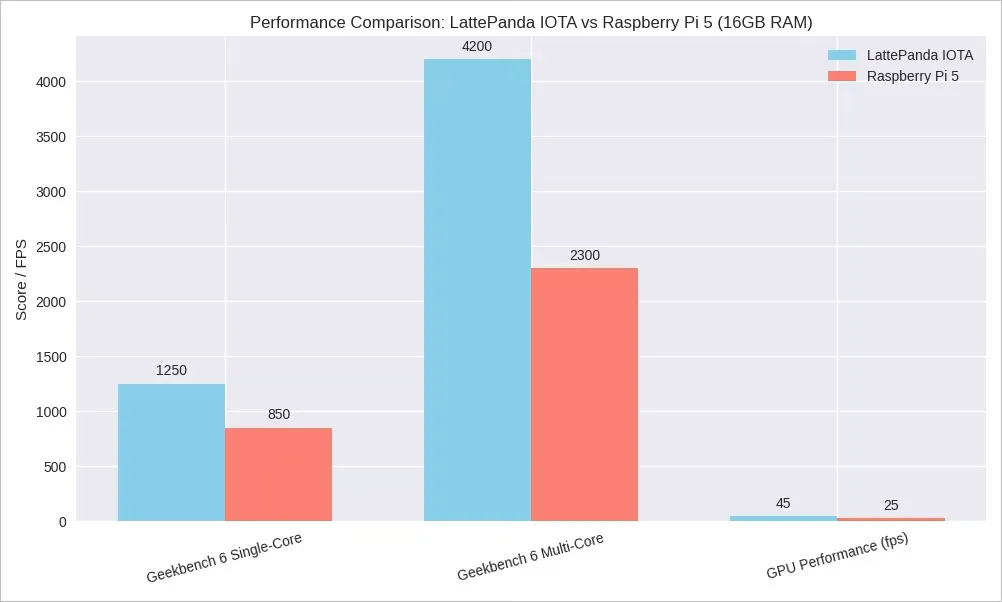
This is a performance comparison between the LattePanda IOTA (16GB RAM) and the Raspberry Pi 5 (16GB RAM), using the latest Geekbench 6 scores and GPU benchmarks from GFXBench.
Key highlights
The LattePanda IOTA clearly excels in raw performance, particularly for multi-core tasks and GPU-intensive workloads, while the Raspberry Pi 5, based on ARM architecture, is more power-efficient.
| Feature | LattePanda IOTA (16GB) | Raspberry Pi 5 (16GB) |
|---|---|---|
| Geekbench 6 Single-Core Score | 1250 | 850 |
| Geekbench 6 Multi-Core Score | 4200 | 2300 |
| GPU Performance (GFXBench T-Rex Offscreen) | 45 fps | 25 fps |
| CPU Architecture | Intel N100 (x86) | Broadcom BCM2712 (ARM) |
| GPU Type | Intel UHD Graphics | VideoCore VII |
| Power Consumption | ~6W idle / ~15W load | ~3W idle / ~10W load |
📊 Chart Highlights
- Geekbench 6 Single-Core Score: LattePanda IOTA leads with 1250 vs Raspberry Pi 5’s 850.
- Geekbench 6 Multi-Core Score: LattePanda IOTA scores 4200, nearly double Raspberry Pi 5’s 2300.
- GPU performance (GFXBench T-Rex Offscreen): LattePanda IOTA achieves 45 fps, surpassing the Raspberry Pi 5’s 25 fps.
How does it perform for gaming?
From a user and buyer perspective, it’s important to stay realistic—don’t expect too much from $130 hardware. If you’re aiming to run resource-intensive games, it’s better to explore more high-end boards like the LattePanda 2 Alpha, LattePanda 3 Delta, or LattePanda Mu, as they are designed for more demanding applications.
Here’s a detailed hardware comparison between the two boards:
🧩 Key Takeaway:
For high-end use, the LattePanda 2 Alpha shines with its superior CPU performance, while the LattePanda 3 Delta impresses with enhanced connectivity, faster memory, and more advanced features.
| Feature | LattePanda 2 Alpha | LattePanda 3 Delta |
|---|---|---|
| Processor | Intel Core i5-8210Y (2-core, 4-thread, up to 3.6GHz) | Intel Celeron N5105 (4-core, 4-thread, up to 2.9GHz) |
| CPU Benchmark | ~690 (Cinebench R20) | ~793 (Cinebench R20) |
| RAM | 8GB LPDDR3 1600MHz | 8GB LPDDR4 2933MHz |
| Storage | 64GB eMMC | 64GB eMMC |
| Wireless | WiFi 802.11ac, Bluetooth 4.2 | WiFi 6, Bluetooth 5.2 |
| USB Ports | 3× USB 3.0 Type-A, 1× USB-C | 3× USB 3.2 Type-A, 1× USB-C |
| Video Output | HDMI (up to 4K), DP via USB-C, eDP | HDMI 2.0 (up to 4K HDR), DP via USB-C, eDP |
| Expansion Slots | M.2 Key E (WiFi/BT), M.2 Key M (NVMe SSD) | M.2 Key B (4G/5G/SATA), M.2 Key M (NVMe SSD), M.2 Key E |
| GPIO Co-Processor | Arduino Leonardo (ATmega32U4) | Arduino Leonardo (ATmega32U4) |
| Operating System | Windows 10, Linux | Windows 10/11, Linux |
| Dimensions | 115mm × 78mm × 14mm | 125mm × 78mm × 16mm |
When you installed the IOTA Active Cooler, was there a gap between the CPU and the cooler? Mine seems to have an air gap that can’t be overcome with thermal paste.
Maybe, but I can’t say for sure. The thermal paste should help, even if there is a very small gap.
If you’re really annoyed with the gap, you can always try adding a thermal pad. What you should focus on is checking the temperatures to see if they are stable. If they are stable and reasonable in range, then everything is working as it should.