

Benchmarking storage performance
The IOTA board comes with built-in eMMC 5.1 flash storage in 64GB and 128GB options. You can also add an NVMe SSD, which we did for our setup. Using the CrystalDiskMark benchmarking tool, we tested both the NVMe SSD and the board’s flash storage, where the OS files are stored, and here are the results:
Storage Type: 1TB crucial P3 Plus (M.2 2280)
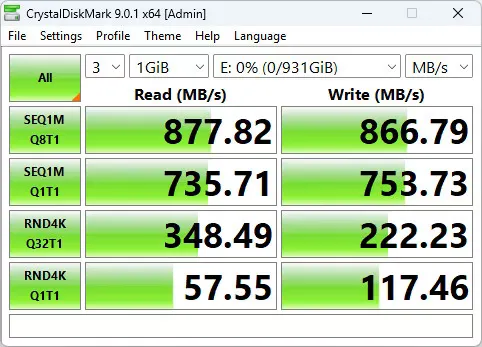
| Test Type: | Read (MB/s) | Write (MB/s) |
|---|---|---|
| SEQ1M Q8T1 | 887.82 | 866.79 |
| SEQ1M Q1T1 | 735.71 | 753.73 |
| RND4K Q32T1 | 348.49 | 222.23 |
| RND4K Q1T1 | 57.55 | 117.46 |
Storage Type: 64GB eMMC 5.1
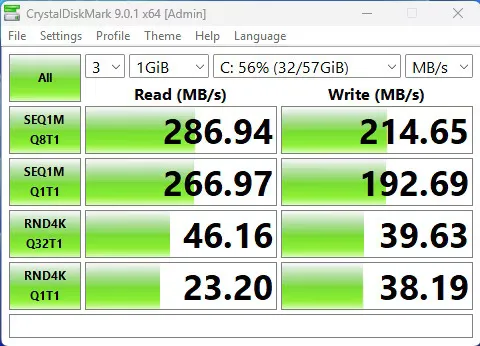
| Test Type: | Read (MB/s) | Write (MB/s) |
|---|---|---|
| SEQ1M Q8T1 | 286.94 | 214.65 |
| SEQ1M Q1T1 | 266.97 | 192.69 |
| RND4K Q32T1 | 46.16 | 39.63 |
| RND4K Q1T1 | 23.20 | 38.19 |
When you installed the IOTA Active Cooler, was there a gap between the CPU and the cooler? Mine seems to have an air gap that can’t be overcome with thermal paste.
Maybe, but I can’t say for sure. The thermal paste should help, even if there is a very small gap.
If you’re really annoyed with the gap, you can always try adding a thermal pad. What you should focus on is checking the temperatures to see if they are stable. If they are stable and reasonable in range, then everything is working as it should.