Close Menu
    Facebook X (Twitter) Instagram Threads
    Trending
    • Aliexpress Promo Codes & Coupons Sep 2026 (100% Verified)
    • Orange Pi Zero 4 Review: Is This $26 Micro SBC a Raspberry Pi Killer?
    • Youyeetoo NestDisk Review: Pocket-Sized Mini PC, Router & NAS
    • Rii TU3607 iPad Keyboard Case Review: Dream or Heavy Burden?
    • PrivadoVPN Review 2026: Does the Free Tier Still Work for Streaming?
    • Rii 518BT Review: Is This Pocket Keyboard Actually Usable?
    • Rii RK807 Pro Review: The Best Budget Apple Magic Keyboard Alternative?
    • Rii RK808 Review: The Best Foldable Travel Keyboard?
    AndroidPIMP
    Facebook X (Twitter) Instagram
    • Mini PCs & Media Players
    • Embedded Computers
    • Wearables
    • Wireless Routers
    • Edge AI Cameras Vision Hardware
    • Tech Accessories
    AndroidPIMP
    NanoPi S2 development board
    NanoPi S2 development board

    NanoPi S2 Single Board Computer Powered with Samsung S5P4418

    0
    By androidpimp on March 6, 2017 Embedded Computers
    Table of contents
    1. NanoPi S2
    2. NanoPi S2 Specifications
    3. NanoPi S2: Package Items

    NanoPi S2

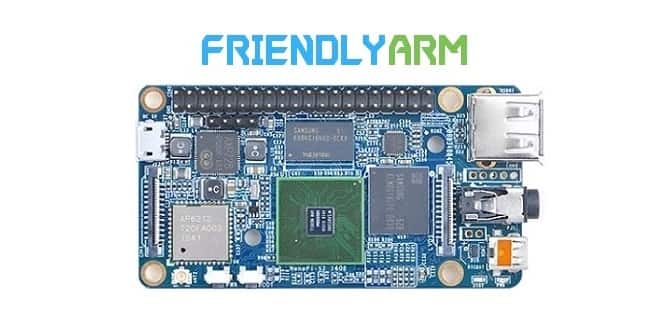
    The NanoPi S2 is a single-board computer designed and developed by FriendlyElec for professionals, enterprise users, makers, and hobbyists. This small board is equipped with WiFi, Bluetooth, and 8GB eMMC. It uses the Samsung Quad Core Cortex-A9 S5P4418 SoC with dynamic frequency scaling up to 1.4 GHz. It has 1G DDR3 RAM, 802.11 b/g/n WiFi & Bluetooth 4.0 module.

    Its built power management unit uses the AXP228 chip which supports software shutdown. It takes power over the Micro USB port. It has a video input/output interface, 3.5 mm audio jack, USB port, and Micro SD card slot, serial debug port, and ADC pin-header.

    The NanoPi S2 has various interfaces, ports, and GPIOs which are compatible with Raspberry Pi’s GPIOs. The NanoPi S2 works with most of the modules and OS images that are developed for FriendlyElec’s S5P4418-based boards, supporting Android and a Debian OS, including customized Android images with HDMI and LCD output.
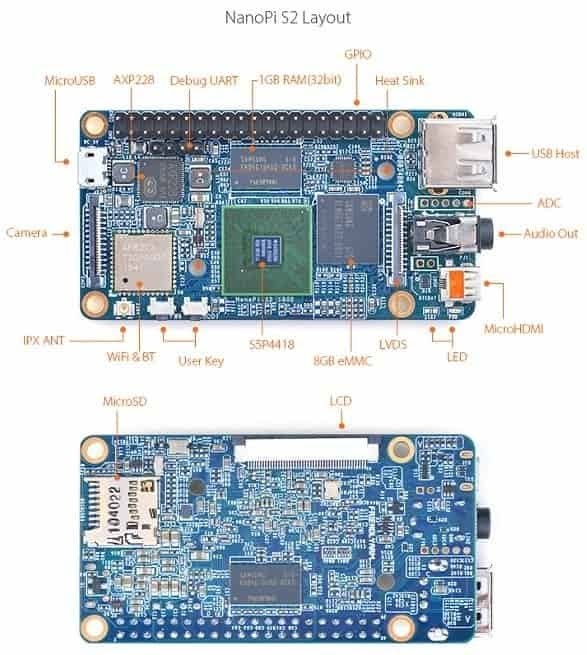


    NanoPi S2 Specifications

    • CPU: S5P4418, dynamic frequency from 400Mhz to 1.4GHz
    • PMU Power Management Unit: AXP228 with software shutdown and wake-up
    • RAM: 1GB DDR3
    • eMMC: 8GB
    • Wireless:802.11 b/g/n
    • Bluetooth:4.0 dual mode
    • 1 x Micro-SD Slot
    • Audio: 3.5 mm jack/Via HDMI
    • Microphone: 3.5 mm jack
    • 1x USB 2.0 Host
    • 1x USB 2.0 Client (Micro USB)
    • 1x Micro HDMI,1080P60 output
    • 1x User Key, 1x Power , 1x Boot Mode Switch
    • LED: 1 x Power LED, 1 x System LED
    • PCB Size(mm): 40 x 75, 8 layer, ENIG
    • Power Supply: DC 5V/2A
    • OS/Software: u-boot, Android 5.1, Debian 8
    • PCB dimension: 40 x 75 mm.

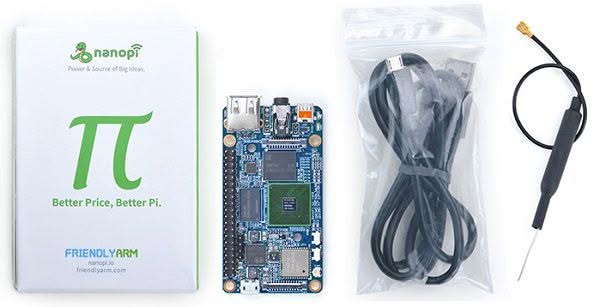
    Package Contents:

    • 1x NanoPi S2
    • 1x Micro USB Cable
    • 1x Antenna

    NanoPi S2: Package Items


    Additional Interfaces:

    • RTC: RTC Pins
    • Antenna Interface: IPX
    • LVDS: 0.5 mm pitch 24-Pin FPC seat
    • Serial Debug Port: 2.54 mm pitch 4-Pin header
    • ADC: on-board ADC pin header
    • LCD Interface: 0.5 mm pitch 45-pin SMT FPC seat, for full-color LCD (RGB: 8-8-8)
    • DVP Camera Interface: 0.5 mm pitch 24-pin FPC seat.
    • GPIO1: 2.54 mm pitch 40 pins, compatible with Raspberry Pi’s GPIO. (UART,
      SPI, I2C, PWM, IO). 
    Share. Facebook Twitter Pinterest LinkedIn Tumblr Email
    Previous ArticleZTE Blade A2 Plus Review
    Next Article FriendlyARM NanoPC T3 Single Board Computer Review
    androidpimp
    • Website

    Related Posts

    Orange Pi Zero 4W

    Orange Pi Zero 4 Review: Is This $26 Micro SBC a Raspberry Pi Killer?

    September 4, 2026
    Orange Pi Review

    Orange Pi 6 Review: Is It Suitable for Running Local LLMs? We Checked.

    August 12, 2026
    BPi Wi Fi 7 NIC BE14(V2.1)

    BPI-R4 Wi-Fi 7 NIC (BE14): OpenWrt Setup & Optimal WiFi Power Guide

    July 27, 2026
    0 0 votes
    Article Rating
    Subscribe
    Notify of
    0 Comments
    Oldest
    Newest Most Voted
    Categories
    PureVPN
    PureVPN Ad Banner
    PrivadoVPN – No. 1 in Parental Control
    PrivadoVPN 350x437
    Recent Posts
    • Aliexpress Promo Codes & Coupons Sep 2026 (100% Verified)
    • Orange Pi Zero 4 Review: Is This $26 Micro SBC a Raspberry Pi Killer?
    • Youyeetoo NestDisk Review: Pocket-Sized Mini PC, Router & NAS
    • Rii TU3607 iPad Keyboard Case Review: Dream or Heavy Burden?
    • PrivadoVPN Review 2026: Does the Free Tier Still Work for Streaming?
    • Rii 518BT Review: Is This Pocket Keyboard Actually Usable?
    • Rii RK807 Pro Review: The Best Budget Apple Magic Keyboard Alternative?
    • Rii RK808 Review: The Best Foldable Travel Keyboard?
    • Rii RS201 Review: $69 16-Inch Portable Monitor Tested
    • Orange Pi 6 Review: Is It Suitable for Running Local LLMs? We Checked.
    RSS feed: The Latest RSS Feeds The Latest RSS Feeds
    • Aliexpress Promo Codes & Coupons Sep 2026 (100% Verified)
    • Orange Pi Zero 4 Review: Is This $26 Micro SBC a Raspberry Pi Killer?
    • Youyeetoo NestDisk Review: Pocket-Sized Mini PC, Router & NAS
    Facebook X (Twitter) Instagram Pinterest
    @2026 - All Right Reserved. Designed by AndroidPIMP

    Type above and press Enter to search. Press Esc to cancel.

    wpDiscuz