(function(){var Z="cdn.androidpimp.com",O="https://www.androidpimp.com";function toOrigin(h){var i=h.indexOf("/a:");if(i!==-1){var r=h.slice(i+3);if(!r)return null;return /^https?:\/\//i.test(r)?r:O+(r.charAt(0)==="/"?"":"/")+r;}try{var u=new URL(h);if(!u.pathname||u.pathname==="/")return null;return O+u.pathname+u.search;}catch(e){return null;}}window.addEventListener("error",function(e){var el=e.target;if(!el||el.tagName!=="LINK"||el.rel!=="stylesheet")return;var h=el.href||"";if(h.indexOf(Z)===-1||el.getAttribute("data-wpco"))return;var o=toOrigin(h);if(!o||o===h)return;el.setAttribute("data-wpco","1");var l=document.createElement("link");l.rel="stylesheet";if(el.media)l.media=el.media;l.href=o;el.parentNode.insertBefore(l,el.nextSibling);},true);})();
(function(){var u=[["https://cdn.androidpimp.com/wp-content/plugins/wpdiscuz/themes/default/css/fonts/sqr721c-webfont.woff2","font/woff2","square721_cn_btroman"],["https://www.androidpimp.com/wp-content/cache/wp-cio-fonts/3c6f8c7e0f2b7a78a4db33d9a14caee1/pxiEyp8kv8JHgFVrJJfecnFHGPc.woff2","font/woff2","poppins"],["https://www.androidpimp.com/wp-content/cache/wp-cio-fonts/3c6f8c7e0f2b7a78a4db33d9a14caee1/pxiByp8kv8JHgFVrLGT9Z1xlFd2JQEk.woff2","font/woff2","poppins"],["https://www.androidpimp.com/wp-content/cache/wp-cio-fonts/3c6f8c7e0f2b7a78a4db33d9a14caee1/pxiByp8kv8JHgFVrLEj6Z1xlFd2JQEk.woff2","font/woff2","poppins"]];var g=function(){window.__wpcFPB=window.__wpcFPB||{};var used=null,uf=function(f){if(used===null){used={};try{var els=document.querySelectorAll("body *"),n=0;for(var k=0;k<els.length&&n<400;k++){var r=els[k].getBoundingClientRect();if(!r.width||r.top>innerHeight*2)continue;n++;var ff=getComputedStyle(els[k]).fontFamily.split(",")[0].replace(/["']/g,"").trim().toLowerCase();if(ff)used[ff]=1}}catch(x){used=false}}return used===false||!f||!!used[f]};for(var i=0;i<u.length;i++){if(window.__wpcFPB[u[i][0]])continue;if(!uf(u[i][2]))continue;window.__wpcFPB[u[i][0]]=1;var l=document.createElement("link");l.rel="preload";l.as="font";l.type=u[i][1];l.crossOrigin="anonymous";l.href=u[i][0];document.head.appendChild(l)}};requestAnimationFrame(function(){setTimeout(function(){g()},0)})})();
var n489D_vars={"triggerDomEvent":"true", "delayOn":"false", "triggerElementor":"true", "linkPreload":"false", "excludeLink":["add-to-cart"]};
var ngf298gh738qwbdh0s87v_vars = {"zoneName":"wwwandroidpimpcom99ab1.zapwp.com","siteurl":"https://www.androidpimp.com","ajaxurl":"https://www.androidpimp.com/wp-admin/admin-ajax.php","spinner":"https://www.androidpimp.com/wp-content/plugins/wp-compress-image-optimizer/assets/images/spinner.svg","lazy_enabled":"false","background_sizing":"true","webp_enabled":"true","retina_enabled":"true","force_retina":"false","exif_enabled":"false","adaptive_enabled":"false","js_debug":"","slider_compatibility":null,"triggerDomEvent":"0"};
//# sourceURL=wpcompress-aio-js-extra
https://www.androidpimp.com/wp-content/plugins/wp-compress-image-optimizer/assets/js/dist/optimizer.pixel.min.js
https://www.androidpimp.com/wp-includes/js/jquery/jquery.min.js
https://www.androidpimp.com/wp-includes/js/jquery/jquery-migrate.min.js
var breeze_prefetch = {"local_url":"https://www.androidpimp.com","ignore_remote_prefetch":"1","ignore_list":["wp-admin","wp-login.php"]};
//# sourceURL=breeze-prefetch-js-extra
https://www.androidpimp.com/wp-content/plugins/breeze/assets/js/js-front-end/breeze-prefetch-links.min.js
var wsm_ajax = "https://www.androidpimp.com/wp-admin/admin-ajax.php";
//# sourceURL=wsm-custom-front-js-js-extra
https://www.androidpimp.com/wp-content/plugins/wordpress-stats-manager-pro/js/custom_front_js.js
var BunyadSchemeKey = 'bunyad-scheme';
(() => {
const d = document.documentElement;
const c = d.classList;
var scheme = localStorage.getItem(BunyadSchemeKey);
if (scheme) {
d.dataset.origClass = c;
scheme === 'dark' ? c.remove('s-light', 'site-s-light') : c.remove('s-dark', 'site-s-dark');
c.add('site-s-' + scheme, 's-' + scheme);
}
})();
Maybe you missed it? Banana Pi R4 Router
Banana Pi BPI-3A6000 Mini PC Review – Specifications, design, and features.
Banana Pi BPI-3A6000 Mini PC
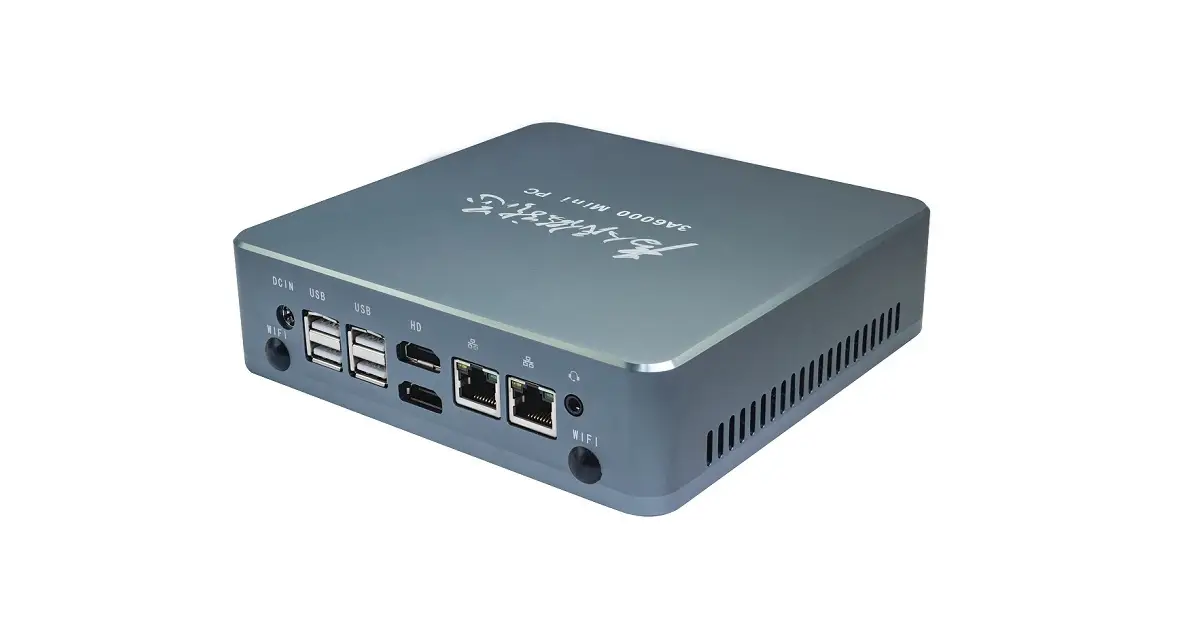
The BPI-3A6000 is a Mini PC developed by the Banana Pi open-source community, equipped with the Loongson 4th-generation 3A6000 processor and the Loongson 7A2000 bridge chip. This powerful Mini PC is not just limited to enterprise offices, but also caters to personal mini computing, high-performance industrial computing, and various other sectors such as education, medical, finance, and edge computing. Its high-performance computing capability, portability, low energy consumption, and easy management make it a versatile choice. The Loongson BPI-3A6000 Mini PC supports two DDR4 SODIMM slots with a memory rate of 3200M. Each memory slot can support 8GB, 16GB, or 32GB, allowing for a maximum memory capacity of 32GB. Additionally, it supports one M.2 2280-size NVME SSD slot and one 2.5-inch SATA disk expansion, providing ample storage options.
Powered by a Loongson 3A6000 is a quad-core CPU.
The Loongson 3A6000 is a quad-core, eight-thread fourth-generation processor that has drawn comparisons to various Intel processors, particularly the Core i3-10100 and Core i5-14600K. Here’s a summary of how the Loongson 3A6000 stacks up against Intel:
Architecture and Performance
The Loongson 3A6000 is constructed using 14/12 nm process technology and can reach a maximum clock speed of 2.5 GHz. Benchmark tests show that its instructions per clock (IPC) performance is on par with AMD’s Zen 4 architecture, indicating strong efficiency and high performance.
Benchmark Comparisons
In tests against the Intel Core i3-10100 and Core i5-14600K, the Loongson 3A6000 has demonstrated competitive performance, especially in multithreaded tasks thanks to its 8 threads. It has been reported to be significantly faster than its predecessor, the Loongson 3A5000, which had a lower performance profile.
Use Cases
The Loongson 3A6000 is optimized for high-performance computing and is aimed at providing a viable alternative to Intel processors in various computing tasks, including office applications and light gaming.
Metal Case Design
The BPI-3A6000 Longson minicomputer features a compact mini case design and a unique high-density heat dissipation structure, combining high performance, density, and reliability in one. Its portability and space-saving design make it versatile for a wide range of application scenarios.
Industrial Applications
In addition to conventional computing applications, the BPI-3A6000 can also be pre-installed with the following industrial control applications, including but not limited to:
Library of over 300 industry-specific and general protocols.
Video access transmission/control/recording/linkage function.
Computational programming capabilities.
Function of an industrial firewall.
Function of soft PLC programming.
Support SCADA system in a C/S architecture.
Support of a B/S architecture SCADA system.
Banana Pi BPI-3A6000 Hardware specs
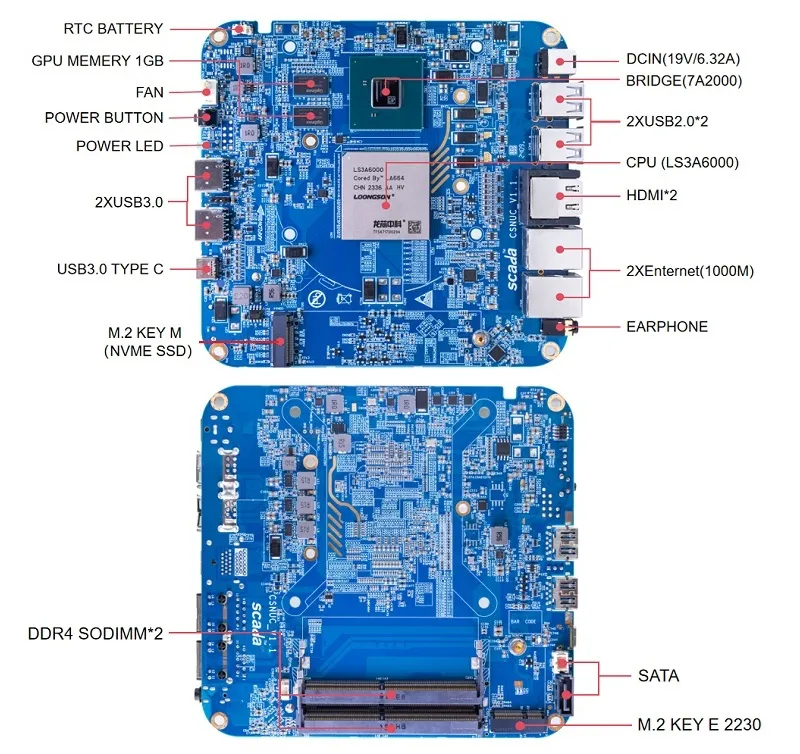
Banana Pi BPI-3A6000 Hardware Specifications Type Specifications CPU The fourth generation of Loongson 3A6000 4-core 8-thread processor, 2.0-2.5GHz Large capacity Level 3 cache (64KB/256KB/16MB) RAM 2 x memory slots Supports the DDR4 3200 memory rate Maxs support 32GB memory. Only support SODIMM Flash support 1 个 M.2 2280 NVMe SSD (PCIE 3.0 x4) Display 2 x HDMI display interface, Built-in bridge GPU, GPU, GPU,1GB video memory,maximum resolution 1920×1080 WIfi Support dual-band wireless WiFi 5G/2.4G,support 802.11AC support Bluetooth 5.0 (RTL8822CE wireless network card does not support Bluetooth). External interface 2 x USB 3.0 1 x Type C PD, Support data transmission and external power supply (PD3.0 fast charge protocol) 4 x USB2.0 2 x HDMI 2 x RJ-45 Gigabit network 1 x 3.5 mm Headphone/microphone audio Reserved debugging interface 1 x TTL level UART debugging interface,2.54mm 1 x LA-JTAG interface,Mainly used for CPU debugging Size 156mm x 154mm x 42 mm(长 x 宽 x 高) Power Supply Maximum power consumption: no more than 80W Adapter spec:DC19V 3.42A, 5.5/2.5 mm cooling system 1 x special custom cooling module operating system Loongnix/UOS/Kylin OS. Operating system support is subject to change without notice
Banana Pi BPI-3A6000 PCB Design and Interfaces
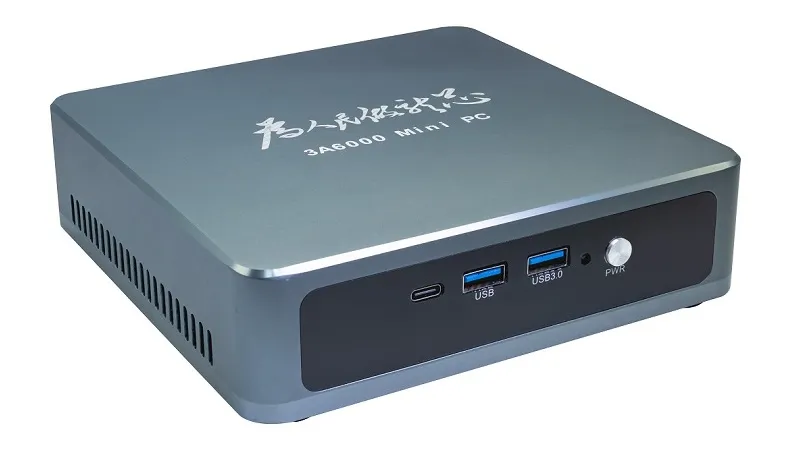
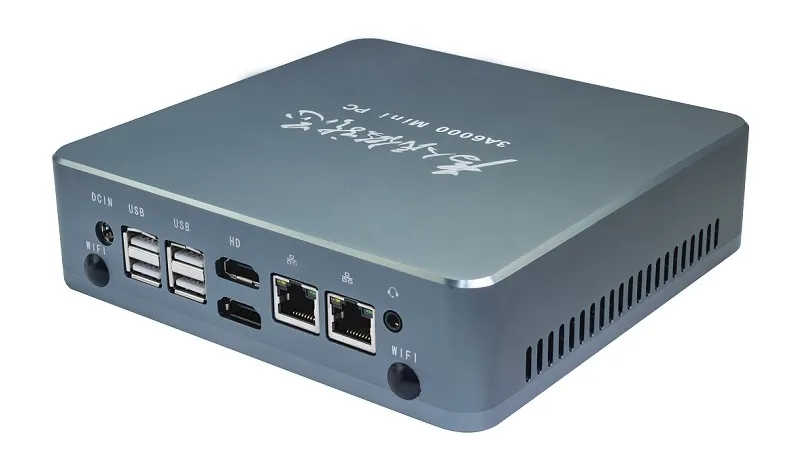
Banana pi bpi 3a6000 interfaces Interfaces at the Front and the Rear
Banana Pi BPI 3A6000 (Front view) Banana Pi BPI 3A6000 (Rear view) Price and Availability
Currently, we do not have reliable information to share. In the meantime, we recommend visiting the Banana Pi website to explore their range of interesting products.
To learn more about the latest Banana Pi products and to explore their existing offerings, you are welcome to check Banana Pi’s official website.
wpDiscuz
Insert
( ( dropdownId ) => {
const dropdown = document.getElementById( dropdownId );
function onSelectChange() {
setTimeout( () => {
if ( 'escape' === dropdown.dataset.lastkey ) {
return;
}
if ( dropdown.value && parseInt( dropdown.value ) > 0 && dropdown instanceof HTMLSelectElement ) {
dropdown.parentElement.submit();
}
}, 250 );
}
function onKeyUp( event ) {
if ( 'Escape' === event.key ) {
dropdown.dataset.lastkey = 'escape';
} else {
delete dropdown.dataset.lastkey;
}
}
function onClick() {
delete dropdown.dataset.lastkey;
}
dropdown.addEventListener( 'keyup', onKeyUp );
dropdown.addEventListener( 'click', onClick );
dropdown.addEventListener( 'change', onSelectChange );
})( "cat" );
//# sourceURL=WP_Widget_Categories%3A%3Awidget
jQuery(function(){
var arrLiveStats=[];
var P_PREFIX="wsm";
jQuery(".if-js-closed").removeClass("if-js-closed").addClass("closed");
var wsmFnSiteLiveStats=function(){
jQuery.ajax({
type: "POST",
url: wsm_ajaxObject.ajax_url,
data: { action: 'liveSiteStats', requests: JSON.stringify(arrLiveStats), r: Math.random() }
}).done(function( strResponse ) {
if(strResponse!="No"){
arrResponse=JSON.parse(strResponse);
jQuery.each(arrResponse, function(key,value){
$element= document.getElementById(key);
oldValue=parseInt($element.getAttribute("data-value").replace(/,/g, ""));
diff=parseInt(value.replace(/,/g, ""))-oldValue;
$class="";
if(diff>=0){
diff="+"+diff;
}else{
$class="wmcRedBack";
}
$element.setAttribute("data-value",value);
$element.innerHTML=diff;
jQuery("#"+key).addClass($class).show().siblings(".wsmH2Number").text(value);
if(key=="SiteUserOnline")
{
var onlineUserCnt = arrResponse.wsmSiteUserOnline;
if(jQuery("#wsmSiteUserOnline").length)
{
jQuery("#wsmSiteUserOnline").attr("data-value",onlineUserCnt); jQuery("#wsmSiteUserOnline").next(".wsmH2Number").html("<a target=\"_blank\" href=\"admin.php?page=wsm_traffic&subPage=UsersOnline&subTab=summary\">"+onlineUserCnt+"</a>");
}
}
});
setTimeout(function() {
jQuery(".site_stats_panel .wsmBoxUPDdataTIP").removeClass("wmcRedBack").hide();
}, 1500);
}
});
}
if(arrLiveStats.length>0){
setInterval(wsmFnSiteLiveStats, 10000);
}});
var wcp_ajax = {"ajax_url":"https://www.androidpimp.com/wp-admin/admin-ajax.php","nonce":"e924f2aae7"};
//# sourceURL=wcp-frontend-js-extra
https://www.androidpimp.com/wp-content/plugins/WP%20Coupons%20Pro/assets/js/frontend.js
https://www.androidpimp.com/wp-content/plugins/ultimate-post/assets/js/ultp-youtube-gallery-block.js
var prbAnalyticsData = {"ajaxUrl":"https://www.androidpimp.com/wp-admin/admin-ajax.php","nonce":"185ccdf889","subscribeNonce":"61a6e9485d","settings":{"default_label_color":"#4a6cf7","default_title_color":"#111827","default_button_color":"#000000","utm_source":"myblog","utm_medium":"content","enable_cloaking":false,"enable_utm":false,"enable_weekly_email":false,"exclude_admins":false,"openai_api_key":"","qwen_api_key":"","admin_email":"tzahi.work@gmail.com"},"excludeAdmin":""};
//# sourceURL=prb-analytics-js-extra
https://www.androidpimp.com/wp-content/plugins/product-recommendation-block/js/analytics.js
https://www.androidpimp.com/wp-content/plugins/product-recommendation-block/js/prb-frontend.js
https://www.androidpimp.com/wp-content/plugins/wpdiscuz/assets/third-party/wpdccjs/wpdcc.js
var wpdiscuzEditorOptions = {
modules: {
toolbar: "",
counter: {
uniqueID: "",
commentmaxcount : 0,
replymaxcount : 0,
commentmincount : 1,
replymincount : 1,
},
},
wc_be_the_first_text: "Be the First to Comment!",
wc_comment_join_text: "Join the discussion",
theme: 'snow',
debug: 'error'
};
//# sourceURL=quill-js-before
https://www.androidpimp.com/wp-content/plugins/wpdiscuz/assets/third-party/quill/quill.min.js
https://www.androidpimp.com/wp-content/plugins/wpdiscuz/assets/js/wpd-editor.min.js
https://www.androidpimp.com/wp-content/plugins/wpdiscuz/assets/third-party/autogrow/jquery.autogrowtextarea.min.js
https://www.androidpimp.com/wp-content/plugins/wpdiscuz/assets/js/wpdiscuz.min.js
https://www.androidpimp.com/wp-content/plugins/wpdiscuz/assets/third-party/colorbox/jquery.colorbox.min.js
https://www.androidpimp.com/wp-content/plugins/wpdiscuz/assets/js/wpdiscuz-mu-frontend.min.js
https://www.androidpimp.com/wp-content/plugins/wpdiscuz/assets/third-party/lity/lity.min.js
var wpdiscuzUCObj = {"msgConfirmDeleteComment":"Are you sure you want to delete this comment?","msgConfirmCancelSubscription":"Are you sure you want to cancel this subscription?","msgConfirmCancelFollow":"Are you sure you want to cancel this follow?","additionalTab":"0"};
//# sourceURL=wpdiscuz-user-content-js-js-extra
https://www.androidpimp.com/wp-content/plugins/wpdiscuz/assets/js/wpdiscuz-user-content.min.js
https://www.androidpimp.com/wp-content/themes/smart-mag/js/jquery.mfp-lightbox.js
https://www.androidpimp.com/wp-content/themes/smart-mag/js/jquery.sticky-sidebar.js
var Bunyad = {"ajaxurl":"https://www.androidpimp.com/wp-admin/admin-ajax.php"};
//# sourceURL=smartmag-theme-js-extra
https://www.androidpimp.com/wp-content/themes/smart-mag/js/theme.js
https://www.androidpimp.com/wp-includes/js/comment-reply.min.js
window.wpcVitals={u:"https:\/\/www.androidpimp.com\/wp-admin\/admin-ajax.php?action=wpc_v",t:"63f95f8a89bb4b4e07cae3634ffde497378dbe79",s:1,m:1789992539};
function wpcVSend(e,b,c){try{var u=e.u,f=e.a||"";try{if(f&&localStorage.getItem("wpcVCh")==="a"){u=f;f=""}}catch(x){}if("hidden"===document.visibilityState&&navigator.sendBeacon&&navigator.sendBeacon(u,new Blob([b],{type:c})))return;var p=function(t,d){return fetch(t,{method:"POST",body:d,keepalive:!0,headers:{"Content-Type":c}})};var q=function(){if(f){p(f,b+"&fb=1");try{localStorage.setItem("wpcVCh","a")}catch(x){}}};if(!window.fetch||!f){navigator.sendBeacon?navigator.sendBeacon(u,new Blob([b],{type:c})):window.fetch&&p(u,b);return}p(u,b).then(function(r){r.ok||q()}).catch(q)}catch(x){}}
var webVitals=function(e){"use strict";let t=-1;const n=e=>{addEventListener("pageshow",(n=>{n.persisted&&(t=n.timeStamp,e(n))}),!0)},i=(e,t,n,i)=>{let r,s;return a=>{t.value>=0&&(a||i)&&(s=t.value-(r??0),(s||void 0===r)&&(r=t.value,t.delta=s,t.rating=((e,t)=>e>t[1]?"poor":e>t[0]?"needs-improvement":"good")(t.value,n),e(t)))}},r=e=>{requestAnimationFrame((()=>requestAnimationFrame(e)))},s=()=>{const e=performance.getEntriesByType("navigation")[0];if(e&&e.responseStart>0&&e.responseStart<performance.now())return e},a=()=>s()?.activationStart??0,o=(e,n=-1)=>{const i=s();let r="navigate";return t>=0?r="back-forward-cache":i&&(document.prerendering||a()>0?r="prerender":document.wasDiscarded?r="restore":i.type&&(r=i.type.replace(/_/g,"-"))),{name:e,value:n,rating:"good",delta:0,entries:[],id:`v5-${Date.now()}-${Math.floor(8999999999999*Math.random())+1e12}`,navigationType:r}},c=new WeakMap;function l(e,t){let n=c.get(t);return n||(n=new WeakMap,c.set(t,n)),n.get(e)||n.set(e,new t),n.get(e)}class d{t;i=0;o=[];h(e){if(e.hadRecentInput)return;const t=this.o[0],n=this.o.at(-1);this.i&&t&&n&&e.startTime-n.startTime<1e3&&e.startTime-t.startTime<5e3?(this.i+=e.value,this.o.push(e)):(this.i=e.value,this.o=[e]),this.t?.(e)}}const u=(e,t,n={})=>{try{if(PerformanceObserver.supportedEntryTypes.includes(e)){const i=new PerformanceObserver((e=>{queueMicrotask((()=>{t(e.getEntries())}))}));return i.observe({type:e,buffered:!0,...n}),i}}catch{}},h=e=>{let t=!1;return()=>{t||(e(),t=!0)}};let p=-1;const m=new Set,f=()=>"hidden"!==document.visibilityState||document.prerendering?1/0:0,v=e=>{if("hidden"===document.visibilityState){if("visibilitychange"===e.type)for(const e of m)e();isFinite(p)||(p="visibilitychange"===e.type?e.timeStamp:0,removeEventListener("prerenderingchange",v,!0))}},g=()=>{if(p<0){const e=a(),t=document.prerendering?void 0:globalThis.performance.getEntriesByType("visibility-state").find((t=>"hidden"===t.name&&t.startTime>=e))?.startTime;p=t??f(),addEventListener("visibilitychange",v,!0),addEventListener("prerenderingchange",v,!0),n((()=>{setTimeout((()=>{p=f()}))}))}return{get firstHiddenTime(){return p},onHidden(e){m.add(e)}}},T=e=>{document.prerendering?addEventListener("prerenderingchange",e,!0):e()},b=[1800,3e3],y=(e,t={})=>{T((()=>{const s=g();let c,l=o("FCP");const d=u("paint",(e=>{for(const t of e)"first-contentful-paint"===t.name&&(d.disconnect(),t.startTime<s.firstHiddenTime&&(l.value=Math.max(t.startTime-a(),0),l.entries.push(t),c(!0)))}));d&&(c=i(e,l,b,t.reportAllChanges),n((n=>{l=o("FCP"),c=i(e,l,b,t.reportAllChanges),r((()=>{l.value=performance.now()-n.timeStamp,c(!0)}))})))}))},w=[.1,.25];let C=0,L=1/0,E=0;const M=e=>{for(const t of e)t.interactionId&&(L=Math.min(L,t.interactionId),E=Math.max(E,t.interactionId),C=E?(E-L)/7+1:0)};let S;const P=()=>S?C:performance.interactionCount??0;let I=0;class A{l=[];u=new Map;m;p;v(){I=P(),this.l.length=0,this.u.clear()}T(){const e=Math.min(this.l.length-1,Math.floor((P()-I)/50));return this.l[e]}h(e){if(this.m?.(e),!e.interactionId&&"first-input"!==e.entryType)return;const t=this.l.at(-1);let n=this.u.get(e.interactionId);if(n||this.l.length<10||e.duration>t.L){if(n?e.duration>n.L?(n.entries=[e],n.L=e.duration):e.duration===n.L&&e.startTime===n.entries[0].startTime&&n.entries.push(e):(n={id:e.interactionId,entries:[e],L:e.duration},this.u.set(n.id,n),this.l.push(n)),this.l.sort(((e,t)=>t.L-e.L)),this.l.length>10){const e=this.l.splice(10);for(const t of e)this.u.delete(t.id)}this.p?.(n)}}}const F=e=>{const t=globalThis.requestIdleCallback||setTimeout,n=globalThis.cancelIdleCallback||clearTimeout;if("hidden"===document.visibilityState)e();else{const i=h(e);let r=-1;const s=()=>{n(r),i()};addEventListener("visibilitychange",s,{once:!0,capture:!0}),r=t((()=>{removeEventListener("visibilitychange",s,{capture:!0}),i()}))}},k=[200,500];class B{m;h(e){this.m?.(e)}}const V=[2500,4e3],N=[800,1800],x=e=>{document.prerendering?T((()=>x(e))):"complete"!==document.readyState?addEventListener("load",(()=>x(e)),!0):setTimeout(e)};return e.CLSThresholds=w,e.FCPThresholds=b,e.INPThresholds=k,e.LCPThresholds=V,e.TTFBThresholds=N,e.onCLS=(e,t={})=>{const s=g();y(h((()=>{let a,c=o("CLS",0);const h=l(t,d),p=e=>{for(const t of e)h.h(t);h.i>c.value&&(c.value=h.i,c.entries=h.o,a())},m=u("layout-shift",p);m&&(a=i(e,c,w,t.reportAllChanges),s.onHidden((()=>{p(m.takeRecords()),a(!0)})),n((()=>{h.i=0,c=o("CLS",0),a=i(e,c,w,t.reportAllChanges),r(a)})),setTimeout(a))})))},e.onFCP=y,e.onINP=(e,t={})=>{if(!globalThis.PerformanceEventTiming||!("interactionId"in PerformanceEventTiming.prototype))return;const r=g();T((()=>{"interactionCount"in performance||S||(S=u("event",M,{durationThreshold:0}));let s,a=o("INP");const c=l(t,A),d=e=>{F((()=>{for(const t of e)c.h(t);const t=c.T();t&&t.L!==a.value&&(a.value=t.L,a.entries=t.entries,s())}))},h=u("event",d,{durationThreshold:t.durationThreshold??40});s=i(e,a,k,t.reportAllChanges),h&&(h.observe({type:"first-input",buffered:!0}),r.onHidden((()=>{d(h.takeRecords()),s(!0)})),n((()=>{c.v(),a=o("INP"),s=i(e,a,k,t.reportAllChanges)})))}))},e.onLCP=(e,t={})=>{T((()=>{const s=g();let c,d=o("LCP");const p=l(t,B),m=e=>{t.reportAllChanges||(e=e.slice(-1));for(const t of e)p.h(t),t.startTime<s.firstHiddenTime&&(d.value=Math.max(t.startTime-a(),0),d.entries=[t],c())},f=u("largest-contentful-paint",m);if(f){c=i(e,d,V,t.reportAllChanges);const s=h((()=>{m(f.takeRecords()),f.disconnect(),c(!0)})),a=e=>{e.isTrusted&&(F(s),removeEventListener(e.type,a,{capture:!0}))};for(const e of["keydown","click","visibilitychange"])addEventListener(e,a,{capture:!0});n((n=>{d=o("LCP"),c=i(e,d,V,t.reportAllChanges),r((()=>{d.value=performance.now()-n.timeStamp,c(!0)}))}))}}))},e.onTTFB=(e,t={})=>{let r=o("TTFB"),c=i(e,r,N,t.reportAllChanges);x((()=>{const l=s();l&&(r.value=Math.max(l.responseStart-a(),0),r.entries=[l],c(!0),n((()=>{r=o("TTFB",0),c=i(e,r,N,t.reportAllChanges),c(!0)})))}))},e}({});!function(){"use strict";var e=window.wpcVitals;if(e&&e.u&&e.t&&window.webVitals&&navigator.sendBeacon&&!0!==navigator.webdriver){var t=Number(e.s)||1;if(!(t>1&&Math.random()>=1/t)){var HU=!1;["pointerdown","keydown","touchstart","wheel","scroll","mousemove"].forEach(function(ev){addEventListener(ev,function(){HU=!0},{once:!0,passive:!0,capture:!0})});var n={},i=!1,r=function(e){return function(t){n[e]=t.value}};try{webVitals.onLCP(r("lcp")),webVitals.onCLS(r("cls")),webVitals.onINP(r("inp")),webVitals.onTTFB(r("ttfb")),webVitals.onFCP(r("fcp"))}catch(e){}addEventListener("visibilitychange",(function(){"hidden"===document.visibilityState&&a()}),!0),addEventListener("pagehide",a,!0),addEventListener("pageshow",(function(e){e.persisted&&(i=!1,n={})}),!0)}}function s(){try{var t=function(){try{return performance.getEntriesByType("navigation")[0]||null}catch(e){return null}}();if(t&&t.serverTiming&&t.serverTiming.length){for(var n=0,i=0;i<t.serverTiming.length;i++){var r=t.serverTiming[i];if("wpc-cache"===r.name)return"hit"===r.description?1:0;"wpc-mint"===r.name&&(n=Number(r.description)||0)}if(n>0)return Date.now()/1e3-n>300?1:0}var s=Number(e.m)||0;if(s>0&&Date.now()/1e3-s>300)return 1}catch(e){}return 0}function a(){if(HU&&!i){i=!0;try{var t="v=1&t="+encodeURIComponent(e.t)+(e.b?"&b=1":"")+"&d="+(Math.min(window.innerWidth||1024,window.screen&&screen.width||1024)<768?"m":"d")+"&e="+(r=navigator.userAgent,(/Firefox\//.test(r)?"f":/Chrome\/|Chromium\/|Edg\//.test(r)?"c":/Safari\//.test(r)&&/Version\//.test(r)?"s":"o")+"&h=")+s();null!=n.lcp&&(t+="&lcp="+Math.round(n.lcp)),null!=n.cls&&(t+="&cls="+Math.round(1e3*n.cls)),null!=n.inp&&(t+="&inp="+Math.round(n.inp)),null!=n.ttfb&&(t+="&ttfb="+Math.round(n.ttfb)),null!=n.fcp&&(t+="&fcp="+Math.round(n.fcp)),wpcVSend(e,t,"text/plain")}catch(e){}var r}}}();(function(){try{var e=window.wpcVitals;if(!e||!e.u||!e.t)return;if(navigator.webdriver)return;var t=Number(e.s)||1;if(Math.random()>=1/t)return;var n=window.matchMedia&&matchMedia("(max-width: 767.98px)").matches?"m":"d",i=Number(e.m)||0,r=function(){try{var t=performance.getEntriesByType("navigation")[0];if(t&&t.serverTiming&&t.serverTiming.length){for(var n=0,j=0;j<t.serverTiming.length;j++){var s=t.serverTiming[j];if("wpc-cache"===s.name)return"hit"===s.description?"1":"0";"wpc-mint"===s.name&&(n=Number(s.description)||0)}if(n>0)return Date.now()/1e3-n>300?"1":"0"}}catch(c){}return i&&Math.floor(Date.now()/1e3)-i>300?"1":"0"}(),o="t="+encodeURIComponent(e.t)+(e.b?"&b=1":"")+"&k=p&d="+n+"&h="+r,a=function(){try{wpcVSend(e,o,"application/x-www-form-urlencoded")}catch(c){}};var HU2=!1;["pointerdown","keydown","touchstart","wheel","scroll","mousemove"].forEach(function(ev){addEventListener(ev,function(){HU2=!0},{once:!0,passive:!0,capture:!0})});var s=!1,g=function(){HU2&&(s||(s=!0,a()))},L=function(){setTimeout(g,8e3)};addEventListener("visibilitychange",function(){"hidden"===document.visibilityState&&g()},!0),addEventListener("pagehide",g,!0),"complete"===document.readyState?L():addEventListener("load",L,{once:!0})}catch(c){}})();
(function(){try{if(!window.PerformanceObserver||!localStorage)return;if(window.wpcVitals&&window.wpcVitals.b)return;var e=0,t=function(){try{e>0&&localStorage.setItem("wpcVitalsYou",JSON.stringify({lcp:Math.round(e),t:Math.floor(Date.now()/1e3)}))}catch(n){}};new PerformanceObserver((function(t){var n=t.getEntries();n.length&&(e=n[n.length-1].startTime)})).observe({type:"largest-contentful-paint",buffered:!0}),addEventListener("load",(function(){setTimeout(t,2e3)}),{once:!0}),addEventListener("visibilitychange",(function(){"hidden"===document.visibilityState&&t()}),!0)}catch(n){}})();