
- Maybe you missed it? Banana Pi R3 Router Board Review.
- Maybe you missed it? Optfocus Universal GPON SFP Stick with Mac.
- Banana Pi BPI-R4 Review, specs, and features.
Part I: Banana Pi BPI-R4 – Product introduction
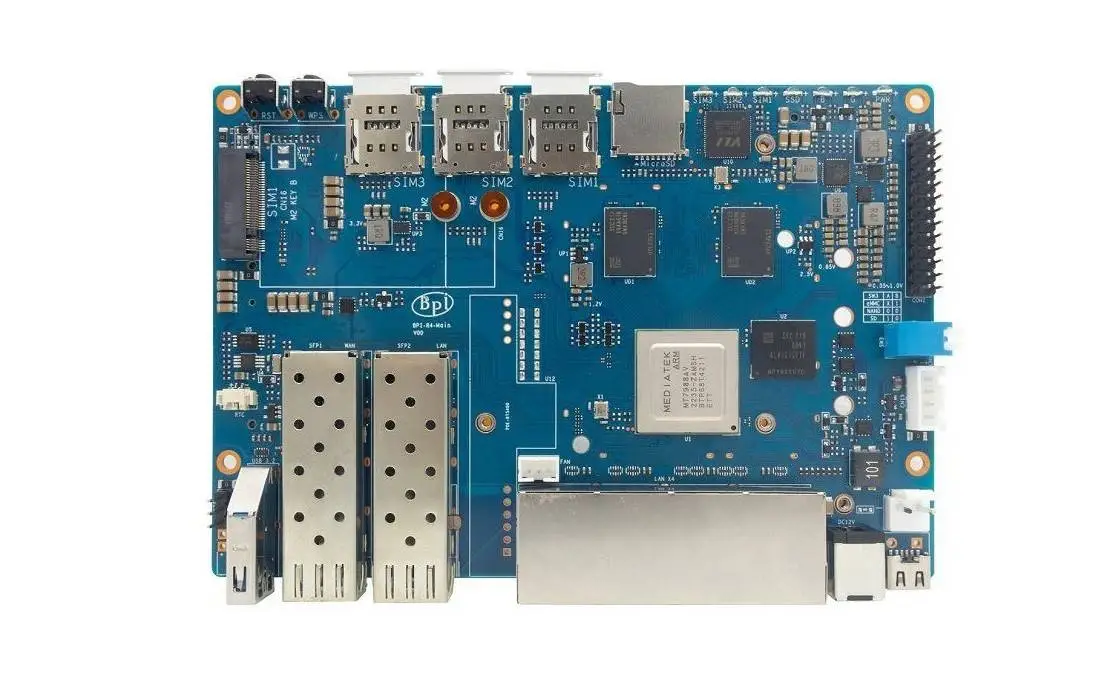
The renowned Banana Pi brand, developed by Sinovoip, has just released their new Banana Pi BPI-R4 router board with significantly upgraded specs compared to the previous Banana Pi R3 model.
The board is available in two different configurations. One option includes a pair of SFP+ optical cages, while the other configuration has one SFP+ alongside a 2.5Gbps RJ45 Ethernet port. Additionally, the four Ethernet ports and the WAN port can handle speeds of up to 1Gbps.
What’s more, the R4 board supports the latest Wi-Fi 7 standard using an expansion network interface controller (NIC), which isa significantt upgrade boost from the R3’s Wi-Fi 6 connectivity. This enhancement will provide users with faster wireless speeds and improved performance for high-bandwidth activities such as video streaming and online gaming. Overall, the new board will offer expanded versatility and enhanced connectivity options for a wide range of networking applications.
Take a quick sneak peek at the Banana Pi R4.
Interfaces
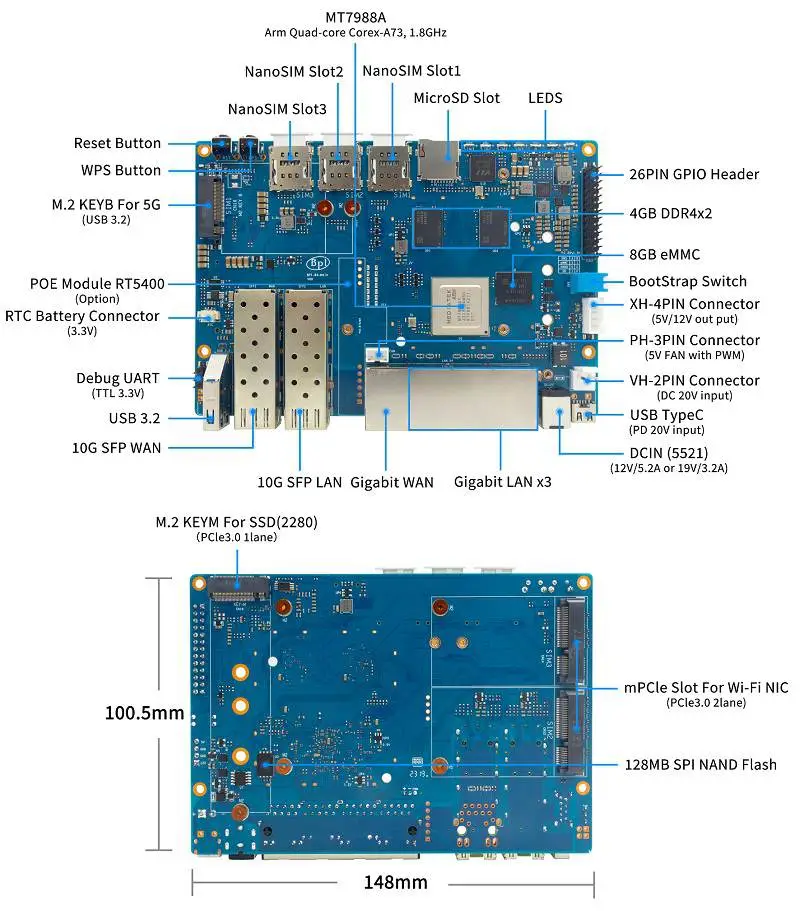
Key Features
- MediaTek MT7988A (Filogic 880) quad-core Arm Corex-A73,1.8GHz processor
- 4GB DDR4
- 8GB eMMC flash
- 128MB SPI-NAND Flash
- Micro SD card slot
- 2x 10Gbe SFP slot (option 1x 10Gbe SFP and 1x SOC embedded 2.5Gbe PHY)
- 4x GbE network port
- 1x USB 3.2 slot
- 1x M.2 KEY-B slot with USB3.2 interface for 5G
- 1x M.2 KEY-M slot with PCIe3.0 1lane interface for NVME SSD
- 2x mini PCIe slots with PCIe3.0 2lane interface for Wi-Fi 7 NIC (Network Interface Card)
- 26 PIN GPIO Header for expanding application
Hardware Specifications
| CPU | MediaTek MT7988A (Filogic 880) quad-core Arm Corex-A73,1.8GHz processor |
| SDRAM | 4 GB DDR4 |
| On board Storage | MicroSD \(TF\) card,8GB eMMC onboard |
| GPIO | 26 Pin GPIO Some of which can be used for specific functions including UART, I2C, SPI, PWM, I2S. |
| On board Network | 4 Port 10/100/1000Mbps Ethernet |
| SFP Configurations | 2x10G SFP or 1x10G SFP and 1x 2.5GbE |
| Wi-Fi | Wi-Fi 6/Wi-Fi 7 |
| PoE module (RT5400) | Integrated in the single 10G SFP+ model |
| mini PCIE | 2x miniPCIe slots with PCIe3.0 2lane interface for Wi-Fi 7 NIC (Network Interface Card) |
| M.2 interface | 1x M.2 KEY-B slot with USB3.2 interface for 5G 1x M.2 KEY-M slot with PCIe3.0 1lane interface for NVME SSD |
| USB | 1xUSB 3.2 slot |
| Buttons | Reset button,WPS botton, boot switch |
| Leds | Power status Led and RJ45 Led |
| DC Power | 12V/3.5A |
| Sizes | 100.5x148mm same as Banana Pi BPI-R64 and Banana Pi BPI-R2 |
| Weight | 250g |
Enhanced Performance
The main difference between MediaTek Filogic 830 and the more advanced Filogic 880 hardware platform is the processing power and performance. The Filogic 880 is equipped with a powerful quad-core Arm Cortex-A73 processor that runs at a maximum speed of 1.8GHz. It is specifically designed to enhance processing capabilities and improve performance in access points, routers, repeaters, and similar applications.In theory, it offers penta-band speeds up to 36 Gbps, which makes it particularly suitable for intensive high CPU workloads.
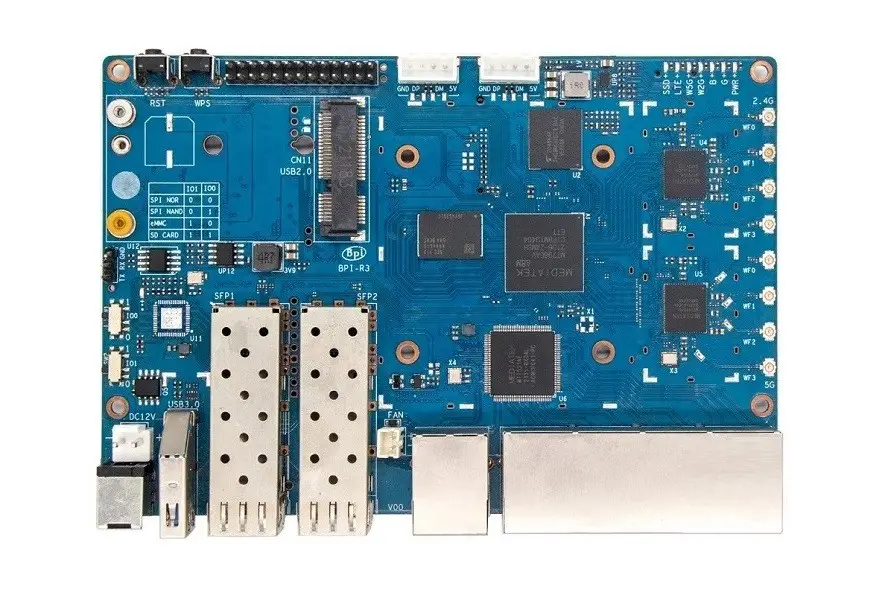
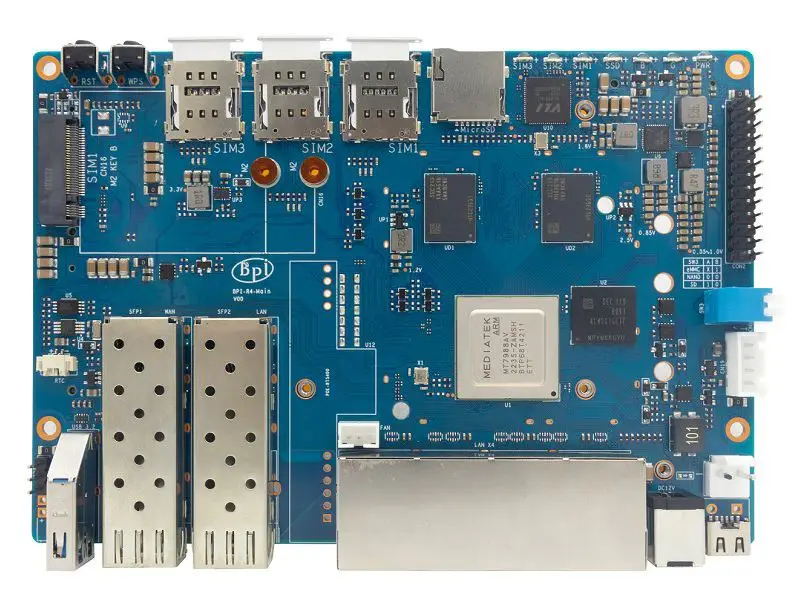
Comparative Analysis: Banana Pi R3 vs. Banana Pi R4 Hardware Specifications
Banana Pi BPI-R3 vs. Banana Pi BPI-R4 | ||
Model | Banana Pi BPI-R3 | Banana Pi BPI-R4 |
– |  |  |
Hardware features | ||
CPU | MediaTek MT7986 (Filogic 830) | MediaTek MT7988 (Filogic 880) |
RAM Configurations | 2 GB | 4 GB (DDR4) |
CPU architecture | Cortex-A53 (64-bit SoC) | Cortex-A73 (64-bit SoC) |
Core number | 4 | 4 |
CPU Frequency (Max) | 4×2.00 GHz | 4×1.80 GHz |
26 PIN GPIO Header |  | |
Interfaces | 1x M.2 KEY-E PCIe inerface | 1x M.2 KEY-B slot with USB3.2 interface for 5G.
|
Micro SD (TF) Card Slot | | |
8GB eMMC onboard storage | | |
128MB SPI-NAND Flash | | |
32MB SPI NOR Flash | |  |
Boot switch | | |
USB port | USB V3.0 | USB V3.2 |
Integrated WiFi | | N/A |
WiFi 7 Support | | (via expansion board) |
Antennas | 8 Antennas | 13 Antennas + DFS Antenna |
3 Pin debug serial port (UART) | | |
Buttons | 1x Boot switch 1x WPS 1x Reset | 1x Boot switch 1x Reset |
Ethernet | 5x 1GbE RJ45 Ethernet | Model 1: 4x 1GbE RJ45 Ethernet 1x SFP 1x 2.5Gbe RJ45 Ethernet |
PCIe Interfaces | 1 | 4 |
SIM Support | x1 Micro SIM | x3 Nano SIM |
Integrated PoE support | | Included in the x1 SFP+ model. |
PCB size | 100.5x148mm | |
Weight | 200g | 250g |
Power Interface | DC (5521) 12V 12A | Type-C PD 20V |
RTC Battery Interface | | |
OS | Ubuntu/Debian/OpenWrt | |
Astimate Price | Starting at $91 | N/A |
More simple to operate
The enhanced bootstrap switch for choosing different boot options is now even more user-friendly. The board consists of two jumpers and four operate. Storage configuration types: SD, NAND, eMMC and a third that we do not understand fully. However, we will let you know when we get more fresh information.
New features and better connectivity
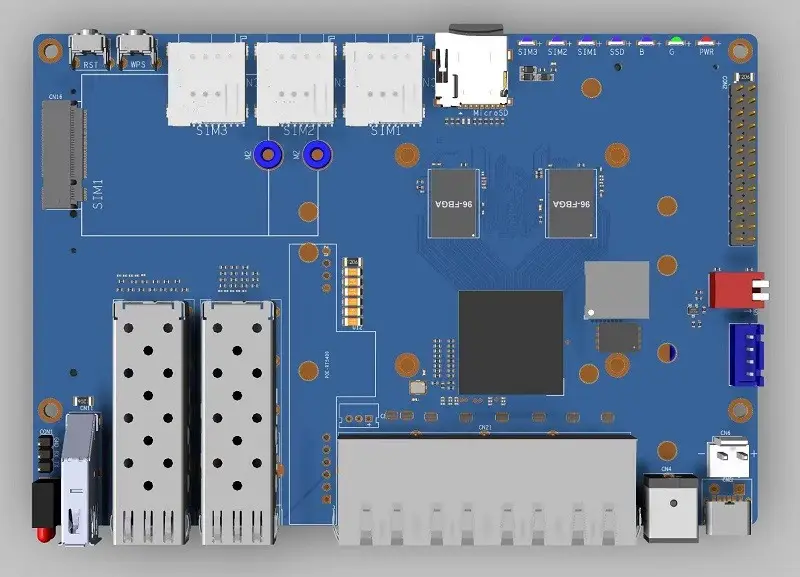
According to our CAD layout drawing, the upcoming Banana Pi R4 board will also come with a Micro SD socket next to three SIM card sockets. It will also have an M.2 slot supporting 4G and 5G modules. In addition, a two-pin power socket is included for powering a FAN.
The board SoC will be based on MediaTek’s latest Filogic 880 solution, designed mostly for AP/Router/Gateway applications. In this new design, you can see that a 26-pin GPIO header was also maintained. This means the R4 board can also be used for IoT and robotic projects, for example to connect sensors etc.
Model 1: Banana Pi BPI-R4 Layout (x2 SFP+ Cages)
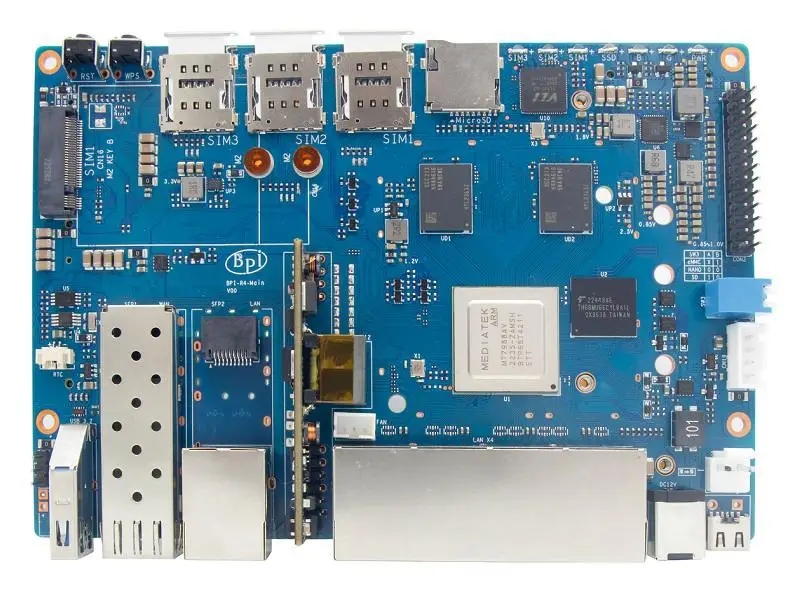
Model 2: Banana Pi BPI-R4 Layout (x1 SFP+ Cage)
As shown in the photo below, the R4 configuration is different with one SFP+ cage next to the RJ45 2.5Gbps Ethernet WAN/LAN port. In addition, the remaining four RJ45 ports support 1Gbps throughput speeds. WIFI 7 and Bluetooth are also optional and include Power over Ethernet support (PoE).
A Closer Look at the R4 Wi-Fi 7 NIC (Network Interface Card)
Tri-band Connectivity explained
The term “tri-band” in the context of Wi-Fi refers to the device or system’s ability to operate on three distinct frequency bands. This means that it can seamlessly function across the 2.4GHz, 5G and 6GHz ranges. By harnessing multiple frequency bands, it offers remarkable versatility, expanded coverage, and minimized interference.
Two design choices
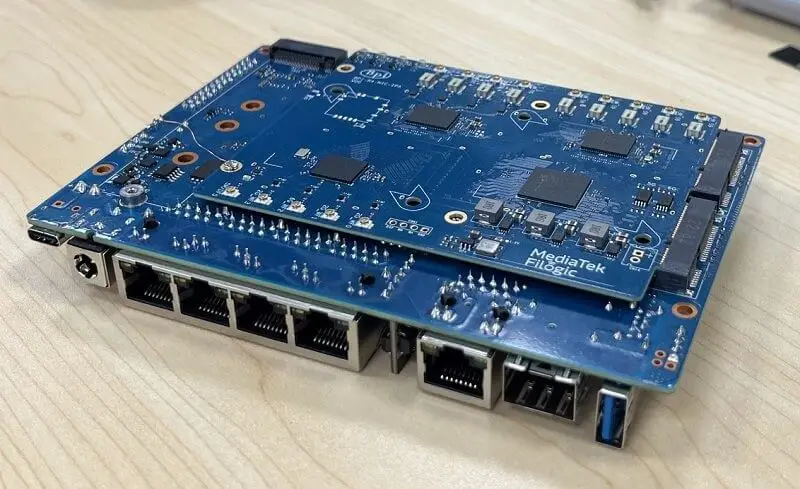
Sinvoip will be releasing two variants of their WiFi 7 NIC Cards. The first option will feature a cutting-edge array of 14 antennas (shown in the photo below), while the second, more affordable option will come with a total of 6 antennas. These boards harness the power of two mini PCIe sockets, ensuring exceptional performance.
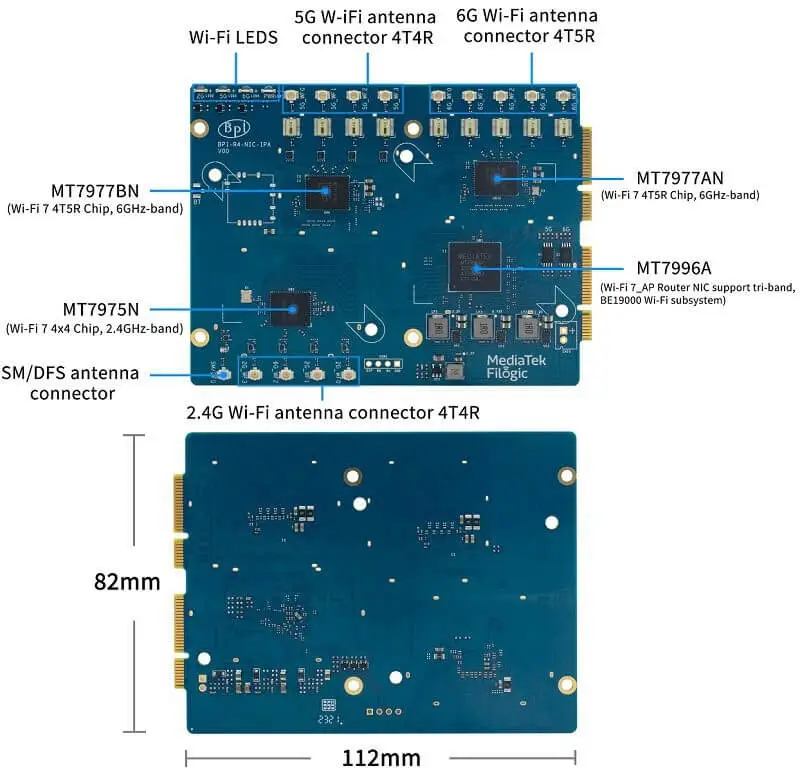
Design No.1: Banana Pi R4 Wi-Fi 7 NIC (4T4R & 4T5R Design)
The NIC interface is equipped with four powerful MediaTek Chips – MT7977BN, MT7977AN, MT7975BN, and MT996A – making it an unstoppable force of seamless connection. With unrivaled 4T4R and 4T5R connectivity, this interface unleashes unparalleled performance. The schematic image below highlights the interface’s impressive array of 14 antennas.
The Banana Pi R4 Wi-Fi 7 NIC boasts an impressive design, featuring a total of 14 onboard antenna sockets.
Design No.2: Banana Pi R4 Wi-Fi 7 NIC (3T3R Design)
This NIC interface is equipped with three powerful MediaTek Chips: MT7976C, MT7977I1, and the cutting-edge Eagle D-Chip design for 3T3R. This combination transforms it into an unstoppable force of connectivity. The schematic image below presents a schematic drawing of the interface, highlighting its impressive array of six antennas.
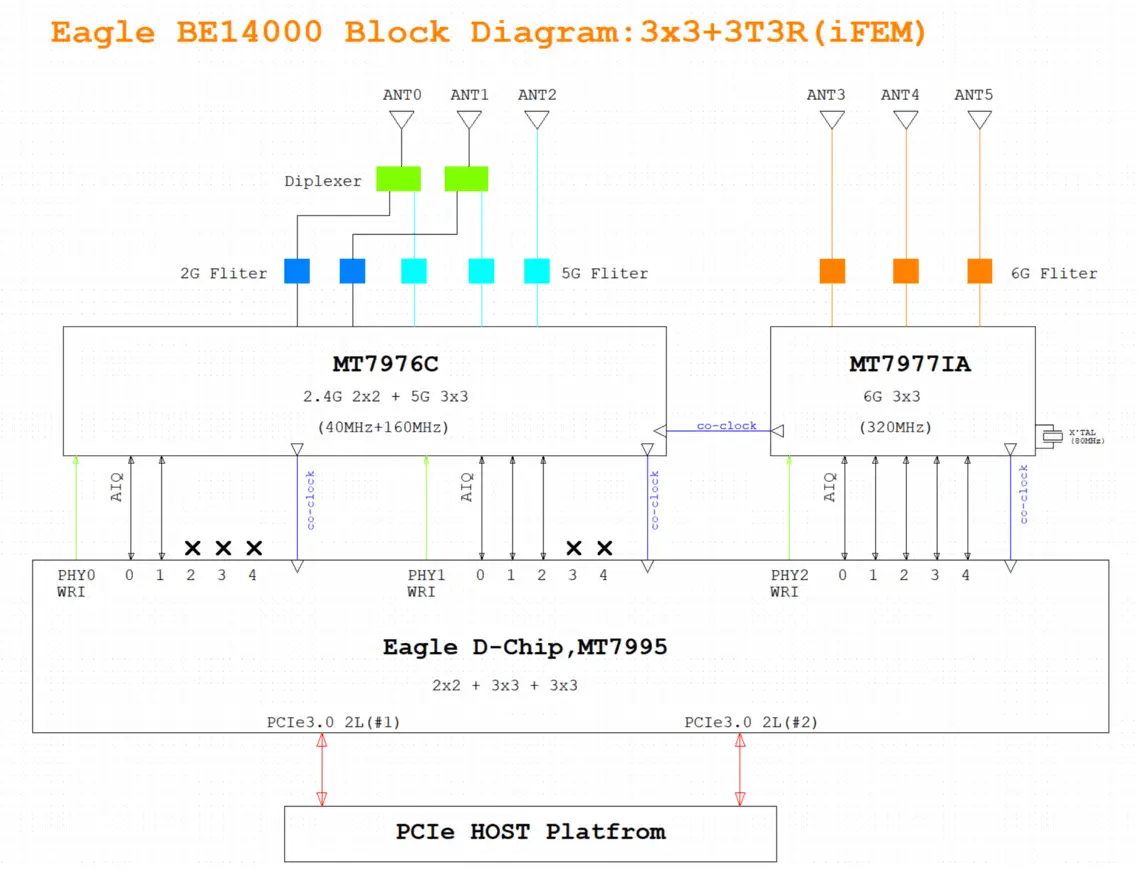
| Chip | Band | Antenna configuration |
| MT7976C | 2.4 GHz, 5GHz | 2.5GHz: 2×2 5G: 3×3 |
| MT7977I1 | 6 GHz | 3T3R (3×3) |
| Eagle D-Chip MT7995 | – | (2×2 + 3×3 + 3×3) |
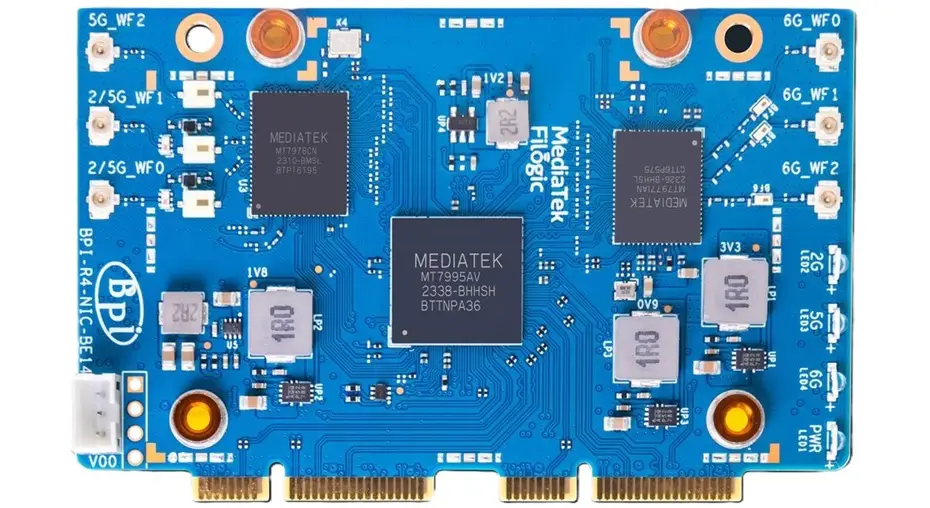
WiFi7 iPA NIC Module (BPI-R4-NIC-BE14)
What is 3T3R?
A 3T3R (3 Transmit 3 Receive) Wi-Fi chip refers to a wireless communication chip used in networking devices, such as routers, access points, or wireless adapters. The “3T” indicates that the chip has 3 transmit chains, which means it can send data over four separate streams simultaneously. The “3R” indicates that the chip has three receive chains, allowing it to receive data from up to 3 different streams simultaneously.
This configuration is part of Multiple Input, Multiple Output (MIMO) technology, which is used to improve the performance and efficiency of wireless communication. The multiple antennas allow for better signal reception and transmission, leading to increased data throughput and improved overall wireless network performance.
By employing multiple transmit and receive chains, a 3T3R Wi-Fi chip can enhance wireless network performance and capacity. It enables higher data throughput, improved signal quality, and increased range than chips with fewer transmit and receive chains. This technology is often used in high-end Wi-Fi equipment and can provide better wireless performance, especially in environments with an increasing number of connected devices or areas with challenging network conditions.
Enhanced connectivity
DFS (Dynamic Frequency Selection) antenna is included and integrated with the Banana Pi BPI-R4 board. This is a channel allocation scheme specified for wireless LAN, commonly known as Wi-Fi. In addition to its ability to avoid interference with other preexisting systems like military radars, satellite communication, and weather radars, Wi-Fi technology also offers extensive and consistent coverage of the spectrum known as Uniform Spreading.
Embedded Routers: What are the advantages?
The Banana Pi R4 is widely recognized as a top choice for embedded routers. You can use it for a wide selection of applications and IoT projects. The R4 features a 26 pin header suitable for development purposes. It can be used to connect devices such as sensors and anything else you can think of, such as building a powerful surveillance camera system. The addition of Wi-Fi 7 is undeniably impressive. However, it may not be an essential feature for everyone. If it’s not a necessity, you can still opt for a PCIe Wi-Fi 6 / BT expansion card as an alternative.
Unlike other premium routers that are priced at $300 and higher, the R4 board offers exceptional value by not only excluding 5G connectivity support and advanced storage options, but also delivering outstanding performance. It’s designed specifically for tech geeks, home consumers, and professionals seeking an all-in-one Linux-based embedded computer and router in one product.
Practical Applications
The Banana Pi R4 Router Board boasts a range of impressive features and specifications that set it apart from other router boards in the market. Firstly, it supports multiple operating systems, including Android, Ubuntu, and OpenWrt, giving users the flexibility to choose the one that best suits their needs. This compatibility ensures that the board can be easily integrated into existing networks without any compatibility issues.
Additionally, the Banana Pi R4 Router Board comes with advanced security features to protect your network. Using VPN protocols, you can access your network securely from a remote location.
With OpenWrt’s built-in firewall, unwanted traffic can be filtered and blocked. It provides peace of mind to know that your network will be protected against unauthorized access and cyberattacks.
Another notable feature of the Banana Pi R4 Router Board is its support for 4G LTE as well as 5G connectivity. This means that you can use a SIM card to connect to the internet, providing a backup option in case your primary internet connection fails. This feature is particularly useful for businesses that rely heavily on a stable internet connection for their operations.
Cost-Effective Solution for Small and Medium-Sized Businesses
For small and medium-sized businesses, cost-effectiveness is a crucial factor when choosing a router board. The Banana Pi R4 Router Board offers an affordable solution without compromising on performance and features. It provides all the necessary networking capabilities at a fraction of the cost of other high-end router boards in the market.
Moreover, the Board is energy-efficient, consuming less power compared to traditional routers. This not only helps to reduce electricity bills but also contributes to a greener environment. The board also has a durable design, ensuring long-term reliability and minimizing the need for frequent replacements or repairs.


Good Job
Thanks
That’s the most in-depth review I’ve seen of the BPI-R4. However, the benchmark and Wi-Fi testing sections are noticeably missing. Any reason why?
Thanks. Probably at that time I didn’t have the extra patience to wait until they fixed the bugs/problems. Hopefully a few months have passed and it should be fine now.