Close Menu
    Facebook X (Twitter) Instagram Threads
    Trending
    • Rii TU3607 iPad Keyboard Case Review: Dream or Heavy Burden?
    • PrivadoVPN Review 2026: Does the Free Tier Still Work for Streaming?
    • Rii 518BT Review: Is This Pocket Keyboard Actually Usable?
    • Rii RK807 Pro Review: The Best Budget Apple Magic Keyboard Alternative?
    • Rii RK808 Review: The Best Foldable Travel Keyboard?
    • Rii RS201 Review: $69 16-Inch Portable Monitor Tested
    • AliExpress Promo Codes: August 2026 (100% Verified)
    • Orange Pi 6 Review: Is It Suitable for Running Local LLMs? We Checked.
    AndroidPIMP
    Facebook X (Twitter) Instagram
    • Mini PCs & Media Players
    • Embedded Computers
    • Wearables
    • Wireless Routers
    • Edge AI Cameras Vision Hardware
    • Tech Accessories
    AndroidPIMP
    Xiaomi Poco Pad Review

    Poco Pad Review: A Detailed Hands-on Review

    0
    By androidpimp on March 27, 2025 Tablet PCs
    Table of contents
    1. Part I: Xiaomi Poco Pad Introduction
    2. Xiaomi Poco Pad Specifications
    3. Comparing Specifications: Xiaomi Pad 6S versus Poc Pad.
    4. Comparison: Xiaomi Poco Pad and Apple iPad Pro 12.9-inch
    5. Powered by HyperOS
    6. An affordable alternative to the Pad Pro with comparable quality
    7. Part II: Xiaomi Poco Pad Review
    8. Unboxing All Items:
    9. The main package (Tablet & Accessories)
    10. Poco Pad Cover (Optional Accessory)
    11. Poco Pad Keyboard (Optional Accessory)
      1. Using the Poco Pad Keyboard
    12. The crucial accessory overlooked by Xiaomi
      1. What are the benefits?
    13. Smart pen (Optional Accessory)
    14. Design
    15. Weight
    16. Display
      1. Testing the visibility of displays in strong sunlight conditions.
      2. Whatโ€™s a TรœV Rheinland certified device is and why it is crucial for the health of your eyes?
    17. Quad speakers for immersive stereo sound
    18. Hardware
    19. Software
      1. What is the current amount of available space?
    20. Interconnectivity
    21. Xiaomi Interconnectivity โ€“ Pairing with the Poco X7 Pro smartphone
    22. Kodi Compatibility
      1. Kodi Performance and Memory Use
    23. Using the Tablet With Stylus Pen For Drawing & Writing
      1. What does Mi Canvas Apps have to offer?
    24. Smart Pen
      1. Charging the Smart Pen
      2. Palm rejection support
      3. Latency
      4. Understanding Smart Pen Latency
      5. How good is the latency on the Poco Pad?
      6. Pressure sensitivity
    25. Cameras
      1. What is the quality of the picture like?
    26. Benchmarking
      1. AnuTu Benchmark
      2. Geekbench 6: Test Results
      3. Comparing the results to equivalent devices
    27. 3DMark performance assessment:
      1. Can the hardware handle graphically intensive games?
    28. Battery Life and Charging Speed of Poco Pad
    29. Battery life during Netflix streaming
    30. Netflix Streaming
    31. The Poco Pad offers support for WiFi 6, providing even better connectivity options.
    32. What about the competition?
    33. Accessories for the Xiaomi Poco Pad
    34. Is the Xiaomi Poco Pad Worth Buying?
    35. Frequently asked questions about the Poco Pad
      1. What type of processor powers the POCO Pad?
      2. What storage options are offered for the POCO Pad?
      3. What kind of display is included in the POCO Pad?
      4. What is the battery capacity and charging capability of the POCO Pad?
      5. Can Kodi be installed on the Poco Pad, and how does it perform?
      6. Is the POCO Pad OS capable of fully utilizing the available 8GB of RAM?
      7. Does the Poco Pad HyperOS support a 64-bit architecture and allow the installation of 64-bit APKs?
      8. What is the highest resolution that Netflix supports for video playback on the Poco Pad?
    36. Verdict, Pricing, and Availability
      1. Poco Pad Pricing and purchasing options
      2. Poco Pad

    What about the competition?

    Choosing between the Xiaomi Poco Pad and well-known brands like Apple’s iPad entails considering factors such as budget, ecosystem preferences, and specific feature needs.

    While the iPad may be the obvious choice for those already immersed in the Apple ecosystem, the Poco Pad offers a compelling alternative for Android OS enthusiasts looking for versatility, affordability, and strong performance in a more open system.


    Accessories for the Xiaomi Poco Pad

    Enhancing the Xiaomi Poco Pad’s functionality is easy with the right accessories. Poco offer protective cases and stands to styluses and keyboards. A variety of add-ons are available to cater to different needs and preferences. These accessories not only protect the device but also extend its versatility, making it even more valuable to its users.


    Is the Xiaomi Poco Pad Worth Buying?

    The Xiaomi Poco Pad stands out as a formidable contender in the tablet market, challenging the dominance of the Apple iPad with its blend of performance, features, and affordability. Whether you’re a student, professional, or casual user, the Poco Pad offers a compelling package that warrants consideration. With its robust specifications, positive user feedback, and competitive pricing, the Pad might just be the perfect tablet choice for many.

    To sum it up
    ✅ Poco Pad delivers an impressive 12-inch display and robust performance without breaking the bank.
    ✅ This tablet offers impressive battery life, exceptional sound quality enhanced by Dolby Atmos, and the added benefit of expandable storage.
    ✅ This tablet is perfectly designed for daily use, light productivity tasks, and entertainment enjoyment.

    Frequently asked questions about the Poco Pad

    What type of processor powers the POCO Pad?

    The Poco Pad features a powerful Qualcomm Snapdragon 7s Gen 2 processor.

    What storage options are offered for the POCO Pad?

    It has 8GB LPDDR4X RAM and options for 128GB or 256GB UFS 2.2 storage, expandable up to 1.5TB via Micro SD.

    What kind of display is included in the POCO Pad?

    The Poco Pad has a 12.1-inch IPS LCD with a 2560 x 1600 resolution, 120Hz refresh rate, 600 nits brightness, and Dolby Vision support.

    What is the battery capacity and charging capability of the POCO Pad?

    10,000mAh battery with 33W Fast Charging.

    Can Kodi be installed on the Poco Pad, and how does it perform?

    Absolutely, it performs exceptionally well.

    Is the POCO Pad OS capable of fully utilizing the available 8GB of RAM?

    Yes, it utilizes all available physical RAM.

    Does the Poco Pad HyperOS support a 64-bit architecture and allow the installation of 64-bit APKs?

    Absolutely, it offers complete support for installing 64-bit applications.

    What is the highest resolution that Netflix supports for video playback on the Poco Pad?

    The Netflix app offers playback at a maximum resolution of Full HD (1080p).

    Verdict, Pricing, and Availability

    The Pad tablet stands out for its numerous strengths, with minimal compromises made in its design and functionality. No expense was spared, making it a noteworthy addition to the market. Although it’s not on the same level as Apple iPad in terms of software, one of the most appealing aspects of the Xiaomi Poco Pad is its competitive pricing. Positioned as a very budget-friendly alternative to the Apple iPad, it provides exceptional value for its price point.

    Poco Pad Pricing and purchasing options

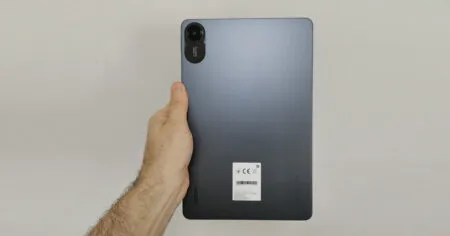
    The initial launch price for the 8GB + 256GB configuration of the product was set at a retail price of $329, making it accessible through various online and physical retail channels across multiple regions. This tablet is offered in two vibrant colors: Grey and Blue. However, it can be purchased at an even more appealing price of $269. By applying a $6 coupon, the final price drops to approximately $260—an enticing deal indeed. If you’re interested in this product, you can easily find it on leading e-commerce platforms like AliExpress (check the link below).
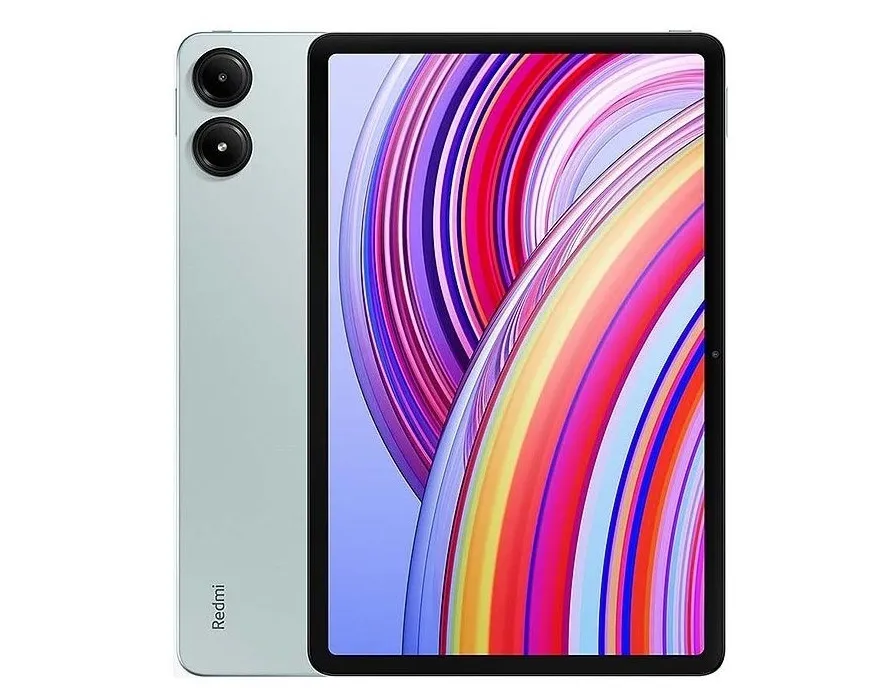
    Xiaomi Poco Pad

    Poco Pad

    $269.00
    This site contains affiliate links to products. We may receive a commission for purchases made through these links.
    Buy this item
    * Poco Official AliExpress Store *

    1 2 3 4 5 6 7 8 9 10 11
    Share. Facebook Twitter Pinterest LinkedIn Tumblr Email
    Previous ArticleSinoVoip unveils Banana Pi BPI-AI2N SBC powered by Renesas RZ/V2N AI MPU
    Next Article Banana Pi R4 gets an 8GB RAM upgrade. Here’s why you should consider buying one!
    androidpimp
    • Website

    Related Posts

    Redmi Pad 2 Tablet Review

    Redmi Pad 2 Review (2025): The Best Budget Tablet Value? Full Review

    September 26, 2025
    Xiaomi Redmi Pad 5 Review

    Xiaomi Redmi Pad Review: Powerful and Affordable

    June 30, 2024
    Xiaomi Pad 6

    Xiaomi Pad 6 Specs, price and top features

    July 7, 2023
    5 1 vote
    Article Rating
    Subscribe
    Notify of
    0 Comments
    Oldest
    Newest Most Voted
    Categories
    PureVPN
    PureVPN Ad Banner
    PrivadoVPN – No. 1 in Parental Control
    PrivadoVPN 350x437
    Recent Posts
    • Rii TU3607 iPad Keyboard Case Review: Dream or Heavy Burden?
    • PrivadoVPN Review 2026: Does the Free Tier Still Work for Streaming?
    • Rii 518BT Review: Is This Pocket Keyboard Actually Usable?
    • Rii RK807 Pro Review: The Best Budget Apple Magic Keyboard Alternative?
    • Rii RK808 Review: The Best Foldable Travel Keyboard?
    • Rii RS201 Review: $69 16-Inch Portable Monitor Tested
    • AliExpress Promo Codes: August 2026 (100% Verified)
    • Orange Pi 6 Review: Is It Suitable for Running Local LLMs? We Checked.
    • Youyeetoo NestDisk Mini PC/Router: Is This Pocket-Sized 3-in-1 NAS Worth It?
    • DFRobot Unveils seeMote Cube: A 6DoF Physical Controller for Apple Vision Pro
    RSS feed: The Latest RSS Feeds The Latest RSS Feeds
    • Rii TU3607 iPad Keyboard Case Review: Dream or Heavy Burden?
    • PrivadoVPN Review 2026: Does the Free Tier Still Work for Streaming?
    • Rii 518BT Review: Is This Pocket Keyboard Actually Usable?
    Facebook X (Twitter) Instagram Pinterest
    @2026 - All Right Reserved. Designed by AndroidPIMP

    Type above and press Enter to search. Press Esc to cancel.

    wpDiscuz