Close Menu
  • Home
  • About
  • Wearables
  • Earbuds
  • Computer Accessories
    • Routers
    • Remotes
  • Embedded
    • Single Board Computers
    • Addon Boards
    • Raspberry Pi
  • Wireless Routers
  • Contact
Facebook X (Twitter) Instagram
Trending News
  • CamThink NE301 Ultra-Low Power Edge AI Camera Module runs Local AI Models
  • Orange Pi 6 Plus Review: A 12-Core SBC Powerhouse (Benchmarks, Specs, and Pricing)
  • Orange Pi 6 Unveiled: The Affordable, Slimmed-Down SBC Alternative to the 6 Plus
  • Ugoos SK4 Review (2025): The Best Mid-Range Android TV Box for Value & Features
  • AliExpress Black Friday 2025: 🚨 LATEST Deals & ALL Exclusive Country Promo Codes (Save 90%!)
  • LattePanda IOTA Review: 4 Reasons It Beats Raspberry Pi 5
  • POCO F8 Ultra/Pro global release date unveiled, showcasing flagship-level specs
  • Ugoos GaN Chargers 2025: 35W, 65W, 140W – Fast, Compact & Universal
AndroidPIMP
Facebook X (Twitter) Instagram
  • Home
  • About
  • Wearables
  • Earbuds
  • Computer Accessories
    • Routers
    • Remotes
  • Embedded
    • Single Board Computers
    • Addon Boards
    • Raspberry Pi
  • Wireless Routers
  • Contact
AndroidPIMP
Embedded Computers

Banana Pi BPI-R3 Mini Review: A Tiny & Fast 2.5GbE router board

By androidpimpDecember 2, 2023Updated:October 13, 20253 Comments21 Mins Read
Facebook Twitter Pinterest LinkedIn Tumblr Email
Follow Us
Google News Flipboard
Table of contents
  1. Part I: Banana Pi BPI-R3 Mini – Features and introduction
  2. Highlights
  3. Banana Pi BPI-R3 Mini (Eng. sample test)
  4. Hardware Interfaces & Layout
  5. Practical Applications
  6. Cybersecurity
    1. Portable router
  7. Hardware and Software Compatibility
  8. Part II: Banana Pi R3 Mini review
  9. Unboxing all items (Before being assembled).
  10. Included packages:
  11. Let’s take a closer look at the board.
  12. Case design
  13. Exhaust fan
  14. A Closer Look
  15. Dive deeper into the internals of the case (Grey Color Edition)
  16. Metal Case (White background photos)
    1. Board & Metal Case
  17. Assembling all the items together.
  18. Operation
  19. Hardware
    1. Checking Available system resources
    2. CPU Information
    3. Finding all storage devices
    4. More detailed information about the storage devices
  20. Banana Pi BPI-R3 Mini specifications
  21. Banana Pi BPI-R3 vs. Banana Pi BPI-R3 Mini
  22. Software
  23. Burning the OpenWrt image
  24. Installing an NVMe SSD
  25. Checking the M.2 NVMe SSD Performance
  26. Benchmarking NVMe Using hdparm
  27. Connectivity
  28. iPerf Throughput test (Wired connection)
  29. iPerf Throughput test (Wireless connection)
  30. 5G & 4G LTE Ready
  31. Banana Pi R3 Mini: Review Summary
  32. Price and Availability
    1. BPI-R3 Mini Router Board
    2. BPI-R3 Mini Router Board

Operation

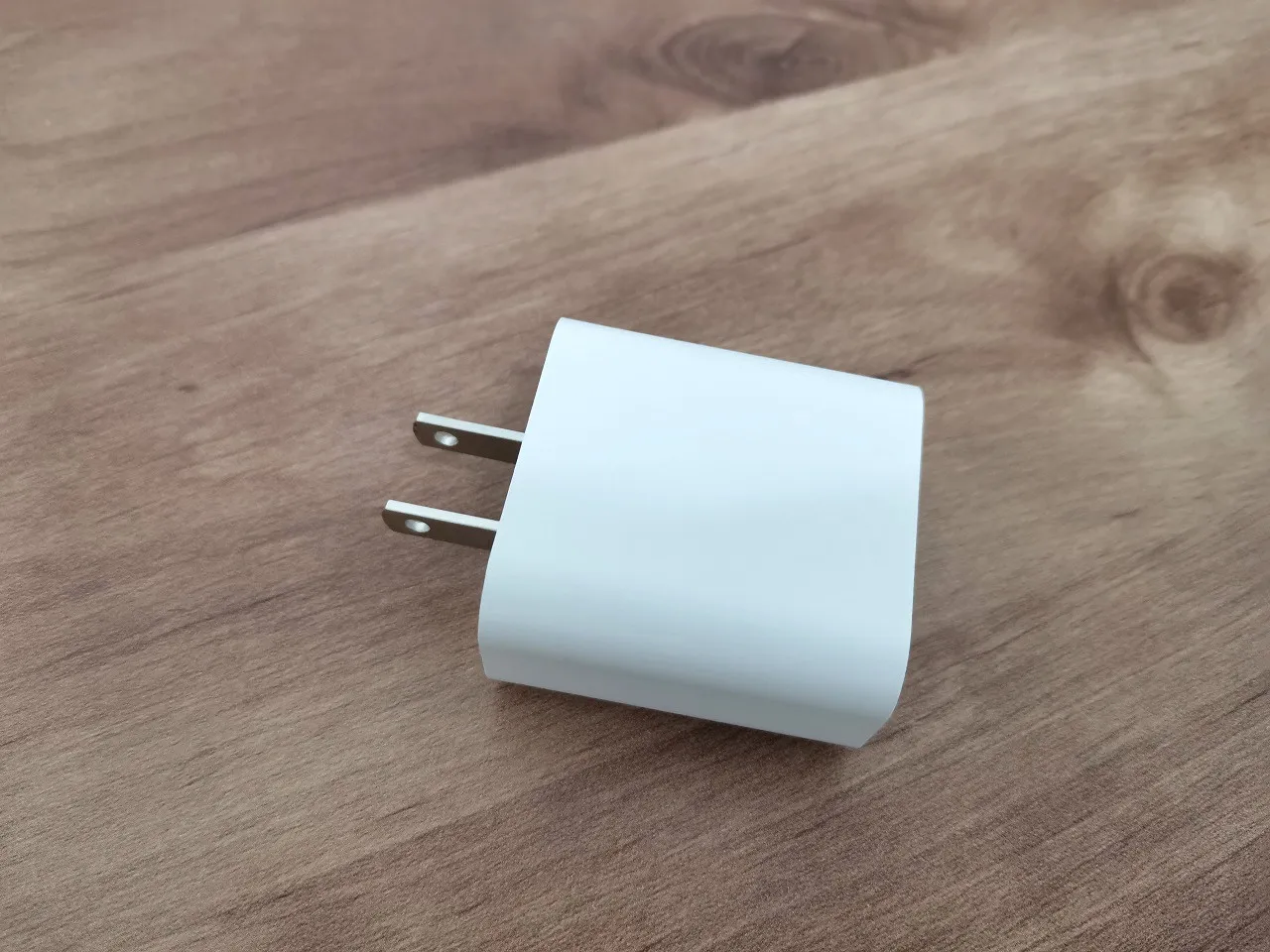
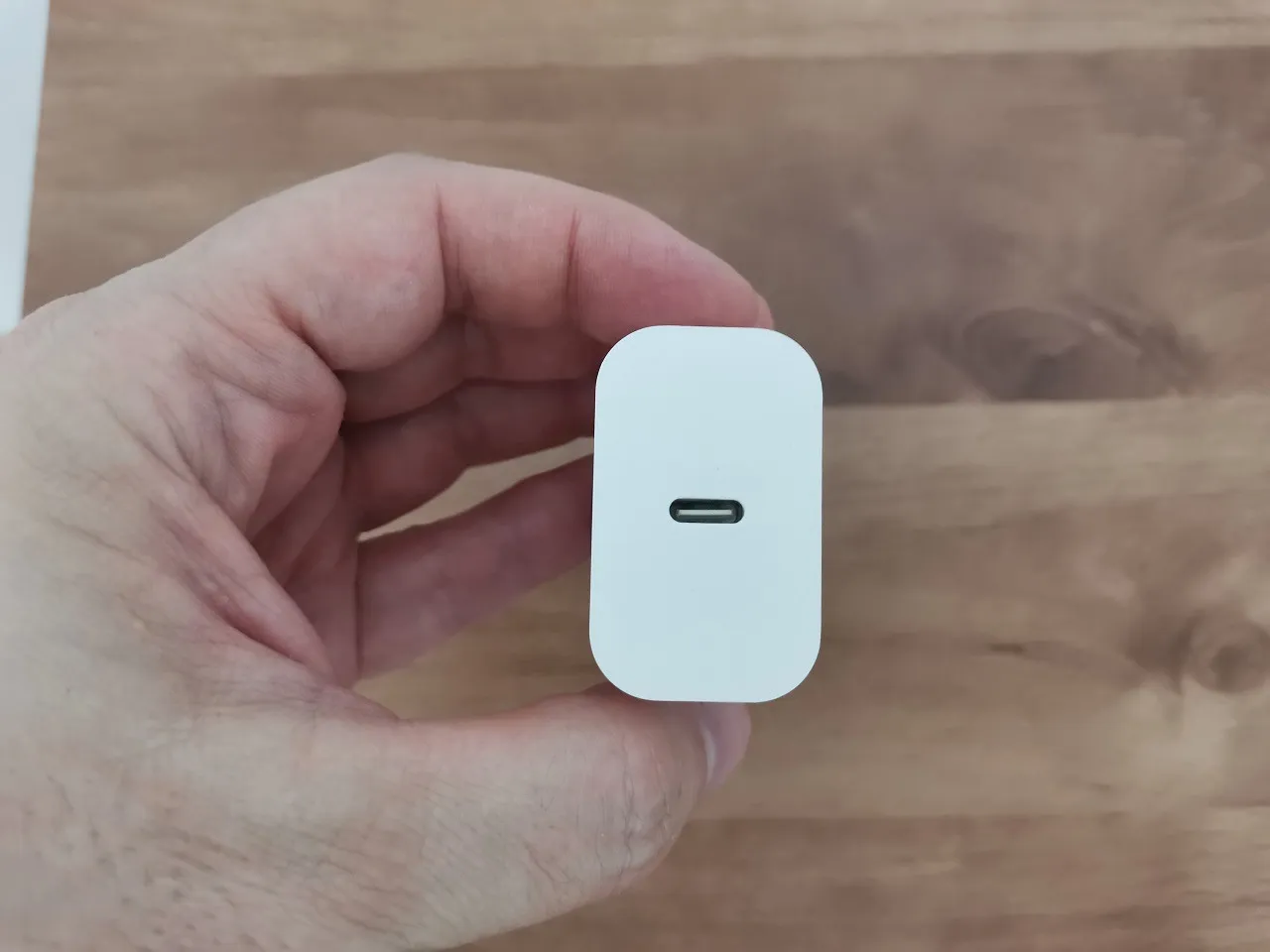
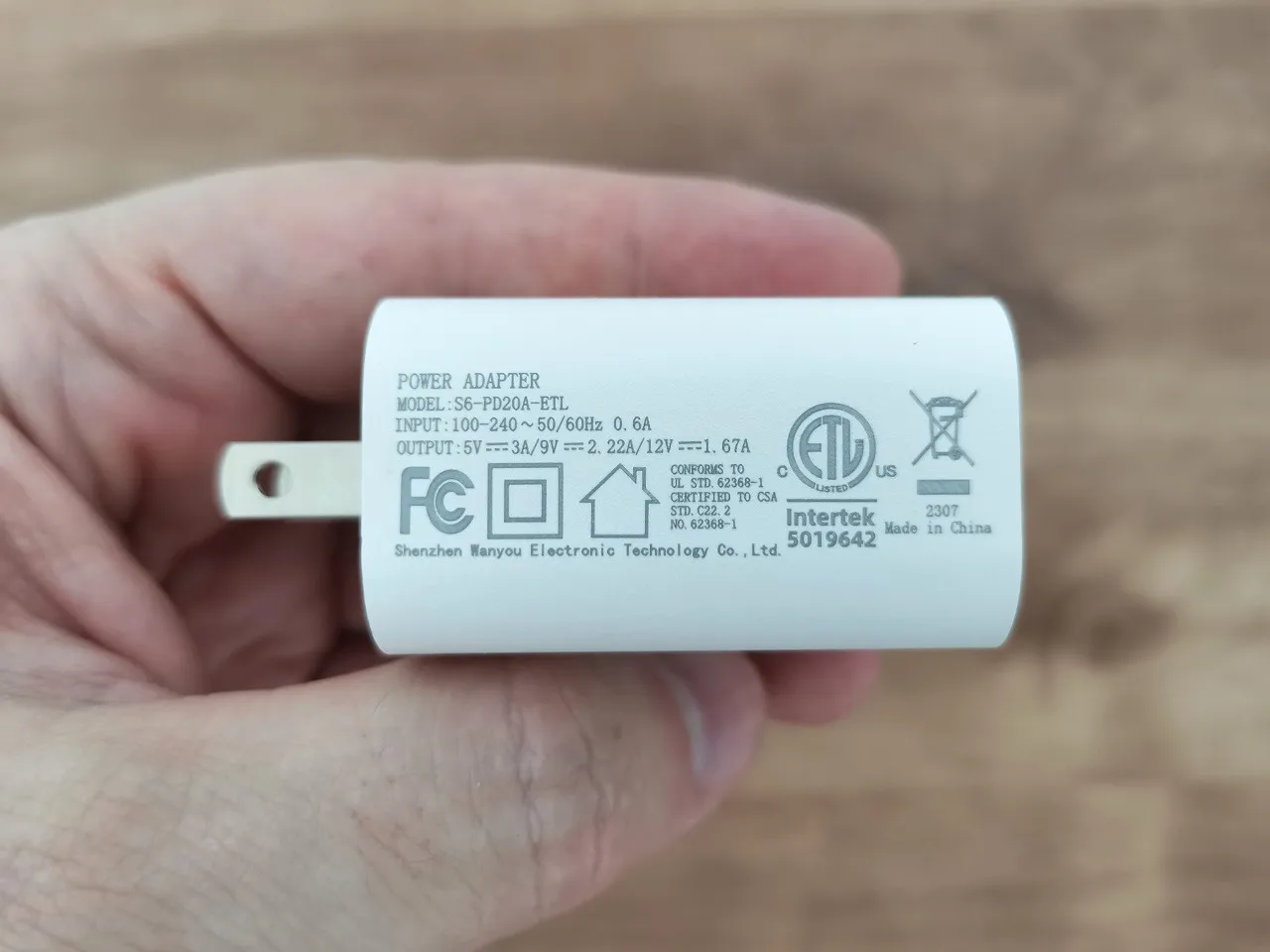
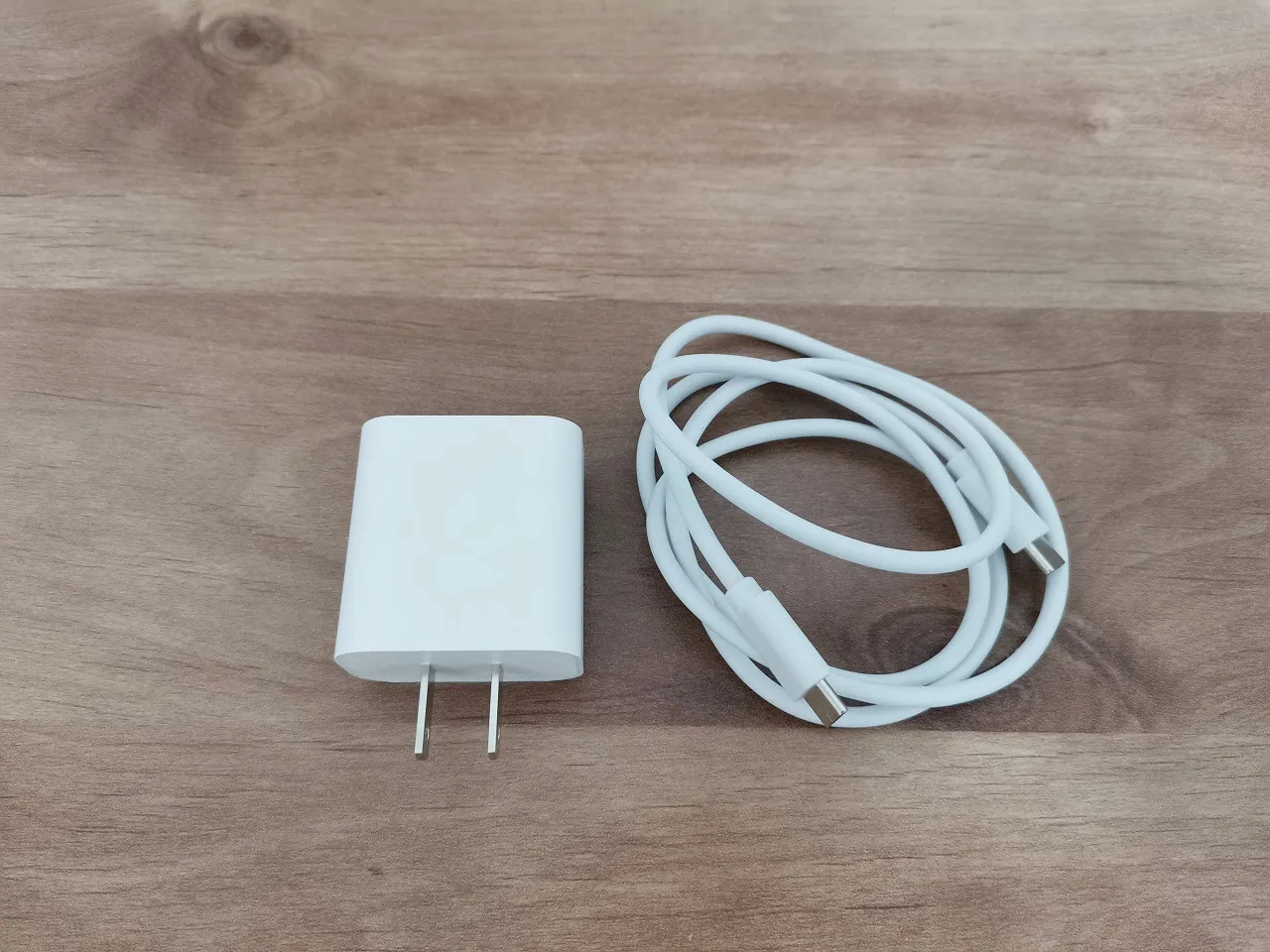
We have been given the BPI-R3 Mini, which comes equipped with a 20W USB-C PD power adapter. This adapter is truly exceptional, as it features an integrated smart chip that intelligently adapts the current to perfectly suit the requirements of your device. It also offers the convenience of adjustable voltages, with options ranging from 5V-3A, 9V-2.22A, to 12V-1.67A. With such versatility and sophistication, this power adapter is a true standout feature of the BPI-R3 Mini.

Banana Pi R3 Mini Power Adaptor
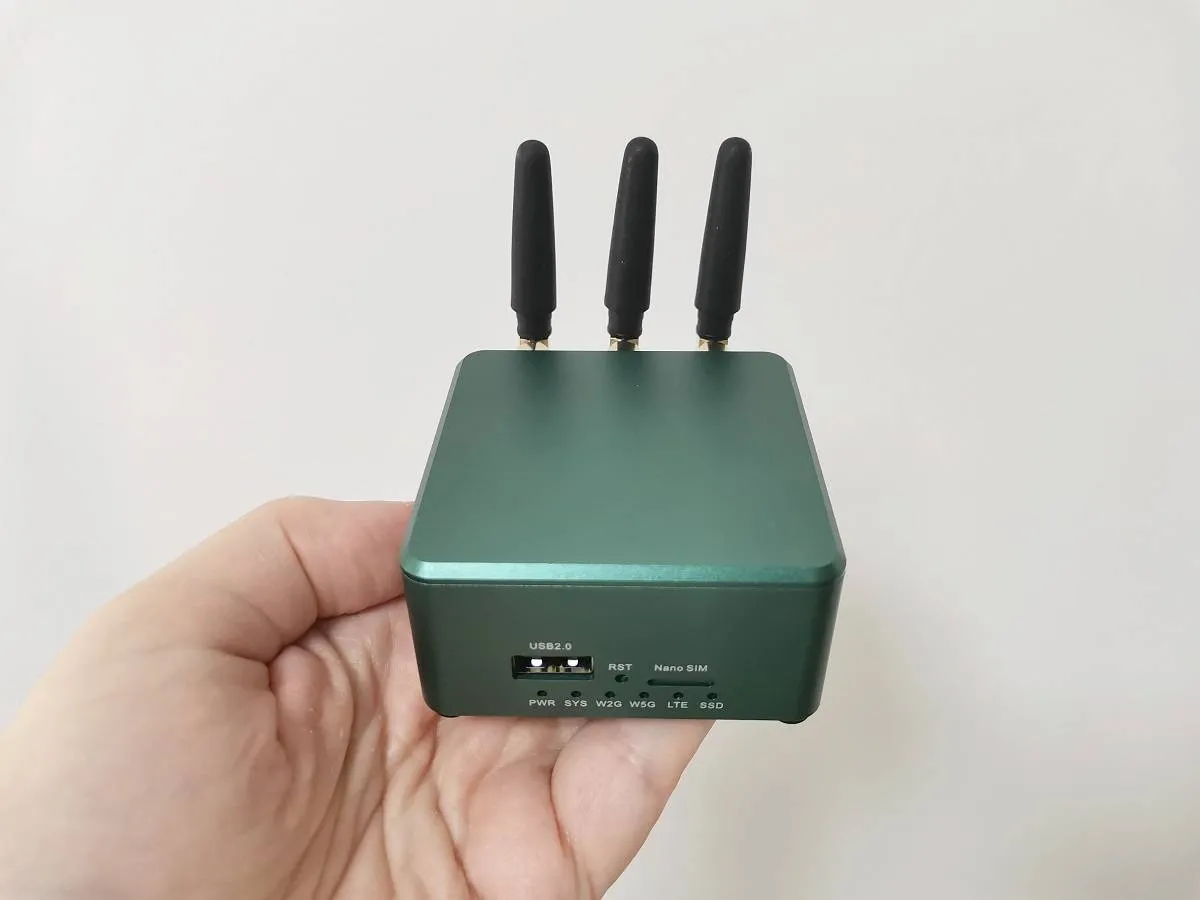
After conducting extensive tests, we have determined that the device’s CPU operates optimally within a temperature range of 52-64℃ (Maximum). The small fan inside the case is controlled by Pulse-width modulation (PWM). It kicks in when there is a change in CPU load or when the temperature exceeds a specific threshold. This fan plays a crucial role in gradually reducing the operating temperature of the device to a very reasonable ~53℃.

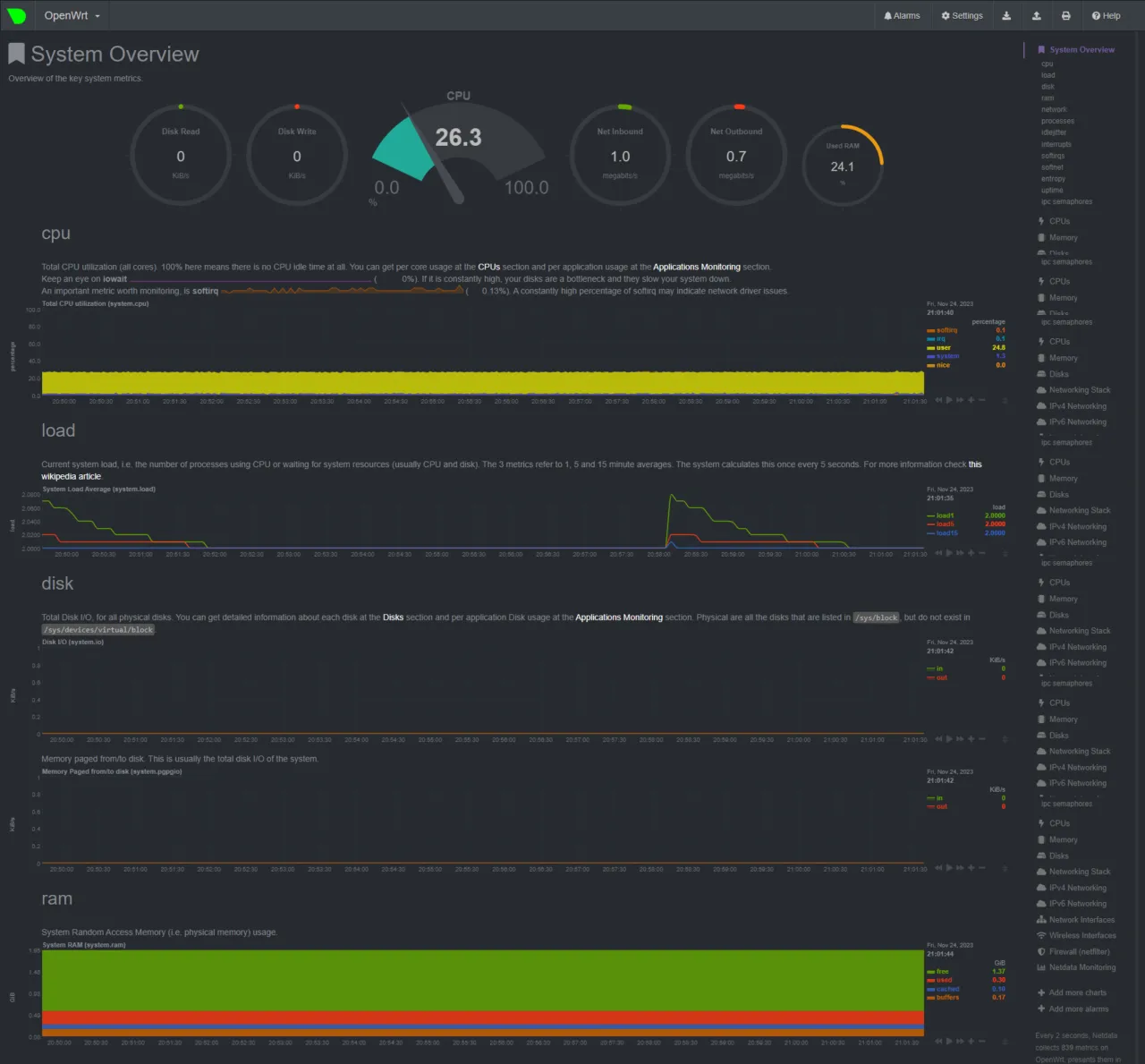
Moreover, we have found that the CPU cores are utilized at approximately 26-28% capacity during normal operation, resulting in superior performance and efficiency.

Banana Pi R3 Mini | CPU Load Information
BPI R3 Mini CPU Load
BPI R3 Mini (CPU Load Information)

Hardware

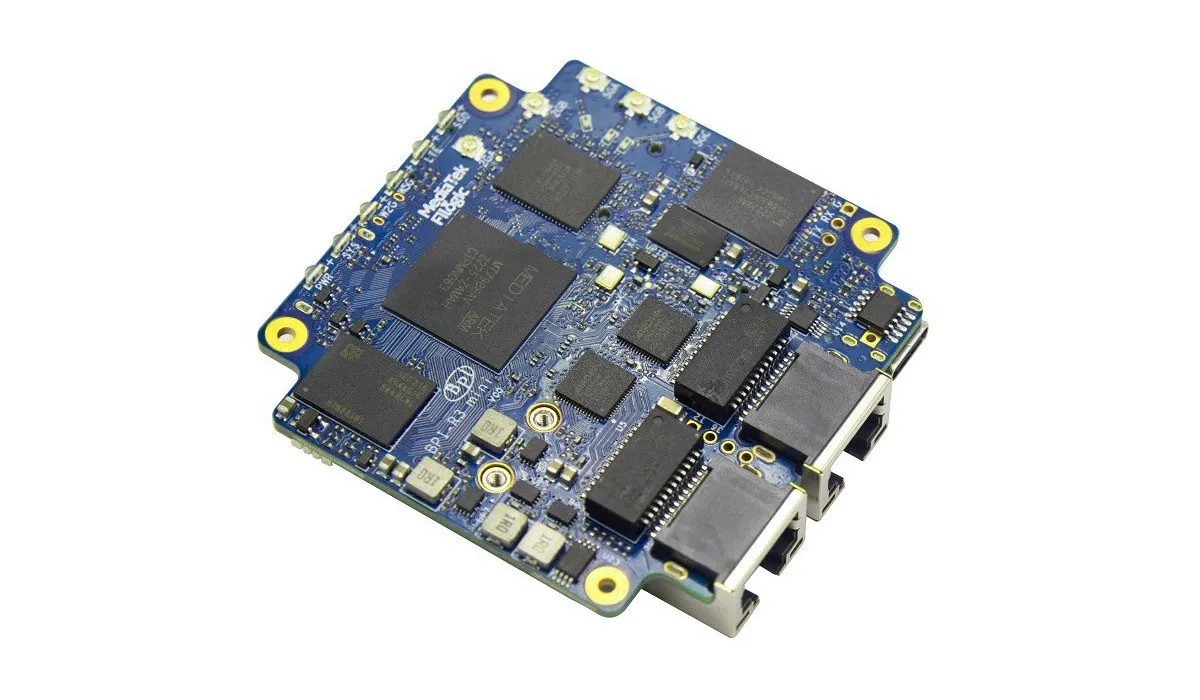
The Banana Pi BPI-R3 mini boasts impressive power, thanks to its robust quad-core ARM MT7986A (Filogic 830) processor. With this advanced 12 nm process technology, it delivers outstanding processing capabilities, seamlessly integrating a highly efficient CPU, GPU, AI processing unit, and a comprehensive connectivity module.

Featuring a robust 2GB of DDR4 memory, this router ensures flawless and effortless performance, even when confronted with numerous devices and extensive network traffic. This device boasts an array of remarkable features including 8GB eMMC storage, M.2 interfaces (B&M) for enhanced functionality, a Nano SIM slot for hassle-free connectivity, two 2.5G Ethernet ports for high-speed networking, and integrated onboard dual-band Wi-Fi 6 support for smooth wireless connectivity.

Checking Memory Usage

root@OpenWrt:/# free
              total        used        free      shared  buff/cache   available
Mem:        2041900      274420     1507116        4504      260364     1709152
Swap:             0 

Checking Available system resources

root@OpenWrt:~# cat /proc/meminfo
MemTotal:        2041900 kB
MemFree:         1597196 kB
MemAvailable:    1788732 kB
Buffers:          162996 kB
Cached:            68448 kB
SwapCached:            0 kB
Active:           203904 kB
Inactive:          36444 kB
Active(anon):       9592 kB
Inactive(anon):     2764 kB
Active(file):     194312 kB
Inactive(file):    33680 kB
Unevictable:           0 kB
Mlocked:               0 kB
SwapTotal:             0 kB
SwapFree:              0 kB
Dirty:                 0 kB
Writeback:             0 kB
AnonPages:          8904 kB
Mapped:            14948 kB
Shmem:              3452 kB
KReclaimable:      17200 kB
Slab:              79536 kB
SReclaimable:      17200 kB
SUnreclaim:        62336 kB
KernelStack:        2048 kB
PageTables:          796 kB
NFS_Unstable:          0 kB
Bounce:                0 kB
WritebackTmp:          0 kB
CommitLimit:     1020948 kB
Committed_AS:      23568 kB
VmallocTotal:   262930368 kB
VmallocUsed:       42876 kB
VmallocChunk:          0 kB
Percpu:              608 kB

Result: The OpenWrt OS efficiently uses around 4.5GB of the available 2GB RAM, ensuring optimal performance and resource utilization.

Result: The OpenWrt OS efficiently uses around 4.5GB of the available 2GB RAM, ensuring optimal performance and resource utilization.

CPU Information

root@OpenWrt:~# cat /proc/cpuinfo
processor       : 0
model name      : ARMv8 Processor rev 4 (v8l)
BogoMIPS        : 26.00
Features        : fp asimd evtstrm aes pmull sha1 sha2 crc32 cpuid
CPU implementer : 0x41
CPU architecture: 8
CPU variant     : 0x0
CPU part        : 0xd03
CPU revision    : 4

processor       : 1
model name      : ARMv8 Processor rev 4 (v8l)
BogoMIPS        : 26.00
Features        : fp asimd evtstrm aes pmull sha1 sha2 crc32 cpuid
CPU implementer : 0x41
CPU architecture: 8
CPU variant     : 0x0
CPU part        : 0xd03
CPU revision    : 4

processor       : 2
model name      : ARMv8 Processor rev 4 (v8l)
BogoMIPS        : 26.00
Features        : fp asimd evtstrm aes pmull sha1 sha2 crc32 cpuid
CPU implementer : 0x41
CPU architecture: 8
CPU variant     : 0x0
CPU part        : 0xd03
CPU revision    : 4

processor       : 3
model name      : ARMv8 Processor rev 4 (v8l)
BogoMIPS        : 26.00
Features        : fp asimd evtstrm aes pmull sha1 sha2 crc32 cpuid
CPU implementer : 0x41
CPU architecture: 8
CPU variant     : 0x0
CPU part        : 0xd03
CPU revision    : 4

Finding all storage devices

root@OpenWrt:/# lsblk -o KNAME,TYPE,SIZE,MODEL
root@OpenWrt:/mnt# lsblk -o KNAME,TYPE,SIZE,MODEL
KNAME        TYPE   SIZE MODEL
mtdblock0    disk   128M
mtdblock1    disk     1M
mtdblock2    disk   512K
mtdblock3    disk     2M
mtdblock4    disk     2M
mtdblock5    disk   4.5M
mtdblock6    disk     2M
mtdblock7    disk     2M
mtdblock8    disk    32M
mtdblock9    disk     1G
mtdblock10   disk 980.3M
mtdblock11   disk     2G
mtdblock12   disk   4.2G
mmcblk0      disk   7.3G
mmcblk0p1    part    17K
mmcblk0p2    part   512K
mmcblk0p3    part     2M
mmcblk0p4    part     2M
mmcblk0p5    part    32M
mmcblk0p6    part   256M
mmcblk0boot0 disk     4M
mmcblk0boot1 disk     4M
nvme0n1      disk 476.9G SAMSUNG MZ9LQ512HBLU-00B00
nvme0n1p1    part 476.9G

More detailed information about the storage devices

root@OpenWrt:/# fdisk -l
Disk /dev/mtdblock0: 128 MiB, 134217728 bytes, 262144 sectors
Units: sectors of 1 * 512 = 512 bytes
Sector size (logical/physical): 512 bytes / 512 bytes
I/O size (minimum/optimal): 512 bytes / 512 bytes

Disk /dev/mtdblock1: 1 MiB, 1048576 bytes, 2048 sectors
Units: sectors of 1 * 512 = 512 bytes
Sector size (logical/physical): 512 bytes / 512 bytes
I/O size (minimum/optimal): 512 bytes / 512 bytes

Disk /dev/mtdblock2: 512 KiB, 524288 bytes, 1024 sectors
Units: sectors of 1 * 512 = 512 bytes
Sector size (logical/physical): 512 bytes / 512 bytes
I/O size (minimum/optimal): 512 bytes / 512 bytes

Disk /dev/mtdblock3: 2 MiB, 2097152 bytes, 4096 sectors
Units: sectors of 1 * 512 = 512 bytes
Sector size (logical/physical): 512 bytes / 512 bytes
I/O size (minimum/optimal): 512 bytes / 512 bytes

Disk /dev/mtdblock4: 2 MiB, 2097152 bytes, 4096 sectors
Units: sectors of 1 * 512 = 512 bytes
Sector size (logical/physical): 512 bytes / 512 bytes
I/O size (minimum/optimal): 512 bytes / 512 bytes
The backup GPT table is not on the end of the device.

Disk /dev/mmcblk0: 7.28 GiB, 7818182656 bytes, 15269888 sectors
Units: sectors of 1 * 512 = 512 bytes
Sector size (logical/physical): 512 bytes / 512 bytes
I/O size (minimum/optimal): 512 bytes / 512 bytes
Disklabel type: gpt
Disk identifier: 2BD17853-102B-4500-AA1A-8A21D4D7984D

Device Start End Sectors Size Type
/dev/mmcblk0p1 0 33 34 17K Linux filesystem
/dev/mmcblk0p2 8192 9215 1024 512K Linux filesystem
/dev/mmcblk0p3 9216 13311 4096 2M Linux filesystem
/dev/mmcblk0p4 13312 17407 4096 2M Linux filesystem
/dev/mmcblk0p5 17408 82943 65536 32M Linux filesystem
/dev/mmcblk0p6 82944 607231 524288 256M Linux filesystem

Disk /dev/mtdblock5: 4.5 MiB, 4718592 bytes, 9216 sectors
Units: sectors of 1 * 512 = 512 bytes
Sector size (logical/physical): 512 bytes / 512 bytes
I/O size (minimum/optimal): 512 bytes / 512 bytes
Disklabel type: dos
Disk identifier: 0x00000000

Device Boot Start End Sectors Size Id Type
/dev/mtdblock5p1 1 4294967295 4294967295 2T ee GPT

Disk /dev/mtdblock6: 2 MiB, 2097152 bytes, 4096 sectors
Units: sectors of 1 * 512 = 512 bytes
Sector size (logical/physical): 512 bytes / 512 bytes
I/O size (minimum/optimal): 512 bytes / 512 bytes

Disk /dev/mtdblock7: 2 MiB, 2097152 bytes, 4096 sectors
Units: sectors of 1 * 512 = 512 bytes
Sector size (logical/physical): 512 bytes / 512 bytes
I/O size (minimum/optimal): 512 bytes / 512 bytes

Disk /dev/mtdblock8: 32 MiB, 33554432 bytes, 65536 sectors
Units: sectors of 1 * 512 = 512 bytes
Sector size (logical/physical): 512 bytes / 512 bytes
I/O size (minimum/optimal): 512 bytes / 512 bytes

Disk /dev/mtdblock9: 1 GiB, 1073741824 bytes, 2097152 sectors
Units: sectors of 1 * 512 = 512 bytes
Sector size (logical/physical): 512 bytes / 512 bytes
I/O size (minimum/optimal): 512 bytes / 512 bytes

Disk /dev/mtdblock10: 980.31 MiB, 1027932160 bytes, 2007680 sectors
Units: sectors of 1 * 512 = 512 bytes
Sector size (logical/physical): 512 bytes / 512 bytes
I/O size (minimum/optimal): 512 bytes / 512 bytes

Disk /dev/mtdblock11: 2 GiB, 2147483648 bytes, 4194304 sectors
Units: sectors of 1 * 512 = 512 bytes
Sector size (logical/physical): 512 bytes / 512 bytes
I/O size (minimum/optimal): 512 bytes / 512 bytes

Disk /dev/mtdblock12: 4.24 GiB, 4554489856 bytes, 8895488 sectors
Units: sectors of 1 * 512 = 512 bytes
Sector size (logical/physical): 512 bytes / 512 bytes
I/O size (minimum/optimal): 512 bytes / 512 bytes

Banana Pi BPI-R3 Mini specifications

  • SoC – MediaTek MT7986A (Filogic 830) 4 x ARM Cortex-A53 CPU cores @ 2 GHz
  • Memory – 2GB DDR4 RAM
  • Internal Storage – 8GB eMMC flash, NAND flash, support for (a short) M.2 NVMe SSD
  • 1 x USB 2.0 Type-C port
  • 2x 2.5GbE RJ45 ports via Airoha controllers
  • Wi-Fi 6 via MediaTek MT7976C (2.4GHz: 574Mbps + 5GHz: 2402Mbps)
  • 4x u.FL antenna connectors
  • Expansion: 1x M.2 B-Key socket + 1x M.2 M-Key socket
  • Debugging – 3-pin Debug UART header for serial console
  • 1x DC power input
  • 1x Nano SIM card slot
  • Misc – 6x LEDs, fan header, NAND/eMMC boot switch
  • Power Supply – Via USB-C PD port
  • Board Dimensions: 65x65mm
  • Metal Case Dimension: 69x69mm

Banana Pi BPI-R3 vs. Banana Pi BPI-R3 Mini

Banana Pi BPI-R3 vs. Banana Pi BPI-R4

Model

Banana Pi BPI-R3

Banana Pi BPI-R3 Mini

–

Hardware features

CPU

MediaTek MT7986

(Filogic 830)

MediaTek MT7986

(Filogic 830)

RAM Configurations

2 GB (DDR4)

2 GB (DDR4)

CPU architecture

Cortex-A53

(64-bit SoC)

Cortex-A73

(64-bit SoC)

Core number

4

4

CPU Frequency (Max)

4×2.00 GHz

4×2.00 GHz

26 PIN GPIO Header

Interfaces

• 1x M.2 Key-M socket
• 1x Mini PCIe slot

• 1x M.2 Key B USB interface
• 1x M.2 KEY M PCIe interface

Micro SD (TF) Card Slot

8GB eMMC onboard storage

128MB SPI-NAND Flash

32MB SPI NOR Flash

Boot switch

(NAND/eMMC boot switch)

USB port

1x USB 3.0 Type-A port

1x USB 2.0 Type-A port

Integrated WiFi

Wi-Fi 6 4×4 2.4G Wifi(MT7975N) +4×4 5G Wifi(MT7975P)

Wi-Fi 6 2×2 2.4G + 3×3 5G(MT7976C)

Antennas

8 Antennas

3 Antennas

3 Pin debug serial port (UART)

Buttons

• 1x Boot switch

• 1x WPS

• 1x Reset

• 1x Boot switch
• 1x WPS

• 1x Reset

Ethernet

• 5x 1GbE RJ45 Ethernet
• 2x SFP 2.5GbE port

2x 2.5GbE RJ45 Ethernet 

PCIe Interfaces

1

1

SIM Support

x1 Micro SIM

x1 Nano SIM

Dimensions

100.5x148mm

65x65mm

Weight

200g

100g

Power Interface

DC (5521) 12V 12A

DC 12V/1.67A DC via USB-C

RTC Battery Interface

OS

Ubuntu/Debian/OpenWrt

Astimate Price

Starting at $91

Starting at $70

1 2 3 4 5 6 7 8 9 10 11
Share. Facebook Twitter Pinterest LinkedIn Tumblr Email
Previous ArticleFriendlyELEC CM3588 NAS Kit features x4 M.2 Key-M 2280 PCIe Gen 3 x1 sockets
Next Article Orange Pi Plus 2E SET5 Review: Open Source Development Kit
androidpimp
  • Website

Related Posts

OPi 6 Plus Board

Orange Pi 6 Plus Review: A 12-Core SBC Powerhouse (Benchmarks, Specs, and Pricing)

December 1, 2025
Orange Pi 6 SBC 1

Orange Pi 6 Unveiled: The Affordable, Slimmed-Down SBC Alternative to the 6 Plus

November 30, 2025
LattePanda IOTA Board

LattePanda IOTA Review: 4 Reasons It Beats Raspberry Pi 5

November 23, 2025
0 0 votes
Article Rating
Subscribe
Notify of
3 Comments
Oldest
Newest Most Voted
Inline Feedbacks
View all comments
zhang
2 years ago

5G外壳 ,希望能采纳

0
Reply
R.
7 months ago

Any idea what is the purpose of the four holes between the RJ45 jacks?

0
Reply
Author
androidpimp
7 months ago
Reply to  R.

According to ChatGPT, the holes are like designed for cooing/ventilation ,to improve airflow on the PCB components.

0
Reply
Categories
PureVPN
PureVPN Ad Banner
VyprVPN – No. 1 in Anonymity
Vyprvpn 350x260
PrivadoVPN – No. 1 in Parental Control
PrivadoVPN 350x437
Recent Posts
  • CamThink NE301 Ultra-Low Power Edge AI Camera Module runs Local AI Models
  • Orange Pi 6 Plus Review: A 12-Core SBC Powerhouse (Benchmarks, Specs, and Pricing)
  • Orange Pi 6 Unveiled: The Affordable, Slimmed-Down SBC Alternative to the 6 Plus
  • Ugoos SK4 Review (2025): The Best Mid-Range Android TV Box for Value & Features
  • AliExpress Black Friday 2025: 🚨 LATEST Deals & ALL Exclusive Country Promo Codes (Save 90%!)
  • LattePanda IOTA Review: 4 Reasons It Beats Raspberry Pi 5
  • POCO F8 Ultra/Pro global release date unveiled, showcasing flagship-level specs
  • Ugoos GaN Chargers 2025: 35W, 65W, 140W – Fast, Compact & Universal
  • Orange Pi RG: A retro handheld gaming console powered by RISC-V is currently in dev.
  • HUSKYLENS 2: DFRobot’s New AI Machine Vision Sensor Unveiled
  • Orange Pi 4 Pro RISC-V SBC Debuts with Allwinner SoC and WiFi 6 Support
  • Orange Pi RV2 Plus with Integrated Wi-Fi 6 Chip Confirmed!
  • Banana Pi BPI-R4 Pro (8X): Wi-Fi 7 Router with 10G SFP+ Ports Released
  • Youyeetoo K1 CoM Packs an Intel N100 processor and X2 Gigabit Ethernet ports
  • Youyeetoo YY3588 Review: Ultimate RK3588 COM for AI, 8K Video & Edge Computing in 2025
  • Xiaomi 17 Pro Max vs iPhone 17 Pro Max: Specs, Price & Honest Review
  • Premium Budget RGB Gaming Keyboard 2025? Rii RK805 Full Review
  • Orange Pi AI Studio / Pro launched Globally, Rivaling Nvidia Jetson Orin Nano
  • Redmi Pad 2 Review (2025): The Best Budget Tablet Value? Full Review
RSS Recent RSS Feed
  • CamThink NE301 Ultra-Low Power Edge AI Camera Module runs Local AI Models December 3, 2025
  • Orange Pi 6 Plus Review: A 12-Core SBC Powerhouse (Benchmarks, Specs, and Pricing) December 1, 2025
  • Orange Pi 6 Unveiled: The Affordable, Slimmed-Down SBC Alternative to the 6 Plus November 30, 2025
  • Ugoos SK4 Review (2025): The Best Mid-Range Android TV Box for Value & Features November 26, 2025
  • AliExpress Black Friday 2025: 🚨 LATEST Deals & ALL Exclusive Country Promo Codes (Save 90%!) November 24, 2025
Facebook X (Twitter) Instagram Pinterest
@2025 - All Right Reserved. Designed by AndroidPIMP

Type above and press Enter to search. Press Esc to cancel.

Accessibility
Accessibility modes
Epilepsy Safe Mode
Dampens color and removes blinks
This mode enables people with epilepsy to use the website safely by eliminating the risk of seizures that result from flashing or blinking animations and risky color combinations.
Visually Impaired Mode
Improves website's visuals
This mode adjusts the website for the convenience of users with visual impairments such as Degrading Eyesight, Tunnel Vision, Cataract, Glaucoma, and others.
Cognitive Disability Mode
Helps to focus on specific content
This mode provides different assistive options to help users with cognitive impairments such as Dyslexia, Autism, CVA, and others, to focus on the essential elements of the website more easily.
ADHD Friendly Mode
Reduces distractions and improve focus
This mode helps users with ADHD and Neurodevelopmental disorders to read, browse, and focus on the main website elements more easily while significantly reducing distractions.
Blindness Mode
Allows using the site with your screen-reader
This mode configures the website to be compatible with screen-readers such as JAWS, NVDA, VoiceOver, and TalkBack. A screen-reader is software for blind users that is installed on a computer and smartphone, and websites must be compatible with it.
Readable Experience
Content Scaling
Default
Text Magnifier
Readable Font
Dyslexia Friendly
Highlight Titles
Highlight Links
Font Sizing
Default
Letter Spacing
Default
Left Aligned
Center Aligned
Right Aligned
Visually Pleasing Experience
Dark Contrast
Light Contrast
Monochrome
High Contrast
High Saturation
Low Saturation
Adjust Text Colors
Adjust Title Colors
Adjust Background Colors
Easy Orientation
Mute Sounds
Hide Images
Hide Emoji
Reading Guide
Stop Animations
Reading Mask
Highlight Hover
Highlight Focus
Big Dark Cursor
Big Light Cursor
Cognitive Reading
Virtual Keyboard
Navigation Keys
Voice Navigation

AndroidPIMP

Accessibility Statement

  • AndroidPIMP.com
  • 10/18/2025

Compliance status

We firmly believe that the internet should be available and accessible to anyone, and are committed to providing a website that is accessible to the widest possible audience, regardless of circumstance and ability.

To fulfill this, we aim to adhere as strictly as possible to the World Wide Web Consortium’s (W3C) Web Content Accessibility Guidelines 2.1 (WCAG 2.1) at the AA level. These guidelines explain how to make web content accessible to people with a wide array of disabilities. Complying with those guidelines helps us ensure that the website is accessible to all people: blind people, people with motor impairments, visual impairment, cognitive disabilities, and more.

This website utilizes various technologies that are meant to make it as accessible as possible at all times. We utilize an accessibility interface that allows persons with specific disabilities to adjust the website’s UI (user interface) and design it to their personal needs.

Additionally, the website utilizes an AI-based application that runs in the background and optimizes its accessibility level constantly. This application remediates the website’s HTML, adapts Its functionality and behavior for screen-readers used by the blind users, and for keyboard functions used by individuals with motor impairments.

If you’ve found a malfunction or have ideas for improvement, we’ll be happy to hear from you. You can reach out to the website’s operators by using the following email

Screen-reader and keyboard navigation

Our website implements the ARIA attributes (Accessible Rich Internet Applications) technique, alongside various different behavioral changes, to ensure blind users visiting with screen-readers are able to read, comprehend, and enjoy the website’s functions. As soon as a user with a screen-reader enters your site, they immediately receive a prompt to enter the Screen-Reader Profile so they can browse and operate your site effectively. Here’s how our website covers some of the most important screen-reader requirements, alongside console screenshots of code examples:

  1. Screen-reader optimization: we run a background process that learns the website’s components from top to bottom, to ensure ongoing compliance even when updating the website. In this process, we provide screen-readers with meaningful data using the ARIA set of attributes. For example, we provide accurate form labels; descriptions for actionable icons (social media icons, search icons, cart icons, etc.); validation guidance for form inputs; element roles such as buttons, menus, modal dialogues (popups), and others. Additionally, the background process scans all the website’s images and provides an accurate and meaningful image-object-recognition-based description as an ALT (alternate text) tag for images that are not described. It will also extract texts that are embedded within the image, using an OCR (optical character recognition) technology. To turn on screen-reader adjustments at any time, users need only to press the Alt+1 keyboard combination. Screen-reader users also get automatic announcements to turn the Screen-reader mode on as soon as they enter the website.

    These adjustments are compatible with all popular screen readers, including JAWS and NVDA.

  2. Keyboard navigation optimization: The background process also adjusts the website’s HTML, and adds various behaviors using JavaScript code to make the website operable by the keyboard. This includes the ability to navigate the website using the Tab and Shift+Tab keys, operate dropdowns with the arrow keys, close them with Esc, trigger buttons and links using the Enter key, navigate between radio and checkbox elements using the arrow keys, and fill them in with the Spacebar or Enter key.Additionally, keyboard users will find quick-navigation and content-skip menus, available at any time by clicking Alt+1, or as the first elements of the site while navigating with the keyboard. The background process also handles triggered popups by moving the keyboard focus towards them as soon as they appear, and not allow the focus drift outside it.

    Users can also use shortcuts such as “M” (menus), “H” (headings), “F” (forms), “B” (buttons), and “G” (graphics) to jump to specific elements.

Disability profiles supported in our website

  • Epilepsy Safe Mode: this profile enables people with epilepsy to use the website safely by eliminating the risk of seizures that result from flashing or blinking animations and risky color combinations.
  • Visually Impaired Mode: this mode adjusts the website for the convenience of users with visual impairments such as Degrading Eyesight, Tunnel Vision, Cataract, Glaucoma, and others.
  • Cognitive Disability Mode: this mode provides different assistive options to help users with cognitive impairments such as Dyslexia, Autism, CVA, and others, to focus on the essential elements of the website more easily.
  • ADHD Friendly Mode: this mode helps users with ADHD and Neurodevelopmental disorders to read, browse, and focus on the main website elements more easily while significantly reducing distractions.
  • Blindness Mode: this mode configures the website to be compatible with screen-readers such as JAWS, NVDA, VoiceOver, and TalkBack. A screen-reader is software for blind users that is installed on a computer and smartphone, and websites must be compatible with it.
  • Keyboard Navigation Profile (Motor-Impaired): this profile enables motor-impaired persons to operate the website using the keyboard Tab, Shift+Tab, and the Enter keys. Users can also use shortcuts such as “M” (menus), “H” (headings), “F” (forms), “B” (buttons), and “G” (graphics) to jump to specific elements.

Additional UI, design, and readability adjustments

  1. Font adjustments – users, can increase and decrease its size, change its family (type), adjust the spacing, alignment, line height, and more.
  2. Color adjustments – users can select various color contrast profiles such as light, dark, inverted, and monochrome. Additionally, users can swap color schemes of titles, texts, and backgrounds, with over seven different coloring options.
  3. Animations – person with epilepsy can stop all running animations with the click of a button. Animations controlled by the interface include videos, GIFs, and CSS flashing transitions.
  4. Content highlighting – users can choose to emphasize important elements such as links and titles. They can also choose to highlight focused or hovered elements only.
  5. Audio muting – users with hearing devices may experience headaches or other issues due to automatic audio playing. This option lets users mute the entire website instantly.
  6. Cognitive disorders – we utilize a search engine that is linked to Wikipedia and Wiktionary, allowing people with cognitive disorders to decipher meanings of phrases, initials, slang, and others.
  7. Additional functions – we provide users the option to change cursor color and size, use a printing mode, enable a virtual keyboard, and many other functions.

Browser and assistive technology compatibility

We aim to support the widest array of browsers and assistive technologies as possible, so our users can choose the best fitting tools for them, with as few limitations as possible. Therefore, we have worked very hard to be able to support all major systems that comprise over 95% of the user market share including Google Chrome, Mozilla Firefox, Apple Safari, Opera and Microsoft Edge, JAWS and NVDA (screen readers).

Notes, comments, and feedback

Despite our very best efforts to allow anybody to adjust the website to their needs. There may still be pages or sections that are not fully accessible, are in the process of becoming accessible, or are lacking an adequate technological solution to make them accessible. Still, we are continually improving our accessibility, adding, updating and improving its options and features, and developing and adopting new technologies. All this is meant to reach the optimal level of accessibility, following technological advancements. For any assistance, please reach out to

wpDiscuz