Close Menu
    Facebook X (Twitter) Instagram Threads
    Trending
    • Rii TU3607 iPad Keyboard Case Review: Dream or Heavy Burden?
    • PrivadoVPN Review 2026: Does the Free Tier Still Work for Streaming?
    • Rii 518BT Review: Is This Pocket Keyboard Actually Usable?
    • Rii RK807 Pro Review: The Best Budget Apple Magic Keyboard Alternative?
    • Rii RK808 Review: The Best Foldable Travel Keyboard?
    • Rii RS201 Review: $69 16-Inch Portable Monitor Tested
    • AliExpress Promo Codes: August 2026 (100% Verified)
    • Orange Pi 6 Review: Is It Suitable for Running Local LLMs? We Checked.
    AndroidPIMP
    Facebook X (Twitter) Instagram
    • Mini PCs & Media Players
    • Embedded Computers
    • Wearables
    • Wireless Routers
    • Edge AI Cameras Vision Hardware
    • Tech Accessories
    AndroidPIMP
    NanoPi NEO Air Raspberry Pi Zero Alternative
    NanoPi NEO Air Raspberry Pi Zero Alternative

    Nano Pi NEO Air: Raspberry Pi Zero Alternative

    0
    By androidpimp on November 10, 2016 Embedded Computers
    Table of contents
    1. Nano Pi NEO Air
    2. NanoPi NEO Air specifications
    3. โšกKey Takeaways
      1. Frequently Asked Questions

    Nano Pi NEO Air

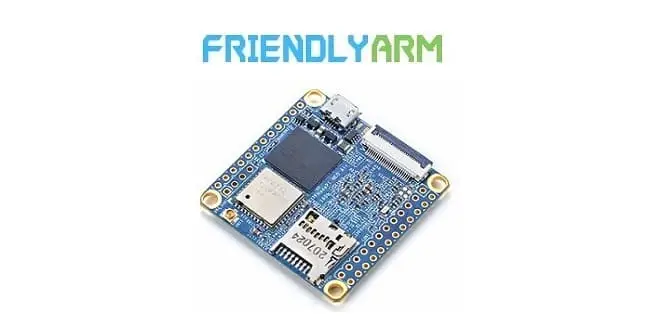
    FriendlyARM`s NanoPi NEO Air is a single board computer with similar concept as the known Raspberry Pi Zero. The board Offers a cheap solution for IoT Projects, Robotic Developers and DIY hobbyist. The NanoPi NEO size is very compact measuring Only 40×40 mm.

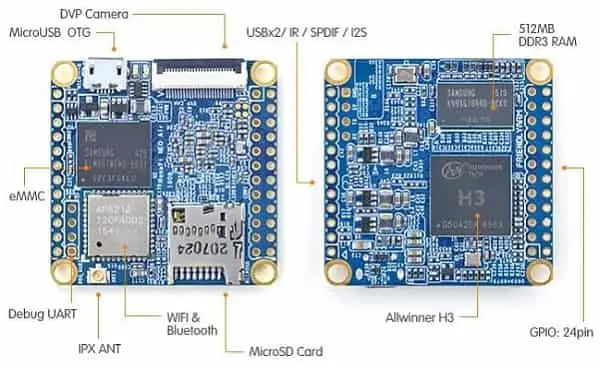
    Jumping to hardware specs the board is equipped with an Allwinner H3 quad-core ARM Cortex-A7 processor with 512MB RAM and 8GB EMMC flash, suitable for most computing applications. Compared to the previous NanoPi NEO model, this board doesn’t have an on-board Ethernet LAN, its was removed and replaced with on-board WiFi & Bluetooth module. Users that still need USB Host and video output interfaces can use the GIPO2 header pins (shown in board layout). That explained, the NanoPi NEO Air board is sold at a retail price tag of $17.99 (including shipping) and can be found at FirendlyARM store link posted below.

    Buy It from FirendlyARM

    NanoPi NEO Air | Board Layout

    nanopi-neo-air-board

    NanoPi NEO Air specifications

    • SoC: Allwinner H3 quad core Cortex A7 @ 1.2 GHz with an ARM Mali-400MP2
    • Connectivity: On-board WiFi 802.11 b/n & Bluetooth 4.0 (Dual mode)
    • USB: micro USB OTG port, X2 USB Hosts through the GPIO2 Header
    • IPX Antenna Socket (External Antenna Interface)
    • System Memory: 215 MB , 512 MB DDR3 RAM
    • Storage: micro SD card slot
    • Internal Storage: 8GB eMMC
    • Power Supply: 5V/2A (via micro USB port).
    • Audio: SPDIF trough GPIO2 Header
    • Power and status LEDs
    • DVP Camera Interface
    • OS/Software: u-boot, Ubuntu Core
    • Dimensions: 40 x 40 mm

    Expansion headers:

    1. GPIO1: 24pin double row header – UART,SPI, I2C,GPIO
    2. GPIO2: 12-pin single row header – USBx2, IR,SPDIF, I2S
    3. 4-pin header for serial console debugging

    Package Content:

    • 1x NanoPi NEO Air
    • 1x User Guide

    Recommended Accessories:

    1. TTL To RS232 Module (+$3.95)
    2. NanoPi NEO Heat Sink (+$2.97)
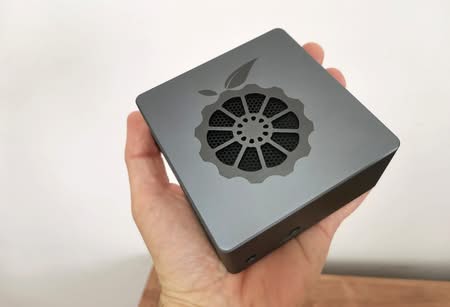
    3. NanoPi NEO 3D Printed Housing (Blue) (+$2.97)
    4. 4-layer Dual Stack Acrylic Case for Cluster DIY (+$12.87)
    5. 5V 3A Universal USB Port Power Adapter (+$8.97)
    6. Mini USB Wi-Fi (+$6.97)

    ⚡Key Takeaways

    • Nano Pi NEO Air FriendlyARM`s NanoPi NEO Air is a single board computer with similar concept as the known Raspberry Pi Zero.
    • The board Offers a cheap solution for IoT Projects, Robotic Developers and DIY hobbyist.
    • The NanoPi NEO size is very compact measuring Only 40x40 mm.
    • Compared to the previous NanoPi NEO model, this board doesn't have an on-board Ethernet LAN, its was removed and replaced with on-board WiFi & Bluetooth module.
    •  Users that still need USB Host and video output interfaces can use the GIPO2 header pins (shown in board layout).

    Frequently Asked Questions

    What is nano pi neo air?

    FriendlyARM`s NanoPi NEO Air is a single board computer with similar concept as the known Raspberry Pi Zero.

    What is nanopi neo air specifications?

    SoC: Allwinner H3 quad core Cortex A7 @ 1.
    Share. Facebook Twitter Pinterest LinkedIn Tumblr Email
    Previous ArticleNanoPi M1 ARM Development Board By FriendlyARM
    Next Article Orange Pi Zero Cheap Single Board Computer for Just $8.99
    androidpimp
    • Website

    Related Posts

    Orange Pi Review

    Orange Pi 6 Review: Is It Suitable for Running Local LLMs? We Checked.

    August 12, 2026
    BPi Wi Fi 7 NIC BE14(V2.1)

    BPI-R4 Wi-Fi 7 NIC (BE14): OpenWrt Setup & Optimal WiFi Power Guide

    July 27, 2026
    Raspberry Pi Zero 3W SBC

    Orange Pi Zero 3W Review: $25 Dual Video Pi Zero 2W Killer?

    June 26, 2026
    0 0 votes
    Article Rating
    Subscribe
    Notify of
    0 Comments
    Oldest
    Newest Most Voted
    Categories
    PureVPN
    PureVPN Ad Banner
    PrivadoVPN – No. 1 in Parental Control
    PrivadoVPN 350x437
    Recent Posts
    • Rii TU3607 iPad Keyboard Case Review: Dream or Heavy Burden?
    • PrivadoVPN Review 2026: Does the Free Tier Still Work for Streaming?
    • Rii 518BT Review: Is This Pocket Keyboard Actually Usable?
    • Rii RK807 Pro Review: The Best Budget Apple Magic Keyboard Alternative?
    • Rii RK808 Review: The Best Foldable Travel Keyboard?
    • Rii RS201 Review: $69 16-Inch Portable Monitor Tested
    • AliExpress Promo Codes: August 2026 (100% Verified)
    • Orange Pi 6 Review: Is It Suitable for Running Local LLMs? We Checked.
    • Youyeetoo NestDisk Review: Pocket-Sized Mini PC, Router & NAS
    • DFRobot Unveils seeMote Cube: A 6DoF Physical Controller for Apple Vision Pro
    RSS feed: The Latest RSS Feeds The Latest RSS Feeds
    • Rii TU3607 iPad Keyboard Case Review: Dream or Heavy Burden?
    • PrivadoVPN Review 2026: Does the Free Tier Still Work for Streaming?
    • Rii 518BT Review: Is This Pocket Keyboard Actually Usable?
    Facebook X (Twitter) Instagram Pinterest
    @2026 - All Right Reserved. Designed by AndroidPIMP

    Type above and press Enter to search. Press Esc to cancel.

    wpDiscuz