Meet the new NanoPi M6 with built-in display (Optional)
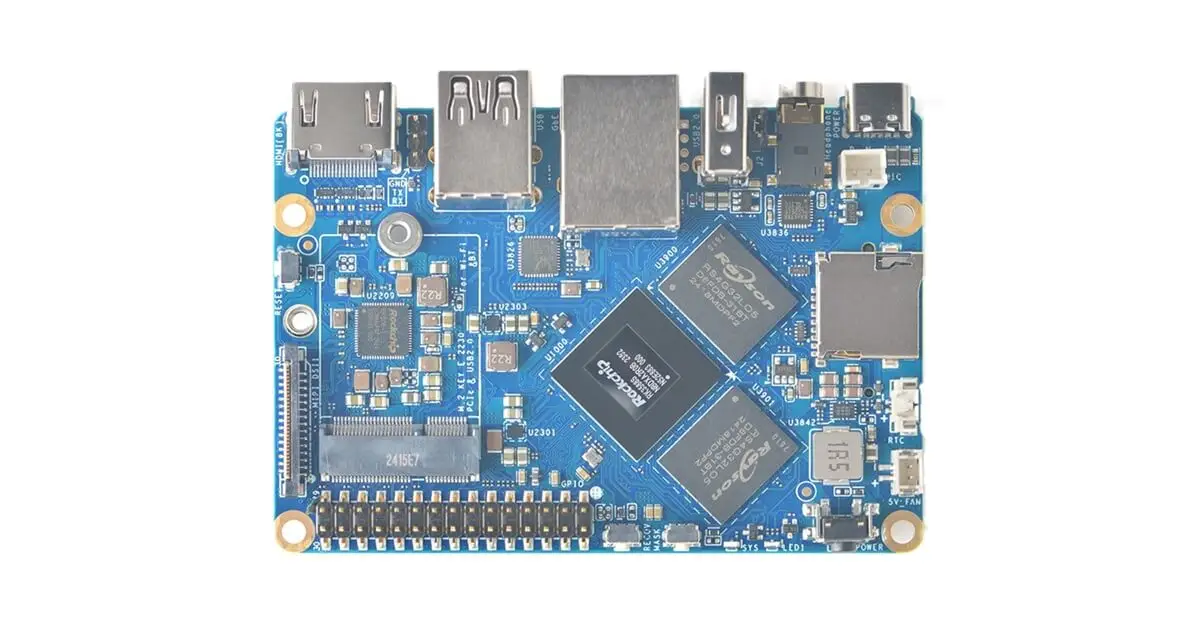
The NanoPi M6 is a powerful single-board computer, slightly larger than the Raspberry Pi 5, yet it surpasses it in terms of versatility. Its Rockchip RK3588S processor provides exceptional performance, while its remarkable support for up to 32 GB of RAM ensures seamless multitasking. In addition, the NanoPi M6 offers a plethora of storage options, including a Micro SD card reader, eMMC socket, and an M.2 slot with PCIe 2.1 NVMe SSD support. With all these outstanding features, the NanoPi M6 is the ultimate choice for tech enthusiasts and professionals seeking uncompromising performance and flexibility.
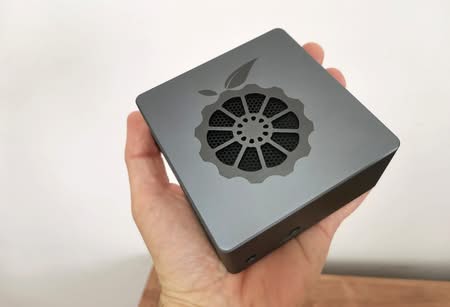
FriendlyElec offers this single board computer for a mere $70. This bare board provides customers with the freedom to customize their purchase by adding more memory and storage. Moreover, customers have the option to enhance their experience by choosing add-ons like a sleek metal case or a metal case that comes with an integrated 3.5-inch touchscreen display.
Hardware: Processor, Memory, GPU.
The RK3588S processor, which powers the board, boasts an impressive array of features. It incorporates four ARM Cortex-A76 CPU cores clocked at a remarkable 2.4 GHz, along with four Cortex-A55 cores operating at 1.8 GHz. Not only that, but it also houses the Mali-G610 MP4 graphics unit, delivering stunning visual performance. Furthermore, the processor is equipped with a powerful 6 TOPS AI accelerator, unlocking unlimited possibilities for artificial intelligence applications. Last but not least, it showcases its prowess in video decoding, supporting breathtaking 8K resolution playback. Although the system has the capability to handle up to 32 GB of LPDDR5 memory, it reaches its maximum potential at a formidable speed of 2400 MT/s.
The design and user interfaces of the board.
Additional expansion options are available.
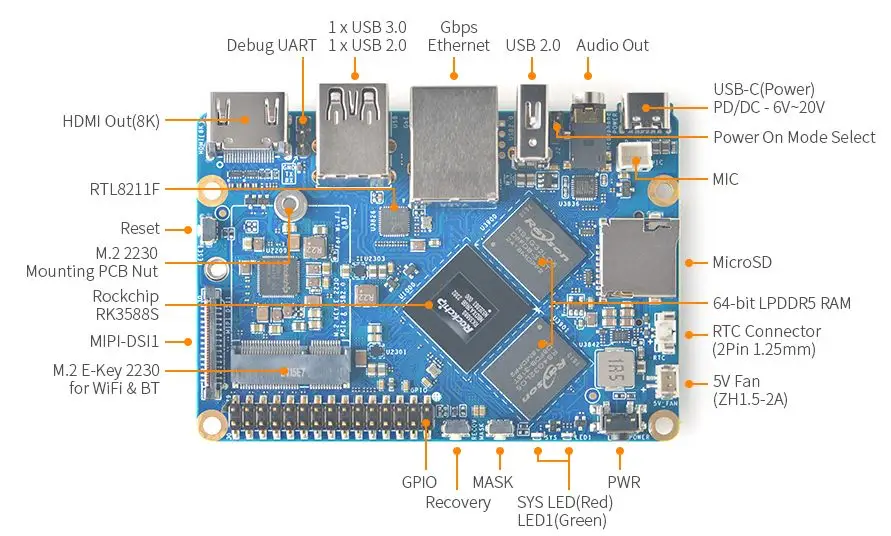
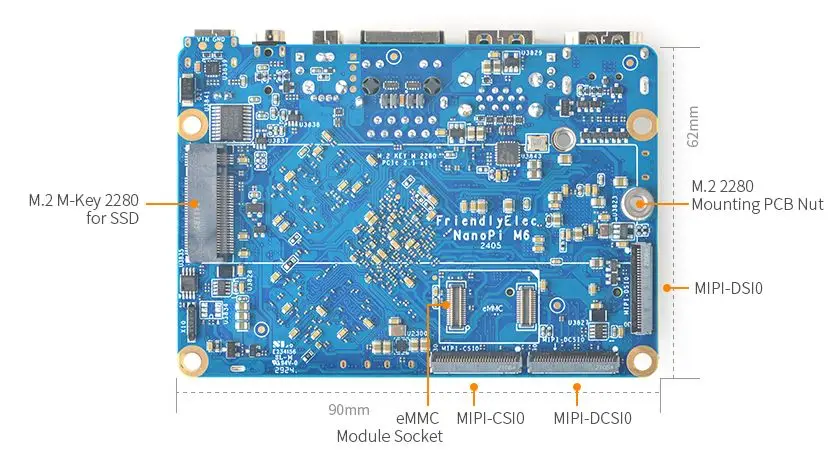
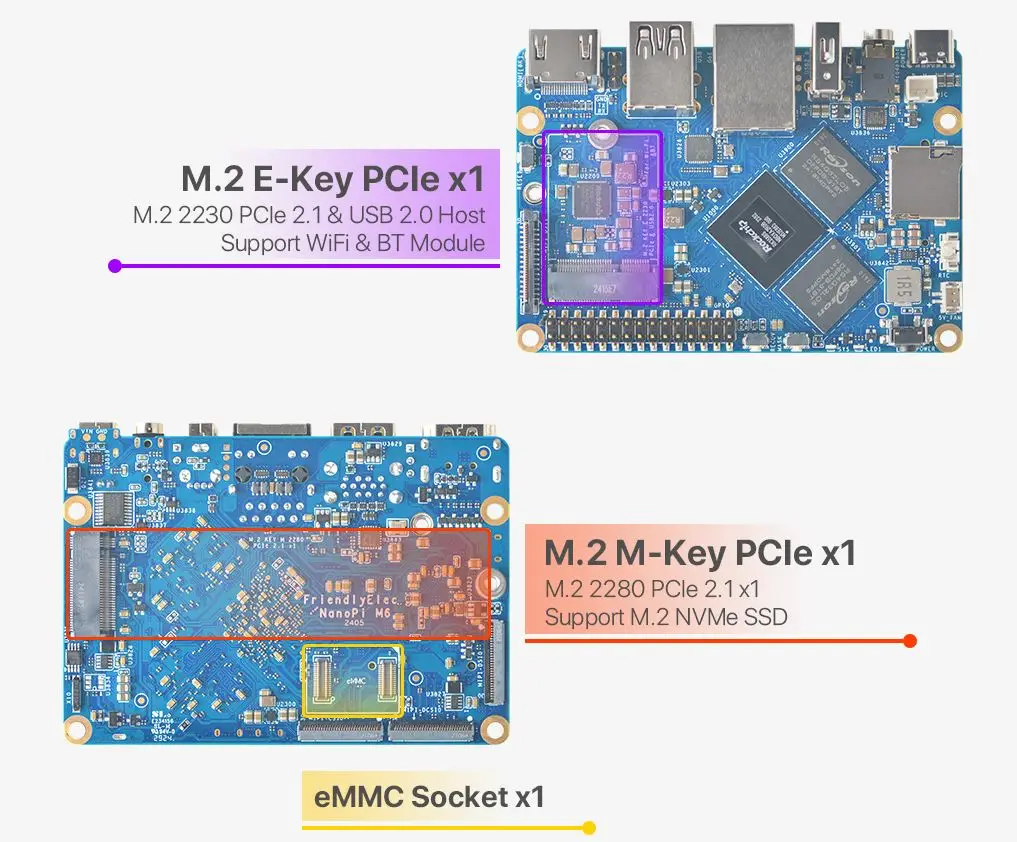
In the photo below, you’ll notice a slot for adding a Wi-Fi/BT M.2 E-Key PCIe card. Additionally, there are storage options at the back, including a socket for adding an eMMC and an M.2 2280 M-Key for NVMe card.
NanoPi M6 Specifications
| Category | Specification |
|---|---|
| SoC | Rockchip RK3588S |
| CPU | Octa-core processor: 4x Cortex-A76 @ up to 2.4 GHz, 4x Cortex-A55 @ up to 1.8 GHz |
| GPU | Arm Mali-G610 MP4, compatible with OpenGL ES 3.2, OpenCL 2.2, Vulkan 1.2 |
| VPU | 8Kp60 decoder for H.265/AVS2/VP9/H.264/AV1; 8Kp30 encoder for H.265/H.264 |
| AI Accelerator | 6 TOPS NPU |
| System Memory | Options: 4GB, 16GB, or 32GB LPDDR5 at 2400 MHz |
| Storage | • eMMC module socket (HS400 mode) • Micro SD card slot (SDR104 mode) • M.2 M-Key socket (PCIe 2.1 x1) for NVMe SSDs |
| Video Output | • HDMI 2.1 port (up to 7680×4320 @ 60Hz) • 2x 4-lane MIPI-DSI connectors • Optional 3.5-inch touchscreen LCD (800×480) |
| Camera Input | • 4-lane MIPI-CSI V1.2 connector • 4-lane MIPI-CSI D/C PHY connector |
| Audio | • 3.5 mm jack for stereo output • 2.0mm PH-2A connector for microphone input |
| Networking | • Gigabit Ethernet RJ45 port • Optional Wi-Fi and Bluetooth (M.2 E-key PCIe 2.1 x1 and USB 2.0 host) |
| USB | • 1x USB 3.0 Type-A port • 2x USB 2.0 Type-A ports |
| Expansion | • M.2 Key-M socket for PCIe storage • M.2 Key-E socket for WiFi/Bluetooth (PCIe/USB) • Debuging: 3-pin header for serial console • 30-pin GPIO header (up to 1x SPI, 6x UART, 3x I2C, 1x SPDIF, 4x PWM, 20x GPIO). |
| Misc | • 2x user LEDs • 2-pin RTC battery input for low-power RTC IC • Buttons: MASK, Reset, Recovery, Power • 5V fan connector |
| Power Supply | 6V~20V input via USB-C with PD support |
| Dimensions & Weight | • PCB: 90 x 62 mm (8-layer PCB), 52 grams • Metal case: 94.5 x 68 x 30 mm, 252 grams • Metal case + LCD: 99 x 68 x 31 mm, 275 grams |
| Temperature Range | 0 °C to 70 °C |
Integrated Display
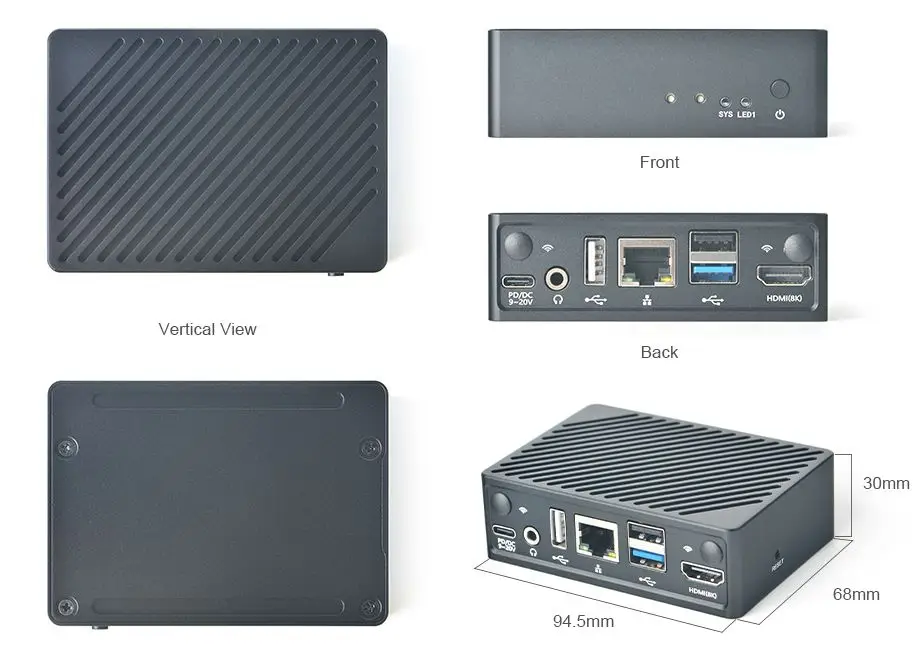
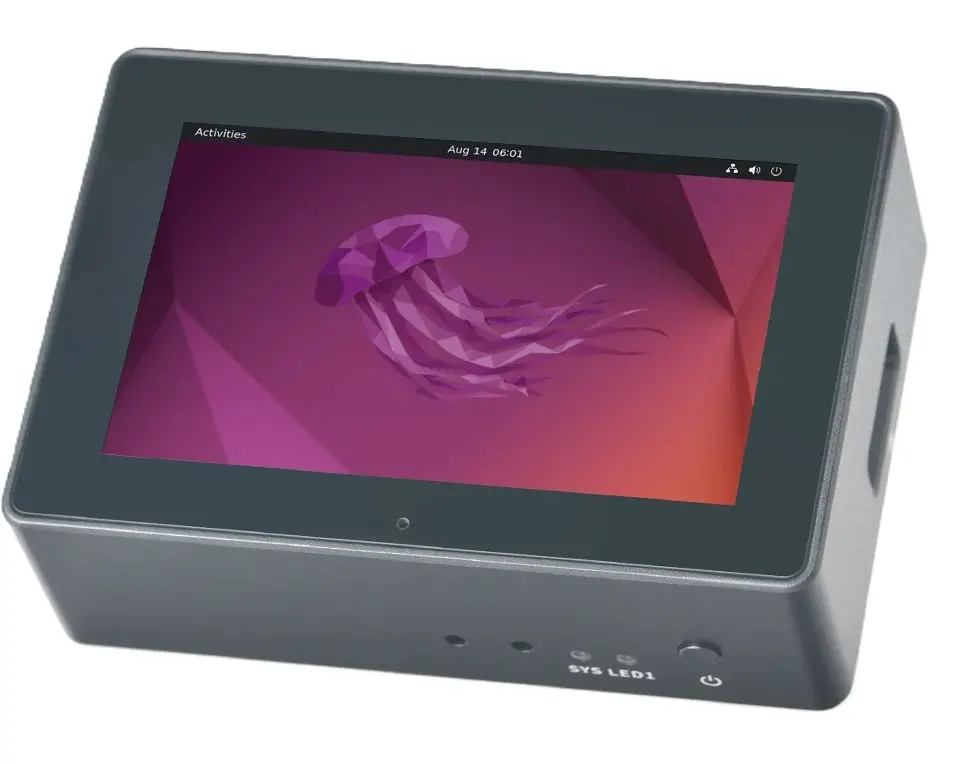
The NanoPi M6 stands out among other single-board PCs with RK3588/S chips, thanks to its remarkable optional display case. The sleek metal case, measuring 99 x 68 x 31 mm (3.9″ x 2.68″ x 1.22″), comes with an optional 3.5-inch, 800 x 480 pixel, 60 Hz capacitive touchscreen display. This impressive feature allows for a complete desktop display, real-time status information, or other engaging graphics. Notably, the board itself is a compact 90 x 62 mm (3.54″ x 2.44″).
You have the option to choose from two different case configurations.
FriendlyElec offers a metal case with an integrated 3.5-inch display. But if this isn’t necessary for you, the company also provides a fully enclosed metal case that is perfect for creating a closed system. This option is particularly useful for industrial projects or even for home use applications.
Software Support
According to FriendlyElec, the NanoPi M6 is designed to be versatile, capable of supporting a wide array of operating systems. These include popular options like Android 12 for an enhanced tablet or TV experience, Debian and Ubuntu for general-purpose computing, as well as specialized operating systems such as OpenMediaVault, ideal for network-attached storage and file server applications, and FriendlyWrt, perfect for router and networking tasks.
NanoPi M6 Price and Availability
The initial price applies to a model equipped with 4 GB of RAM, without any storage or case included. However, FriendlyElec offers models with 16 GB of RAM starting from $100 and higher, and a 32 GB model commences at $150.
Customers also have the option to upgrade to an eMMC module, offering an ample storage capacity of 32 GB for only $8 or a generous 64 GB for just $10. In addition, for those seeking enhanced durability and style, a sleek metal case is available for a mere $20. For the ultimate experience, there is the option to acquire a metal case with an integrated LCD, elevating both form and function, for a modest price of $45.
In order to make pricing more user-friendly, we have compiled a list of all available options.
| Item type | Configuration |
|---|---|
| Bare Board | • 4 GB RAM ($70.00) No eMMC • 16 GB RAM ($100.00) No eMMC • 32 GB RAM ($80.00) No eMMC |
| eMMC Storage (Optional) | • 32GB eMMC Module for M6 (+$8.00) • 64GB eMMC Module for M6 (+$10.00) |
| Optional Cases (Optional) | • Combo with Metal Case + LCD (+$45.00) • Combo with Metal Case (+$20.00) |
The company conducted a rigorous stress test on the NanoPi M6, both with and without the metal case and display. Remarkably, even under these conditions, the maximum CPU temperature remained below a comfortable 70 °C. Additionally, it’s worth noting that the board does not come equipped with WiFi. However, the company thoughtfully offers a comprehensive list of supported WiFi dongles to ensure your connectivity needs are met.
You can easily access all relevant information on the product page, where you’ll have the opportunity to purchase the NanoPi M6 starting at just $70 (Bare Board), with various options available depending on your personal preferences.
About
Since 2005, FriendlyElec has been dedicated to designing and developing ARM boards, establishing itself as a leading global provider of open source hardware and software. The company is committed to empowering tech enthusiasts and electronics aficionados with affordable technology products from China, fostering better collaboration and innovation.