Close Menu
  • Home
  • About
  • Wearables
  • Earbuds
  • Computer Accessories
    • Routers
    • Remotes
  • Embedded
    • Single Board Computers
    • Addon Boards
    • Raspberry Pi
  • Wireless Routers
  • Contact
Facebook X (Twitter) Instagram Threads
Trending
  • Banana Pi BPI-R4 Pro Review: The Best WiFi 7 OpenWrt Router? We Checked!
  • AliExpress New Promotions: Country-specific Promo Codes
  • CamThink NeoEyes NE301: An Ultra-Low Power Edge AI Camera with STM32N6 MCU (Review)
  • Kickpi K7C RK3576 Edge AI SBC Launches with 6 TOPS AI Power & Dual Gigabit Ethernet
  • Raspberry Pi 5 vs Orange Pi 6: Which SBC is Best in 2026?
  • Ugoos SK4 Review (2025): The Best Mid-Range Android TV Box for Value & Features
  • Orange Pi 6 Unveiled: The Affordable, Slimmed-Down SBC Alternative to the 6 Plus
  • Orange Pi 6 Plus Review: A 12-Core SBC Powerhouse (Benchmarks, Specs, and Pricing)
AndroidPIMP
Facebook X (Twitter) Instagram
  • Home
  • About
  • Wearables
  • Earbuds
  • Computer Accessories
    • Routers
    • Remotes
  • Embedded
    • Single Board Computers
    • Addon Boards
    • Raspberry Pi
  • Wireless Routers
  • Contact
AndroidPIMP
Wireless Routers

Review of Mi Router AX1800 WiFi 6 Router – The Ultimate Budget Router Choice for 2021

By androidpimpJuly 18, 2022Updated:May 26, 2024No Comments11 Mins Read
Facebook Twitter Pinterest LinkedIn Tumblr Email
Follow Us
Google News Flipboard
Table of contents
  1. Xiaomi Mi Router AX1800
  2. Appearance & Design
  3. SoC with integrated NPU
  4. Hardware Specification
  5. Connectivity & Security
  6. Device Management
  7. Mesh Networking
  8. Target market
  9. Specification
  10. What’s in the box
  11. Software
  12. Web interface for configuring the router
  13. Experience using Mi Router AX1800
  14. Security
  15. Mi Router AX1800 vs. Redmi AX5, which one is better?
  16. Final Words
  17. Price & Availability
    1. Where to Buy
  18. Review Summary
  • Maybe you missed it? Xiaomi Router AX3000 Router Review
  • Mi Router AX1800 Wi-Fi 6 Router Review – Comparing specs & performance.

Xiaomi Mi Router AX1800

Xiaomi has just launched its second WiFi 6 router, the Mi Router AX1800, offering an incredible combination of features and affordability. With a lower price point compared to the Xiaomi AIoT AX3600 and comparable specifications to the Redmi AX5, this router is a game-changer. It not only supports WiFi 6 technology, but also ensures outstanding performance, connection stability, and blazing-fast speeds. If you’re in the market for a WiFi 6 router, look no further – the Mi Router AX1800 is the perfect choice for a seamless and top-notch experience.

WiFi 6 (802.11ax) is a new generation of WiFi standards. Compared with the previous generation of WiFi 5 (802.11ac), the transmission rate, signal coverage, and data delay have greatly improved. Especially in the scenario where multiple devices are connected simultaneously, the WiFi 6 router can significantly reduce data delays and stalls. At the beginning of the year, with the release of various Android flagship phones, the WiFi 6 standard has also been adopted by multiple manufacturers many times and gradually became the standard for mobile phones in the 5G era.

Consumers can now enjoy a more affordable price range for WiFi 6 routers. The recently released Xiaomi AX1800 perfectly complements popular Xiaomi 10, Samsung S20, and Apple iPhone 11 series handsets, while also offering WiFi 5 compatibility.


Appearance & Design

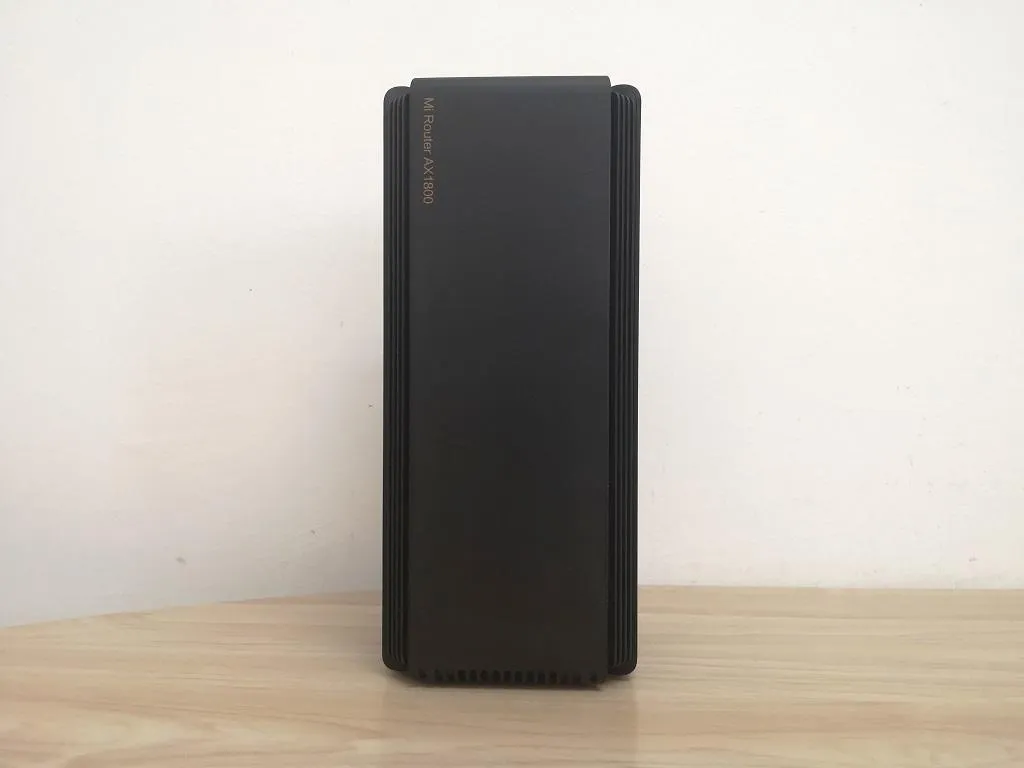
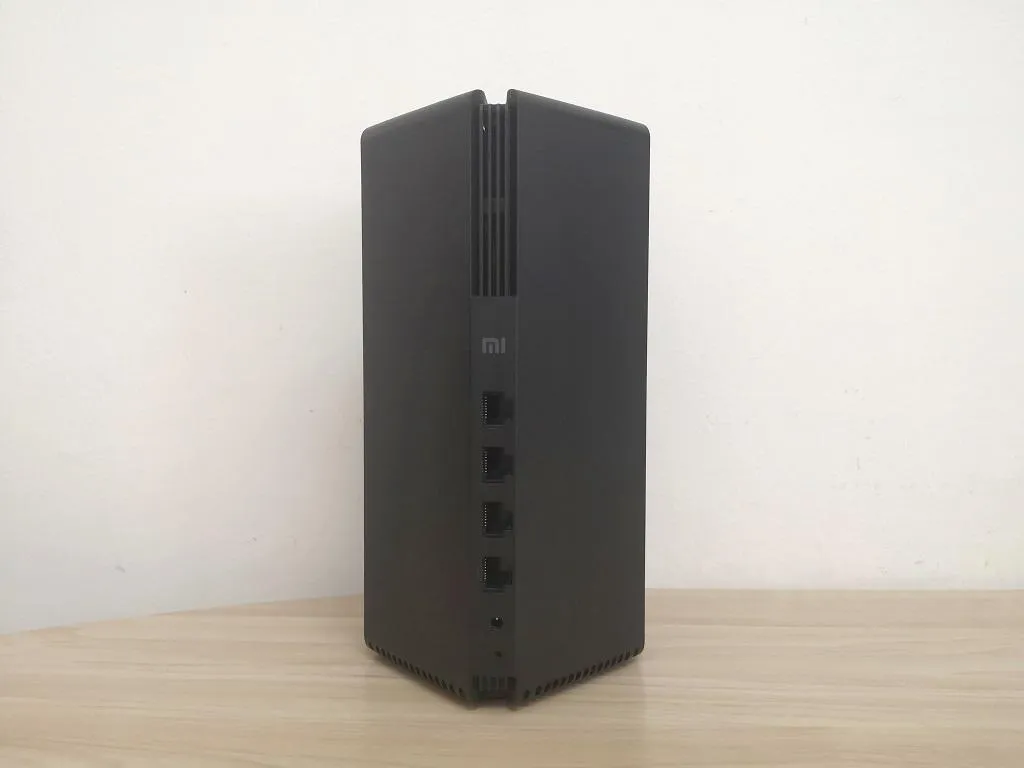
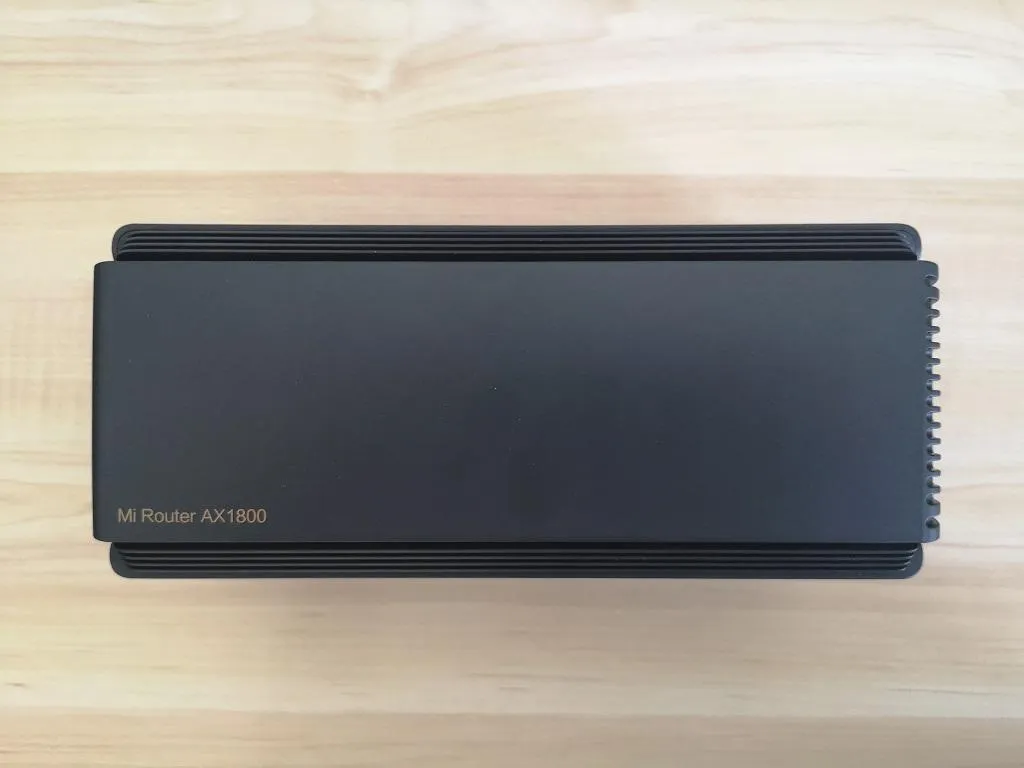
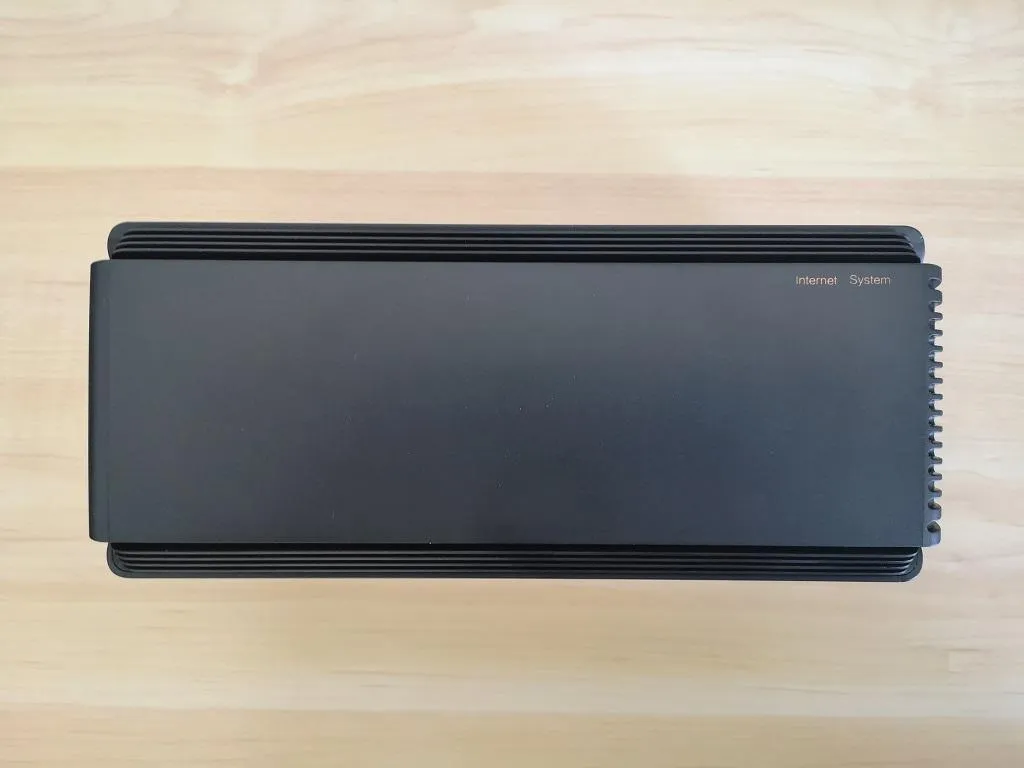
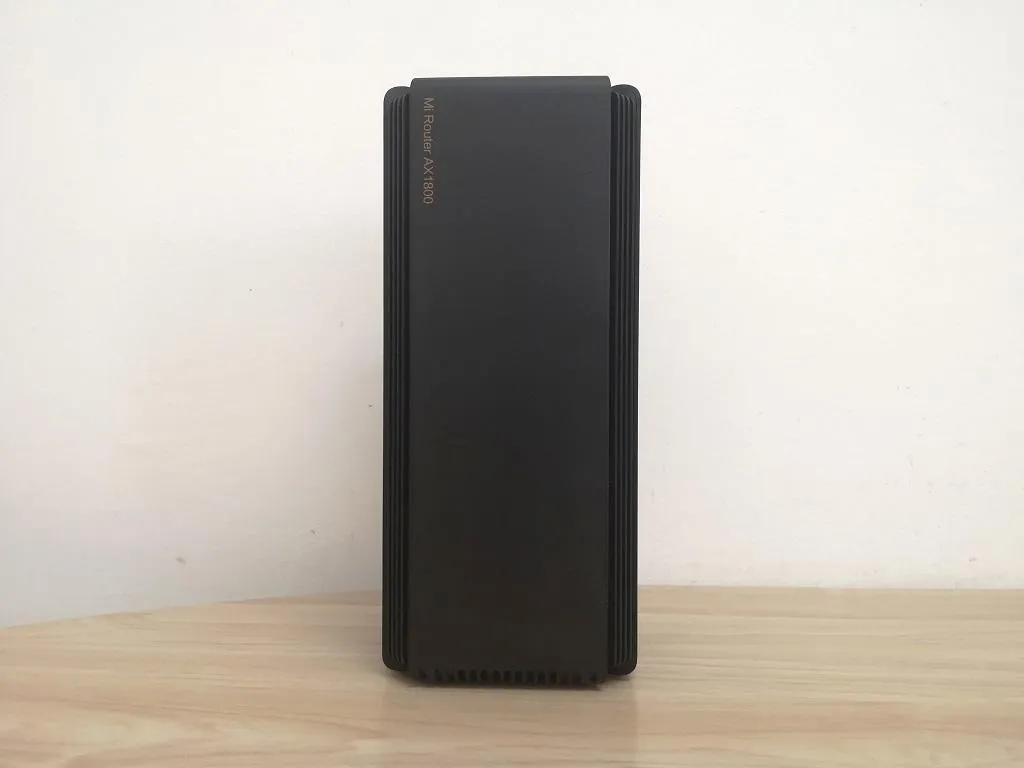
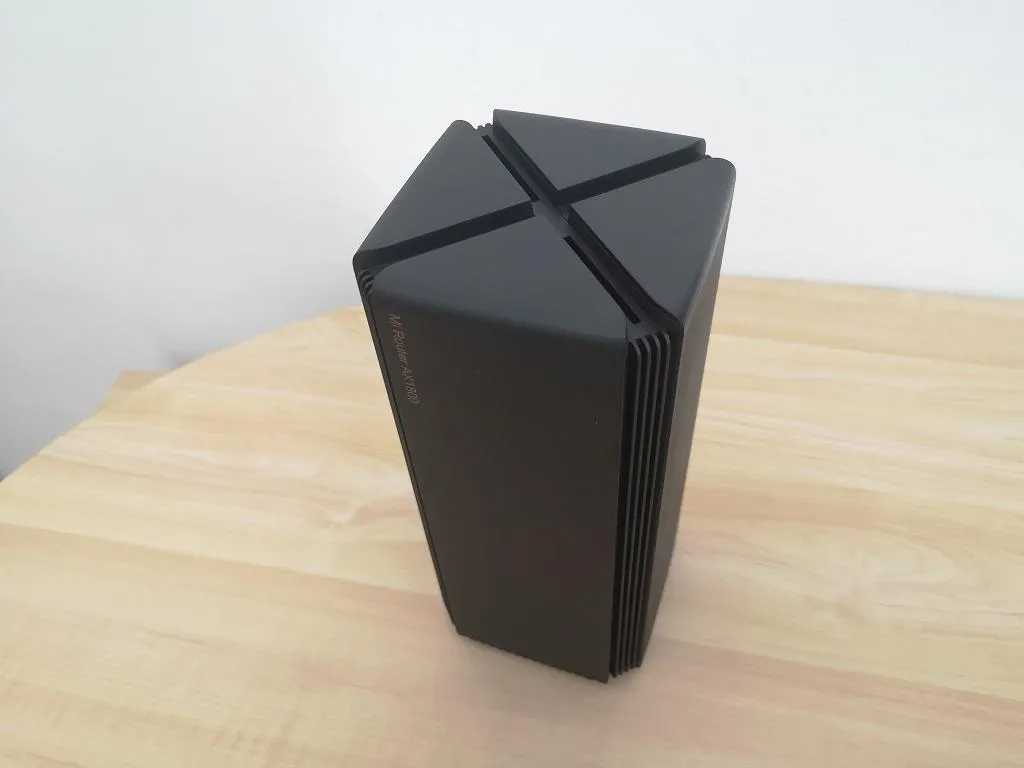
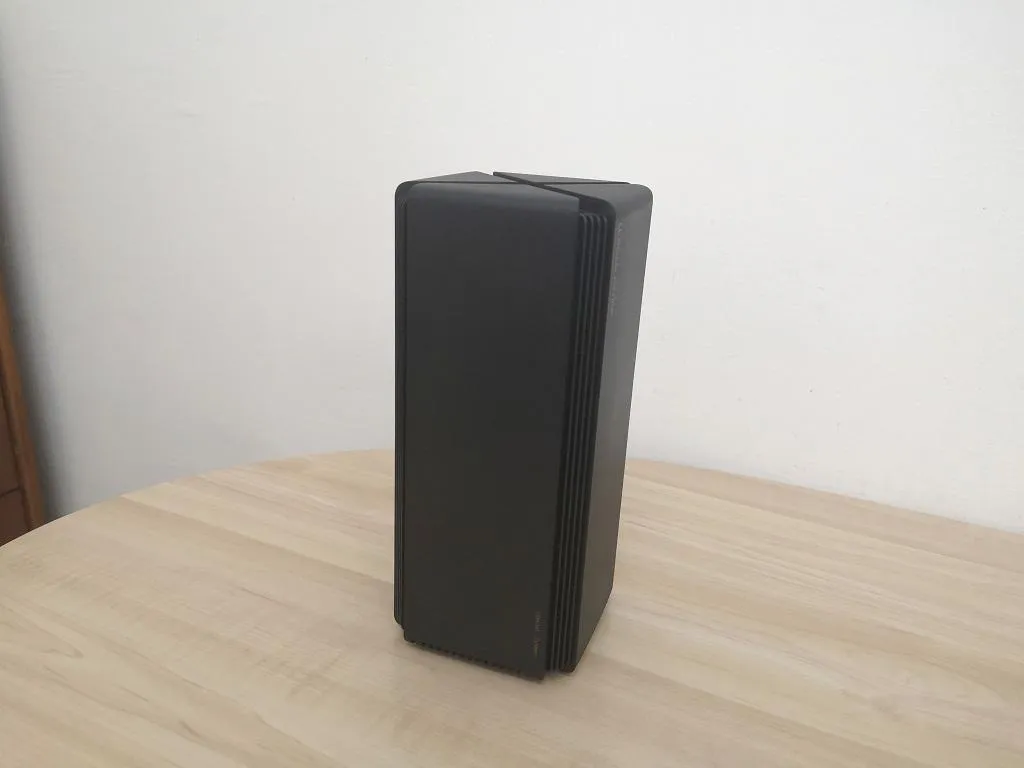
The Mi Router AX1800 is a remarkable product that bears a striking resemblance to Xiaomi’s popular AI speaker. What sets this router apart is its innovative antenna design. Departing from the horizontal layout of the AX3600, the AX1800 adopts a sleek vertical design inspired by the AC2100 model. This results in a visually pleasing rectangular parallelized shape that cleverly conceals the external antennas. By breaking free from the limitations of physical antenna constraints and strategically placing them within the middle frame, the AX1800 achieves an impressive 360-degree coverage, ensuring a comprehensive and uninterrupted wireless experience.

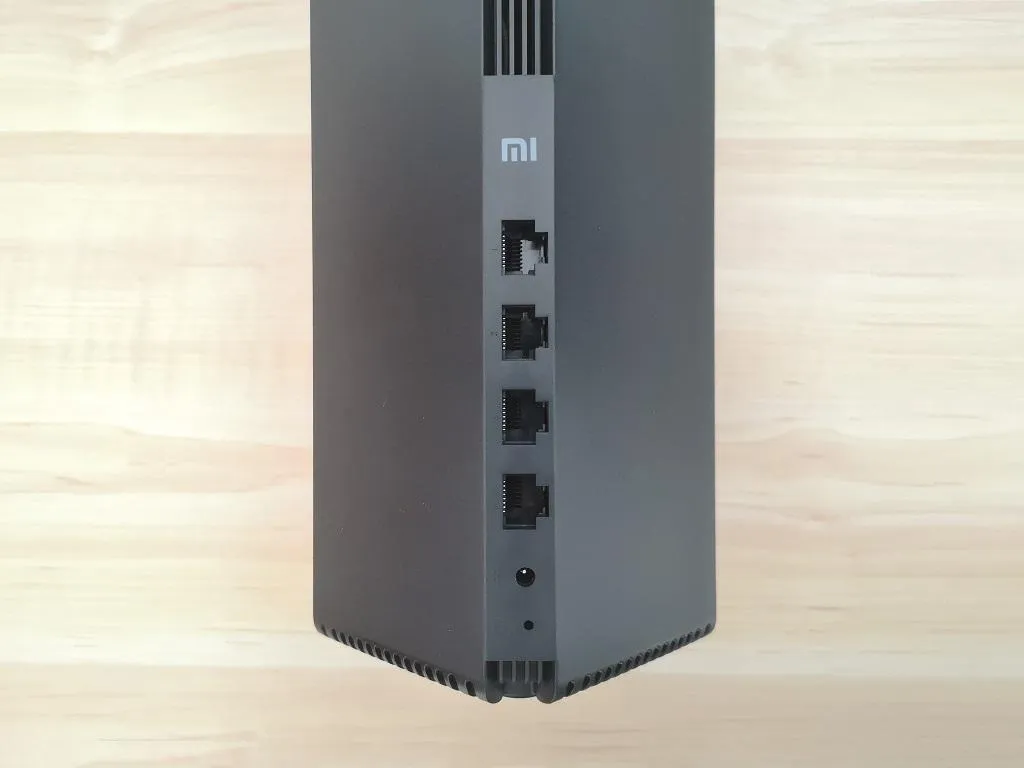
The router features a prominent “X”-shaped segment at the top, creating an appealing design element that divides the square shape. The running indicator is conveniently positioned in the lower front corner of the rectangular area. At the back, you will find the network cable interface and power socket thoughtfully integrated into the design. The outer shell is securely fastened with a buckle, ensuring stability and enhancing the overall aesthetic appeal.

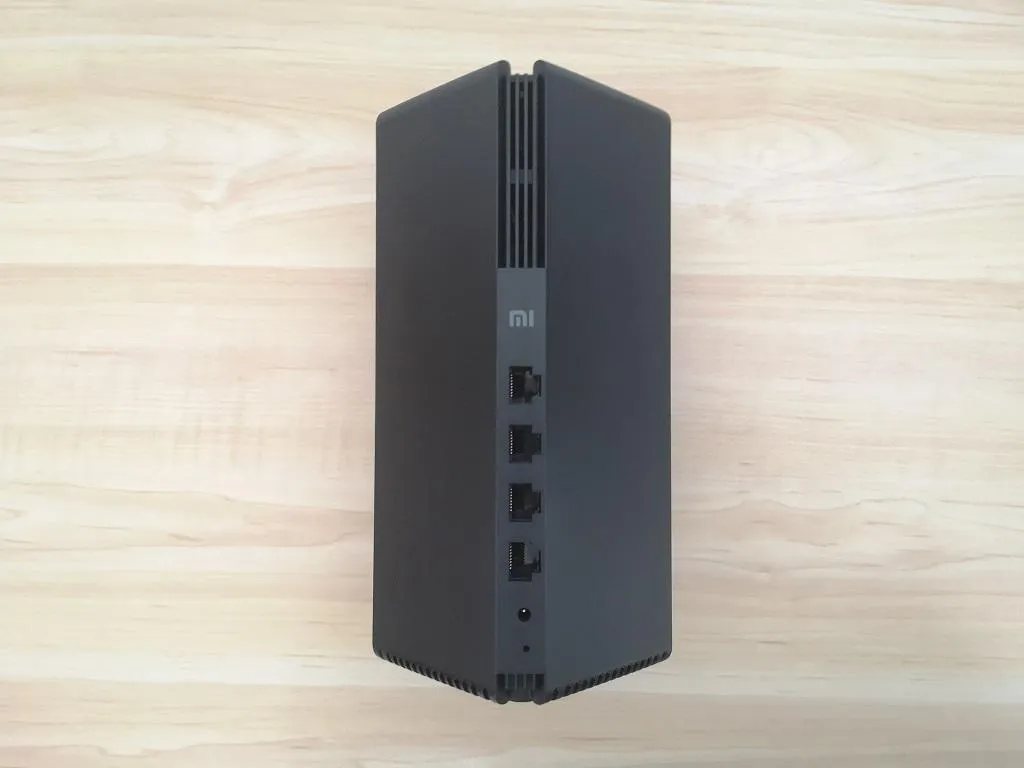
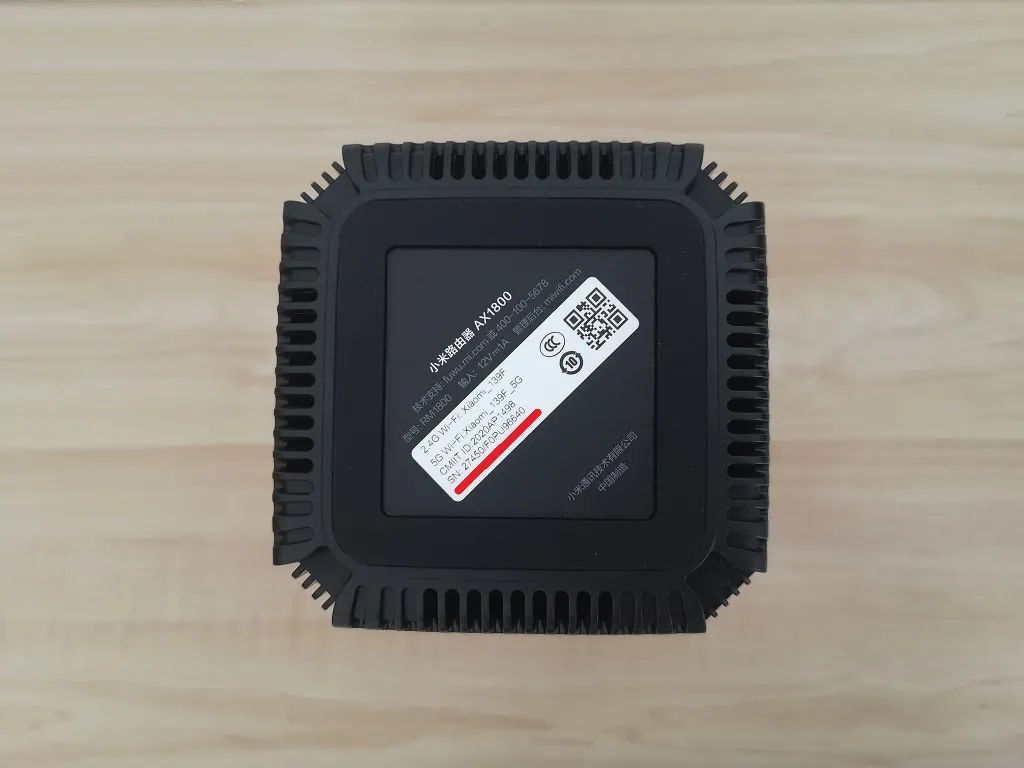
To ensure efficient heat dissipation and maintain a stable operating state, Xiaomi has implemented a smart design on their routers. They have incorporated a clever arrangement of cooling slots in the shape of an X, as well as strategically placed holes on the bottom of the device, allowing the heat to escape the case. Additionally, the router features a tower cooling structure design, which creates ample room for significant channel convection. Inside, a large metal heat sink has been skillfully assembled to provide exceptional heat dissipation, offering a reliable guarantee for the router’s stable operation.
Xiaomi AX1800 3
Xiaomi AX1800 – Full view
Xiaomi AX1800 2
AX1800 – side view
Xiaomi AX1800 1
Xiaomi AX1800 – Front
Xiaomi AX1800 10
AX1800 – Interfaces
Xiaomi AX1800 9
AX1800 – Back view
Xiaomi AX1800 8
Xiaomi AX1800 8
Xiaomi AX1800 7
AX1800 – vertical view 1
Xiaomi AX1800 6
AX1800 – vertical view 2
Xiaomi AX1800 4
AX1800 – Top view
AX1800 – Bottom view

SoC with integrated NPU

The Mi Router AX1800 adopts the configuration of a 4-core CPU + single-core NPU. NPU is a network acceleration engine of the processor used to process and forward continuous small data packets. In theory, it can increase the routing throughput by 21%, reduce the CPU data consumption, and reduce the CPU load.


Hardware Specification

The processor of the Xiaomi Mi Router AX1800 uses a 14-nanometer process, which is better than the 28-nanometer process of many WiFi 6 products currently on the market. This advanced technology can give total efficient processor capacity, and at the same time, it provides better control over heat dissipation, power consumption, and stable performance. With the tower cooling design, this router can always maintain an average operating temperature maintaining good performance.


Connectivity & Security

The router, the infrastructure for networking appliances in the home, plays a vital role in the smart home ecosystem. Regarding device access, the Mi Router AX1800 is equipped with 256MB of large memory and theoretically supports 128 devices simultaneously. In addition to being able to access many devices, the Xiaomi router AX1800 can also monitor mainstream IoT devices for security and privacy vulnerabilities on the Xiaomi WiFi App to protect the network security of the smart home ecosystem.


Device Management

When the Xiaomi smart device is connected to the network for the first time, it will sync with the Mijia APP setting, and there is no need to enter a password manually. The Mi Router AX1800 continues many of the previous AX3600 excellent features, such as children’s Internet protection, visitor WiFi, anti-rub network, WiFi optimization, and many other functions have been kept users can directly set the corresponding on the Xiaomi WiFi App.


Mesh Networking

Xiaomi Mi AX1800 also supports OFDMA, MU-MIMO, other technologies, and multiple Mesh networking. OFDMA technology allows the router to complete the data transmission of up to 8 devices in one connection. The network delay can be reduced by 66%; MU-MIMO makes multiple people surfing the Internet a smoother experience. 

Many large-scale users need multiple routers for Mesh networking to cater to the needs of different complex types. Mi Router AX1800 can also do it. Through subsequent upgrades, Xiaomi AX1800 can perform Mesh networking with the AX3600 to further expand WiFi Signal coverage throughout the house.


Target market

Ethernet broadband has upgraded to gigabit bandwidth. For non-heavy users, it can perfectly fit with phones and other mobile devices and use at home or office, supporting the latest WiFi 5/6 standards. When you usually use the network to watch videos, play games, and connect multiple smart devices to control, a Mi Router AX1800 is more than capable of doing all these tasks.


Specification

Hardware configuration
CPUQuad-core IPQ6000 A53 1.2 GHz processor
Network acceleration engineSingle Core 1.5 GHz NPU
ROM128 Mb
Memory:256 Mb
2.4 GHz WiFi:2×2 (maximum IEEE 802.11ax protocol support, theoretical maximum speed up to 574 Mbps)
5 GHz WiFi:2×2 (maximum IEEE 802.11ax protocol support, the theoretical maximum speed can reach 1201 Mbps)
Product AntennaTwo integrated dual-frequency antennas
Product cooling:Natural cooling
WAN interfacex1 10/100 / 1000M adaptive WAN port (Auto MDIMDIX)
LAN interfacex3 10/100 / 1000M adaptive LAN ports (Auto MDIMDIX)
Led indicator2 (system indicator * 1, Internet indicator * 1)
System Reset Button:1
Power Input Interface:1
Protocol StandardsIEEE 802.11a / b / g / n / ac / ax, IEEE 802.3 / 3u / 3ab
Certification StandardGB / T9254-: 2008; GB4943.1-2011
Dual frequency2.4 GHz and 5 GHz
Wireless Channel2.4 GHz channel: 1,2,3,4,5,6,7,8,9,10,11,12,13
5 GHz channel: 36,40,44,48, 149153157161165
Modulation11b: DSSS: DBPSK (1 Mbps), DQPSK (2 Mbps), CCK (5.5 / 1 Mbps)
11a / g: OFDM: BPSK (6/9 Mbit / s), QPSK (12/18 Mbit / s), 16QAM (24/36 Mbit / s),
64QAM (48/54 Mbps)
11n: MIMO-OFDM: BPSK, QPSK, 16QAM, 64QAM.
Bet Set: MCS0 ~ MCS15
11ac: MIMO-OFDM: BPSK, QPSK, 16QAM, 64QAM, 256QAM.
Speed ​​dial: MCS0 ~ MCS9 (support 2 streams)
11ax: MIMO-OFDM: BPSK, QPSK, 16QAM, 64QAM, 256QAM, 1024QAM.
Speed ​​dial: MCS0 ~ MCS11 (support 2 streams)
Software Parameters:
Operating system:Smart WiFi operating system based on OpenWRT deeply tuned MiWiFi ROM
Wireless Security:WPA-PSKWPA2-PSKWPA3-SAE encryption, wireless access control (blocklist and allowlist), SSID hiding, anti-friction intelligent network
Management Application:Support web, Android. Ios
Product Features:Manual (including three packs of cards) * 1
Network cablex1
Product Power Supplyx1
Ambient operating temperature:0 ~ 40 ℃
Working humidity:10% ~ 90% RH (non-condensing)
Storage temperature:-4 -70 ℃
Storage Humidity:5% ~ 90% RH (non-condensing)

What’s in the box

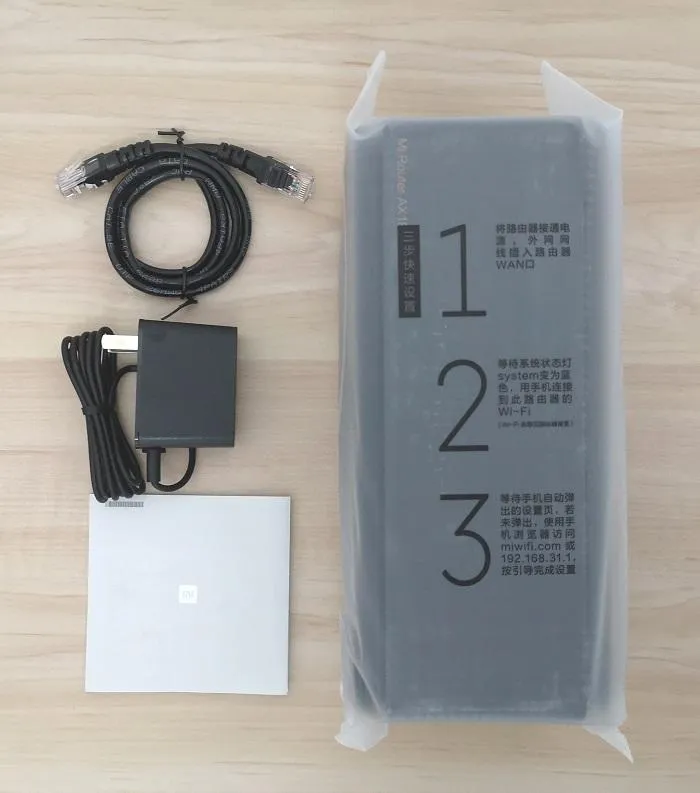
Inside the package, you will find the following items:

  • 1x Mi Router AX1800.
  • 1x User Guide.
  • 1x Power adapter.
  • 1x Network Cable (Type Cat5e).
Xiaomi AX1800 Items
Xiaomi AX1800 Items

Software

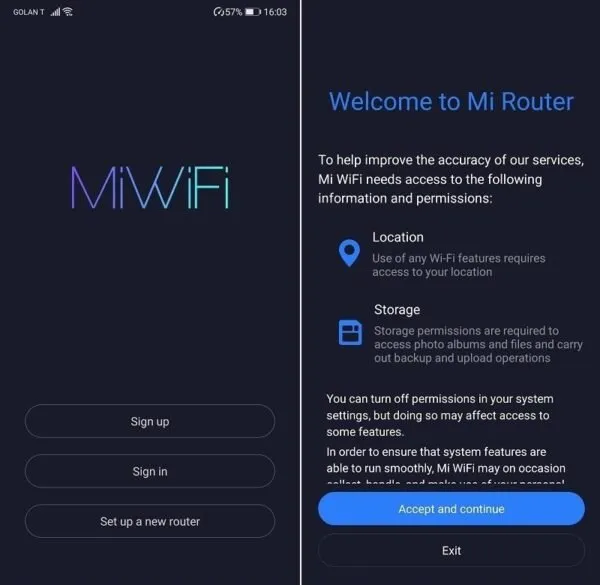
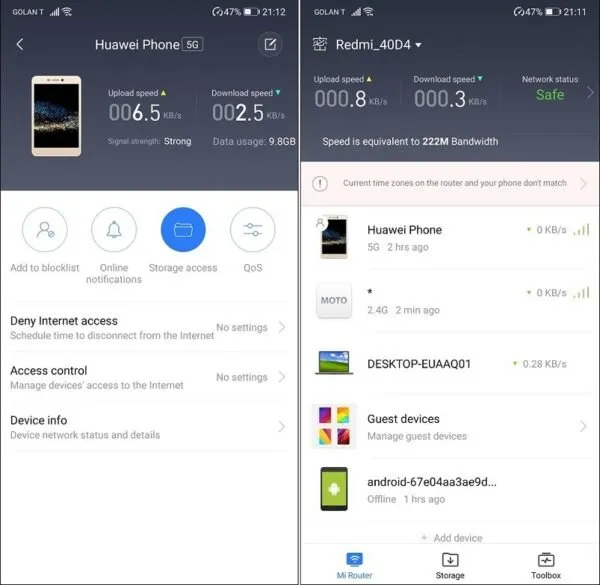
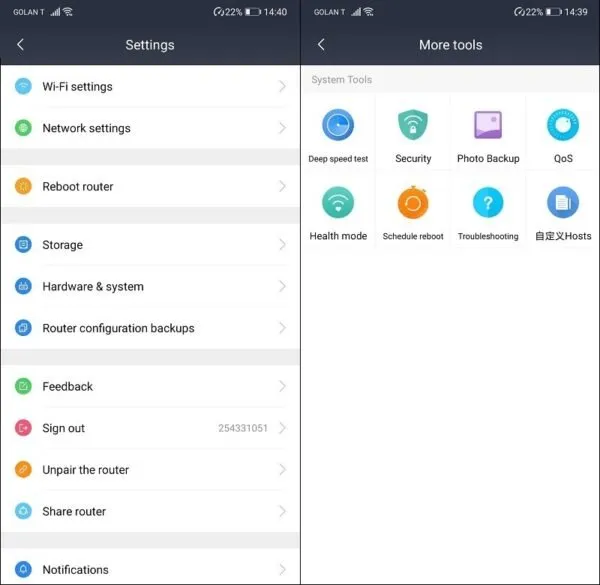
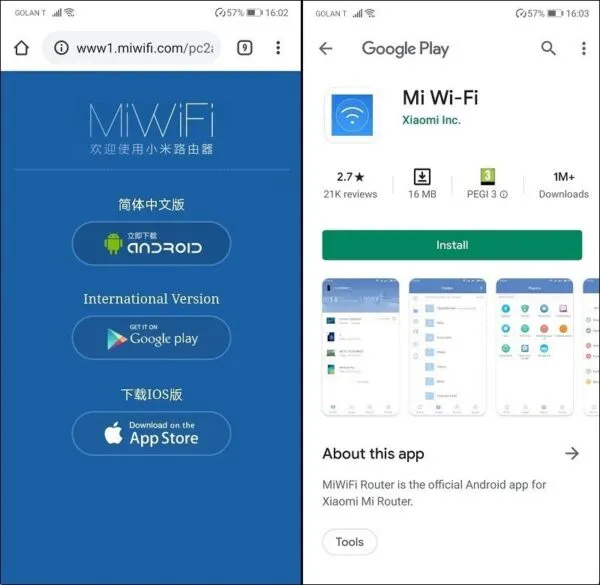
The software powering all Xiaomi routers is called ‘MiWiFi.’ Based on the popular open-source OpenWrt framework. All Xiaomi router devices run ‘MiWiFi’ software, which is very easy to configure and set up. You can use the ‘WiFi Mi mobile app to manage all of your Xiaomi devices. Although the web interface only supports the Chinese language, the ‘WiFi Mi’ mobile app also supports multiple languages, including English. You can add additional router devices to create a local mesh array network to increase signal coverage. Manage all of Xiaomi’s smart home appliances effectively under Xiaomi’s platform.


Web interface for configuring the router

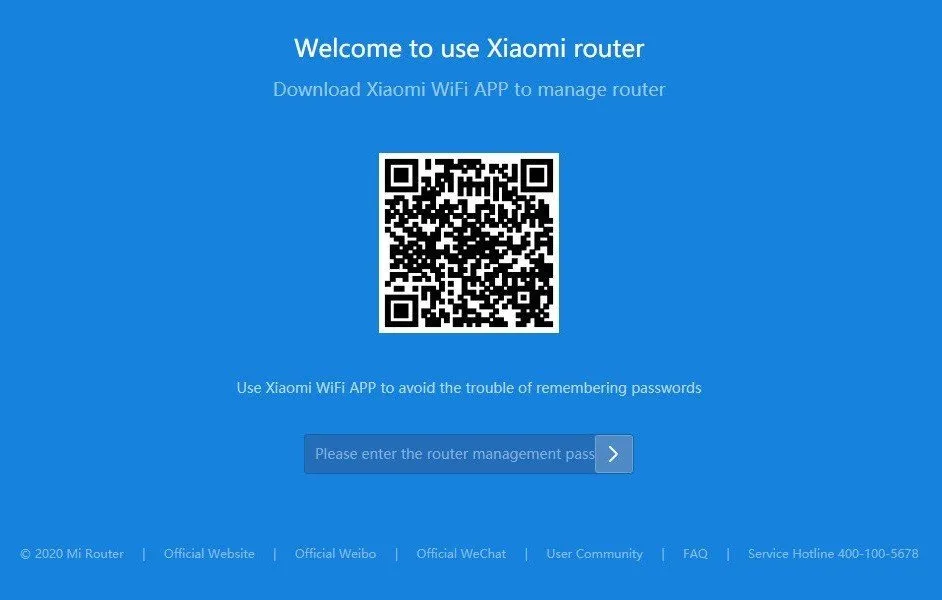
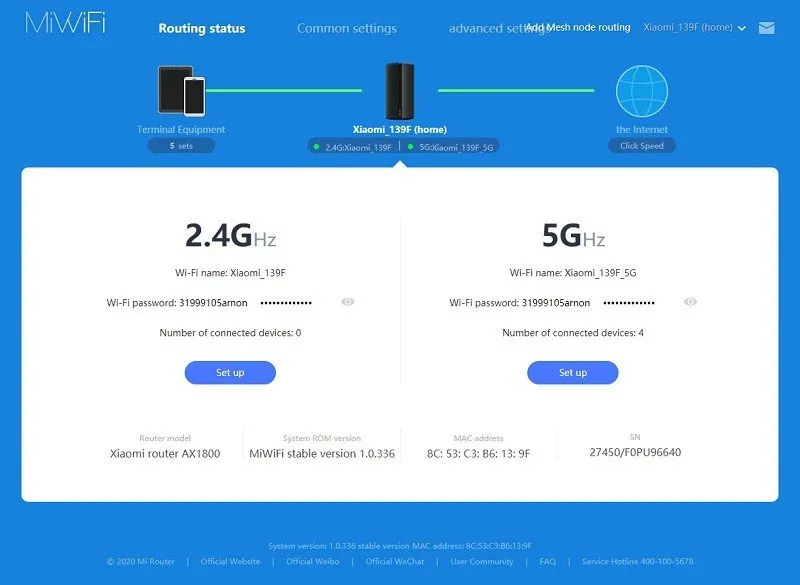
All of the settings of the Mi Router AX1800 are simple to understand and require minimal technical knowledge. The AX1800 web interface only supports Chinese, but once you connect the Mi Router AX1800 to the Internet, you can use the google translation tool in your web browser and pick a preferred language to translate.

Mi Router AX1800 web interface | Login Screen

(Translated to Eng. with google)
Xiaomi AX1800 Web Loing
Mi Router AX1800 Web Loing

Mi Router AX1800 web interface | WiFi Settings

(Web interface Translated to Eng. with google)
Xiaomi AX1800 Web
Mi Router AX1800 Web

MiWiFi | Mobile App

  • Xiaomi Mi WiFi App 2
    Xiaomi Mi WiFi | Android App [ PIC 1 OF 4 ]
  • Xiaomi Mi WiFi App 1
    Xiaomi Mi WiFi | Android App [ PIC 2 OF 4 ]
  • Xiaomi Mi WiFi App 3
    Xiaomi Mi WiFi | Android App [ PIC 3 OF 4 ]
  • Xiaomi Mi WiFi App 4
    Xiaomi Mi WiFi | Android App [ PIC 4 OF 4 ]

Experience using Mi Router AX1800

Our general user experience was good. The Mi AX1800’s unique tower design with a squared-shaped base measuring just 97mm has its advantage as it doesn’t occupy as much space as a traditional router when placed on a table or even an upper small-sized shelf. It also looks very modern and will blend well with your living room.
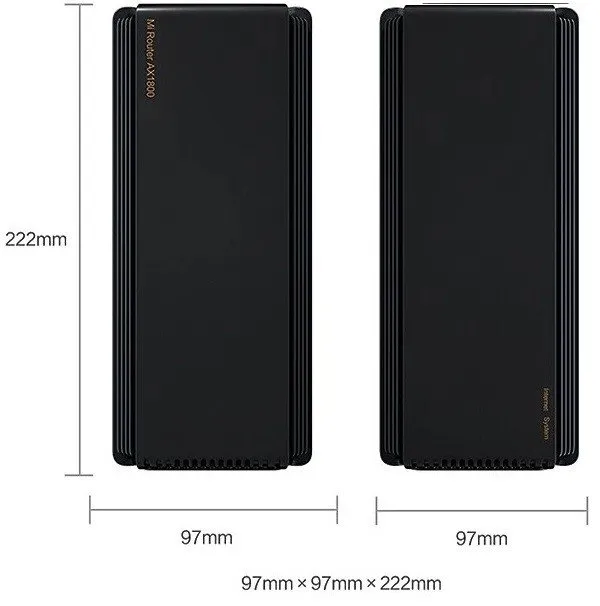
AX1800 Reouter Size
AX1800 Router Size

LEDs for Operational Status

Xiaomi added a pair of LED lights that indicate the Mi Router AX1800 device operation modes. When both lights turn blue, it means that the router is working and established an internet connection, and vice versa turn orange if the device is disconnected or in a booting process step.
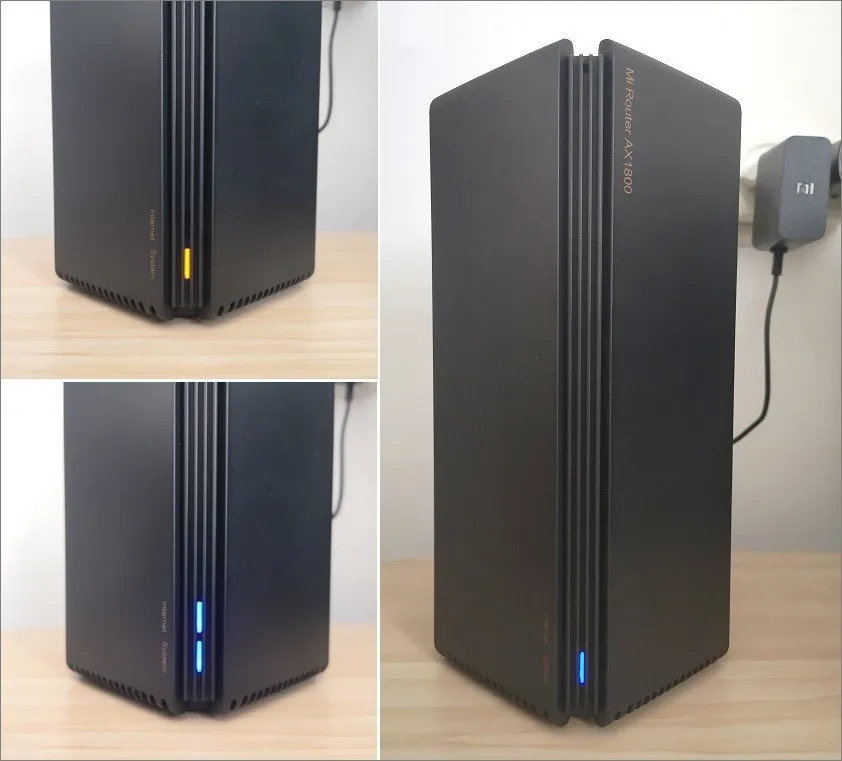
AX1800 Status
AX1800 Status

Security

This day’s cybersecurity is becoming a big issue, especially during the COVID-19 outbreak, as many of the population work remotely from home. Xiaomi integrated a few applicable security settings that are straightforward to manage through the ‘MiWiFi mobile app.

Under the ‘Security Center’ settings, you have options to block access for specific devices based on their MAC addresses. You can add mobile devices manually or automatically from a list of devices currently connected to the Mi Router AX1800. Few other useful advanced options also include QoS settings to limit users’ bandwidth or schedule an internet disconnection time.

QoS intelligent speed limit

(Translated to Eng. with google)
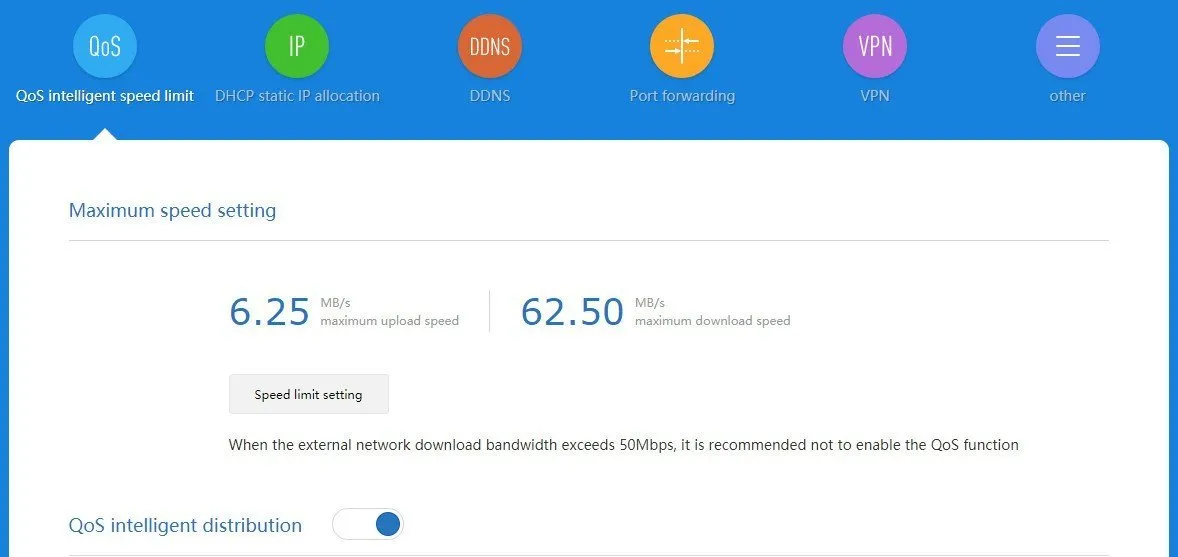
Xiaomi AX1800 QoS
Mi Router AX1800 QoS

Adding device MAC Address to White / Blacklist lists

(Translated to Eng. with google)
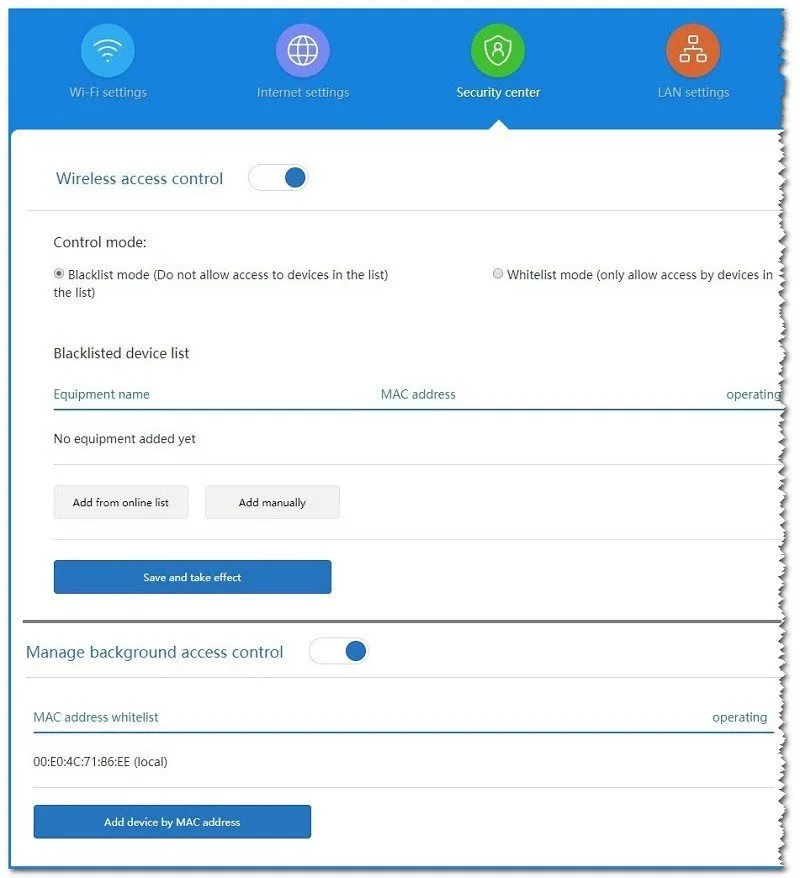
Xiaomi MiWiFi Security

Firewall

Xiaomi firewall settings are average and not too advanced for professional IT security persons. You can forward specific ports according to your security needs, but as a user, you don’t have too many options to play with compared to the Huawei AX3. The firewall offers three fixed preset protection levels: High, Medium, and high.

DMZ (Demilitarized Zone) – The DMZ option allows you to map an IP of a specific device on the internal network to the external network to facilitate access to the device from the external network.

UPnP (Universal Plug and Play) – Considered less secure as it permits networked devices, such as personal computers, printers, Internet gateways, WiFi access points, and mobile devices to discover each other’s presence on the network seamlessly, those can pose a potential security risk.


Mi Router AX1800 vs. Redmi AX5, which one is better?
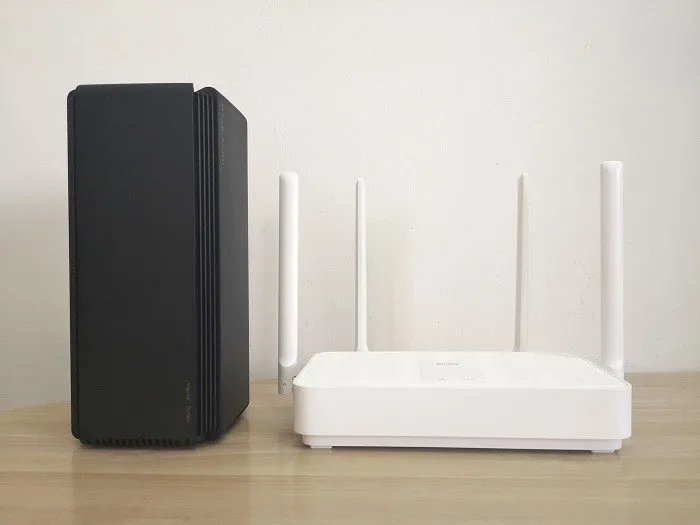
Xiaomi Redmi AX5 AX1800
Xiaomi Redmi AX5 – Mi Router AX1800

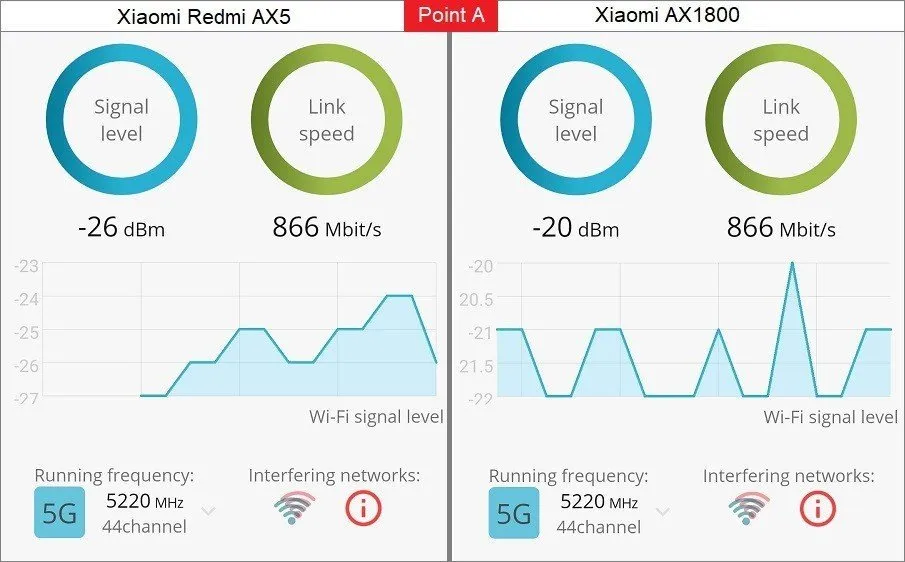
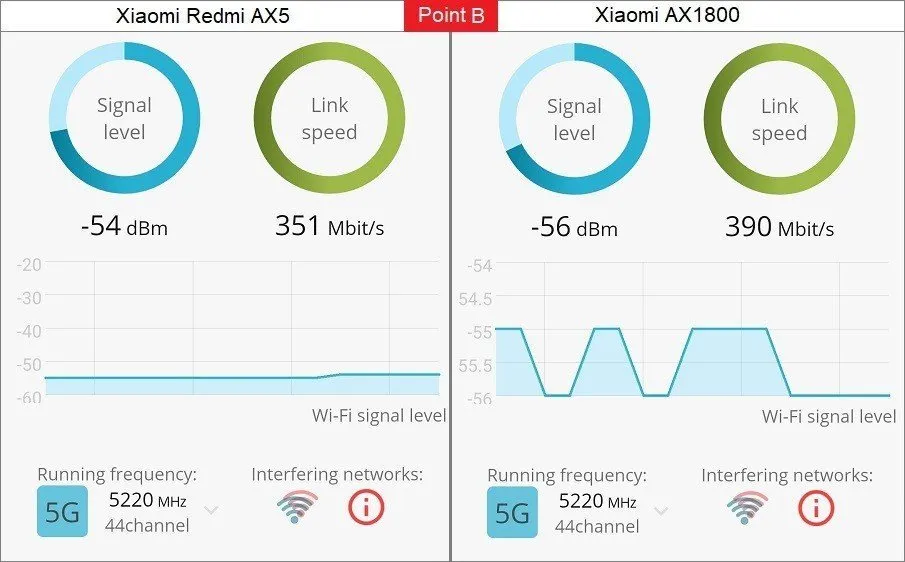
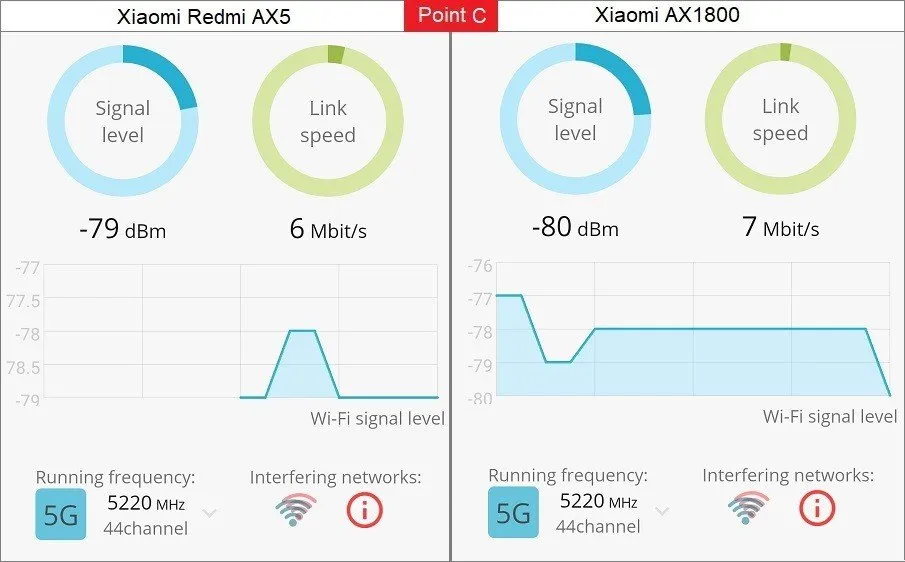
According to our tests, checking the signal reception in 3 different spots at a 100 sq. ft apartment home, to our surprise, both Mi Router AX1800 & AX5 routers provided almost the same signal strength and coverage.
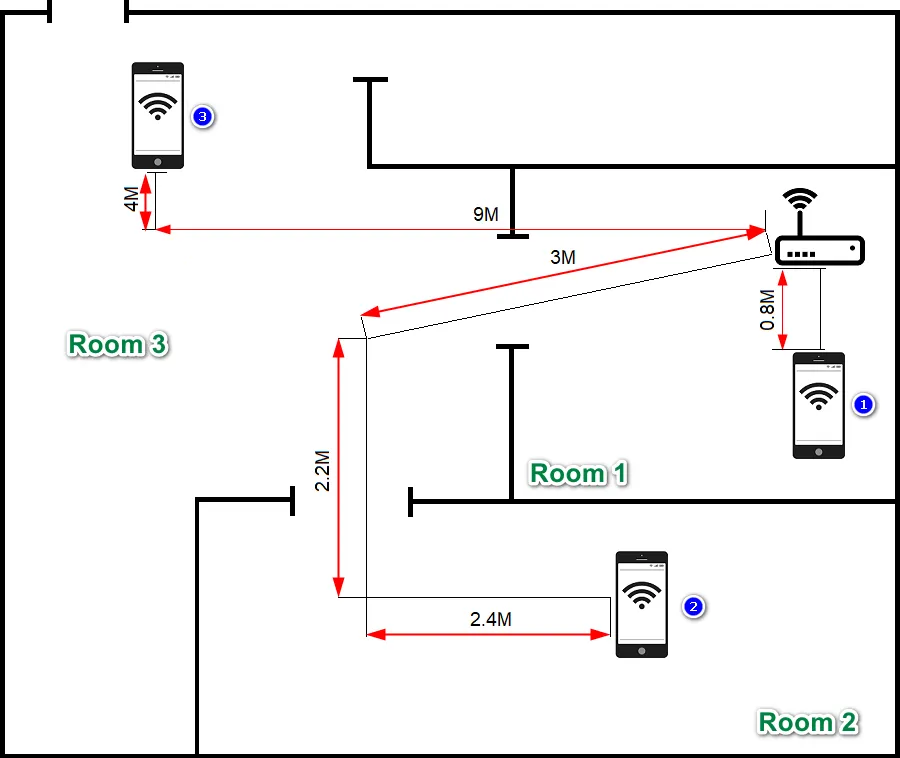
AX5 AX1800 Test
AX5 AX1800 Test

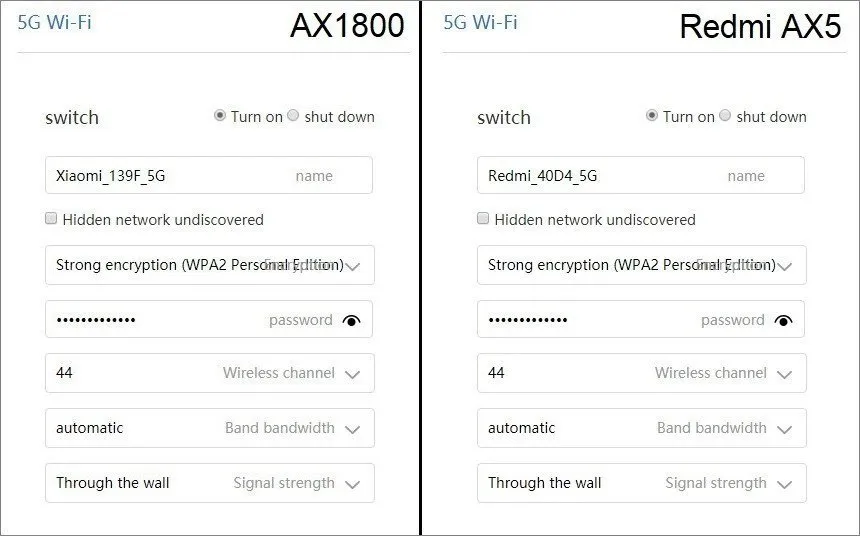
Default Wireless Network Settings

  • Band: 5GHz
  • No’ of channels: 44
  • Encryption: WPA2 Personal Edition
Xiaomi AX1800 Redmi AX5 WiFi Settings

Test Results:

Device #1Xiaomi Redmi AX5
PointLocationDistanceSignal Strenght (dBm)
ANext to the router Unit0.8M-26
BThe nearest room~8M-54
CHall~10M-79
Device #2Xiaomi Router Mi AX1800
PointLocationDistanceSignal Strenght (dBm)
ANext to the router Unit0.8M-20
BThe nearest room~8M-56
CHall~13M-80
AX1800 Router Test Point A
Test Point A
AX1800 Router Test Point B
Test Point B
AX1800 Router Test Point C
Test Point C

Final Words

If you are looking for a cost-effective router that can also handle high broadband internet connections up to 1 Gigabyte, then the Mi Router AX1800 is an excellent choice. As a final tip, you can buy a pair of AX1800 units or more to set a mesh network by placing all AX1800 units in different strategic spots around your home, which should greatly help extend signal coverage.


Price & Availability

Xiaomi’s AX3600 AIoT router has garnered high praise from users for its top-notch hardware and exceptional user experience. Following the success of this flagship product, Xiaomi has now launched its second WiFi 6 router, the Mi Router AX1800. With a starting price of just $58, it offers a more affordable option while still retaining the impressive functionalities of the AX3600. This provides an excellent value proposition for both home and office users, ensuring a remarkable balance between specifications and price.


Where to Buy

The Mi Router AX1800 is now available in the AliExpress Joinrun-Tech Store. If you are interested in this outstanding product, we highly recommend checking out the product link provided below:


Review Summary
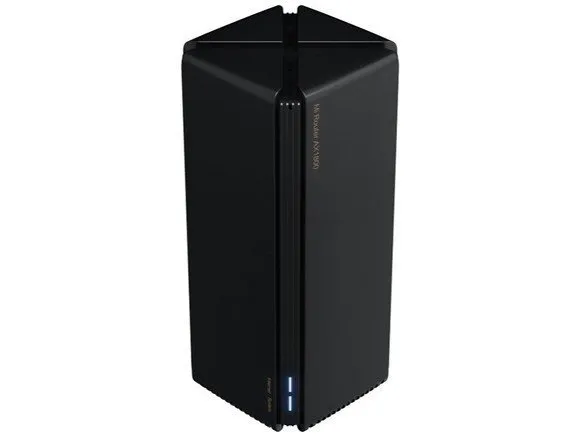
Xiaomi AX1800 Router
9
Mi Router AX1800
Check lowest prices
POSITIVES
  • Design
  • Quality
  • Value for Money
NEGATIVES
  • No USB port

Share. Facebook Twitter Pinterest LinkedIn Tumblr Email
Previous ArticleITX-3588J mini-ITX: Deep Learning & AI Embedded Hardware
Next Article Banana Pi BPI-W3 Open Source SBC /Mini PC /Routerboard
androidpimp
  • Website

Related Posts

Flint 3 WiFi 7 Router

Flint 3 (GL-BE9300) Tri-band Wi-Fi 7 Router is out, what to expect!

May 8, 2025
Redmi AX5400 Gaming Router Review

Redmi AX5400 Gaming Router Review – Top WiFi 6 Router on Steroids

December 14, 2024
Xiaomi Router AX3000T

How to install OpenWrt on Xiaomi AX3000T Router (A Quick Guide)

March 14, 2024
0 0 votes
Article Rating
Subscribe
Notify of
0 Comments
Oldest
Newest Most Voted
Inline Feedbacks
View all comments
Categories
PureVPN
PureVPN Ad Banner
VyprVPN – No. 1 in Anonymity
Vyprvpn 350x260
PrivadoVPN – No. 1 in Parental Control
PrivadoVPN 350x437
Recent Posts
  • Banana Pi BPI-R4 Pro Review: The Best WiFi 7 OpenWrt Router? We Checked!
  • AliExpress New Promotions: Country-specific Promo Codes
  • CamThink NeoEyes NE301: An Ultra-Low Power Edge AI Camera with STM32N6 MCU (Review)
  • Kickpi K7C RK3576 Edge AI SBC Launches with 6 TOPS AI Power & Dual Gigabit Ethernet
  • Raspberry Pi 5 vs Orange Pi 6: Which SBC is Best in 2026?
  • Ugoos SK4 Review (2025): The Best Mid-Range Android TV Box for Value & Features
  • Orange Pi 6 Unveiled: The Affordable, Slimmed-Down SBC Alternative to the 6 Plus
  • Orange Pi 6 Plus Review: A 12-Core SBC Powerhouse (Benchmarks, Specs, and Pricing)
  • LattePanda IOTA Review: 4 Reasons It Beats Raspberry Pi 5
  • Ugoos GaN Fast Chargers (35W, 65W, 140W): USB‑C PD 3.1, Ultra‑Compact, High‑Speed Charging 2026
RSS The Latest RSS Feeds
  • Banana Pi BPI-R4 Pro Review: The Best WiFi 7 OpenWrt Router? We Checked!
  • AliExpress New Promotions: Country-specific Promo Codes
  • CamThink NeoEyes NE301: An Ultra-Low Power Edge AI Camera with STM32N6 MCU (Review)
Facebook X (Twitter) Instagram Pinterest
@2026 - All Right Reserved. Designed by AndroidPIMP

Type above and press Enter to search. Press Esc to cancel.

Accessibility
Accessibility modes
Epilepsy Safe Mode
Dampens color and removes blinks
This mode enables people with epilepsy to use the website safely by eliminating the risk of seizures that result from flashing or blinking animations and risky color combinations.
Visually Impaired Mode
Improves website's visuals
This mode adjusts the website for the convenience of users with visual impairments such as Degrading Eyesight, Tunnel Vision, Cataract, Glaucoma, and others.
Cognitive Disability Mode
Helps to focus on specific content
This mode provides different assistive options to help users with cognitive impairments such as Dyslexia, Autism, CVA, and others, to focus on the essential elements of the website more easily.
ADHD Friendly Mode
Reduces distractions and improve focus
This mode helps users with ADHD and Neurodevelopmental disorders to read, browse, and focus on the main website elements more easily while significantly reducing distractions.
Blindness Mode
Allows using the site with your screen-reader
This mode configures the website to be compatible with screen-readers such as JAWS, NVDA, VoiceOver, and TalkBack. A screen-reader is software for blind users that is installed on a computer and smartphone, and websites must be compatible with it.
Readable Experience
Content Scaling
Default
Text Magnifier
Readable Font
Dyslexia Friendly
Highlight Titles
Highlight Links
Font Sizing
Default
Letter Spacing
Default
Left Aligned
Center Aligned
Right Aligned
Visually Pleasing Experience
Dark Contrast
Light Contrast
Monochrome
High Contrast
High Saturation
Low Saturation
Adjust Text Colors
Adjust Title Colors
Adjust Background Colors
Easy Orientation
Mute Sounds
Hide Images
Hide Emoji
Reading Guide
Stop Animations
Reading Mask
Highlight Hover
Highlight Focus
Big Dark Cursor
Big Light Cursor
Cognitive Reading
Virtual Keyboard
Navigation Keys
Voice Navigation

AndroidPIMP

Accessibility Statement

  • AndroidPIMP.com
  • 10/18/2025

Compliance status

We believe the internet should be open and accessible to everyone, and we’re dedicated to making our website usable for the widest audience possible, no matter their circumstances or abilities.

To achieve this, we follow the World Wide Web Consortium’s (W3C) Web Content Accessibility Guidelines 2.1 (WCAG 2.1) at the AA level as closely as possible. These guidelines outline how to make web content accessible for people with a variety of disabilities. By complying with them, we help ensure our website is usable by everyone, including those who are blind, have motor or visual impairments, cognitive disabilities, and more.

This website uses a range of technologies to stay accessible at all times. An accessibility interface lets people with specific disabilities customize the site’s UI and design to fit their personal needs.

The website also uses an AI-powered application that works in the background to constantly enhance its accessibility. This app fixes the site’s HTML, adjusts its features and behavior for screen readers used by blind users, and optimizes keyboard functions for people with motor impairments.

If you’ve found a malfunction or have ideas for improvement, we’ll be happy to hear from you. You can reach out to the website’s operators by using the following email [email protected]

Screen-reader and keyboard navigation

Our website implements the ARIA attributes (Accessible Rich Internet Applications) technique, alongside various different behavioral changes, to ensure blind users visiting with screen-readers are able to read, comprehend, and enjoy the website’s functions. As soon as a user with a screen-reader enters your site, they immediately receive a prompt to enter the Screen-Reader Profile so they can browse and operate your site effectively. Here’s how our website covers some of the most important screen-reader requirements, alongside console screenshots of code examples:

  1. Screen-reader optimization: we run a background process that learns the website’s components from top to bottom, to ensure ongoing compliance even when updating the website. In this process, we provide screen-readers with meaningful data using the ARIA set of attributes. For example, we provide accurate form labels; descriptions for actionable icons (social media icons, search icons, cart icons, etc.); validation guidance for form inputs; element roles such as buttons, menus, modal dialogues (popups), and others. Additionally, the background process scans all the website’s images and provides an accurate and meaningful image-object-recognition-based description as an ALT (alternate text) tag for images that are not described. It will also extract texts that are embedded within the image, using an OCR (optical character recognition) technology. To turn on screen-reader adjustments at any time, users need only to press the Alt+1 keyboard combination. Screen-reader users also get automatic announcements to turn the Screen-reader mode on as soon as they enter the website.

    These adjustments are compatible with all popular screen readers, including JAWS and NVDA.

  2. Keyboard navigation optimization: The background process also adjusts the website’s HTML, and adds various behaviors using JavaScript code to make the website operable by the keyboard. This includes the ability to navigate the website using the Tab and Shift+Tab keys, operate dropdowns with the arrow keys, close them with Esc, trigger buttons and links using the Enter key, navigate between radio and checkbox elements using the arrow keys, and fill them in with the Spacebar or Enter key.Additionally, keyboard users will find quick-navigation and content-skip menus, available at any time by clicking Alt+1, or as the first elements of the site while navigating with the keyboard. The background process also handles triggered popups by moving the keyboard focus towards them as soon as they appear, and not allow the focus drift outside it.

    Users can also use shortcuts such as “M” (menus), “H” (headings), “F” (forms), “B” (buttons), and “G” (graphics) to jump to specific elements.

Disability profiles supported in our website

  • Epilepsy Safe Mode: this profile enables people with epilepsy to use the website safely by eliminating the risk of seizures that result from flashing or blinking animations and risky color combinations.
  • Visually Impaired Mode: this mode adjusts the website for the convenience of users with visual impairments such as Degrading Eyesight, Tunnel Vision, Cataract, Glaucoma, and others.
  • Cognitive Disability Mode: this mode provides different assistive options to help users with cognitive impairments such as Dyslexia, Autism, CVA, and others, to focus on the essential elements of the website more easily.
  • ADHD Friendly Mode: this mode helps users with ADHD and Neurodevelopmental disorders to read, browse, and focus on the main website elements more easily while significantly reducing distractions.
  • Blindness Mode: this mode configures the website to be compatible with screen-readers such as JAWS, NVDA, VoiceOver, and TalkBack. A screen-reader is software for blind users that is installed on a computer and smartphone, and websites must be compatible with it.
  • Keyboard Navigation Profile (Motor-Impaired): this profile enables motor-impaired persons to operate the website using the keyboard Tab, Shift+Tab, and the Enter keys. Users can also use shortcuts such as “M” (menus), “H” (headings), “F” (forms), “B” (buttons), and “G” (graphics) to jump to specific elements.

Additional UI, design, and readability adjustments

  1. Font adjustments – users, can increase and decrease its size, change its family (type), adjust the spacing, alignment, line height, and more.
  2. Color adjustments – users can select various color contrast profiles such as light, dark, inverted, and monochrome. Additionally, users can swap color schemes of titles, texts, and backgrounds, with over seven different coloring options.
  3. Animations – person with epilepsy can stop all running animations with the click of a button. Animations controlled by the interface include videos, GIFs, and CSS flashing transitions.
  4. Content highlighting – users can choose to emphasize important elements such as links and titles. They can also choose to highlight focused or hovered elements only.
  5. Audio muting – users with hearing devices may experience headaches or other issues due to automatic audio playing. This option lets users mute the entire website instantly.
  6. Cognitive disorders – we utilize a search engine that is linked to Wikipedia and Wiktionary, allowing people with cognitive disorders to decipher meanings of phrases, initials, slang, and others.
  7. Additional functions – we provide users the option to change cursor color and size, use a printing mode, enable a virtual keyboard, and many other functions.

Browser and assistive technology compatibility

We aim to support the widest array of browsers and assistive technologies as possible, so our users can choose the best fitting tools for them, with as few limitations as possible. Therefore, we have worked very hard to be able to support all major systems that comprise over 95% of the user market share including Google Chrome, Mozilla Firefox, Apple Safari, Opera and Microsoft Edge, JAWS and NVDA (screen readers).

Notes, comments, and feedback

Despite our very best efforts to allow anybody to adjust the website to their needs. There may still be pages or sections that are not fully accessible, are in the process of becoming accessible, or are lacking an adequate technological solution to make them accessible. Still, we are continually improving our accessibility, adding, updating and improving its options and features, and developing and adopting new technologies. All this is meant to reach the optimal level of accessibility, following technological advancements. For any assistance, please reach out to [email protected]

wpDiscuz