Close Menu
    Facebook X (Twitter) Instagram Threads
    Trending
    • Rii TU3607 iPad Keyboard Case Review: Dream or Heavy Burden?
    • PrivadoVPN Review 2026: Does the Free Tier Still Work for Streaming?
    • Rii 518BT Review: Is This Pocket Keyboard Actually Usable?
    • Rii RK807 Pro Review: The Best Budget Apple Magic Keyboard Alternative?
    • Rii RK808 Review: The Best Foldable Travel Keyboard?
    • Rii RS201 Review: $69 16-Inch Portable Monitor Tested
    • AliExpress Promo Codes: August 2026 (100% Verified)
    • Orange Pi 6 Review: Is It Suitable for Running Local LLMs? We Checked.
    AndroidPIMP
    Facebook X (Twitter) Instagram
    • Mini PCs & Media Players
    • Embedded Computers
    • Wearables
    • Wireless Routers
    • Edge AI Cameras Vision Hardware
    • Tech Accessories
    AndroidPIMP

    NanoPi R6C 2.5GbE Router: A better & more affordable choice

    0
    By androidpimp on May 27, 2023 Embedded Computers
    Table of contents
    1. NanoPi R6C
    2. NanoPi R6C specifications
    3. NanoPi R6S vs. NanoPi R6C
    4. Key Takeaways
      1. Frequently Asked Questions
        1. What is nanopi r6c?
        2. What is nanopi r6c specifications?
        3. What is connectivity & video support?
        4. What is applicable in industrial environments?
    5. Key Takeaways
      1. Frequently Asked Questions
        1. What is nanopi r6c?
        2. What is nanopi r6c specifications?
        3. What is connectivity & video support?
        4. What is applicable in industrial environments?
    6. Connectivity & Video Support
    7. Applicable in industrial environments
    8. Storage Interfaces
    9. Key Takeaways
      1. Frequently Asked Questions
        1. What is nanopi r6c?
        2. What is nanopi r6c specifications?
        3. What is connectivity & video support?
        4. What is applicable in industrial environments?
    10. Key Takeaways
      1. Frequently Asked Questions
        1. What is nanopi r6c?
        2. What is nanopi r6c specifications?
        3. What is connectivity & video support?
        4. What is applicable in industrial environments?
    11. The Package
    12. Unboxing
    13. Key Takeaways
      1. Frequently Asked Questions
        1. What is nanopi r6c?
        2. What is nanopi r6c specifications?
        3. What is connectivity & video support?
        4. What is applicable in industrial environments?
    14. Key Takeaways
      1. Frequently Asked Questions
        1. What is nanopi r6c?
        2. What is nanopi r6c specifications?
        3. What is connectivity & video support?
        4. What is applicable in industrial environments?
    15. A Closer Look at the Board
    16. Case design
      1. The downsides
    17. Key Takeaways
      1. Frequently Asked Questions
        1. What is nanopi r6c?
        2. What is nanopi r6c specifications?
        3. What is connectivity & video support?
        4. What is applicable in industrial environments?
    18. Key Takeaways
      1. Frequently Asked Questions
        1. What is nanopi r6c?
        2. What is nanopi r6c specifications?
        3. What is connectivity & video support?
        4. What is applicable in industrial environments?
    19. Benchmarking SSD/eMMC, Checking CPU Temperatures
      1. Sysbench CPU benchmark.
    20. Benchmarking a M.2 NVMeย storage Device
      1. Testing Tool: Gnome Disk Utility.
    21. Tips and Steps for applying a thermal pad
    22. Additional tests
      1. eMMC (hdparm Read Speed)
      2. eMMC (dd Read test)
      3. NVMe (hdparm Read Speed)
    23. Checking Temperatures
      1. Tool: s-tui stress test.
    24. Key Takeaways
      1. Frequently Asked Questions
        1. What is nanopi r6c?
        2. What is nanopi r6c specifications?
        3. What is connectivity & video support?
        4. What is applicable in industrial environments?
    25. Key Takeaways
      1. Frequently Asked Questions
        1. What is nanopi r6c?
        2. What is nanopi r6c specifications?
        3. What is connectivity & video support?
        4. What is applicable in industrial environments?
    26. Pros and Cons Compared to Orange Pi 5
    27. Software Support
    28. Conclusion
    29. Price and Availability
      1. NanoPi R6C: Models and Prices
      2. NanoPi R6C
    30. Key Takeaways
      1. Frequently Asked Questions
        1. What is nanopi r6c?
        2. What is nanopi r6c specifications?
        3. What is connectivity & video support?
        4. What is applicable in industrial environments?
    31. Key Takeaways
      1. Frequently Asked Questions
        1. What is nanopi r6c?
        2. What is nanopi r6c specifications?
        3. What is connectivity & video support?
        4. What is applicable in industrial environments?
    • Maybe you missed it?  NanoPi R6S Review
    • NanoPi R6C Review, Specifications, and Price.

    NanoPi R6C

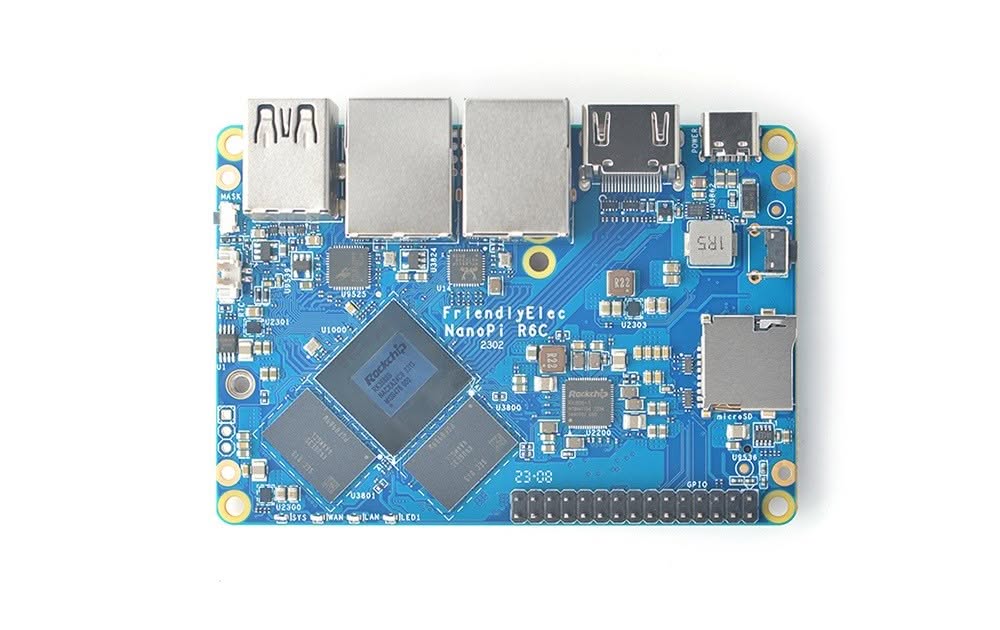
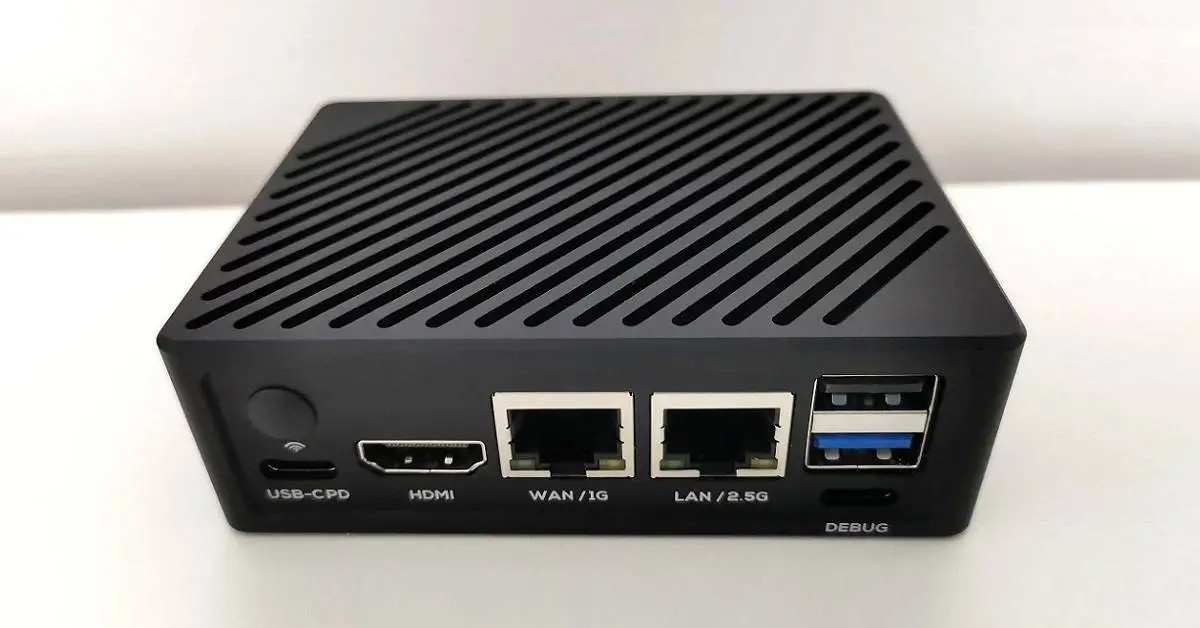
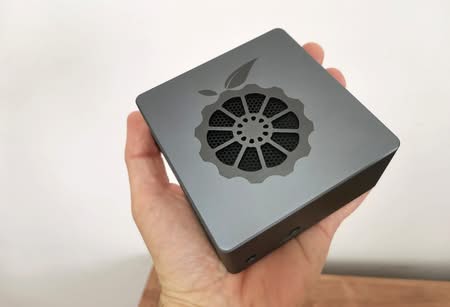
    This single-board computer is designed to work well in industrial settings. Single-board computers made by FriendlyElec are known for their high quality and low price. Designed to withstand harsh environments, the NanoPi R6C is durable and robust. Additionally, it offers a wide range of features and capabilities that make it suitable for a wide range of applications. As an example, it can serve as a media player, NAS, mini router, and so forth.

    Featuring a mighty processor, the NanoPi R6C showcases impressive performance. The device is powered by a Rockchip RK3588S SoC, which is a powerful processor that can handle a range of tasks. It has four Cortex-A72 cores and additional four Cortex-A55 cores, giving it plenty of computing power. In addition, it has a Mali-G610 MP4 GPU, which makes it capable of handling graphics-intensive tasks.

    NanoPi R6C: Layout and Interfaces
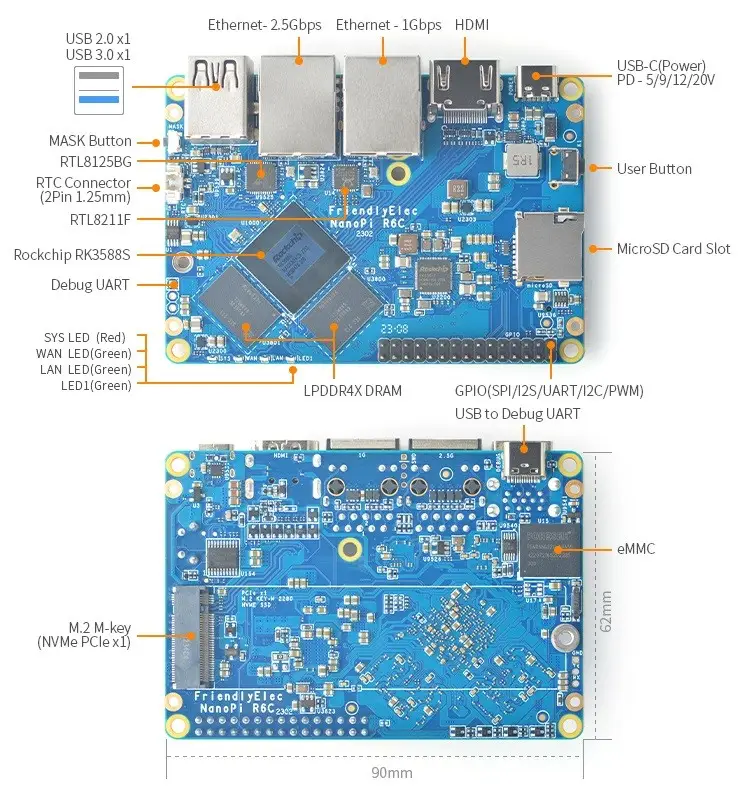
    Nanopi R6c Layout

    NanoPi R6C specifications

    • SoC – Rockchip RK3588S octa-core processor with:
      • CPU – 4x Cortex-A76 cores @ up to 2.4 GHz, four Cortex-A55 cores @ 1.8 GHz
      • GPU – Arm Mali-G610 MP4 quad-core GPU with OpenGL ES3.2 / OpenCL 2.2 / Vulkan1.1
      • VPU – 8Kp60 H.265/VP9/AVS2 video decoder, 8Kp30 H.264 decoder, 4Kp60 AV1 decoder, 8Kp30 H.265/H.264 video encoder
      • AI accelerator – 6 TOPS NPU
    • System Memory – 4GB or 8GB LPDDR4X @ 2133 MHz
    • Storage: MicroSD, M.2 PCIe 2.1 x1 socket for NVMe 2280 SSD, 32 GB eMMC flash (HS400 mode)
    • Video Output – 1x HDMI 2.1 port up to 8Kp60, or 4Kp120
    • Networking:
      • 1x 2.5GbE RJ45 port via Realtek RTL8125BG PCIe controller tested up to 2.35 Gbps (Rx) and 2.35 Gbps (Tx)
      • 1x Gigabit Ethernet RJ45 port via Realtek RTL8211F tested up to 941 Mbps (Tx and Rx)
    • USB – 1x USB 3.0 port, 1x USB 2.0 port
    • Expansion – 30-pin 2.54mm header connector up to 1x SPI, 3x UARTs, 3x I2Cs, 2x SPDIFs, 1x I2Ss, 3x PWMs, 1x CAN, 20x GPIOs
    • Debugging – 3-pin UART header and USB-C Debug UART port with CH341 chip
    • Misc:
      • Mask key for eMMC flash update
      • 2-Pin 1.27/1.25mm RTC battery input connector for low-power RTC IC HYM8563TS
      • 1x user button
      • 4x user-programmable LEDs (SYS, WAN, LAN, LED1)
    • Power Supply – 5V/9V/12V/20V USB Type-C port (USB PD support)
    • Dimensions – PCB: 90 x 62 mm; enclosure: 96.5 x 68 x 30 mm
    • Weight – TBD
    • Temperature Range – 0℃ to 70℃
    • Software: Android, FriendlyWrt (OpenWrt-based), Debian/Ubuntu/FriendlyCore Lite.

    NanoPi R6S vs. NanoPi R6C

    Product Photo

    Model


    NanoPi R6S

    NanoPi R6C

    SoC

    Rockchip RK3588S

    CPU

    Octa-Core (8 cores):

    4 x Cortex-A76 up to 2.4GHz 

    4 x Cortex-A55 up to 1.8GHz

    GPU

    ARM Mali-G610 MP4 Quad-core GPU (up to 1GHz)

    VPU

    8Kp60 H.265/VP9/AVS2 video decoder, 8Kp30 H.264 decoder, 4Kp60 AV1 decoder, 8Kp30 H.265/H.264 video encoder AI accelerator – 6 TOPS NPU System

    NPU

    TOPs, supports INT4/INT8/INT16/FP16

    RAM Configurations

    64-bit 8GB LPDDR4X  (2133MHz)

    64-bit 4GB/8GB LPDDR4X (2133MHz)

    Flash

    32GB eMMC

    32GB eMMC or None

    MicroSD Slot

    M.2 M-Key

    User (Reset) Button 

    Mask Button

    IR Sensor

    Fan Connector(ZH1.5-2A) x1, 5V

    Debug

    3Pin UART,  2.54mm header

    3Pin UART,  2.54mm header

    LED

    • SYS LED(Red) x1
    • WAN LED(Green) x1
    • LAN1 LED(Green) x1
    • LAN2 LED(Green) x1

    USB

    USB 3.0 Host x1: USB Type A
    USB 2.0 Host x1: USB Type A
    USB-C PD x1: Power input(5V/9V/12V/20V

    Connectivity

    x1 Native Gigabit Ethernet:  RTL8211F-CG chip
    x2 2.5G Ethernet: RTL8125BG chip

    x1 Native Gigabit Ethernet:  RTL8211F-CG chip
    x1 2.5G Ethernet: RTL8125BG chip

    GPIO

    GPIO: 12-pin 0.5mm FPC connector
    12-pin 0.5mm FPC connector
    up to 1x SPI, up to 3x UARTs, up to 4x PWMs, up to 8x GPIOs

    GPIO: 30-pin 2.54mm header connector
    up to 1x SPI, 3x UARTs, 3x I2Cs, 2x SPDIFs, 1x I2Ss, 3x PWMs, 1x CAN, 20x GPIOs

    Debug UART

    UART x1, 3 Pin 

    USB-C to UART

    Video & Audio

    HDMI 2.1 port that support up to 8Kp60 video output

    Other

    • RTC Battery: 2 Pin 1.27/1.25mm RTC battery input connector for low • power RTC IC HYM8563TS
    • Working Temperature: 0℃ to 70℃

    Software

    • Android TV 12
    • Debian 10 Desktop
    • FriendlyWrt 22.03 (OpenWrt)
    • Ubuntu 22.04 LTS Desktop (Coming Soon)
    • FriendlyCore Focal Lite(Base on Ubuntu 20.04)

    Metal Enclosure

    Yes,(Optional)

    Power (DC)

    5V/9V/12V/20V input via USB-C PD

    Dimensions

    62x90x1.6mm

    Weight

    55.1g(without Case) / 262g(with Case)

    53.1g(without Case) / 260g(with Case)

    Key Takeaways

    •   NanoPi R6S Review NanoPi R6C Review, Specifications, and Price.
    • NanoPi R6C This single-board computer is designed to work well in industrial settings.
    • NanoPi R6S vs.
    • Storage Interfaces NanoPi R6C also offers a wide range of storage options.
    • NanoPi R6 NVMe Install 2 NanoPi R6 NVMe Install 3 NanoPi R6 NVMe Install 4 NanoPi R6 NVMe Install 5 NanoPi R6 NVMe Install 6 NanoPi R6 NVMe Install 1 GNOME Disk Utility Benchmark tests We booted from a MicroSD card for…

    Frequently Asked Questions

    What is nanopi r6c?

    This single-board computer is designed to work well in industrial settings.

    What is nanopi r6c specifications?

    SoC – Rockchip RK3588S octa-core processor with: CPU – 4x Cortex-A76 cores @ up to 2.

    What is connectivity & video support?

    Additionally, the NanoPi R6C offers a wide range of connectivity options.

    What is applicable in industrial environments?

    A variety of industrial-grade features are also built into the NanoPi R6C.
    1 2 3 4 5 6
    Share. Facebook Twitter Pinterest LinkedIn Tumblr Email
    Previous ArticleOrange Pi 5 / 5B Metal Case W/ Improved Cooling is finally out!
    Next Article Orange Pi 5 Plus is out, and hereโ€™s what we know
    androidpimp
    • Website

    Related Posts

    Orange Pi Review

    Orange Pi 6 Review: Is It Suitable for Running Local LLMs? We Checked.

    August 12, 2026
    BPi Wi Fi 7 NIC BE14(V2.1)

    BPI-R4 Wi-Fi 7 NIC (BE14): OpenWrt Setup & Optimal WiFi Power Guide

    July 27, 2026
    Raspberry Pi Zero 3W SBC

    Orange Pi Zero 3W Review: $25 Dual Video Pi Zero 2W Killer?

    June 26, 2026
    0 0 votes
    Article Rating
    Subscribe
    Notify of
    0 Comments
    Oldest
    Newest Most Voted
    Categories
    PureVPN
    PureVPN Ad Banner
    PrivadoVPN – No. 1 in Parental Control
    PrivadoVPN 350x437
    Recent Posts
    • Rii TU3607 iPad Keyboard Case Review: Dream or Heavy Burden?
    • PrivadoVPN Review 2026: Does the Free Tier Still Work for Streaming?
    • Rii 518BT Review: Is This Pocket Keyboard Actually Usable?
    • Rii RK807 Pro Review: The Best Budget Apple Magic Keyboard Alternative?
    • Rii RK808 Review: The Best Foldable Travel Keyboard?
    • Rii RS201 Review: $69 16-Inch Portable Monitor Tested
    • AliExpress Promo Codes: August 2026 (100% Verified)
    • Orange Pi 6 Review: Is It Suitable for Running Local LLMs? We Checked.
    • Youyeetoo NestDisk Mini PC/Router: Is This Pocket-Sized 3-in-1 NAS Worth It?
    • DFRobot Unveils seeMote Cube: A 6DoF Physical Controller for Apple Vision Pro
    RSS feed: The Latest RSS Feeds The Latest RSS Feeds
    • Rii TU3607 iPad Keyboard Case Review: Dream or Heavy Burden?
    • PrivadoVPN Review 2026: Does the Free Tier Still Work for Streaming?
    • Rii 518BT Review: Is This Pocket Keyboard Actually Usable?
    Facebook X (Twitter) Instagram Pinterest
    @2026 - All Right Reserved. Designed by AndroidPIMP

    Type above and press Enter to search. Press Esc to cancel.

    wpDiscuz