(function(){var Z="cdn.androidpimp.com",O="https://www.androidpimp.com";function toOrigin(h){var i=h.indexOf("/a:");if(i!==-1){var r=h.slice(i+3);if(!r)return null;return /^https?:\/\//i.test(r)?r:O+(r.charAt(0)==="/"?"":"/")+r;}try{var u=new URL(h);if(!u.pathname||u.pathname==="/")return null;return O+u.pathname+u.search;}catch(e){return null;}}window.addEventListener("error",function(e){var el=e.target;if(!el||el.tagName!=="LINK"||el.rel!=="stylesheet")return;var h=el.href||"";if(h.indexOf(Z)===-1||el.getAttribute("data-wpco"))return;var o=toOrigin(h);if(!o||o===h)return;el.setAttribute("data-wpco","1");var l=document.createElement("link");l.rel="stylesheet";if(el.media)l.media=el.media;l.href=o;el.parentNode.insertBefore(l,el.nextSibling);},true);})();
(function(){var u=[["https://cdn.androidpimp.com/wp-content/plugins/wpdiscuz/themes/default/css/fonts/sqr721c-webfont.woff2","font/woff2","square721_cn_btroman"],["https://www.androidpimp.com/wp-content/cache/wp-cio-fonts/3c6f8c7e0f2b7a78a4db33d9a14caee1/pxiEyp8kv8JHgFVrJJfecnFHGPc.woff2","font/woff2","poppins"],["https://www.androidpimp.com/wp-content/cache/wp-cio-fonts/3c6f8c7e0f2b7a78a4db33d9a14caee1/pxiByp8kv8JHgFVrLGT9Z1xlFd2JQEk.woff2","font/woff2","poppins"],["https://www.androidpimp.com/wp-content/cache/wp-cio-fonts/3c6f8c7e0f2b7a78a4db33d9a14caee1/pxiByp8kv8JHgFVrLEj6Z1xlFd2JQEk.woff2","font/woff2","poppins"]];var g=function(){window.__wpcFPB=window.__wpcFPB||{};var used=null,uf=function(f){if(used===null){used={};try{var els=document.querySelectorAll("body *"),n=0;for(var k=0;k<els.length&&n<400;k++){var r=els[k].getBoundingClientRect();if(!r.width||r.top>innerHeight*2)continue;n++;var ff=getComputedStyle(els[k]).fontFamily.split(",")[0].replace(/["']/g,"").trim().toLowerCase();if(ff)used[ff]=1}}catch(x){used=false}}return used===false||!f||!!used[f]};for(var i=0;i<u.length;i++){if(window.__wpcFPB[u[i][0]])continue;if(!uf(u[i][2]))continue;window.__wpcFPB[u[i][0]]=1;var l=document.createElement("link");l.rel="preload";l.as="font";l.type=u[i][1];l.crossOrigin="anonymous";l.href=u[i][0];document.head.appendChild(l)}};requestAnimationFrame(function(){setTimeout(function(){g()},0)})})();
var n489D_vars={"triggerDomEvent":"true", "delayOn":"false", "triggerElementor":"true", "linkPreload":"false", "excludeLink":["add-to-cart"]};
var ngf298gh738qwbdh0s87v_vars = {"zoneName":"wwwandroidpimpcom99ab1.zapwp.com","siteurl":"https://www.androidpimp.com","ajaxurl":"https://www.androidpimp.com/wp-admin/admin-ajax.php","spinner":"https://www.androidpimp.com/wp-content/plugins/wp-compress-image-optimizer/assets/images/spinner.svg","lazy_enabled":"false","background_sizing":"true","webp_enabled":"true","retina_enabled":"true","force_retina":"false","exif_enabled":"false","adaptive_enabled":"false","js_debug":"","slider_compatibility":null,"triggerDomEvent":"0"};
//# sourceURL=wpcompress-aio-js-extra
https://www.androidpimp.com/wp-content/plugins/wp-compress-image-optimizer/assets/js/dist/optimizer.pixel.min.js
https://www.androidpimp.com/wp-includes/js/jquery/jquery.min.js
https://www.androidpimp.com/wp-includes/js/jquery/jquery-migrate.min.js
var breeze_prefetch = {"local_url":"https://www.androidpimp.com","ignore_remote_prefetch":"1","ignore_list":["wp-admin","wp-login.php"]};
//# sourceURL=breeze-prefetch-js-extra
https://www.androidpimp.com/wp-content/plugins/breeze/assets/js/js-front-end/breeze-prefetch-links.min.js
var wsm_ajax = "https://www.androidpimp.com/wp-admin/admin-ajax.php";
//# sourceURL=wsm-custom-front-js-js-extra
https://www.androidpimp.com/wp-content/plugins/wordpress-stats-manager-pro/js/custom_front_js.js
var BunyadSchemeKey = 'bunyad-scheme';
(() => {
const d = document.documentElement;
const c = d.classList;
var scheme = localStorage.getItem(BunyadSchemeKey);
if (scheme) {
d.dataset.origClass = c;
scheme === 'dark' ? c.remove('s-light', 'site-s-light') : c.remove('s-dark', 'site-s-dark');
c.add('site-s-' + scheme, 's-' + scheme);
}
})();
Table of contents
Raspberry Pi 4 vs NanoPi M4V2: Which One is More Powerful?
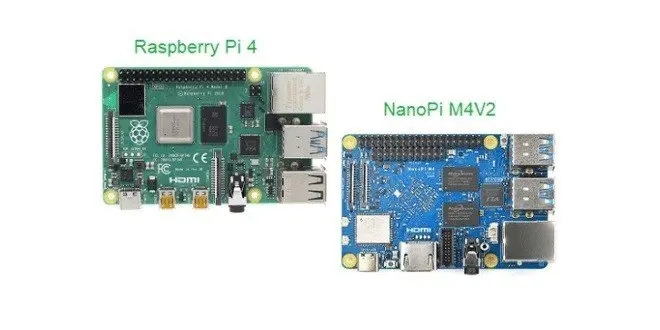
In this general hardware benchmark comparison, we will focus on comparing the performance of the Raspberry Pi 4 vs NanoPi M4V2 SBC. So first thing first, let’s compare both boards specifications and get a more clear view of the features including interfaces each board has to offer in terms of value/price ratio.
Both SBCs are based on the ARM Cortex-A72 microarchitecture implementing the ARMv8-A 64-bit instruction set. The NanoPi M4V2 SBC is based on Rockchip Solution powered by a hex (6) Cores CPU priced at $70. Against it, Its main competitor. The Raspberry Pi 4 SBC powered by a Quad-core Broadcom processor, priced at a retail price between $60-80.
Raspberry Pi 4 Specs
Architecture ARM Cortex-A72 SoC Broadcom BCM2711 Processor Cores Quad-core Cortex-A72 (ARM v8) 64-bit SoC @ 1.5GHz Processor Speed 1.5GHz per core RAM 1GB, 2GB, 4GB LPDDR4-3200 SDRAM Video/Audio output 2 × micro-HDMI ports (up to 4kp60 supported)
Dual-monitor support
Video-Input 2-lane MIPI DSI display port
2-lane MIPI CSI camera port
Audio Headphone jack Yes, Output Only Storage Interfaces 2 USB 3.0 ports; 2 USB 2.0 ports, Micro-SD Slot Header Pin Extension 24Pin – 2 independent native USB 2.0 Host + PCIe x2
Standard 40 pin GPIO header
Onboard eMMC No Wireless LAN 2.4Ghz and 5Ghz Dual-Band On-Board Antenna, supporting IEEE 802.11 b/g/n/ac Gigabit Ethernet Yes Max Power Draw 3A Ethernet / Local Area Network 1000mbps Gigabit (802.3ab using dedicated chip) Bluetooth Bluetooth 5.0 Video Chip Broadcom VideoCore VI @ 500MHz 2 Pin RTC battery input connector No Power management chip Yes, MaxLinear PMIC
NanoPi M4V2 Specs
Architecture ARM big.LITTLE SoC RockChip RK3399 Processor Cores Dual-Core Cortex-A72(up to 2.0GHz) + Quad-Core Cortex-A53 (up to 1.5GHz) Processor Speed 1.5GHz – 1.8GHz per core RAM 4GB Dual-Channel 4GB LPDDR4 Video/Audio output HDMI 2.0a supports 4K@60Hz,HDCP 1.4/2.2 Video-Input one or two 4-Lane MIPI-CSI, dual ISP, up to 13MPix/s,supports simultaneous input of dual-camera data Audio Headphone jack Yes, Input & Output Storage Interfaces 4 USB 3.0 ports, Micro-SD Slot Header Pin Extension Standard 40 pin GPIO header Onboard eMMC Yes, via Module Wireless LAN 2.4Ghz and 5Ghz Dual-Band On-Board Antenna, supporting IEEE 802.11 b/g/n/ac Gigabit Ethernet Yes Max Power Draw 3A Ethernet / Local Area Network 1000mbps Gigabit (802.3ab using dedicated chip) Bluetooth Bluetooth 4.1 Video Chip ARM Mali-T860 MP2 @ 700MHz 2 Pin RTC battery input connector RTC Battery: 2 Pin 1.27/1.25mm RTC battery input connector Power management chip Yes, RK808-D PMIC
Raspberry Pi 4
Operating system: Raspbian Buster
sysbench –num-threads=4 –test=cpu –cpu-max-prime=20000 –validate run
total time: 62.6426s
Results were taken from the following sources:
Maximum prime number checked in CPU test: 20000

Test execution summary:
    total time:                          62.8169s
    total number of events:              10000
    total time taken by event execution: 251.2240
    per-request statistics:
         min:                                 24.94ms
         avg:                                 25.12ms
         max:                                 68.14ms
         approx.  95 percentile:              25.10ms

Threads fairness:
    events (avg/stddev):           2500.0000/4.24
    execution time (avg/stddev):   62.8060/0.01
NanoPi M4V2
Operating system: Armbian
sysbench –num-threads=4 –test=cpu –cpu-max-prime=20000 –validate run
Maximum prime number checked in CPU test: 20000

Test execution summary:
    total time:                          10.0022s
    total number of events:              19546
    total time taken by event execution: 251.2240
    per-request statistics:
         min:                                 1.42ms
         avg:                                 2.05ms
         max:                                 17.37ms
         approx.  95 percentile:              3.55ms
         sum:                                 39985.88

Threads fairness:
    events (avg/stddev):           4886.5000/2101.50
    execution time (avg/stddev):   9.9965/0.00
Translating the data to more clear to understand results:
SBC Latency (ms) Min Latency (ms) Max Total execution Time Raspberry Pi 4 24.95 68.14 62.6426s NanoPi M4V2 1.42 17.37 10.0022s The Winner NanoPi M4V2
Note: Lower execution time it better!
Final words
Based on my personal opinion and above preliminary results, the NanoPi M4V2 outperforms the new raspberry pi 4 by approximately %84. Although raspberry pi 4 offers much better software support and a wide selection of Linux distributions, including better documentation and a more robust community for bug-testing. My advice, if you are looking for a more powerful SBC go with the NanoPi M4V2. If you don’t need much computing power than raspberry pi 4 is the best choice between the two.
wpDiscuz
Insert
(function(){var n=document.getElementById("stoc-nav-1");if(!n)return;var sw=n.querySelector(".stoc-darkswitch input");if(!sw)return;var AUTO=n.getAttribute("data-autodark")==="1";var mq=window.matchMedia?window.matchMedia("(prefers-color-scheme: dark)"):null;function gs(){try{return localStorage.getItem("slimtoc_theme");}catch(e){return null;}}function ss(v){try{localStorage.setItem("slimtoc_theme",v);}catch(e){}}function isDark(){var st=gs();if(st==="dark")return true;if(st==="light")return false;return !!(mq&&mq.matches);}function paint(d){var manual=!!gs();n.classList.remove("stoc-dark","stoc-light","stoc-autodark");if(manual){n.classList.add(d?"stoc-dark":"stoc-light");}else if(AUTO){n.classList.add("stoc-autodark");}document.querySelectorAll(".stoc-review").forEach(function(r){r.classList.remove("stoc-dark","stoc-light","stoc-autodark");if(manual){r.classList.add(d?"stoc-dark":"stoc-light");}else if(AUTO){r.classList.add("stoc-autodark");}});sw.checked=d;}paint(isDark());sw.addEventListener("change",function(){var d=sw.checked;ss(d?"dark":"light");paint(d);});if(mq){var f=function(){if(!gs())paint(isDark());};if(mq.addEventListener)mq.addEventListener("change",f);else if(mq.addListener)mq.addListener(f);}})();
( ( dropdownId ) => {
const dropdown = document.getElementById( dropdownId );
function onSelectChange() {
setTimeout( () => {
if ( 'escape' === dropdown.dataset.lastkey ) {
return;
}
if ( dropdown.value && parseInt( dropdown.value ) > 0 && dropdown instanceof HTMLSelectElement ) {
dropdown.parentElement.submit();
}
}, 250 );
}
function onKeyUp( event ) {
if ( 'Escape' === event.key ) {
dropdown.dataset.lastkey = 'escape';
} else {
delete dropdown.dataset.lastkey;
}
}
function onClick() {
delete dropdown.dataset.lastkey;
}
dropdown.addEventListener( 'keyup', onKeyUp );
dropdown.addEventListener( 'click', onClick );
dropdown.addEventListener( 'change', onSelectChange );
})( "cat" );
//# sourceURL=WP_Widget_Categories%3A%3Awidget
jQuery(function(){
var arrLiveStats=[];
var P_PREFIX="wsm";
jQuery(".if-js-closed").removeClass("if-js-closed").addClass("closed");
var wsmFnSiteLiveStats=function(){
jQuery.ajax({
type: "POST",
url: wsm_ajaxObject.ajax_url,
data: { action: 'liveSiteStats', requests: JSON.stringify(arrLiveStats), r: Math.random() }
}).done(function( strResponse ) {
if(strResponse!="No"){
arrResponse=JSON.parse(strResponse);
jQuery.each(arrResponse, function(key,value){
$element= document.getElementById(key);
oldValue=parseInt($element.getAttribute("data-value").replace(/,/g, ""));
diff=parseInt(value.replace(/,/g, ""))-oldValue;
$class="";
if(diff>=0){
diff="+"+diff;
}else{
$class="wmcRedBack";
}
$element.setAttribute("data-value",value);
$element.innerHTML=diff;
jQuery("#"+key).addClass($class).show().siblings(".wsmH2Number").text(value);
if(key=="SiteUserOnline")
{
var onlineUserCnt = arrResponse.wsmSiteUserOnline;
if(jQuery("#wsmSiteUserOnline").length)
{
jQuery("#wsmSiteUserOnline").attr("data-value",onlineUserCnt); jQuery("#wsmSiteUserOnline").next(".wsmH2Number").html("<a target=\"_blank\" href=\"admin.php?page=wsm_traffic&subPage=UsersOnline&subTab=summary\">"+onlineUserCnt+"</a>");
}
}
});
setTimeout(function() {
jQuery(".site_stats_panel .wsmBoxUPDdataTIP").removeClass("wmcRedBack").hide();
}, 1500);
}
});
}
if(arrLiveStats.length>0){
setInterval(wsmFnSiteLiveStats, 10000);
}});
var wcp_ajax = {"ajax_url":"https://www.androidpimp.com/wp-admin/admin-ajax.php","nonce":"96ee493231"};
//# sourceURL=wcp-frontend-js-extra
https://www.androidpimp.com/wp-content/plugins/WP%20Coupons%20Pro/assets/js/frontend.js
https://www.androidpimp.com/wp-content/plugins/ultimate-post/assets/js/ultp-youtube-gallery-block.js
var SLIMTOC_FRONT = {"progress":"1","spy":"1","resume":"1","minimap":"","copy":"1","heat":"1","read":"1","pid":"52688","nonce":"146129bcb8","ajax":"https://www.androidpimp.com/wp-admin/admin-ajax.php","min":"3"};
//# sourceURL=slimtoc-js-extra
https://www.androidpimp.com/wp-content/plugins/slimtoc/assets/js/slimtoc-front.js
var prbAnalyticsData = {"ajaxUrl":"https://www.androidpimp.com/wp-admin/admin-ajax.php","nonce":"a8ff6d8dfe","subscribeNonce":"add1742bc3","settings":{"default_label_color":"#4a6cf7","default_title_color":"#111827","default_button_color":"#000000","utm_source":"myblog","utm_medium":"content","enable_cloaking":false,"enable_utm":false,"enable_weekly_email":false,"exclude_admins":false,"openai_api_key":"","qwen_api_key":"","admin_email":"tzahi.work@gmail.com"},"excludeAdmin":""};
//# sourceURL=prb-analytics-js-extra
https://www.androidpimp.com/wp-content/plugins/product-recommendation-block/js/analytics.js
https://www.androidpimp.com/wp-content/plugins/product-recommendation-block/js/prb-frontend.js
https://www.androidpimp.com/wp-content/plugins/wpdiscuz/assets/third-party/wpdccjs/wpdcc.js
var wpdiscuzEditorOptions = {
modules: {
toolbar: "",
counter: {
uniqueID: "",
commentmaxcount : 0,
replymaxcount : 0,
commentmincount : 1,
replymincount : 1,
},
},
wc_be_the_first_text: "Be the First to Comment!",
wc_comment_join_text: "Join the discussion",
theme: 'snow',
debug: 'error'
};
//# sourceURL=quill-js-before
https://www.androidpimp.com/wp-content/plugins/wpdiscuz/assets/third-party/quill/quill.min.js
https://www.androidpimp.com/wp-content/plugins/wpdiscuz/assets/js/wpd-editor.min.js
https://www.androidpimp.com/wp-content/plugins/wpdiscuz/assets/third-party/autogrow/jquery.autogrowtextarea.min.js
https://www.androidpimp.com/wp-content/plugins/wpdiscuz/assets/js/wpdiscuz.min.js
https://www.androidpimp.com/wp-content/plugins/wpdiscuz/assets/third-party/colorbox/jquery.colorbox.min.js
https://www.androidpimp.com/wp-content/plugins/wpdiscuz/assets/js/wpdiscuz-mu-frontend.min.js
https://www.androidpimp.com/wp-content/plugins/wpdiscuz/assets/third-party/lity/lity.min.js
var wpdiscuzUCObj = {"msgConfirmDeleteComment":"Are you sure you want to delete this comment?","msgConfirmCancelSubscription":"Are you sure you want to cancel this subscription?","msgConfirmCancelFollow":"Are you sure you want to cancel this follow?","additionalTab":"0"};
//# sourceURL=wpdiscuz-user-content-js-js-extra
https://www.androidpimp.com/wp-content/plugins/wpdiscuz/assets/js/wpdiscuz-user-content.min.js
https://www.androidpimp.com/wp-content/themes/smart-mag/js/jquery.mfp-lightbox.js
https://www.androidpimp.com/wp-content/themes/smart-mag/js/jquery.sticky-sidebar.js
var Bunyad = {"ajaxurl":"https://www.androidpimp.com/wp-admin/admin-ajax.php"};
//# sourceURL=smartmag-theme-js-extra
https://www.androidpimp.com/wp-content/themes/smart-mag/js/theme.js
https://www.androidpimp.com/wp-includes/js/comment-reply.min.js
window.wpcVitals={u:"https:\/\/www.androidpimp.com\/wp-admin\/admin-ajax.php?action=wpc_v",t:"63f95f8a89bb4b4e07cae3634ffde497378dbe79",s:1,m:1790036443};
function wpcVSend(e,b,c){try{var u=e.u,f=e.a||"";try{if(f&&localStorage.getItem("wpcVCh")==="a"){u=f;f=""}}catch(x){}if("hidden"===document.visibilityState&&navigator.sendBeacon&&navigator.sendBeacon(u,new Blob([b],{type:c})))return;var p=function(t,d){return fetch(t,{method:"POST",body:d,keepalive:!0,headers:{"Content-Type":c}})};var q=function(){if(f){p(f,b+"&fb=1");try{localStorage.setItem("wpcVCh","a")}catch(x){}}};if(!window.fetch||!f){navigator.sendBeacon?navigator.sendBeacon(u,new Blob([b],{type:c})):window.fetch&&p(u,b);return}p(u,b).then(function(r){r.ok||q()}).catch(q)}catch(x){}}
var webVitals=function(e){"use strict";let t=-1;const n=e=>{addEventListener("pageshow",(n=>{n.persisted&&(t=n.timeStamp,e(n))}),!0)},i=(e,t,n,i)=>{let r,s;return a=>{t.value>=0&&(a||i)&&(s=t.value-(r??0),(s||void 0===r)&&(r=t.value,t.delta=s,t.rating=((e,t)=>e>t[1]?"poor":e>t[0]?"needs-improvement":"good")(t.value,n),e(t)))}},r=e=>{requestAnimationFrame((()=>requestAnimationFrame(e)))},s=()=>{const e=performance.getEntriesByType("navigation")[0];if(e&&e.responseStart>0&&e.responseStart<performance.now())return e},a=()=>s()?.activationStart??0,o=(e,n=-1)=>{const i=s();let r="navigate";return t>=0?r="back-forward-cache":i&&(document.prerendering||a()>0?r="prerender":document.wasDiscarded?r="restore":i.type&&(r=i.type.replace(/_/g,"-"))),{name:e,value:n,rating:"good",delta:0,entries:[],id:`v5-${Date.now()}-${Math.floor(8999999999999*Math.random())+1e12}`,navigationType:r}},c=new WeakMap;function l(e,t){let n=c.get(t);return n||(n=new WeakMap,c.set(t,n)),n.get(e)||n.set(e,new t),n.get(e)}class d{t;i=0;o=[];h(e){if(e.hadRecentInput)return;const t=this.o[0],n=this.o.at(-1);this.i&&t&&n&&e.startTime-n.startTime<1e3&&e.startTime-t.startTime<5e3?(this.i+=e.value,this.o.push(e)):(this.i=e.value,this.o=[e]),this.t?.(e)}}const u=(e,t,n={})=>{try{if(PerformanceObserver.supportedEntryTypes.includes(e)){const i=new PerformanceObserver((e=>{queueMicrotask((()=>{t(e.getEntries())}))}));return i.observe({type:e,buffered:!0,...n}),i}}catch{}},h=e=>{let t=!1;return()=>{t||(e(),t=!0)}};let p=-1;const m=new Set,f=()=>"hidden"!==document.visibilityState||document.prerendering?1/0:0,v=e=>{if("hidden"===document.visibilityState){if("visibilitychange"===e.type)for(const e of m)e();isFinite(p)||(p="visibilitychange"===e.type?e.timeStamp:0,removeEventListener("prerenderingchange",v,!0))}},g=()=>{if(p<0){const e=a(),t=document.prerendering?void 0:globalThis.performance.getEntriesByType("visibility-state").find((t=>"hidden"===t.name&&t.startTime>=e))?.startTime;p=t??f(),addEventListener("visibilitychange",v,!0),addEventListener("prerenderingchange",v,!0),n((()=>{setTimeout((()=>{p=f()}))}))}return{get firstHiddenTime(){return p},onHidden(e){m.add(e)}}},T=e=>{document.prerendering?addEventListener("prerenderingchange",e,!0):e()},b=[1800,3e3],y=(e,t={})=>{T((()=>{const s=g();let c,l=o("FCP");const d=u("paint",(e=>{for(const t of e)"first-contentful-paint"===t.name&&(d.disconnect(),t.startTime<s.firstHiddenTime&&(l.value=Math.max(t.startTime-a(),0),l.entries.push(t),c(!0)))}));d&&(c=i(e,l,b,t.reportAllChanges),n((n=>{l=o("FCP"),c=i(e,l,b,t.reportAllChanges),r((()=>{l.value=performance.now()-n.timeStamp,c(!0)}))})))}))},w=[.1,.25];let C=0,L=1/0,E=0;const M=e=>{for(const t of e)t.interactionId&&(L=Math.min(L,t.interactionId),E=Math.max(E,t.interactionId),C=E?(E-L)/7+1:0)};let S;const P=()=>S?C:performance.interactionCount??0;let I=0;class A{l=[];u=new Map;m;p;v(){I=P(),this.l.length=0,this.u.clear()}T(){const e=Math.min(this.l.length-1,Math.floor((P()-I)/50));return this.l[e]}h(e){if(this.m?.(e),!e.interactionId&&"first-input"!==e.entryType)return;const t=this.l.at(-1);let n=this.u.get(e.interactionId);if(n||this.l.length<10||e.duration>t.L){if(n?e.duration>n.L?(n.entries=[e],n.L=e.duration):e.duration===n.L&&e.startTime===n.entries[0].startTime&&n.entries.push(e):(n={id:e.interactionId,entries:[e],L:e.duration},this.u.set(n.id,n),this.l.push(n)),this.l.sort(((e,t)=>t.L-e.L)),this.l.length>10){const e=this.l.splice(10);for(const t of e)this.u.delete(t.id)}this.p?.(n)}}}const F=e=>{const t=globalThis.requestIdleCallback||setTimeout,n=globalThis.cancelIdleCallback||clearTimeout;if("hidden"===document.visibilityState)e();else{const i=h(e);let r=-1;const s=()=>{n(r),i()};addEventListener("visibilitychange",s,{once:!0,capture:!0}),r=t((()=>{removeEventListener("visibilitychange",s,{capture:!0}),i()}))}},k=[200,500];class B{m;h(e){this.m?.(e)}}const V=[2500,4e3],N=[800,1800],x=e=>{document.prerendering?T((()=>x(e))):"complete"!==document.readyState?addEventListener("load",(()=>x(e)),!0):setTimeout(e)};return e.CLSThresholds=w,e.FCPThresholds=b,e.INPThresholds=k,e.LCPThresholds=V,e.TTFBThresholds=N,e.onCLS=(e,t={})=>{const s=g();y(h((()=>{let a,c=o("CLS",0);const h=l(t,d),p=e=>{for(const t of e)h.h(t);h.i>c.value&&(c.value=h.i,c.entries=h.o,a())},m=u("layout-shift",p);m&&(a=i(e,c,w,t.reportAllChanges),s.onHidden((()=>{p(m.takeRecords()),a(!0)})),n((()=>{h.i=0,c=o("CLS",0),a=i(e,c,w,t.reportAllChanges),r(a)})),setTimeout(a))})))},e.onFCP=y,e.onINP=(e,t={})=>{if(!globalThis.PerformanceEventTiming||!("interactionId"in PerformanceEventTiming.prototype))return;const r=g();T((()=>{"interactionCount"in performance||S||(S=u("event",M,{durationThreshold:0}));let s,a=o("INP");const c=l(t,A),d=e=>{F((()=>{for(const t of e)c.h(t);const t=c.T();t&&t.L!==a.value&&(a.value=t.L,a.entries=t.entries,s())}))},h=u("event",d,{durationThreshold:t.durationThreshold??40});s=i(e,a,k,t.reportAllChanges),h&&(h.observe({type:"first-input",buffered:!0}),r.onHidden((()=>{d(h.takeRecords()),s(!0)})),n((()=>{c.v(),a=o("INP"),s=i(e,a,k,t.reportAllChanges)})))}))},e.onLCP=(e,t={})=>{T((()=>{const s=g();let c,d=o("LCP");const p=l(t,B),m=e=>{t.reportAllChanges||(e=e.slice(-1));for(const t of e)p.h(t),t.startTime<s.firstHiddenTime&&(d.value=Math.max(t.startTime-a(),0),d.entries=[t],c())},f=u("largest-contentful-paint",m);if(f){c=i(e,d,V,t.reportAllChanges);const s=h((()=>{m(f.takeRecords()),f.disconnect(),c(!0)})),a=e=>{e.isTrusted&&(F(s),removeEventListener(e.type,a,{capture:!0}))};for(const e of["keydown","click","visibilitychange"])addEventListener(e,a,{capture:!0});n((n=>{d=o("LCP"),c=i(e,d,V,t.reportAllChanges),r((()=>{d.value=performance.now()-n.timeStamp,c(!0)}))}))}}))},e.onTTFB=(e,t={})=>{let r=o("TTFB"),c=i(e,r,N,t.reportAllChanges);x((()=>{const l=s();l&&(r.value=Math.max(l.responseStart-a(),0),r.entries=[l],c(!0),n((()=>{r=o("TTFB",0),c=i(e,r,N,t.reportAllChanges),c(!0)})))}))},e}({});!function(){"use strict";var e=window.wpcVitals;if(e&&e.u&&e.t&&window.webVitals&&navigator.sendBeacon&&!0!==navigator.webdriver){var t=Number(e.s)||1;if(!(t>1&&Math.random()>=1/t)){var HU=!1;["pointerdown","keydown","touchstart","wheel","scroll","mousemove"].forEach(function(ev){addEventListener(ev,function(){HU=!0},{once:!0,passive:!0,capture:!0})});var n={},i=!1,r=function(e){return function(t){n[e]=t.value}};try{webVitals.onLCP(r("lcp")),webVitals.onCLS(r("cls")),webVitals.onINP(r("inp")),webVitals.onTTFB(r("ttfb")),webVitals.onFCP(r("fcp"))}catch(e){}addEventListener("visibilitychange",(function(){"hidden"===document.visibilityState&&a()}),!0),addEventListener("pagehide",a,!0),addEventListener("pageshow",(function(e){e.persisted&&(i=!1,n={})}),!0)}}function s(){try{var t=function(){try{return performance.getEntriesByType("navigation")[0]||null}catch(e){return null}}();if(t&&t.serverTiming&&t.serverTiming.length){for(var n=0,i=0;i<t.serverTiming.length;i++){var r=t.serverTiming[i];if("wpc-cache"===r.name)return"hit"===r.description?1:0;"wpc-mint"===r.name&&(n=Number(r.description)||0)}if(n>0)return Date.now()/1e3-n>300?1:0}var s=Number(e.m)||0;if(s>0&&Date.now()/1e3-s>300)return 1}catch(e){}return 0}function a(){if(HU&&!i){i=!0;try{var t="v=1&t="+encodeURIComponent(e.t)+(e.b?"&b=1":"")+"&d="+(Math.min(window.innerWidth||1024,window.screen&&screen.width||1024)<768?"m":"d")+"&e="+(r=navigator.userAgent,(/Firefox\//.test(r)?"f":/Chrome\/|Chromium\/|Edg\//.test(r)?"c":/Safari\//.test(r)&&/Version\//.test(r)?"s":"o")+"&h=")+s();null!=n.lcp&&(t+="&lcp="+Math.round(n.lcp)),null!=n.cls&&(t+="&cls="+Math.round(1e3*n.cls)),null!=n.inp&&(t+="&inp="+Math.round(n.inp)),null!=n.ttfb&&(t+="&ttfb="+Math.round(n.ttfb)),null!=n.fcp&&(t+="&fcp="+Math.round(n.fcp)),wpcVSend(e,t,"text/plain")}catch(e){}var r}}}();(function(){try{var e=window.wpcVitals;if(!e||!e.u||!e.t)return;if(navigator.webdriver)return;var t=Number(e.s)||1;if(Math.random()>=1/t)return;var n=window.matchMedia&&matchMedia("(max-width: 767.98px)").matches?"m":"d",i=Number(e.m)||0,r=function(){try{var t=performance.getEntriesByType("navigation")[0];if(t&&t.serverTiming&&t.serverTiming.length){for(var n=0,j=0;j<t.serverTiming.length;j++){var s=t.serverTiming[j];if("wpc-cache"===s.name)return"hit"===s.description?"1":"0";"wpc-mint"===s.name&&(n=Number(s.description)||0)}if(n>0)return Date.now()/1e3-n>300?"1":"0"}}catch(c){}return i&&Math.floor(Date.now()/1e3)-i>300?"1":"0"}(),o="t="+encodeURIComponent(e.t)+(e.b?"&b=1":"")+"&k=p&d="+n+"&h="+r,a=function(){try{wpcVSend(e,o,"application/x-www-form-urlencoded")}catch(c){}};var HU2=!1;["pointerdown","keydown","touchstart","wheel","scroll","mousemove"].forEach(function(ev){addEventListener(ev,function(){HU2=!0},{once:!0,passive:!0,capture:!0})});var s=!1,g=function(){HU2&&(s||(s=!0,a()))},L=function(){setTimeout(g,8e3)};addEventListener("visibilitychange",function(){"hidden"===document.visibilityState&&g()},!0),addEventListener("pagehide",g,!0),"complete"===document.readyState?L():addEventListener("load",L,{once:!0})}catch(c){}})();
(function(){try{if(!window.PerformanceObserver||!localStorage)return;if(window.wpcVitals&&window.wpcVitals.b)return;var e=0,t=function(){try{e>0&&localStorage.setItem("wpcVitalsYou",JSON.stringify({lcp:Math.round(e),t:Math.floor(Date.now()/1e3)}))}catch(n){}};new PerformanceObserver((function(t){var n=t.getEntries();n.length&&(e=n[n.length-1].startTime)})).observe({type:"largest-contentful-paint",buffered:!0}),addEventListener("load",(function(){setTimeout(t,2e3)}),{once:!0}),addEventListener("visibilitychange",(function(){"hidden"===document.visibilityState&&t()}),!0)}catch(n){}})();