Close Menu
    Facebook X (Twitter) Instagram Threads
    Trending
    • RiiTek RK807 Pro Review: The Best Budget Apple Magic Keyboard Alternative?
    • Rii 518BT Review: Is This Pocket Keyboard Actually Usable?
    • RiiTek RK808 Review: The Best Foldable Travel Keyboard?
    • Rii RS201 Review: $69 16-Inch Portable Monitor Tested
    • AliExpress Promo Codes: August 2026 (100% Verified)
    • Orange Pi 6 Review: Is It Suitable for Running Local LLMs? We Checked.
    • Youyeetoo NestDisk Mini PC/Router: Is This Pocket-Sized 3-in-1 NAS Worth It?
    • DFRobot Unveils seeMote Cube: A 6DoF Physical Controller for Apple Vision Pro
    AndroidPIMP
    Facebook X (Twitter) Instagram
    • Mini PCs & Media Players
    • Embedded Computers
    • Wearables
    • Wireless Routers
    AndroidPIMP
    Rikomagic V5 Mini PC Review
    Rikomagic V5 Mini PC Review

    Rikomagic V5 Android Mini PC Review

    0
    By androidpimp on February 1, 2015 Mini PCs & Media Players
    Table of contents
    1. Main Specifications
    2. The Package
    3. Unpacking
    4. Rikomagic V5 Android Mini PC (All Items)
    5. Design & Quality
    6. Weighting
    7. Performance
    8. System
    9. Storage Space
    10. Operation
    11. Conclusions
    Table of Contents
    [Open][Close]
    • Main Specifications
    • The Package
    • Unpacking
    • Rikomagic V5 Android Mini PC (All Items)
    • Design & Quality
    • Weighting
    • Performance
    • XBMC Support
    • 2K & 4K Support
    • System
    • Storage Space
    • Operation
    • Conclusions

    Main Specifications

    • CPU:  RK3288 28 nm Cortex-A17 Quad core.
    • GPU:  Quad-Core Mali-T764.
    • RAM:  2GB  / ROM: 16GB (Flash).
    • Support H.265 Hardware decoding.
    • Operating system: Android 4.4
    • Language: MULTI Language support.

    Networking & Connectivity :

    • Bluetooth: Support BT4.0 Module.
    • WiFi: 2.4GHz/5GHz , Dual Band WiFi; 802.11 b/g/n and 802.11 a/c.
    • Built-in Ethernet port (Support LAN 100M/1000M network).

    Ports & Interface :

    • 1 x HDMI 2.0.
    • 1 x Power DC Jack.
    • 1 x Gigabit RJ45.
    • 1 x Recovery hole.
    • 1 x USB Host, x1 OTG.
    • Micro SD: 1*Micro SD slot, Maximum support 32GB.
    Rikomagic_V5_Quad_Core_Android_TV_Stick_Specs_thumb.png

    Rikomagic_V5_Quad_Core_Android_TV_Stick_Views.png
    Rikomagic_V5_Quad_Core_Android_TV_Stick_All_Items.jpg

    The Package

    Rikomagic_V5_Quad_Core_Android_TV_Stick_package_thumb.jpg

    Unpacking

    Rikomagic_V5_Quad_Core_Android_TV_Stick_Unpacking_thumb.jpg

    Items in the package:

    • 1x V5 Mini PC Android Stick.
    • 1x User Manual.
    • 1x HDM Extension Cable.
    • 1X USB Cable (OTG).
    • 1x Power Supply Unit.

    Rikomagic V5 Android Mini PC (All Items)

    Rikomagic_V5_Quad_Core_Android_TV_Stick_All_Items.jpg

    Accessories:

    • 1X OTG Cable (Type: USB Male-Male).
    • 1x HDM Extension Cable (Type: Male-Female).
    • 1x Power Supply Unit (5V / 2.5A).
    Rikomagic_V5_Quad_Core_Android_TV_Stick_Accessories_thumb.jpg

    V5 Power Supply Unit

    Rikomagic_V5_Quad_Core_Android_Mini_PC_Power_Supply_Unit_thumb.jpg

    Design & Quality

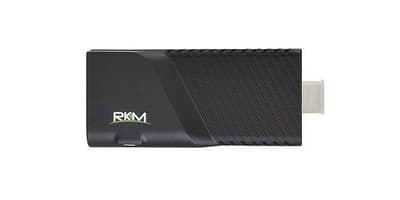
    Product design and quality are superb, What is normally expected from Rikomagic products. The casing is made from ABS plastic material with a thin rubberized coating and 45 degrees venting slots (holes) located on both side walls, assuring the device gets the proper cooling.

    On the back side, you have one USB 2.0 Host port along with a built-in Gigabit RJ45 Ethernet LAN Port for wired connectivity. An additional USB OTG port located on the side is mainly used for firmware updating purposes.

    Rikomagic_V5_Quad_Core_Android_TV_Stick_All_Views_thumb.jpg

    Weighting

    Rikomagic_V5_Quad_Core_Android_Mini_PC_Weight_thumb.jpg

    Performance

    The V5 is equipped with Cortex-A17 Rockchip RK3288 quad-core processor working at clock frequencies ranging between 312 MHz – 1800 MHz (Peak Speed) for each core. In general, it works extremely fast and doesn’t heat much.

    Rikomagic_V5_Quad_Core_Android_Mini_PC_CPU_Z_Soc_info_thumb.png

    AnTuTu Benchmark

    Rikomagic_V5_-android_Mini_PC_antutu_benchmark_Scores_thumb.png

    Rikomagic_V5_Quad_Core_Android_Mini_PC_Antutu_Test_Results.png

    XBMC Support

    The V5 Mini PC came pre-installed with Kodi 14.0 Alpha-4 so I have installed the latest stable 14.1 “Helix” release. On my tests, 1080P Playback worked well without any lags or slowness playing large size, MKV, and ISO video files up to 34GB in size.

    I did some experimentation with Semper Media Center (SMPC) Build which is a fork of the official XBMC Build that is said to have better support for Rockchip hardware. Like before, It played most of my samples, including a few video files encoded in H.265 that didn’t previously work with the official release.

    2K & 4K Support

    2K & 4K video playback is far from perfect. About 40-50%, depending on the video file bitrate didn’t really play correctly and had minor lags or some sudden picture freezes, That’s why I didn’t see any point in adding an additional test sheet and just included this note.

    Test # 1 :

    • Files: 1080P Video samples.
    • Test Type: Local Playback.
    • Storage Source: External Portable Hard Drive (USB interface).
    • XBMC Build: SPMC 13.4.0
    V5_xbmc_media_player_1080P_samples_list_thumb.png

    Test # 2 :

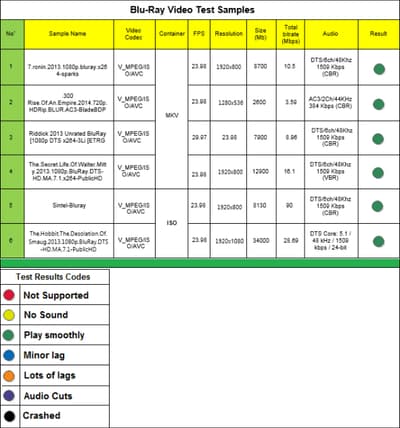
    • Files: Blu-ray Video samples.
    • Test Type: Local Playback.
    • Storage Source: External Portable Hard Drive (USB interface).
    • XBMC Build: SPMC 13.4.0
    Rikomagic V5 media player Blu Ray samples test

    System

    The device provided by Rikomagic had firmware Build 140613, But I have upgraded It to the latest new build 150112. The V5 Mini PC runs Android 4.4.2 KitKat OS and It works very fast, without problems or system crashes. In addition, it comes with pre-root access via the pre-installed “SuperSU” app.

    • Installed firmware: RKM V5-eng 4.4.2 K07 49H eng.zz.20141204.test-keys
    • Latest firmware: RKM V5-eng 4.4.2 K07 49H eng.zz.20150112.test-keys
    Rikomagic_V5_Quad_Core_Mini_PC_Firmware_info_thumb.png

    UI – Windows 8 tile style UI (User interface), very user-friendly and easy to operate.

    Rikomagic_V5_Quad_Core_Android_Mini_PC_UI_thumb.jpg

    Storage Space

    Internal flash storage space in total is 16GB. The actual real available free space, excluding system files and apps, is approximately 11.44GB.

    Rikomagic_V5_Quad_Core_Android_Mini_PC_Storage_info_thumb.png

    Operation

    Updating V5 Firmware procedure:

    1 – Extracting archive file which includes firmware and OS drivers.

    2 – Loading RKBatchTool (recovery tool Batch Tool) app and selecting the firmware image file.

    3 – Connect the OTG cable on one side to the USB (OTG) host port.

    4 – Press the recovery/update button (Hole) with a paper clip. While Still holding it with the paper clip connecting the other side of the OTG cable straight to the P.C.

    5 – Releasing the update button after 3-5 seconds.

    6 – There will pop up a guide window to install a new driver.

    7 – Now agreed square indicating device is connected.

    8 – Final step: Click the “Upgrade” button.

    Rikomagic_V5_Quad_Core_Android_TV_Leftt_View.png

    Conclusions

    Excellent product in terms of performance & quality. Focusing on the XBMC video playback issue,  Playing 1080P works very well, including large Blue-Ray Rip files up to 34GB in size. Speaking from a home user perspective, you don’t need a higher resolution than that. If you’re still very keen on playing 4K videos I recommend checking the Rikomagic MK12 Box-based Amlogic S812 solution. That said, the V5 Mini PC sale at a retail price of $86 (Including shipping) in the Rikormagic Aleixpress store Here.
    Rikomagic V5 Mini PC Review
    9.2
    Check lowest prices
    POSITIVES
    • High Quality
    • – Root Access
    • Excellent Built design
    • Kodi Plays 1080P videos smoothly (Note: Without lags).
    • Great For Gaming – Equipped with Powerful GPU.
    NEGATIVES
    • Partially XBMC supports Playing 2K & 4K videos.

    Rikomagic Website: Click Here

    Rikomagic_contact_card
    Share. Facebook Twitter Pinterest LinkedIn Tumblr Email
    Previous ArticleUyesee SoundMate Wireless Audio Streaming Box Review
    Next Article Rikomagic MK12 Android TV Box Review
    androidpimp
    • Website

    Related Posts

    Youyeetoo NestDisk Mini PC/Router: Is This Pocket-Sized 3-in-1 NAS Worth It?

    August 4, 2026

    Orange Pi X2 Mini PC Is Officially in the Works – Here’s What We Know

    July 29, 2026
    Ugoos SK4 Review

    Ugoos SK4 Review: The Best Mid-Range Android TV Box for Value & Features

    December 6, 2025

    Comments are closed.

    Categories
    PureVPN
    PureVPN Ad Banner
    PrivadoVPN – No. 1 in Parental Control
    PrivadoVPN 350x437
    Recent Posts
    • RiiTek RK807 Pro Review: The Best Budget Apple Magic Keyboard Alternative?
    • Rii 518BT Review: Is This Pocket Keyboard Actually Usable?
    • RiiTek RK808 Review: The Best Foldable Travel Keyboard?
    • Rii RS201 Review: $69 16-Inch Portable Monitor Tested
    • AliExpress Promo Codes: August 2026 (100% Verified)
    • Orange Pi 6 Review: Is It Suitable for Running Local LLMs? We Checked.
    • Youyeetoo NestDisk Mini PC/Router: Is This Pocket-Sized 3-in-1 NAS Worth It?
    • DFRobot Unveils seeMote Cube: A 6DoF Physical Controller for Apple Vision Pro
    • Orange Pi X2 Mini PC Is Officially in the Works – Here’s What We Know
    • BPI-R4 Wi-Fi 7 NIC (BE14): OpenWrt Setup & Optimal WiFi Power Guide
    RSS feed: The Latest RSS Feeds The Latest RSS Feeds
    • RiiTek RK807 Pro Review: The Best Budget Apple Magic Keyboard Alternative?
    • Rii 518BT Review: Is This Pocket Keyboard Actually Usable?
    • RiiTek RK808 Review: The Best Foldable Travel Keyboard?
    Facebook X (Twitter) Instagram Pinterest
    @2026 - All Right Reserved. Designed by AndroidPIMP

    Type above and press Enter to search. Press Esc to cancel.