Close Menu
    Facebook X (Twitter) Instagram Threads
    Trending
    • LattePanda Mu Ultra Debuts: A Micro x86 Compute Module for On-Device AI
    • Aliexpress Promo Codes Sep 2026 (100% Verified)
    • Orange Pi Zero 4 Review: Is This $26 Micro SBC a Raspberry Pi Killer?
    • Youyeetoo NestDisk Review: Pocket-Sized Mini PC, Router & NAS
    • Rii TU3607 iPad Keyboard Case Review: Dream or Heavy Burden?
    • PrivadoVPN Review 2026: Does the Free Tier Still Work for Streaming?
    • Rii 518BT Review: Is This Pocket Keyboard Actually Usable?
    • Rii RK807 Pro Review: The Best Budget Apple Magic Keyboard Alternative?
    AndroidPIMP
    Facebook X (Twitter) Instagram
    • Mini PCs & Media Players
    • Embedded Computers
    • Wearables
    • Wireless Routers
    • Edge AI Cameras Vision Hardware
    • Tech Accessories
    AndroidPIMP
    dfrobot lorawan gateway
    DFRobot LoRaWAN Gateway

    DFRobot ESP32-S3 LoRaWAN & Gateway Review: Build a Private IoT Network

    0
    By androidpimp on March 17, 2026 Embedded Computers
    Last updated August 25, 2026
    • • Part I: Overview of the LoRaWAN ESP32-S3 Dev Board and Private LoRaWAN Gateway.
    • • DFRobot launched an all-in-one IoT solution with an ESP32-S3 board and a new Private LoRaWAN Gateway compatible with Node-RED, ideal for home automation and long-range IoT connectivity projects.
    • • The LoRaWAN Interfaces for the ESP32-S3
    • • So, what features and capabilities does this board offer?
    • • What Sets This Board Apart?
    • • Multi-Protocol Wireless Flexibility
    • • Completely Compatible with the Meshtastic Protocol
    • • Is it compatible with the Meshtastic protocol?
    • • What makes the DFR1195 compatible?
    • • The essential components are as follows.
    • • Manufacturer confirmation
    • • Developer-Focused Hardware Design
    • • Every physical feature prioritizes rapid prototyping and field testing:
    • • Hardware Specfications
    • • Smart Home Ecosystem Expansion
    • • Real-World Application Scenarios
    • • 🏡Large-Property Home Automation
    • • 🌾Precision Agriculture & Horticulture
    • • 🏔️ Off-Grid Adventure Communication
    • • 🏭 Industrial IoT Prototyping
    • • 🌤️ Urban Environmental Monitoring
    • • Comparison: LoRaWAN with TTN vs. Private LoRaWAN (Offline)
    • • Key takeaway
    • • What is the difference between LoRa and LoRaWAN?
    • • Streamlined Development Experience
    • • Arduino IDE Ready
    • • Ready-to-Run Code Examples
    • • Reasons to Choose This Board for Your Next Project!
    • • Private LoRaWAN Gateway with Built-in Local Server & Node-RED Support p2
    • • Affordable and capable of long-distance connectivity. p2
    • • Perfectly suited for agricultural applications. p2
    • • A quick video showcasing the product. p2
    • • Hardware Specfications p2
    • • Applications p2
    • • HomeAssistant Compatible: ESPHome YAML Configuration p2
    • • Review: DFRobot ESP32-S3 LoRaWAN and Gateway p3
    • • Package Content (List of Items) p3
    • • Part II: DFRobot ESP32-S3 LoRaWAN & Gateway Review p4
    • • A Closer look at the Items We Received for This Review p4
    • • Connnecting the Gateway to a router p5
    • • First-time logging into the Gateway p5
    • • An overview of LoRaWAN ESP32-S3 development Board p5
    • • Additional interfaces p5
    • • Power Supply p5
    • • Operatio buttons p5
    • • Our personal viewpoint p5
    • • Configuring the LoRaWAN ESP32-S3 Development Board and establishing a connection to the LoRaWAN Gateway. p6
    • • STEP 1 – STEP 8 p6
    • • Configuring the Gateway p7
    • • Official Regulations p7
    • • LoRaWAN Frequency Comparison for Israel p7
    • • Connecting to a public LoRaWAN network: Joining The Things Network (TTN) p7
    • • What exactly is The Things Network (TTN)? p7
    • • Setting up our gateway on The Things Network (TTN) p7
    • • Registering the gateway EUI on The Things Network (TTN). p7
    • • Enabling the Correct Gateway Mode p7
    • • Final Step: Verifying that the Gateway is correctly configured. p7
    • • Setting up an endpoint device using TTN. p8
    • • More settings are also required. p8
    • • Setting LoRaWAN ESP32-S3 OTAA (Over‑The‑Air Activation) p8
    • • loading the Sketch p8
    • • Running the gateway in LoRaWAN Network Server (LNS) mode p9
    • • Benefits of Operating the Gateway in Standalone Mode: p9
    • • So what essentials do you need to make this work? p9
    • • The final result p9
    • • Can you connect with LoRa end devices? p9
    • • What should you verify before making it operational? p9
    • • Final Thoughts p10
    • • Price and availability p11
    • • Price & Details p11
    • • Frequently Asked Questions p11

    Part II: DFRobot ESP32-S3 LoRaWAN & Gateway Review

    Creating a network through TTN, as illustrated below.
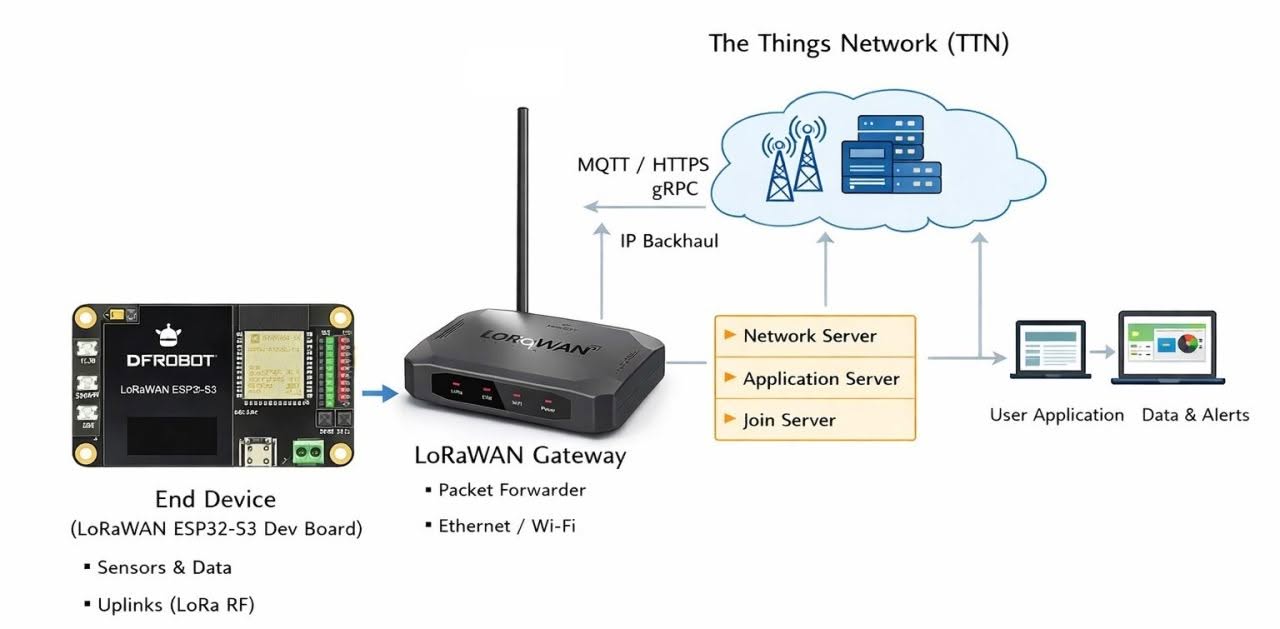
    DFRobot LoRaWAN TTN Setup
    DFRobot LoRaWAN (TTN Setup)

    A Closer look at the Items We Received for This Review

    An overview of LoRaWAN gateway

    The device is available in two unique models: the U.S. version that operates on the 915MHz band and the European version designed for the 868MHz band. Both variants are attractively priced at $99.00 USD. With impressive specifications, the device features one 100Mbps Ethernet RJ45 port and supports WiFi connectivity at 2.4GHz, making it an ideal choice for smart home automation. DFRobot classifies this device as an Indoor Gateway; however, it may be adaptable for outdoor use with appropriate protective measures, such as a waterproof casing.

    DFRobot LoRaWAN Gateway 1
    DFRobot LoRaWAN Gateway 1
    DFRobot LoRaWAN Gateway 2
    DFRobot LoRaWAN Gateway 2
    DFRobot LoRaWAN Gateway 3
    DFRobot LoRaWAN Gateway 3
    DFRobot LoRaWAN Gateway 4
    DFRobot LoRaWAN Gateway 4
    DFRobot LoRaWAN Gateway 5
    DFRobot LoRaWAN Gateway 5
    DFRobot LoRaWAN Gateway 6
    DFRobot LoRaWAN Gateway 6

    Mounting Holes

    The images above highlight the unit’s effortless versatility in wall mounting, whether in a vertical or horizontal orientation, thanks to the built-in metal threads integrated into the case.

    1 2 3 4 5 6 7 8 9 10 11
    ESP32-S3 Board LoRaWAN LoRaWAN Gateway
    Share. Facebook Twitter Pinterest LinkedIn Tumblr Email
    Previous ArticleWaveNote AI Recorder Review: Is the Subscription Actually Worth It?
    Next Article Banana Pi BPI-R4 Pro Review: The Best WiFi 7 OpenWrt Router? We Checked!
    androidpimp
    • Website

    Related Posts

    LattePanda Mu Ultra

    LattePanda Mu Ultra Debuts: A Micro x86 Compute Module for On-Device AI

    September 10, 2026
    Orange Pi Zero 4W

    Orange Pi Zero 4 Review: Is This $26 Micro SBC a Raspberry Pi Killer?

    September 4, 2026
    Orange Pi Review

    Orange Pi 6 Review: Is It Suitable for Running Local LLMs? We Checked.

    August 12, 2026
    0 0 votes
    Article Rating
    Subscribe
    Notify of
    0 Comments
    Oldest
    Newest Most Voted
    Categories
    PureVPN
    PureVPN Ad Banner
    PrivadoVPN – No. 1 in Parental Control
    PrivadoVPN 350x437
    Recent Posts
    • LattePanda Mu Ultra Debuts: A Micro x86 Compute Module for On-Device AI
    • Aliexpress Promo Codes Sep 2026 (100% Verified)
    • Orange Pi Zero 4 Review: Is This $26 Micro SBC a Raspberry Pi Killer?
    • Youyeetoo NestDisk Review: Pocket-Sized Mini PC, Router & NAS
    • Rii TU3607 iPad Keyboard Case Review: Dream or Heavy Burden?
    • PrivadoVPN Review 2026: Does the Free Tier Still Work for Streaming?
    • Rii 518BT Review: Is This Pocket Keyboard Actually Usable?
    • Rii RK807 Pro Review: The Best Budget Apple Magic Keyboard Alternative?
    • Rii RK808 Review: The Best Foldable Travel Keyboard?
    • Rii RS201 Review: $69 16-Inch Portable Monitor Tested
    RSS feed: The Latest RSS Feeds The Latest RSS Feeds
    • LattePanda Mu Ultra Debuts: A Micro x86 Compute Module for On-Device AI
    • Aliexpress Promo Codes Sep 2026 (100% Verified)
    • Orange Pi Zero 4 Review: Is This $26 Micro SBC a Raspberry Pi Killer?
    Facebook X (Twitter) Instagram Pinterest
    @2026 - All Right Reserved. Designed by AndroidPIMP

    Type above and press Enter to search. Press Esc to cancel.

    wpDiscuz