Close Menu
  • Home
  • About
  • Wearables
  • Earbuds
  • Computer Accessories
    • Routers
    • Remotes
  • Embedded
    • Single Board Computers
    • Addon Boards
    • Raspberry Pi
  • Wireless Routers
  • Contact
Facebook X (Twitter) Instagram Threads
Trending
  • Banana Pi BPI-R4 Pro Review: The Best WiFi 7 OpenWrt Router? We Checked!
  • DFRobot ESP32-S3 LoRaWAN & Gateway Review: Build a Private IoT Network
  • Top Global AliExpress Promo Worldwide Country Codes June 1, 2026
  • WaveNote AI Review 2026: An Honest Pro/Con Comparison (Tested)
  • CamThink NE301 Review: 25 FPS YOLOv8 on STM32 Edge AI
  • PrivadoVPN Review 2026: Is the Best Free VPN Still Good for Streaming?
  • Orange Pi 6: Why Buy an AI HAT+? This SBC has 45 TOPS of Integrated AI Power
  • AliExpress Shopping Guide 2026: How to Find Top Deals & Avoid Scams
AndroidPIMP
Facebook X (Twitter) Instagram
  • Home
  • About
  • Wearables
  • Earbuds
  • Computer Accessories
    • Routers
    • Remotes
  • Embedded
    • Single Board Computers
    • Addon Boards
    • Raspberry Pi
  • Wireless Routers
  • Contact
AndroidPIMP

DFRobot ESP32-S3 LoRaWAN & Gateway Review: Build a Private IoT Network

0
By androidpimp on March 17, 2026 Embedded Computers
dfrobot lorawan gateway
DFRobot LoRaWAN Gateway
Table of contents
  1. Part I: Overview of the LoRaWAN ESP32-S3 Dev Board and Private LoRaWAN Gateway.
  2. DFRobot launched an all-in-one IoT solution with an ESP32-S3 board and a new Private LoRaWAN Gateway compatible with Node-RED, ideal for home automation and long-range IoT connectivity projects.
  3. The LoRaWAN Interfaces for the ESP32-S3
  4. So, what features and capabilities does this board offer?
  5. What Sets This Board Apart?
    1. Multi-Protocol Wireless Flexibility
  6. Completely Compatible with the Meshtastic Protocol
    1. Is it compatible with the Meshtastic protocol?
    2. What makes the DFR1195 compatible?
    3. The essential components are as follows.
    4. Manufacturer confirmation
  7. Developer-Focused Hardware Design
    1. Every physical feature prioritizes rapid prototyping and field testing:
    2. Hardware Specfications
    3. Smart Home Ecosystem Expansion
  8. Real-World Application Scenarios
    1. ๐ŸกLarge-Property Home Automation
    2. ๐ŸŒพPrecision Agriculture & Horticulture
    3. ๐Ÿ”๏ธ Off-Grid Adventure Communication
    4. ๐Ÿญ Industrial IoT Prototyping
    5. ๐ŸŒค๏ธ Urban Environmental Monitoring
  9. Comparison: LoRaWAN with TTN vs. Private LoRaWAN (Offline)
    1. Key takeaway
  10. What is the difference between LoRa and LoRaWAN?
  11. Streamlined Development Experience
    1. Arduino IDE Ready
    2. Ready-to-Run Code Examples
  12. Reasons to Choose This Board for Your Next Project!
  13. Private LoRaWAN Gateway with Built-in Local Server & Node-RED Support
  14. Affordable and capable of long-distance connectivity.
    1. Perfectly suited for agricultural applications.
  15. A quick video showcasing the product.
    1. Hardware Specfications
    2. Applications
    3. HomeAssistant Compatible: ESPHome YAML Configuration
  16. Review: DFRobot ESP32-S3 LoRaWAN and Gateway
    1. Package Content (List of Items)
  17. Part II: DFRobot ESP32-S3 LoRaWAN & Gateway Review
    1. A Closer look at the Items We Received for This Review
      1. An overview of LoRaWAN gateway
      2. Mounting Holes
  18. Connnecting the Gateway to a router
  19. First-time logging into the Gateway
    1. An overview of LoRaWAN ESP32-S3 development Board
    2. Additional interfaces
    3. Power Supply
    4. Operatio buttons
    5. Our personal viewpoint
  20. Configuring the LoRaWAN ESP32-S3 Development Board and establishing a connection to the LoRaWAN Gateway.
    1. STEP 1 โ€“ STEP 8
      1. Manually downloading the necessary libraries from GitHub repository
  21. Configuring the Gateway
    1. Official Regulations
    2. LoRaWAN Frequency Comparison for Israel
      1. 2026 regulations set by the Israeli Ministry of Communications (MoC).
    3. Connecting to a public LoRaWAN network: Joining The Things Network (TTN)
      1. Here are all the steps you need to take:
    4. What exactly is The Things Network (TTN)?
    5. Setting up our gateway on The Things Network (TTN)
  22. Registering the gateway EUI on The Things Network (TTN).
  23. Enabling the Correct Gateway Mode
  24. Final Step: Verifying that the Gateway is correctly configured.
  25. Setting up an endpoint device using TTN.
    1. More settings are also required.
    2. Setting LoRaWAN ESP32-S3 OTAA (Overโ€‘Theโ€‘Air Activation)
      1. Example Configuration:
    3. loading the Sketch
  26. Running the gateway in LoRaWAN Network Server (LNS) mode
    1. Benefits of Operating the Gateway in Standalone Mode:
    2. So what essentials do you need to make this work?
  27. The final result
    1. Can you connect with LoRa end devices?
    2. What should you verify before making it operational?
  28. Final Thoughts
  29. Price and availability
    1. Price & Details
  30. Frequently Asked Questions
    1. What is this gateway used for?
    2. Does this gateway require an external cloud server?
    3. What frequency bands this gateway support?
    4. What is the maximum number of channels supported by the gateway?
    5. What is the gateway wireless range
    6. What connectivity options are available for the gateway?
    7. What does Node-RED mean, and where can I find it?
    8. What items are included in the gateway box?
    9. Is it possible to link the gateway with a cloud service such as TTN?
    10. What is the maximum number of end devices (nodes) that I can connect to the gateway?
    11. What should I consider before placing my order?
    12. What exactly is LoRaWAN?
    13. Is it possible to utilize the hardware for internet connectivity?
    14. What LoRaWAN is used for? (potential applications)
    15. What is the role of LoRaWAN in emergency communication?

Setting up an endpoint device using TTN.

During this step, you will register an end device, specifically our LoRaWAN ESP32-S3 board. First, you need to find the board’s MAC address. The Arduino IDE contains numerous sketch examples designed to assist you in this endeavor.

Getting the board DevEUI (Example):

  • If your MAC address is AC:DE:48:12:34:56.
  • You need to place FF:FE in the center, resulting in the EUI format: AC:DE:48:FF:FE:12:34:56

Step #2: Add the LoRaWAN ESP32-S3 DevEUI key AE:DE:48:FF:FE:12:34:56 to your TTN end device settings to create the AppKey.

Step #1: Begin the process of generating the necessary keys from The Things Network (TTN). Under DevEUI field you can insert 00:00:00:00:00:00:00:00.

What TTN requires when adding a device?

TTN needs three identifiers:

  • DevEUI → required
  • JoinEUI → required, but can be all zeros
  • AppKey → generated by TTN

Here’s what it looks like after you manually input your ESP32 board’s DevEUI.

2026 03 12 165401
2026 03 12 165401
FieldWhere it comes from
DevEUIDerived from your ESP32‑S3 MAC
JoinEUIYou can use 0000000000000000
AppKeyTTN generates it automatically when you add the device.

More settings are also required.

End deviceSelected settings on TNN
End device IDFor example: my-node-esp32
Frequency planUnited States 902-928 MHz, FSB 2 (used by TTN)
(This should match your Gateway’s supported bands)
LoRaWAN versionLoRaWAN Specification 1.0.3

Setting up our LoRaWAN ESP32-S3 board in The Things Network

LoRaWAN ESP32S3 End Device 1
LoRaWAN ESP32S3 End Device 2
LoRaWAN ESP32S3 End Device 3
LoRaWAN ESP32S3 End Device 4
LoRaWAN ESP32S3 End Device 5

Setting LoRaWAN ESP32-S3 OTAA (Over‑The‑Air Activation)

In this final step you will need to upload your TTN (The Things Network) keys into your ESP32‑S3 LoRaWAN board. That’s exactly how LoRaWAN devices work. Every LoRaWAN node must store its DevEUI, AppEUI, and AppKey inside our ESP32 board firmware so it can authenticate and join the TTN network.

Example Configuration:

Getting the Device Identifiers values from our TTN you should add them in this code section:

// ------------------------------------------------------
// REPLACE THESE WITH YOUR VALUES FROM THE GATEWAY
// ------------------------------------------------------
const uint8_t DevEUI[8] = {0x12, 0x20, 0xBA, 0xFF, 0xFD, 0x12, 0x01, 0x28};
const uint8_t AppEUI[8] = {0x00, 0x00, 0x00, 0x00, 0x00, 0x00, 0x00, 0x00};
const uint8_t AppKey[16] = {
0x01, 0x2B, 0xA8, 0xE9, 0xDF, 0x4B, 0x6B, 0xC3, 
0xC6, 0x54, 0x96, 0x75, 0x42, 0xF2, 0x15, 0x09};

loading the Sketch

  1. Select the board: Tools → Board → DFRobot LoRaWAN ESP32-S3
  2. Identify the correct COM port, which in our case is COM10.
  3. Tools → Serial Monitor Set baud rate to 115200.
  4. Click Upload

This example code provided is derived from the following configuration:

  • Frequency plan: United States 902-928 MHz, FSB 2 (used by TTN)
  • LoRaWAN version: LoRaWAN Specification 1.0.3
  • The US915 Gateway Band Settings must be aligned and configured to FSB2 (FSB2, channel8~15,65).
#include "DFRobot_LoRaWAN.h"
// Data packet transmission interval
#define APP_INTERVAL_MS 10000
const uint8_t DevEUI[8] = {0x12, 0x20, 0xBA, 0xFF, 0xFD, 0x12, 0x01, 0x28};
const uint8_t AppEUI[8] = {0x00, 0x00, 0x00, 0x00, 0x00, 0x00, 0x00, 0x00};
const uint8_t AppKey[16] = {
0x01, 0x2B, 0xA8, 0xE9, 0xDF, 0x4B, 0x6B, 0xC3, 
0xC6, 0x54, 0x96, 0x75, 0x42, 0xF2, 0x15, 0x09};
uint8_t port = 2;
uint8_t buffer[255];
LoRaWAN_Node node(DevEUI, AppEUI, AppKey, CLASS_A);
TimerEvent_t appTimer;
void joinCb(bool isOk, int16_t rssi, int8_t snr)
{
if(isOk){
printf("JOIN SUCCESS\n");
TimerSetValue(&appTimer, APP_INTERVAL_MS);
TimerStart(&appTimer);
}else{
printf("OTAA connection error. Restart the connection request packet after 5 seconds.\n");
delay(5000);
node.join(joinCb);      // Rejoin the LoRaWAN network        
}
}
void userSendUnConfirmedPacket(void)
{
TimerSetValue(&appTimer, APP_INTERVAL_MS);
TimerStart(&appTimer);    
const char * data = "DFRobot"; 
uint32_t datalen = strlen(data);
memcpy(buffer, data, datalen);
node.sendUnconfirmedPacket(port, buffer, /*size=*/datalen);
printf("Sending Unconfirmed Packet...\n");
}
// Receive data callback function
void rxCb(void *buffer, uint16_t size, uint8_t port, int16_t rssi, int8_t snr, bool ackReceived, uint16_t uplinkCounter, uint16_t downlinkCounter)
{
if(size != 0){
printf("data:%s\n", (uint8_t*)buffer);
}
}
void setup()
{
Serial.begin(115200);
delay(5000); // Open the serial port within 5 seconds after uploading to view full print output
if(!(node.init(/*dataRate=*/DR_4, /*txEirp=*/16))){     // Initialize the LoRaWAN node, set the data rate and Tx Eirp
printf("LoRaWAN Init Failed!\nPlease Check: DR or Region\n");
while(1);
}
TimerInit(&appTimer, userSendUnConfirmedPacket); // Initialize timer event
node.setRxCB(rxCb);                            // Set the callback function for receiving data
node.join(joinCb);                             // Join the LoRaWAN network
printf("Join Request Packet\n");
}
void loop()
{
delay(1000);
}

Once it completes, you will see something similar to this under the Serial Monitor windows:

LoRaWAN ESP32S3 OTAA Join Request
LoRaWAN ESP32S3 [OTAA Join Request]

Once everything is properly set up and configured, you should be able to view the End Device information in the TTN console.

The final outcome after successfully configuring everything with TTN.
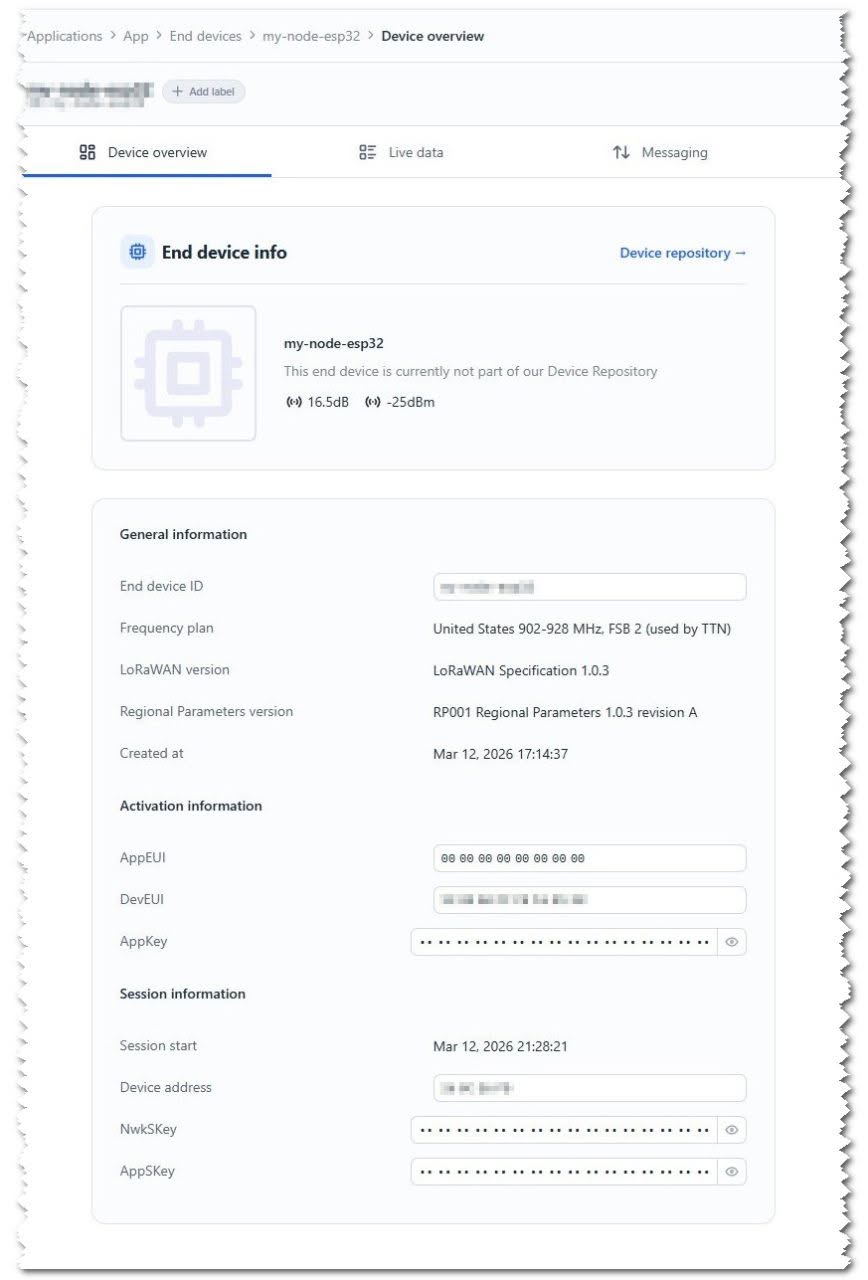
LoRaWAN ESP32 S3 After OTAA
1 2 3 4 5 6 7 8 9 10 11
ESP32-S3 Board LoRaWAN LoRaWAN Gateway
Share. Facebook Twitter Pinterest LinkedIn Tumblr Email
Previous ArticleTop Global AliExpress Promo Worldwide Country Codes June 1, 2026
Next Article Banana Pi BPI-R4 Pro Review: The Best WiFi 7 OpenWrt Router? We Checked!
androidpimp
  • Website

Related Posts

Banana bpi r4 pro

Banana Pi BPI-R4 Pro Review: The Best WiFi 7 OpenWrt Router? We Checked!

March 17, 2026
Orange Pi 6

Orange Pi 6: Why Buy an AI HAT+? This SBC has 45 TOPS of Integrated AI Power

February 17, 2026
KICKPI K7 Development Board

Kickpi K7C RK3576 Edge AI SBC Launches with 6 TOPS AI Power & Dual Gigabit Ethernet

December 15, 2025
0 0 votes
Article Rating
Subscribe
Notify of
0 Comments
Oldest
Newest Most Voted
Inline Feedbacks
View all comments
PureVPN
PureVPN Ad Banner
VyprVPN – No. 1 in Anonymity
Vyprvpn 350x260
PrivadoVPN – No. 1 in Parental Control
PrivadoVPN 350x437
Recent Posts
  • Banana Pi BPI-R4 Pro Review: The Best WiFi 7 OpenWrt Router? We Checked!
  • DFRobot ESP32-S3 LoRaWAN & Gateway Review: Build a Private IoT Network
  • Top Global AliExpress Promo Worldwide Country Codes June 1, 2026
  • WaveNote AI Review 2026: An Honest Pro/Con Comparison (Tested)
  • CamThink NE301 Review: 25 FPS YOLOv8 on STM32 Edge AI
  • PrivadoVPN Review 2026: Is the Best Free VPN Still Good for Streaming?
  • Orange Pi 6: Why Buy an AI HAT+? This SBC has 45 TOPS of Integrated AI Power
  • AliExpress Shopping Guide 2026: How to Find Top Deals & Avoid Scams
  • Best Off-Grid LoRa Mesh Messenger 2026 – LoraSecret
  • Redmi Turbo 5 Max (2026) unveiled with 9,000mAh battery, specs, price, and design
RSS The Latest RSS Feeds
  • Banana Pi BPI-R4 Pro Review: The Best WiFi 7 OpenWrt Router? We Checked!
  • DFRobot ESP32-S3 LoRaWAN & Gateway Review: Build a Private IoT Network
  • Top Global AliExpress Promo Worldwide Country Codes June 1, 2026
Facebook X (Twitter) Instagram Pinterest
@2026 - All Right Reserved. Designed by AndroidPIMP

Type above and press Enter to search. Press Esc to cancel.

Powered by
►
Necessary cookies enable essential site features like secure log-ins and consent preference adjustments. They do not store personal data.
None
►
Functional cookies support features like content sharing on social media, collecting feedback, and enabling third-party tools.
None
►
Analytical cookies track visitor interactions, providing insights on metrics like visitor count, bounce rate, and traffic sources.
None
►
Advertisement cookies deliver personalized ads based on your previous visits and analyze the effectiveness of ad campaigns.
None
►
Unclassified cookies are cookies that we are in the process of classifying, together with the providers of individual cookies.
None
Powered by
wpDiscuz