
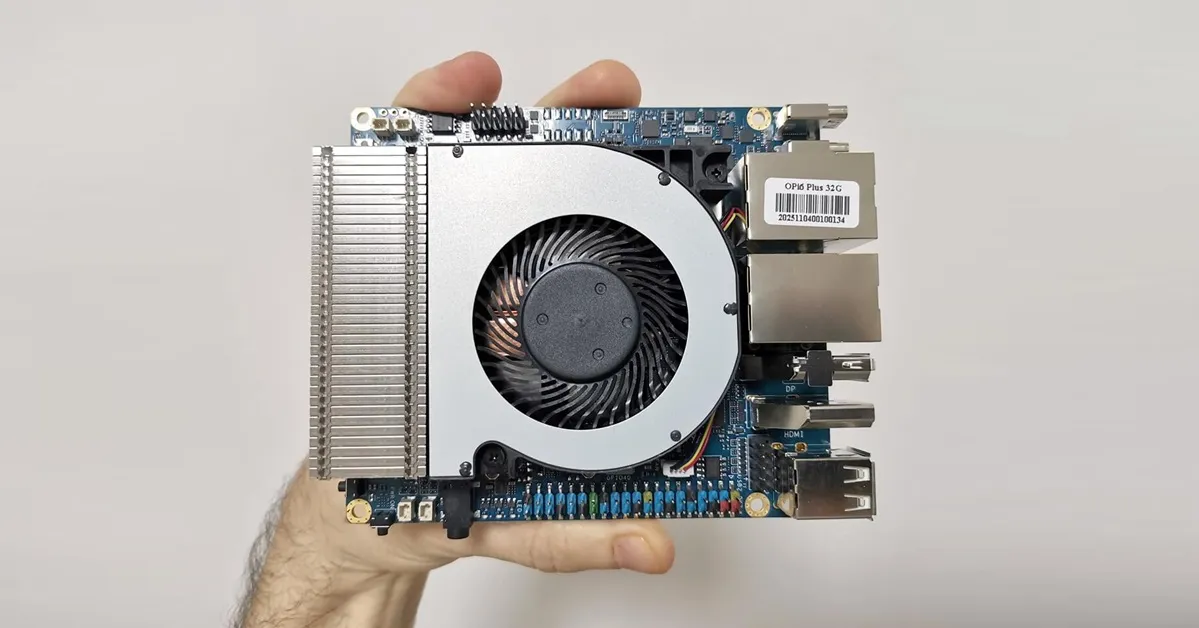
Measuring Temperatures
🔹 Temperature & Sensor Readings
root@orangepi6plus:/mnt/ssd# sensors
scmi_sensors-virtual-0
Adapter: Virtual device
VPU:          +34.0°C
GPU_btm:      +34.0°C
GPU_top:      +36.0°C
SOC_BRC:      +37.0°C
DDR_btm:      +37.0°C
DDR_top:      +38.0°C
CI:           +35.0°C
NPU:          +35.0°C
CPU_M1:       +35.0°C
CPU_B1:       +36.0°C
CPU_M0:       +36.0°C
CPU_B0:       +38.0°C
SOC_TRC:      +37.0°C
GPU_AVE:      +35.0°C
PCB_HOT:      +39.0°C
PCB_AMB:      +36.0°C
PCB_USER:      +0.0°C

battery-isa-0000
Adapter: ISA adapter
in0:           0.00 V
curr1:         0.00 A
Even without being assembled inside a case, the tested board delivered excellent temperature readings, as shown in the table below:
| Sensor Name | Value | Description |
|---|---|---|
| VPU | +34.0 °C | Video Processing Unit temperature |
| GPU_btm | +34.0 °C | GPU bottom sensor (lower part of chip) |
| GPU_top | +36.0 °C | GPU top sensor (upper part of chip) |
| SOC_BRC | +37.0 °C | System‑on‑Chip bridge controller region |
| DDR_btm | +37.0 °C | DDR memory bottom sensor |
| DDR_top | +38.0 °C | DDR memory top sensor |
| CI | +35.0 °C | Camera Interface / multimedia block |
| NPU | +35.0 °C | Neural Processing Unit temperature |
| CPU_M1 | +35.0 °C | CPU cluster M1 (middle core) |
Running benchmarks and checking temperatures.
In short, the script is a benchmark runner with temperature monitoring:
After each test, it stops the logger and calculates the minimum, maximum, and average temperature recorded during that run.
It runs five performance tests (CPU, memory, storage, GPU, and stress) one after another.
Each test lasts about 2 minutes, so the whole suite finishes in ~10 minutes.
While each test runs, it starts a background loop that calls sensors every 5 seconds to log system temperatures.
#!/bin/bash
# run_benchmarks_with_temps.sh
# Benchmark suite with temperature logging via sensors
# Total runtime ~10 minutes (5 tests × 2 minutes each)

REPORT=./benchmark_report.txt
echo "=== Benchmark Report with Temperatures ===" > $REPORT

# Helper function: run a test + log temps
run_test() {
  NAME=$1
  CMD=$2
  LOG=./${NAME}_temps.log

  echo "Running $NAME..." | tee -a $REPORT

  # Background temperature logger
  (
    while true; do
      echo "=== $(date) ===" >> $LOG
      sensors >> $LOG
      sleep 5
    done
  ) &
  MON_PID=$!

  # Run the benchmark
  eval $CMD | tee ${NAME}_output.txt

  # Stop logger
  kill $MON_PID

  # Extract temps: only lines with "temp" or "CPU", ignore 0.0°C
  TEMPS=$(grep -Ei 'temp|cpu' $LOG | grep -Eo '[+0-9]+\.[0-9]+°C|[0-9]+°C' | sed 's/[+°C]//g' | awk '$1>0')

  MIN=$(echo "$TEMPS" | awk 'NR==1{min=$1} {if($1<min)min=$1} END{print min}')
  MAX=$(echo "$TEMPS" | awk 'NR==1{max=$1} {if($1>max)max=$1} END{print max}')
  AVG=$(echo "$TEMPS" | awk '{sum+=$1; count++} END{if(count>0) print sum/count}')

  if [ -n "$MIN" ] && [ -n "$MAX" ] && [ -n "$AVG" ]; then
    echo "$NAME Temps: Min=$MIN°C, Max=$MAX°C, Avg=$AVG°C" | tee -a $REPORT
  else
    echo "$NAME Temps: No temperature data found" | tee -a $REPORT
  fi
  echo "" >> $REPORT
}

# === Run tests (shortened for ~10 min total) ===
run_test "CPU_sysbench" "sysbench cpu --threads=$(nproc) --time=120 run"       # 2 min
run_test "Memory_sysbench" "sysbench memory --threads=$(nproc) --time=120 run" # 2 min
run_test "Storage_fio" "fio --name=randrw --rw=randrw --size=512M --bs=4k --numjobs=2 --runtime=120 --group_reporting" # 2 min
run_test "GPU_glmark2" "timeout 120 glmark2-es2"                               # 2 min
run_test "StressNG" "stress-ng --cpu 0 --vm 2 --timeout 120 --metrics-brief"   # 2 min

echo "=== All tests complete. See $REPORT for results. ==="
Test report
Based on our results shown below, the board didn’t cool much, which indicates that the active heatsink is performing well as expected.
| Test | Min Temp (°C) | Max Temp (°C) | Avg Temp (°C) |
|---|---|---|---|
| CPU_sysbench | 36.0 | 55.0 | 50.20 |
| Memory_sysbench | 47.0 | 55.0 | 51.67 |
| Storage_fio | 39.0 | 47.0 | 40.66 |
| GPU_glmark2 | 42.0 | 49.0 | 45.75 |
| StressNG | 40.0 | 67.0 | 59.38 |
This is great, but i have a Orange Pi 5 Max almost a year and still there is only first versions of few images for that board and few beta on some forums. So support for that is like zero after board is released.
From my checking, the Orange Pi 5 Max supports around 3-4 distributions. There’s often a delay for new images after hardware release, but the popular RK3588 SoC has solid support. You can always upgrade your existing distribution and install a newer kernel with the latest packages. You can always switch to an RP5 that has less powerful hardware but comes with better software support.
I think this is BS, no announcements form the Orange PI, nothing on the forums.
I would definitely buy this with 32GB or 64GB, now that would be a decent platform
It’s not ready yet, but the news is reliable, and the company has also shared some updates about it.
Well, if they truly on this, this will be a great SBC, I would buy one immediately.
This should be marketed using like 5$ vouchers in ARACE, OrangePI would immediately gauge the interest and get some early revenue o produce the board