
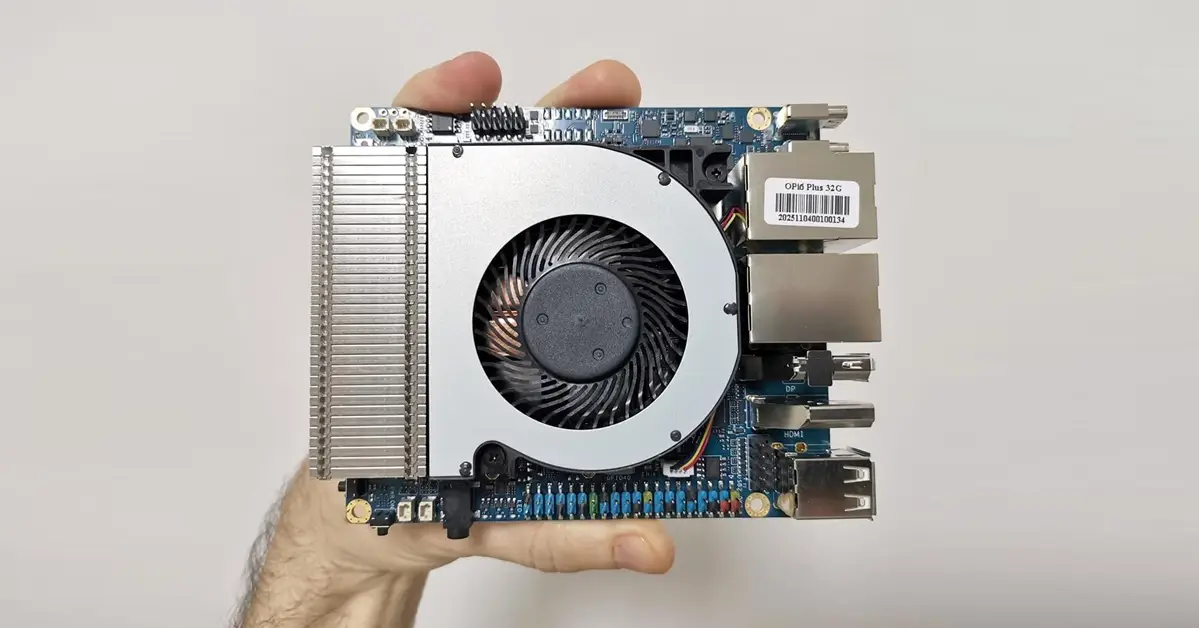
Memory benchmark tests
Sysbench benchmark test
The Orange Pi 6 Plus hit around 4174 MiB/sec in a sysbench memory write test, while the Raspberry Pi 5 with 16GB of RAM usually scores between 6500 and 7000 MiB/sec, delivering roughly 1.5 to 1.7 times higher memory bandwidth.
Sysbench Memory Benchmark Comparison
| Board | RAM | Sysbench Memory Write Throughput |
|---|---|---|
| Orange Pi 6 Plus (32GB) | LPDDR5 | 4174 MiB/sec |
| Raspberry Pi 5 (16GB) | 16GB LPDDR4X | ~6500–7000 MiB/sec |
root@orangepi6plus:/# sudo apt install sysbench

sysbench memory run
Reading package lists... Done
Building dependency tree... Done
Reading state information... Done
sysbench is already the newest version (1.0.20+ds-5).
0 upgraded, 0 newly installed, 0 to remove and 0 not upgraded.
sysbench 1.0.20 (using system LuaJIT 2.1.0-beta3)

Running the test with following options:
Number of threads: 1
Initializing random number generator from current time


Running memory speed test with the following options:
  block size: 1KiB
  total size: 102400MiB
  operation: write
  scope: global

Initializing worker threads...

Threads started!

Total operations: 42774901 (4274957.60 per second)

41772.36 MiB transferred (4174.76 MiB/sec)


General statistics:
    total time:                          10.0001s
    total number of events:              42774901

Latency (ms):
         min:                                    0.00
         avg:                                    0.00
         max:                                    0.15
         95th percentile:                        0.00
         sum:                                 4340.76

Threads fairness:
    events (avg/stddev):           42774901.0000/0.00
    execution time (avg/stddev):   4.3408/0.00
mbw (Memory Bandwidth) benchmark test
#Running a test on 128 MB of memory.

root@orangepi6plus:/# mbw 128

Long uses 8 bytes. Allocating 2*16777216 elements = 268435456 bytes of memory.
Using 262144 bytes as blocks for memcpy block copy test.
Getting down to business... Doing 10 runs per test.
0       Method: MEMCPY  Elapsed: 0.01125        MiB: 128.00000  Copy: 11381.825 MiB/s
1       Method: MEMCPY  Elapsed: 0.00983        MiB: 128.00000  Copy: 13018.714 MiB/s
2       Method: MEMCPY  Elapsed: 0.00887        MiB: 128.00000  Copy: 14435.548 MiB/s
3       Method: MEMCPY  Elapsed: 0.00871        MiB: 128.00000  Copy: 14700.815 MiB/s
4       Method: MEMCPY  Elapsed: 0.00846        MiB: 128.00000  Copy: 15122.873 MiB/s
5       Method: MEMCPY  Elapsed: 0.00799        MiB: 128.00000  Copy: 16024.036 MiB/s
6       Method: MEMCPY  Elapsed: 0.00898        MiB: 128.00000  Copy: 14260.250 MiB/s
7       Method: MEMCPY  Elapsed: 0.00991        MiB: 128.00000  Copy: 12917.550 MiB/s
8       Method: MEMCPY  Elapsed: 0.00971        MiB: 128.00000  Copy: 13175.502 MiB/s
9       Method: MEMCPY  Elapsed: 0.00977        MiB: 128.00000  Copy: 13095.969 MiB/s
AVG     Method: MEMCPY  Elapsed: 0.00935        MiB: 128.00000  Copy: 13693.061 MiB/s
0       Method: DUMB    Elapsed: 0.00917        MiB: 128.00000  Copy: 13961.606 MiB/s
1       Method: DUMB    Elapsed: 0.00900        MiB: 128.00000  Copy: 14219.062 MiB/s
2       Method: DUMB    Elapsed: 0.00904        MiB: 128.00000  Copy: 14157.726 MiB/s
3       Method: DUMB    Elapsed: 0.00903        MiB: 128.00000  Copy: 14182.825 MiB/s
4       Method: DUMB    Elapsed: 0.00910        MiB: 128.00000  Copy: 14065.934 MiB/s
5       Method: DUMB    Elapsed: 0.00904        MiB: 128.00000  Copy: 14153.030 MiB/s
6       Method: DUMB    Elapsed: 0.00901        MiB: 128.00000  Copy: 14200.133 MiB/s
7       Method: DUMB    Elapsed: 0.00908        MiB: 128.00000  Copy: 14101.575 MiB/s
8       Method: DUMB    Elapsed: 0.00902        MiB: 128.00000  Copy: 14184.397 MiB/s
9       Method: DUMB    Elapsed: 0.00914        MiB: 128.00000  Copy: 14007.441 MiB/s
AVG     Method: DUMB    Elapsed: 0.00906        MiB: 128.00000  Copy: 14122.891 MiB/s
0       Method: MCBLOCK Elapsed: 0.00457        MiB: 128.00000  Copy: 27984.259 MiB/s
1       Method: MCBLOCK Elapsed: 0.00447        MiB: 128.00000  Copy: 28628.942 MiB/s
2       Method: MCBLOCK Elapsed: 0.00446        MiB: 128.00000  Copy: 28699.552 MiB/s
3       Method: MCBLOCK Elapsed: 0.00446        MiB: 128.00000  Copy: 28699.552 MiB/s
4       Method: MCBLOCK Elapsed: 0.00446        MiB: 128.00000  Copy: 28673.835 MiB/s
5       Method: MCBLOCK Elapsed: 0.00447        MiB: 128.00000  Copy: 28648.165 MiB/s
6       Method: MCBLOCK Elapsed: 0.00445        MiB: 128.00000  Copy: 28789.924 MiB/s
7       Method: MCBLOCK Elapsed: 0.00445        MiB: 128.00000  Copy: 28744.667 MiB/s
8       Method: MCBLOCK Elapsed: 0.00445        MiB: 128.00000  Copy: 28770.510 MiB/s
9       Method: MCBLOCK Elapsed: 0.00445        MiB: 128.00000  Copy: 28751.123 MiB/s
AVG     Method: MCBLOCK Elapsed: 0.00447        MiB: 128.00000  Copy: 28637.269 MiB/s
MBW Memory Benchmark Comparison
In this test, the Orange Pi 6 Plus outperforms the Raspberry Pi 5 with faster memory speeds.
| Board | MEMCPY Avg | DUMB Avg | MCBLOCK Avg |
|---|---|---|---|
| Orange Pi 6 Plus | 13,693 MiB/s | 14,123 MiB/s | 28,637 MiB/s |
| Raspberry Pi 5 (16GB) | ~11,500 MiB/s | ~12,000 MiB/s | ~23,000 MiB/s |
How Each Test Works
- mbw
- Focuses on raw memory bandwidth.
- Runs simple copy operations (
memcpy,dumb loop,mcblock) to measure how fast data moves in RAM. - Results are in MiB/s, showing peak throughput.
- Very low‑level, synthetic test — good for comparing hardware memory controllers.
- sysbench memory
- Measures memory allocation and access performance under load.
- Can simulate multiple threads, random vs sequential access, and different block sizes.
- Results are in operations per second or MiB/s, depending on configuration.
- More representative of real application workloads (databases, servers, multitasking).
So, which one is more correct?
- If you want raw hardware bandwidth numbers → mbw is more direct and accurate.
- If you want application‑like performance under stress → sysbench memory is more realistic.
- In practice, they complement each other:
- mbw tells you the ceiling of your memory subsystem.
- sysbench tells you how memory behaves under realistic workloads.


This is great, but i have a Orange Pi 5 Max almost a year and still there is only first versions of few images for that board and few beta on some forums. So support for that is like zero after board is released.
From my checking, the Orange Pi 5 Max supports around 3-4 distributions. There’s often a delay for new images after hardware release, but the popular RK3588 SoC has solid support. You can always upgrade your existing distribution and install a newer kernel with the latest packages. You can always switch to an RP5 that has less powerful hardware but comes with better software support.
I think this is BS, no announcements form the Orange PI, nothing on the forums.
I would definitely buy this with 32GB or 64GB, now that would be a decent platform
It’s not ready yet, but the news is reliable, and the company has also shared some updates about it.
Well, if they truly on this, this will be a great SBC, I would buy one immediately.
This should be marketed using like 5$ vouchers in ARACE, OrangePI would immediately gauge the interest and get some early revenue o produce the board