Close Menu
    Facebook X (Twitter) Instagram Threads
    Trending
    • LattePanda Mu Ultra Debuts: A Micro x86 Compute Module for On-Device AI
    • Aliexpress Promo Codes Sep 2026 (100% Verified)
    • Orange Pi Zero 4 Review: Is This $26 Micro SBC a Raspberry Pi Killer?
    • Youyeetoo NestDisk Review: Pocket-Sized Mini PC, Router & NAS
    • Rii TU3607 iPad Keyboard Case Review: Dream or Heavy Burden?
    • PrivadoVPN Review 2026: Does the Free Tier Still Work for Streaming?
    • Rii 518BT Review: Is This Pocket Keyboard Actually Usable?
    • Rii RK807 Pro Review: The Best Budget Apple Magic Keyboard Alternative?
    AndroidPIMP
    Facebook X (Twitter) Instagram
    • Mini PCs & Media Players
    • Embedded
    • Wearables
    • Wireless Routers
    • Edge AI Cameras
    • Tech Accessories
    AndroidPIMP
    OPi 6 Plus Board
    OPi 6 Plus Board

    Orange Pi 6 Plus Review: A 12-Core SBC Powerhouse (Benchmarks, Specs, and Pricing)

    5
    By androidpimp on December 1, 2025 Embedded Computers
    35 min read
    • • Part I: Introduction to the Orange Pi 6 Plus
    • • A powerful ARM Board featuring a 12-core CPU
    • • Key takeaways
    • • Hardware
    • • Yet another Chinese SoC designed and produced domestically
    • • 1. NPU with 30TOPS computing power
    • • 2. Graphics performance
    • • 3. Power Consumption
    • • 4. Additional Interfaces and applications
    • • Video and audio
    • • Extensive options for memory and storage expansion.
    • • Additional interfaces
    • • Connectivity
    • • 🧾Orange Pi 6 Plus vs. Radxa Orion O6: Comparing hardware specs
    • • Specifications (Official)
    • • 📊 CIX CD8180 vs CD8160 Comparison Table
    • • Exclusive first-hand photos [final sample] (Dated: October 10, 2025)
    • • A Quick Overview of Orange Pi Series
    • • Potential Applications of Orange Pi 6 Plus
    • • 1. Home Automation and IoT
    • • 2. Educational Purposes
    • • 3. Prototyping and Development
    • • Part II: Orange Pi 6 Plus Review (currently being updated) p2
    • • The Items (The basic package) p2
    • • A closer look at the board p3
    • • Measuring Temperatures p4
    • • 🔹 Temperature & Sensor Readings p4
    • • Running benchmarks and checking temperatures. p4
    • • Test report p4
    • • System information p5
    • • Advantages of this Design: p5
    • • Out of 32GB of RAM, how much is actually available? p5
    • • Storage space and memory options p5
    • • Yes, the Orange Pi 6 Plus also has a BIOS p5
    • • How does it stack up against the Raspberry Pi 5? p5
    • • 🖥️What Makes the BIOS of the Orange Pi 6 Plus Stand Out p5
    • • Testing the read and write speeds of the NVMe SSD p6
    • • Test Results p6
    • • Summary p6
    • • Graphic performance test [OpenGL 2.0 and ES 2.0 benchmark test] p7
    • • 📊 Orange Pi 6 Plus vs Raspberry Pi 5 16GB (glmark2) p7
    • • 📊 GPU Comparison Table p7
    • • Results of the test in comparison to the Raspberry Pi 5 p7
    • • Important Takeaways p7
    • • Memory benchmark tests p8
    • • Sysbench benchmark test p8
    • • mbw (Memory Bandwidth) benchmark test p8
    • • How Each Test Works p8
    • • So, which one is more correct? p8
    • • Geekbench benchmarking p9
    • • 📊 Geekbench 6.5.0 Results — Orange Pi 6 Plus Board (32GB) p9
    • • 🔎Insights – we’ve got a winner! p9
    • • 📊 Geekbench 6 CPU Comparison — Orange Pi 6 Plus vs Raspberry Pi 5 (16GB) p9
    • • 🔎 Insights p9
    • • Geekbench 6 CPU Comparison — Orange Pi 6 Plus vs Radxa Orion O6 p9
    • • Key Takeaways p9
    • • Connectivity p10
    • • Dual Ethernet 5Gbps LAN ports p10
    • • Software support p11
    • • The less positive p11
    • • Power Usage p12
    • • Final thoughts p13
    • • Software-wise p13
    • • Is the price justified or too pricey compared to the Raspberry Pi 5? p13
    • • So, do we recommend it? p13
    • • A metal case is also available (Optional) p14
    • • How much does it cost? p14
    • • 🖥️ Supported Operating Systems p14
    • • Price and Availability p14
    • • Where can I buy? p14

    Measuring Temperatures

    🔹 Temperature & Sensor Readings

    root@orangepi6plus:/mnt/ssd# sensors
    scmi_sensors-virtual-0
    Adapter: Virtual device
    VPU:          +34.0°C
    GPU_btm:      +34.0°C
    GPU_top:      +36.0°C
    SOC_BRC:      +37.0°C
    DDR_btm:      +37.0°C
    DDR_top:      +38.0°C
    CI:           +35.0°C
    NPU:          +35.0°C
    CPU_M1:       +35.0°C
    CPU_B1:       +36.0°C
    CPU_M0:       +36.0°C
    CPU_B0:       +38.0°C
    SOC_TRC:      +37.0°C
    GPU_AVE:      +35.0°C
    PCB_HOT:      +39.0°C
    PCB_AMB:      +36.0°C
    PCB_USER:      +0.0°C
    
    battery-isa-0000
    Adapter: ISA adapter
    in0:           0.00 V
    curr1:         0.00 A

    Even without being assembled inside a case, the tested board delivered excellent temperature readings, as shown in the table below:

    Sensor NameValueDescription
    VPU+34.0 °CVideo Processing Unit temperature
    GPU_btm+34.0 °CGPU bottom sensor (lower part of chip)
    GPU_top+36.0 °CGPU top sensor (upper part of chip)
    SOC_BRC+37.0 °CSystem‑on‑Chip bridge controller region
    DDR_btm+37.0 °CDDR memory bottom sensor
    DDR_top+38.0 °CDDR memory top sensor
    CI+35.0 °CCamera Interface / multimedia block
    NPU+35.0 °CNeural Processing Unit temperature
    CPU_M1+35.0 °CCPU cluster M1 (middle core)

    Running benchmarks and checking temperatures.

    In short, the script is a benchmark runner with temperature monitoring:

    After each test, it stops the logger and calculates the minimum, maximum, and average temperature recorded during that run.

    It runs five performance tests (CPU, memory, storage, GPU, and stress) one after another.

    Each test lasts about 2 minutes, so the whole suite finishes in ~10 minutes.

    While each test runs, it starts a background loop that calls sensors every 5 seconds to log system temperatures.

    #!/bin/bash
    # run_benchmarks_with_temps.sh
    # Benchmark suite with temperature logging via sensors
    # Total runtime ~10 minutes (5 tests × 2 minutes each)
    
    REPORT=./benchmark_report.txt
    echo "=== Benchmark Report with Temperatures ===" > $REPORT
    
    # Helper function: run a test + log temps
    run_test() {
      NAME=$1
      CMD=$2
      LOG=./${NAME}_temps.log
    
      echo "Running $NAME..." | tee -a $REPORT
    
      # Background temperature logger
      (
        while true; do
          echo "=== $(date) ===" >> $LOG
          sensors >> $LOG
          sleep 5
        done
      ) &
      MON_PID=$!
    
      # Run the benchmark
      eval $CMD | tee ${NAME}_output.txt
    
      # Stop logger
      kill $MON_PID
    
      # Extract temps: only lines with "temp" or "CPU", ignore 0.0°C
      TEMPS=$(grep -Ei 'temp|cpu' $LOG | grep -Eo '[+0-9]+\.[0-9]+°C|[0-9]+°C' | sed 's/[+°C]//g' | awk '$1>0')
    
      MIN=$(echo "$TEMPS" | awk 'NR==1{min=$1} {if($1<min)min=$1} END{print min}')
      MAX=$(echo "$TEMPS" | awk 'NR==1{max=$1} {if($1>max)max=$1} END{print max}')
      AVG=$(echo "$TEMPS" | awk '{sum+=$1; count++} END{if(count>0) print sum/count}')
    
      if [ -n "$MIN" ] && [ -n "$MAX" ] && [ -n "$AVG" ]; then
        echo "$NAME Temps: Min=$MIN°C, Max=$MAX°C, Avg=$AVG°C" | tee -a $REPORT
      else
        echo "$NAME Temps: No temperature data found" | tee -a $REPORT
      fi
      echo "" >> $REPORT
    }
    
    # === Run tests (shortened for ~10 min total) ===
    run_test "CPU_sysbench" "sysbench cpu --threads=$(nproc) --time=120 run"       # 2 min
    run_test "Memory_sysbench" "sysbench memory --threads=$(nproc) --time=120 run" # 2 min
    run_test "Storage_fio" "fio --name=randrw --rw=randrw --size=512M --bs=4k --numjobs=2 --runtime=120 --group_reporting" # 2 min
    run_test "GPU_glmark2" "timeout 120 glmark2-es2"                               # 2 min
    run_test "StressNG" "stress-ng --cpu 0 --vm 2 --timeout 120 --metrics-brief"   # 2 min
    
    echo "=== All tests complete. See $REPORT for results. ==="
    

    Test report

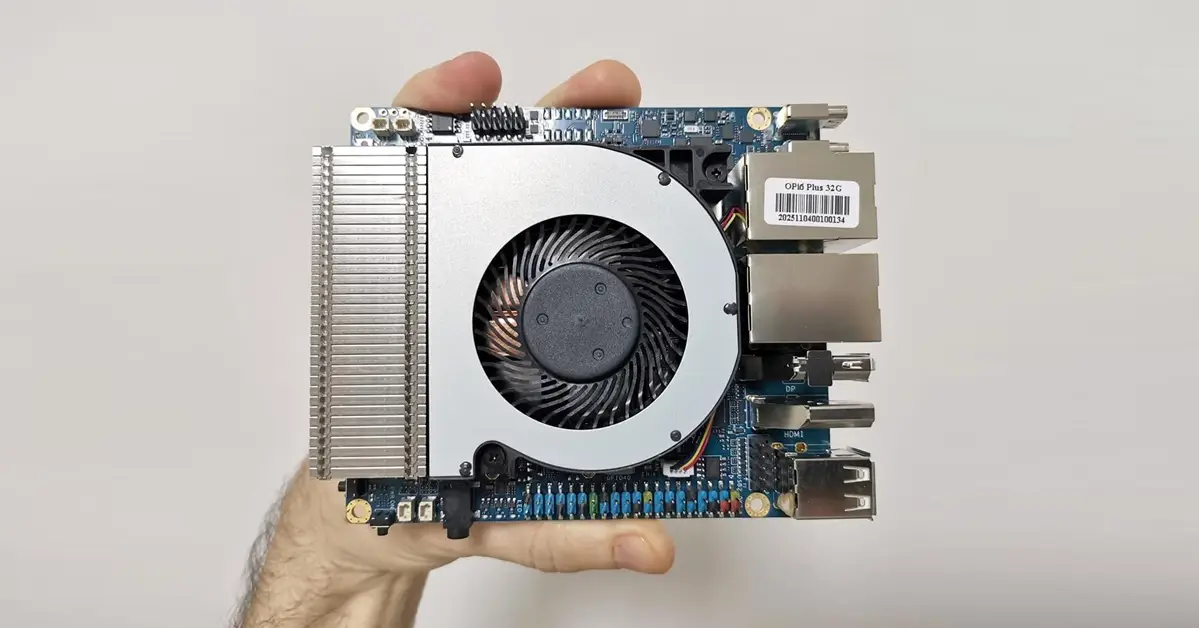
    Based on our results shown below, the board didn’t cool much, which indicates that the active heatsink is performing well as expected.

    TestMin Temp (°C)Max Temp (°C)Avg Temp (°C)
    CPU_sysbench36.055.050.20
    Memory_sysbench47.055.051.67
    Storage_fio39.047.040.66
    GPU_glmark242.049.045.75
    StressNG40.067.059.38
    1 2 3 4 5 6 7 8 9 10 11 12 13 14
    Share. Facebook Twitter Pinterest LinkedIn Tumblr Email
    Previous ArticleLattePanda IOTA Review: 4 Reasons It Beats Raspberry Pi 5
    Next Article Ugoos SK4 Review: The Best Mid-Range Android TV Box for Value & Features
    androidpimp
    • Website

    0 0 votes
    Article Rating
    Subscribe
    Notify of
    5 Comments
    Oldest
    Newest Most Voted
    Solarfox
    1 year ago

    This is great, but i have a Orange Pi 5 Max almost a year and still there is only first versions of few images for that board and few beta on some forums. So support for that is like zero after board is released.

    0
    Reply
    Author
    androidpimp
    1 year ago
    Reply to  Solarfox

    From my checking, the Orange Pi 5 Max supports around 3-4 distributions. There’s often a delay for new images after hardware release, but the popular RK3588 SoC has solid support. You can always upgrade your existing distribution and install a newer kernel with the latest packages. You can always switch to an RP5 that has less powerful hardware but comes with better software support.

    0
    Reply
    Fical Gupta
    11 months ago

    I think this is BS, no announcements form the Orange PI, nothing on the forums.
    I would definitely buy this with 32GB or 64GB, now that would be a decent platform

    0
    Reply
    Author
    androidpimp
    11 months ago
    Reply to  Fical Gupta

    It’s not ready yet, but the news is reliable, and the company has also shared some updates about it.

    0
    Reply
    Fical Gupta
    11 months ago
    Reply to  androidpimp

    Well, if they truly on this, this will be a great SBC, I would buy one immediately.
    This should be marketed using like 5$ vouchers in ARACE, OrangePI would immediately gauge the interest and get some early revenue o produce the board

    0
    Reply
    Categories
    Recent Posts
    • LattePanda Mu Ultra Debuts: A Micro x86 Compute Module for On-Device AI
    • Aliexpress Promo Codes Sep 2026 (100% Verified)
    • Orange Pi Zero 4 Review: Is This $26 Micro SBC a Raspberry Pi Killer?
    • Youyeetoo NestDisk Review: Pocket-Sized Mini PC, Router & NAS
    • Rii TU3607 iPad Keyboard Case Review: Dream or Heavy Burden?
    • PrivadoVPN Review 2026: Does the Free Tier Still Work for Streaming?
    • Rii 518BT Review: Is This Pocket Keyboard Actually Usable?
    • Rii RK807 Pro Review: The Best Budget Apple Magic Keyboard Alternative?
    • Rii RK808 Review: The Best Foldable Travel Keyboard?
    • Rii RS201 Review: $69 16-Inch Portable Monitor Tested
    RSS feed: The Latest RSS Feeds The Latest RSS Feeds
    • LattePanda Mu Ultra Debuts: A Micro x86 Compute Module for On-Device AI
    • Aliexpress Promo Codes Sep 2026 (100% Verified)
    • Orange Pi Zero 4 Review: Is This $26 Micro SBC a Raspberry Pi Killer?
    Facebook X (Twitter) Instagram Pinterest
    @2026 - All Right Reserved. Designed by AndroidPIMP

    Type above and press Enter to search. Press Esc to cancel.

    wpDiscuz