Close Menu
  • Home
  • About
  • Wearables
  • Earbuds
  • Tech Accessories
    • Routers
    • Remotes
  • Embedded
    • Single Board Computers
    • Addon Boards
    • Raspberry Pi
  • Wireless Routers
  • Contact
Facebook X (Twitter) Instagram Threads
Trending
  • RiiTek RK807 Pro Review: The Best Budget Apple Magic Keyboard Alternative?
  • Rii 518BT Review: Is This Pocket Keyboard Actually Usable?
  • RiiTek RK808 Review: The Best Foldable Travel Keyboard?
  • Rii RS201 Review: $69 16-Inch Portable Monitor Tested
  • AliExpress Promo Codes: August 2026 (100% Verified)
  • Orange Pi 6 Review: Is It Suitable for Running Local LLMs? We Checked.
  • Youyeetoo NestDisk Mini PC/Router: Is This Pocket-Sized 3-in-1 NAS Worth It?
  • DFRobot Unveils seeMote Cube: A 6DoF Physical Controller for Apple Vision Pro
AndroidPIMP
Facebook X (Twitter) Instagram
  • Home
  • About
  • Wearables
  • Earbuds
  • Tech Accessories
    • Routers
    • Remotes
  • Embedded
    • Single Board Computers
    • Addon Boards
    • Raspberry Pi
  • Wireless Routers
  • Contact
AndroidPIMP
Edge AI Hardware

CamThink NE301 Review: 25 FPS YOLOv8 on STM32 Edge AI

By androidpimpFebruary 19, 2026Updated:June 15, 2026No Comments18 Mins Read
Facebook Twitter Pinterest LinkedIn Tumblr Email
Follow Us
Google News Flipboard
NeoEyes NE301 Review
NeoEyes NE301
Table of contents
  1. Part 1 – Introducing the Product
  2. Meet the CamThink NE301 Edge AI Camera Module, designed to run AI models locally and offer a wide range of additional features.
  3. Short video intro
  4. Modular Design
  5. Design with an open hardware architecture in mind
    1. It can also connect to external sensors
  6. Key highlights
  7. A closer look at the main board that powers the device
  8. Hardware – Behind the Scenes
  9. Specifications
  10. Designed for Edge AI computing, it offers durability along with water and dust resistance.
    1. It can be used for AI applications, either running locally or sending data to the cloud.
  11. Part 2 – Review of the CamThink NeoEyes NE301 (currently being updated)
    1. The Package
    2. Package Contents
  12. A closer look at the NE300-MB01 development board, the powerhouse behind the NeoEyes NE301 camera.
  13. Installing additional components
    1. LTE Cat.1 Communication Board
    2. The camera Module
  14. The NE301 Case
  15. The lesser good
    1. Protection against water and dust
  16. Power supply
    1. Powering the NE301 with a cable
      1. Option #1
      2. Option #2
      3. Final thoughts
    2. Extra interfaces
  17. Cooling the main board components
  18. Mounting Options
  19. Operation
  20. Software-wise
    1. Training AI Models
    2. What are the steps?
    3. How to Train AI Models – A Complete Summary of the Workflow
    4. We gave a few trained models a spin to see how they performed.
  21. Final verdict
  22. CamThink NeoEyes NE301 price
    1. Prices and availability

Power supply

The NE310 camera runs on a pack of four type AA 1.5V batteries, neatly placed on the back of the case. While it’s not the most convenient setup, it works well and gets the job done. The batteries can be easily replaced by opening the back cover and removing four Phillips screws.

Powering the NE301 with a cable

Option #1

The device can also run on external power via a cable, rather than solely relying on batteries. This wired setup is great for hooking it up to a solar panel, power bank, or 5V adapter. With the slim 6.6 mm gap between the case wall and the port, a flat 90-degree elbow Type-C cable is ideal for a snug, hassle-free fit. You can find one that should work in the link below. Just keep in mind you’ll also need to buy a USB Type-C to Type-A adapter if you’re planning to connect the device directly to a desktop PC.

Item Name

QTY

Buy Link

Xiwai Flat Power Angled USB-C Type Cable

1

Click Here


;

Option #2

As a final option, which will likely work and could be the best choice, is to use a PoE module to supply the required 5V power. The company hasn’t released one yet, but we’re hopeful they will.
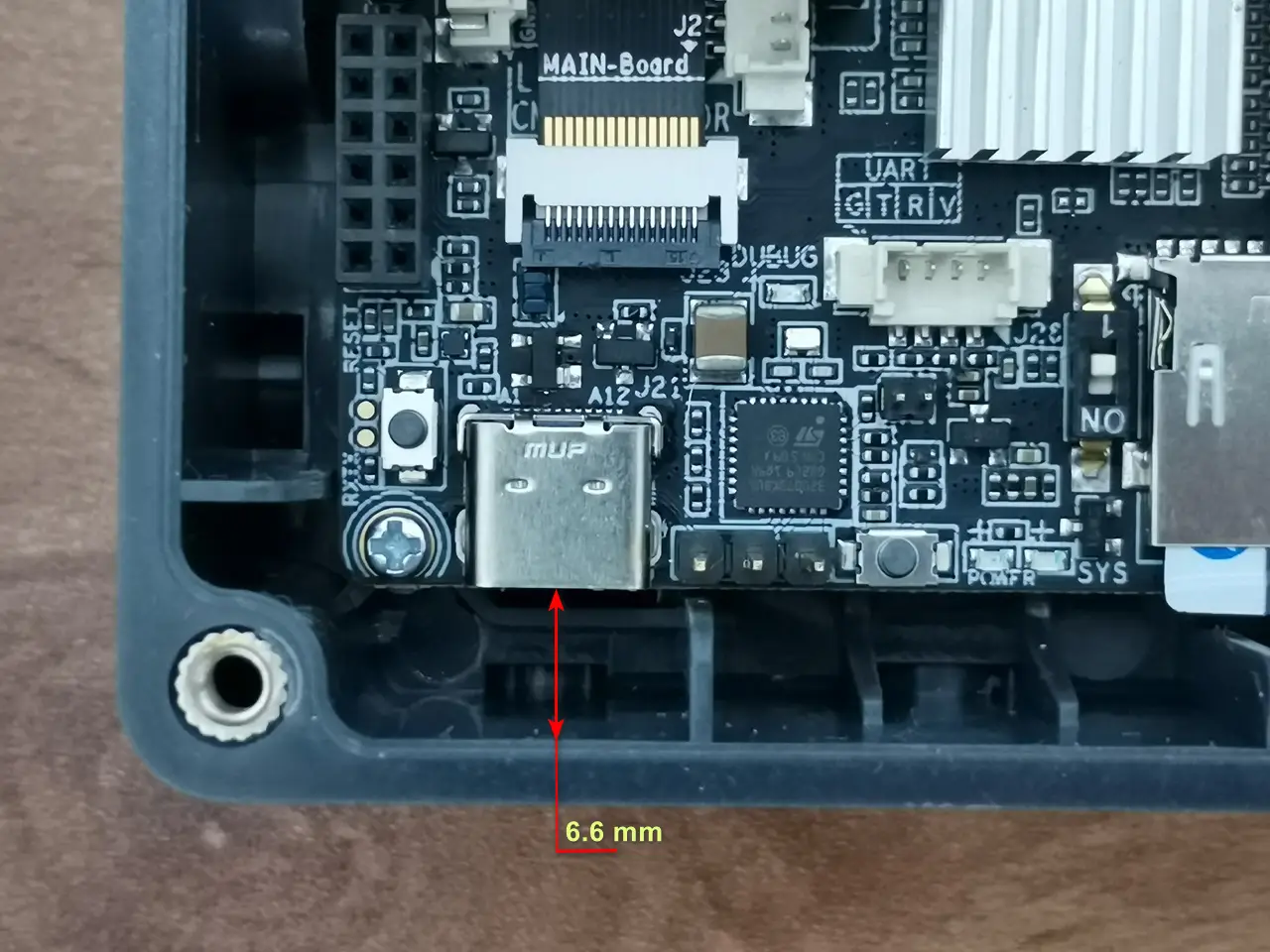
NE301 USB Power Source

Final thoughts

To sum things up, no matter which option you choose, you’ll still need to adjust the back cover to route the USB cable through.


Extra interfaces

If you’re looking to hook up the NE301 camera to external sensors, there’s a handy 16-pin header on the back of the device. It’s pretty easy to get to once you open the back cover, but if you want to keep the case sealed, you’ll probably need to drill a hole to run the cables through.

A table printed on the board shows that the header can supply both 3V and 5V outputs and supports the I2C protocol, allowing easy connection to external sensors and boards like an Arduino.

A closer look at the back of the NE301 16-pin header
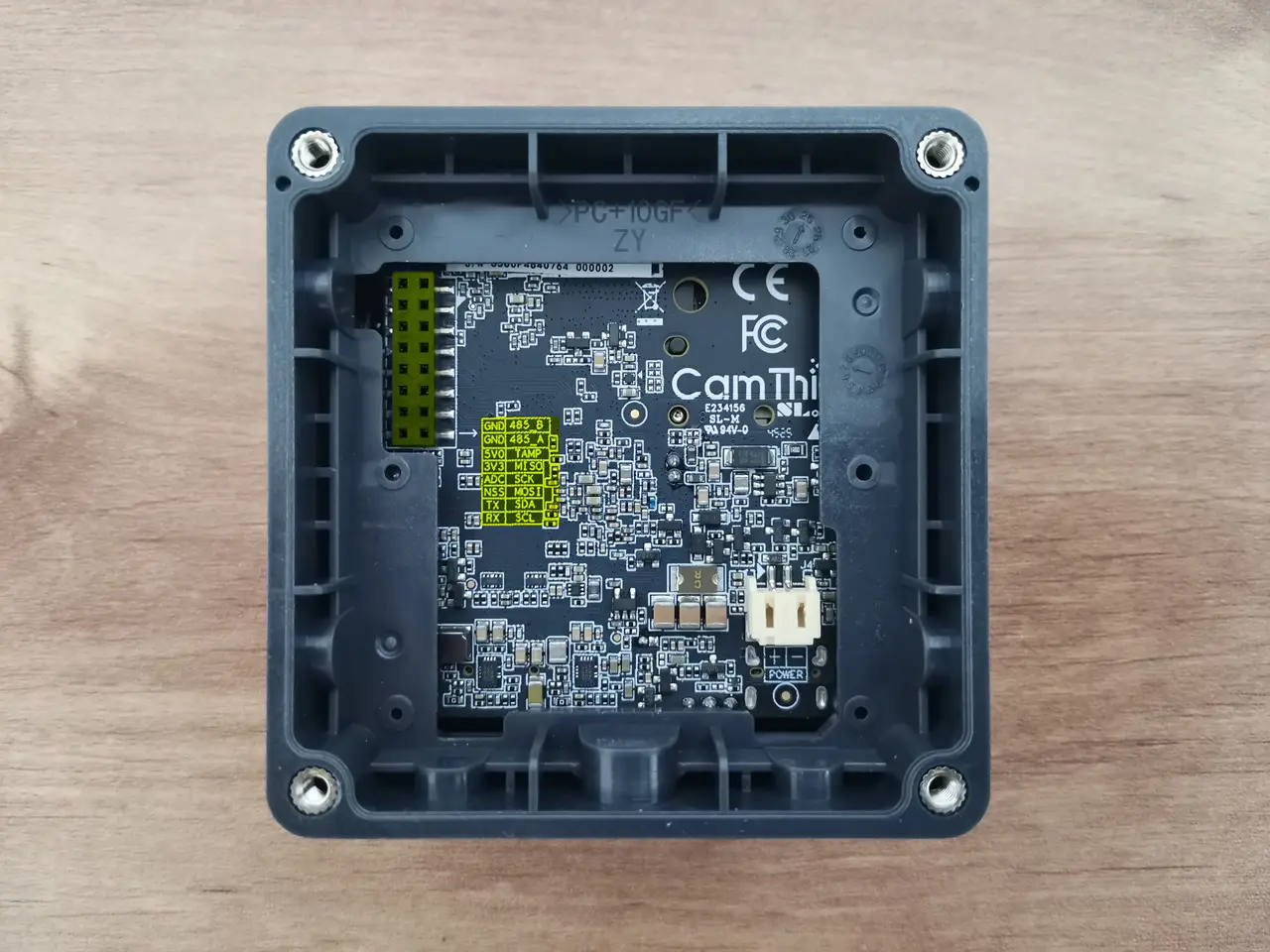
NE301 16Pin Header
NE301 16Pin Header
1 2 3 4 5 6 7 8 9 10 11
Share. Facebook Twitter Pinterest LinkedIn Tumblr Email
Previous ArticlePrivadoVPN Review 2026: Is the Best Free VPN Still Good for Streaming?
Next Article WaveNote AI Recorder Review: Is the Subscription Actually Worth It?
androidpimp
  • Website

Related Posts

WaveNote

WaveNote AI Recorder Review: Is the Subscription Actually Worth It?

February 26, 2026
WonderLLM Chatbot Module

HiWonder WonderLLM: ESP32-S3 AI Vision & Chatbot Module with 2MP Camera

January 30, 2026
HuskyLens 2 AI Machine Vision sensor

HUSKYLENS 2: DFRobot’s New AI Machine Vision Sensor Unveiled

November 5, 2025
0 0 votes
Article Rating
Subscribe
Notify of
0 Comments
Oldest
Newest Most Voted
Categories
PureVPN
PureVPN Ad Banner
PrivadoVPN – No. 1 in Parental Control
PrivadoVPN 350x437
Recent Posts
  • RiiTek RK807 Pro Review: The Best Budget Apple Magic Keyboard Alternative?
  • Rii 518BT Review: Is This Pocket Keyboard Actually Usable?
  • RiiTek RK808 Review: The Best Foldable Travel Keyboard?
  • Rii RS201 Review: $69 16-Inch Portable Monitor Tested
  • AliExpress Promo Codes: August 2026 (100% Verified)
  • Orange Pi 6 Review: Is It Suitable for Running Local LLMs? We Checked.
  • Youyeetoo NestDisk Mini PC/Router: Is This Pocket-Sized 3-in-1 NAS Worth It?
  • DFRobot Unveils seeMote Cube: A 6DoF Physical Controller for Apple Vision Pro
  • Orange Pi X2 Mini PC Is Officially in the Works – Here’s What We Know
  • BPI-R4 Wi-Fi 7 NIC (BE14): OpenWrt Setup & Optimal WiFi Power Guide
RSS feed: The Latest RSS Feeds The Latest RSS Feeds
  • RiiTek RK807 Pro Review: The Best Budget Apple Magic Keyboard Alternative?
  • Rii 518BT Review: Is This Pocket Keyboard Actually Usable?
  • RiiTek RK808 Review: The Best Foldable Travel Keyboard?
Facebook X (Twitter) Instagram Pinterest
@2026 - All Right Reserved. Designed by AndroidPIMP

Type above and press Enter to search. Press Esc to cancel.

wpDiscuz