
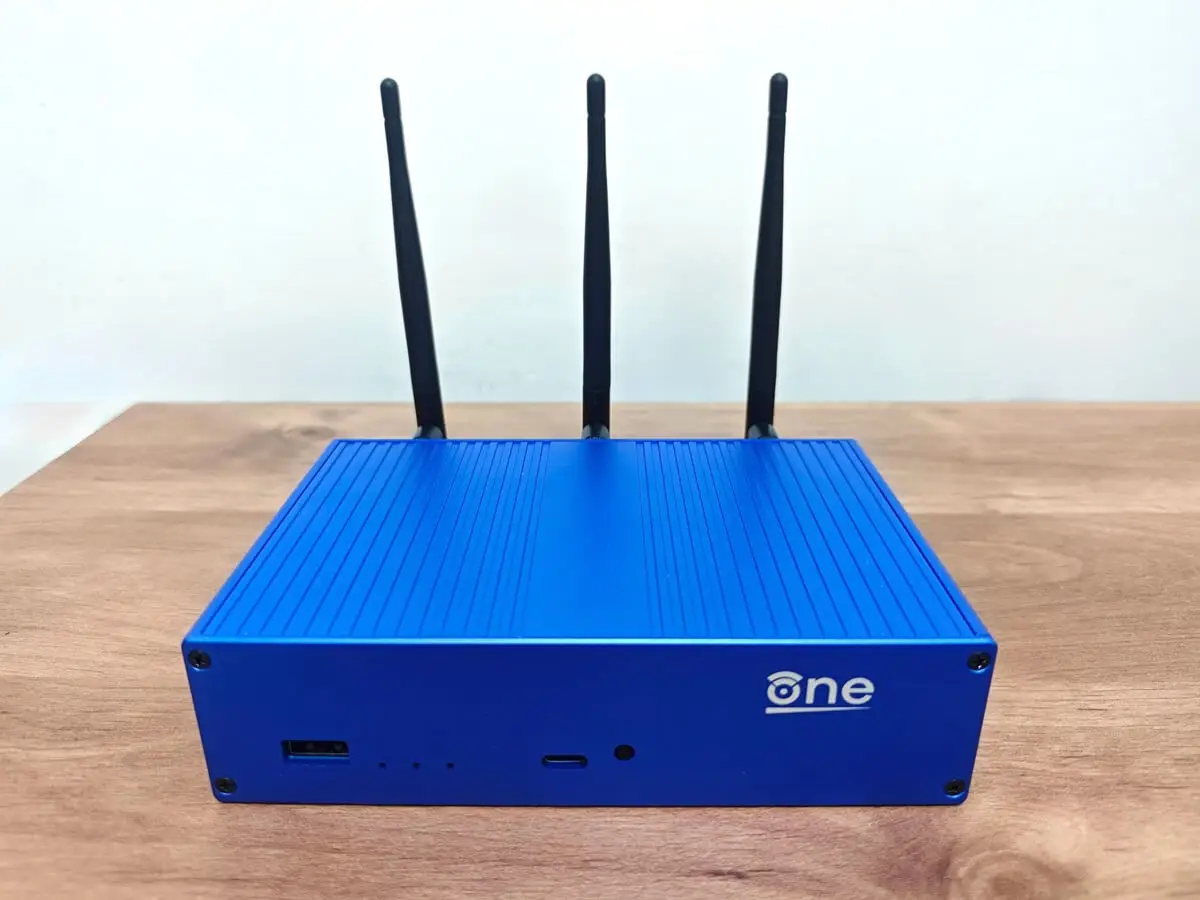
NVMe SSD Installation
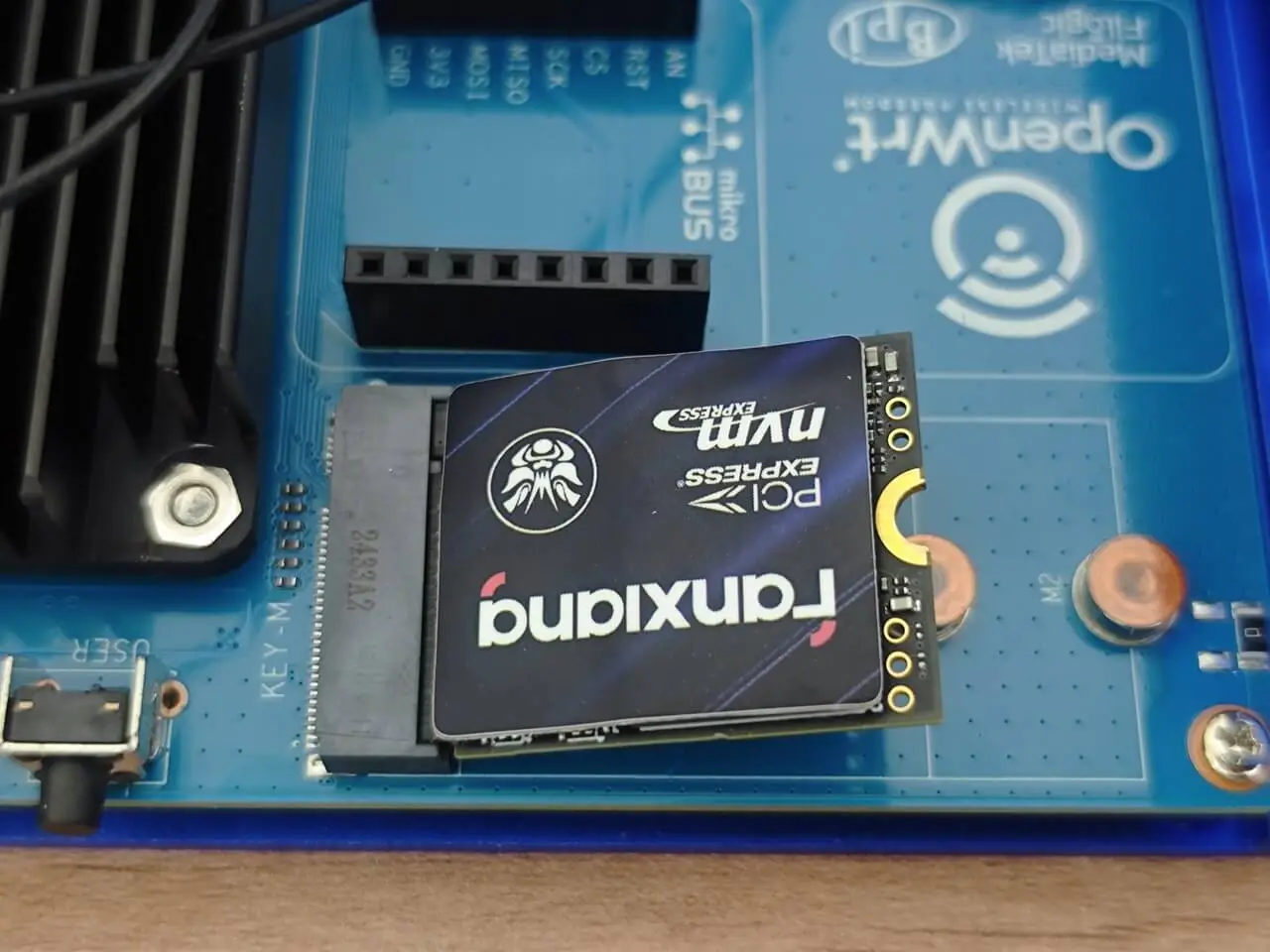
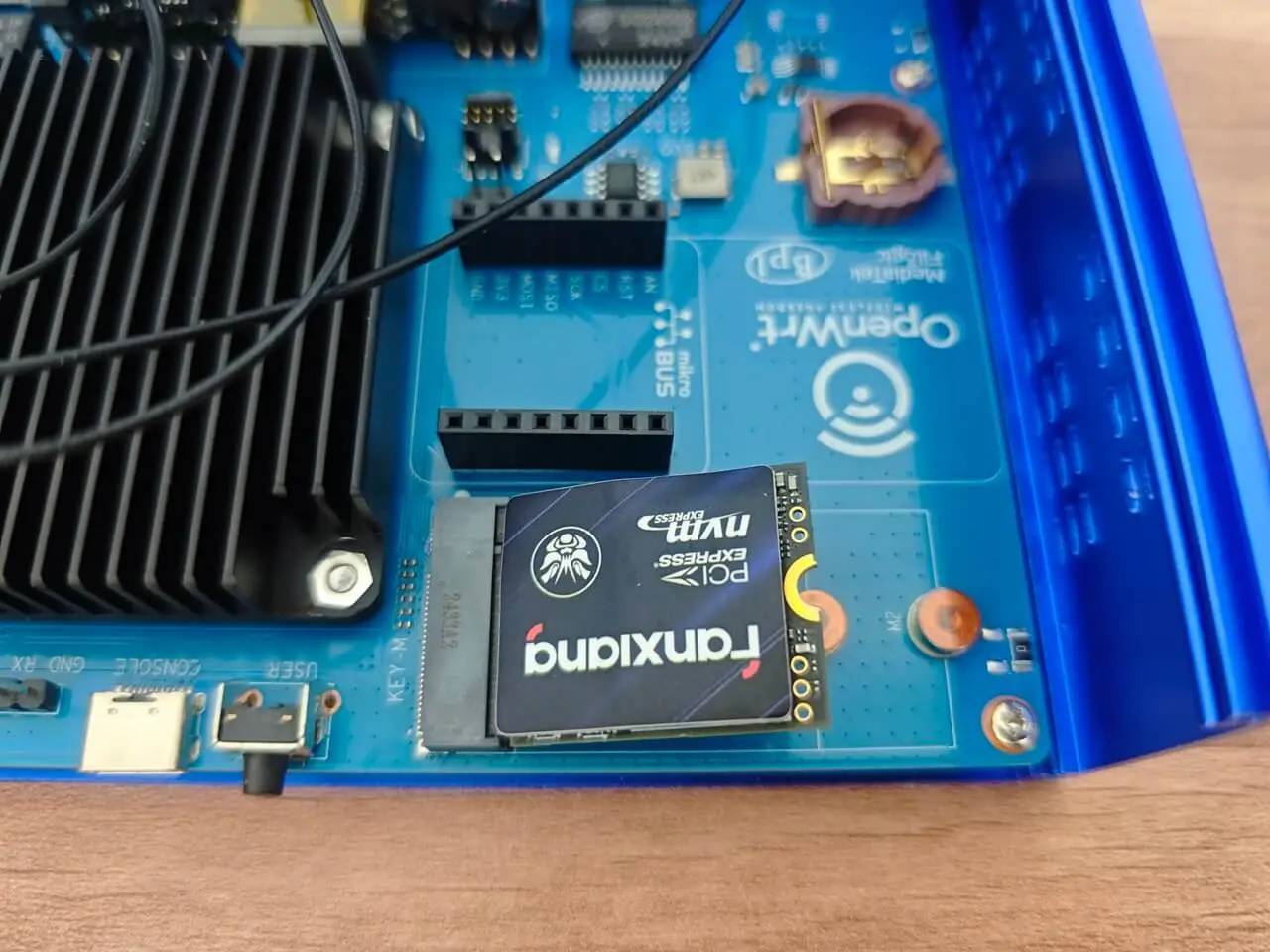
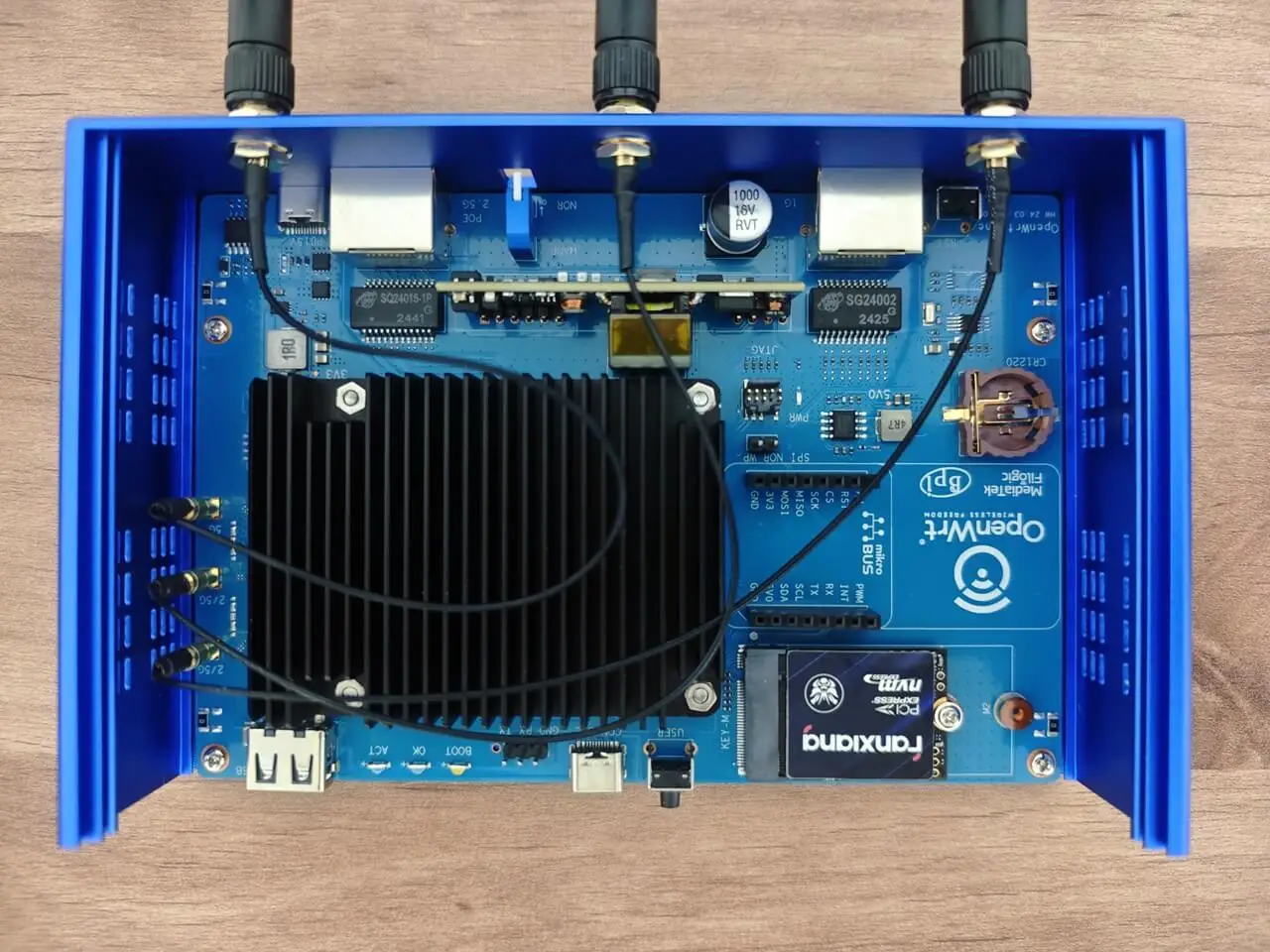
The OpenWrt One is equipped with an NVMe Key-M socket PCIe 2.0 slot that supports both 2230 and 2242 cards. Unlike the Banana Pi R3 and R4 router boards, where M.2 sockets are situated on the back of the PCB, the OpenWrt One’s interfaces are conveniently located on the top side. This user-centric design allows for effortless installation of additional cards by simply removing the upper-case cover, significantly reducing assembly time and greatly improving user convenience.
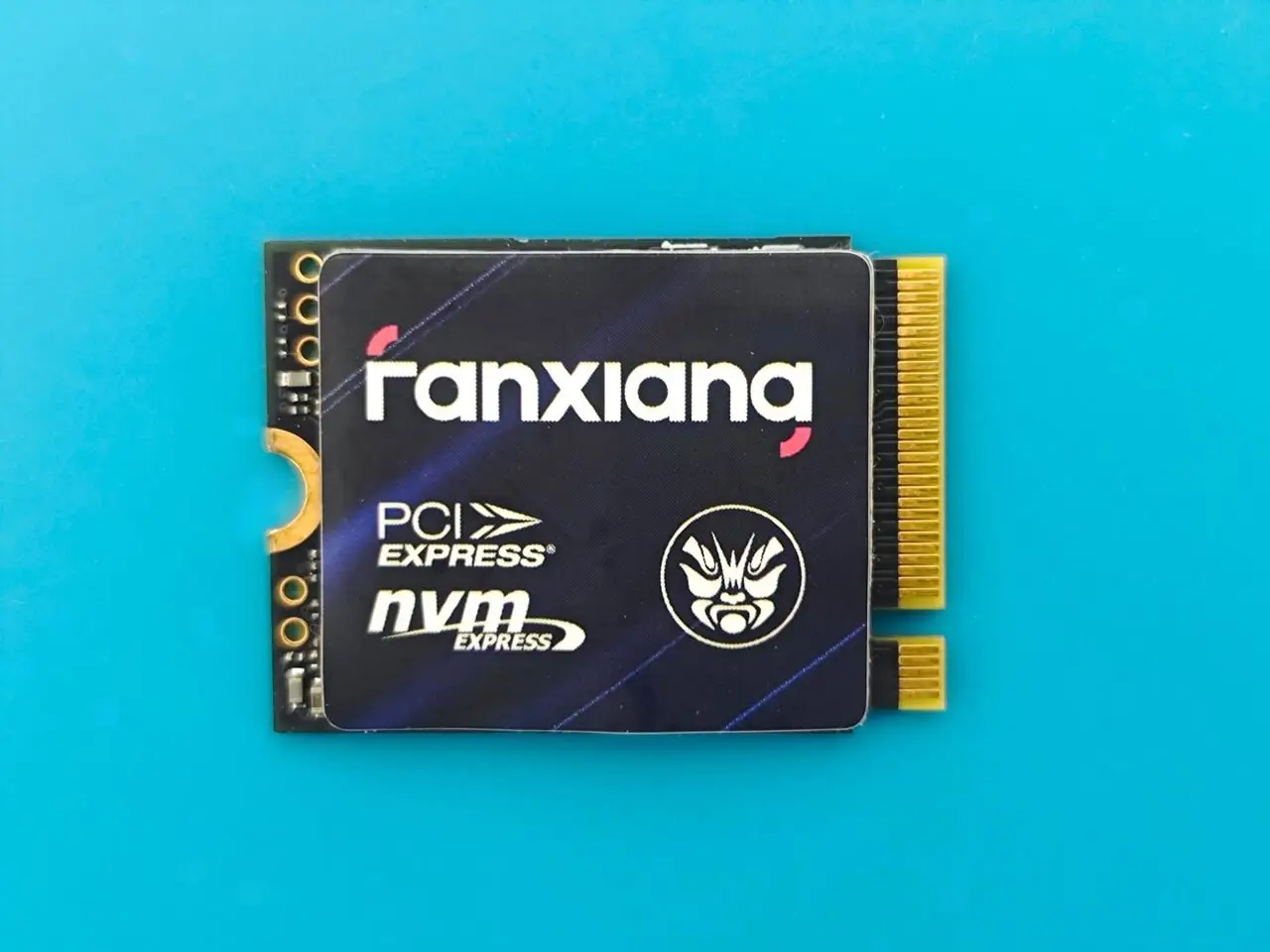
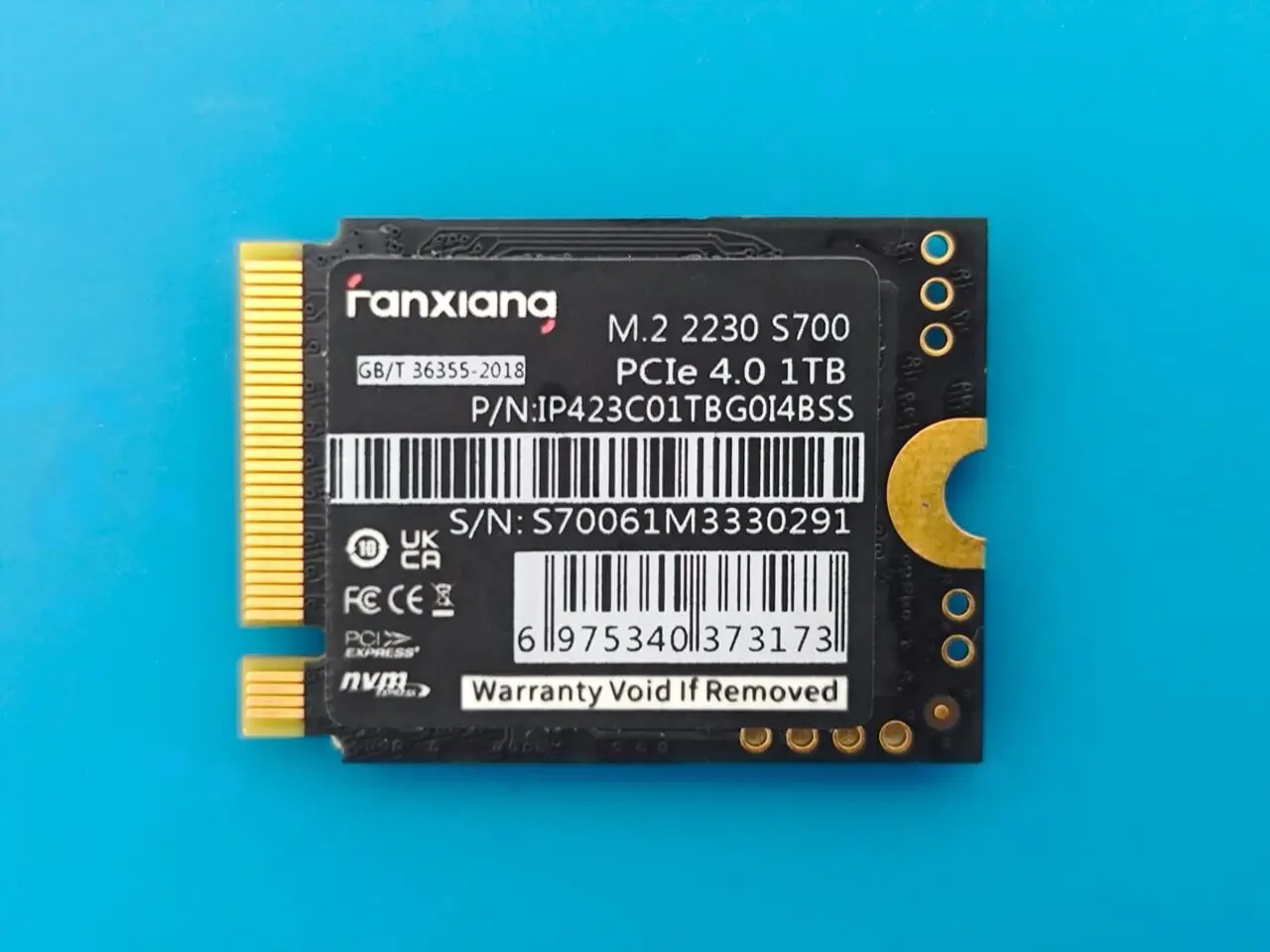
Upgrading to a high-performance 1TB NVMe SSD (Fanxiana S700/ PCIe 4.0)
# Storage devices information
root@OpenWrt:/# fdisk -l
Disk /dev/mtdblock0: 256 KiB, 262144 bytes, 512 sectors
Units: sectors of 1 * 512 = 512 bytes
Sector size (logical/physical): 512 bytes / 512 bytes
I/O size (minimum/optimal): 512 bytes / 512 bytes
Disk /dev/mtdblock1: 768 KiB, 786432 bytes, 1536 sectors
Units: sectors of 1 * 512 = 512 bytes
Sector size (logical/physical): 512 bytes / 512 bytes
I/O size (minimum/optimal): 512 bytes / 512 bytes
Disk /dev/mtdblock2: 512 KiB, 524288 bytes, 1024 sectors
Units: sectors of 1 * 512 = 512 bytes
Sector size (logical/physical): 512 bytes / 512 bytes
I/O size (minimum/optimal): 512 bytes / 512 bytes
Disk /dev/mtdblock3: 12.5 MiB, 13107200 bytes, 25600 sectors
Units: sectors of 1 * 512 = 512 bytes
Sector size (logical/physical): 512 bytes / 512 bytes
I/O size (minimum/optimal): 512 bytes / 512 bytes
Disk /dev/ubiblock0_4: 10.17 MiB, 10665984 bytes, 20832 sectors
Units: sectors of 1 * 512 = 512 bytes
Sector size (logical/physical): 512 bytes / 512 bytes
I/O size (minimum/optimal): 512 bytes / 512 bytes
Disk /dev/mtdblock4: 1 MiB, 1048576 bytes, 2048 sectors
Units: sectors of 1 * 512 = 512 bytes
Sector size (logical/physical): 512 bytes / 512 bytes
I/O size (minimum/optimal): 512 bytes / 512 bytes
Disk /dev/mtdblock5: 255 MiB, 267386880 bytes, 522240 sectors
Units: sectors of 1 * 512 = 512 bytes
Sector size (logical/physical): 512 bytes / 512 bytes
I/O size (minimum/optimal): 512 bytes / 512 bytes
Disk /dev/fit0: 4.72 MiB, 4947968 bytes, 9664 sectors
Units: sectors of 1 * 512 = 512 bytes
Sector size (logical/physical): 512 bytes / 512 bytes
I/O size (minimum/optimal): 512 bytes / 512 bytes
Disk /dev/nvme0n1: 931.51 GiB, 1000204886016 bytes, 1953525168 sectors
Disk model: Fanxiang S700 1TB
Units: sectors of 1 * 512 = 512 bytes
Sector size (logical/physical): 512 bytes / 512 bytes
I/O size (minimum/optimal): 512 bytes / 512 bytes
Disk /dev/mtdblock0: 256 KiB, 262144 bytes, 512 sectors
Units: sectors of 1 * 512 = 512 bytes
Sector size (logical/physical): 512 bytes / 512 bytes
I/O size (minimum/optimal): 512 bytes / 512 bytes
Disk /dev/mtdblock1: 768 KiB, 786432 bytes, 1536 sectors
Units: sectors of 1 * 512 = 512 bytes
Sector size (logical/physical): 512 bytes / 512 bytes
I/O size (minimum/optimal): 512 bytes / 512 bytes
Disk /dev/mtdblock2: 512 KiB, 524288 bytes, 1024 sectors
Units: sectors of 1 * 512 = 512 bytes
Sector size (logical/physical): 512 bytes / 512 bytes
I/O size (minimum/optimal): 512 bytes / 512 bytes
Disk /dev/mtdblock3: 12.5 MiB, 13107200 bytes, 25600 sectors
Units: sectors of 1 * 512 = 512 bytes
Sector size (logical/physical): 512 bytes / 512 bytes
I/O size (minimum/optimal): 512 bytes / 512 bytes
Disk /dev/ubiblock0_4: 10.17 MiB, 10665984 bytes, 20832 sectors
Units: sectors of 1 * 512 = 512 bytes
Sector size (logical/physical): 512 bytes / 512 bytes
I/O size (minimum/optimal): 512 bytes / 512 bytes
Disk /dev/mtdblock4: 1 MiB, 1048576 bytes, 2048 sectors
Units: sectors of 1 * 512 = 512 bytes
Sector size (logical/physical): 512 bytes / 512 bytes
I/O size (minimum/optimal): 512 bytes / 512 bytes
Disk /dev/mtdblock5: 255 MiB, 267386880 bytes, 522240 sectors
Units: sectors of 1 * 512 = 512 bytes
Sector size (logical/physical): 512 bytes / 512 bytes
I/O size (minimum/optimal): 512 bytes / 512 bytes
Disk /dev/fit0: 4.72 MiB, 4947968 bytes, 9664 sectors
Units: sectors of 1 * 512 = 512 bytes
Sector size (logical/physical): 512 bytes / 512 bytes
I/O size (minimum/optimal): 512 bytes / 512 bytes
Disk /dev/nvme0n1: 931.51 GiB, 1000204886016 bytes, 1953525168 sectors
Disk model: Fanxiang S700 1TB
Units: sectors of 1 * 512 = 512 bytes
Sector size (logical/physical): 512 bytes / 512 bytes
I/O size (minimum/optimal): 512 bytes / 512 bytes
# Listing All Block Devices
root@OpenWrt:/# lsblk
NAME MAJ: MIN RM SIZE RO TYPE MOUNTPOINTS
mtdblock0 31:0 0 256K 0 disk
mtdblock1 31:1 0 768K 1 disk
mtdblock2 31:2 0 512K 0 disk
mtdblock3 31:3 0 12.5M 0 disk
mtdblock4 31:4 0 1M 1 disk
mtdblock5 31:5 0 255M 0 disk
ubiblock0_4 254:0 0 10.2M 0 disk
fit0 259:0 0 4.7M 1 disk /rom
nvme0n1 259:1 0 931.5G 0 disk
NAME MAJ: MIN RM SIZE RO TYPE MOUNTPOINTS
mtdblock0 31:0 0 256K 0 disk
mtdblock1 31:1 0 768K 1 disk
mtdblock2 31:2 0 512K 0 disk
mtdblock3 31:3 0 12.5M 0 disk
mtdblock4 31:4 0 1M 1 disk
mtdblock5 31:5 0 255M 0 disk
ubiblock0_4 254:0 0 10.2M 0 disk
fit0 259:0 0 4.7M 1 disk /rom
nvme0n1 259:1 0 931.5G 0 disk
Verifying the interface bus specifications
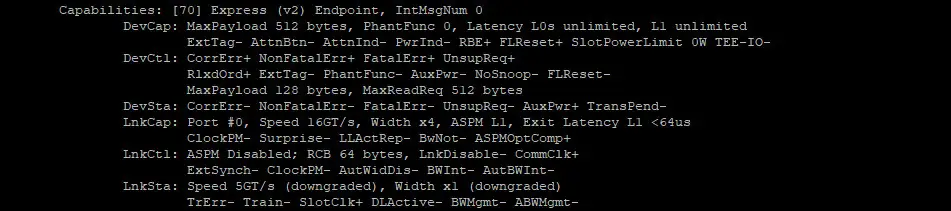
LnkCap (Link Capability)
- Port #0: The port number is 0.
- Speed 16GT/s: The maximum data transfer speed is 16 gigatransfers per second.
- Width x4: The link width is 4 lanes.
- ASPM L1: Active State Power Management L1 mode is supported.
- Exit Latency L1 <64us: The exit latency for ASPM L1 is less than 64 microseconds.
- ClockPM- Surprise- LLActRep- BwNot- ASPMOptComp+: Various link capabilities, indicating clock power management, surprise down status, link latency reporting, bandwidth notification, and ASPM optional completion.
Assessing the NVMe SSD Performance
# Checking The Read & Write Speeds (/dev/nvme0n1)
(Using a 1024 Megabyte sample file for the test)
(Using a 1024 Megabyte sample file for the test)
# Testing Read Speeds
fio –name=read_test –rw=read –size=1G –bs=1M –numjobs=1 –runtime=60 –time_based
Starting 1 thread
read_test: Laying out IO file (1 file / 1024MiB)
Jobs: 1 (f=1): [R(1)][100.0%][r=358MiB/s][r=358 IOPS][eta 00m:00s]
read_test: (groupid=0, jobs=1): err= 0: pid=5609: Wed Dec 11 13:59:57 2024
read: IOPS=323, BW=324MiB/s (340MB/s)(19.0GiB/60005msec)
clat (usec): min=1363, max=7168, avg=2768.71, stdev=1268.67
lat (usec): min=1368, max=7174, avg=2773.09, stdev=1268.56
clat percentiles (usec):
| 1.00th=[ 1418], 5.00th=[ 1434], 10.00th=[ 1450], 20.00th=[ 1467],
| 30.00th=[ 1516], 40.00th=[ 1565], 50.00th=[ 2606], 60.00th=[ 3916],
| 70.00th=[ 3949], 80.00th=[ 3982], 90.00th=[ 4047], 95.00th=[ 4146],
| 99.00th=[ 4948], 99.50th=[ 5080], 99.90th=[ 5211], 99.95th=[ 5342],
| 99.99th=[ 6718]
bw ( KiB/s): min=143360, max=374035, per=100.00%, avg=331611.55, stdev=67513.39, samples=119
iops : min= 140, max= 365, avg=323.70, stdev=65.94, samples=119
lat (msec) : 2=49.05%, 4=32.59%, 10=18.36%
cpu : usr=1.92%, sys=65.28%, ctx=16162, majf=0, minf=255
IO depths : 1=100.0%, 2=0.0%, 4=0.0%, 8=0.0%, 16=0.0%, 32=0.0%, >=64=0.0%
submit : 0=0.0%, 4=100.0%, 8=0.0%, 16=0.0%, 32=0.0%, 64=0.0%, >=64=0.0%
complete : 0=0.0%, 4=100.0%, 8=0.0%, 16=0.0%, 32=0.0%, 64=0.0%, >=64=0.0%
issued rwts: total=19428,0,0,0 short=0,0,0,0 dropped=0,0,0,0
latency : target=0, window=0, percentile=100.00%, depth=1
Run status group 0 (all jobs):
READ: bw=324MiB/s (340MB/s), 324MiB/s-324MiB/s (340MB/s-340MB/s), io=19.0GiB (20.4GB), run=60005-60005msec
Disk stats (read/write):
nvme0n1: ios=29297/4, sectors=39613440/40, merge=0/1, ticks=69359/1, in_queue=69360, util=82.97%
Test Results:
CPU usage: usr=1.92%, sys=65.28%, ctx=16162, majf=0, minf=255
Total data read: 19.0GiB
Current read speed: 358MiB/s
Current Input/Output Operations Per Second: 358 IOPS
————————————————————————————————————————
# Testing Write Speeds
fio –name=write_test –rw=write –size=1G –bs=1M –numjobs=1 –runtime=60 –time_based –end_fs
Starting 1 thread
write_test: Laying out IO file (1 file / 1024MiB)
Jobs: 1 (f=1): [F(1)][100.0%][w=326MiB/s][w=326 IOPS][eta 00m:00s]
write_test: (groupid=0, jobs=1): err= 0: pid=4970: Wed Dec 11 13:49:16 2024
write: IOPS=314, BW=315MiB/s (330MB/s)(18.5GiB/60211msec); 0 zone resets
clat (usec): min=2140, max=72317, avg=2494.04, stdev=921.98
lat (usec): min=2284, max=72574, avg=2713.97, stdev=927.40
clat percentiles (usec):
| 1.00th=[ 2245], 5.00th=[ 2311], 10.00th=[ 2343], 20.00th=[ 2376],
| 30.00th=[ 2376], 40.00th=[ 2409], 50.00th=[ 2442], 60.00th=[ 2474],
| 70.00th=[ 2507], 80.00th=[ 2540], 90.00th=[ 2638], 95.00th=[ 2704],
| 99.00th=[ 3097], 99.50th=[ 4293], 99.90th=[10290], 99.95th=[12911],
| 99.99th=[57934]
bw ( KiB/s): min=49152, max=389120, per=100.00%, avg=323195.94, stdev=93810.18, samples=119
iops : min= 48, max= 380, avg=315.39, stdev=91.63, samples=119
lat (msec) : 4=99.48%, 10=0.42%, 20=0.07%, 50=0.01%, 100=0.02%
cpu : usr=8.35%, sys=89.07%, ctx=13010, majf=0, minf=34
IO depths : 1=100.0%, 2=0.0%, 4=0.0%, 8=0.0%, 16=0.0%, 32=0.0%, >=64=0.0%
submit : 0=0.0%, 4=100.0%, 8=0.0%, 16=0.0%, 32=0.0%, 64=0.0%, >=64=0.0%
complete : 0=0.0%, 4=100.0%, 8=0.0%, 16=0.0%, 32=0.0%, 64=0.0%, >=64=0.0%
issued rwts: total=0,18938,0,0 short=0,0,0,0 dropped=0,0,0,0
latency : target=0, window=0, percentile=100.00%, depth=1
Run status group 0 (all jobs):
WRITE: bw=315MiB/s (330MB/s), 315MiB/s-315MiB/s (330MB/s-330MB/s), io=18.5GiB (19.9GB), run=60211-60211msec
Disk stats (read/write):
nvme0n1: ios=0/17032, sectors=0/38728200, merge=0/58, ticks=0/707233, in_queue=707251, util=79.58%
Test Results:
CPU usage: usr=8.35%, sys=89.07%, ctx=13010, majf=0, minf=34
Total data written: 18.5GiB
Current write speed: 326MiB/s
Current Input/Output Operations Per Second: 326 IOPS
fio –name=read_test –rw=read –size=1G –bs=1M –numjobs=1 –runtime=60 –time_based
Starting 1 thread
read_test: Laying out IO file (1 file / 1024MiB)
Jobs: 1 (f=1): [R(1)][100.0%][r=358MiB/s][r=358 IOPS][eta 00m:00s]
read_test: (groupid=0, jobs=1): err= 0: pid=5609: Wed Dec 11 13:59:57 2024
read: IOPS=323, BW=324MiB/s (340MB/s)(19.0GiB/60005msec)
clat (usec): min=1363, max=7168, avg=2768.71, stdev=1268.67
lat (usec): min=1368, max=7174, avg=2773.09, stdev=1268.56
clat percentiles (usec):
| 1.00th=[ 1418], 5.00th=[ 1434], 10.00th=[ 1450], 20.00th=[ 1467],
| 30.00th=[ 1516], 40.00th=[ 1565], 50.00th=[ 2606], 60.00th=[ 3916],
| 70.00th=[ 3949], 80.00th=[ 3982], 90.00th=[ 4047], 95.00th=[ 4146],
| 99.00th=[ 4948], 99.50th=[ 5080], 99.90th=[ 5211], 99.95th=[ 5342],
| 99.99th=[ 6718]
bw ( KiB/s): min=143360, max=374035, per=100.00%, avg=331611.55, stdev=67513.39, samples=119
iops : min= 140, max= 365, avg=323.70, stdev=65.94, samples=119
lat (msec) : 2=49.05%, 4=32.59%, 10=18.36%
cpu : usr=1.92%, sys=65.28%, ctx=16162, majf=0, minf=255
IO depths : 1=100.0%, 2=0.0%, 4=0.0%, 8=0.0%, 16=0.0%, 32=0.0%, >=64=0.0%
submit : 0=0.0%, 4=100.0%, 8=0.0%, 16=0.0%, 32=0.0%, 64=0.0%, >=64=0.0%
complete : 0=0.0%, 4=100.0%, 8=0.0%, 16=0.0%, 32=0.0%, 64=0.0%, >=64=0.0%
issued rwts: total=19428,0,0,0 short=0,0,0,0 dropped=0,0,0,0
latency : target=0, window=0, percentile=100.00%, depth=1
Run status group 0 (all jobs):
READ: bw=324MiB/s (340MB/s), 324MiB/s-324MiB/s (340MB/s-340MB/s), io=19.0GiB (20.4GB), run=60005-60005msec
Disk stats (read/write):
nvme0n1: ios=29297/4, sectors=39613440/40, merge=0/1, ticks=69359/1, in_queue=69360, util=82.97%
Test Results:
CPU usage: usr=1.92%, sys=65.28%, ctx=16162, majf=0, minf=255
Total data read: 19.0GiB
Current read speed: 358MiB/s
Current Input/Output Operations Per Second: 358 IOPS
————————————————————————————————————————
# Testing Write Speeds
fio –name=write_test –rw=write –size=1G –bs=1M –numjobs=1 –runtime=60 –time_based –end_fs
Starting 1 thread
write_test: Laying out IO file (1 file / 1024MiB)
Jobs: 1 (f=1): [F(1)][100.0%][w=326MiB/s][w=326 IOPS][eta 00m:00s]
write_test: (groupid=0, jobs=1): err= 0: pid=4970: Wed Dec 11 13:49:16 2024
write: IOPS=314, BW=315MiB/s (330MB/s)(18.5GiB/60211msec); 0 zone resets
clat (usec): min=2140, max=72317, avg=2494.04, stdev=921.98
lat (usec): min=2284, max=72574, avg=2713.97, stdev=927.40
clat percentiles (usec):
| 1.00th=[ 2245], 5.00th=[ 2311], 10.00th=[ 2343], 20.00th=[ 2376],
| 30.00th=[ 2376], 40.00th=[ 2409], 50.00th=[ 2442], 60.00th=[ 2474],
| 70.00th=[ 2507], 80.00th=[ 2540], 90.00th=[ 2638], 95.00th=[ 2704],
| 99.00th=[ 3097], 99.50th=[ 4293], 99.90th=[10290], 99.95th=[12911],
| 99.99th=[57934]
bw ( KiB/s): min=49152, max=389120, per=100.00%, avg=323195.94, stdev=93810.18, samples=119
iops : min= 48, max= 380, avg=315.39, stdev=91.63, samples=119
lat (msec) : 4=99.48%, 10=0.42%, 20=0.07%, 50=0.01%, 100=0.02%
cpu : usr=8.35%, sys=89.07%, ctx=13010, majf=0, minf=34
IO depths : 1=100.0%, 2=0.0%, 4=0.0%, 8=0.0%, 16=0.0%, 32=0.0%, >=64=0.0%
submit : 0=0.0%, 4=100.0%, 8=0.0%, 16=0.0%, 32=0.0%, 64=0.0%, >=64=0.0%
complete : 0=0.0%, 4=100.0%, 8=0.0%, 16=0.0%, 32=0.0%, 64=0.0%, >=64=0.0%
issued rwts: total=0,18938,0,0 short=0,0,0,0 dropped=0,0,0,0
latency : target=0, window=0, percentile=100.00%, depth=1
Run status group 0 (all jobs):
WRITE: bw=315MiB/s (330MB/s), 315MiB/s-315MiB/s (330MB/s-330MB/s), io=18.5GiB (19.9GB), run=60211-60211msec
Disk stats (read/write):
nvme0n1: ios=0/17032, sectors=0/38728200, merge=0/58, ticks=0/707233, in_queue=707251, util=79.58%
Test Results:
CPU usage: usr=8.35%, sys=89.07%, ctx=13010, majf=0, minf=34
Total data written: 18.5GiB
Current write speed: 326MiB/s
Current Input/Output Operations Per Second: 326 IOPS


It’s a mistake to compare the router with BPI R4.
Compare it with BPI R3. Unfortunately Openwrt One looses in every possible category including price.
OpenWrt may have prioritized profit over customer value, which could be considered a strategic mistake.
no, check out the latest news of TP-Link. This Chinese company has been selling these insecure routers, sometimes at costs lower than what it takes to manufacture. This is truly an alarming issue, certainly consumers in the US have been given unrealistic prices for decent router hardware, and much of our internet infrastructure is based on highly insecure hardware. If you have a TP-Link router, try breaking in with password “1234” it’s scary how simple it can be!
You can always consider purchasing an Asus router may come at a higher price point, it generally offers enhanced security. It’s important to note that the lower price of open-source-based routers is not necessarily a cause for concern. These routers tend to be more affordable due to their DIY nature, which often means less direct customer support and software.
I believe the OpenWrt community offers significant advantages over manufacturer firmware. However, the lack of a standardized method for evaluating the security of routers remains a concern. Same goes with electric cars and other products.
There are not free gifts.
Links page 2 – 10 are broken!
Thanks. It should be fine now.
Please check..
Working again – thx!
I got myself one and sadly I must say the wireless range and connection stability is way worse than a Cudy WR3000 that uses the same SoC and comes at 1/3 of the price. So I had to pull back.
I didn’t notice any difference in connection range or stability problems when I compared performance to one of my stronger Chinese routers.
Again, it depends if you have a lot of walls that might interfere with signal reception. You can check the latest update, maybe there are improvements or tweaks in newer OpenWrt releases.
You can also buy WiFi signal boosters on AliExpress and check if it helps.