Close Menu
  • Home
  • About
  • Wearables
  • Earbuds
  • Tech Accessories
    • Routers
    • Remotes
  • Embedded
    • Single Board Computers
    • Addon Boards
    • Raspberry Pi
  • Wireless Routers
  • Contact
Facebook X (Twitter) Instagram Threads
Trending
  • RiiTek RK807 Pro Review: The Best Budget Apple Magic Keyboard Alternative?
  • Rii 518BT Review: Is This Pocket Keyboard Actually Usable?
  • RiiTek RK808 Review: The Best Foldable Travel Keyboard?
  • Rii RS201 Review: $69 16-Inch Portable Monitor Tested
  • AliExpress Promo Codes: August 2026 (100% Verified)
  • Orange Pi 6 Review: Is It Suitable for Running Local LLMs? We Checked.
  • Youyeetoo NestDisk Mini PC/Router: Is This Pocket-Sized 3-in-1 NAS Worth It?
  • DFRobot Unveils seeMote Cube: A 6DoF Physical Controller for Apple Vision Pro
AndroidPIMP
Facebook X (Twitter) Instagram
  • Home
  • About
  • Wearables
  • Earbuds
  • Tech Accessories
    • Routers
    • Remotes
  • Embedded
    • Single Board Computers
    • Addon Boards
    • Raspberry Pi
  • Wireless Routers
  • Contact
AndroidPIMP
Mini PCs & Media Players

Orange Pi 800 Review: All-in-one PC Inside a Keyboard Kit

By androidpimpNovember 23, 2022Updated:August 22, 2026No Comments16 Mins Read
Facebook Twitter Pinterest LinkedIn Tumblr Email
Follow Us
Google News Flipboard
Orange Pi 800 Computer Kit
Table of contents
  1. Orange Pi 800
  2. Product Highlights
    1. Orange Pi 800 specifications
  3. Portable and lightweight
  4. Hardware & Interfaces
  5. Orange Pi 800 Keyboard layout
  6. Orange Pi 800 Review
    1. Package, Unboxing, Package Content, Design & Build Quality, and Installation
      1. The Package
      2. Unboxing All Items
  7. Package Content
    1. Design
    2. Portability – A Single Board Computer inside a Keyboard
    3. Build Quality
    4. Cooling
    5. External Speaker
  8. Installation
  9. Software
  10. Hardware Information
    1. CPU Information
    2. Block Device Information
    3. Internal Storage Information
  11. Performing GPU, CPU, and I/O stress testing
    1. S-tui CPU Stress Test
    2. HardInfo: Comparing Performance to other CPUs
  12. Sysbench – Benchmarking (CPU, Memory, File IO) 
    1. CPU Benchmark
    2. Memory Benchmark
    3. I/O Benchmark
  13. Geekbench 5: Benchmarks Test Results 
    1. Geekbench 5 test results: Single-Core Performance
    2. Geekbench 5 test results: Multi-Core Performance
  14. Glmark2: GPU Stress testing & benchmarking
    1. GPU Driver
    2. Running glmark2 benchmark suite.
  15. What about video playback?
  16. Kodi Support
  17. Fixing user experience problems
  18. Final Words
  19. Price & Availability

Software

The Orange Pi 800 comes pre-installed with customized Orange Pi images based on the widespread Ubuntu 22.04 LTS / Debian Linux distributions running under kernel ver 5.18.5. It also supports other operating systems, such as Manjaro, including a fresh customized Android OS in a desktop pc style design and branded under the name Orange Pi OS(Droid), which worked well for us.

Regarding software availability and support, it’s less compared to the Raspberry Pi 400 Kit. Still, it’s enough for most users who are not into reinstalling and experimenting with new distros every few days or months.

Checking Linux distribution name and release version information

root@orangepi800:~# cat /etc/os-release
PRETTY_NAME="Ubuntu 22.04.1 LTS"
NAME="Ubuntu"
VERSION_ID="22.04"
VERSION="22.04.1 LTS (Jammy Jellyfish)"
VERSION_CODENAME=jammy
ID=ubuntu
ID_LIKE=debian
HOME_URL="https://www.ubuntu.com/"
SUPPORT_URL="https://help.ubuntu.com/"
BUG_REPORT_URL="https://bugs.launchpad.net/ubuntu/"
PRIVACY_POLICY_URL="https://www.ubuntu.com/legal/terms-and-policies/privacy-policy"
UBUNTU_CODENAME=jammy

Checking Kernel Information

root@orangepi800:~# hostnamectl
 Static hostname: orangepi800
       Icon name: computer
      Machine ID: 58e9b4346b904716aa4c93c3297fd02c
         Boot ID: be7dd23c01f54ceca841820d1a1b5d66
Operating System: Ubuntu 22.04.1 LTS
          Kernel: Linux 5.18.5-rk3399
    Architecture: arm64

Checking system resources: Real-time process monitoring with Htop (in Idle/ low usage mode)
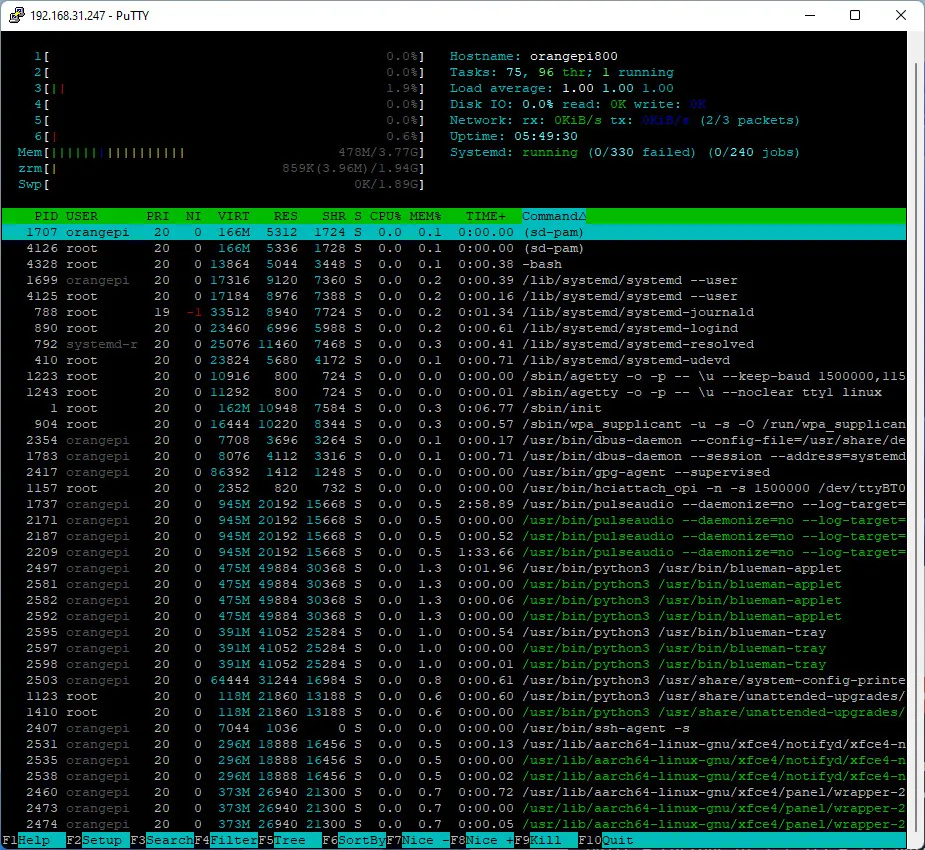
Orange Pi 800 Htop
1 2 3 4
Share. Facebook Twitter Pinterest LinkedIn Tumblr Email
Previous ArticleASUS Tinker Edge T/R To Challenge the Raspberry Pi 4
Next Article NanoPi R5C Tiny & Powerful OpenWrt Router Starts at $49
androidpimp
  • Website

Related Posts

Youyeetoo NestDisk Mini PC/Router: Is This Pocket-Sized 3-in-1 NAS Worth It?

August 4, 2026

Orange Pi X2 Mini PC Is Officially in the Works – Here’s What We Know

July 29, 2026
Ugoos SK4 Review

Ugoos SK4 Review: The Best Mid-Range Android TV Box for Value & Features

December 6, 2025
0 0 votes
Article Rating
Subscribe
Notify of
0 Comments
Oldest
Newest Most Voted
Categories
PureVPN
PureVPN Ad Banner
PrivadoVPN – No. 1 in Parental Control
PrivadoVPN 350x437
Recent Posts
  • RiiTek RK807 Pro Review: The Best Budget Apple Magic Keyboard Alternative?
  • Rii 518BT Review: Is This Pocket Keyboard Actually Usable?
  • RiiTek RK808 Review: The Best Foldable Travel Keyboard?
  • Rii RS201 Review: $69 16-Inch Portable Monitor Tested
  • AliExpress Promo Codes: August 2026 (100% Verified)
  • Orange Pi 6 Review: Is It Suitable for Running Local LLMs? We Checked.
  • Youyeetoo NestDisk Mini PC/Router: Is This Pocket-Sized 3-in-1 NAS Worth It?
  • DFRobot Unveils seeMote Cube: A 6DoF Physical Controller for Apple Vision Pro
  • Orange Pi X2 Mini PC Is Officially in the Works – Here’s What We Know
  • BPI-R4 Wi-Fi 7 NIC (BE14): OpenWrt Setup & Optimal WiFi Power Guide
RSS feed: The Latest RSS Feeds The Latest RSS Feeds
  • RiiTek RK807 Pro Review: The Best Budget Apple Magic Keyboard Alternative?
  • Rii 518BT Review: Is This Pocket Keyboard Actually Usable?
  • RiiTek RK808 Review: The Best Foldable Travel Keyboard?
Facebook X (Twitter) Instagram Pinterest
@2026 - All Right Reserved. Designed by AndroidPIMP

Type above and press Enter to search. Press Esc to cancel.

wpDiscuz