Maybe you missed it? DFRobot 6.67″ Bendable AMOLED Display Review.
DFRobot seeMote Cube is now available globally, making spatial computing and computer vision easier for Apple visionOS users.
The landscape of spatial computing is undergoing a profound transformation. As devices like the Apple Vision Pro transition from novel consumer gadgets to indispensable professional tools, the demands placed on spatial software are evolving rapidly. Initially, the focus of spatial computing was heavily skewed toward immersive visualization—allowing users to passively view 3D content in a new light. However, as industries such as manufacturing, architecture, education, and enterprise design adopt these technologies, the need for active, precise, and reliable interaction has become paramount.
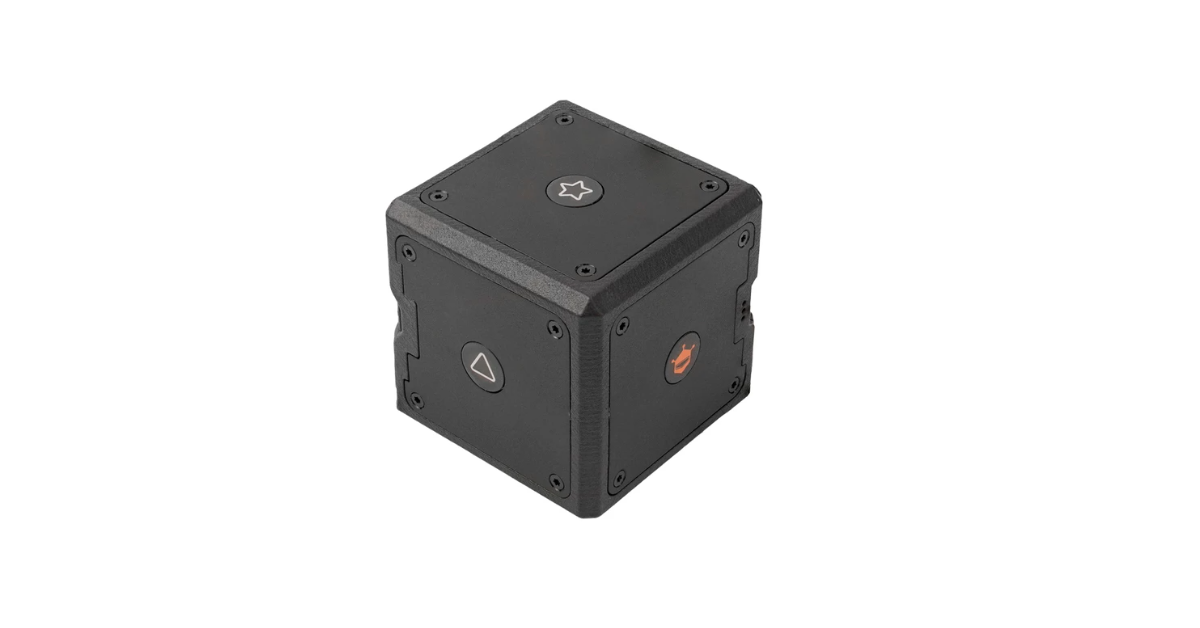
Recognizing this critical shift, DFRobot has officially announced the availability of the seeMote Cube, a groundbreaking handheld spatial input device tailored specifically for Apple Vision Pro development. By seamlessly integrating 6 Degrees of Freedom (6DoF) spatial motion tracking, six programmable physical buttons, and advanced haptic feedback, the seeMote Cube empowers visionOS developers to craft highly natural, physically grounded interactions.
This innovative device allows users to move, select, confirm, and manipulate digital objects within spatial environments with a level of precision and confidence that purely gesture-based interfaces struggle to match. Priced at an accessible US$299, the seeMote Cube is poised to become a cornerstone tool for professional spatial application development.
A quick example of seeMote Cube operating spatial content in visionOS
The Limitations of Purely Virtual Interfaces in Professional Workflows
To understand the significance of the seeMote Cube, one must first examine the inherent limitations of current spatial input methods. Hand tracking and eye-tracking technologies are undeniably revolutionary for casual consumption, media browsing, and light interaction. They offer a frictionless, magical experience for users navigating simple menus or watching immersive videos. However, when spatial computing is applied to professional, high-stakes workflows, these purely virtual interfaces often reveal their shortcomings.
Professional tasks demand precision, repeatability, and efficiency. Consider an engineer reviewing a complex 3D engine model or an architect walking through a full-scale digital twin of a building. Relying solely on mid-air hand gestures for continuous navigation, fine-tuned parameter adjustment, and rapid selection can lead to “gorilla arm” fatigue, a well-documented phenomenon where prolonged mid-air interaction causes physical strain. Furthermore, the absence of tactile confirmation means users must constantly visually verify that their inputs have been registered, breaking their immersion and slowing down their workflow.
Developers building for these professional environments increasingly require reliable physical input devices capable of handling complex application logic through tangible interaction. The seeMote Cube addresses this exact pain point. Rather than attempting to replace hand tracking entirely, it complements it. By combining spatial motion, physical inputs, and haptic feedback, DFRobot has created a programmable, dependable physical control interface that bridges the gap between the digital and physical worlds, enabling workflows that are both efficient and ergonomically sound.
Deep Dive into seeMote Cube’s Core Technologies
The seeMote Cube is not merely a controller; it is a carefully engineered interaction platform built around three foundational technological pillars designed to meet the rigorous demands of professional spatial applications.
1. 6DoF Spatial Motion Tracking
At the heart of the seeMote Cube is its 6 Degrees of Freedom (6DoF) spatial motion tracking capability. Unlike traditional 3DoF controllers that only track rotational movement (pitch, yaw, and roll), 6DoF tracking monitors both rotation and positional movement along the X, Y, and Z axes. This allows the device to accurately translate natural, real-world hand movements into precise digital actions. Whether a user is leaning in to inspect a minute detail of a 3D model or stepping back to view an entire assembly, the seeMote Cube mirrors these physical motions in the virtual space with low latency and high fidelity, creating a seamless extension of the user’s intent.
2. Six Programmable Physical Buttons
While motion handles navigation, discrete actions require discrete inputs. The seeMote Cube features six strategically placed, programmable physical buttons. These buttons provide the tactile resistance and muscle-memory engagement that touchscreens and air gestures lack. Developers can map these buttons to a wide array of functions, such as object selection, action confirmation, menu toggling, or parameter adjustment. By offloading these frequent, repetitive commands to physical buttons, the interaction workflow becomes significantly faster and less cognitively demanding, as users no longer need to hunt for floating virtual buttons in their field of view.
3. Advanced Haptic Feedback
The third pillar of the seeMote Cube’s design is its integrated haptic feedback system. In professional environments, confirmation is critical. When a user presses a button to confirm a design modification or select a component in a digital twin, the device delivers an immediate, localized tactile response. This physical confirmation reassures the user that the action has been successfully registered without requiring them to divert their visual attention from the task at hand. This closed-loop feedback system dramatically enhances the fluidity, intuition, and overall reliability of the spatial interaction experience.
Transforming Professional Spatial Applications: Key Use Cases
Although professional spatial applications span a diverse array of industries, they share common interaction challenges. Users must continuously browse, select, confirm, and adjust content. The seeMote Cube is explicitly designed to help developers build robust interaction workflows around these real-world tasks.
Making 3D Design More Interactive and Efficient
Spatial design review is a prime candidate for the seeMote Cube’s capabilities. In traditional workflows, reviewing a full-scale 3D model might involve cumbersome mouse-and-keyboard setups or limited tablet interfaces. With the seeMote Cube, designers can naturally navigate the 3D space, using the 6DoF tracking to orbit, pan, and zoom into specific components. When a modification is needed, the programmable buttons allow for instant selection and confirmation of changes. The accompanying haptic feedback provides a satisfying, physical “click” that validates each adjustment, creating a smoother, more confident, and highly efficient iterative design process.
Digital Twins and Model Inspection: Maintaining Deep Immersion
Digital twin technology is revolutionizing industries by allowing professionals to interact with real-time, data-rich virtual replicas of physical assets. Inspecting these complex spatial models requires users to remain deeply immersed while simultaneously navigating intricate geometries, selecting specific sub-components, and adjusting live data parameters. The seeMote Cube excels in this environment. Its 6DoF tracking maps physical movement directly to spatial navigation, while the programmable buttons handle rapid object selection and parameter switching. The tactile reinforcement of every interaction ensures that model inspection remains fluid and intuitive, preventing the user from being pulled out of the immersive experience by clunky virtual UI interactions.
Training Simulations and Complex Spatial Interfaces
For training simulations—specifically those designed for non-clinical and non-safety-critical scenarios—the seeMote Cube offers developers unprecedented flexibility. In a simulated environment, such as training a technician to assemble a complex piece of machinery, the interaction must be centered on task execution, procedural confirmation, and immediate feedback. By combining motion tracking, physical buttons, and haptic feedback, developers can replicate the feel of operating real-world machinery. In more sophisticated spatial interfaces, the device serves as a stable, programmable physical controller that moves common interactions (like navigation, selection, and confirmation) away from ephemeral virtual UI elements and onto dedicated, reliable hardware, thereby simplifying and stabilizing the overall interaction workflow.
Shamelessly interact with Apple Vision Pro
The DFRobot seeMote Cube has been specifically developed for use with Apple Vision Pro and visionOS applications, making it one of the device’s standout features.
Here are the key compatibility details:
Built for Apple Vision Pro
- Native visionOS Support: The seeMote Cube is purpose-built to work seamlessly with Apple Vision Pro’s spatial computing platform.
- Spatial Accessory Integration: It uses Apple’s official Spatial Accessory API, ensuring deep integration with the Vision Pro ecosystem.
What This Means for Users
When paired with Apple Vision Pro, the seeMote Cube:
- Tracks your hand movements in 3D space (6DoF tracking)
- Provides physical buttons for precise control within visionOS apps
- Delivers haptic feedback to confirm your interactions
- Works as a professional input device for tasks like 3D design, digital twin inspection, and training simulations
Accelerating Interaction Prototyping and Application Development
Beyond its role in end-user applications, the seeMote Cube is a powerful tool for the development process itself, particularly in the realm of rapid interaction prototyping.
In the early stages of spatial app development, teams often struggle to validate interaction concepts. Building custom hardware from scratch to test a new spatial workflow is prohibitively expensive and time-consuming. Conversely, relying solely on software-based mockups fails to capture the ergonomic and tactile realities of the final product.
The seeMote Cube bridges this gap perfectly. Development teams can leverage its out-of-the-box motion tracking, programmable buttons, and haptic feedback to quickly prototype, test, and validate new interaction concepts. This allows designers and engineers to gather meaningful user feedback on the physical feel and logical flow of their applications early in the development cycle. By shortening the iteration loop, the seeMote Cube dramatically reduces the time and cost required to move a project from a rough proof of concept to a polished, functional prototype.
Empowering the Developer Ecosystem with Open-Source Resources
DFRobot has long been a champion of the maker and developer communities, and the launch of the seeMote Cube is accompanied by a robust suite of open-source development resources. Understanding that professional developers need deep customization and seamless integration, DFRobot provides comprehensive tools to ensure the seeMote Cube can be tailored to any project’s unique requirements.
These resources include:
- .referenceaccessory files: Essential for defining the accessory’s behavior and ensuring seamless recognition and integration within the visionOS ecosystem.
- USDZ assets: High-quality 3D models of the seeMote Cube that developers can use within their own applications to visually represent the controller in mixed-reality environments, enhancing user guidance and onboarding.
- SeeMote Viewer Application Source Code: By providing the full source code for their companion viewer app, DFRobot gives developers a functional, working template. Teams can study, modify, extend, and integrate this code directly into their own projects, bypassing weeks of foundational setup and allowing them to focus on their core application logic.
This commitment to open-source principles significantly lowers the barrier to entry for development teams, fostering a vibrant ecosystem of innovation around the seeMote platform.
The Future of Hybrid Spatial Interaction
The introduction of the DFRobot seeMote Cube marks a significant milestone in the maturation of spatial computing. It represents a clear acknowledgment that while the magic of spatial computing lies in its boundless virtual environments, the efficiency and reliability of professional work still rely heavily on tangible, physical interaction.
By thoughtfully combining 6DoF spatial motion tracking, programmable physical buttons, and responsive haptic feedback, the seeMote Cube provides a sophisticated, developer-friendly solution to the complex interaction challenges of modern visionOS applications. Whether it is accelerating the prototyping phase, refining 3D design reviews, enabling deep immersion in digital twin inspections, or enhancing the realism of training simulations, the seeMote Cube is equipped to handle the rigorous demands of professional workflows.
As the spatial computing industry continues to expand beyond entertainment and into the core of enterprise, education, and industrial design, hybrid input devices like the seeMote Cube will become increasingly indispensable. DFRobot has not only provided a tool for today’s developers but has also laid down a foundational piece of the infrastructure that will shape how we interact with the spatial internet of tomorrow.
Price and Availability
(Media Source: DFRobot)
The strategic positioning of the seeMote Cube reflects DFRobot’s deep understanding of the spatial computing market. By pricing the device at an official retail price of US$299, DFRobot has made professional-grade spatial interaction hardware accessible to a broad spectrum of users. This price point is highly attractive not only to well-funded enterprise development teams but also to independent developers, startups, and educational institutions looking to experiment with and build the next generation of visionOS applications.
The seeMote Cube is officially available now. Developers and organizations interested in integrating this technology into their workflows can find product availability details by region, comprehensive technical specifications, and purchasing options directly on the DFRobot website.
As a product manager at DFRobot aptly stated during the announcement: “Professional spatial applications require users to interact naturally with digital content—not simply view it. By combining spatial motion tracking, physical buttons, and haptic feedback in a single device, seeMote Cube gives visionOS developers a more intuitive physical interaction solution, helping development teams rapidly validate interaction concepts and build applications around real operational workflows.”