Close Menu
  • Home
  • About
  • Wearables
  • Earbuds
  • Computer Accessories
    • Routers
    • Remotes
  • Embedded
    • Single Board Computers
    • Addon Boards
    • Raspberry Pi
  • Wireless Routers
  • Contact
Facebook X (Twitter) Instagram Threads
Trending
  • Orange Pi 6 Launches: New 45 TOPS AI SBC Beats Raspberry Pi HATs in Speed [Review]
  • How to install OpenWrt on Xiaomi AX3000T Router (A Quick Guide)
  • Orange Pi Maker Xunlong & Huawei Launch Edge AI at WAIC 2026
  • AliExpress Promo Codes: July 2026 (100% Verified)
  • BPI-R4 Wi-Fi 7 NIC (BE14): OpenWrt Setup & Optimal WiFi Power Guide
  • Orange Pi Zero 3W Review: $25 Dual Video Pi Zero 2W Killer?
  • CamThink NeoEyes NE503: A 20 TOPS 4k Edge AI Camera Platform Powerhouse
  • DFRobot 6.67″ Flexible AMOLED Review: Best Raspberry Pi & LattePanda Display?
AndroidPIMP
Facebook X (Twitter) Instagram
  • Home
  • About
  • Wearables
  • Earbuds
  • Computer Accessories
    • Routers
    • Remotes
  • Embedded
    • Single Board Computers
    • Addon Boards
    • Raspberry Pi
  • Wireless Routers
  • Contact
AndroidPIMP
Embedded Computers

DFRobot 6.67″ Flexible AMOLED Review: Best Raspberry Pi & LattePanda Display?

By androidpimpJune 19, 2026No Comments10 Mins Read
Facebook Twitter Pinterest LinkedIn Tumblr Email
Follow Us
Google News Flipboard
DFRobot Flexible AMOLED Display
Table of contents
  1. Part 1: Introducing the DFRobot 6.67″ 1.2 mm Bendable AMOLED Display
    1. DFRobot launches its new ultra-thin 6.67″ flexible AMOLED display.
    2. Design Tailored for DIY Projects, Engineers, and Designers.
    3. Easy and user friendly to setup
  2. Vivid, High-Resolution AMOLED Visuals
    1. Bending to the Geometry of the Cockpit
    2. Uncompromising Daytime Visibility and “True Black” Aesthetics
    3. Dead-Simple Integration with In-Car Compute Platforms
  3. Main Features
  4. 📱 Specification
  5. Part 2: DFRobot 6.67″ Flexible AMOLED Review
    1. Unboxing All items (Package Contents)
  6. First time setup
  7. The good and the less good
  8. Mounting the display
  9. Compatibility
  10. Final thoughts
  11. Price and where to buy.
  • Maybe you missed it? LattePanda IOTA Review.

Part 1: Introducing the DFRobot 6.67″ 1.2 mm Bendable AMOLED Display

DFRobot launches its new ultra-thin 6.67″ flexible AMOLED display.

The landscape of maker electronics, rapid prototyping, and single-board computing (SBC) has experienced a a huge leep. For years, developers using platforms like the Raspberry Pi or LattePanda were limited to rigid, boxy designs. When a project required a visual interface, builders had to rely on standard flat-panel liquid crystal displays (LCDs) or inflexible organic light-emitting diode (OLED) modules. Although these displays were highly functional, they constrained the physical design of a product to the flat surface of the screen, hindering creativity in human-machine interface (HMI) design, wearable technology, and robotics.
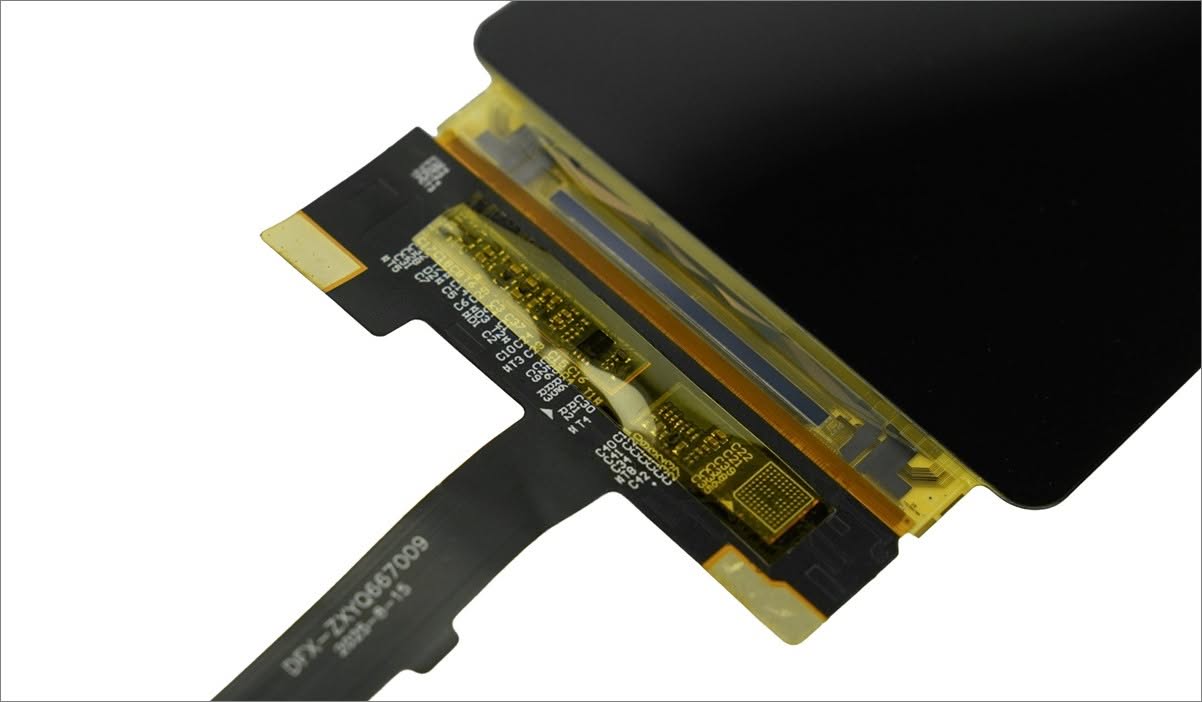
DFR1262 Flexible Display
DFRobot Flexible Display (DFR1262)

Design Tailored for DIY Projects, Engineers, and Designers.

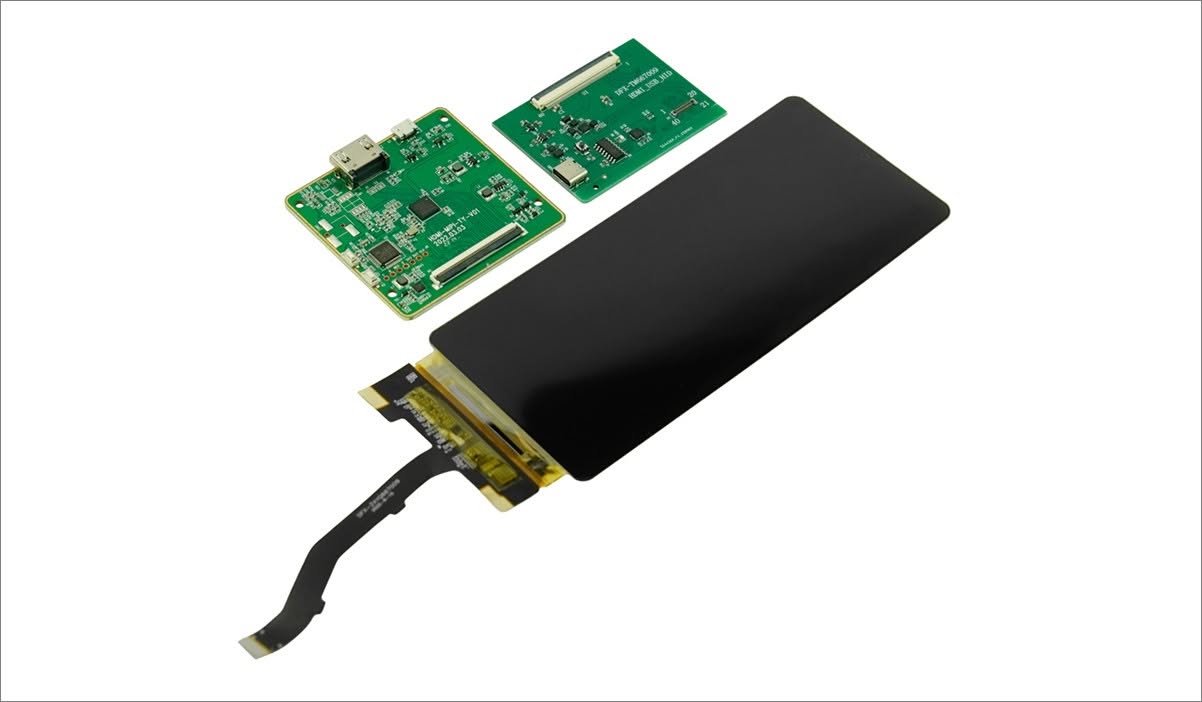
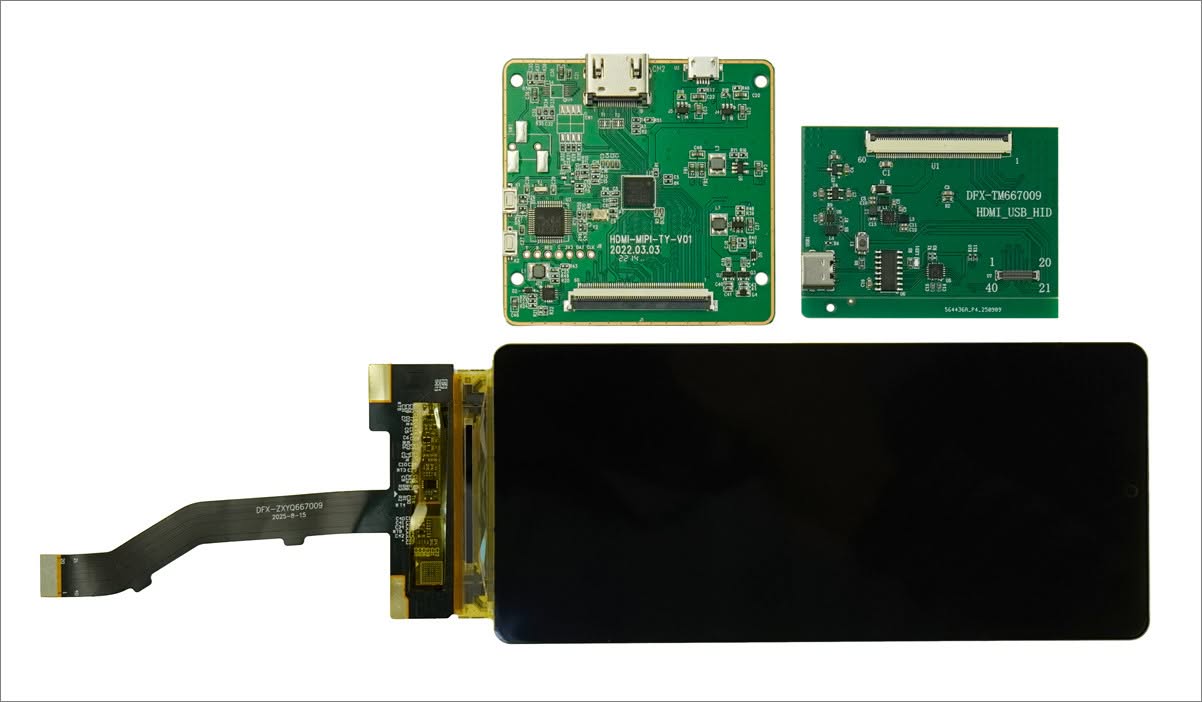
DFRobot has addressed design limitations with the release of its 6.67” Flexible AMOLED Display, specifically designed for LattePanda and Raspberry Pi boards. This kit merges an ultra-thin, flexible substrate with a high-density, high-definition Active-Matrix OLED panel, bringing the advanced curved display technology typically seen in premium smartphones directly to engineers, hobbyists, and industrial designers. Furthermore, by incorporating a custom MIPI-to-HDMI driver board, DFRobot has eliminated the common challenges associated with low-level display configuration.


No more boxy projects

For years, building custom hardware meant wrestling with the “box penalty.” You design a sleek, ergonomic handheld, an advanced wearable, or a futuristic robot face, only to find your entire aesthetic ruined because you have to mount a flat, rigid glass rectangle right in the middle of it.

Whether you are hacking together a sci-fi bracer, a sweeping automotive dashboard prototype, or a social robot with an expressive, curved face, this kit means your enclosures no longer have to live in the flatlands. The future of hardware is officially bendy.

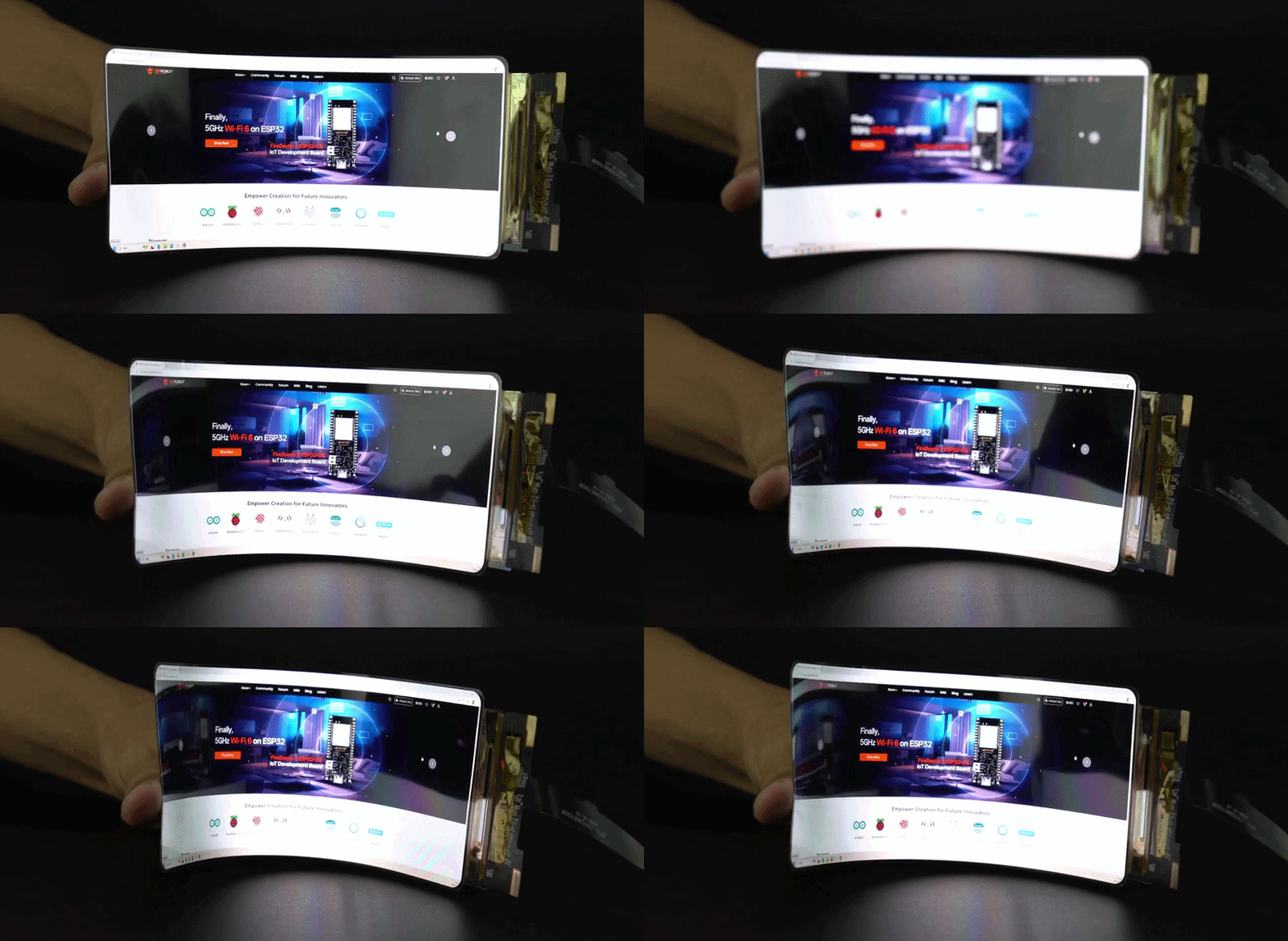
The new 6.67″ Flexible AMOLED Display Kit brings the bendable, organic screen tech found in high-end smartphones straight to the maker community. At a razor-thin 1.2mm thick, the panel uses a tough polyimide plastic substrate instead of brittle glass. This lets you warp, curve, and wrap the display smoothly around contoured enclosures without snapping the internal circuits or distorting the image.

Because it’s an AMOLED panel, the visual performance is superior. Every individual pixel glows on its own. When a pixel displays black, it turns completely off, offering true ink-like blacks and a rich 16.7-million color palette that makes user interfaces pop—even at extreme 85-degree viewing angles.

Easy and user friendly to setup

But the real engineering triumph here is how easy it is to use. Raw mobile screens communicate using low-level, notoriously frustrating MIPI signals that usually require custom Linux kernel configurations. DFRobot solves this by bundling a hardware MIPI-to-HDMI driver board.

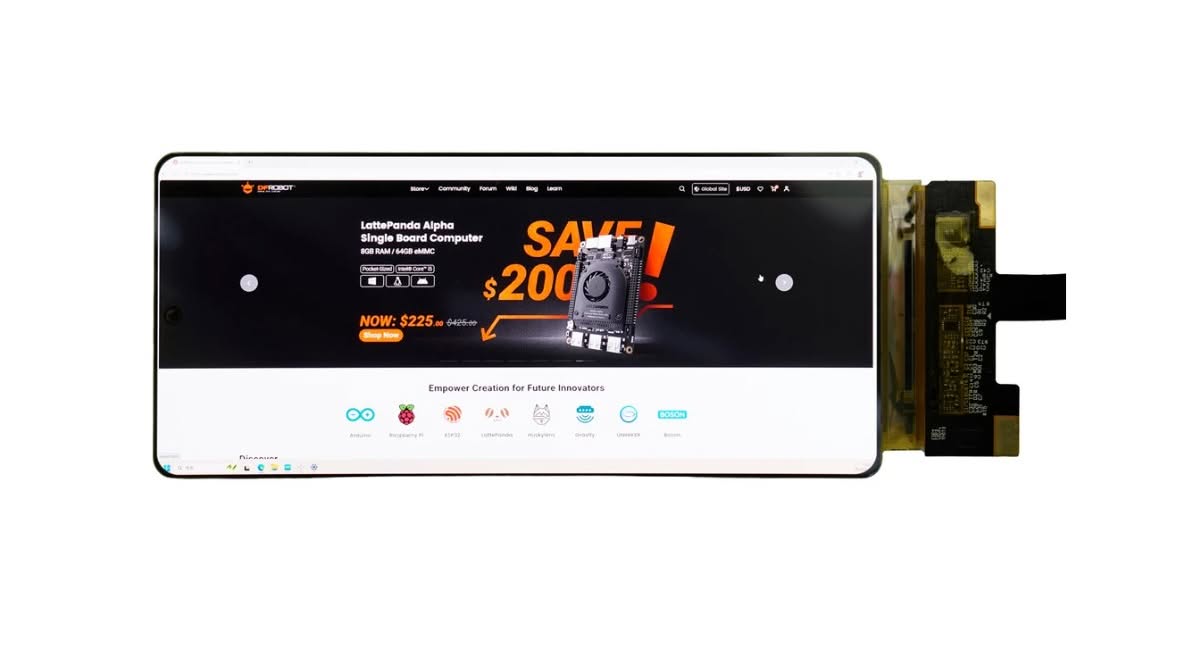
You simply connect a standard HDMI cable from your Raspberry Pi, LattePanda, mini PC, or desktop, supply standard 5V power, and the screen springs to life as a standard plug-and-play monitor. No custom code required.

Interfacing with the Flexible Display
DFRobot Flexible AMOLED Display 2
DFRobot Flexible AMOLED Display 1
DFRobot Flexible AMOLED Display 3

Vivid, High-Resolution AMOLED Visuals

The display features a resolution of 2400×1080 and a typical brightness of 450 cd/m². This AMOLED panel produces sharp text and vibrant images. With 16.7 million colors and an 85° viewing angle, it ensures consistent color accuracy from various perspectives. Whether showcasing complex UI elements, videos, or graphics, this screen delivers well-saturated visuals suitable for both consumer and industrial applications. It also provides a streamlined HDMI setup for SBCs.

The included driver board provides a standard HDMI input, enabling direct connection to SBCs without the need for custom kernel compilation or complicated adapter boards.


Beyond the Flat Dashboard: An Ideal Solution for Embedded Automotive Projects

The days of the blocky, utilitarian car dashboard are officially over. Step inside any modern vehicle, and you are instantly greeted by sweeping, panoramic glass cockpits that curve gracefully around the driver’s line of sight. Carmakers are rapidly moving away from flat, tablet-like screens in favor of organic, flowing digital interfaces.

For automotive engineers, aftermarket modders, and custom overland builders, mimicking this modern aesthetic has been an uphill battle. Until now, prototyping a custom digital dashboard or flight simulator cockpit meant forcing a flat, rigid glass monitor into a naturally contoured dashboard shroud. It looked clunky, out of place, and broke the design rhythm of the interior. This flexible display changes the game entirely, serving as the perfect mechanical and visual missing link for car-embedded projects.

Bending to the Geometry of the Cockpit

The primary reason this display fits automotive projects so perfectly is its structural freedom. At a hyper-thin 1.2 mm, the display completely eliminates brittle glass substrates in favor of a bendable polyimide plastic base.

In automotive prototyping, space behind the instrument cluster is at an absolute premium—it is tightly packed with structural crossbeams, HVAC ducting, and wiring harnesses. Because this panel has no bulky LED backlight assembly, it can be wrapped flush against a curved dashboard bezel or center console housing, requiring virtually zero deep cavity space. Whether you are building an overland navigation cluster that contours seamlessly to an asymmetrical dashboard pod or an avionics panel that wraps around a pilot’s seat, the screen adapts to your design, rather than your design adapting to the screen.

Uncompromising Daytime Visibility and “True Black” Aesthetics

Automotive cabins present one of the harshest environments for electronic displays due to extreme ambient lighting and glare. Traditional LCD panels struggle here; their backlights wash out under indirect sunlight, making map data or crucial engine telemetry difficult to read.

As an AMOLED screen, every individual pixel emits its own light. With a bright 450-nit output and an mathematically infinite contrast ratio, graphics remain razor-sharp and punchy. More importantly for car interiors, when an AMOLED pixel displays black, it turns off entirely. This means when you design a dashboard interface with a pitch-black background, the edges of the display disappear completely into the shadows of the physical dashboard trim. You get a seamless, factory-finish look where the gauges look like they are floating directly on the dashboard surface, rather than sitting trapped inside a glowing grey rectangle.

Furthermore, the display features a wide 85° viewing angle across all axes. Whether the screen is tilted toward the driver or centered in the console for the passenger, there is zero color shifting or contrast degradation—a vital safety feature when monitoring real-time vehicle vitals on the move.

Dead-Simple Integration with In-Car Compute Platforms

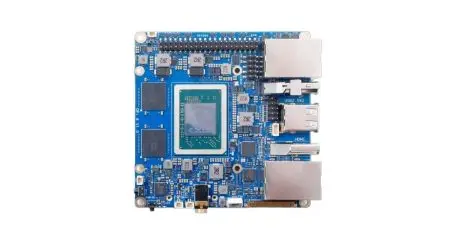
Building a custom infotainment layout requires processing power, usually delivered via single-board computers like the Raspberry Pi or x86 platforms like the LattePanda running custom Android, Linux, or Windows dashboard builds.

Ordinarily, hooking up a raw flexible smartphone screen to an embedded computer requires low-level MIPI signal engineering, proprietary drivers, and constant troubleshooting. DFRobot eliminates this entire hurdle by including a hardware-level MIPI-to-HDMI driver board.

The board runs seamlessly on standard 5V power, easily tapped from a vehicle’s accessory wiring or a standard USB port. You simply run a standard HDMI cable from your LattePanda or Raspberry Pi into the driver board, and your custom digital instrument cluster boots instantly as a plug-and-play monitor. By marrying smartphone-tier physical flexibility with standard desktop ease of use, DFRobot has delivered the ultimate tool for shaping the next generation of custom automotive cockpits.


Main Features

FeatureDescription
Ultra‑Thin Flexible Profile1.2 mm maximum thickness enables integration into tight spaces and curved mechanical designs.
Vivid Visuals2400×1080 (SPR) resolution, 450 cd/m² brightness, and 16.7M colors deliver high‑contrast, self‑emissive AMOLED output.
Plug‑and‑Play IntegrationIncluded MIPI‑to‑HDMI driver board removes the need for complex DSI routing.
SBC CompatibilityWorks with the following boards:
✔ LattePanda IOTA/MU/Alpha/3 Delta/Sigma
✔ Raspberry Pi 4, and Raspberry Pi 5 via HDMI.
Independent PowerPowered through 5 V Micro USB on the driver board (approx. 3 W typical consumption).

📱 Specification

CategoryItemDetails
Display CharacteristicsScreen Size6.67 inches
Resolution2400×1080 (SPR)
Screen MaterialAM‑OLED
Brightness450 cd/m²
Frequency50 Hz
Aspect Ratio20:9
Viewing Angle85°
Display Colors16.7M
Display Area154.56 × 69.552 mm
MechanicalDimensions162.56 × 74.46 mm
Maximum Thickness1.2 mm
Driver & InterfaceDriver ICICNA3511A
Driver Voltage3.3–5 V
InterfaceMIPI‑40Pin
Operating Temperature−20°C to 60°C
Package ContentsIncluded Items×1 6.67‑inch AMOLED flexible display
×1 HDMI driver board
×1 MIPI adapter board
×1 FPC cable
×1 HDMI‑to‑HDMI data cable
×1 Micro USB power cable
1 2 3 4 5 6 7
Flexible AMOLED Display
Share. Facebook Twitter Pinterest LinkedIn Tumblr Email
Previous ArticleBanana Pi BPI-SM10 Review: 60 TOPS RISC-V Jetson Orin Nano Alternative
Next Article CamThink NeoEyes NE503: A 20 TOPS 4k Edge AI Camera Platform Powerhouse
androidpimp
  • Website

Related Posts

Orange Pi 6

Orange Pi 6 Launches: New 45 TOPS AI SBC Beats Raspberry Pi HATs in Speed [Review]

July 23, 2026
BPi Wi Fi 7 NIC BE14(V2.1)

BPI-R4 Wi-Fi 7 NIC (BE14): OpenWrt Setup & Optimal WiFi Power Guide

July 10, 2026
Raspberry Pi Zero 3W SBC

Orange Pi Zero 3W Review: $25 Dual Video Pi Zero 2W Killer?

June 26, 2026
0 0 votes
Article Rating
Subscribe
Notify of
0 Comments
Oldest
Newest Most Voted
Categories
PureVPN
PureVPN Ad Banner
PrivadoVPN – No. 1 in Parental Control
PrivadoVPN 350x437
VyprVPN – No. 1 in Anonymity
Vyprvpn 350x260
Recent Posts
  • Orange Pi 6 Launches: New 45 TOPS AI SBC Beats Raspberry Pi HATs in Speed [Review]
  • How to install OpenWrt on Xiaomi AX3000T Router (A Quick Guide)
  • Orange Pi Maker Xunlong & Huawei Launch Edge AI at WAIC 2026
  • AliExpress Promo Codes: July 2026 (100% Verified)
  • BPI-R4 Wi-Fi 7 NIC (BE14): OpenWrt Setup & Optimal WiFi Power Guide
  • Orange Pi Zero 3W Review: $25 Dual Video Pi Zero 2W Killer?
  • CamThink NeoEyes NE503: A 20 TOPS 4k Edge AI Camera Platform Powerhouse
  • DFRobot 6.67″ Flexible AMOLED Review: Best Raspberry Pi & LattePanda Display?
  • Banana Pi BPI-SM10 Review: 60 TOPS RISC-V Jetson Orin Nano Alternative
  • SpacemiT K3 Pico-ITX Review: 60-TOPS RISC-V Powerhouse for LLMs?
RSS The Latest RSS Feeds
  • How to install OpenWrt on Xiaomi AX3000T Router (A Quick Guide)
  • Orange Pi Maker Xunlong & Huawei Launch Edge AI at WAIC 2026
  • AliExpress Promo Codes: July 2026 (100% Verified)
Facebook X (Twitter) Instagram Pinterest
@2026 - All Right Reserved. Designed by AndroidPIMP

Type above and press Enter to search. Press Esc to cancel.

Accessibility
Accessibility modes
Epilepsy Safe Mode
Dampens color and removes blinks
This mode enables people with epilepsy to use the website safely by eliminating the risk of seizures that result from flashing or blinking animations and risky color combinations.
Visually Impaired Mode
Improves website's visuals
This mode adjusts the website for the convenience of users with visual impairments such as Degrading Eyesight, Tunnel Vision, Cataract, Glaucoma, and others.
Cognitive Disability Mode
Helps to focus on specific content
This mode provides different assistive options to help users with cognitive impairments such as Dyslexia, Autism, CVA, and others, to focus on the essential elements of the website more easily.
ADHD Friendly Mode
Reduces distractions and improve focus
This mode helps users with ADHD and Neurodevelopmental disorders to read, browse, and focus on the main website elements more easily while significantly reducing distractions.
Blindness Mode
Allows using the site with your screen-reader
This mode configures the website to be compatible with screen-readers such as JAWS, NVDA, VoiceOver, and TalkBack. A screen-reader is software for blind users that is installed on a computer and smartphone, and websites must be compatible with it.
Readable Experience
Content Scaling
Default
Text Magnifier
Readable Font
Dyslexia Friendly
Highlight Titles
Highlight Links
Font Sizing
Default
Letter Spacing
Default
Left Aligned
Center Aligned
Right Aligned
Visually Pleasing Experience
Dark Contrast
Light Contrast
Monochrome
High Contrast
High Saturation
Low Saturation
Adjust Text Colors
Adjust Title Colors
Adjust Background Colors
Easy Orientation
Mute Sounds
Hide Images
Hide Emoji
Reading Guide
Stop Animations
Reading Mask
Highlight Hover
Highlight Focus
Big Dark Cursor
Big Light Cursor
Cognitive Reading
Virtual Keyboard
Navigation Keys
Voice Navigation

AndroidPIMP

Accessibility Statement

  • AndroidPIMP.com
  • 10/18/2025

Compliance status

We believe the internet should be open and accessible to everyone, and we’re dedicated to making our website usable for the widest audience possible, no matter their circumstances or abilities.

To achieve this, we follow the World Wide Web Consortium’s (W3C) Web Content Accessibility Guidelines 2.1 (WCAG 2.1) at the AA level as closely as possible. These guidelines outline how to make web content accessible for people with a variety of disabilities. By complying with them, we help ensure our website is usable by everyone, including those who are blind, have motor or visual impairments, cognitive disabilities, and more.

This website uses a range of technologies to stay accessible at all times. An accessibility interface lets people with specific disabilities customize the site’s UI and design to fit their personal needs.

The website also uses an AI-powered application that works in the background to constantly enhance its accessibility. This app fixes the site’s HTML, adjusts its features and behavior for screen readers used by blind users, and optimizes keyboard functions for people with motor impairments.

If you’ve found a malfunction or have ideas for improvement, we’ll be happy to hear from you. You can reach out to the website’s operators by using the following email tzahi.work@gmail.com

Screen-reader and keyboard navigation

Our website implements the ARIA attributes (Accessible Rich Internet Applications) technique, alongside various different behavioral changes, to ensure blind users visiting with screen-readers are able to read, comprehend, and enjoy the website’s functions. As soon as a user with a screen-reader enters your site, they immediately receive a prompt to enter the Screen-Reader Profile so they can browse and operate your site effectively. Here’s how our website covers some of the most important screen-reader requirements, alongside console screenshots of code examples:

  1. Screen-reader optimization: we run a background process that learns the website’s components from top to bottom, to ensure ongoing compliance even when updating the website. In this process, we provide screen-readers with meaningful data using the ARIA set of attributes. For example, we provide accurate form labels; descriptions for actionable icons (social media icons, search icons, cart icons, etc.); validation guidance for form inputs; element roles such as buttons, menus, modal dialogues (popups), and others. Additionally, the background process scans all the website’s images and provides an accurate and meaningful image-object-recognition-based description as an ALT (alternate text) tag for images that are not described. It will also extract texts that are embedded within the image, using an OCR (optical character recognition) technology. To turn on screen-reader adjustments at any time, users need only to press the Alt+1 keyboard combination. Screen-reader users also get automatic announcements to turn the Screen-reader mode on as soon as they enter the website.

    These adjustments are compatible with all popular screen readers, including JAWS and NVDA.

  2. Keyboard navigation optimization: The background process also adjusts the website’s HTML, and adds various behaviors using JavaScript code to make the website operable by the keyboard. This includes the ability to navigate the website using the Tab and Shift+Tab keys, operate dropdowns with the arrow keys, close them with Esc, trigger buttons and links using the Enter key, navigate between radio and checkbox elements using the arrow keys, and fill them in with the Spacebar or Enter key.Additionally, keyboard users will find quick-navigation and content-skip menus, available at any time by clicking Alt+1, or as the first elements of the site while navigating with the keyboard. The background process also handles triggered popups by moving the keyboard focus towards them as soon as they appear, and not allow the focus drift outside it.

    Users can also use shortcuts such as “M” (menus), “H” (headings), “F” (forms), “B” (buttons), and “G” (graphics) to jump to specific elements.

Disability profiles supported in our website

  • Epilepsy Safe Mode: this profile enables people with epilepsy to use the website safely by eliminating the risk of seizures that result from flashing or blinking animations and risky color combinations.
  • Visually Impaired Mode: this mode adjusts the website for the convenience of users with visual impairments such as Degrading Eyesight, Tunnel Vision, Cataract, Glaucoma, and others.
  • Cognitive Disability Mode: this mode provides different assistive options to help users with cognitive impairments such as Dyslexia, Autism, CVA, and others, to focus on the essential elements of the website more easily.
  • ADHD Friendly Mode: this mode helps users with ADHD and Neurodevelopmental disorders to read, browse, and focus on the main website elements more easily while significantly reducing distractions.
  • Blindness Mode: this mode configures the website to be compatible with screen-readers such as JAWS, NVDA, VoiceOver, and TalkBack. A screen-reader is software for blind users that is installed on a computer and smartphone, and websites must be compatible with it.
  • Keyboard Navigation Profile (Motor-Impaired): this profile enables motor-impaired persons to operate the website using the keyboard Tab, Shift+Tab, and the Enter keys. Users can also use shortcuts such as “M” (menus), “H” (headings), “F” (forms), “B” (buttons), and “G” (graphics) to jump to specific elements.

Additional UI, design, and readability adjustments

  1. Font adjustments – users, can increase and decrease its size, change its family (type), adjust the spacing, alignment, line height, and more.
  2. Color adjustments – users can select various color contrast profiles such as light, dark, inverted, and monochrome. Additionally, users can swap color schemes of titles, texts, and backgrounds, with over seven different coloring options.
  3. Animations – person with epilepsy can stop all running animations with the click of a button. Animations controlled by the interface include videos, GIFs, and CSS flashing transitions.
  4. Content highlighting – users can choose to emphasize important elements such as links and titles. They can also choose to highlight focused or hovered elements only.
  5. Audio muting – users with hearing devices may experience headaches or other issues due to automatic audio playing. This option lets users mute the entire website instantly.
  6. Cognitive disorders – we utilize a search engine that is linked to Wikipedia and Wiktionary, allowing people with cognitive disorders to decipher meanings of phrases, initials, slang, and others.
  7. Additional functions – we provide users the option to change cursor color and size, use a printing mode, enable a virtual keyboard, and many other functions.

Browser and assistive technology compatibility

We aim to support the widest array of browsers and assistive technologies as possible, so our users can choose the best fitting tools for them, with as few limitations as possible. Therefore, we have worked very hard to be able to support all major systems that comprise over 95% of the user market share including Google Chrome, Mozilla Firefox, Apple Safari, Opera and Microsoft Edge, JAWS and NVDA (screen readers).

Notes, comments, and feedback

Despite our very best efforts to allow anybody to adjust the website to their needs. There may still be pages or sections that are not fully accessible, are in the process of becoming accessible, or are lacking an adequate technological solution to make them accessible. Still, we are continually improving our accessibility, adding, updating and improving its options and features, and developing and adopting new technologies. All this is meant to reach the optimal level of accessibility, following technological advancements. For any assistance, please reach out to tzahi.work@gmail.com

wpDiscuz