Maybe you missed it? Rii RK805 Mechanical Gaming Keyboard Review.
Part I: Product Introduction
Shenzhen Riitek Technology, China [31-07-2026]
Riitek unveils the RS201 Portable Monitor, a 16″ HDR display for travelers, developers, DIY enthusiasts, and gamers.
Many mobile workers, gamers, and software engineers need extra screens. However, they have a problem. Regular 16:9 1080p portable monitors often seem small, have a limited area for scrolling, and have weak magnetic covers that can easily fall off on café tables.
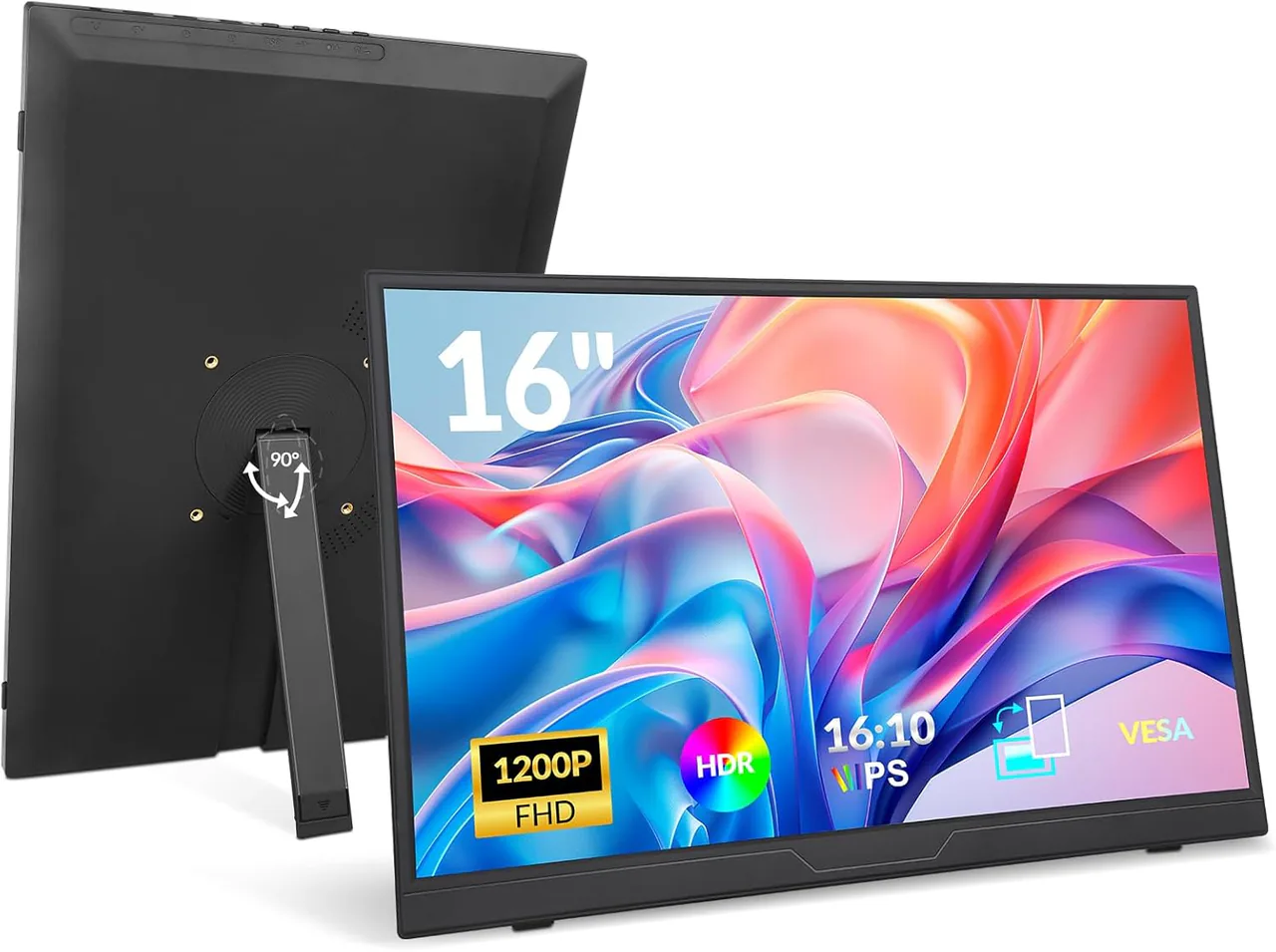
Peripheral hardware specialist Riitek is tackling these challenges with the launch of its Rii 16-Inch 1200P FHD+ Portable Monitor. This monitor features a taller 16:10 WUXGA IPS panel and an innovative built-in 90-degree rotatable kickstand, providing a complete second-screen setup designed to optimize vertical screen space, ensure low-latency connectivity, and offer ergonomic flexibility for users on the go.
The 16:10 Ratio Advantage: Why Vertical Pixels Matter More Than Ever
Standard full HD screens have a resolution of 1920 x 1080. Rii’s 16-inch panel has a higher resolution of 1920 x 1200 pixels. That extra 120 vertical pixels deliver roughly 11% more usable screen real estate—a subtle change on paper that completely transforms everyday productivity.
“When working on a portable screen, vertical depth is the real bottleneck. More vertical space means less scrolling, quicker document editing, and a tidier setup for using multiple windows at once.
For developers, content creators, and spreadsheet enthusiasts, the taller 16:10 aspect ratio provides distinct advantages:
- Coding & Terminal Output: Read significantly more lines of code simultaneously without needing to scroll endlessly through scripts.
- Data & Financial Modeling: Display extra rows in Microsoft Excel or Google Sheets for faster data analysis on the go.
- Document Management & Editing: Side-by-side legal or writing workflows gain vertical padding that closely mimics real physical paper documents.
Ditching the Folio Cover: An Integrated 90° Rotatable Kickstand
The most notable design upgrade on the Rii 16-inch monitor is its heavy-duty built-in rotatable kickstand. Traditional portable monitors rely on magnetic origami-style smart cases that quickly wear down, slip on smooth surfaces, or lack adjustable viewing angles.
Rii’s integrated kickstand swivels smoothly up to 90 degrees, giving users continuous control over screen tilt to reduce neck strain. Crucially, the stand supports seamless transitions between two distinct operational modes:
1. Landscape Orientation
Ideal for expanding a primary laptop display during remote meetings, editing video timelines in Premiere or DaVinci Resolve, or kicking back with console gaming in a hotel room.
2. Native Portrait Mode
By rotating the monitor 90 degrees vertically, the screen transforms into a dedicated document, code, or social feed monitor. Software engineers can run live code compilers while monitoring terminal logs, while creators can keep continuous tabs on Slack, Discord, or live analytics streams.
Visuals & Eye Comfort: High Contrast IPS Display
A common critique of budget-friendly portable displays is washed-out contrast and narrow viewing angles. The Rii 16-inch display addresses this with a high-grade IPS panel featuring a 1500:1 static contrast ratio—a noticeable bump over standard 1000:1 portable panels.
- Deeper Blacks & Sharp Text: Fine code syntax and text characters remain crisp and legible even at lower brightness levels.
- 178° Wide Viewing Angles: Colors remain accurate and vibrant when sharing screen content during collaborative group sessions.
- Anti-Glare Matte Finish: The diffused coating reduces reflections from harsh overhead fluorescent lights or outdoor ambient sunlight.
- Hardware Eye-Care Protection: Integrated Low Blue Light and Flicker-Free backlighting help mitigate eye fatigue during long late-night coding or editing sessions.
Single-Cable Plug-and-Play Simplicity
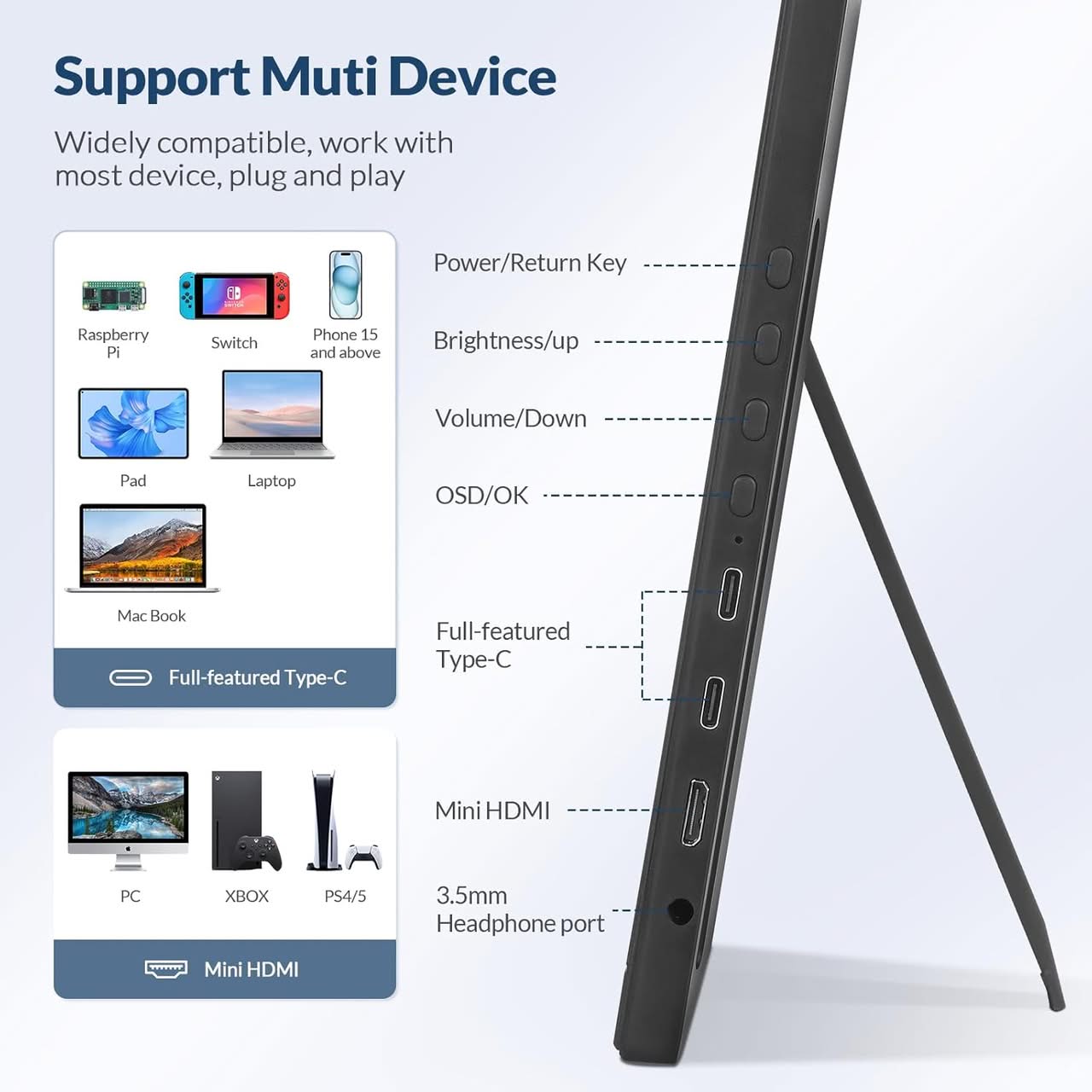
The Rii 16-inch Portable Monitor simplifies cable management with versatile I/O options that require zero driver downloads or manual software installation:
- Dual Full-Featured USB Type-C Ports: Supporting Thunderbolt 3/4/5 and USB-C DP Alt Mode, a single cable handles video, audio, and power delivery directly from a MacBook, Windows PC, iPad Pro, or compatible Android device.
- Pass-Through Charging: By plugging an external USB-C power wall adapter directly into the monitor’s secondary port, the display feeds power backward to keep the connected laptop or handheld device charged during intensive workloads.
- Mini HDMI Compatibility: Includes a Mini HDMI to HDMI cable for seamless connection to desktop GPUs, legacy laptops, and gaming consoles like the PlayStation 5, Xbox Series X, Nintendo Switch, or Steam Deck.
Dual built-in stereo speakers provide onboard audio for conference calls and media playback, complemented by a dedicated 3.5mm headphone jack for private listening.
Rii RS201 Monitor Interfaces – Supporting a wide range of devices
Key Advantages for Gamers
1. Dock-Free Handheld Gaming (Nintendo Switch, Steam Deck, ROG Ally)
The biggest selling point for handheld gamers is single-cable USB-C connectivity:
- Nintendo Switch without the TV Dock: The monitor’s full-featured USB-C ports carry power, video, and audio over one cable. You can play Switch on a 16-inch screen at a hotel or coffee shop without lugging around the bulky official Nintendo dock.
- Handheld PC Expansion: Devices like the Steam Deck, ASUS ROG Ally, or Lenovo Legion Go plug directly in via USB-C to immediately scale handheld games up to a crisp 16-inch display.
- Pass-Through Powering: Plug your USB-C power adapter into the monitor, and it will charge both the screen and your connected handheld device simultaneously during long gaming sessions.
2. Taller 16:10 Aspect Ratio for Strategy & RPG Games
Standard TVs and monitors run on a widescreen 16:9 ratio. Moving to 16:10 (1920 x 1200) adds 120 extra vertical pixels:
- Expanded Field of View: In strategy games (e.g., Civilization, Total War), RPGs, and simulators, the extra vertical headroom displays more of the map, HUD elements, and inventory menus without cluttering the main action.
- Retro & Emulation Gaming: Classic retro titles and arcade emulators natively fit 4:3 and taller aspect ratios much better, resulting in smaller black sidebars (letterboxing).
3. Superior Visual Fidelity & Contrast
Budget portable screens often suffer from washed-out colors and weak contrast. This panel features:
- 1500:1 Static Contrast Ratio: Significantly higher than standard 1000:1 IPS panels, delivering noticeably deeper blacks and better shadow detail in atmospheric or dark titles (e.g., Elden Ring, Diablo IV, or Cyberpunk 2077).
- 178° Wide Viewing Angles: The IPS panel ensures zero color distortion or darkening when playing local couch co-op or tabletop multiplayer games with friends standing or sitting beside you.
- Anti-Glare Matte Coating: Diffuses harsh overhead lighting or sunlight when gaming outdoors, on trains, or near bright windows.
4. Built-in Audio & Zero-Latency Headphone Output
- Integrated Stereo Speakers: Eliminates the need to pack extra portable Bluetooth speakers for casual console gaming.
- 3.5mm Headphone Jack: Allows you to plug in a wired gaming headset directly into the display for zero audio lag—crucial for rhythm games and competitive shooters where Bluetooth latency causes a delay between audio and action.
5. Multi-Console Compatibility via Mini HDMI
In addition to dual USB-C ports, the built-in Mini HDMI port makes it instantly compatible with traditional home consoles like the PlayStation 5, Xbox Series X/S, or Nintendo Switch. It turns any hotel room or travel desk into a compact multi-console station.
Comfortable Easy to Mount
Horizontal & vertical mounting, vesa mountable
The RS201 features a standard folding kickstand with an integrated plastic hinge on the back, which extends to support the device like a picture frame.
Built-in Folding Kickstand / Foldable Base: An integrated hinge or flip-out kickstand built into the lower half of the rear chassis. This allows continuous angle adjustments for standard landscape tilt.
VESA mounting holes: Also included are standard 75×75 mm VESA mounting holes on the back for those who wish to attach an external arm or bracket.
90° Rotating Detachable Stands: The monitor model features a dedicated central hinge on a detachable base, allowing you to rotate the display 90° into portrait orientation without the need to physically unplug or move the base.
Rii RS201 Monitor: Front and Rear Views
What Gamers Should Keep in Mind
- 60Hz Refresh Rate: At 1200P/60Hz, this model is built for immersive AAA single-player games, RPGs, fighting games, and handheld emulation rather than ultra-high-frame-rate competitive eSports shooters (like Valorant or Apex Legends).
- Aspect Ratio Scaling on Consoles: While PCs and handhelds automatically adapt to 1920×1200, home consoles (PS5/Xbox) output a native 16:9 signal (1080p). The monitor will display slight, thin black bars at the top and bottom to preserve perfect, un-stretched 1:1 pixel accuracy.
Full Technical Specifications
| Hardware Feature | Specification Details |
| Display Size | 16.0 Inches Diagonal |
| Panel Type | IPS LCD with Anti-Glare Matte Coating |
| Native Resolution | 1920 x 1200 (WUXGA / FHD+) |
| Brigthness | 330 cd/m² |
| Aspect Ratio | 16:10 |
| Refresh Rate | 60 Hz |
| Contrast Ratio | 1500:1 |
| Viewing Angle | 178° Horizontal / 178° Vertical |
| Stand Mechanism | Integrated 90° Rotatable Heavy-Duty Kickstand |
| Connectivity | 2x USB-C (DP Alt-Mode & Power Delivery), 1x Mini HDMI |
| Audio | Dual Onboard Stereo Speakers + 3.5mm Headphone Jack |
| OS Compatibility | macOS, Windows 10/11, ChromeOS, iPadOS, iOS, Android, Linux |
| Power Consumption | 15 W |
| Weight | 739 g |