
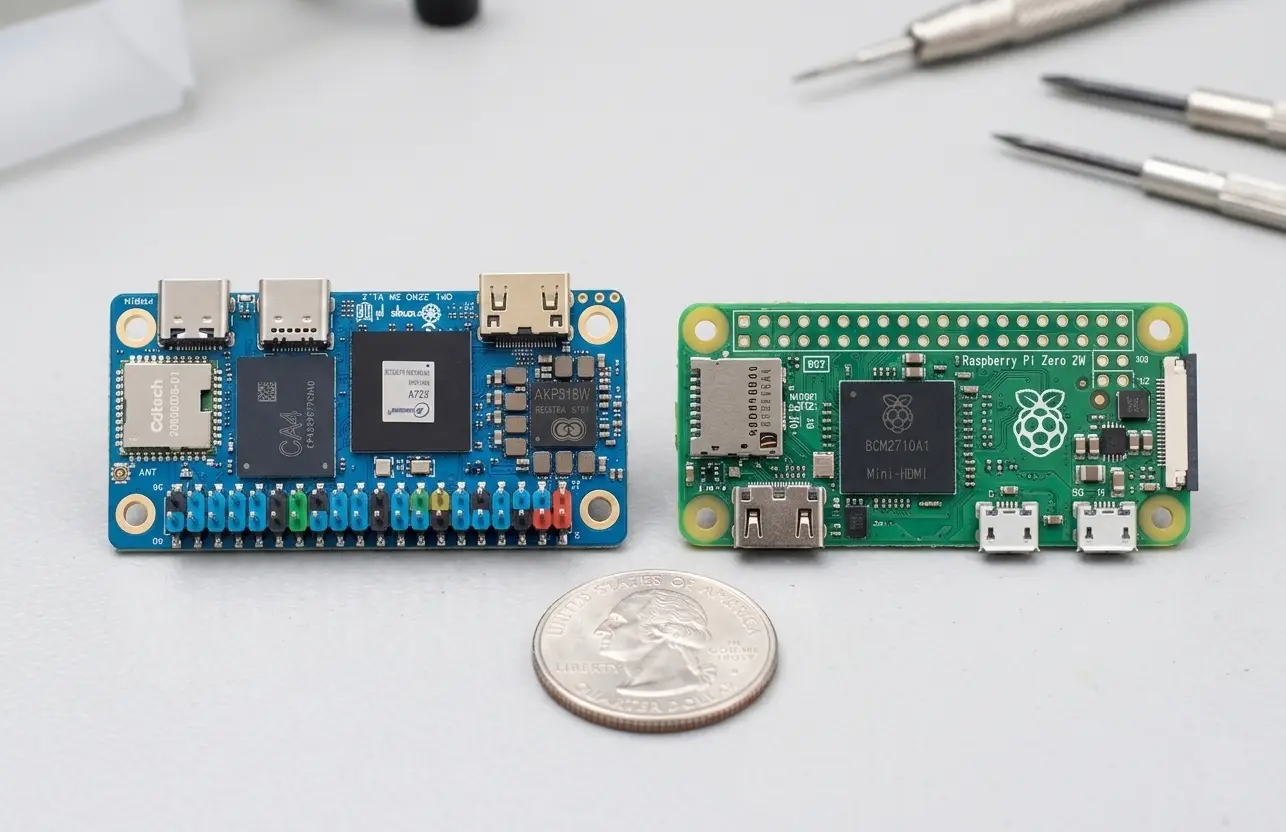
Power consumption
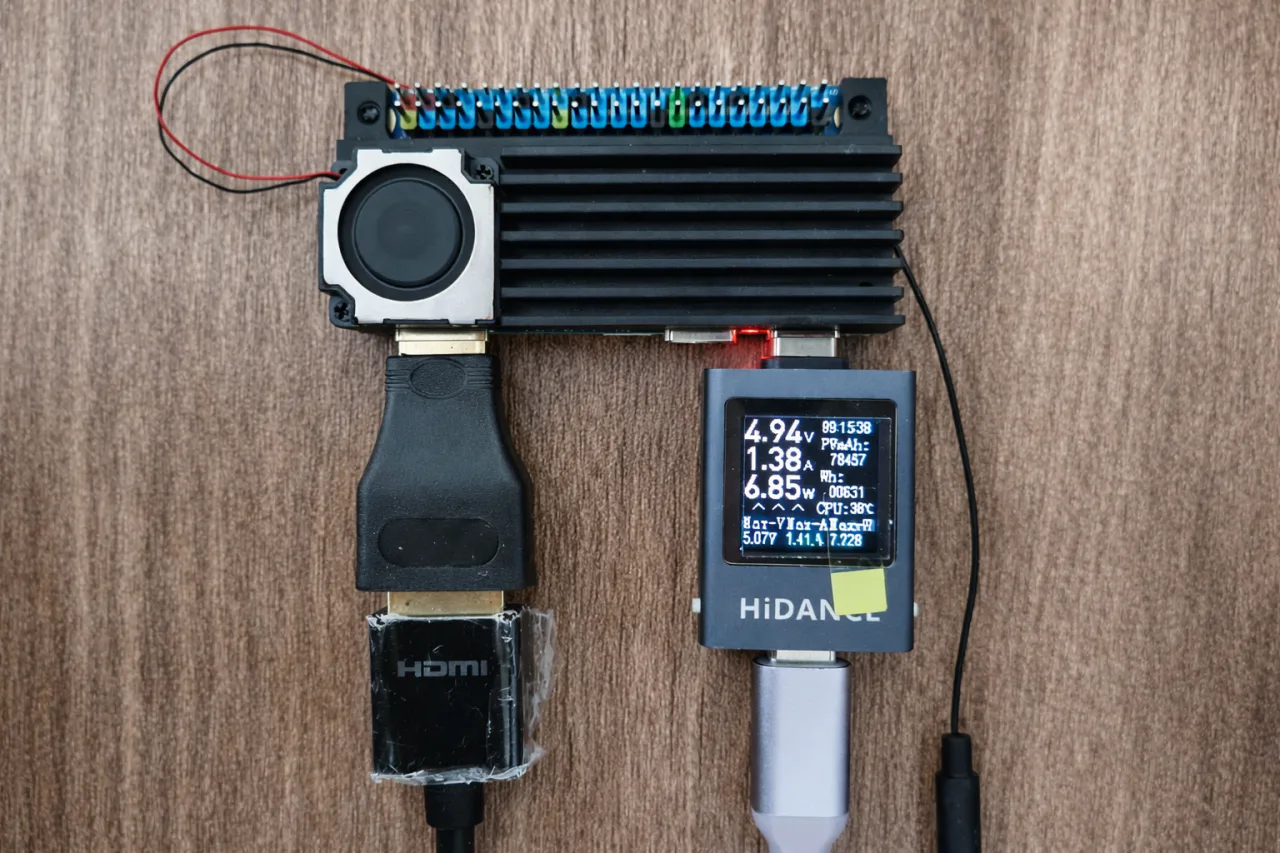
Based on our testing, which involved running a stress test script that fully loaded all CPU cores for 1 minute, we recorded a peak power usage of approximately 7 watts, which is quite low. Additionally, you should not experience any issues connecting this board to a power bank as a power source.
Our 1-Minute Stress Script
#!/bin/bash

# Ensure the script is run with sudo/root privileges
if [ "$EUID" -ne 0 ]; then
    echo "ERROR: Please run this script with sudo privileges."
    echo "Usage: sudo ./advanced_stress.sh"
    exit 1
fi

# 1. System Dependency Validation
if ! command -v mpstat &> /dev/null; then
    echo "Dependency 'sysstat' missing. Installing..."
    apt-get update -y && apt-get install -y sysstat
fi

CORES=$(nproc)
REPORT_FILE="cpu_stress_report.txt"
DURATION=60  # Set to 60 seconds (1 minute)

> "$REPORT_FILE"
{
    echo "======================================================================"
    echo "                 ORANGE PI 1-MINUTE PERFORMANCE REPORT                "
    echo "======================================================================"
    echo "Start Timestamp : $(date)"
    echo "Device Model    : $(tr -d '\0' < /sys/firmware/devicetree/base/model 2>/dev/null || echo 'Generic Orange Pi Board')"
    echo "Total CPU Cores : $CORES Available"
    echo "Test Horizon    : $DURATION Seconds"
    echo "======================================================================"
} >> "$REPORT_FILE"

echo "=================================================="
echo " Starting 1-Minute CPU Performance Benchmark"
echo "=================================================="

# 2. Fire up the heavy load generators FIRST
echo "Engaging maximum CPU resource computational stressors..."
STRESS_PIDS=()
for i in $(seq 1 $CORES); do
    sha1sum /dev/zero > /dev/null 2>&1 &
    STRESS_PIDS+=($!)
done

# Give the background processes 1 second to fully spin up to 100%
sleep 1

# 3. Dynamic Tracking Loop (Runs while stress processes are alive)
elapsed=0
while [ $elapsed -lt $((DURATION - 2)) ]; do
    {
        echo -e "\n--------------------------------------------------"
        echo " TIMELINE SNAPSHOT: ${elapsed}s / ${DURATION}s"
        echo "--------------------------------------------------"

        # Core Frequencies
        echo "[*] CPU Core Operational Frequencies:"
        for i in $(seq 0 $((CORES-1))); do
            FREQ_PATH="/sys/devices/system/cpu/cpu$i/cpufreq/scaling_cur_freq"
            if [ -f "$FREQ_PATH" ]; then
                RAW_FREQ=$(cat "$FREQ_PATH")
                echo "    Core $i: $((RAW_FREQ / 1000)) MHz"
            fi
        done

        # Temperature
        if [ -f "/sys/class/thermal/thermal_zone0/temp" ]; then
            RAW_TEMP=$(cat /sys/class/thermal/thermal_zone0/temp)
            echo -e "\n[*] SoC Die Junction Temperature: $((RAW_TEMP / 1000))°C"
        fi

        # Real-time Workload
        echo -e "\n[*] Active Per-Core Workload Capacities:"
    } >> "$REPORT_FILE"

    # Run mpstat directly in the main thread to guarantee accurate sampling timing
    mpstat -P ALL 1 1 | awk '/Average:/ && $2 ~ /[0-9]/ {printf "    Core %s: %.1f%%\n", $2, (100 - $12)}' >> "$REPORT_FILE"

    # Snapshot interval pacing
    elapsed=$((elapsed + 3))
    sleep 2

    # UI countdown progress printout
    printf "\r[+] Processing load tests... Remaining Duration Window: %2d seconds." "$((DURATION - elapsed))"
done

echo -e "\n\nTarget period elapsed. Initiating safety cleanup protocol..."

# 4. Safety Cleanup Routines
kill "${STRESS_PIDS[@]}" 2>/dev/null
wait "${STRESS_PIDS[@]}" 2>/dev/null

{
    echo -e "\n======================================================================"
    echo "End Timestamp   : $(date)"
    echo "STATUS          : 1-Minute Stress Cycle Finished Successfully."
    echo "======================================================================"
} >> "$REPORT_FILE"

echo "SUCCESS: Benchmark completed. View report with: cat $REPORT_FILE"
Test Report:
                 Orange Pi Zero W3 1-MINUTE PERFORMANCE REPORT
======================================================================
Start Timestamp : Fri Jun 12 08:56:20 AM UTC 2026
Device Model    : sun60iw2
Total CPU Cores : 8 Available
Test Horizon    : 60 Seconds
======================================================================

--------------------------------------------------
 TIMELINE SNAPSHOT: 0s / 60s
--------------------------------------------------
[*] CPU Core Operational Frequencies:
    Core 0: 1794 MHz
    Core 1: 1794 MHz
    Core 2: 1794 MHz
    Core 3: 1794 MHz
    Core 4: 1794 MHz
    Core 5: 1794 MHz
    Core 6: 2002 MHz
    Core 7: 2002 MHz

[*] SoC Die Junction Temperature: 57°C

[*] Active Per-Core Workload Capacities:
    Core 0: 100.0%
    Core 1: 100.0%
    Core 2: 100.0%
    Core 3: 100.0%
    Core 4: 100.0%
    Core 5: 100.0%
    Core 6: 100.0%
    Core 7: 100.0%

--------------------------------------------------
 TIMELINE SNAPSHOT: 3s / 60s
--------------------------------------------------
[*] CPU Core Operational Frequencies:
    Core 0: 1794 MHz
    Core 1: 1794 MHz
    Core 2: 1794 MHz
    Core 3: 1794 MHz
    Core 4: 1794 MHz
    Core 5: 1794 MHz
    Core 6: 2002 MHz
    Core 7: 2002 MHz

[*] SoC Die Junction Temperature: 59°C

[*] Active Per-Core Workload Capacities:
    Core 0: 100.0%
    Core 1: 100.0%
    Core 2: 100.0%
    Core 3: 100.0%
    Core 4: 100.0%
    Core 5: 100.0%
    Core 6: 100.0%
    Core 7: 100.0%

--------------------------------------------------
 TIMELINE SNAPSHOT: 6s / 60s
--------------------------------------------------
[*] CPU Core Operational Frequencies:
    Core 0: 1794 MHz
    Core 1: 1794 MHz
    Core 2: 1794 MHz
    Core 3: 1794 MHz
    Core 4: 1794 MHz
    Core 5: 1794 MHz
    Core 6: 2002 MHz
    Core 7: 2002 MHz

[*] SoC Die Junction Temperature: 60°C

[*] Active Per-Core Workload Capacities:
    Core 0: 100.0%
    Core 1: 100.0%
    Core 2: 100.0%
    Core 3: 100.0%
    Core 4: 100.0%
    Core 5: 100.0%
    Core 6: 100.0%
    Core 7: 100.0%

--------------------------------------------------
 TIMELINE SNAPSHOT: 9s / 60s
--------------------------------------------------
[*] CPU Core Operational Frequencies:
    Core 0: 1794 MHz
    Core 1: 1794 MHz
    Core 2: 1794 MHz
    Core 3: 1794 MHz
    Core 4: 1794 MHz
    Core 5: 1794 MHz
    Core 6: 2002 MHz
    Core 7: 2002 MHz

[*] SoC Die Junction Temperature: 59°C

[*] Active Per-Core Workload Capacities:
    Core 0: 100.0%
    Core 1: 100.0%
    Core 2: 100.0%
    Core 3: 100.0%
    Core 4: 100.0%
    Core 5: 100.0%
    Core 6: 100.0%
    Core 7: 100.0%

--------------------------------------------------
 TIMELINE SNAPSHOT: 12s / 60s
--------------------------------------------------
[*] CPU Core Operational Frequencies:
    Core 0: 1794 MHz
    Core 1: 1794 MHz
    Core 2: 1794 MHz
    Core 3: 1794 MHz
    Core 4: 1794 MHz
    Core 5: 1794 MHz
    Core 6: 2002 MHz
    Core 7: 2002 MHz

[*] SoC Die Junction Temperature: 60°C

[*] Active Per-Core Workload Capacities:
    Core 0: 100.0%
    Core 1: 100.0%
    Core 2: 100.0%
    Core 3: 100.0%
    Core 4: 100.0%
    Core 5: 100.0%
    Core 6: 100.0%
    Core 7: 100.0%

--------------------------------------------------
 TIMELINE SNAPSHOT: 15s / 60s
--------------------------------------------------
[*] CPU Core Operational Frequencies:
    Core 0: 1794 MHz
    Core 1: 1794 MHz
    Core 2: 1794 MHz
    Core 3: 1794 MHz
    Core 4: 1794 MHz
    Core 5: 1794 MHz
    Core 6: 2002 MHz
    Core 7: 2002 MHz

[*] SoC Die Junction Temperature: 60°C

[*] Active Per-Core Workload Capacities:
    Core 0: 100.0%
    Core 1: 100.0%
    Core 2: 100.0%
    Core 3: 100.0%
    Core 4: 100.0%
    Core 5: 100.0%
    Core 6: 100.0%
    Core 7: 100.0%

--------------------------------------------------
 TIMELINE SNAPSHOT: 18s / 60s
--------------------------------------------------
[*] CPU Core Operational Frequencies:
    Core 0: 1794 MHz
    Core 1: 1794 MHz
    Core 2: 1794 MHz
    Core 3: 1794 MHz
    Core 4: 1794 MHz
    Core 5: 1794 MHz
    Core 6: 2002 MHz
    Core 7: 2002 MHz

[*] SoC Die Junction Temperature: 60°C

[*] Active Per-Core Workload Capacities:
    Core 0: 100.0%
    Core 1: 100.0%
    Core 2: 100.0%
    Core 3: 100.0%
    Core 4: 100.0%
    Core 5: 100.0%
    Core 6: 100.0%
    Core 7: 100.0%

--------------------------------------------------
 TIMELINE SNAPSHOT: 21s / 60s
--------------------------------------------------
[*] CPU Core Operational Frequencies:
    Core 0: 1794 MHz
    Core 1: 1794 MHz
    Core 2: 1794 MHz
    Core 3: 1794 MHz
    Core 4: 1794 MHz
    Core 5: 1794 MHz
    Core 6: 2002 MHz
    Core 7: 2002 MHz

[*] SoC Die Junction Temperature: 61°C

[*] Active Per-Core Workload Capacities:
    Core 0: 100.0%
    Core 1: 100.0%
    Core 2: 100.0%
    Core 3: 100.0%
    Core 4: 100.0%
    Core 5: 100.0%
    Core 6: 100.0%
    Core 7: 100.0%

--------------------------------------------------
 TIMELINE SNAPSHOT: 24s / 60s
--------------------------------------------------
[*] CPU Core Operational Frequencies:
    Core 0: 1794 MHz
    Core 1: 1794 MHz
    Core 2: 1794 MHz
    Core 3: 1794 MHz
    Core 4: 1794 MHz
    Core 5: 1794 MHz
    Core 6: 2002 MHz
    Core 7: 2002 MHz

[*] SoC Die Junction Temperature: 62°C

[*] Active Per-Core Workload Capacities:
    Core 0: 100.0%
    Core 1: 100.0%
    Core 2: 100.0%
    Core 3: 100.0%
    Core 4: 100.0%
    Core 5: 100.0%
    Core 6: 100.0%
    Core 7: 100.0%

--------------------------------------------------
 TIMELINE SNAPSHOT: 27s / 60s
--------------------------------------------------
[*] CPU Core Operational Frequencies:
    Core 0: 1794 MHz
    Core 1: 1794 MHz
    Core 2: 1794 MHz
    Core 3: 1794 MHz
    Core 4: 1794 MHz
    Core 5: 1794 MHz
    Core 6: 2002 MHz
    Core 7: 2002 MHz

[*] SoC Die Junction Temperature: 61°C

[*] Active Per-Core Workload Capacities:
    Core 0: 100.0%
    Core 1: 100.0%
    Core 2: 100.0%
    Core 3: 100.0%
    Core 4: 100.0%
    Core 5: 100.0%
    Core 6: 100.0%
    Core 7: 100.0%

--------------------------------------------------
 TIMELINE SNAPSHOT: 30s / 60s
--------------------------------------------------
[*] CPU Core Operational Frequencies:
    Core 0: 1794 MHz
    Core 1: 1794 MHz
    Core 2: 1794 MHz
    Core 3: 1794 MHz
    Core 4: 1794 MHz
    Core 5: 1794 MHz
    Core 6: 2002 MHz
    Core 7: 2002 MHz

[*] SoC Die Junction Temperature: 62°C

[*] Active Per-Core Workload Capacities:
    Core 0: 100.0%
    Core 1: 100.0%
    Core 2: 100.0%
    Core 3: 100.0%
    Core 4: 100.0%
    Core 5: 100.0%
    Core 6: 100.0%
    Core 7: 100.0%

--------------------------------------------------
 TIMELINE SNAPSHOT: 33s / 60s
--------------------------------------------------
[*] CPU Core Operational Frequencies:
    Core 0: 1794 MHz
    Core 1: 1794 MHz
    Core 2: 1794 MHz
    Core 3: 1794 MHz
    Core 4: 1794 MHz
    Core 5: 1794 MHz
    Core 6: 2002 MHz
    Core 7: 2002 MHz

[*] SoC Die Junction Temperature: 61°C

[*] Active Per-Core Workload Capacities:
    Core 0: 100.0%
    Core 1: 100.0%
    Core 2: 100.0%
    Core 3: 100.0%
    Core 4: 100.0%
    Core 5: 100.0%
    Core 6: 100.0%
    Core 7: 100.0%

--------------------------------------------------
 TIMELINE SNAPSHOT: 36s / 60s
--------------------------------------------------
[*] CPU Core Operational Frequencies:
    Core 0: 1794 MHz
    Core 1: 1794 MHz
    Core 2: 1794 MHz
    Core 3: 1794 MHz
    Core 4: 1794 MHz
    Core 5: 1794 MHz
    Core 6: 2002 MHz
    Core 7: 2002 MHz

[*] SoC Die Junction Temperature: 62°C

[*] Active Per-Core Workload Capacities:
    Core 0: 100.0%
    Core 1: 100.0%
    Core 2: 100.0%
    Core 3: 100.0%
    Core 4: 100.0%
    Core 5: 100.0%
    Core 6: 100.0%
    Core 7: 100.0%

--------------------------------------------------
 TIMELINE SNAPSHOT: 39s / 60s
--------------------------------------------------
[*] CPU Core Operational Frequencies:
    Core 0: 1794 MHz
    Core 1: 1794 MHz
    Core 2: 1794 MHz
    Core 3: 1794 MHz
    Core 4: 1794 MHz
    Core 5: 1794 MHz
    Core 6: 2002 MHz
    Core 7: 2002 MHz

[*] SoC Die Junction Temperature: 62°C

[*] Active Per-Core Workload Capacities:
    Core 0: 100.0%
    Core 1: 100.0%
    Core 2: 100.0%
    Core 3: 100.0%
    Core 4: 100.0%
    Core 5: 100.0%
    Core 6: 100.0%
    Core 7: 100.0%

--------------------------------------------------
 TIMELINE SNAPSHOT: 42s / 60s
--------------------------------------------------
[*] CPU Core Operational Frequencies:
    Core 0: 1794 MHz
    Core 1: 1794 MHz
    Core 2: 1794 MHz
    Core 3: 1794 MHz
    Core 4: 1794 MHz
    Core 5: 1794 MHz
    Core 6: 2002 MHz
    Core 7: 2002 MHz

[*] SoC Die Junction Temperature: 62°C

[*] Active Per-Core Workload Capacities:
    Core 0: 100.0%
    Core 1: 100.0%
    Core 2: 100.0%
    Core 3: 100.0%
    Core 4: 100.0%
    Core 5: 100.0%
    Core 6: 100.0%
    Core 7: 100.0%

--------------------------------------------------
 TIMELINE SNAPSHOT: 45s / 60s
--------------------------------------------------
[*] CPU Core Operational Frequencies:
    Core 0: 1794 MHz
    Core 1: 1794 MHz
    Core 2: 1794 MHz
    Core 3: 1794 MHz
    Core 4: 1794 MHz
    Core 5: 1794 MHz
    Core 6: 2002 MHz
    Core 7: 2002 MHz

[*] SoC Die Junction Temperature: 62°C

[*] Active Per-Core Workload Capacities:
    Core 0: 100.0%
    Core 1: 100.0%
    Core 2: 100.0%
    Core 3: 100.0%
    Core 4: 100.0%
    Core 5: 100.0%
    Core 6: 100.0%
    Core 7: 100.0%

--------------------------------------------------
 TIMELINE SNAPSHOT: 48s / 60s
--------------------------------------------------
[*] CPU Core Operational Frequencies:
    Core 0: 1794 MHz
    Core 1: 1794 MHz
    Core 2: 1794 MHz
    Core 3: 1794 MHz
    Core 4: 1794 MHz
    Core 5: 1794 MHz
    Core 6: 2002 MHz
    Core 7: 2002 MHz

[*] SoC Die Junction Temperature: 62°C

[*] Active Per-Core Workload Capacities:
    Core 0: 100.0%
    Core 1: 100.0%
    Core 2: 100.0%
    Core 3: 100.0%
    Core 4: 100.0%
    Core 5: 100.0%
    Core 6: 100.0%
    Core 7: 100.0%

--------------------------------------------------
 TIMELINE SNAPSHOT: 51s / 60s
--------------------------------------------------
[*] CPU Core Operational Frequencies:
    Core 0: 1794 MHz
    Core 1: 1794 MHz
    Core 2: 1794 MHz
    Core 3: 1794 MHz
    Core 4: 1794 MHz
    Core 5: 1794 MHz
    Core 6: 2002 MHz
    Core 7: 2002 MHz

[*] SoC Die Junction Temperature: 62°C

[*] Active Per-Core Workload Capacities:
    Core 0: 100.0%
    Core 1: 100.0%
    Core 2: 100.0%
    Core 3: 100.0%
    Core 4: 100.0%
    Core 5: 100.0%
    Core 6: 100.0%
    Core 7: 100.0%

--------------------------------------------------
 TIMELINE SNAPSHOT: 54s / 60s
--------------------------------------------------
[*] CPU Core Operational Frequencies:
    Core 0: 1794 MHz
    Core 1: 1794 MHz
    Core 2: 1794 MHz
    Core 3: 1794 MHz
    Core 4: 1794 MHz
    Core 5: 1794 MHz
    Core 6: 2002 MHz
    Core 7: 2002 MHz

[*] SoC Die Junction Temperature: 63°C

[*] Active Per-Core Workload Capacities:
    Core 0: 100.0%
    Core 1: 100.0%
    Core 2: 100.0%
    Core 3: 100.0%
    Core 4: 100.0%
    Core 5: 100.0%
    Core 6: 100.0%
    Core 7: 100.0%

--------------------------------------------------
 TIMELINE SNAPSHOT: 57s / 60s
--------------------------------------------------
[*] CPU Core Operational Frequencies:
    Core 0: 1794 MHz
    Core 1: 1794 MHz
    Core 2: 1794 MHz
    Core 3: 1794 MHz
    Core 4: 1794 MHz
    Core 5: 1794 MHz
    Core 6: 2002 MHz
    Core 7: 2002 MHz

[*] SoC Die Junction Temperature: 63°C

[*] Active Per-Core Workload Capacities:
    Core 0: 100.0%
    Core 1: 100.0%
    Core 2: 100.0%
    Core 3: 100.0%
    Core 4: 100.0%
    Core 5: 100.0%
    Core 6: 100.0%
    Core 7: 100.0%

======================================================================
End Timestamp   : Fri Jun 12 08:57:22 AM UTC 2026
STATUS          : 1-Minute Stress Cycle Finished Successfully.
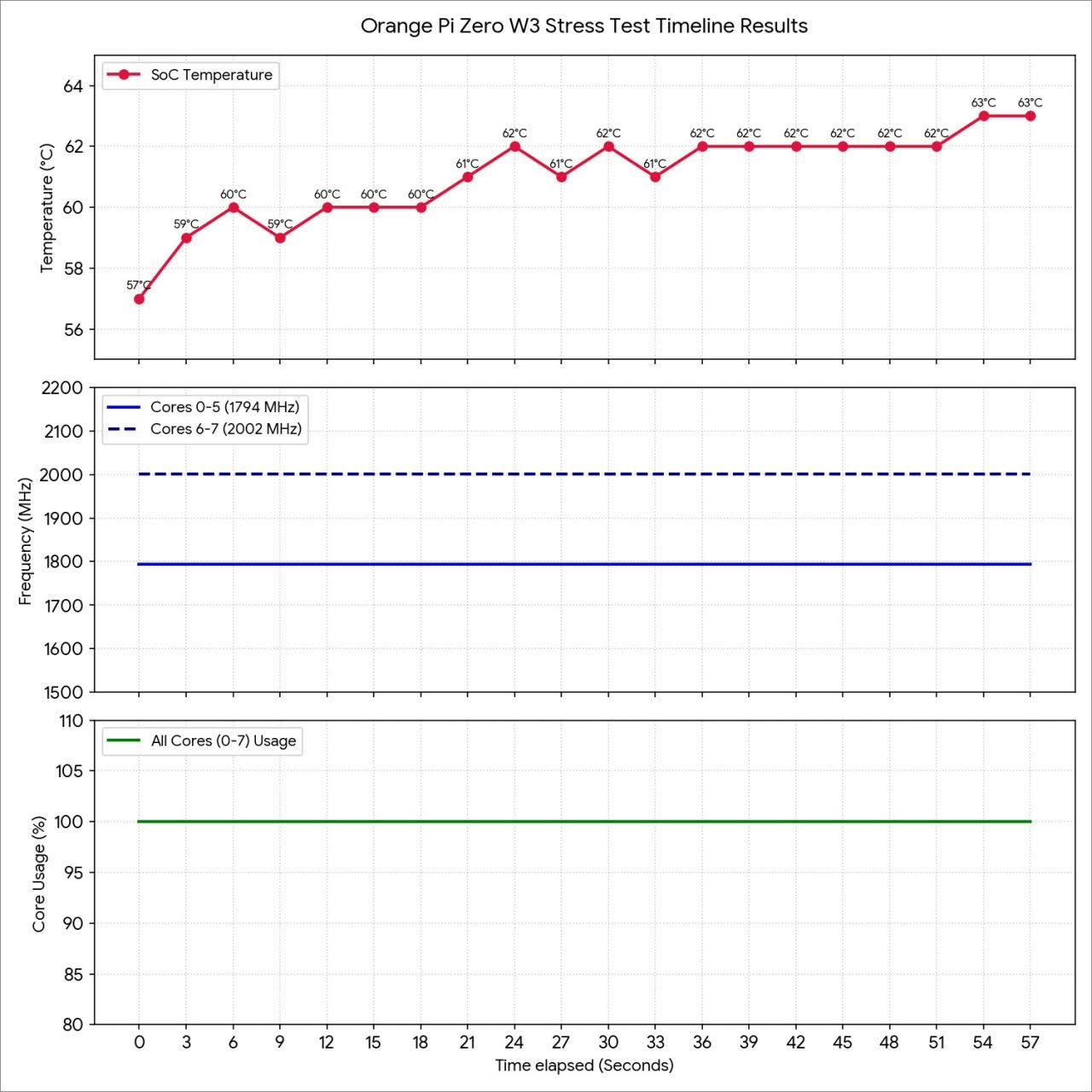
======================================================================
According to its user manual (PDF created 2026-05-15 11:18:04) GPU and video encoding/decoding units are only supported by “Debian bullseye” – which was released 2021, is in LTS with EOL August 2026 (this month, as of writing). In other words, OrangePI have released a device that had two months (2!) OS support left.
If its that critical, you can always use the Armbian image, or buy a pi board for 140-200$. its not that the software
is useless and cannot be updated.