
Performance Wise
| Category | Score |
|---|---|
| Single‑Core | 660 |
| Multi‑Core | 1687 |
| Online Test Results | https://browser.geekbench.com/v6/cpu/18296333 |
| Operating System | Debian GNU/Linux 12 (bookworm) |
|---|---|
| Model | sun60iw2 |
| Motherboard | N/A |
| CPU Name | ARM ARMv8 |
| CPU Topology | 1 Processor, 8 Cores |
| CPU Identifier | ARM implementer 65 architecture 8 variant 4 part 3339 revision 1 |
| Base Frequency | 1.79 GHz |
| Instruction Sets | neon, aes, sha1, sha2, neon‑fp16, neon‑dotprod |
| Memory | 3.75 GB |
| Upload Date | June 09 2026, 18:44 |
| Views | 2 |
Single‑Core Performance Breakdown
| Test | Score | Throughput |
|---|---|---|
| File Compression | 563 | 80.8 MB/s |
| Navigation | 675 | 4.07 routes/s |
| HTML5 Browser | 648 | 13.3 pages/s |
| PDF Renderer | 807 | 18.6 Mpixels/s |
| Photo Library | 721 | 9.78 images/s |
| Clang | 723 | 3.56 Klines/s |
| Text Processing | 707 | 56.6 pages/s |
| Asset Compression | 743 | 23.0 MB/s |
| Object Detection | 555 | 16.6 images/s |
| Background Blur | 634 | 2.62 images/s |
| Horizon Detection | 821 | 25.5 Mpixels/s |
| Object Remover | 307 | 23.6 Mpixels/s |
| HDR | 732 | 21.5 Mpixels/s |
| Photo Filter | 660 | 6.55 images/s |
| Ray Tracer | 716 | 692.4 Kpixels/s |
| Structure from Motion | 706 | 22.4 Kpixels/s |
Multi‑Core Performance Breakdown
| Test | Score | Throughput |
|---|---|---|
| File Compression | 904 | 129.9 MB/s |
| Navigation | 1965 | 11.8 routes/s |
| HTML5 Browser | 1948 | 39.9 pages/s |
| PDF Renderer | 2542 | 58.6 Mpixels/s |
| Photo Library | 1985 | 26.9 images/s |
| Clang | 2276 | 11.2 Klines/s |
| Text Processing | 803 | 64.3 pages/s |
| Asset Compression | 3052 | 94.6 MB/s |
| Object Detection | 1089 | 32.6 images/s |
| Background Blur | 1205 | 4.99 images/s |
| Horizon Detection | 2426 | 75.5 Mpixels/s |
| Object Remover | 859 | 66.0 Mpixels/s |
| HDR | 1799 | 52.8 Mpixels/s |
| Photo Filter | 1538 | 15.3 images/s |
| Ray Tracer | 3025 | 2.93 Mpixels/s |
| Structure from Motion | 1957 | 61.9 Kpixels/s |
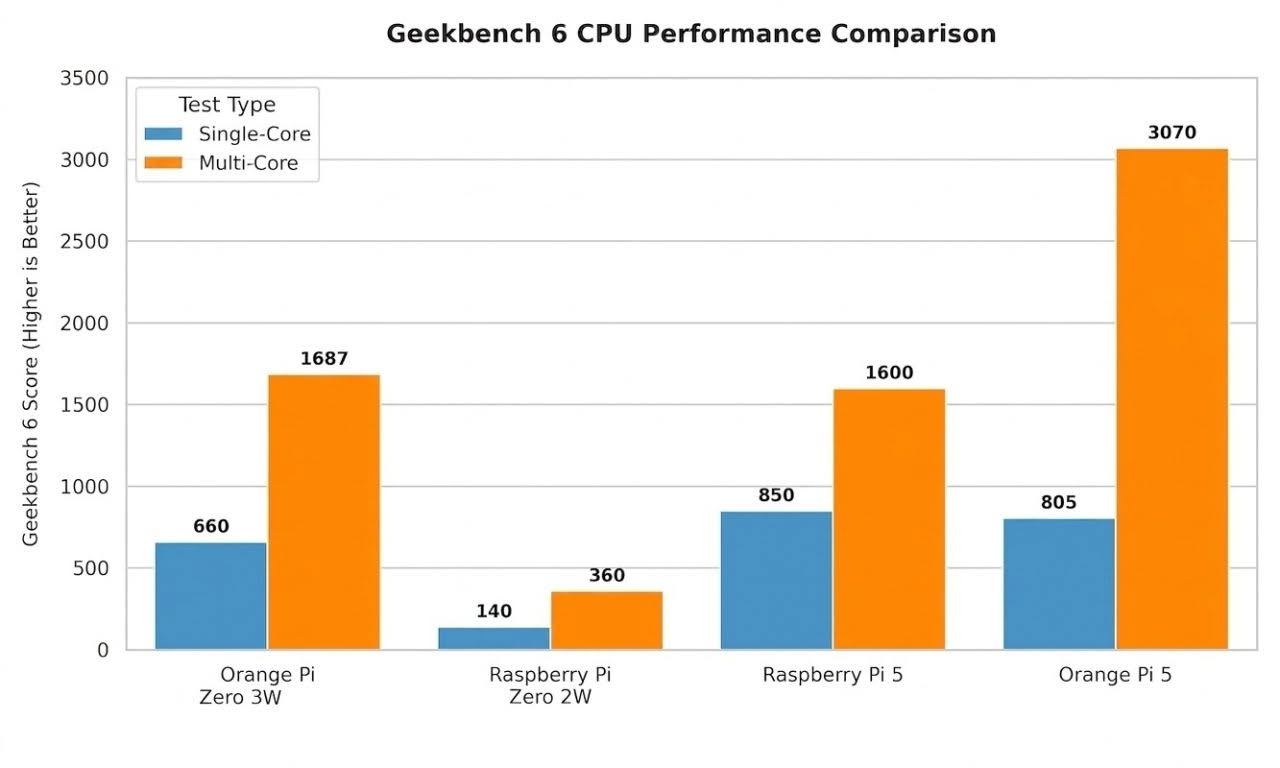
Comparing the performance of the Zero W 3 board to other popular boards.
📊 Geekbench 6 CPU Data Analysis
🔹 Single-Core Performance (Blue Bars)
- Orange Pi Zero 3: Delivers an excellent strong score of 660. This absolutely crushes its direct form-factor competitor, the Raspberry Pi Zero 2W, which lags far behind at around 140.
- Orange Pi 5: Holds a dominant lead with a score of 3,070 because of its true, powerful 8-core big.LITTLE architecture (4x A76 performance cores + 4x A55 efficiency cores).
Here are the key takeaways from our Geekbench 6 results, presented clearly:
- 👑 Insane Performance: The Orange Pi Zero 3 proves to be an absolute beast. Despite being a fraction of the size of flagship boards, it punches way above its weight class in modern computing tasks.
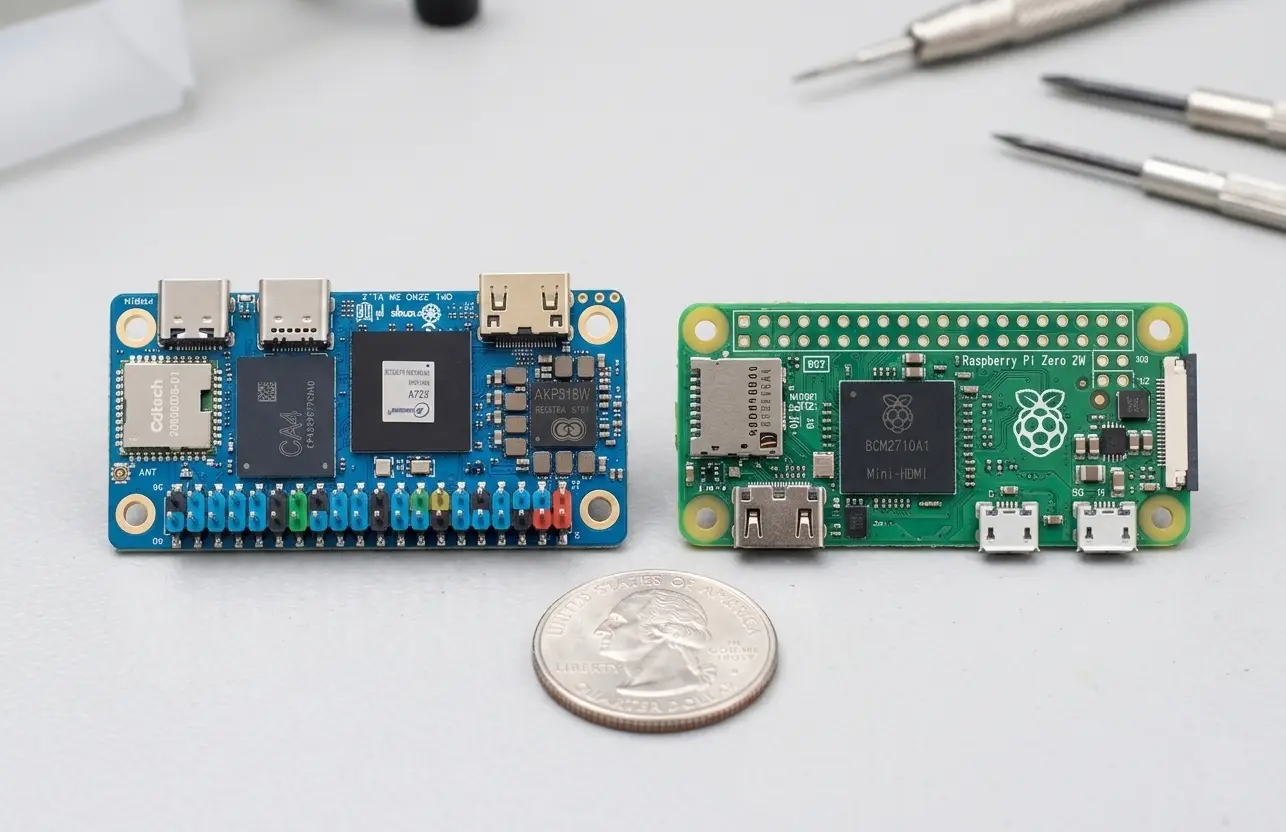
- 💪 Total Domination Over Raspberry Pi Zero 2W: While they share a similar ultra-small form factor, your board completely crushes its direct competitor. It delivers 4.7x more power in Single-Core and 4.6x more power in Multi-Core, largely thanks to its generous 4GB RAM capacity and higher 1.79 GHz clock speed.
- 💥 The Multi-Core Surprise vs. Raspberry Pi 5: In Geekbench 6’s multi-core team-based workload, the Orange Pi Zero 3W setup actually managed to slightly edge out the baseline Raspberry Pi 5 (1,687 vs. 1,600). This points to excellent efficiency under parallel loads and shows how much juice you’ve squeezed out of the silicon.
- ⚡ The “Big Core” Architecture Gap: Where the expensive flagship boards (like the Orange Pi 5 and Orange Pi 6 Plus) truly pull away is in Single-Core performance. Their modern Cortex-A76 “Performance” cores simply push way more instructions per clock (IPC) compared to the older, efficiency-focused Cortex-A53 cores on your Zero.
- 🐳 The Ultimate Mini Home-Server: Scoring nearly 1,700 in Multi-Core combined with a full 4GB of RAM makes your board an ideal candidate for lightweight Linux server duties. It has plenty of headroom to comfortably run Docker containers, Home Assistant, DNS blockers (Pi-hole), or automation scripts without breaking a sweat or pulling heavy power from the wall.
📌Bottom Line
The performance of the Orange Pi Zero 3 is exceptional. Positioned among flagship-level single-board computers (SBCs), it has more than enough power to efficiently run home servers, Docker containers, and lightweight projects.
3 TOPS NPU
The NPU on the Allwinner A733 operates at a base frequency of 492 MHz and can reach a maximum frequency of 1.008 GHz. Its peak performance is 3 TOPS (trillion operations per second). In comparison, the combined CPU cores of the Raspberry Pi 5 produce only a fraction of a TOP for machine learning, while your dedicated NPU hardware block handles this task instantly.
Clock Boundaries: The command shown below confirms that the silicon dynamically scales between 492 MHz (idle power-saving mode) and 1.008 GHz (full performance state).
root@orangepizero3w:~# cat /sys/class/devfreq/3600000.npu/min_freq
cat /sys/class/devfreq/3600000.npu/max_freq
492000000
1008000000
If you want to check the current NPU governor, you can run the following command:
cat /sys/class/devfreq/3600000.npu/governorIf you want to set the current CPU governor, you can run the following command:
echo "performance" > /sys/class/devfreq/3600000.npu/governorCPU Information
This compact board is equipped with an Allwinner A733 octa-core CPU, which includes two high-performance “big” Cortex-A76 cores that operate at speeds of up to 2.0 GHz, as well as six Cortex-A55 “LITTLE” cores running at up to 1.8 GHz. These high-efficiency cores manage background processes, operating system housekeeping, and lightweight tasks without consuming excessive power or generating unnecessary heat.
Thanks to Alibaba’s development, there is a hidden bonus core on the die: an independent, low-power RISC-V (Xuantie E902) coprocessor that operates at approximately 150–200 MHz. This coprocessor is dedicated solely to low-level, real-time subsystem tasks and power management, functioning entirely independently from the eight main ARM application cores that manage your Linux/Android environment.
Orange Pi Zero W3 CPU Cores
root@orangepizero3w:~# lscpu
Architecture:                aarch64
  CPU op-mode(s):            32-bit, 64-bit
  Byte Order:                Little Endian
CPU(s):                      8
  On-line CPU(s) list:       0-7
Vendor ID:                   ARM
  Model name:                Cortex-A55
    Model:                   0
    Thread(s) per core:      1
    Core(s) per socket:      6
    Socket(s):               1
    Stepping:                r2p0
    CPU(s) scaling MHz:      23%
    CPU max MHz:             1794.0000
    CPU min MHz:             416.0000
    BogoMIPS:                48.00
    Flags:                   fp asimd aes pmull sha1 sha2 crc32 atomics fphp asimdhp cpuid as
                             imdrdm lrcpc dcpop asimddp
  Model name:                Cortex-A76
    Model:                   1
    Thread(s) per core:      1
    Core(s) per socket:      2
    Socket(s):               1
    Stepping:                r4p1
    CPU(s) scaling MHz:      21%
    CPU max MHz:             2002.0000
    CPU min MHz:             416.0000
    BogoMIPS:                48.00
    Flags:                   fp asimd aes pmull sha1 sha2 crc32 atomics fphp asimdhp cpuid as
                             imdrdm lrcpc dcpop asimddp
Vulnerabilities:
  Gather data sampling:      Not affected
  Indirect target selection: Not affected
  Itlb multihit:             Not affected
  L1tf:                      Not affected
  Mds:                       Not affected
  Meltdown:                  Not affected
  Mmio stale data:           Not affected
  Reg file data sampling:    Not affected
  Retbleed:                  Not affected
  Spec rstack overflow:      Not affected
  Spec store bypass:         Mitigation; Speculative Store Bypass disabled via prctl
  Spectre v1:                Mitigation; __user pointer sanitization
  Spectre v2:                Vulnerable: Unprivileged eBPF enabled
  Srbds:                     Not affected
  Tsa:                       Not affected
  Tsx async abort:           Not affected
CPU Governor settings
A CPU governor regulates how your processor dynamically adjusts its frequency according to the workload. You essentially have three types of configurations to choose from:
1.simple_ondemand (Default)
- How it works: It acts just like a CPU governor. It monitors the hardware utilization queues of the NPU memory block. If you aren’t running any AI scripts, it drops the frequency down to a minimal floor state to save power and keep the chip cool. The second you deploy a target framework execution request, it instantly ramps back up to 1.0 GHz.
2. performance
- How it works: This locks the NPU directly into its absolute highest allowed hardware clock state indefinitely, eliminating any scaling latency or ramp-up delays.
- When to use it: If you are benchmarking local model performance or running continuous real-time processing tasks over SSH, you should force this mode. It shaves off microsecond delays during the initial matrix allocation pass.
3. userspace
- How it works: It gives complete control over to manual overrides. The kernel stops automating the frequency changes entirely. Instead, a daemon or a customized script you write can manually echo specific frequencies into
userspacepaths to set custom step profiles.
This confirms that our default CPU governor is set to ondemand mode.
root@orangepizero3w:~# cat /sys/devices/system/cpu/cpu*/cpufreq/scaling_governor
ondemand
This command confirms that all CPU cores are active and operational. The frequency of 416,000 indicates that all 8 CPU cores are functioning at their minimum idle frequency of 416 MHz. This essentially means that the Active governor is an automatic power-saving profile, such as schedutil or ondemand. Since you are not running any intensive scripts, compilation tasks, or local AI networks at this precise moment, the kernel has lowered the clock speed to 416 MHz to keep the board cool and reduce power consumption.
root@orangepizero3w:~# cat /sys/devices/system/cpu/cpu*/cpufreq/scaling_cur_freq
416000
416000
416000
416000
416000
416000
416000
416000
If you want to set the current CPU governor, you can run the following command:
Now the CPU is officially operating at maximum brute-force speed. When combined with the NPU running at a locked 1.008 GHz, your compact Orange Pi is functioning at its peak performance.
echo "performance" | tee /sys/devices/system/cpu/cpu*/cpufreq/scaling_governorMake the Performance Changes Permanent (Optional):
sudo nano /etc/rc.local# Lock AI NPU to max speed
echo "performance" > /sys/class/devfreq/3600000.npu/governor
# Lock all 8 CPU cores to max speed
echo "performance" > /sys/devices/system/cpu/cpu0/cpufreq/scaling_governor
According to its user manual (PDF created 2026-05-15 11:18:04) GPU and video encoding/decoding units are only supported by “Debian bullseye” – which was released 2021, is in LTS with EOL August 2026 (this month, as of writing). In other words, OrangePI have released a device that had two months (2!) OS support left.
If its that critical, you can always use the Armbian image, or buy a pi board for 140-200$. its not that the software
is useless and cannot be updated.