Close Menu
  • Home
  • About
  • Wearables
  • Earbuds
  • Computer Accessories
    • Routers
    • Remotes
  • Embedded
    • Single Board Computers
    • Addon Boards
    • Raspberry Pi
  • Wireless Routers
  • Contact
Facebook X (Twitter) Instagram Threads
Trending
  • Orange Pi 6 Review: A New 45 TOPS AI SBC Beats Raspberry Pi HATs in Speed
  • AliExpress Promo Codes: August 2026 (100% Verified)
  • Youyeetoo NestDisk Mini PC/Router: Is This Pocket-Sized 3-in-1 NAS Worth It?
  • Riitek RS201 16-Inch Portable Monitor Debuts for $69
  • DFRobot Unveils seeMote Cube: A 6DoF Physical Controller for Apple Vision Pro
  • Orange Pi X2 Mini PC Is Officially in the Works – Here’s What We Know
  • BPI-R4 Wi-Fi 7 NIC (BE14): OpenWrt Setup & Optimal WiFi Power Guide
  • How to install OpenWrt on Xiaomi AX3000T Router (A Quick Guide)
AndroidPIMP
Facebook X (Twitter) Instagram
  • Home
  • About
  • Wearables
  • Earbuds
  • Computer Accessories
    • Routers
    • Remotes
  • Embedded
    • Single Board Computers
    • Addon Boards
    • Raspberry Pi
  • Wireless Routers
  • Contact
AndroidPIMP
Embedded Computers

Orange Pi 6 Review: A New 45 TOPS AI SBC Beats Raspberry Pi HATs in Speed

By androidpimpAugust 10, 2026Updated:August 10, 20261 Comment61 Mins Read
Facebook Twitter Pinterest LinkedIn Tumblr Email
Follow Us
Google News Flipboard
Table of contents
  1. Part I: Product Intoduction
  2. Specifications
  3. Orange Pi 6 Interfaces
  4. Exclusive first-look photos (engineering sample).
  5. What else is in the pipeline?
  6. A true Raspberry Pi 5 killer in terms of both price and hardware specifications
    1. 1. Orange Pi 6 vs. Raspberry Pi 5 with AI HAT+ 2
    2. 1.1 Performance: 12-Core vs. 4-Core
    3. 1.2 Summary: Why the Orange Pi 6 Wins
  7. Raspberry Pi 5 versus Orange Pi 6
  8. Part II: Orange Pi 6 Review – Unboxing and Testing
    1. Package Contents
  9. A Closer Look at the Orange Pi 6 Board
  10. The Meta Case Design: Almost perfect, but not quite!
    1. Design Wise
    2. Airflow Design
  11. A Closer Look at the Case
  12. The lesser good.
    1. How to solve both problems?
    2. The rear side panel option
  13. Assembling the Pi 6 board into the case
  14. Software Support
  15. Video Playback Performance
  16. Chrome browser gpu settings
    1. Testing video playback using the Chrome web browser.
    2. SMPlayer
    3. Testing if 3D hardware acceleration is working (glxgears)
    4. Full report on the Orange Pi 6’s graphics stack.
      1. 3D/Desktop GPU rendering Support
  17. Hardware video decoding checked and confimed!
    1. Confirming if GStreamer on our Orange Pi includes hardware-accelerated decoders for recent video codecs.
    2. 🔍 What the list actually means
    3. What does this tell us about the Orange Pi 6?
  18. Installing the NVMe and Wi-Fi Card
    1. GNOME Disks (gnome-disk-utility) Benchmarking (Read & Write)
    2. Fio Benchmarking
    3. Key Benchmark Metrics
    4. Analysis & Key Takeaways
    5. Key Benchmark Metrics
      1. Analysis & Key Takeaways
    6. Key Benchmark Metrics
      1. Analysis & Key Takeaways
    7. Key Benchmark Metrics
      1. Analysis & Key Takeaways
      2. Benchmark Comparison (Final Results)
    8. Updated Benchmark Summary
    9. Key Technical Conclusions
    10. Key Data Visualization Summary
  19. Connectivity
    1. Our test results.
  20. Measuring Power, Wattage, and Temperatures
    1. Power usage
    2. Working temperatures
    3. Running benchmarks, stressing main components, and checking temperatures.
    4. Test results
    5. Key Takeaways from Our Results
  21. Benchmarking & System resources
    1. How much is available?
    2. Sysbench Memory Benchmark Comparison
    3. Geekbench benchmarking
  22. 📊 Geekbench 6.5.0 Results — Orange Pi 6 Board (16GB)
  23. Overall Scores
    1. Comparing results to the Orange Pi 6 (32GB) and Raspberry Pi 5 (16GB)
    2. Performance Difference relative to the Raspberry Pi 5
    3. Single-Core Performance Details
    4. Multi-Core Performance Details
  24. Running Local LLMs
    1. Here are a few additional insights on attempting to run large models locally.
    2. Our tests
    3. Key Takeaways
  25. Price and Availability
    1. More powerful and a lot cheaper?
    2. Orange Pi 6 [8GB RAM]

Video Playback Performance

In this area, the Opi 6 comes with all the necessary GPU drivers pre-installed, including support for Vulkan drivers. We also verified the supported GPU settings in the Chrome browser, and it has been confirmed that hardware acceleration support is fully enabled.

Chrome browser gpu settings
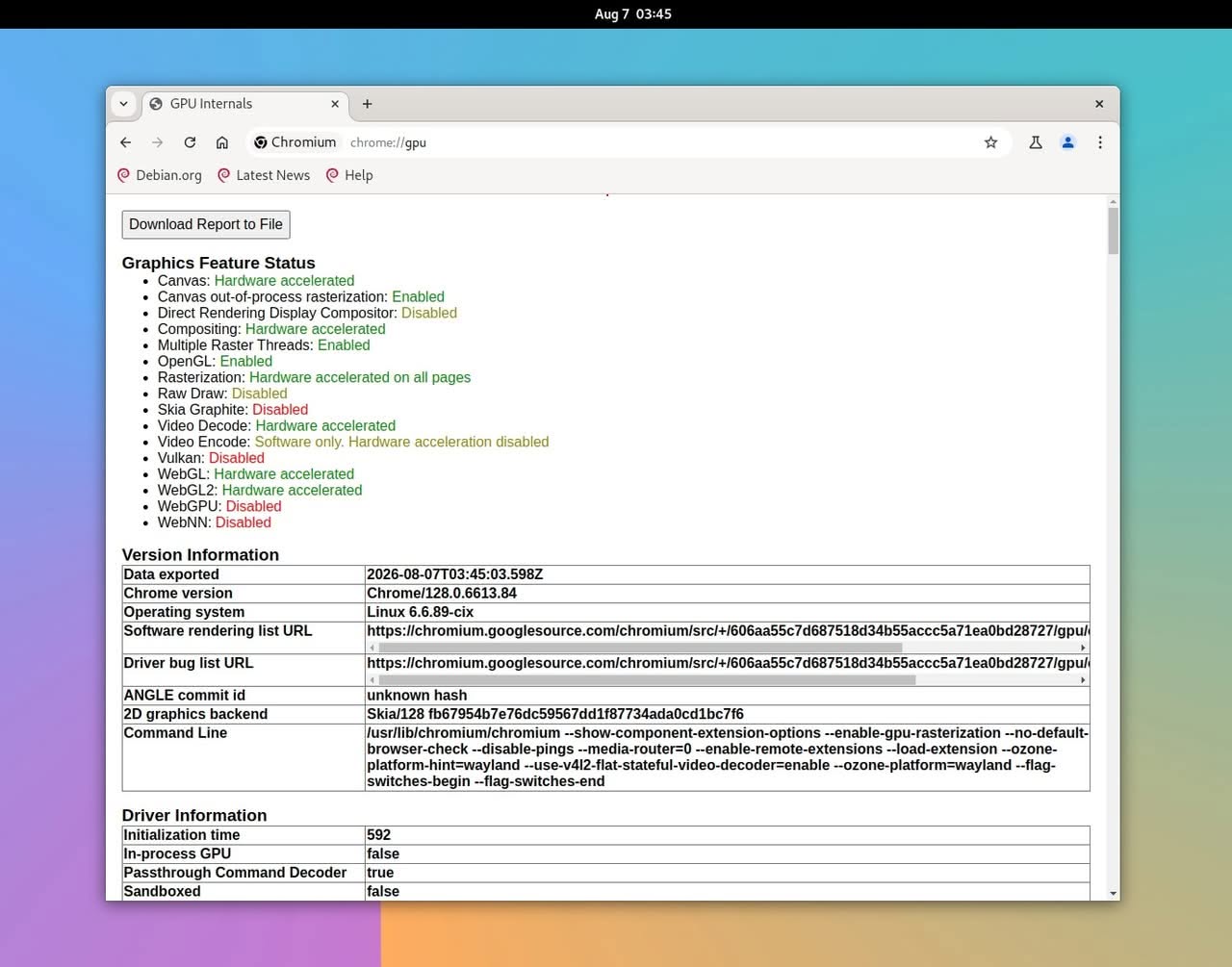
GPU internals report displaying hardware acceleration features and version information for the Orange Pi 6 on a Linux system.

Testing video playback using the Chrome web browser.

Testing 4K video playback wasn’t too bad either. Most of the videos played pretty smoothly, with few frame drops, as shown in the screenshot below.
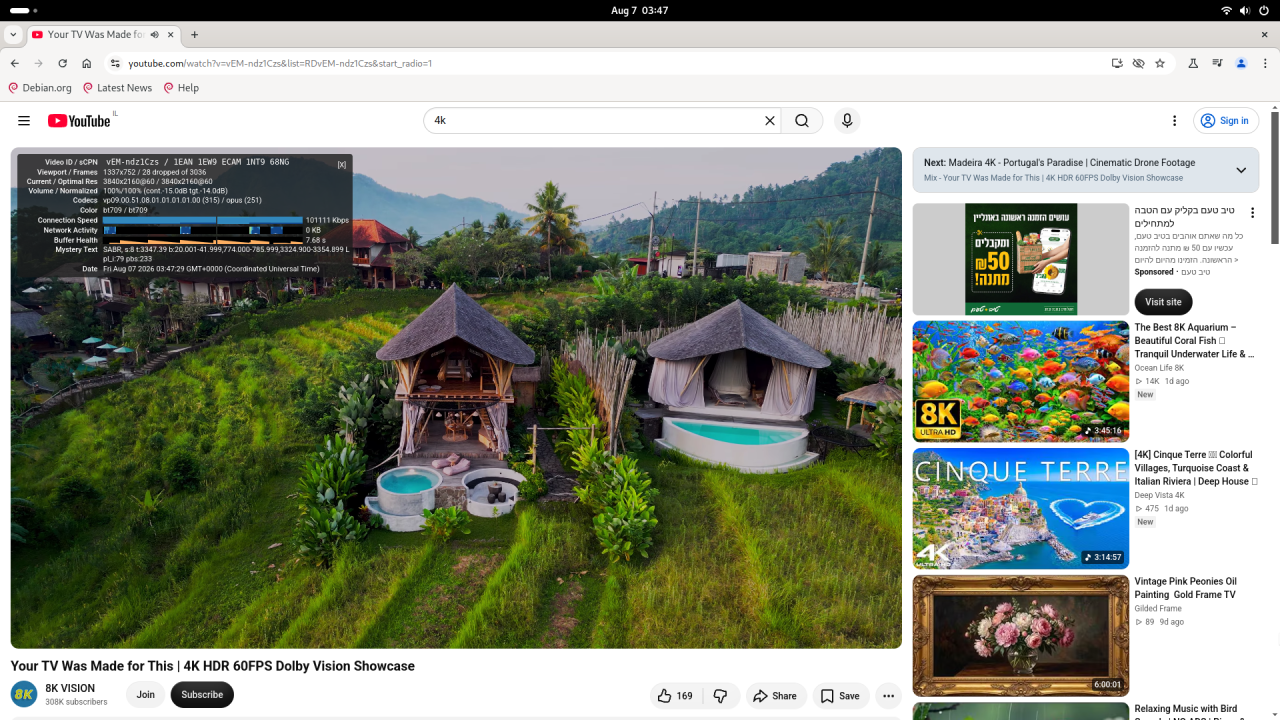
A scenic view of two thatched-roof huts with pools, set in lush greenery, showcasing the capabilities of the Orange Pi 6.

SMPlayer

The device came pre-installed with the Orange Pi Ubuntu Noble image. Thanks to full video decoding support, we were able to play 4K and 2K videos without any issues. While you shouldn’t expect every file to play perfectly, the overall performance was satisfactory.
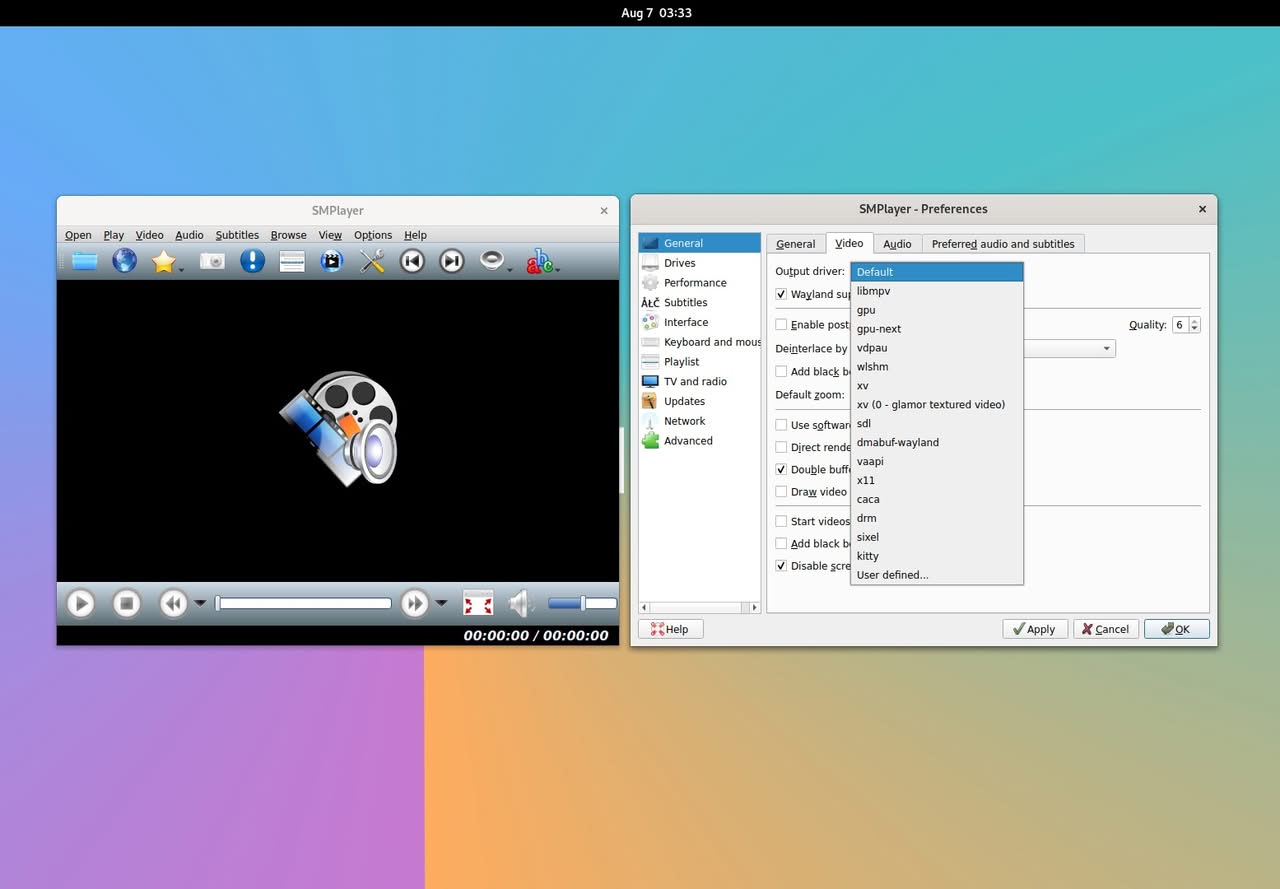
SMPlayer interface displaying video playback options and settings, highlighting features relevant to the Orange Pi 6 review.

Testing if 3D hardware acceleration is working (glxgears)
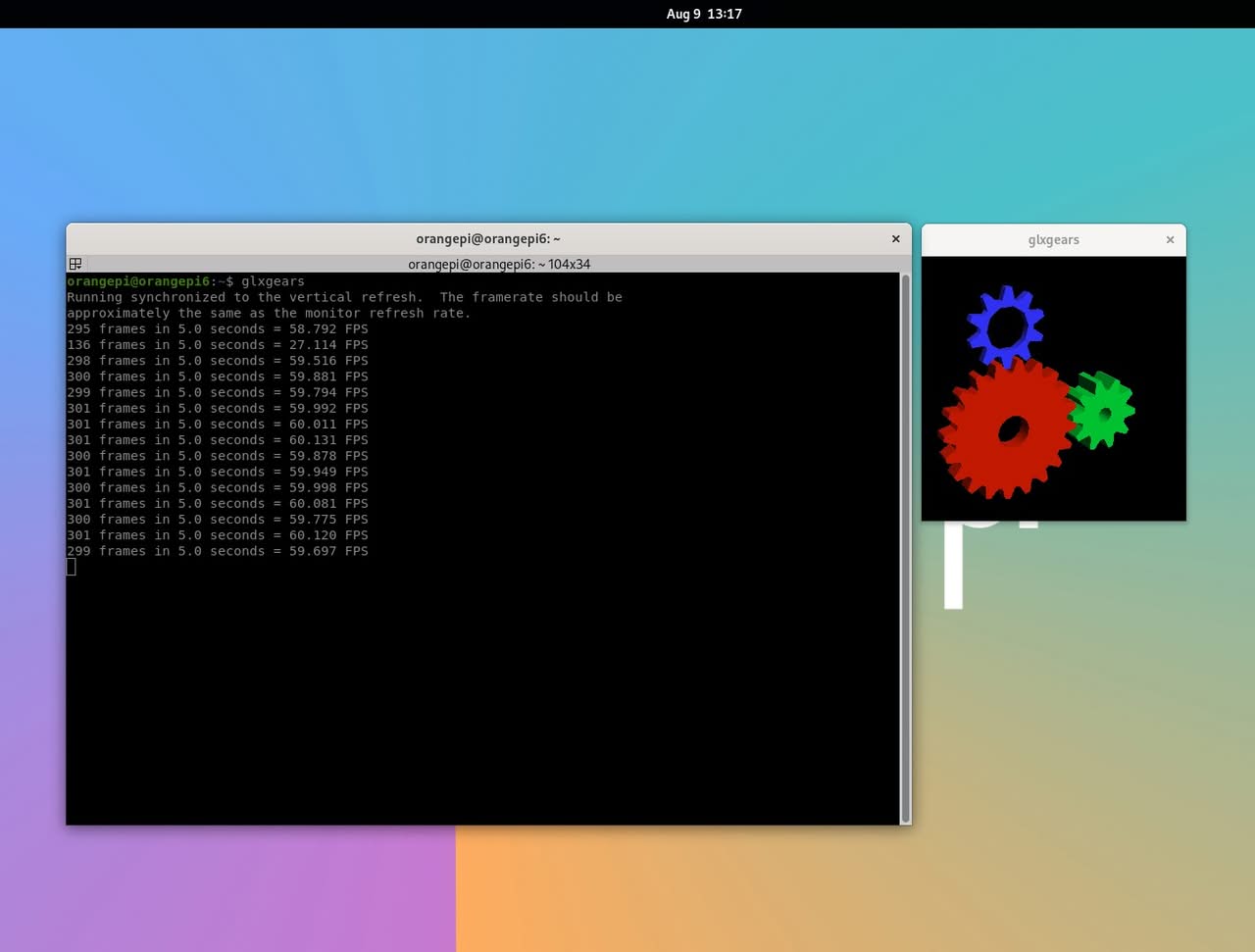
Terminal output displaying frame rates while running glxgears on the Orange Pi 6, showcasing its graphical performance.

Full report on the Orange Pi 6’s graphics stack.

3D/Desktop GPU rendering Support

The output shows that our Orange Pi 6 is running an X11 session with hardware‑accelerated graphics, using the Mesa driver stack and the Zink layer to provide OpenGL by translating it over the GPU’s native Vulkan 1.3 API; the GPU is a Mali‑G720 Immortalis, which supports OpenGL 4.0, OpenGL ES 3.2, and unified memory, so the large “15610 MB” video‑memory values simply reflect total system RAM rather than real VRAM, confirming that our system has full acceleration, modern API support, and a Vulkan‑based OpenGL implementation.
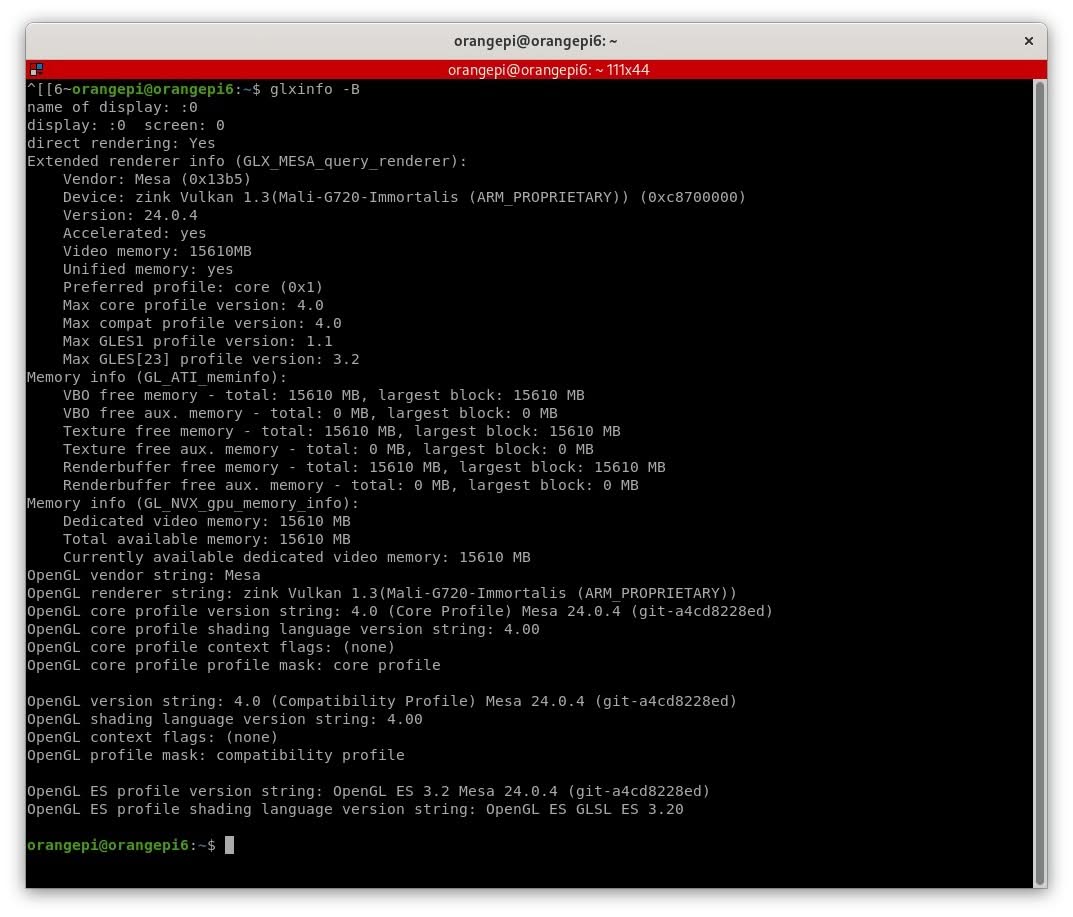
Terminal output displaying system information and graphics capabilities of the Orange Pi 6 single-board computer.

Hardware video decoding checked and confimed!

The adjusted regular expression is filtered specifically for decoding blocks, allowing the video4linux2 plugin suite to handle VPU operations directly through the standard Linux V4L2 drivers.

Supported Hardware Decoders Installed:

  • AV1: v4l2av1dec (Hardware AV1 decoding)
  • H.264: v4l2h264dec (Hardware AVC decoding)
  • H.265 / HEVC: v4l2h265dec (Hardware HEVC decoding)
  • VP8 & VP9: v4l2vp8dec & v4l2vp9dec (Hardware VP8/VP9 decoding, used extensively by YouTube)
  • MPEG-2 / MPEG-4: v4l2mpeg2dec & v4l2mpeg4dec
  • JPEG & H.263: v4l2jpegdec & v4l2h263dec

Because these stateful and stateless v4l2 decoders are registered with GStreamer, video players that utilize GStreamer, such as Totem or custom pipelines, can offload the decoding process directly from the CPU to your board’s VPU hardware.
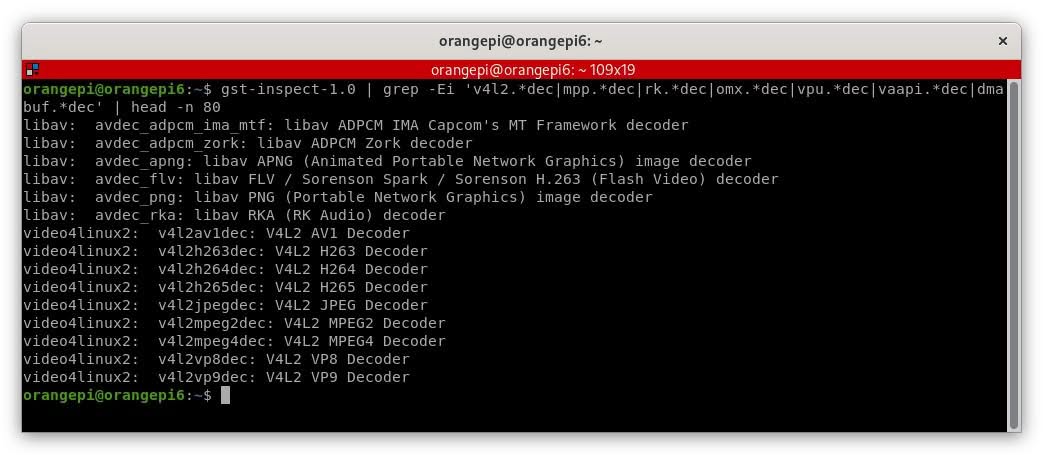
Terminal output displaying various video decoders supported by the Orange Pi 6 for multimedia processing.

Confirming if GStreamer on our Orange Pi includes hardware-accelerated decoders for recent video codecs.

This command lists all hardware video decoders available on your system through GStreamer, letting you verify which codecs (H.264, H.265, VP9, AV1, etc.) are supported by the hardware.

This output indicates the available video decoders for our Orange Pi 6 via GStreamer. It confirms that the board supports hardware-accelerated decoding for modern codecs through V4L2, in addition to software decoders from libav (FFmpeg).

🔍 What the list actually means

  • libav: These entries are software decoders provided by FFmpeg. They run on the CPU and are used when no hardware decoder is available or when the format is obscure.
  • video4linux2 (V4L2): These entries are hardware accelerated decoders provided by the kernel’s media subsystem. These are the important ones for performance:
    • v4l2av1dec — hardware AV1 decoding
    • v4l2h263dec — hardware H.263 decoding
    • v4l2h264dec — hardware H.264 decoding
    • v4l2h265dec — hardware H.265 / HEVC decoding
    • v4l2jpegdec — hardware JPEG decoding
    • v4l2mpeg2dec — hardware MPEG‑2 decoding
    • v4l2mpeg4dec — hardware MPEG‑4 decoding
    • v4l2vp8dec — hardware VP8 decoding
    • v4l2vp9dec — hardware VP9 decoding

What does this tell us about the Orange Pi 6?

That our system fully supports hardware decoding for all major modern video formats (H.264, H.265, VP9, AV1). This capability ensures smooth playback in applications such as VLC, MPV, Kodi, or any GStreamer-based pipeline. When GStreamer utilizes these V4L2 decoders, video playback is offloaded to the GPU/VPU rather than the CPU, resulting in:

  • lower CPU usage
  • cooler temperatures
  • smoother playback
  • better battery/energy efficiency
1 2 3 4 5 6 7 8 9 10 11 12 13
Share. Facebook Twitter Pinterest LinkedIn Tumblr Email
Previous ArticleAliExpress Promo Codes: August 2026 (100% Verified)
androidpimp
  • Website

Related Posts

BPi Wi Fi 7 NIC BE14(V2.1)

BPI-R4 Wi-Fi 7 NIC (BE14): OpenWrt Setup & Optimal WiFi Power Guide

July 27, 2026
Raspberry Pi Zero 3W SBC

Orange Pi Zero 3W Review: $25 Dual Video Pi Zero 2W Killer?

June 26, 2026
NeoEyes NE503 Edge AI Camera

CamThink NeoEyes NE503: A 20 TOPS 4k Edge AI Camera Platform Powerhouse

June 26, 2026
0 0 votes
Article Rating
Subscribe
Notify of
1 Comment
Oldest
Newest Most Voted
Categories
PureVPN
PureVPN Ad Banner
PrivadoVPN – No. 1 in Parental Control
PrivadoVPN 350x437
Recent Posts
  • Orange Pi 6 Review: A New 45 TOPS AI SBC Beats Raspberry Pi HATs in Speed
  • AliExpress Promo Codes: August 2026 (100% Verified)
  • Youyeetoo NestDisk Mini PC/Router: Is This Pocket-Sized 3-in-1 NAS Worth It?
  • Riitek RS201 16-Inch Portable Monitor Debuts for $69
  • DFRobot Unveils seeMote Cube: A 6DoF Physical Controller for Apple Vision Pro
  • Orange Pi X2 Mini PC Is Officially in the Works – Here’s What We Know
  • BPI-R4 Wi-Fi 7 NIC (BE14): OpenWrt Setup & Optimal WiFi Power Guide
  • How to install OpenWrt on Xiaomi AX3000T Router (A Quick Guide)
  • Orange Pi Maker Xunlong & Huawei Launch Edge AI at WAIC 2026
  • Orange Pi Zero 3W Review: $25 Dual Video Pi Zero 2W Killer?
RSS The Latest RSS Feeds
  • Orange Pi 6 Review: A New 45 TOPS AI SBC Beats Raspberry Pi HATs in Speed
  • AliExpress Promo Codes: August 2026 (100% Verified)
  • Youyeetoo NestDisk Mini PC/Router: Is This Pocket-Sized 3-in-1 NAS Worth It?
Facebook X (Twitter) Instagram Pinterest
@2026 - All Right Reserved. Designed by AndroidPIMP

Type above and press Enter to search. Press Esc to cancel.

wpDiscuz