Close Menu
  • Home
  • About
  • Wearables
  • Earbuds
  • Computer Accessories
    • Routers
    • Remotes
  • Embedded
    • Single Board Computers
    • Addon Boards
    • Raspberry Pi
  • Wireless Routers
  • Contact
Facebook X (Twitter) Instagram Threads
Trending
  • Orange Pi 6 Launches: New 45 TOPS AI SBC Beats Raspberry Pi HATs in Speed [Review]
  • How to install OpenWrt on Xiaomi AX3000T Router (A Quick Guide)
  • Orange Pi Maker Xunlong & Huawei Launch Edge AI at WAIC 2026
  • AliExpress Promo Codes: July 2026 (100% Verified)
  • BPI-R4 Wi-Fi 7 NIC (BE14): OpenWrt Setup & Optimal WiFi Power Guide
  • Orange Pi Zero 3W Review: $25 Dual Video Pi Zero 2W Killer?
  • CamThink NeoEyes NE503: A 20 TOPS 4k Edge AI Camera Platform Powerhouse
  • DFRobot 6.67″ Flexible AMOLED Review: Best Raspberry Pi & LattePanda Display?
AndroidPIMP
Facebook X (Twitter) Instagram
  • Home
  • About
  • Wearables
  • Earbuds
  • Computer Accessories
    • Routers
    • Remotes
  • Embedded
    • Single Board Computers
    • Addon Boards
    • Raspberry Pi
  • Wireless Routers
  • Contact
AndroidPIMP
Embedded Computers

SpacemiT K3 Pico-ITX Review: 60-TOPS RISC-V Powerhouse for LLMs?

By androidpimpJune 2, 2026Updated:June 5, 2026No Comments47 Mins Read
Facebook Twitter Pinterest LinkedIn Tumblr Email
Follow Us
Google News Flipboard
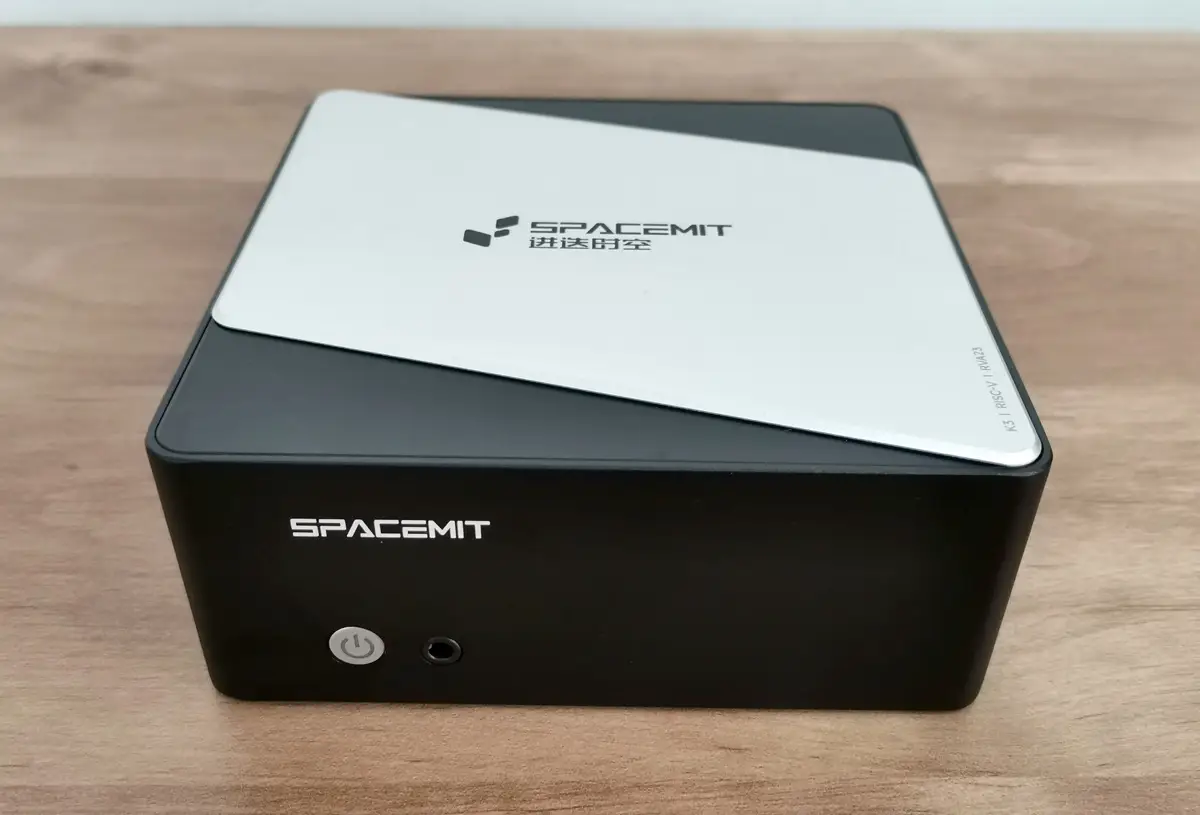
SpacemiT K3 Pico ITX
Table of contents
  1. Part I: An Introduction to the SpacemiT K3 RISC-V Series Boards
  2. Why “capable of running 30B parameter LLMs” is a big deal?
  3. 1️⃣SpacemiT K3 high-performance RISC-V processor 
    1. The K3 is a cutting-edge, high-performance RISC-V CPU built for advanced AI applications.
    2. Target market
    3. Main Highlights
  4. Completely compliant with the RVA23 profile.
    1. What is RVA23 and why is it important?
    2. What’s inside RVA23?
  5. Why developers care?
    1. In one sentence
  6. Here’s a closer look at the full range of capabilities offered by the SpacemiT K3:
  7. 2️⃣K3 Pico-ITX single board computer (Also known as Milk-V Jupiter 2)
  8. Specifications
  9. 3️⃣SpacemiT K3-CoM260 Developer Kit
    1. A Full-Stack RISC-V Robotics Development Kit
  10. Key Features
  11. Extensive software compatibility
    1. OS compatibility now includes Ubuntu 26.04 with support for RISC-V architecture.
    2. Official mainline Ubuntu support.
  12. Extra support through official partner channels
    1. What about official OpenWrt mainline support?
  13. Supporting the Spine Triton kernel development system
    1. Why does SpacemiT care about Triton?
  14. Hardware designed to work with AI agents
  15. Platforms that are already compatible with the K3 architecture.
  16. RISC V AI Acceleration in 2026: How SpacemiT K3 Challenges Jetson at the Edge
    1. SpacemiT K3 vs NVIDIA Jetson Series – Performance Comparison
  17. Part II: SpacemiT K3 Pico-ITX Review
    1. The Package
  18. Package Contents (Unboxing)
  19. Design-wise
  20. Storage Space – What You Need to Know!
  21. How much internal storage comes with the 16GB RAM model?
    1. ⭐ 128 GB total capacity!
    2. How much space do we have available, and how much is left to use?
  22. How to install an NVMe SSD
    1. Checking for drives and partitions
    2. Performance benchmarks
    3. What do p80, p90, p95, and p99 latency mean?
    4. Test Results In plain language:
  23. Checking temperatures
  24. Software Support
    1. How do I flash the firmware to set up a new operating system?
    2. Pre-installed software
  25. Available usable RAM
    1. Compatibility with Tailscale
      1. Step 1: Installing Tailscale for a riscv64 architecture environment
      2. Step 2: Enabling and starting the Tailscale service
      3. Step 3: Checking that it’s running
      4. Step 4: Authenticating our device
  26. Better and more cost-effective?
    1. Chinese companies are great at keeping costs low, but is their hardware actually better than Nvidia’s?
  27. Architecture: Heterogeneous vs. Homogeneous Fusion
    1. Nvidia design philosophy
    2. SpacemiT K3 design philosophy
    3. Conclusion: Better is Relative
      1. Is the hardware actually better?
  28. System performance benchmarks
    1. Key takeaways
    2. Key Takeaways
  29. Running the official llama.cpp benchmark tool (llama-bench)
    1. Running our test
    2. Our test script
    3. Why did we pick this model?
    4. LLaMA-3 8B Q4_K_M — Spacemit K3 vs Mac mini (16 GB RAM) + Estimated Prices (USD)
    5. Final Conclusions:
      1. What do the results mean?
    6. What kinds of AI language models can operate on this device?
      1. What does this mean from a user’s standpoint?
    7. Unified LLM Compatibility Table (16GB RAM Pico ITX)
  30. Connectivity
    1. Wireless connectivity
    2. How is the performance?
    3. What about support for cellular modems?
  31. Setting up our 10Gb RJ45 SFP+ module
    1. iPerf3 network throughput Speed Test
    2. ⭐Quick Takeaways from our test results
      1. The bottom line
    3. We also took a look at the CPU usage of the K3 Pico-ITX.
      1. Key Observations from the Metrics:
    4. Improving performance by optimizing operating system governors
  32. Power requirements
  33. Usable Interfaces
  34. Final verdict
    1. Price wise
    2. Places to buy
    3. SPACEMIT K3 Pico-ITX RISC-V Development Board

Maybe you missed it? Orange Pi 6 Plus Review.

You are currently reading:

An overview of SpacemiT’s latest K3 RISC-V boards built for running LLMs, along with a hands-on review of the new K3 Pico-ITX Mini PC, capable of running Ubuntu Mainline and various other operating systems.

Part I: An Introduction to the SpacemiT K3 RISC-V Series Boards

SpacemiT has rolled out an exciting new range of products built around the K3 ecosystem, delivering a great balance of affordability and power efficiency.

In recent years, China has made remarkable strides in the chip industry, fueled by its adoption of open-source software solutions and, more recently, the RISC-V architecture. SpacemiT Inc. is one of the leading Chinese semiconductor companies, specializing in developing next generation, high performance AI CPUs based on the RISCV architecture. Their mission is to create the best native computing platform for the new AI era, with a focus on large model AI workloads.

This article dives into the new K3 RISC-V series boards, designed to tackle massive models with support for up to 30 billion parameters. In the second part, we’ll put the K3 Pico-ITX Mini PC to the test.


Why “capable of running 30B parameter LLMs” is a big deal?

Running a 30-billion-parameter model on your own machine is no easy task. Typically, this requires:

  • High memory bandwidth
  • Efficient parallel compute
  • Optimized AI acceleration
  • Support for quantization and model compression
  • A robust software stack (e.g., ONNX Runtime)

1️⃣SpacemiT K3 high-performance RISC-V processor 

The K3 is a cutting-edge, high-performance RISC-V CPU built for advanced AI applications.

The new SpacemiT K3 chip series uses RISC-V homogeneous integrated computing technology, packing 8 high-performance X100 cores and 8 ultra-wide parallel AI A100 cores developed by SpacemiT. Together, they deliver 130 KDMIPS of general computing power and 60 TOPS of AI performance, capable of running 30-billion-parameter models with ease.

he K3 is the more advanced predecessor to the K1, featuring 60 TOPS of computing power and supporting double the RAM capacity compared to the previous K1 chip. It can handle up to 32GB of DDR5 RAM and is capable of running large AI models.


SpacemiT K3 CPU Block Diagram
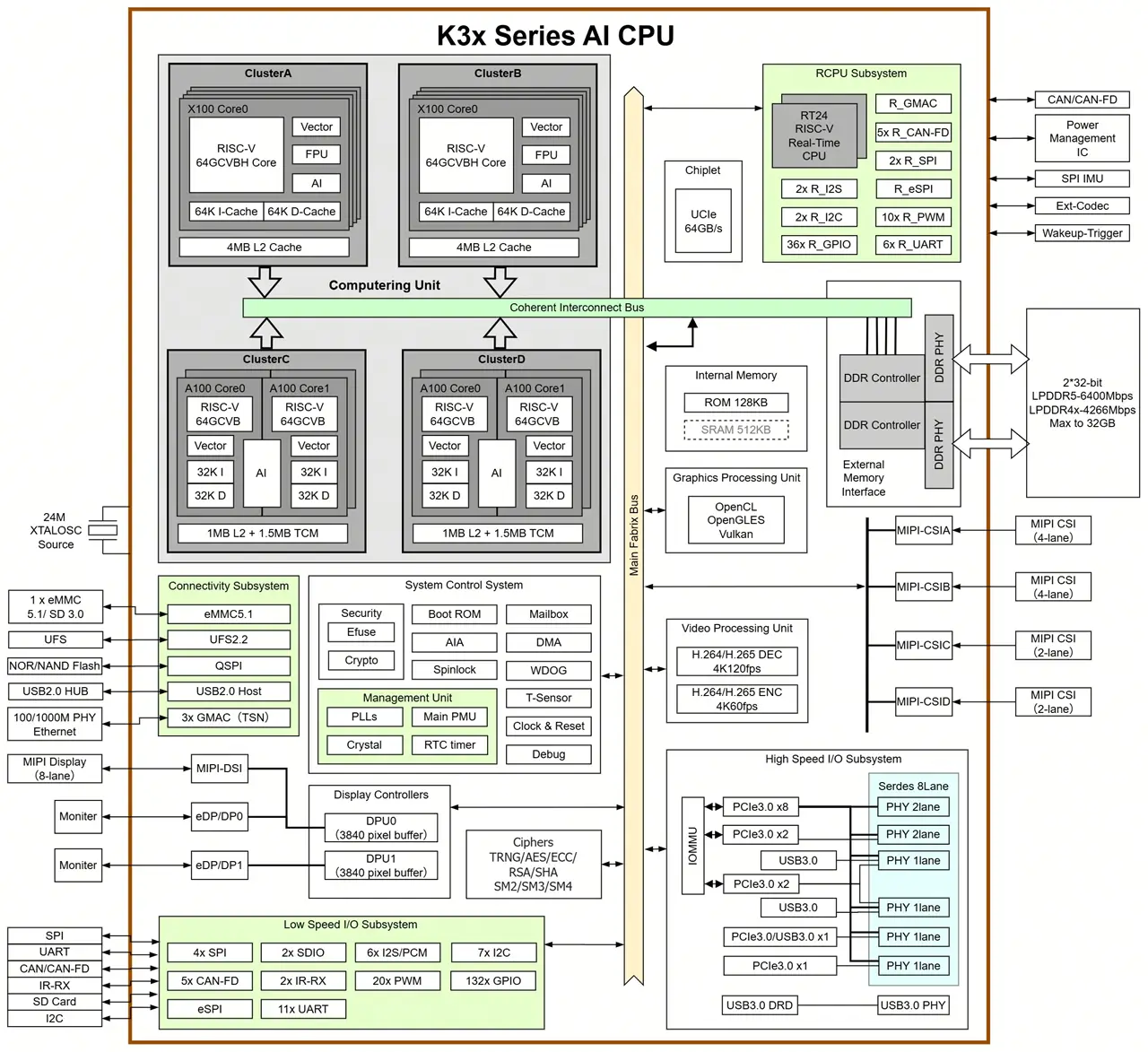
SpacemiT K3 Block BD

Target market

The K3 chip series is designed for AI consumer hardware, including smart home gadgets, AI-powered conference and office tools, AI content creation devices, AI-driven e-commerce setups, retail systems, and users who want to run local LLMs, among other applications. All of this offers real value to developers, as mainstream Linux distributions, toolchains, and runtimes work smoothly right out of the box without any tweaks.

Main Highlights

FeatureRequired by RVA23Supported by SpacemiT K3
RV64I base✔✔
M/A/F/D/C✔✔
Bitmanip (B)✔✔
Vector (V / RVV 1.0)✔✔ (1024bit)
Hypervisor (H)✔ (Sprofile)✔
AIA / IOMMUOptional✔
Full RVA23 compliance✔✔

Completely compliant with the RVA23 profile.

What is RVA23 and why is it important?

RVA23 is a “standard package” of features that every modern 64 bit RISC-V processor must have if it wants to run big operating systems like Linux or Android smoothly. Think of it like a minimum spec list for RISC-V CPUs. Without RVA23, every chip maker could pick random features, and software would break.
With RVA23, everyone agrees on the same baseline.

What’s inside RVA23?

RVA23 requires a CPU to support:

  • Basic math + advanced math (multiplication, division, floating point)
  • Compressed instructions (smaller, faster code)
  • Atomic operations (needed for multithreading)
  • Bit manipulation (faster crypto, hashing, graphics)
  • Vector instructions (the big one)
  • Performance counters (profiling, debugging)
  • Memory model guarantees (so OSes behave predictably)
  • Optional: hypervisor support (for virtualization, in the Sprofile)

Why developers care?

RVA23 means:

  • No more guessing which extensions a CPU supports
  • One binary target for Linux/Android
  • Better performance guarantees
  • A stable foundation for future RISC V software ecosystems

It’s the difference between “maybe it works” and “it definitely works

In one sentence

RVA23 is the official checklist that ensures all modern 64 bit RISC V CPUs have the same essential features — especially vectors — so software runs reliably everywhere.


Here’s a closer look at the full range of capabilities offered by the SpacemiT K3:

Feature CategoryDetails
Core DescriptionHigh performance RISC V AI CPU capable of running 30B parameter LLMs smoothly; integrates 8× X100 CPU cores + 8× A100 AI cores
General Compute130 KDMIPS total CPU compute
AI Compute60 TOPS general purpose AI performance; supports BF16, FP16, FP8, INT8, INT4
Model PerformanceSmooth 30B LLM inference; >10 tokens/s @ 30B; ~84% of 235B model capability
Use CasesAI smart home, AI office devices, AI content creation, AI retail/ecommerce, consumer AI hardware
CPU Cores8× X100 64 bit RISC V cores; quad issue, out of order; 2.4 GHz max
CPU Performance130 K DMIPS; SPECint2006 > 9.0/GHz (CortexA76 class)
CPU ArchitectureRVA23 profile; 8 MB shared L2 per 8 core cluster
AI Cores8× A100 ultrawide AI cores
Vector ProcessingRVV 1.0 with 1024bit vector width
AI AccelerationDedicated TCM + DMA
Security (General)M/S/U privilege levels; hardware protection against Spectre/Meltdownclass attacks
Security (Crypto)AES, SHA, RSA, SM2, SM3, SM4
Security (RISC V)PMP, ePMP, IOPMP; secure boot; secure storage; signature verification; full lifecycle security
VirtualizationRVH 1.0 CPU virtualization; AIA interrupt virtualization; IOMMU device virtualization
Memory SupportLPDDR5 6400, LPDDR4X4266; 64bit bus; up to 32 GB; 51 GB/s bandwidth
Storage SupportSPI Flash, eMMC 5.1, UFS 2.2, SDIO 3.0; NVMe SSD via PCIe
Real Time ProcessingDual core RT24 64bit RISC-V; 6 stage in order pipeline
GraphicsIntegrated 3D GPU supporting Vulkan, OpenCL, OpenGLES
Video Decode4K 120fps (H.265, H.264, VP9, others)
Video Encode4K 60fps (H.265, H.264)
Display OutputsDual 3840×2160@60fps
MIPI DSI8lane, 4.5Gbps/lane; supports 4K60, 1440p90, 1080p60
DP/eDPDual outputs; up to 1440p144
Camera Interfaces4× MIPI CSI; 12 lanes total; supports up to 12 cameras
PCIe8 lanes @ 8Gbps; 5 controllers; RC/EP modes; hotplug
USB3× USB 3.0 Host; 1× USB 3.0 DRD (TypeC); 1× USB 2.0 Host
Ethernet4× GMAC (RGMII/RMII/MII); TSN support
Other I/O6× SPI, 2× eSPI, 17× UART, 10× CANFD, 9× I2C, 30× PWM
Power15W–25W TDP
Operating Temperature–40°C to 85°C (industrialgrade)
Mainline software support✅ Ubuntu / Debian
✅ BayLibre (AOSP Android)
✅ OpenWrt
✅ OpenHarmony
✅ OpenKylin
✅ Bianbu
✅ Fedora Remix
✅ Deepin

2️⃣K3 Pico-ITX single board computer (Also known as Milk-V Jupiter 2)

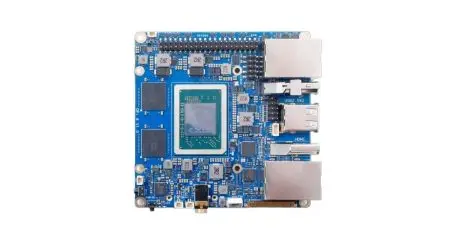
The K3 Pico-ITX is a compact single-board computer packing up to 60 TOPS of AI performance. It comes with a unified memory setup, 8 CPU cores, and 8 AI acceleration cores, plus fast onboard UFS storage and a 10Gb optical network port. Its design boosts computing power and efficiency, making it great for tasks like scientific computing and AI.

The K3 Pico-ITX, designed in a compact 2.5-inch Pico-ITX Plus form factor, is perfect for tight spaces. It features dual M.2 expansion slots and offers interfaces for real-time motion control and system management.

Packed with versatile I/O options and built with an industrial-grade design, the K3 Pico-ITX makes it easy to evaluate and integrate systems quickly, helping speed up time to market.
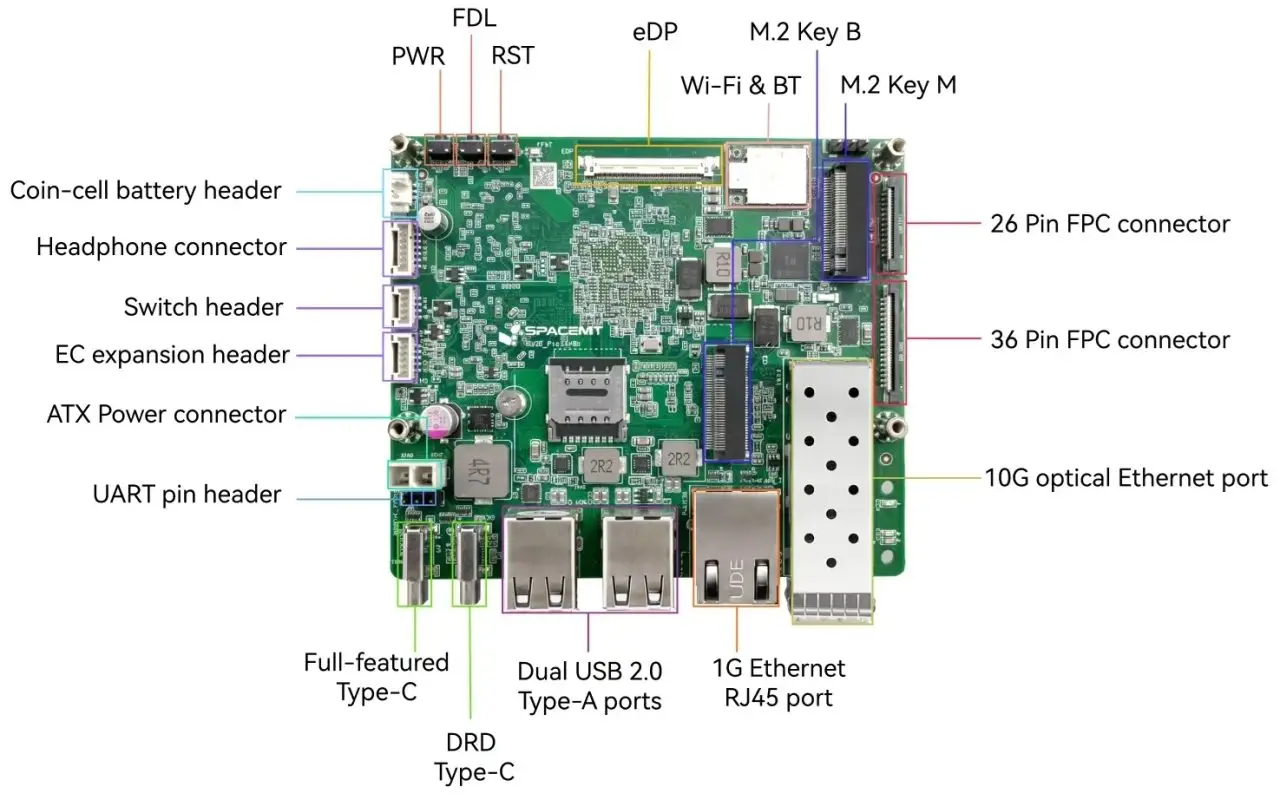
K3 Pico ITX Interfaces

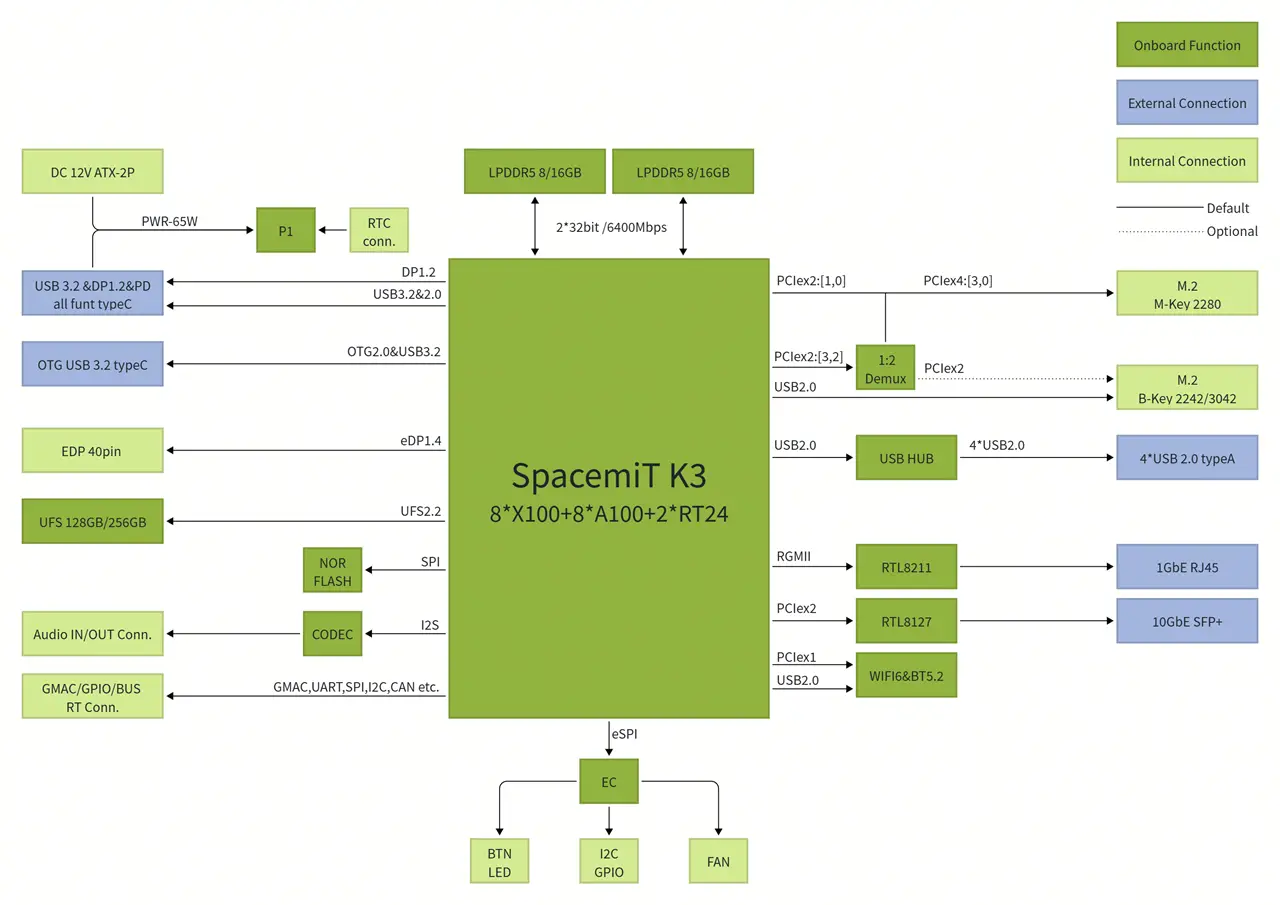
SpacemiT K3 Pico-ITX Block Diagram

k3 pico bd
k3 pico bd

Specifications

ModuleDescription
SoCSpacemiT K3
ProcessorSpacemiT K3, 8 cores @2.4 GHz, 60 TOPS AI performance, RVA23 compliant, supports IME vector extensions and full virtualization
GPUIMG BXM-4-64-MC1
OpenGL ES1.1 / ES2.0 / ES3.2
OpenCL 3.0
Vulkan 1.3
DisplayDP Type-C: up to 4K (3840 × 2160) @ 60 Hz
40-pin eDP: up to 2.5K (2560 × 1600) @ 90 Hz
MemoryDual-channel 2 × 32-bit LPDDR5 6400 MT/s, 16 GB / 32 GB options
Local StorageUFS 2.2, 128 GB / 256 GB options
Storage ExpansionM.2 M-Key (PCIe Gen3 ×4), supports 2280 NVMe SSD
HS ExpansionM.2 B-Key (PCIe Gen3 ×2 + USB), supports 2242/3042 cards
Real-Time ExpansionFPC connector for EtherCAT, 5 × CAN-FD, SPI, I²C, UART, etc.
WirelessOnboard Wi-Fi 6 + BT 5.2, dual-band, dual-antenna, 802.11 a/b/g/n/ac/ax compliant
Wired Network1 × RJ45 Ethernet, 10/100/1000 Mbps adaptive
Optical Network10GbE SFP+ port, supports 10GBASE-R / 10GBASE-X, QinQ, MSI-X, WOL, and clustering
AudioOnboard CODEC, internal audio input/output
USB2 × USB 3.2 Gen1 Type-C (1 full-featured, one OTG)
4 × USB 2.0 Type-A Host
DebugUART, JTAG, and 3 side buttons for power, reset, and firmware update
System ManagementOnboard EC controller for power, thermal, and system status; includes I²C/UART/GPIO expansion
Form Factor100 × 86 mm, Pico-ITX Plus single-board computer, approx. size of a 2.5″ drive
OSPre-installed Bianbu 3.0; supports Ubuntu 26.04, OpenHarmony 6.0, OpenKylin, Deepin, Fedora, etc.
Power InputDual Type-C USB-PD (65 W) or ATX 2-pin 12 V @ 7 A
ReliabilityESD protection: board: ±4 kV (contact), ±8 kV (air); system: ±6 kV (contact), ±12 kV (air)
Compliant with CCC, CE, and FCC; operating temp: -20 °C ~ 70 °C (consumer) / -40 °C ~ 85 °C (industrial)
ClockOnboard RTC with battery interface, supports G3 state
StructureOptional single-board or fan-cooled heatsink assembly
Optional single-board or fully-metal industrial chassis
Optional real-time board, touchscreen, terminal blocks
Mainline software support✅ Ubuntu, OpenWrt
✅ OpenHarmony
✅ OpenKylin
✅ Bianbu
Link to the productMilk-V Jupiter2 | Your All-in-One Development Platform

Note: The M.2 B-Key PCIe ×2 lanes share bandwidth with the M-Key slot; if both are in use, the M.2 M-Key runs at PCIe Gen3 ×2.

Optional Components

CategoryNameDescriptionInterface
PeripheralSSD980 NVMe™ M.2 SSD, PCIe Gen 3.0 ×4, NVMe 1.4,
sequential read up to 3,500 MB/s,
sequential write up to 3,000 MB/s
M.2 M-Key 2280
 SSDB+M NVMe SSD 128 GBM.2 B-Key 2242
 4G ModuleEM05M.2 B-Key 3042
 SATA Expansion CardPCIe to 5 × SATA interfaceM.2 M-Key 2280
 Docking StationType-C dock for HD 4K display, PD charging,
USB 3.0 for tablets/laptops (3-in-1)
Full-featured Type-C
 Ultra HD Display16″ 2.5K LCD, 90 Hz, 2560 × 160040-pin eDP
 Real-time Control Expansion Board19 V input, 5 × CAN-FD, EtherCAT, RS232 & RS485 I/O,
industrial-grade isolation protectiosn
FPC
Structural AccessoryEmbedded Fan HeatsinkCustom aluminum designFAN
 Metal Chassis120 × 120 × 48 mm self-developed metal chassisBTN

3️⃣SpacemiT K3-CoM260 Developer Kit

A Full-Stack RISC-V Robotics Development Kit

The SpacemiT K3-CoM260 Developer Kit packs an 8-core general-purpose CPU and an 8-core AI CPU into a compact compute module with a reference carrier board. It offers up to 60 TOPS of AI performance and 130 KDMIPS of general computing power, making it capable of running 30B large models smoothly.

Powered by the RISC-V architecture, the kit makes it easy to run popular AI models while sticking to standard CPU programming methods, enabling smooth, cost-free migration of AI algorithms. It’s hardware compatibility with the Orin Nano makes it a complete solution for edge AI development and testing, perfect for AI appliances, service robots, and autonomous edge devices.

SpacemiT K3 CoM260 (CASE + Board)
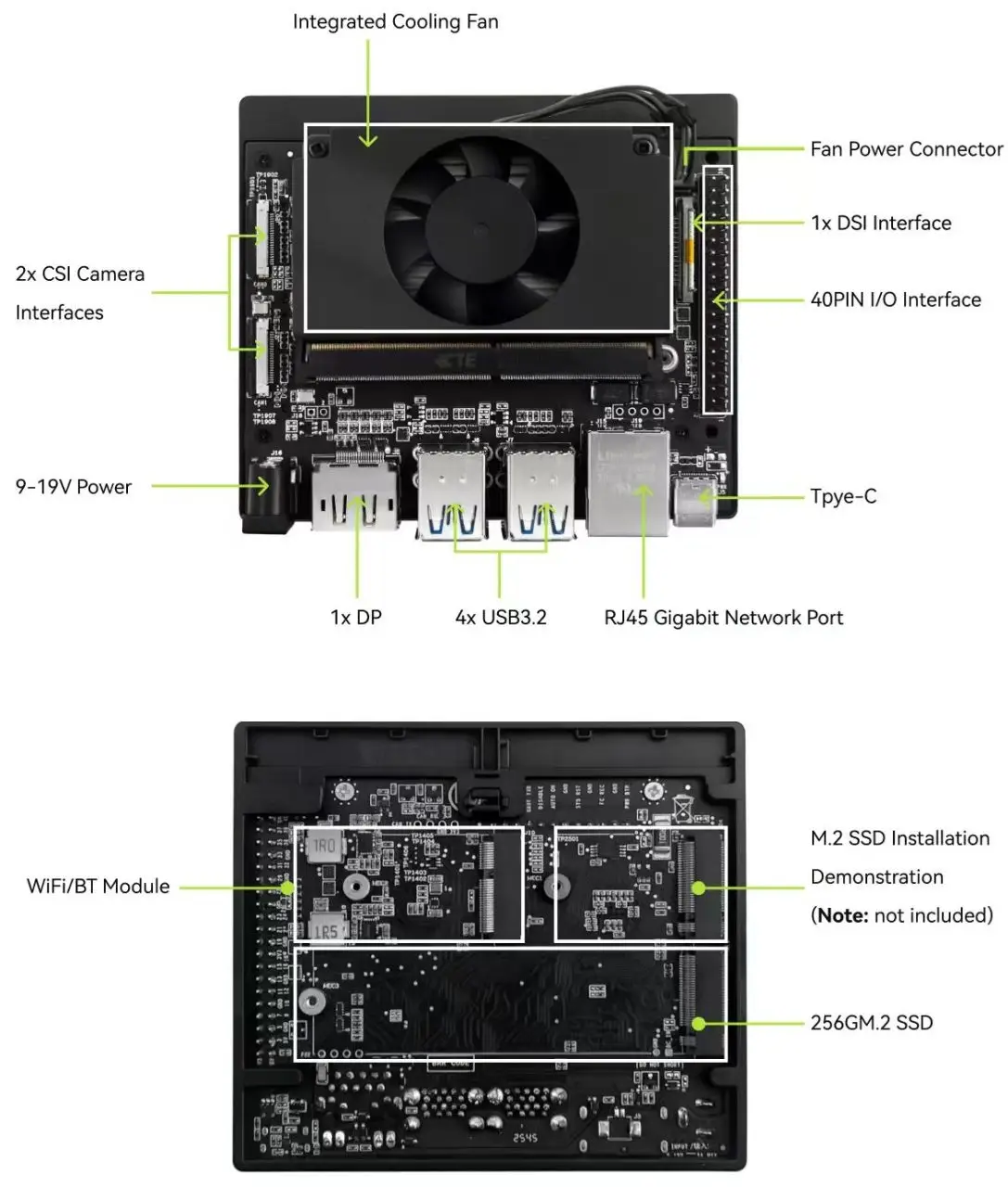
SpacemiT K3 CoM260
SpacemiT K3 CoM260

Key Features

Feature CategoryDescription
High Performance Edge AIUp to 60 TOPS AI compute, enabling smooth 30B parameter model inference and multi stream concurrent workloads
CPU + AI CPU ArchitectureCodesigned general purpose CPU + AI CPU for balanced system compute and high performance AI inference
Modular DesignCompute module + carrier board form factor; fully compatible with K3 CoM260 series for easy integration
Developer FriendlyStandard CPU programming model allows zero cost migration of AI algorithms and system software
Advanced RISC-V ArchitectureFirst compact RISC V edge platform supporting the RVA23 profile
Rich Standard InterfacesComprehensive high speed I/O for cameras, sensors, and peripherals
Built for Real World ApplicationsIdeal for AI appliances, service robots, and autonomous edge agents
Engineering Ready SupportSupports custom software, carrier board design, and full system integration to accelerate deployment

Extensive software compatibility

The K3 now has native support in Linux kernel 7.0, and work is underway to upstream OpenSBI, U-Boot, LLVM, and other core software. For more information, see the details on the project’s GitHub wiki. (https://github.com/spacemit-com/linux/wiki).

OS compatibility now includes Ubuntu 26.04 with support for RISC-V architecture.

K3 currently supports a range of open-source operating systems, including Ubuntu, OpenHarmony, OpenKylin, and OpenEuler. Additional operating systems and widely used tools are in the process of being adapted to expand compatibility.

Official mainline Ubuntu support.

February 5, 2026 – Canonical, the company behind Ubuntu and other open-source solutions, has teamed up with SpacemiT to bring the Ubuntu operating system to the K3/K1 RISC-V AI CPU platform. This partnership highlights the deep integration of open-source operating systems with open RISC-V chips, delivering powerful, flexible, and reliable computing options for developers around the globe.

Continuously updated download links can be found at:

(https://www.spacemit.com/community/eco-software?id=spacemit-open-source-soft)

Extra support through official partner channels

As a hardware partner of SpacemiT, Milk-V provides user support and shares technical information through its community forum.

(https://community.milkv.io)

The Banana Pi team also provides software and hardware support through their community forum.

(https://community.milkv.io)

What about official OpenWrt mainline support?

The answer is affirmative. According to company sources, it’s currently in development. The official source tree and Firmware updates for SpacemiT’s latest boards, including the K3, will be available and easily accessible through OpenWrt official website.


Supporting the Spine Triton kernel development system

Triton, developed by OpenAI, is a high-level language that lets developers create custom AI kernels with impressive speed. In simpler terms, it’s an open-source framework and library for writing highly efficient GPU code, designed to boost productivity beyond what CUDA offers.

Spine-Triton is a compiler and kernel-writing framework supports SpacemiT RISC-V chips like the K1 and K3, making it easy to create high-performance kernels—like MatMul, Softmax, and FlashAttention—using Triton-style code.

Why does SpacemiT care about Triton?

If SpacemiT gets Triton running efficiently on their RISCV AI CPU, it means:

  • Developers can write GPU style kernels for K3
  • AI operators can be optimized without handcoding assembly
  • RISCV becomes more competitive with NVIDIA/ARM
  • K3 becomes a real platform for custom AI workloads

This is a smart strategy to create a modern AI software ecosystem that complements their hardware.

Although Triton has many advantages, it has limitations when targeting CPUs. SpacemiT aims for something bigger: enabling Triton written operators to run efficiently on RISC-V AI CPUs. 

  • Deployment info: https://github.com/spacemit-com/spine-triton 
  • Example: https://forum.spacemit.com/t/topic/872 

Hardware designed to work with AI agents

The SpacemiT K3 is a RISCV AI processor optimized for on device AI agents, integrating 8 general purpose X100 CPU cores with 8 A100 AI accelerated cores featuring 1024bit vector units and delivering up to 60 TOPS of performance. With both CPU and AI cores sharing a unified architecture and running a single Linux OS, it eliminates the overhead of separate NPUs and drivers, making it well suited for real time LLM inference, autonomous decision loops, and robotics oriented agent workloads. Boards like the Banana Pi SM10, based on the K3, are marketed for edge AI agent development and can run 30B parameter models locally at practical speeds, underscoring the platform’s design for agent style autonomy.

The K3’s design makes it a great fit for local AI autonomy, with support for full Linux distributions like Ubuntu, OpenHarmony, and OpenKylin, plus fast LPDDR5 6400 memory for handling large models. Its 15–35W power range works well for robots, kiosks, and smart devices. The shared RISC V ISA across compute and AI cores lets agent logic, planning, and neural inference run in the same memory space with minimal latency—just what modern agent frameworks call for. In real world terms, the K3 stands out as one of the first serious RISC V platforms capable of running on device LLM agents, driving applications from service robots to industrial automation and sensor driven autonomous systems.


Platforms that are already compatible with the K3 architecture.

PlatformDescription
ZenowOn-device AI knowledge assistant desktop app. All data processing stays local, ensuring privacy. Supports multi-model management, intelligent chat, knowledge base Q&A, voice interaction, etc. 
YumeetAn on-device AI meeting assistant desktop application offering local audio processing, transcription, translation, and summarization to enhance meeting efficiency while safeguarding sensitive data.
Seewisemulti-modal vision processing: image search by text, video search by text. 

RISC V AI Acceleration in 2026: How SpacemiT K3 Challenges Jetson at the Edge

SpacemiT K3 vs NVIDIA Jetson Series – Performance Comparison

Here’s a clear, side by side comparison table highlighting the performance positioning of the SpacemiT K3, NVIDIA Jetson Orin Nano, and NVIDIA Jetson AGX Orin.

CategorySpacemiT K3NVIDIA Jetson Orin NanoNVIDIA Jetson AGX Orin
AI Compute (TOPS)60 TOPS20 TOPS275 TOPS
LLM CapabilitySmooth 30B model inferenceSuitable for small models (≤7B)Can run 70B+ models (quantized)
AI Architecture8× A100 AI cores (1024 bit RVV vector engines)32 Tensor Cores2048 CUDA cores + 64 Tensor Cores
CPU Architecture8× X100 RISC V @ 2.4GHz6× ARM Cortex A78AE12× ARM Cortex A78AE
StrengthsEfficient LLM inference, strong vector AI, low powerLowest cost, good for vision tasksMaximum performance for robotics & multimodel AI
WeaknessesNo CUDA ecosystem; new platformLimited AI computeHigh cost & high power draw
Power (TDP)15–25W7–15W15–60W
Best Use CasesEdge LLMs, AI appliances, RISC V developmentLightweight robotics, cameras, CVHeavy robotics, multi camera AI, high end edge compute
Estimate price~$300$280 – $580 USD$1,300–$1,900 USD
1 2 3 4 5 6 7 8 9 10 11 12 13
Share. Facebook Twitter Pinterest LinkedIn Tumblr Email
Previous ArticleBanana Pi BPI-R4 Pro Review: The Best WiFi 7 OpenWrt Router? We Checked!
Next Article Banana Pi BPI-SM10 Review: 60 TOPS RISC-V Jetson Orin Nano Alternative
androidpimp
  • Website

Related Posts

Orange Pi 6

Orange Pi 6 Launches: New 45 TOPS AI SBC Beats Raspberry Pi HATs in Speed [Review]

July 24, 2026
BPi Wi Fi 7 NIC BE14(V2.1)

BPI-R4 Wi-Fi 7 NIC (BE14): OpenWrt Setup & Optimal WiFi Power Guide

July 10, 2026
Raspberry Pi Zero 3W SBC

Orange Pi Zero 3W Review: $25 Dual Video Pi Zero 2W Killer?

June 26, 2026
0 0 votes
Article Rating
Subscribe
Notify of
0 Comments
Oldest
Newest Most Voted
Categories
PureVPN
PureVPN Ad Banner
PrivadoVPN – No. 1 in Parental Control
PrivadoVPN 350x437
VyprVPN – No. 1 in Anonymity
Vyprvpn 350x260
Recent Posts
  • Orange Pi 6 Launches: New 45 TOPS AI SBC Beats Raspberry Pi HATs in Speed [Review]
  • How to install OpenWrt on Xiaomi AX3000T Router (A Quick Guide)
  • Orange Pi Maker Xunlong & Huawei Launch Edge AI at WAIC 2026
  • AliExpress Promo Codes: July 2026 (100% Verified)
  • BPI-R4 Wi-Fi 7 NIC (BE14): OpenWrt Setup & Optimal WiFi Power Guide
  • Orange Pi Zero 3W Review: $25 Dual Video Pi Zero 2W Killer?
  • CamThink NeoEyes NE503: A 20 TOPS 4k Edge AI Camera Platform Powerhouse
  • DFRobot 6.67″ Flexible AMOLED Review: Best Raspberry Pi & LattePanda Display?
  • Banana Pi BPI-SM10 Review: 60 TOPS RISC-V Jetson Orin Nano Alternative
  • SpacemiT K3 Pico-ITX Review: 60-TOPS RISC-V Powerhouse for LLMs?
RSS The Latest RSS Feeds
  • Orange Pi 6 Launches: New 45 TOPS AI SBC Beats Raspberry Pi HATs in Speed [Review]
  • How to install OpenWrt on Xiaomi AX3000T Router (A Quick Guide)
  • Orange Pi Maker Xunlong & Huawei Launch Edge AI at WAIC 2026
Facebook X (Twitter) Instagram Pinterest
@2026 - All Right Reserved. Designed by AndroidPIMP

Type above and press Enter to search. Press Esc to cancel.

Accessibility
Accessibility modes
Epilepsy Safe Mode
Dampens color and removes blinks
This mode enables people with epilepsy to use the website safely by eliminating the risk of seizures that result from flashing or blinking animations and risky color combinations.
Visually Impaired Mode
Improves website's visuals
This mode adjusts the website for the convenience of users with visual impairments such as Degrading Eyesight, Tunnel Vision, Cataract, Glaucoma, and others.
Cognitive Disability Mode
Helps to focus on specific content
This mode provides different assistive options to help users with cognitive impairments such as Dyslexia, Autism, CVA, and others, to focus on the essential elements of the website more easily.
ADHD Friendly Mode
Reduces distractions and improve focus
This mode helps users with ADHD and Neurodevelopmental disorders to read, browse, and focus on the main website elements more easily while significantly reducing distractions.
Blindness Mode
Allows using the site with your screen-reader
This mode configures the website to be compatible with screen-readers such as JAWS, NVDA, VoiceOver, and TalkBack. A screen-reader is software for blind users that is installed on a computer and smartphone, and websites must be compatible with it.
Readable Experience
Content Scaling
Default
Text Magnifier
Readable Font
Dyslexia Friendly
Highlight Titles
Highlight Links
Font Sizing
Default
Letter Spacing
Default
Left Aligned
Center Aligned
Right Aligned
Visually Pleasing Experience
Dark Contrast
Light Contrast
Monochrome
High Contrast
High Saturation
Low Saturation
Adjust Text Colors
Adjust Title Colors
Adjust Background Colors
Easy Orientation
Mute Sounds
Hide Images
Hide Emoji
Reading Guide
Stop Animations
Reading Mask
Highlight Hover
Highlight Focus
Big Dark Cursor
Big Light Cursor
Cognitive Reading
Virtual Keyboard
Navigation Keys
Voice Navigation

AndroidPIMP

Accessibility Statement

  • AndroidPIMP.com
  • 10/18/2025

Compliance status

We believe the internet should be open and accessible to everyone, and we’re dedicated to making our website usable for the widest audience possible, no matter their circumstances or abilities.

To achieve this, we follow the World Wide Web Consortium’s (W3C) Web Content Accessibility Guidelines 2.1 (WCAG 2.1) at the AA level as closely as possible. These guidelines outline how to make web content accessible for people with a variety of disabilities. By complying with them, we help ensure our website is usable by everyone, including those who are blind, have motor or visual impairments, cognitive disabilities, and more.

This website uses a range of technologies to stay accessible at all times. An accessibility interface lets people with specific disabilities customize the site’s UI and design to fit their personal needs.

The website also uses an AI-powered application that works in the background to constantly enhance its accessibility. This app fixes the site’s HTML, adjusts its features and behavior for screen readers used by blind users, and optimizes keyboard functions for people with motor impairments.

If you’ve found a malfunction or have ideas for improvement, we’ll be happy to hear from you. You can reach out to the website’s operators by using the following email tzahi.work@gmail.com

Screen-reader and keyboard navigation

Our website implements the ARIA attributes (Accessible Rich Internet Applications) technique, alongside various different behavioral changes, to ensure blind users visiting with screen-readers are able to read, comprehend, and enjoy the website’s functions. As soon as a user with a screen-reader enters your site, they immediately receive a prompt to enter the Screen-Reader Profile so they can browse and operate your site effectively. Here’s how our website covers some of the most important screen-reader requirements, alongside console screenshots of code examples:

  1. Screen-reader optimization: we run a background process that learns the website’s components from top to bottom, to ensure ongoing compliance even when updating the website. In this process, we provide screen-readers with meaningful data using the ARIA set of attributes. For example, we provide accurate form labels; descriptions for actionable icons (social media icons, search icons, cart icons, etc.); validation guidance for form inputs; element roles such as buttons, menus, modal dialogues (popups), and others. Additionally, the background process scans all the website’s images and provides an accurate and meaningful image-object-recognition-based description as an ALT (alternate text) tag for images that are not described. It will also extract texts that are embedded within the image, using an OCR (optical character recognition) technology. To turn on screen-reader adjustments at any time, users need only to press the Alt+1 keyboard combination. Screen-reader users also get automatic announcements to turn the Screen-reader mode on as soon as they enter the website.

    These adjustments are compatible with all popular screen readers, including JAWS and NVDA.

  2. Keyboard navigation optimization: The background process also adjusts the website’s HTML, and adds various behaviors using JavaScript code to make the website operable by the keyboard. This includes the ability to navigate the website using the Tab and Shift+Tab keys, operate dropdowns with the arrow keys, close them with Esc, trigger buttons and links using the Enter key, navigate between radio and checkbox elements using the arrow keys, and fill them in with the Spacebar or Enter key.Additionally, keyboard users will find quick-navigation and content-skip menus, available at any time by clicking Alt+1, or as the first elements of the site while navigating with the keyboard. The background process also handles triggered popups by moving the keyboard focus towards them as soon as they appear, and not allow the focus drift outside it.

    Users can also use shortcuts such as “M” (menus), “H” (headings), “F” (forms), “B” (buttons), and “G” (graphics) to jump to specific elements.

Disability profiles supported in our website

  • Epilepsy Safe Mode: this profile enables people with epilepsy to use the website safely by eliminating the risk of seizures that result from flashing or blinking animations and risky color combinations.
  • Visually Impaired Mode: this mode adjusts the website for the convenience of users with visual impairments such as Degrading Eyesight, Tunnel Vision, Cataract, Glaucoma, and others.
  • Cognitive Disability Mode: this mode provides different assistive options to help users with cognitive impairments such as Dyslexia, Autism, CVA, and others, to focus on the essential elements of the website more easily.
  • ADHD Friendly Mode: this mode helps users with ADHD and Neurodevelopmental disorders to read, browse, and focus on the main website elements more easily while significantly reducing distractions.
  • Blindness Mode: this mode configures the website to be compatible with screen-readers such as JAWS, NVDA, VoiceOver, and TalkBack. A screen-reader is software for blind users that is installed on a computer and smartphone, and websites must be compatible with it.
  • Keyboard Navigation Profile (Motor-Impaired): this profile enables motor-impaired persons to operate the website using the keyboard Tab, Shift+Tab, and the Enter keys. Users can also use shortcuts such as “M” (menus), “H” (headings), “F” (forms), “B” (buttons), and “G” (graphics) to jump to specific elements.

Additional UI, design, and readability adjustments

  1. Font adjustments – users, can increase and decrease its size, change its family (type), adjust the spacing, alignment, line height, and more.
  2. Color adjustments – users can select various color contrast profiles such as light, dark, inverted, and monochrome. Additionally, users can swap color schemes of titles, texts, and backgrounds, with over seven different coloring options.
  3. Animations – person with epilepsy can stop all running animations with the click of a button. Animations controlled by the interface include videos, GIFs, and CSS flashing transitions.
  4. Content highlighting – users can choose to emphasize important elements such as links and titles. They can also choose to highlight focused or hovered elements only.
  5. Audio muting – users with hearing devices may experience headaches or other issues due to automatic audio playing. This option lets users mute the entire website instantly.
  6. Cognitive disorders – we utilize a search engine that is linked to Wikipedia and Wiktionary, allowing people with cognitive disorders to decipher meanings of phrases, initials, slang, and others.
  7. Additional functions – we provide users the option to change cursor color and size, use a printing mode, enable a virtual keyboard, and many other functions.

Browser and assistive technology compatibility

We aim to support the widest array of browsers and assistive technologies as possible, so our users can choose the best fitting tools for them, with as few limitations as possible. Therefore, we have worked very hard to be able to support all major systems that comprise over 95% of the user market share including Google Chrome, Mozilla Firefox, Apple Safari, Opera and Microsoft Edge, JAWS and NVDA (screen readers).

Notes, comments, and feedback

Despite our very best efforts to allow anybody to adjust the website to their needs. There may still be pages or sections that are not fully accessible, are in the process of becoming accessible, or are lacking an adequate technological solution to make them accessible. Still, we are continually improving our accessibility, adding, updating and improving its options and features, and developing and adopting new technologies. All this is meant to reach the optimal level of accessibility, following technological advancements. For any assistance, please reach out to tzahi.work@gmail.com

wpDiscuz