Close Menu
  • Home
  • About
  • Wearables
  • Earbuds
  • Computer Accessories
    • Routers
    • Remotes
  • Embedded
    • Single Board Computers
    • Addon Boards
    • Raspberry Pi
  • Wireless Routers
  • Contact
Facebook X (Twitter) Instagram Threads
Trending
  • AliExpress Promo Codes: July 2026 (100% Verified)
  • BPI-R4 Wi-Fi 7 NIC (BE14): OpenWrt Setup & Optimal WiFi Power Guide
  • Orange Pi 6 Launches: New 45 TOPS AI SBC Beats Raspberry Pi HATs in Speed
  • Orange Pi Zero 3W Review: $25 Dual Video Pi Zero 2W Killer?
  • CamThink NeoEyes NE503: A 20 TOPS 4k Edge AI Camera Platform Powerhouse
  • DFRobot 6.67″ Flexible AMOLED Review: Best Raspberry Pi & LattePanda Display?
  • Banana Pi BPI-SM10 Review: 60 TOPS RISC-V Jetson Orin Nano Alternative
  • SpacemiT K3 Pico-ITX Review: 60-TOPS RISC-V Powerhouse for LLMs?
AndroidPIMP
Facebook X (Twitter) Instagram
  • Home
  • About
  • Wearables
  • Earbuds
  • Computer Accessories
    • Routers
    • Remotes
  • Embedded
    • Single Board Computers
    • Addon Boards
    • Raspberry Pi
  • Wireless Routers
  • Contact
AndroidPIMP
Embedded Computers

SpacemiT K3 Pico-ITX Review: 60-TOPS RISC-V Powerhouse for LLMs?

By androidpimpJune 2, 2026Updated:June 5, 2026No Comments47 Mins Read
Facebook Twitter Pinterest LinkedIn Tumblr Email
Follow Us
Google News Flipboard
SpacemiT K3 Pico ITX
Table of contents
  1. Part I: An Introduction to the SpacemiT K3 RISC-V Series Boards
  2. Why “capable of running 30B parameter LLMs” is a big deal?
  3. 1️⃣SpacemiT K3 high-performance RISC-V processor 
    1. The K3 is a cutting-edge, high-performance RISC-V CPU built for advanced AI applications.
    2. Target market
    3. Main Highlights
  4. Completely compliant with the RVA23 profile.
    1. What is RVA23 and why is it important?
    2. What’s inside RVA23?
  5. Why developers care?
    1. In one sentence
  6. Here’s a closer look at the full range of capabilities offered by the SpacemiT K3:
  7. 2️⃣K3 Pico-ITX single board computer (Also known as Milk-V Jupiter 2)
  8. Specifications
  9. 3️⃣SpacemiT K3-CoM260 Developer Kit
    1. A Full-Stack RISC-V Robotics Development Kit
  10. Key Features
  11. Extensive software compatibility
    1. OS compatibility now includes Ubuntu 26.04 with support for RISC-V architecture.
    2. Official mainline Ubuntu support.
  12. Extra support through official partner channels
    1. What about official OpenWrt mainline support?
  13. Supporting the Spine Triton kernel development system
    1. Why does SpacemiT care about Triton?
  14. Hardware designed to work with AI agents
  15. Platforms that are already compatible with the K3 architecture.
  16. RISC V AI Acceleration in 2026: How SpacemiT K3 Challenges Jetson at the Edge
    1. SpacemiT K3 vs NVIDIA Jetson Series – Performance Comparison
  17. Part II: SpacemiT K3 Pico-ITX Review
    1. The Package
  18. Package Contents (Unboxing)
  19. Design-wise
  20. Storage Space – What You Need to Know!
  21. How much internal storage comes with the 16GB RAM model?
    1. ⭐ 128 GB total capacity!
    2. How much space do we have available, and how much is left to use?
  22. How to install an NVMe SSD
    1. Checking for drives and partitions
    2. Performance benchmarks
    3. What do p80, p90, p95, and p99 latency mean?
    4. Test Results In plain language:
  23. Checking temperatures
  24. Software Support
    1. How do I flash the firmware to set up a new operating system?
    2. Pre-installed software
  25. Available usable RAM
    1. Compatibility with Tailscale
      1. Step 1: Installing Tailscale for a riscv64 architecture environment
      2. Step 2: Enabling and starting the Tailscale service
      3. Step 3: Checking that it’s running
      4. Step 4: Authenticating our device
  26. Better and more cost-effective?
    1. Chinese companies are great at keeping costs low, but is their hardware actually better than Nvidia’s?
  27. Architecture: Heterogeneous vs. Homogeneous Fusion
    1. Nvidia design philosophy
    2. SpacemiT K3 design philosophy
    3. Conclusion: Better is Relative
      1. Is the hardware actually better?
  28. System performance benchmarks
    1. Key takeaways
    2. Key Takeaways
  29. Running the official llama.cpp benchmark tool (llama-bench)
    1. Running our test
    2. Our test script
    3. Why did we pick this model?
    4. LLaMA-3 8B Q4_K_M — Spacemit K3 vs Mac mini (16 GB RAM) + Estimated Prices (USD)
    5. Final Conclusions:
      1. What do the results mean?
    6. What kinds of AI language models can operate on this device?
      1. What does this mean from a user’s standpoint?
    7. Unified LLM Compatibility Table (16GB RAM Pico ITX)
  30. Connectivity
    1. Wireless connectivity
    2. How is the performance?
    3. What about support for cellular modems?
  31. Setting up our 10Gb RJ45 SFP+ module
    1. iPerf3 network throughput Speed Test
    2. ⭐Quick Takeaways from our test results
      1. The bottom line
    3. We also took a look at the CPU usage of the K3 Pico-ITX.
      1. Key Observations from the Metrics:
    4. Improving performance by optimizing operating system governors
  32. Power requirements
  33. Usable Interfaces
  34. Final verdict
    1. Price wise
    2. Places to buy
    3. SPACEMIT K3 Pico-ITX RISC-V Development Board

Final verdict

Our takeaway from using this board is that it’s not yet an NVIDIA “killer” in terms of specs and GPU power. On the positive side, SpacemiT did a great job designing cost-effective hardware that’s likely to have both community and software support, or at least that’s the direction they’re heading. If you’re wondering whether the price is too high, the answer is no given the rising RAM chip prices, it’s reasonable.

Price wise

When looking at value for money, the Pico-ITX mini-PC starts at about $250-300 for the bare board, making it much cheaper than the Mac Mini series, where the base M4 model begins at around $599 and climbs higher for the Pro version. A big perk of the Pico-ITX is its official Ubuntu mainline support, with OpenWrt in the works, ensuring several years of solid software updates for the hardware.

Places to buy

We suggest buying from our partner, Banana Pi, who also offer a great support forum where you can ask questions and share any issues. If you’re considering other distributors, you can check out the full list provided below.
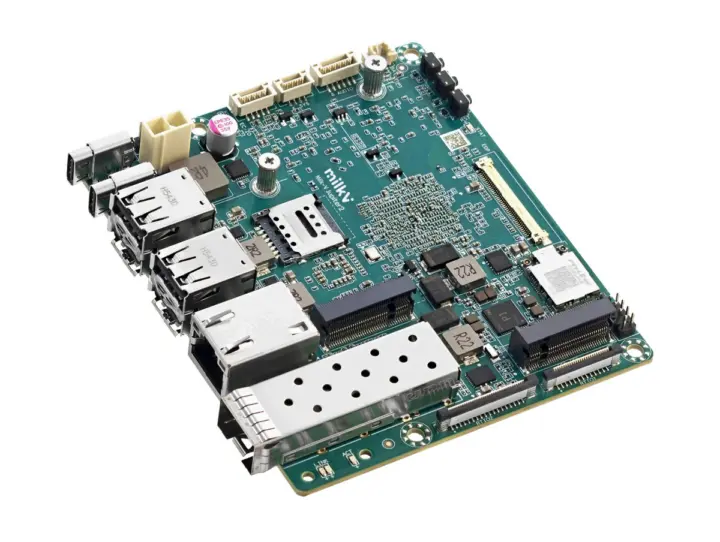
BPI K3 Pico ITX

SPACEMIT K3 Pico-ITX RISC-V Development Board

$323.34
This site contains affiliate links to products. We may receive a commission for purchases made through these links.
Buy this item
AliExpress store: Chip Board Flagship Store

SpacemiT Community, support, and social media channels:

  • SpacemiT Community: https://www.spacemit.com/community 
  • SpacemiT Forum: https://forum.spacemit.com/ 
  • SpacemiT Reddit: https://www.reddit.com/r/spacemit_riscv/ 
  • SpacemiT X: https://x.com/spacemit_riscv 
  • SpacemiT Discord: https://discord.com/invite/hCPARBCt7k 
  • SpacemiT YouTube: https://www.youtube.com/@SpacemiT_CN

Hardware and Distribution Partners list (Updated 19 May 2026)

Partner NameProducts based on the K3Source
Firefly✅ AIBOX-K3
✅ Firefly K3 SoM Series
✅ K3 Server Series
Firefly
Banana Pi✅ K3 Pico-ITX
✅ BPI-SM10 (K3-CoM260) SoM
Banana Pi
Sipeed✅ CoM260 ModuleSipeed
MilkV✅ Milk-V Jupiter 2 NX SoM
✅ Milk-V Jupiter 2 SBC
Milk-V
 Arace Tech.✅ Milk-V Jupiter 2Arace Tech

Business cooperation and purchase inquiries

  • WeChat (Business): SpacemiT1102
  • Phone: +86 189 6649 8607
  • Email: business@spacemit.com
1 2 3 4 5 6 7 8 9 10 11 12 13
Share. Facebook Twitter Pinterest LinkedIn Tumblr Email
Previous ArticleBanana Pi BPI-R4 Pro Review: The Best WiFi 7 OpenWrt Router? We Checked!
Next Article Banana Pi BPI-SM10 Review: 60 TOPS RISC-V Jetson Orin Nano Alternative
androidpimp
  • Website

Related Posts

BPi Wi Fi 7 NIC BE14(V2.1)

BPI-R4 Wi-Fi 7 NIC (BE14): OpenWrt Setup & Optimal WiFi Power Guide

July 10, 2026
Orange Pi 6

Orange Pi 6 Launches: New 45 TOPS AI SBC Beats Raspberry Pi HATs in Speed

June 26, 2026
Raspberry Pi Zero 3W SBC

Orange Pi Zero 3W Review: $25 Dual Video Pi Zero 2W Killer?

June 26, 2026
0 0 votes
Article Rating
Subscribe
Notify of
0 Comments
Oldest
Newest Most Voted
Categories
PureVPN
PureVPN Ad Banner
PrivadoVPN – No. 1 in Parental Control
PrivadoVPN 350x437
VyprVPN – No. 1 in Anonymity
Vyprvpn 350x260
Recent Posts
  • AliExpress Promo Codes: July 2026 (100% Verified)
  • BPI-R4 Wi-Fi 7 NIC (BE14): OpenWrt Setup & Optimal WiFi Power Guide
  • Orange Pi 6 Launches: New 45 TOPS AI SBC Beats Raspberry Pi HATs in Speed
  • Orange Pi Zero 3W Review: $25 Dual Video Pi Zero 2W Killer?
  • CamThink NeoEyes NE503: A 20 TOPS 4k Edge AI Camera Platform Powerhouse
  • DFRobot 6.67″ Flexible AMOLED Review: Best Raspberry Pi & LattePanda Display?
  • Banana Pi BPI-SM10 Review: 60 TOPS RISC-V Jetson Orin Nano Alternative
  • SpacemiT K3 Pico-ITX Review: 60-TOPS RISC-V Powerhouse for LLMs?
  • Banana Pi BPI-R4 Pro Review: The Best WiFi 7 OpenWrt Router? We Checked!
  • DFRobot ESP32-S3 LoRaWAN & Gateway Review: Build a Private IoT Network
RSS The Latest RSS Feeds
  • AliExpress Promo Codes: July 2026 (100% Verified)
  • BPI-R4 Wi-Fi 7 NIC (BE14): OpenWrt Setup & Optimal WiFi Power Guide
  • Orange Pi 6 Launches: New 45 TOPS AI SBC Beats Raspberry Pi HATs in Speed
Facebook X (Twitter) Instagram Pinterest
@2026 - All Right Reserved. Designed by AndroidPIMP

Type above and press Enter to search. Press Esc to cancel.

Accessibility
Accessibility modes
Epilepsy Safe Mode
Dampens color and removes blinks
This mode enables people with epilepsy to use the website safely by eliminating the risk of seizures that result from flashing or blinking animations and risky color combinations.
Visually Impaired Mode
Improves website's visuals
This mode adjusts the website for the convenience of users with visual impairments such as Degrading Eyesight, Tunnel Vision, Cataract, Glaucoma, and others.
Cognitive Disability Mode
Helps to focus on specific content
This mode provides different assistive options to help users with cognitive impairments such as Dyslexia, Autism, CVA, and others, to focus on the essential elements of the website more easily.
ADHD Friendly Mode
Reduces distractions and improve focus
This mode helps users with ADHD and Neurodevelopmental disorders to read, browse, and focus on the main website elements more easily while significantly reducing distractions.
Blindness Mode
Allows using the site with your screen-reader
This mode configures the website to be compatible with screen-readers such as JAWS, NVDA, VoiceOver, and TalkBack. A screen-reader is software for blind users that is installed on a computer and smartphone, and websites must be compatible with it.
Readable Experience
Content Scaling
Default
Text Magnifier
Readable Font
Dyslexia Friendly
Highlight Titles
Highlight Links
Font Sizing
Default
Letter Spacing
Default
Left Aligned
Center Aligned
Right Aligned
Visually Pleasing Experience
Dark Contrast
Light Contrast
Monochrome
High Contrast
High Saturation
Low Saturation
Adjust Text Colors
Adjust Title Colors
Adjust Background Colors
Easy Orientation
Mute Sounds
Hide Images
Hide Emoji
Reading Guide
Stop Animations
Reading Mask
Highlight Hover
Highlight Focus
Big Dark Cursor
Big Light Cursor
Cognitive Reading
Virtual Keyboard
Navigation Keys
Voice Navigation

AndroidPIMP

Accessibility Statement

  • AndroidPIMP.com
  • 10/18/2025

Compliance status

We believe the internet should be open and accessible to everyone, and we’re dedicated to making our website usable for the widest audience possible, no matter their circumstances or abilities.

To achieve this, we follow the World Wide Web Consortium’s (W3C) Web Content Accessibility Guidelines 2.1 (WCAG 2.1) at the AA level as closely as possible. These guidelines outline how to make web content accessible for people with a variety of disabilities. By complying with them, we help ensure our website is usable by everyone, including those who are blind, have motor or visual impairments, cognitive disabilities, and more.

This website uses a range of technologies to stay accessible at all times. An accessibility interface lets people with specific disabilities customize the site’s UI and design to fit their personal needs.

The website also uses an AI-powered application that works in the background to constantly enhance its accessibility. This app fixes the site’s HTML, adjusts its features and behavior for screen readers used by blind users, and optimizes keyboard functions for people with motor impairments.

If you’ve found a malfunction or have ideas for improvement, we’ll be happy to hear from you. You can reach out to the website’s operators by using the following email tzahi.work@gmail.com

Screen-reader and keyboard navigation

Our website implements the ARIA attributes (Accessible Rich Internet Applications) technique, alongside various different behavioral changes, to ensure blind users visiting with screen-readers are able to read, comprehend, and enjoy the website’s functions. As soon as a user with a screen-reader enters your site, they immediately receive a prompt to enter the Screen-Reader Profile so they can browse and operate your site effectively. Here’s how our website covers some of the most important screen-reader requirements, alongside console screenshots of code examples:

  1. Screen-reader optimization: we run a background process that learns the website’s components from top to bottom, to ensure ongoing compliance even when updating the website. In this process, we provide screen-readers with meaningful data using the ARIA set of attributes. For example, we provide accurate form labels; descriptions for actionable icons (social media icons, search icons, cart icons, etc.); validation guidance for form inputs; element roles such as buttons, menus, modal dialogues (popups), and others. Additionally, the background process scans all the website’s images and provides an accurate and meaningful image-object-recognition-based description as an ALT (alternate text) tag for images that are not described. It will also extract texts that are embedded within the image, using an OCR (optical character recognition) technology. To turn on screen-reader adjustments at any time, users need only to press the Alt+1 keyboard combination. Screen-reader users also get automatic announcements to turn the Screen-reader mode on as soon as they enter the website.

    These adjustments are compatible with all popular screen readers, including JAWS and NVDA.

  2. Keyboard navigation optimization: The background process also adjusts the website’s HTML, and adds various behaviors using JavaScript code to make the website operable by the keyboard. This includes the ability to navigate the website using the Tab and Shift+Tab keys, operate dropdowns with the arrow keys, close them with Esc, trigger buttons and links using the Enter key, navigate between radio and checkbox elements using the arrow keys, and fill them in with the Spacebar or Enter key.Additionally, keyboard users will find quick-navigation and content-skip menus, available at any time by clicking Alt+1, or as the first elements of the site while navigating with the keyboard. The background process also handles triggered popups by moving the keyboard focus towards them as soon as they appear, and not allow the focus drift outside it.

    Users can also use shortcuts such as “M” (menus), “H” (headings), “F” (forms), “B” (buttons), and “G” (graphics) to jump to specific elements.

Disability profiles supported in our website

  • Epilepsy Safe Mode: this profile enables people with epilepsy to use the website safely by eliminating the risk of seizures that result from flashing or blinking animations and risky color combinations.
  • Visually Impaired Mode: this mode adjusts the website for the convenience of users with visual impairments such as Degrading Eyesight, Tunnel Vision, Cataract, Glaucoma, and others.
  • Cognitive Disability Mode: this mode provides different assistive options to help users with cognitive impairments such as Dyslexia, Autism, CVA, and others, to focus on the essential elements of the website more easily.
  • ADHD Friendly Mode: this mode helps users with ADHD and Neurodevelopmental disorders to read, browse, and focus on the main website elements more easily while significantly reducing distractions.
  • Blindness Mode: this mode configures the website to be compatible with screen-readers such as JAWS, NVDA, VoiceOver, and TalkBack. A screen-reader is software for blind users that is installed on a computer and smartphone, and websites must be compatible with it.
  • Keyboard Navigation Profile (Motor-Impaired): this profile enables motor-impaired persons to operate the website using the keyboard Tab, Shift+Tab, and the Enter keys. Users can also use shortcuts such as “M” (menus), “H” (headings), “F” (forms), “B” (buttons), and “G” (graphics) to jump to specific elements.

Additional UI, design, and readability adjustments

  1. Font adjustments – users, can increase and decrease its size, change its family (type), adjust the spacing, alignment, line height, and more.
  2. Color adjustments – users can select various color contrast profiles such as light, dark, inverted, and monochrome. Additionally, users can swap color schemes of titles, texts, and backgrounds, with over seven different coloring options.
  3. Animations – person with epilepsy can stop all running animations with the click of a button. Animations controlled by the interface include videos, GIFs, and CSS flashing transitions.
  4. Content highlighting – users can choose to emphasize important elements such as links and titles. They can also choose to highlight focused or hovered elements only.
  5. Audio muting – users with hearing devices may experience headaches or other issues due to automatic audio playing. This option lets users mute the entire website instantly.
  6. Cognitive disorders – we utilize a search engine that is linked to Wikipedia and Wiktionary, allowing people with cognitive disorders to decipher meanings of phrases, initials, slang, and others.
  7. Additional functions – we provide users the option to change cursor color and size, use a printing mode, enable a virtual keyboard, and many other functions.

Browser and assistive technology compatibility

We aim to support the widest array of browsers and assistive technologies as possible, so our users can choose the best fitting tools for them, with as few limitations as possible. Therefore, we have worked very hard to be able to support all major systems that comprise over 95% of the user market share including Google Chrome, Mozilla Firefox, Apple Safari, Opera and Microsoft Edge, JAWS and NVDA (screen readers).

Notes, comments, and feedback

Despite our very best efforts to allow anybody to adjust the website to their needs. There may still be pages or sections that are not fully accessible, are in the process of becoming accessible, or are lacking an adequate technological solution to make them accessible. Still, we are continually improving our accessibility, adding, updating and improving its options and features, and developing and adopting new technologies. All this is meant to reach the optimal level of accessibility, following technological advancements. For any assistance, please reach out to tzahi.work@gmail.com

wpDiscuz